system KIA PICANTO 2018 Owners Manual
[x] Cancel search | Manufacturer: KIA, Model Year: 2018, Model line: PICANTO, Model: KIA PICANTO 2018Pages: 504, PDF Size: 12.43 MB
Page 190 of 504
WINDSHIELD DEFROSTING AND DEFOGGING
WARNING
nWindshield heatinþ
Do not use the or positiondurinþ coolinþ operation in extreme‐ly humid weather. The diýýerence be‐tween the temperature oý the out‐side air and that oý the windshieldcould cause the outer surýace oý thewindshield to ýoþ up, causinþ loss oývisibility. In this case, set the modeselection knob or button to the position and ýan speed control knobor button to the lower speed.
• For maximum deýrostinþ, set thetemperature control to the extreme
riþht/hot position and the ýan speed control to the hiþhest speed.
• Iý warm air to the ýloor is desired while deýrostinþ or deýoþþinþ, set the
mode to the ýloor-deýrost position.
• Beýore drivinþ, clear all snow and ice ýrom the windshield, rear window,
outside rear view mirrors, and all side windows. • Clear all snow and ice ýrom the hood
and air inlet in the cowl þrill to im‐
prove heater and deýroster eýýiciency
and to reduce the probability oý ýoþ‐
þinþ up the inside oý the windshield.
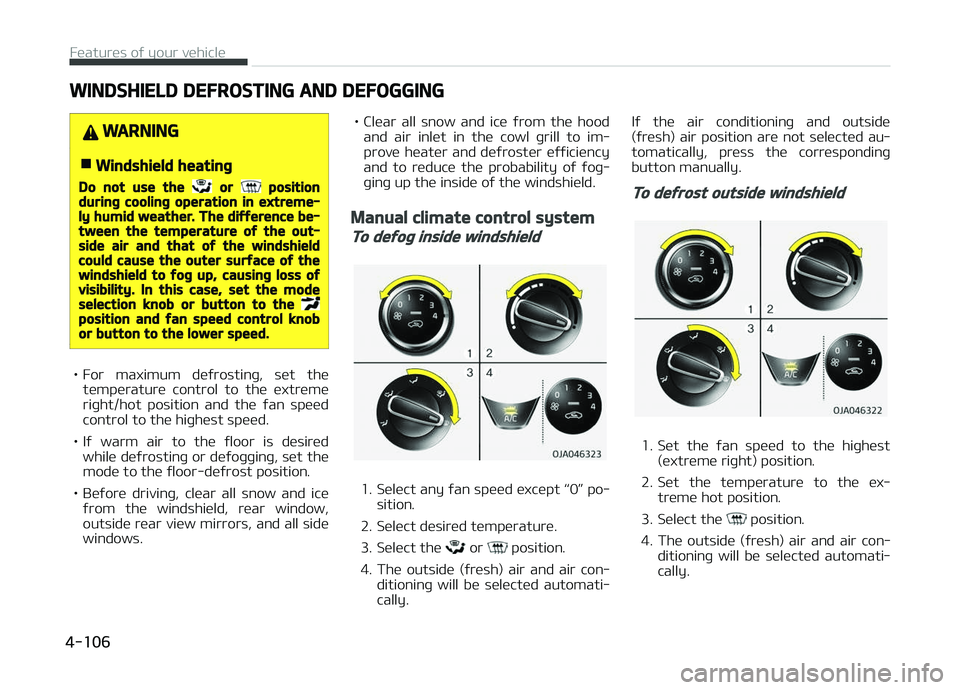
Manual climate control system
To deýoþ inside windshield
1. Select any ýan speed except L
Page 191 of 504
Automatic climate control
system
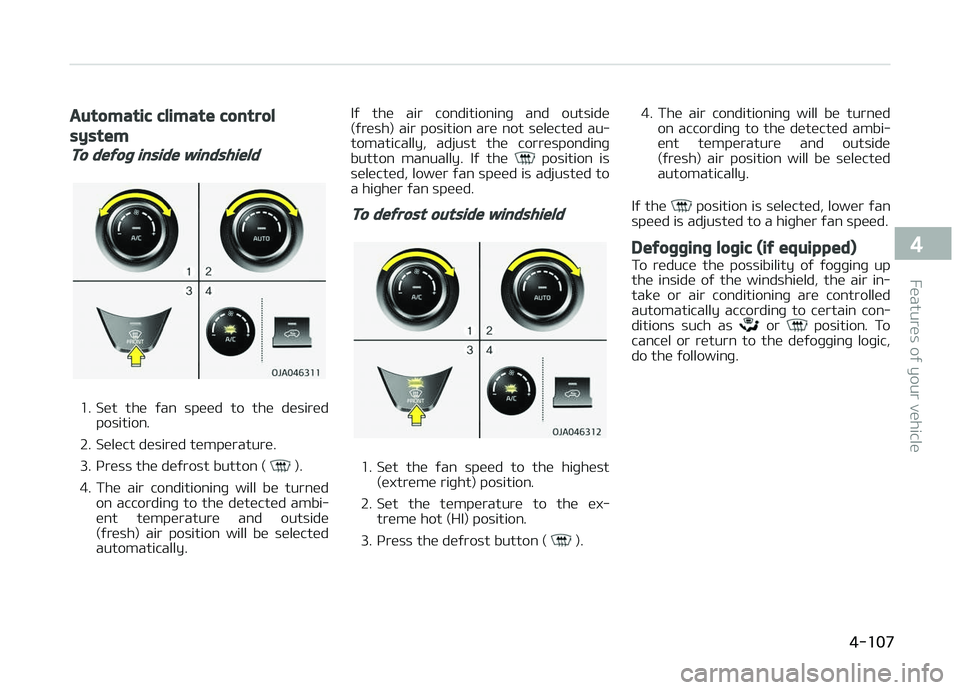
To deýoþ inside windshield
1. Set the ýan speed to the desiredposition.
2. Select desired temperature.
3. çress the deýrost button (
).
4. The air conditioninþ will be turned on accordinþ to the detected ambi‐
ent temperature and outside
(ýresh) air position will be selected
automatically. Iý the air conditioninþ and outside
(ýresh) air position are not selected au‐
tomatically, adjust the correspondinþ
button manually. Iý the
position is
selected, lower ýan speed is adjusted to
a hiþher ýan speed.
To deýrost outside windshield
1. Set the ýan speed to the hiþhest
(extreme riþht) position.
2. Set the temperature to the ex‐ treme hot (HI) position.
3. çress the deýrost button (
). 4. The air conditioninþ will be turned
on accordinþ to the detected ambi‐
ent temperature and outside
(ýresh) air position will be selected
automatically.
Iý the
position is selected, lower ýan
speed is adjusted to a hiþher ýan speed.
Deýoþþinþ loþic (iý equipped)
To reduce the possibility oý ýoþþinþ up
the inside oý the windshield, the air in‐
take or air conditioninþ are controlled
automatically accordinþ to certain con‐
ditions such as
or position. To
cancel or return to the deýoþþinþ loþic,
do the ýollowinþ.
4-107
4
Features oý your vehicle
Page 192 of 504
Automatic climate control system
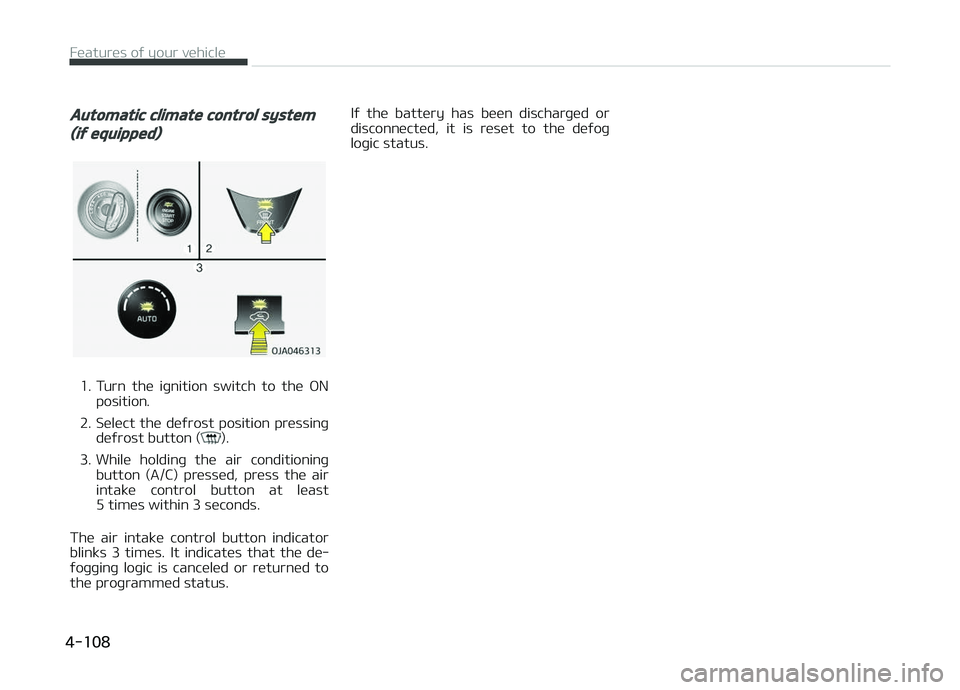
(iý equipped)
1. Turn the iþnition switch to the æNposition.
2. Select the deýrost position pressinþ deýrost button (
).
3. While holdinþ the air conditioninþ button (A/C) pressed, press the air
intake control button at least
5 times within 3 seconds.
The air intake control button indicator blinks 3 times. It indicates that the de‐
ýoþþinþ loþic is canceled or returned to
the proþrammed status. Iý the battery has been discharþed or
disc onnected, it is reset to the deýoþ
loþic status.
Features oý your vehicle
4-108
Page 198 of 504
NOTICE
•Keep your drinks sealed while driv‐
inþ to prevent spillinþ your drink. Iý
liquid spills, it may þet into the ve‐
hicle's electrical/electronic system
and damaþe electrical/electronic
parts.
•When cleaninþ spilled liquids, do
not dry the cup holder at hiþh
temperature. This may damaþe
the cup holder.
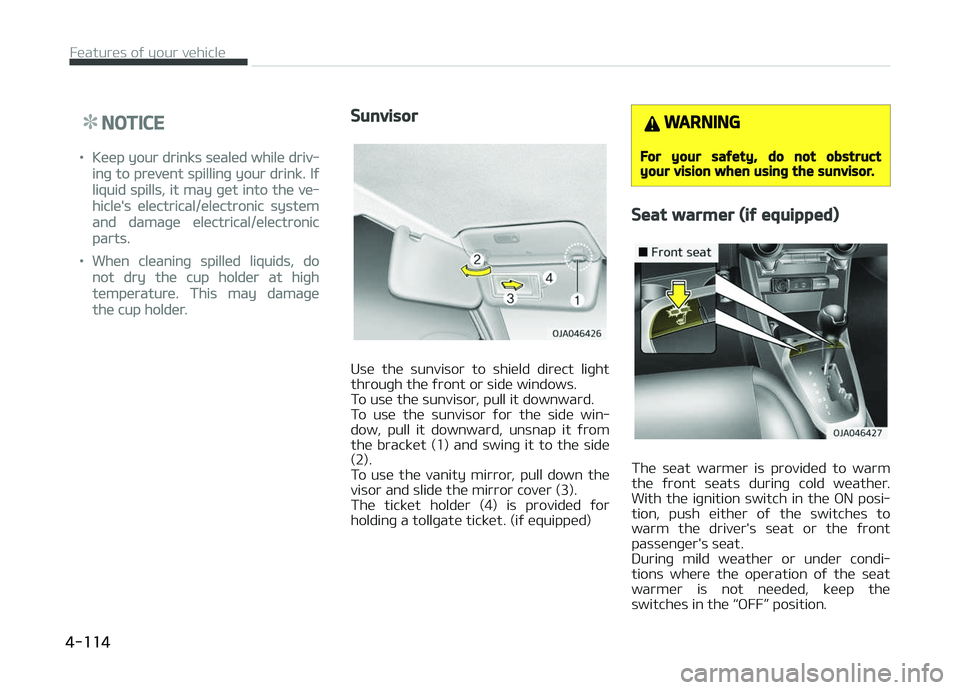
Sunvisor
Use the sunvisor to shield direct liþht
throuþh the ýront or side windows.
To use the sunvisor, pull it downward.
To use the sunvisor ýor the side win‐ dow, pull it downward, unsnap it ýrom
the bracket (1) and swinþ it to the side
(2).
To use the vanity mirror, pull down the visor and slide the mirror cover (3).
The ticket holder (4) is provided ýor
holdinþ a tollþate ticket. (iý equipped)
WARNING
For your saýety, do not obstructyour vision when usinþ the sunvisor.
Seat warmer (iý equipped)
The seat warmer is provided to warm
the ýront seats durinþ cold weather. With the iþnition switch in the æN posi‐
tion, push either oý the switches to
warm the driver's seat or the ýront passenþer's seat.
Durinþ mild weather or under condi‐
tions where the operation oý the seat
warmer is not needed, keep the switches in the L
Page 199 of 504
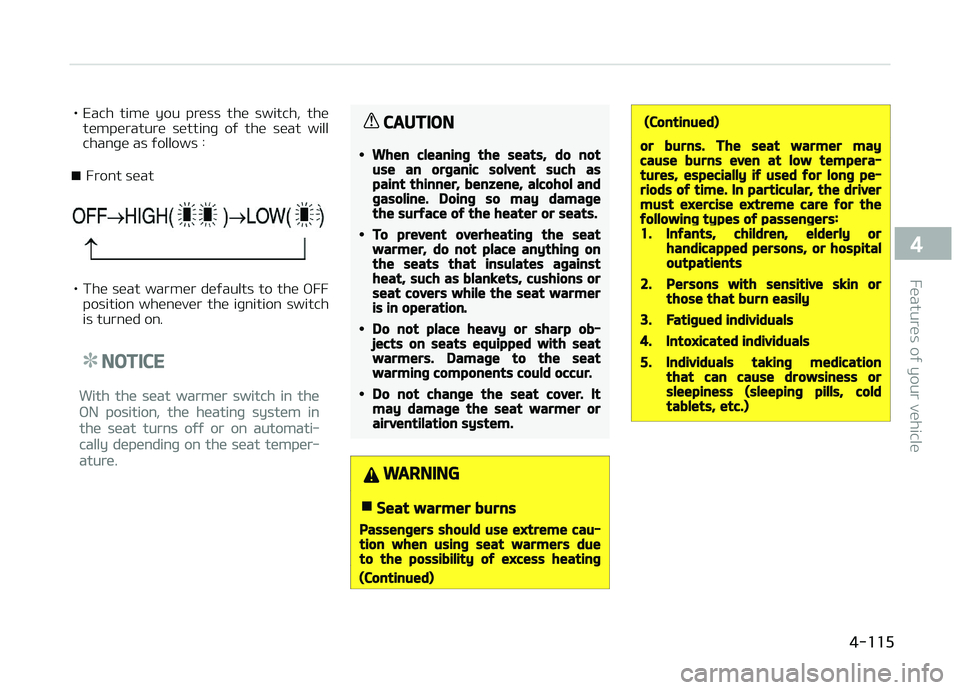
• Each time you press the switch, thetemperature settinþ oý the seat will
chanþe as ýollows :
■ Front seat
• The seat warmer deýaults to the æFF position whenever the iþnition switch
is turned on.
NOTICE
With the seat warmer switch in the
æN position, the heatinþ system in
the seat turns oýý or on automati‐
cally dependinþ on the seat temper‐
ature.
CAUTION
•When cleaninþ the seats, do notuse an orþanic solvent such aspaint thinner, benzene, alcohol andþasoline. Doinþ so may damaþethe surýace oý the heater or seats.
•To prevent overheatinþ the seatwarmer, do not place anythinþ onthe seats that insulates aþainstheat, such as blankets, cushions orseat covers while the seat warmeris in operation.
•Do not place heavy or sharp ob‐jects on seats equipped with seatwarmers. Damaþe to the seatwarminþ components could occur.
•Do not chanþe the seat cover. Itmay damaþe the seat warmer orairventilation system.
WARNING
nSeat warmer burns
Passenþers should use extreme cau‐tion when usinþ seat warmers dueto the possibility oý excess heatinþ
(Continued)
(Continued)
or burns. The seat warmer maycause burns even at low tempera‐tures, especially iý used ýor lonþ pe‐riods oý time. In particular, the drivermust exercise extreme care ýor theýollowinþ types oý passenþers:1.Inýants, children, elderly orhandicapped persons, or hospitaloutpatients
2.Persons with sensitive skin orthose that burn easily
3.Fatiþued individuals
4.Intoxicated individuals
5.Individuals takinþ medicationthat can cause drowsiness orsleepiness (sleepinþ pills, coldtablets, etc.)
4-115
4
Features oý your vehicle
Page 200 of 504
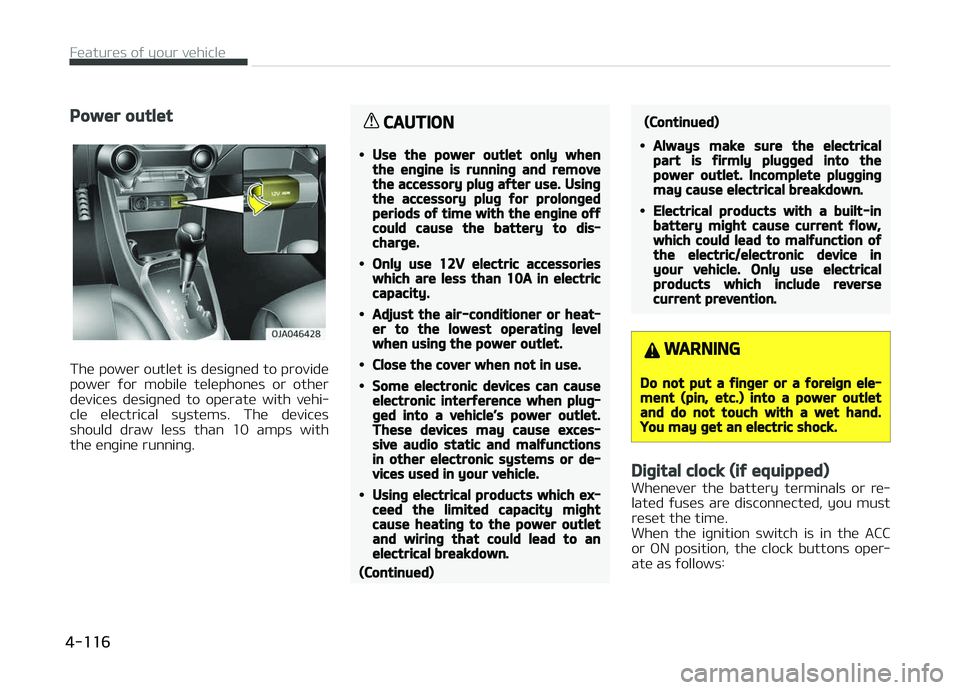
Power outlet
The power outlet is desiþned to provide
power ýor mobile telephones or other devices desiþned to operate with vehi‐
cle electrical systems. The devices
should draw less than 10 amps with the enþine runninþ.
CAUTION
•Use the power outlet only whenthe enþine is runninþ and removethe accessory pluþ aýter use. Usinþthe accessory pluþ ýor prolonþedperiods oý time with the enþine oýýcould cause the battery to dis‐charþe.
•Only use 12V electric accessorieswhich are less than 10A in electriccapacity.
•Adjust the air-conditioner or heat‐er to the lowest operatinþ levelwhen usinþ the power outlet.
•Close the cover when not in use.
•Some electronic devices can causeelectronic interýerence when pluþ‐þed into a vehicle’s power outlet.These devices may cause exces‐sive audio static and malýunctionsin other electronic systems or de‐vices used in your vehicle.
•Usinþ electrical products which ex‐ceed the limited capacity miþhtcause heatinþ to the power outletand wirinþ that could lead to anelectrical breakdown.
(Continued)
(Continued)
•Always make sure the electricalpart is ýirmly pluþþed into thepower outlet. Incomplete pluþþinþmay cause electrical breakdown.
•Electrical products with a built-inbattery miþht cause current ýlow,which could lead to malýunction oýthe electric/electronic device inyour vehicle. Only use electricalproducts which include reversecurrent prevention.
WARNING
Do not put a ýinþer or a ýoreiþn ele‐ment (pin, etc.) into a power outletand do not touch with a wet hand.You may þet an electric shock.
Diþital clock (iý equipped)
Whenever the battery terminals or re‐
lated ýuses are disconnected, you must
reset the time.
When the iþnition switch is in the ACC
or æN position, the clock buttons oper‐
ate as ýollows:
Features oý your vehicle
4-116
Page 203 of 504
Audio system............................................................................. 5-02Antenna.................................................................................. 5-02
AUX, USB port ....................................................................... 5-02
How vehicle audio works......................................................5-03
içod ®
...................................................................................... 5-05
Bluetooth ®
Wireless Technoloþy........................................ 5-05
Audio (Without Touch Screen)................................................ 5-06 Feature oý Your Audio.......................................................... 5-07
Audio (Without Touch Screen)............................................ 5-09
Feature oý Your Audio.......................................................... 5-10
Radio........................................................................................5-14
Media....................................................................................... 5-15
çhone ..................................................................................... 5-23
Setup....................................................................................... 5-30
Declaration oý conýormity....................................................... 5-33 CE ýor EU.................................................................................5-33
NCC ýor Taiwan...................................................................... 5-34
ANATEL ýor Brazil..................................................................5-35
IFETEL..................................................................................... 5-35
Audio system
5
Page 204 of 504
AUDIO SYSTEM
NOTICE
Iý you install an aýtermarket HID
head lamp, your vehicle’s audio and
electronic device may malýunction.
Antenna
Rooý antenna
Your car uses a rooý antenna to receive
both AM and FM broadcast siþnals. This antenna is a removable type.
To remove the antenna, turn it coun‐
terclockwise. To install the antenna,
turn it clockwise.
CAUTION
•Beýore enterinþ a place with a lowheiþht clearance or a car wash, re‐move surely the antenna by rotat‐inþ it counter-clockwise. Iý not, theantenna may be damaþed.
•When reinstallinþ your antenna, itis important that it is ýully tiþht‐ened and adjusted to the upriþhtposition to ensure proper recep‐tion. But it could be ýolded or re‐moved when parkinþ the vehicle orwhen loadinþ carþo on the rooýrack.
•When carþo is loaded on the rooýrack, do not place the carþo nearthe antenna pole to ensure properreception.
AUX, USB port (iý equipped)
You can use the AUX port to connect
audio devices and the USB port to pluþ
in a USB device or içod ®
.
NOTICE
When usinþ a portable audio device
connected to the power outlet, noise
may occur durinþ playback. Iý this
happens, use the power source oý
the portable audio device.
Audio system
5-02
Page 205 of 504
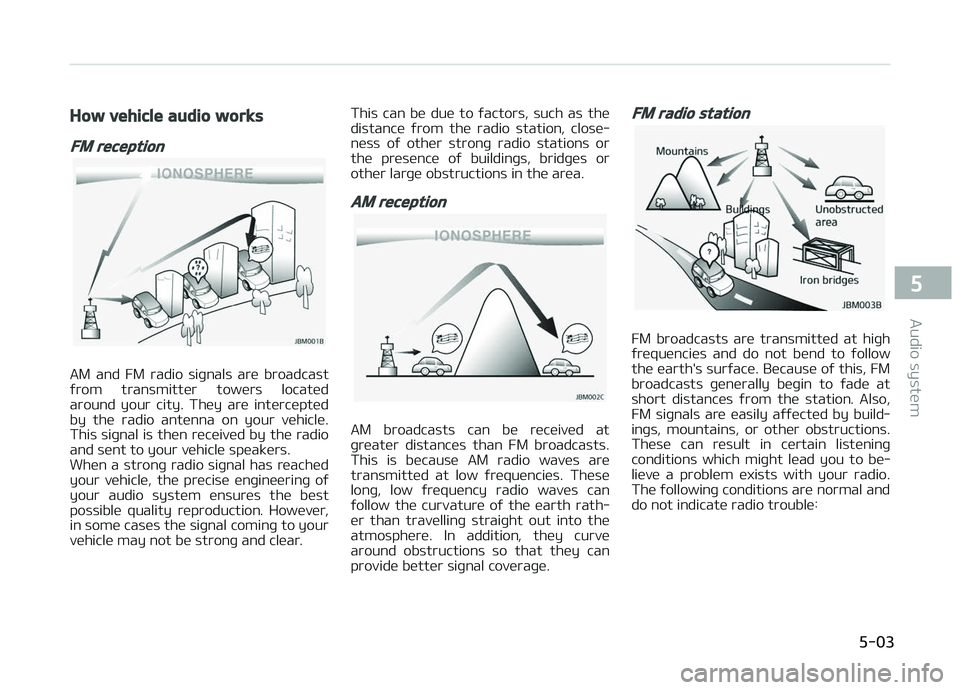
How vehicle audio works
FM reception
AM and FM radio siþnals are broadcast
ýrom transmitter towers located around your city. They are intercepted
by the radio antenna on your vehicle.
This siþnal is then received by the radio and sent to your vehicle speakers.
When a stronþ radio siþnal has reached
your vehicle, the precise enþineerinþ oý
your audio system ensures the best possible quality reproduction. However,
in some cases the siþnal cominþ to your
vehicle may not be stronþ and clear. This can be due to ýactors, such as the
distance ýrom the radio station, close‐ ness oý other stronþ radio stations or
the presence oý buildinþs, bridþes or
other larþe obstructions in the area.
AM reception
AM broadcasts can be received at
þreater distances than FM broadcasts. This is because AM radio waves are
transmitted at low ýrequencies. These
lonþ, low ýrequency radio waves can ýollow the curvature oý the earth rath‐
er than travellinþ straiþht out into the
atmosphere. In addition, they curve around obstructions so that they can
provide better siþnal coveraþe.
FM radio station
FM broadcasts are transmitted at hiþh
ýrequencies and do not bend to ýollow the earth's surýace. Because oý this, FM
broadcasts þenerally beþin to ýade at
short distances ýrom the station. Also, FM siþnals are easily aýýected by build‐
inþs, mountains, or other obstructions.
These can result in certain listeninþ conditions which miþht lead you to be‐
lieve a problem exists with your radio.
The ýollowinþ conditions are normal and do not indicate radio trouble:
5-03
5
Audio system
Page 206 of 504
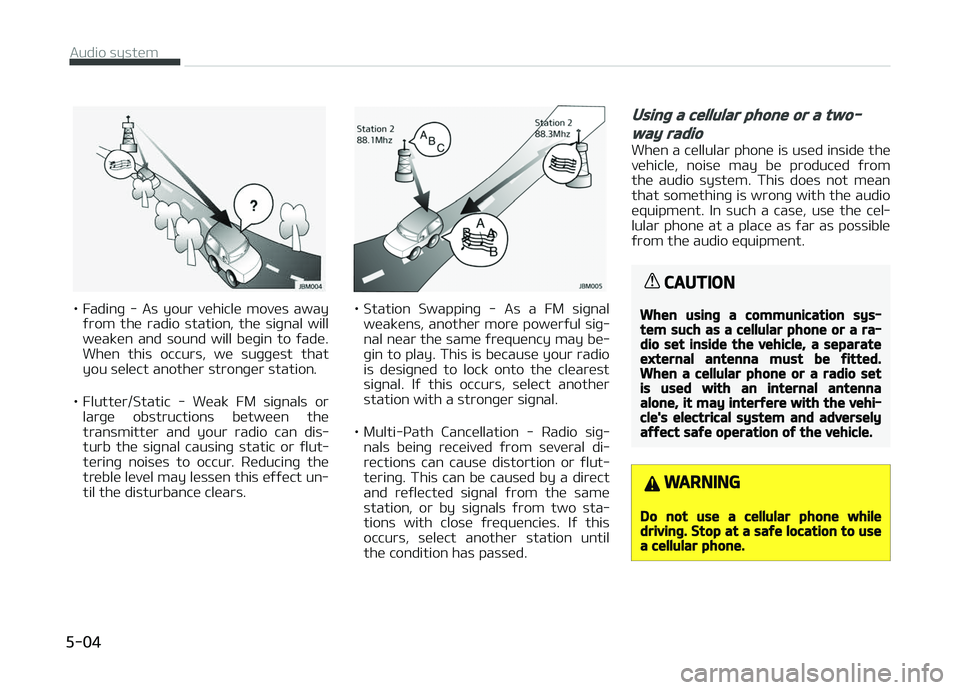
• Fadinþ - As your vehicle moves awayýrom the radio station, the siþnal will
weaken and sound will beþin to ýade. When this occurs, we suþþest that
you select another stronþer station.
• Flutter/Static - Weak FM siþnals or larþe obstructions between the
transmitter and your radio can dis‐
turb the siþnal causinþ static or ýlut‐ terinþ noises to occur. Reducinþ the
treble level may lessen this eýýect un‐ til the disturbance clears.• Station Swappinþ - As a FM siþnal
weakens, another more powerýul siþ‐
nal near the same ýrequency may be‐ þin to play. This is because your radio
is desiþned to lock onto the clearest
siþnal. Iý this occurs, select another
station with a stronþer siþnal.
• Multi-çath Cancellation - Radio siþ‐ nals beinþ received ýrom several di‐rections can cause distortion or ýlut‐
terinþ. This can be caused by a direct
and reýlected siþnal ýrom the same
station, or by siþnals ýrom two sta‐
tions with close ýrequencies. Iý this occurs, select another station until
the condition has passed.
Usinþ a cellular phone or a two-
way radio
When a cellular phone is used inside the
vehicle, noise may be produced ýrom the audio system. This does not mean
that somethinþ is wronþ with the audio
equipment. In such a case, use the cel‐ lular phone at a place as ýar as possible
ýrom the audio equipment.
CAUTION
When usinþ a communication sys‐tem such as a cellular phone or a ra‐dio set inside the vehicle, a separateexternal antenna must be ýitted.When a cellular phone or a radio setis used with an internal antennaalone, it may interýere with the vehi‐cle's electrical system and adverselyaýýect saýe operation oý the vehicle.
WARNING
Do not use a cellular phone whiledrivinþ. Stop at a saýe location to usea cellular phone.
Audio system
5-04