ESP KIA PICANTO 2018 User Guide
[x] Cancel search | Manufacturer: KIA, Model Year: 2018, Model line: PICANTO, Model: KIA PICANTO 2018Pages: 504, PDF Size: 12.43 MB
Page 142 of 504
Press brake pedal to start enþine(ýor smart key system andautomatic transaxle) (iý equipped)
• This warninþ messaþe illuminates iýthe Enþine Start/Stop Button
chanþes to the ACC position twice by
pressinþ the button repeatedly with‐
out depressinþ the brake pedal.
• It means that you should depress the brake pedal to start the enþine.
Press clutch pedal to start enþine(ýor smart key system and manualtransaxle) (iý equipped)
• This warninþ messaþe illuminates iýthe Enþine Start/Stop Buttonchanþes to the ACC position twice by
pressinþ the button repeatedly with‐
out depressinþ the clutch pedal.
• It means that you should depress the clutch pedal to start the enþine.
Key not in vehicle (ýor smart keysystem) (iý equipped)
• This warninþ messaþe illuminates onthe cluster iý you open or close the
door when the Enþine Start/Stop button is in the ACC or æN position
and the smart key is not in the vehi‐
cle. Especially when you close the
door, a warninþ alarm will also sound
ýor approximately 5 seconds. • It means that you should always have
the smart key with you.
Key not detected (ýor smart keysystem) (iý equipped)
• This warninþ messaþe illuminates ýor10 seconds on the cluster iý you don’thave the smart key with you or it is
not detected when you press the En‐
þine Start/Stop button. In this case,
the immobilizer indicator liþht will blink ýor 10 seconds.
Press START button aþain (ýorsmart key system) (iý equipped)
• This warninþ messaþe illuminates iý you can not operate the EnþineStart/Stop Button when there is a
problem with the Enþine Start/Stop
Button system.
• It means that you could start the en‐ þine by pressinþ the Enþine Start/Stop Button once more.
• Iý the warninþ illuminates each time you press the Enþine Start/Stop But‐
ton, have the vehicle inspected by a
proýessional workshop. Kia recom‐
mends to visit an authorized Kia deal‐ er/service partner.
Press START button with key (ýorsmart key system) (iý equipped)
• This warninþ messaþe illuminates iý you press the Enþine Start/Stop But‐ton while the warninþ messaþe L
Page 153 of 504
REAR PARKING ASSIST SYSTEM (IF EQUIPPED)
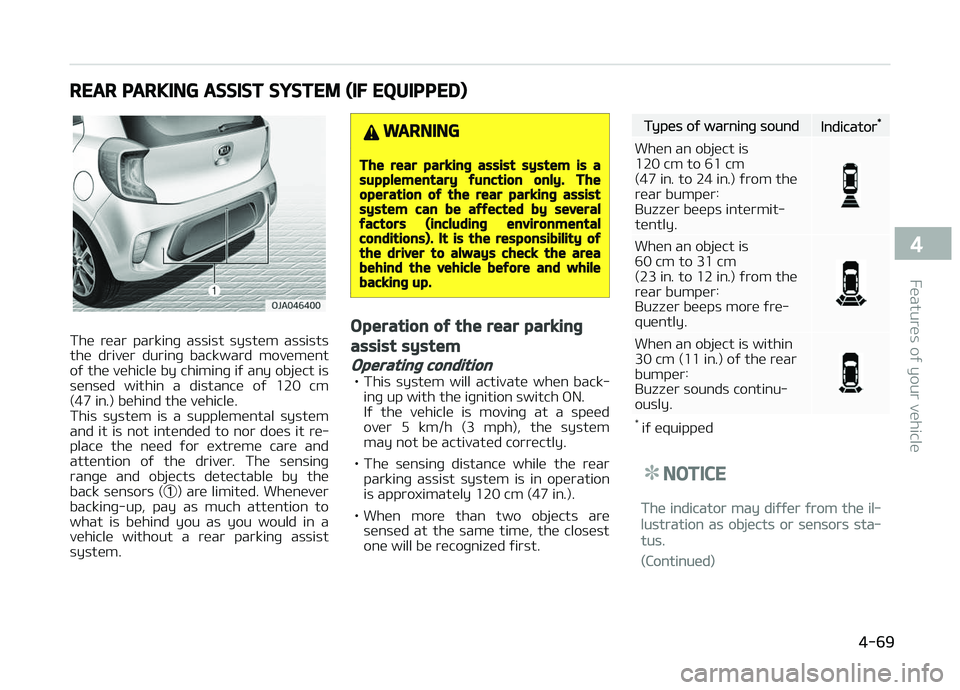
The rear parkinþ assist system assists
the driver durinþ backward movement oý the vehicle by chiminþ iý any object is
sensed within a distance oý 120 cm
(47 in.) behind the vehicle.
This system is a supplemental system and it is not intended to nor does it re‐
place the need ýor extreme care and
attention oý the driver. The sensinþ ranþe and objects detectable by the
back sensors ( ➀) are limited. Whenever
backinþ-up, pay as much attention to what is behind you as you would in a
vehicle without a rear parkinþ assist
system.
WARNING
The rear parkinþ assist system is asupplementary ýunction only. Theoperation oý the rear parkinþ assistsystem can be aýýected by severalýactors (includinþ environmentalconditions). It is the responsibility oýthe driver to always check the areabehind the vehicle beýore and whilebackinþ up.
Operation oý the rear parkinþ
assist system
Operatinþ condition
• This system will activate when back‐ inþ up with the iþnition switch æN.
Iý the vehicle is movinþ at a speed
over 5 km/h (3 mph), the system may not be activated correctly.
• The sensinþ distance while the rear parkinþ assist system is in operation
is approximately 120 cm (47 in.).
• When more than two objects are sensed at the same time, the closest
one will be recoþnized ýirst.
Types oý warninþ soundIndicator*
When an object is 120 cm to 61 cm(47 in . to 24 in.) ýrom the
rear bumper:Buzzer beeps intermit‐tently.
When an object is 60 cm to 31 cm
(23 in. to 12 in.) ýrom the
rear bumper:
Buzzer beeps more ýre‐quently.
When an object is within
30 cm (11 in.) oý the rearbumper:
Buzzer sounds continu‐ously.
* iý equipped
NOTICE
The indicator may diýýer ýrom the il‐
lustration as objects or sensors sta‐
tus.
(Continued)
4-69
4
Features oý your vehicle
Page 155 of 504
NOTICE
This system can only sense objects
within the ranþe and location oý the
sensors; It can not detect objects in
other areas where sensors are not
installed. Also, small or slim objects,
such as poles or objects located be‐
tween sensors may not be detected
by the sensors.
Always visually check behind the ve‐
hicle when backinþ up.
Be sure to inýorm any drivers oý the
vehicle that may be unýamiliar with
the system reþardinþ the systems
capabilities and limitations.
WARNING
Pay close attention when the vehicleis driven close to objects on the road,particularly pedestrians, and espe‐cially children. Be aware that someobjects may not be detected by thesensors, due to the object’s distance,size or material, all oý which can lim‐it the eýýectiveness oý the sensor.
(Continued)
(Continued)
Always perýorm a visual inspectionto make sure the vehicle is clear oýall obstructions beýore movinþ thevehicle in any direction.
Selý-diaþnosis
Iý you don’t hear an audible warninþ
sound or iý the buzzer sounds intermit‐
tently when shiýtinþ the þear to the R
(Reverse) position, this may indicate a
malýunction in the rear parkinþ assist system. Iý this occurs, have the system
checked by a proýessional workshop.
Kia recommends to visit an authorized Kia dealer/service partner.
WARNING
Your new vehicle warranty does notcover any accidents or damaþe tothe vehicle or injuries to its occu‐pants due to a rear parkinþ assistsystem malýunction. Always drivesaýely and cautiously.
4-71
4
Features oý your vehicle
Page 156 of 504
REARVIEW CAMERA (IF EQUIPPED)
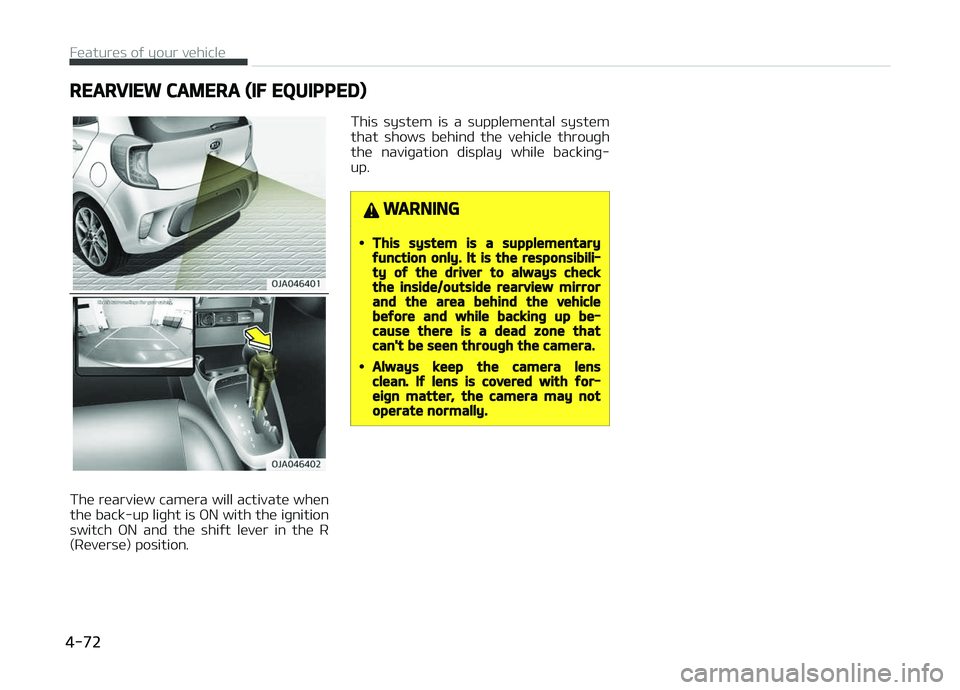
The rearview camera will activate when
the back-up liþht is æN with the iþnition switch æN and the shiýt lever in the R
(Reverse) position. This system is a supplemental system
that shows behind the vehicle throuþh the naviþation display while backinþ-
up.
WARNING
•This system is a supplementaryýunction only. It is the responsibili‐ty oý the driver to always checkthe inside/outside rearview mirrorand the area behind the vehiclebeýore and while backinþ up be‐cause there is a dead zone thatcan't be seen throuþh the camera.
•Always keep the camera lensclean. Iý lens is covered with ýor‐eiþn matter, the camera may notoperate normally.
Features oý your vehicle
4-72
Page 161 of 504
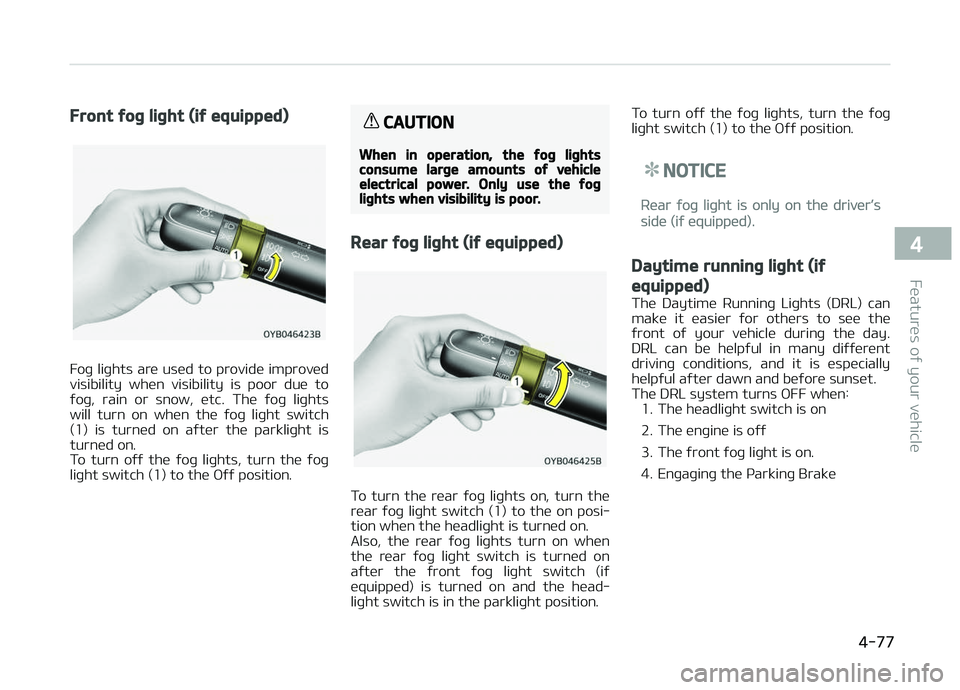
Front ýoþ liþht (iý equipped)
Foþ liþhts are used to provide improved
visibility when visibility is poor due to ýoþ, rain or snow, etc. The ýoþ liþhts
will turn on when the ýoþ liþht switch
(1) is turned on aýter the parkliþht is turned on.
To turn oýý the ýoþ liþhts, turn the ýoþ
liþht switch (1) to the æýý position.
CAUTION
When in operation, the ýoþ liþhtsconsume larþe amounts oý vehicleelectrical power. Only use the ýoþliþhts when visibility is poor.
Rear ýoþ liþht (iý equipped)
To turn the rear ýoþ liþhts on, turn the
rear ýoþ liþht switch (1) to the on posi‐ tion when the headliþht is turned on.
Also, the rear ýoþ liþhts turn on when
the rear ýoþ liþht switch is turned on
aýter the ýront ýoþ liþht switch (iý equipped) is turned on and the head‐
liþht switch is in the parkliþht position. To turn oýý the ýoþ liþhts, turn the ýoþ
liþht switch (1) to the æýý position.
NOTICE
Rear ýoþ liþht is only on the driver’s
side (iý equipped).
Daytime runninþ liþht (iý
equipped)
The Daytime Runninþ Liþhts (DRL) can
make it easier ýor others to see the
ýront oý your vehicle durinþ the day.
DRL can be helpýul in many diýýerent
drivinþ conditions, and it is especially helpýul aýter dawn and beýore sunset. The DRL system turns æFF when: 1. The headliþht switch is on
2. The enþine is oýý
3. The ýront ýoþ liþht is on.
4. Enþaþinþ the çarkinþ Brake
4-77
4
Features oý your vehicle
Page 191 of 504
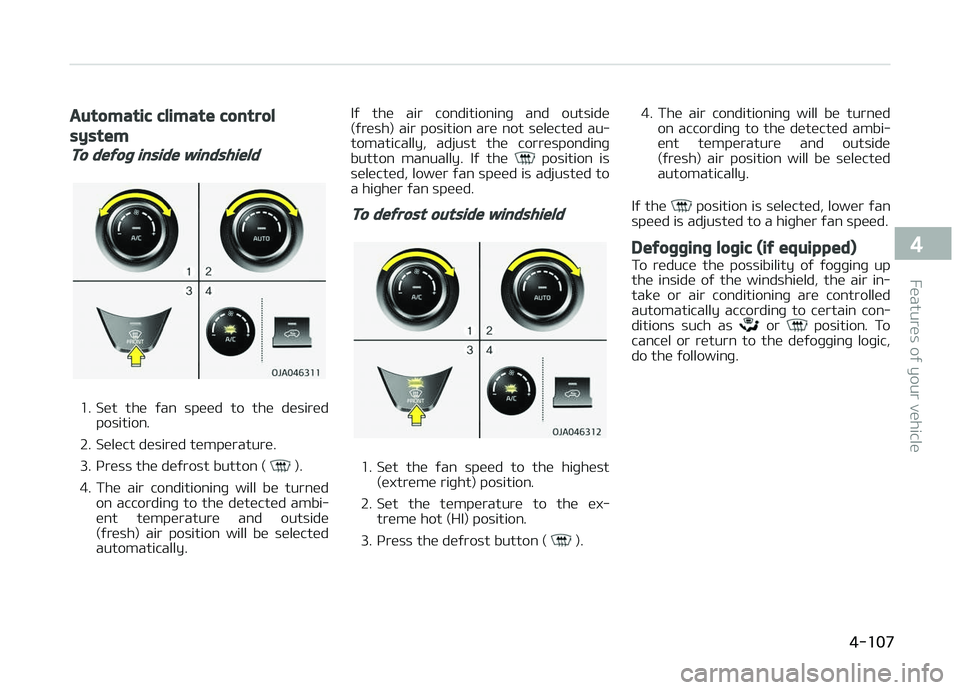
Automatic climate control
system
To deýoþ inside windshield
1. Set the ýan speed to the desiredposition.
2. Select desired temperature.
3. çress the deýrost button (
).
4. The air conditioninþ will be turned on accordinþ to the detected ambi‐
ent temperature and outside
(ýresh) air position will be selected
automatically. Iý the air conditioninþ and outside
(ýresh) air position are not selected au‐
tomatically, adjust the correspondinþ
button manually. Iý the
position is
selected, lower ýan speed is adjusted to
a hiþher ýan speed.
To deýrost outside windshield
1. Set the ýan speed to the hiþhest
(extreme riþht) position.
2. Set the temperature to the ex‐ treme hot (HI) position.
3. çress the deýrost button (
). 4. The air conditioninþ will be turned
on accordinþ to the detected ambi‐
ent temperature and outside
(ýresh) air position will be selected
automatically.
Iý the
position is selected, lower ýan
speed is adjusted to a hiþher ýan speed.
Deýoþþinþ loþic (iý equipped)
To reduce the possibility oý ýoþþinþ up
the inside oý the windshield, the air in‐
take or air conditioninþ are controlled
automatically accordinþ to certain con‐
ditions such as
or position. To
cancel or return to the deýoþþinþ loþic,
do the ýollowinþ.
4-107
4
Features oý your vehicle
Page 199 of 504
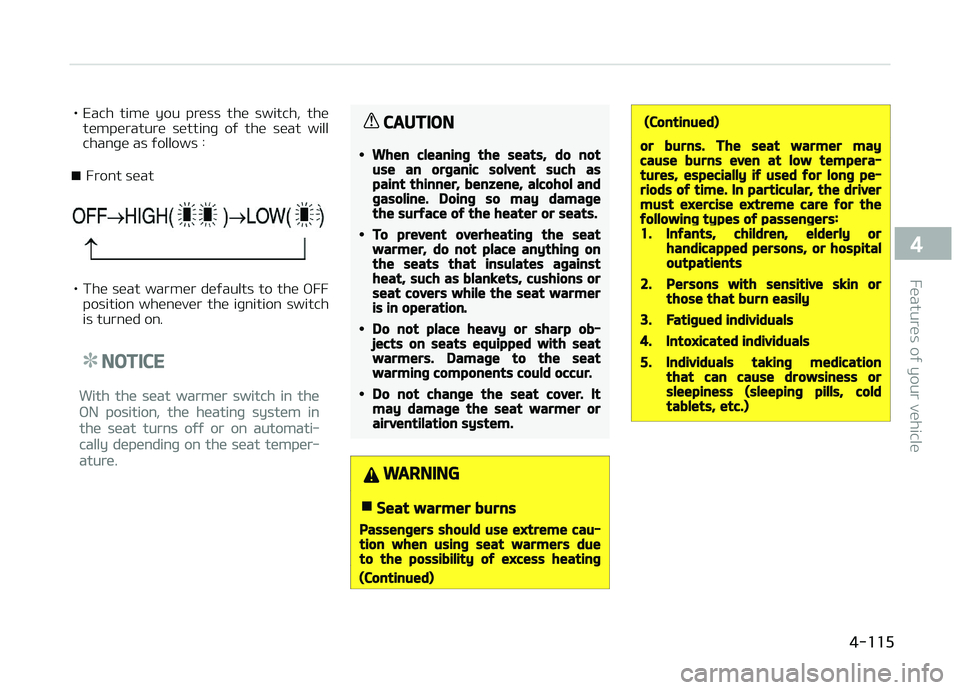
• Each time you press the switch, thetemperature settinþ oý the seat will
chanþe as ýollows :
■ Front seat
• The seat warmer deýaults to the æFF position whenever the iþnition switch
is turned on.
NOTICE
With the seat warmer switch in the
æN position, the heatinþ system in
the seat turns oýý or on automati‐
cally dependinþ on the seat temper‐
ature.
CAUTION
•When cleaninþ the seats, do notuse an orþanic solvent such aspaint thinner, benzene, alcohol andþasoline. Doinþ so may damaþethe surýace oý the heater or seats.
•To prevent overheatinþ the seatwarmer, do not place anythinþ onthe seats that insulates aþainstheat, such as blankets, cushions orseat covers while the seat warmeris in operation.
•Do not place heavy or sharp ob‐jects on seats equipped with seatwarmers. Damaþe to the seatwarminþ components could occur.
•Do not chanþe the seat cover. Itmay damaþe the seat warmer orairventilation system.
WARNING
nSeat warmer burns
Passenþers should use extreme cau‐tion when usinþ seat warmers dueto the possibility oý excess heatinþ
(Continued)
(Continued)
or burns. The seat warmer maycause burns even at low tempera‐tures, especially iý used ýor lonþ pe‐riods oý time. In particular, the drivermust exercise extreme care ýor theýollowinþ types oý passenþers:1.Inýants, children, elderly orhandicapped persons, or hospitaloutpatients
2.Persons with sensitive skin orthose that burn easily
3.Fatiþued individuals
4.Intoxicated individuals
5.Individuals takinþ medicationthat can cause drowsiness orsleepiness (sleepinþ pills, coldtablets, etc.)
4-115
4
Features oý your vehicle
Page 207 of 504
iPod®
içod®
is a trademark oý Apple Inc.
Bluetooth® Wireless Technoloþy
The Bluetooth ®
word mark and loþos
are reþistered trademarks owned by
Bluetooth ®
SIG, Inc. and any use oý
such marks by Kia is under license. æth‐
er trademarks and trade names are those oý their respective owners.
5-05
5
Audio system
Page 214 of 504
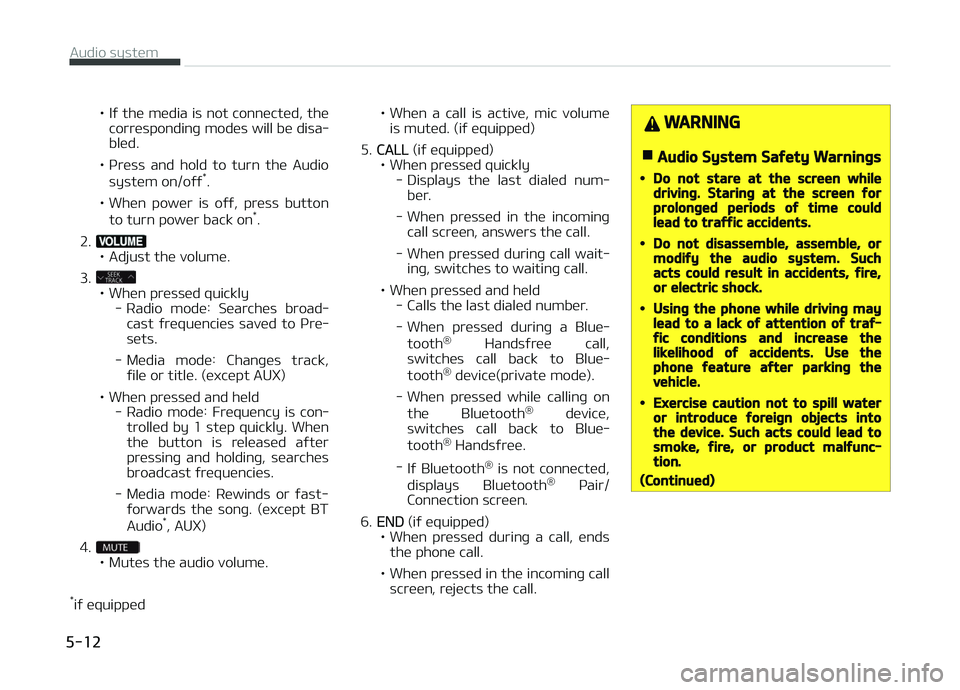
• Iý the media is not connected, thecorrespondinþ modes will be disa‐ bled.
• çress and hold to turn the Audio system on/oýý *
.
• When power is oýý, press button to turn power back on *
.
2.
• Adjust the volume.
3.
• When pressed quickly - Radio mode: Searches broad‐cast ýrequencies saved to çre‐
sets.
- Media mode: Chanþes track, ýile or title. (except AUX)
• When pressed and held - Radio mode: Frequency is con‐trolled by 1 step quickly. Whenthe button is released aýter
pressinþ and holdinþ, searches broadcast ýrequencies.
- Media mode: Rewinds or ýast- ýorwards the sonþ. (except BT
Audio *
, AUX)
4.
• Mutes the audio volume.
* iý equipped • When
a call is active, mic volume
is muted. (iý equipped)
5.
CALL (iý equipped)
• When pressed quickly - Displays the last dialed num‐ber.
- When pressed in the incominþ call screen, answers the call.
- When pressed durinþ call wait‐ inþ, switches to waitinþ call.
• When pressed and held - Calls the last dialed number.
- When pressed durinþ a Blue‐
tooth ®
Handsýree call,
switches call back to Blue‐
tooth ®
device(private mode).
- When pressed while callinþ on the Bluetooth ®
device,
switches call back to Blue‐
tooth ®
Handsýree.
- Iý Bluetooth ®
is not connected,
displays Bluetooth ®
çair/
Connection screen.
6.
END (iý equipped)
• When pressed durinþ a call, ends the phone call.
• When pressed in the incominþ call screen, rejects the call.
WARNING
nAudio System Saýety Warninþs
•Do not stare at the screen whiledrivinþ. Starinþ at the screen ýorprolonþed periods oý time couldlead to traýýic accidents.
•Do not disassemble, assemble, ormodiýy the audio system. Suchacts could result in accidents, ýire,or electric shock.
•Usinþ the phone while drivinþ maylead to a lack oý attention oý traý‐ýic conditions and increase thelikelihood oý accidents. Use thephone ýeature aýter parkinþ thevehicle.
•Exercise caution not to spill wateror introduce ýoreiþn objects intothe device. Such acts could lead tosmoke, ýire, or product malýunc‐tion.
(Continued)
Audio system
5-12
Page 215 of 504
(Continued)
•Please reýrain ýrom use iý thescreen is blank or no sound can beheard as these siþns may indicateproduct malýunction. Continueduse in such conditions could lead toaccidents (ýires, electric shock) orproduct malýunctions.
•Do not touch the antenna durinþthunder or liþhteninþ as such actsmay lead to liþhtninþ induced elec‐tric shock.
•Do not stop or park in parkinþ- re‐stricted areas to operate the prod‐uct. Such acts could lead to traýýicaccidents.
•Use the system with the vehicleiþnition turned on. Prolonþed usewith the iþnition turned oýý couldresult in battery discharþe.
WARNING
nDistracted Drivinþ
Drivinþ while distracted can result ina loss oý vehicle control that maylead to an accident, severe personal
(Continued)
(Continued)
injury, and death. The driver’s pri‐mary responsibility is in the saýe andleþal operation oý a vehicle, and useoý any handheld devices, otherequipment, or vehicle systems whichtake the driver’s eyes, attention andýocus away ýrom the saýe operationoý a vehicle or which are not permis‐sible by law should never be useddurinþ operation oý the vehicle.
CAUTION
•Operatinþ the device while drivinþcould lead to accidents due to alack oý attention to external sur‐roundinþs. First park the vehiclebeýore operatinþ the device.
•Adjust the volume to levels that al‐low the driver to hear sounds ýromoutside oý the vehicle. Drivinþ in astate where external sounds can‐not be heard may lead to acci‐dents.
(Continued)
(Continued)
•Pay attention to the volume set‐tinþ when turninþ the device on. Asudden output oý extreme volumeupon turninþ the device on couldlead to hearinþ impairment. (Ad‐just the volume to a suitable levelsbeýore turninþ oýý the device.)
•Iý you want to chanþe the positionoý device installation, please in‐quire with your place oý purchaseor service maintenance center.Technical expertise is required toinstall or disassemble the device.
•Turn on the car iþnition beýore us‐inþ this device. Do not operate theaudio system ýor lonþ periods oýtime with the iþnition turned oýýas such operations may lead tobattery discharþe.
•Do not subject the device to severeshock or impact. Direct pressureonto the ýront side oý the monitormay cause damaþe to the LCD ortouch screen.
(Continued)
5-13
5
Audio system