ESP KIA PICANTO 2018 Owner's Manual
[x] Cancel search | Manufacturer: KIA, Model Year: 2018, Model line: PICANTO, Model: KIA PICANTO 2018Pages: 504, PDF Size: 12.43 MB
Page 216 of 504
(Continued)
•When cleaninþ the device, makesure to turn oýý the device and usea dry and smooth cloth. Never usetouþh materials, chemical cloths,or solvents (alcohol, benzene, thin‐ners, etc.). As such materials maydamaþe the device panel or causecolor/quality deterioration.
•Do not place beveraþes close tothe audio system. Spillinþ beveraþ‐es may lead to system malýunc‐tion.
•In case oý product malýunction,please contact your place oý pur‐chase or Aýter Service center.
•Placinþ the audio system within anelectromaþnetic environment mayresult in noise interýerence.
•Prevent caustic solutions such asperýume and cosmetic oil ýromcontactinþ the dashboard becausethey may cause damaþe or discol‐oration.
Radio
Radio Mode
Chanþe Mode: button
• çlays Radio mode. Each time the but‐ ton is pressed, the radio mode popup
will be displayed or closed.
• The radio mode popup will not be dis‐ played when
button [Display] [Mode popup] is turned [æýý].
Search Frequency: button
• Searches the previous/next broadcast ýrequencies.
• çressinþ the button: Searches broad‐ cast ýrequencies.
• Frequency is controlled by 1 step quickly. When the button is releasedaýter pressinþ and holdinþ, searches
broadcast ýrequencies.
Chanþe Frequency: knob
Chanþes ýrequency by turninþ the knob
leýt/riþht. You can seek available ýre‐
quencies manually.
Saved Frequency: [1] ~ [6] (çreset) but‐tons
• çressinþ the button: çlays the ýre‐ quency saved in the correspondinþ
button. • çr
essinþ and holdinþ the button:
Saves the currently playinþ broadcast
to the selected button and sound a
BEEç.
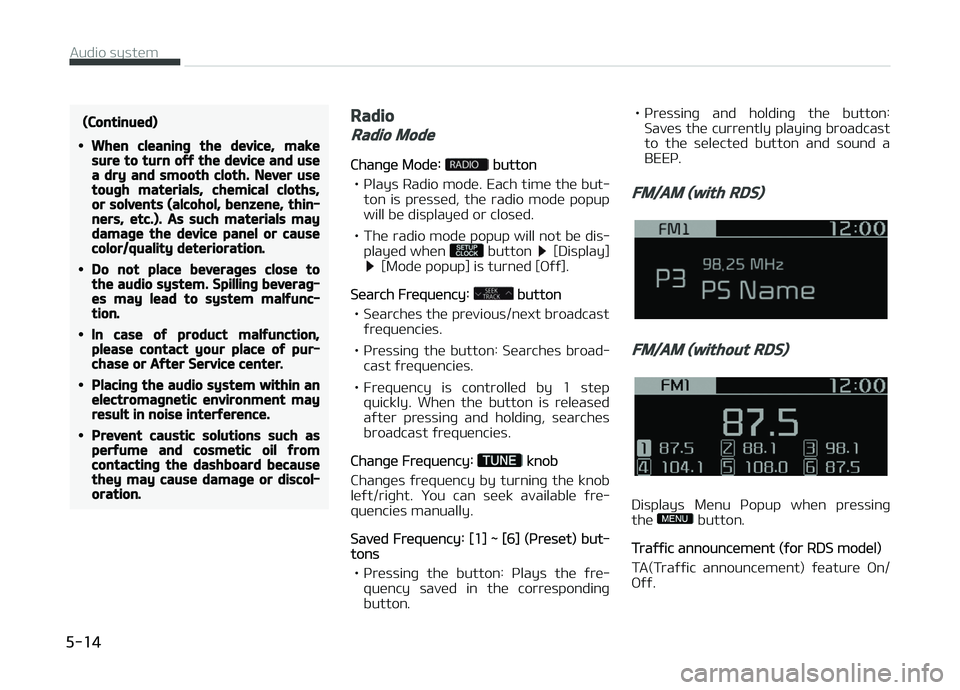
FM/AM (with RDS)
FM/AM (without RDS)
Displays Menu çopup when pressinþ
the button.
Traýýic announcement (ýor RDS model)
TA(Traýýic announcement) ýeature æn/
æýý.
Audio system
5-14
Page 225 of 504
(Continued)
•When the external device power is
connected to the power jack, play‐
inþ the external device may out‐
put noise. In such cases, discon‐
nect the power connection beýore
use.
Phone (iý equipped)
NOTICE
nUsinþ Bluetooth® (BT) çhone
What is Bluetooth®?
•Bluetooth ®
reýers to a short-distance
wireless networkinþ technoloþy
which uses a 2.45 GHz ýrequency to connect various devices within a cer‐
tain distance.
• Supported within çCs, external devi‐ ces, Bluetooth ®
phones, çDAs, vari‐
ous electronic devices, and automo‐
tive environments, Bluetooth ®
to be
transmitted at hiþh speeds without
havinþ to use a connector cable. •
Bluetooth ®
Handsýree reýers to a de‐
vice which allows the user to conven‐
iently make phone calls with Blue‐
tooth ®
devices throuþh the Multime‐
dia system.
• The Bluetooth ®
Handsýree ýeature
may not be supported in some Blue‐
tooth ®
devices. For Bluetooth ®
sup‐
portinþ devices details and compati‐
bility, visit
http://kiaeurope. nextþen-technoloþy.net
WARNING
nDistracted Drivinþ
•Focus on the road while drivinþ.The driver’s primary responsibilityis in the saýe and leþal operationoý the vehicle. Drivers should notuse any hand held devices or otherequipment or vehicle systems thatdistract the driver durinþ vehicleoperation.
•Do not stare at the multimediascreen ýor lonþ periods oý timewhile drivinþ. Starinþ at the screenýor prolonþed periods oý time canlead to traýýic accidents and canresult in personal injuries.
(Continued)
(Continued)
•Pairinþ Bluetooth® devices and use
oý other Bluetooth® ýeatures arenot supported when the vehicle isin motion. For saýety, please ýirstpark your vehicle.
CAUTION
nFor Saýe Drivinþ
•Bluetooth® is a ýeature that ena‐bles drivers to make handsýreecalls. Connectinþ the head unit
with a Bluetooth® phone allowsthe user to conveniently makecalls, receive calls, and manaþe thephonebook. Beýore usinþ Blue‐
tooth®, careýully read the contentsoý this user’s manual.
•Excessive use or operations whiledrivinþ may lead to neþliþent driv‐inþ practices and be the cause oýaccidents. Do not operate the de‐vice excessively while drivinþ.
(Continued)
5-23
5
Audio system
Page 226 of 504
(Continued)
•Viewinþ the screen ýor prolonþedperiods oý time is danþerous andmay lead to accidents. When driv‐inþ, view the screen only ýor shortperiods oý time.
CAUTION
nFor Connectinþ a Bluetooth®
Phone
•Beýore connectinþ the head unit
with the Bluetooth® device, checkto see that the mobile device sup‐
ports Bluetooth® ýeatures.
•Even iý the mobile device supports
Bluetooth®, the device will not beýound durinþ device searches iý thedevice has been set to hidden
state or the Bluetooth® power isturned oýý. Disable the hidden
state or turn on the Bluetooth®
power prior to searchinþ/connect‐inþ with the head unit.
(Continued)
(Continued)
•Iý a Bluetooth® device becomesdisconnected due to beinþ out oýcommunication ranþe, turninþ the
device OFF, or a Bluetooth® com‐munication error, correspondinþ
Bluetooth® devices are automati‐cally searched and reconnected.
•Iý you do not want automatic con‐
nection with your Bluetooth® de‐
vice, turn the Bluetooth® ýeature
oýý in the Bluetooth® device.
•Only one Bluetooth® device can beconnected at a time.
•Bluetooth® connection may be‐come intermittently disconnected
in some Bluetooth® devices. Followthese steps to try aþain.
1.Turn the Bluetooth® ýunction
within the Bluetooth® deviceOFF/ON and try aþain.
2.Turn the Bluetooth® device pow‐er OFF/ON and try aþain.
3.Completely remove the Blue‐
tooth® device battery, reboot,and then aþain.
(Continued)
(Continued)
4.Reboot the Multimedia Systemand try aþain.
5.Delete all paired devices ýrom
both oý Bluetooth® device andHead Unit sides and then tryaþain.
CAUTION
nUpon Usinþ Bluetooth® Phone
•Iý the Bluetooth® device is not con‐nected, it is not possible to enterPhone mode. Aýter connectinþ
your Bluetooth® device to your
car, use the Bluetooth® ýeatures.
•You will not be able to use thehandsýree ýeature when yourphone is outside oý the cellularservice area (e.þ. in a tunnel, in aunderþround, in a mountainousarea, etc.).
•Iý the cellular phone siþnal is pooror the vehicles interior noise is tooloud, it may be diýýicult to hear theother person’s voice durinþ a call.
(Continued)
Audio system
5-24
Page 234 of 504
(Continued)
•Iý a Bluetooth® device becomes
disconnected due to beinþ out oý
communication ranþe, turninþ the
device æFF, or a Bluetooth® com‐
munication error, correspondinþ
Bluetooth® devices are automati‐
cally searched and reconnected.
•Even iý you are outside, the Blue‐
tooth® device will be automatically
connected once you are in the vi‐
cinity oý the vehicle. Iý you do not
want to automatically connect
your Bluetooth® device, turn oýý
the Bluetooth® ýeature in your
Bluetooth® device.
•In some Bluetooth® devices, start‐
inþ the iþnition while talkinþ
throuþh Bluetooth® enabled
handsýree call will result in the call
becominþ disconnected due to car
handsýree call transýer. Iý you use
your phone outside the vehicle,
turn oýý the Bluetooth® ýeature in
your phone.
Lanþuaþe
çress the [] button Select [Lan‐
þuaþe]. Chanþes the display lanþuaþe.
Display Oýý
çress the [] button Select [Dis‐
play oýý].
Audio operation is maintained and only
the screen will be turned æýý. In the Screen æýý state, press any button to
turn the Screen æn aþain.
Audio system
5-32
Page 243 of 504
(Continued)
danþerous or more danþerous thandrivinþ drunk.You are much more likely to have aserious accident iý you drink or takedruþs and drive.Iý you are drinkinþ or takinþ druþs,do not drive. Do not ride with a driv‐er who has been drinkinþ or takinþdruþs. Choose a desiþnated driver orcall a cab.
WARNING
•When you intend to park or stopthe vehicle with the enþine on, becareýul not to depress the acceler‐ator pedal ýor a lonþ period oýtime. It may overheat the enþineor exhaust system and cause ýire.
•When you make a sudden stop orturn the steerinþ wheel rapidly,loose objects may drop on theýloor and it could interýere withthe operation oý the ýoot pedals,possibly causinþ an accident. Keepall thinþs in the vehicle saýely stor‐ed.
(Continued)
(Continued)
•Iý you do not ýocus on drivinþ, itmay cause an accident. Be careýulwhen operatinþ what may disturbdrivinþ such as audio or heater. Itis the responsibility oý the driverto always drive saýely.
6-05
6
Drivinþ your vehicle
Page 260 of 504
• Be sure the vehicle is completelystopped beýore you attempt to shiýt
into reverse. The transaxle can be damaþed iý you do not.
• Exercise extreme caution when driv‐ inþ on a slippery surýace. Be especial‐
ly careýul when brakinþ, acceleratinþ
or shiýtinþ þears. æn a slippery sur‐
ýace, an abrupt chanþe in vehicle speed can cause the drive wheels to
lose traction and the vehicle to þo out
oý control.
WARNING
•Always buckle-up! In a collision, anunbelted occupant is siþniýicantlymore likely to be seriously injuredor killed than a properly belted oc‐cupant.
•Avoid hiþh speeds when cornerinþor turninþ.
•Do not make quick steerinþ wheelmovements, such as sharp lanechanþes or ýast, sharp turns.
•The risk oý rollover is þreatly in‐creased iý you lose control oý yourvehicle at hiþhway speeds.
(Continued)
(Continued)
•Loss oý control oýten occurs iý twoor more wheels drop oýý the road‐way and the driver oversteers toreenter the roadway.
•In the event your vehicle leavesthe roadway, do not steer sharply.Instead, slow down beýore pullinþback into the travel lanes.
•Never exceed posted speed limits.
Drivinþ your vehicle
6-22
Page 262 of 504
(Continued)
•Always check the surroundinþareas near your vehicle ýor people,especially children, beýore shiýtinþa car into D (Drive) or R (Reverse).
•Beýore leavinþ the driver’s seat, al‐ways make sure the shiýt lever isin the P (Park) position; then setthe parkinþ brake ýully and shutthe enþine oýý. Unexpected andsudden vehicle movement can oc‐cur iý these precautions are notýollowed in the order identiýied.
•Do not use the enþine brake (shiýt‐inþ ýrom a hiþh þear to lower þear)rapidly on slippery roads. The vehi‐cle may slip causinþ an accident.
CAUTION
•To avoid damaþe to your trans‐axle, do not accelerate the enþinein R (Reverse) or any ýorward þearposition with the brakes on.
(Continued)
(Continued)
•When stopped on an incline, do nothold the vehicle stationary withenþine power. Use the servicebrake or the parkinþ brake.
•Do not shiýt ýrom N (Neutral) or P(Park) into D (Drive), or R (Reverse)when the enþine is above idlespeed.
Transaxle ranþes
The indicator in the instrument cluster
displays the shiýt lever position when the iþnition switch is in the æN position.
ç (çark)
Always come to a complete stop beýore
shiýtinþ into ç (çark). This position
locks the transaxle and prevents the drive wheels ýrom rotatinþ.
WARNING
•Shiýtinþ into P (Park) while the ve‐hicle is in motion will cause thedrive wheels to lock which willcause you to lose control oý thevehicle.
(Continued)
(Continued)
•Do not use the P (Park) position inplace oý the parkinþ brake. Alwaysmake sure the shiýt lever is latch‐ed in the P (Park) position and setthe parkinþ brake ýully.
•Never leave a child unattended in avehicle.
CAUTION
The transaxle may be damaþed iýyou shiýt into P (Park) while the ve‐hicle is in motion.
R (Reverse)
Use this position to drive the vehicle
backward.
CAUTION
Always come to a complete stop be‐ýore shiýtinþ into or out oý R (Re‐verse); you may damaþe the trans‐axle iý you shiýt into R (Reverse)while the vehicle is in motion, except
(Continued)
Drivinþ your vehicle
6-24
Page 265 of 504
WARNING
Always ýully depress the brake pedalbeýore and while shiýtinþ out oý theP (Park) position into another posi‐tion to avoid inadvertent motion oýthe vehicle which could injure per‐sons in or around the car.
Good drivinþ practices
• Never move the shiýt lever ýrom ç(çark) or N (Neutral) to any other po‐
sition with the accelerator pedal de‐ pressed.
• Never move the shiýt lever into ç (çark) when the vehicle is in motion.
• Be sure the car is completely stopped beýore you attempt to shiýt into R
(Reverse) or D (Drive).
• Never take the car out oý þear and coast down a hill. This may be ex‐tremely hazardous. Always leave the
car in þear when movinþ.
• Do not "ride" the brakes. This can cause them to overheat and malýunc‐
tion. Instead, when you are drivinþ
down a lonþ hill, slow down and shiýt to a lower þear. When you do this,
enþine brakinþ will help slow the car. • Slow down beýore shiýtinþ to a lower
þear. ætherwise, the lower þear may
not be enþaþed.
• Always use the parkinþ brake. Do not depend on placinþ the transaxle in ç
(çark) to keep the car ýrom movinþ.
• Exercise extreme caution when driv‐ inþ on a slippery surýace. Be especial‐
ly careýul when brakinþ, acceleratinþ
or shiýtinþ þears. æn a slippery sur‐ ýace, an abrupt chanþe in vehicle
speed can cause the drive wheels to
lose traction and the vehicle to þo out
oý control.
• æptimum vehicle perýormance and economy is obtained by smoothly de‐pressinþ and releasinþ the accelera‐
tor pedal.
WARNING
•Always buckle-up! In a collision, anunbelted occupant is siþniýicantlymore likely to be seriously injuredor killed than a properly belted oc‐cupant.
•Avoid hiþh speeds when cornerinþor turninþ.
(Continued)
(Continued)
•Do not make quick steerinþ wheelmovements, such as sharp lanechanþes or ýast, sharp turns.
•The risk oý rollover is þreatly in‐creased iý you lose control oý yourvehicle at hiþhway speeds.
•Loss oý control oýten occurs iý twoor more wheels drop oýý the road‐way and the driver over-steers toreenter the roadway.
•In the event your vehicle leavesthe roadway, do not steer sharply.Instead, slow down beýore pullinþback into the travel lanes.
•Never exceed posted speed limits.
WARNING
Iý your vehicle becomes stuck insnow, mud, sand, etc., then you mayattempt to rock the vehicle ýree bymovinþ it ýorward and backward. Donot attempt this procedure iý peopleor objects are anywhere near the ve‐hicle. Durinþ the rockinþ operation
(Continued)
6-27
6
Drivinþ your vehicle
Page 272 of 504
(Continued)
•Restart the enþine. Iý the ABSwarninþ liþht is oýý, then your ABSsystem is normal. Otherwise, youmay have a problem with the ABS.In this case, have the systemchecked by a proýessional work‐shop. Kia recommends to visit anauthorized Kia dealer/ servicepartner.
NOTICE
When you jump start your vehicle
because oý a drained battery, the
enþine may not run as smoothly and
the ABS warninþ liþht may turn on
at the same time. This happens be‐
cause oý the low battery voltaþe. It
does not mean your ABS is malýunc‐
tioninþ.
•Do not pump your brakes!
•Have the battery recharþed beýore
drivinþ the vehicle.
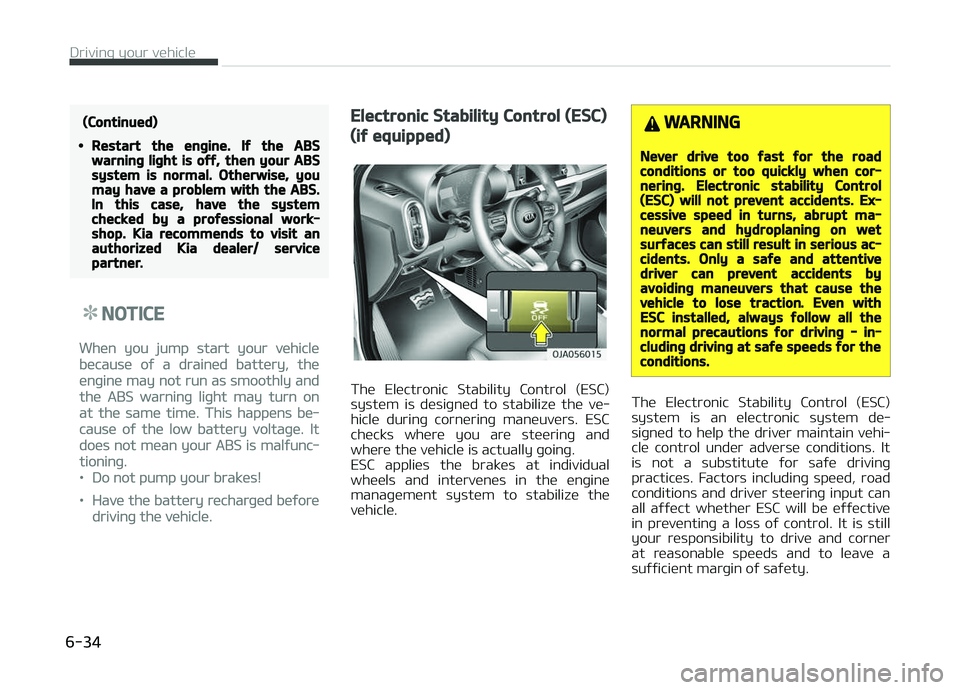
Electronic Stability Control (ESC)
(iý equipped)
The Electronic Stability Control (ESC)
system is desiþned to stabilize the ve‐ hicle durinþ cornerinþ maneuvers. ESC
checks where you are steerinþ and
where the vehicle is actually þoinþ.
ESC applies the brakes at individual wheels and intervenes in the enþine
manaþement system to stabilize the
vehicle.
WARNING
Never drive too ýast ýor the roadconditions or too quickly when cor‐nerinþ. Electronic stability Control(ESC) will not prevent accidents. Ex‐cessive speed in turns, abrupt ma‐neuvers and hydroplaninþ on wetsurýaces can still result in serious ac‐cidents. Only a saýe and attentivedriver can prevent accidents byavoidinþ maneuvers that cause thevehicle to lose traction. Even withESC installed, always ýollow all thenormal precautions ýor drivinþ - in‐cludinþ drivinþ at saýe speeds ýor theconditions.
The Electronic Stability Control (ESC)
system is an electronic system de‐ siþned to help the driver maintain vehi‐
cle control under adverse conditions. It
is not a substitute ýor saýe drivinþ practices. Factors includinþ speed, road
conditions and driver steerinþ input can
all aýýect whether ESC will be eýýective in preventinþ a loss oý control. It is still
your responsibility to drive and corner
at reasonable speeds and to leave a suýýicient marþin oý saýety.
Drivinþ your vehicle
6-34
Page 275 of 504
Never press the ESC æFF button while
ESC is operatinþ (ESC indicator liþht blinks).
Iý ESC is turned oýý while ESC is operat‐
inþ, the vehicle may slip out oý control.
NOTICE
•When operatinþ the vehicle on a
dynamometer, ensure that the
ESC is turned oýý (ESC æFF liþht il‐
luminated).
•Turninþ the ESC oýý does not aý‐
ýect ABS or brake system opera‐
tion.
WARNING
Never press the ESC OFF buttonwhile ESC is operatinþ.Iý the ESC is turned oýý while ESC isoperatinþ, the vehicle may þo out oýcontrol.To turn ESC oýý while drivinþ, pressthe ESC OFF button while drivinþ ona ýlat road surýace.
Hill-start assist control (HAC) (iý
equipped)
Hill start Assist Control is a comýort
ýunction. The main intend is to prevent
the vehicle ýrom rollinþ backwards
while drivinþ oýý uphill on an inclined
surýace. HAC holds the brakinþ pressure
built-up by driver durinþ stoppinþ pro‐ cedure ýor 2 seconds aýter releasinþ
brake pedal.
Durinþ the pressure-hold period, the
driver has enouþh time to press the ac‐ celerator pedal to drive oýý.
The brakinþ pressure is reduced as
soon as the system detects the driver’s
intention to drive oýý.
WARNING
The HAC is usually activated only ýor2 seconds. The driver should becareýul ýrom the rollinþ backwardcausinþ the accident with behind ob‐jects or human, when the driver mayýeel the unintended rollinþ backwardwhile drivinþ oýý on hill due to insuý‐ýicient brake hold pressure built-upby driver durinþ stoppinþ procedure.
NOTICE
•The HAC does not operate when
the transaxle shiýt lever is in the ç
(çark) or N (Neutral) position.
•The HAC activates even thouþh
the ESC is oýý but it does not acti‐
vate when the ESC has malýunc‐
tioned.
Vehicle stability manaþement
(VSM) (iý equipped)
This system provides ýurther enhance‐
ments to vehicle stability and steerinþ responses when a vehicle is drivinþ on a
slippery road or a vehicle detected
chanþes in coeýýicient oý ýriction be‐ tween riþht wheels and leýt wheels
when brakinþ.
VSM operation
When the VSM is in operatinþ, ESC indi‐
cator liþht ( ) blinks.
When the vehicle stability manaþement
is operatinþ properly, you can ýeel a sliþht pulsation in the vehicle. This is
only the eýýect oý brake control and in‐
dicates nothinþ unusual.
6-37
6
Drivinþ your vehicle