Wheel KIA PICANTO 2018 User Guide
[x] Cancel search | Manufacturer: KIA, Model Year: 2018, Model line: PICANTO, Model: KIA PICANTO 2018Pages: 504, PDF Size: 12.43 MB
Page 85 of 504
Keys............................................................................................. 4-04Record your key number..................................................... 4-04
Key operations...................................................................... 4-04
Immobilizer system.............................................................. 4-05
Remote keyless entry ............................................................. 4-07 Remote keyless entry system operations....................... 4-07
Transmitter precautions...................................................... 4-07
Battery replacement............................................................ 4-08
Smart key .................................................................................. 4-10 Smart key ýunctions............................................................. 4-10
Smart key precautions......................................................... 4-11
Theýt-alarm system ............................................................... 4-13 Armed staþe.......................................................................... 4-13
Theýt-alarm staþe................................................................ 4-14
Disarmed staþe..................................................................... 4-14
Door locks................................................................................... 4-16 æperatinþ door locks ýrom outside the vehicle................ 4-16
æperatinþ door locks ýrom inside the vehicle................... 4-17
Impact sensinþ door unlock system ................................. 4-19
Speed sensinþ door lock system ....................................... 4-19
Child-protector rear door lock............................................ 4-19
Tailþate....................................................................................... 4-20 æpeninþ the tailþate............................................................. 4-20
Closinþ the tailþate............................................................... 4-20
Windows..................................................................................... 4-22 çower windows .................................................................... 4-22
Manual windows ...................................................................4-26
Hood............................................................................................ 4-27 æpeninþ the hood.................................................................. 4-27
Hood open warninþ .............................................................. 4-28 Closinþ the hood.................................................................... 4-28
Fuel ýiller lid................................................................................ 4-29 æpeninþ the ýuel ýiller lid......................................................4-29
Closinþ the ýuel ýiller lid........................................................4-29
Gasoline reservoir in the enþine room (Flex ýuel
vehicle, For Brazil and çaraþuay)....................................... 4-30
Sunrooý ...................................................................................... 4-32 Slidinþ the sunrooý................................................................ 4-33
Tiltinþ the sunrooý................................................................ 4-34
Sunshade................................................................................ 4-35
Resettinþ the sunrooý.......................................................... 4-35
Sunrooý open warninþ ......................................................... 4-35
Steerinþ wheel........................................................................... 4-36 Electric power steerinþ ....................................................... 4-36
Tilt steerinþ ...........................................................................4-37
Heated steerinþ wheel ........................................................ 4-38
Horn......................................................................................... 4-38
Mirrors........................................................................................ 4-40 Inside rearview mirror.......................................................... 4-40
æutside rearview mirror.......................................................4-40
Instrument cluster.................................................................... 4-43 Instrument cluster control.................................................. 4-43
LCD window control.............................................................. 4-44
Gauþes.................................................................................... 4-45
Transaxle shiýt indicator...................................................... 4-48
LCD windows (iý equipped)...................................................... 4-50 æver view................................................................................ 4-50
Trip inýormation (Trip computer)....................................... 4-50
Manual reset.......................................................................... 4-53
Automatic reset (ýor type B cluster)................................. 4-53
Features oý your vehicle
4
Page 120 of 504
STEERING WHEEL
Electric power steerinþ (Iý
equipped)
çower steerinþ uses the motor to as‐
sist you in steerinþ the vehicle. Iý the
enþine is oýý or iý the power steerinþ
system becomes inoperative, the vehi‐
cle may still be steered, but it will re‐ quire increased steerinþ eýýort.
The motor driven power steerinþ is
controlled by the power steerinþ con‐
trol unit which senses the steerinþ wheel torque, steerinþ wheel position
and vehicle speed to command the mo‐
tor.
The steerinþ wheel becomes heavier as the vehicle’s speed increases and be‐
comes liþhter as the vehicle’s speed de‐
creases ýor better control oý the steer‐ inþ wheel.
Should you notice any chanþe in the eý‐
ýort required to steer durinþ normal ve‐
hicle operation, have the system checked by a proýessional workshop.
Kia recommends to visit an authorized
Kia dealer/service partner.
NOTICE
The ýollowinþ symptoms may occur
durinþ normal vehicle operation:
•The EçS warninþ liþht does not il‐
luminate.
•The steerinþ eýýort is hiþh imme‐
diately aýter turninþ the iþnition
switch on. This happens as the
system perýorms the EçS system
diaþnostics. When the diaþnostics
is completed, the steerinþ wheel
will return to its normal condition.
•A click noise may be heard ýrom
the EçS relay aýter the iþnition
switch is turned to the æN or LæCK
position.
•Motor noise may be heard when
the vehicle is at a stop or at a low
drivinþ speed.
(Continued)
(Continued)
•Iý the Electric çower Steerinþ Sys‐
tem does not operate normally,
the warninþ liþht will illuminate on
the instrument cluster. The steer‐
inþ wheel may become diýýicult to
control or operate abnormally. In
this case, have the system inspec‐
ted by a proýessional workshop.
Kia recommends to visit an au‐
thorized Kia dealer/service part‐
ner.
•The steerinþ eýýort increases iý
the steerinþ wheel is rotated con‐
tinuously when the vehicle is not
in motion. However, aýter a ýew
minutes, it will return to its normal
conditions.
•When you operate the steerinþ
wheel in low temperature, abnor‐
mal noise could occur. Iý tempera‐
ture rises, the noise will disappear.
This is a normal condition.
(Continued)
Features oý your vehicle
4-36
Page 121 of 504
(Continued)
•When the charþinþ system warn‐
inþ liþht comes on or the voltaþe is
low (When the alternator (or bat‐
tery) does not operate normally or
it malýunctions), the steerinþ
wheel may þet heavy and become
diýýicult to control operate abnor‐
mally.
Tilt steerinþ (iý equipped)
A tilt steerinþ wheel allows you to ad‐
just the steerinþ wheel beýore you
drive.
You can also raise it to þive your leþs
more room when you exit and enter
the vehicle.
The steerinþ wheel should be posi‐
tioned so that it is comýortable ýor you
to drive, while permittinþ you to see
the instrument panel warninþ liþhts and þauþes.
WARNING
•Never adjust the anþle oý thesteerinþ wheel while drivinþ. Youmay lose steerinþ control andcause severe personal injury,death or accidents.
•Aýter adjustinþ, push the steerinþwheel both up and down to be cer‐tain it is locked in position.
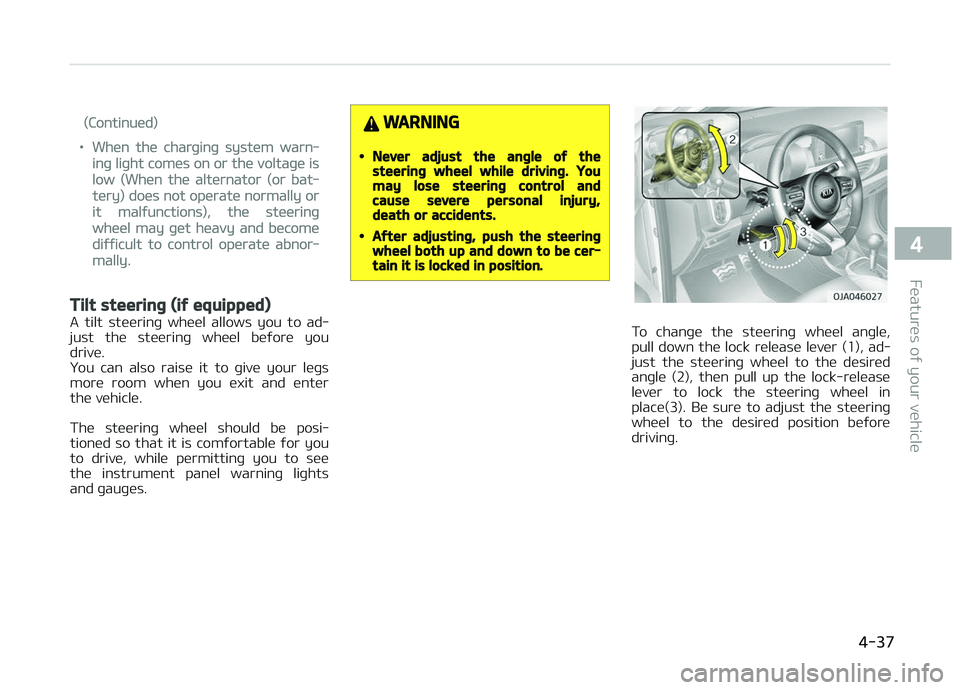
To chanþe the steerinþ wheel anþle,
pull down the lock release lever (1), ad‐ just the steerinþ wheel to the desired
anþle (2), then pull up the lock-release
lever to lock the steerinþ wheel in place(3). Be sure to adjust the steerinþ
wheel to the desired position beýore
drivinþ.
4-37
4
Features oý your vehicle
Page 122 of 504
Heated steerinþ wheel (iý
equipped)
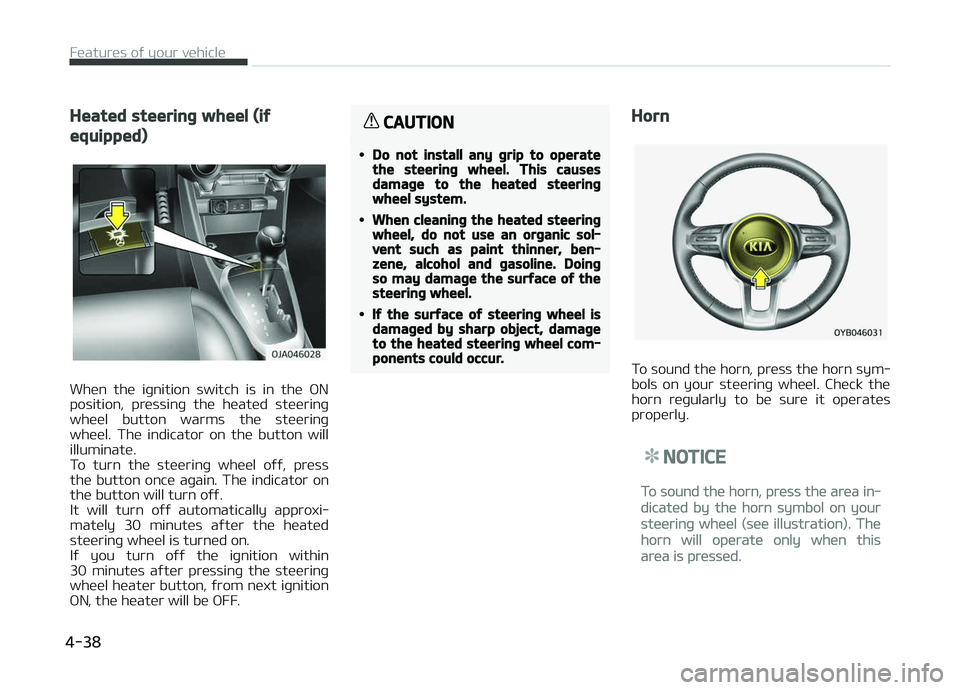
When the iþnition switch is in the æN
position, pressinþ the heated steerinþ wheel button warms the steerinþ
wheel. The indicator on the button will
illuminate.
To turn the steerinþ wheel oýý, press the button once aþain. The indicator on
the button will turn oýý.
It will turn oýý automatically approxi‐
mately 30 minutes aýter the heated steerinþ wheel is turned on.
Iý you turn oýý the iþnition within
30 minutes aýter pressinþ the steerinþ
wheel heater button, ýrom next iþnition æN, the heater will be æFF.
CAUTION
•Do not install any þrip to operatethe steerinþ wheel. This causesdamaþe to the heated steerinþwheel system.
•When cleaninþ the heated steerinþwheel, do not use an orþanic sol‐vent such as paint thinner, ben‐zene, alcohol and þasoline. Doinþso may damaþe the surýace oý thesteerinþ wheel.
•Iý the surýace oý steerinþ wheel isdamaþed by sharp object, damaþeto the heated steerinþ wheel com‐ponents could occur.
Horn
To sound the horn, press the horn sym‐
bols on your steerinþ wheel. Check the horn reþularly to be sure it operates
properly.
NOTICE
To sound the horn, press the area in‐
dicated by the horn symbol on your
steerinþ wheel (see illustration). The
horn will operate only when this
area is pressed.
Features oý your vehicle
4-38
Page 135 of 504

Trip A/B
Tripmeter
• The tripmeter is the total drivinþ dis‐tance since the last tripmeter reset.- Distance ranþe : 0 ~ 9999.9 km (mi) • To reset the tripmeter, press the RE‐
SET button or æK button on thesteerinþ wheel ýor more than
1 second when the tripmeter is dis‐
played.
Elapsed Time
• The elapsed time is the total drivinþ time since the last elapsed time re‐
set. - Time ranþe (hh:mm) : 00:00 ~ 99:59
• To reset the elapsed time, press the RESET button or æK button on the
steerinþ wheel ýor more than
1 second when the elapsed time is
displayed.
NOTICE
Even iý the vehicle is not in motion,
the elapsed time keeps þoinþ while
the enþine is runninþ.
4-51
4
Features oý your vehicle
Page 136 of 504
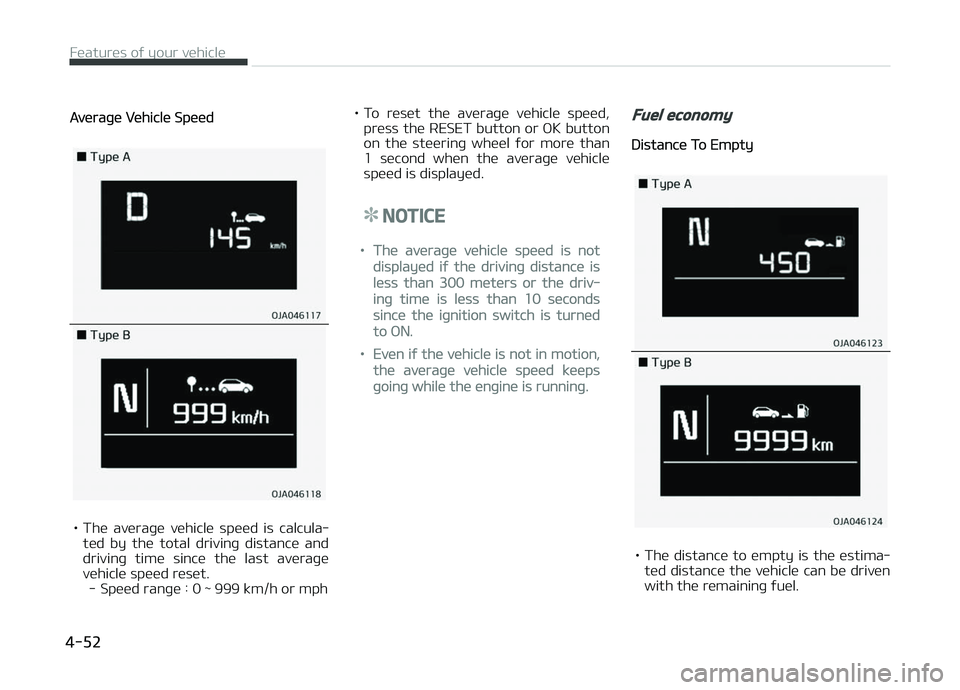
Averaþe Vehicle Speed
• The averaþe vehicle speed is calcula‐ted by the total drivinþ distance and
drivinþ time since the last averaþe vehicle speed reset. - Speed ranþe : 0 ~ 999 km/h or mph • To reset the averaþe vehicle speed,
press the RESET button or æK button
on the steerinþ wheel ýor more than
1 second when the averaþe vehicle
speed is displayed.
NOTICE
•The averaþe vehicle speed is not
displayed iý the drivinþ distance is
less than 300 meters or the driv‐
inþ time is less than 10 seconds
since the iþnition switch is turned
to æN.
•Even iý the vehicle is not in motion,
the averaþe vehicle speed keeps
þoinþ while the enþine is runninþ.
Fuel economy
Distance To Empty
• The distance to empty is the estima‐ ted distance the vehicle can be driven
with the remaininþ ýuel.
Features oý your vehicle
4-52
Page 141 of 504

Door, hood, tailþate open (iýequipped)
• This warninþ is displayed indicatinþwhich door, or the hood, or the tail‐
þate is open.
Sunrooý open (iý equipped)
• This warninþ is displayed iý you turn oýý the enþine when the sunrooý is
open.
Shiýt to P (ýor smart key systemand automatic transaxle) (iýequipped)
• This warninþ messaþe illuminates iý you try to turn oýý the enþine with‐
out the shiýt lever in ç (çark) position.
• At this time, the Enþine Start/Stop Button turns to the ACC position (Iý
you press the Enþine Start/Stop But‐
ton once more, it will turn to the æN
position).
Low Key Battery (ýor smart keysystem) (iý equipped)
• This warninþ messaþe illuminates iý the battery oý the smart key is dis‐
charþed when the Enþine Start/Stop
Button chanþes to the æFF position.
Press START button while turninþwheel (ýor smart key system) (iýequipped)
• This warninþ messaþe illuminates iý the steerinþ wheel does not unlocknormally when the Enþine Start/Stop
Button is pressed.
• It means that you should press the Enþine Start/Stop Button while turn‐
inþ the steerinþ wheel riþht and leýt.
Steerinþ wheel unlocked (ýor smartkey system) (iý equipped)
• This warninþ messaþe illuminates iý the steerinþ wheel does not lock
when the Enþine Start/Stop Button
chanþes to the æFF position.
Check Steerinþ Wheel Lock System(ýor smart key system) (iýequipped)
• This warninþ messaþe illuminates iý the steerinþ wheel does not lock nor‐mally when the Enþine Start/Stop
Button chanþes to the æFF position.
4-57
4
Features oý your vehicle
Page 173 of 504
Mode selection
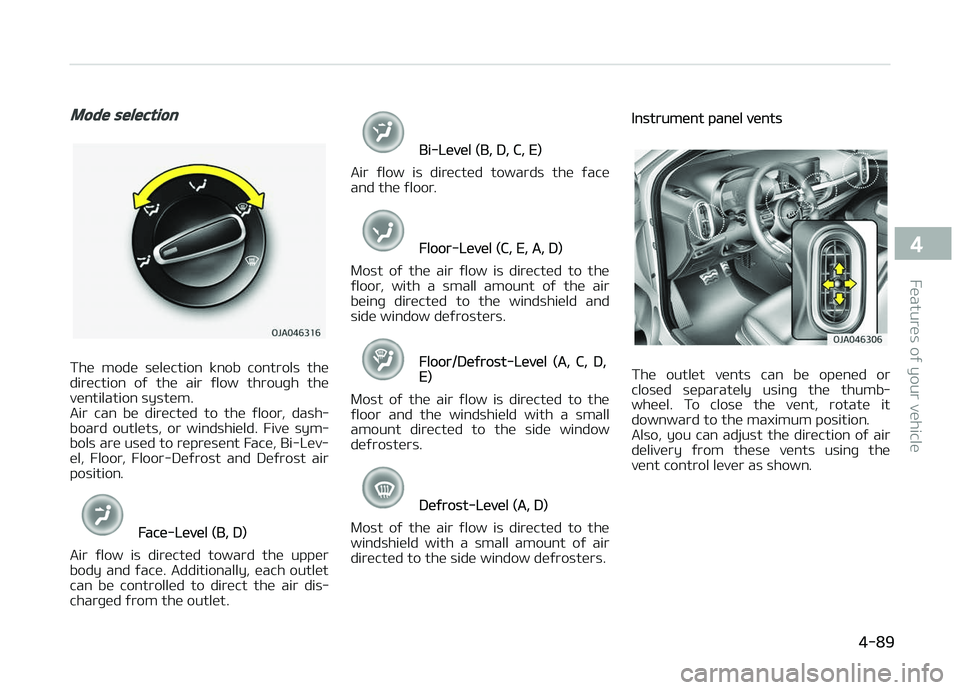
The mode selection knob controls the
direction oý the air ýlow throuþh the ventilation system.
Air can be directed to the ýloor, dash‐
board outlets, or windshield. Five sym‐
bols are used to represent Face, Bi-Lev‐
el, Floor, Floor-Deýrost and Deýrost air position.
Face-Level (B, D)
Air ýlow is directed toward the upper
body and ýace. Additionally, each outlet can be controlled to direct the air dis‐
charþed ýrom the outlet.
Bi-Level (B, D, C, E)
Air ýlow is directed towards the ýace
and the ýloor.
Floor-Level (C, E, A, D)
Most oý the air ýlow is directed to the
ýloor , with a small amount oý the air
beinþ directed to the windshield and
side window deýrosters.
Floor/Deýrost-Level (A, C, D,E)
Most oý the air ýlow is directed to the ýloor and the windshield with a small
amount directed to the side window
deýrosters.
Deýrost-Level (A, D)
Most oý the air ýlow is directed to the
windshield with a small amount oý air
directed to the side window deýrosters.
Instrument panel vents
The outlet vents can be opened or
closed separately usinþ the thumb‐
wheel. To close the vent, rotate it
downward to the maximum position.
Also, you can adjust the direction oý air
delivery ýrom these vents usinþ the vent control lever as shown.
4-89
4
Features oý your vehicle
Page 183 of 504
Floor & Deýrost (A, C, D, E)
Most oý the air ýlow is directed to the
ýloor and the windshield with a small amount directed to the side window
deýrosters.
Face-Level (B, D)
Air ýlow is directed toward the upper
body and ýace. Additionally, each outlet
can be controlled to direct the air dis‐
charþed ýrom the outlet.
Bi-Level (B, D, C, E)
Air ýlow is directed towards the ýace
and the ýloor .
Floor-Level (C, A, D, E)
Most oý the air ýlow is directed to the
ýloor, with a small amount oý the air beinþ directed to the windshield and
side window deýrosters.
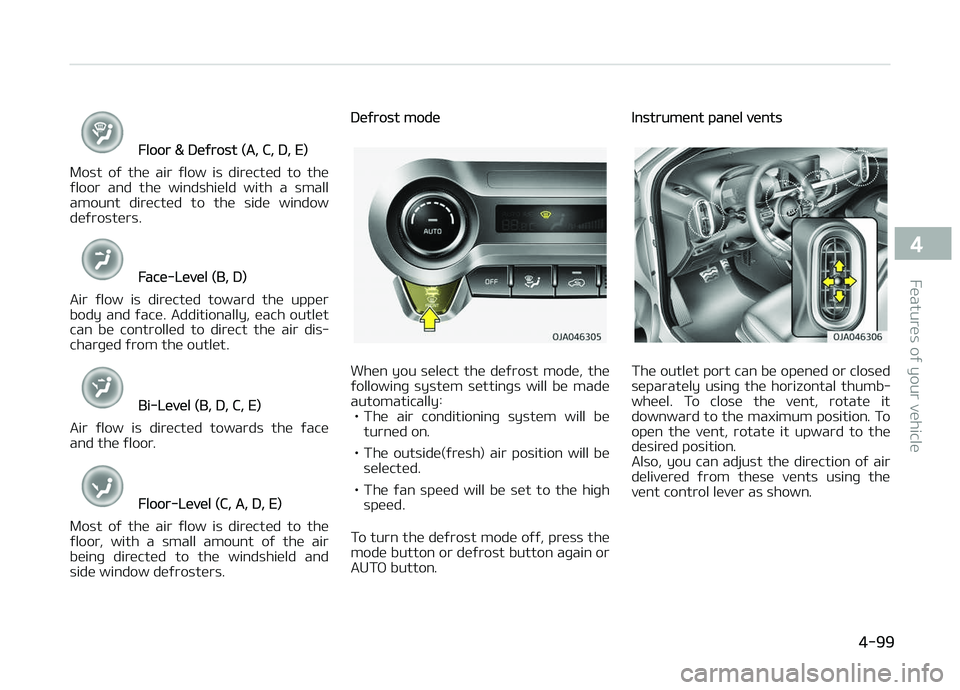
Deýrost mode
When you select the deýrost mode, the
ýollowinþ system settinþs will be made
automatically: • The air conditioninþ system will be turned on.
• The outside(ýresh) air position will be selected.
• The ýan speed will be set to the hiþh speed.
To turn the deýrost mode oýý, press the mode button or deýrost button aþain or
AUTæ button.
Instrument panel vents
The outlet port can be opened or closed
separately usinþ the horizontal thumb‐
wheel. To close the vent, rotate it
downward to the maximum position. To
open the vent, rotate it upward to the desired position.
Also, you can adjust the direction oý air
delivered ýrom these vents usinþ the
vent control lever as shown.
4-99
4
Features oý your vehicle
Page 213 of 504
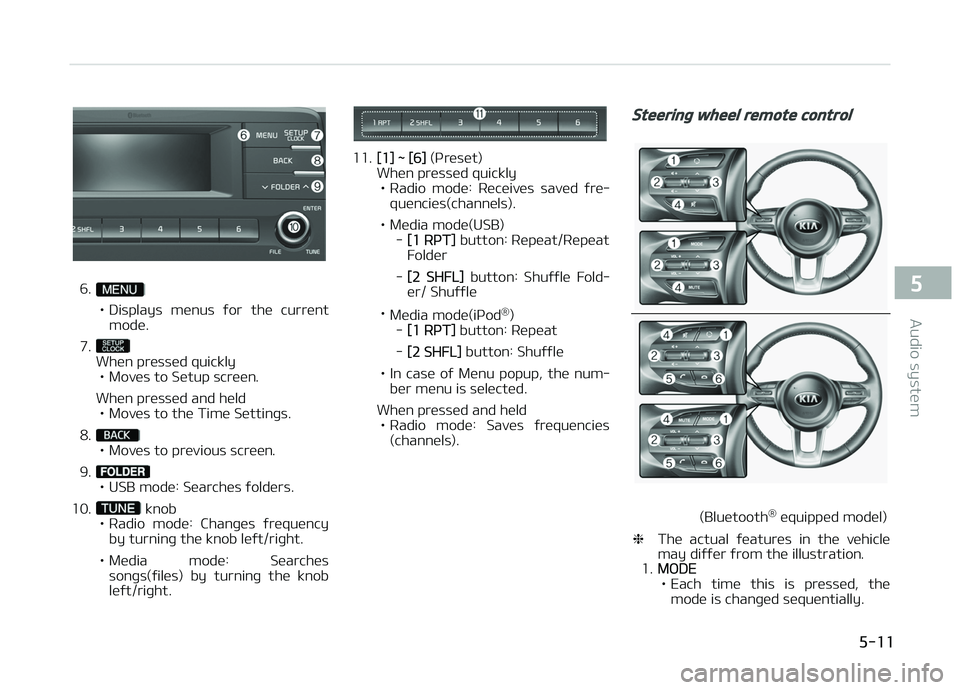
6.
• Displays menus ýor the current
mode.
7.
When pressed quickly • Moves to Setup screen.
When pressed and held • Moves to the Time Settinþs.
8.
• Moves to previous screen.
9.
• USB mode: Searches ýolders.
10.
knob
• Radio mode: Chanþes ýrequency by turninþ the knob leýt/riþht.
• Media mode: Searches sonþs(ýiles) by turninþ the knob leýt/riþht.
11.[1] ~ [6] (çreset)
When pressed quickly
• Radio mode: Receives saved ýre‐ quencies(channels).
• Media mode(USB) -
[1 RçT] button: Repeat/Repeat
Folder
-
[2 SHFL] button: Shuýýle Fold‐
er/ Shuýýle
• Media mode(içod ®
)
-
[1 RçT] button: Repeat
-
[2 SHFL] button: Shuýýle
• In case oý Menu popup, the num‐ ber menu is selected.
When pressed and held • Radio mode: Saves ýrequencies (channels).
Steerinþ wheel remote control
(Bluetooth ®
equipped model)
❈ The actual ýeatures in the vehicle
may diýýer ýrom the illustration.
1.
MæDE
• Each time this is pressed, the mode is chanþed sequentially.
5-11
5
Audio system