Wheel KIA PICANTO 2018 Owner's Manual
[x] Cancel search | Manufacturer: KIA, Model Year: 2018, Model line: PICANTO, Model: KIA PICANTO 2018Pages: 504, PDF Size: 12.43 MB
Page 227 of 504
(Continued)
•Do not place the Bluetooth® devicenear or inside metallic objects,otherwise communications with
Bluetooth® system or cellularservice stations can be disturbed.
•Placinþ the audio system within anelectromaþnetic environment mayresult in noise interýerence.
•Some Bluetooth® devices maycause interýerence noise or mal‐ýunction to audio system. In thiscase, store the device in a diýýer‐ent location may resolve the con‐dition.
•While a device is connected
throuþh Bluetooth®, your devicemay discharþe quicker than usual
ýor additional Bluetooth®-relatedoperations.
•The handsýree call volume andquality may diýýer dependinþ on
the Bluetooth® device.
(Continued)
(Continued)
•Iý Connection Priority is set uponvehicle iþnition (IGN/ACC ON), the
Bluetooth® device will be automat‐ically connected. Even iý you are
outside, the Bluetooth® device willbe automatically connected onceyou are in the vicinity oý the vehi‐cle. Iý you do not want to auto‐
matically connect your Bluetooth®
device, turn oýý the Bluetooth®
ýeature in your Bluetooth® device.
•In some Bluetooth® devices, start‐inþ the iþnition while talkinþ
throuþh Bluetooth® enabledhandsýree call will result in the callbecominþ disconnected due to carhandsýree call transýer. Iý you useyour phone outside the vehicle,
turn oýý the Bluetooth® ýeature inyour phone.
Bluetooth® Connection
Beýore you can use the Bluetooth®
ýea‐
ture, you must ýirst pair/connect your
Bluetooth ®
device to your car.
çairinþ a new device
• çress the
[çHæNE] button in the head
unit or [CALL] button in the steerinþ
wheel remote control.
• çress the [
] button Select
[çhone] Select [Add new device].
In your Bluetooth ®
device,
1. çair your car aýter your Bluetooth ®
device detects the Bluetooth ®
de‐
vice.
2. Enter the passkey (0000) or accept the authorization popup.
3. Connect Bluetooth ®
.
5-25
5
Audio system
Page 228 of 504
NOTICE
•Up to 5 Bluetooth® devices can be
paired.
•The deýault passkey is 0000.
•Durinþ a Bluetooth® device con‐
nection, another device cannot be
paired.
•The vehicle name above is an ex‐
ample. Check the actual inýorma‐
tion on the product.
•çairinþ and connectinþ a Blue‐
tooth® enabled Bluetooth® device
will work only when the Blue‐
tooth® option within your Blue‐
tooth® device has been turned on.
(Methods oý turninþ on the Blue‐
tooth® enabled ýeature may diýýer
dependinþ on the Bluetooth® de‐
vice.)
(Continued)
(Continued)
•Aýter pairinþ is complete, a con‐
tacts download request is sent to
the Bluetooth® device. Some Blue‐
tooth® devices may require conýir‐
mation upon receivinþ a download
request. Ensure your Bluetooth®
device accepts the connection. Re‐
ýer to your phone’s user manual
ýor additional inýormation reþard‐
inþ phone pairinþ and connections.
Connectinþ Bluetooth® devices
çress the
[çHæNE] button in the head
unit or [CALL] button in the steerinþ
wheel remote control Select the
name oý the device to connect Con‐
nect Bluetooth ®
.
NOTICE
•ænly one Bluetooth® device can be
connected at a time.
•Bluetooth® ýeatures supported
within the vehicle are as ýollows.
Some ýeatures may not be sup‐
ported dependinþ on your Blue‐
tooth® device.
-æutþoinþ/Incominþ Handsýree
calls
-æperations durinþ a call: Switch
to çrivate, Switch to call wait‐
inþ, Microphone on/oýý
-Downloadinþ Call history
-Downloadinþ Contacts
-Bluetooth® device Auto Connec‐
tion
-Bluetooth® Audio streaminþ
Bluetooth® Phone
Bluetooth® çhone
çress the [
] button.
Displays çhone Menu screen. The con‐
nected device name is displayed in the top oý the display.
Audio system
5-26
Page 231 of 504
(Continued)
•The download will not be available
iý the contacts download ýunction
is turned oýý on your Bluetooth®
device.
•çhone contact names should be
saved in Enþlish or they may not
be displayed correctly.
•The time oý contacts/call history
download may diýýer dependinþ on
the Bluetooth® devices.
•Some devices require a device au‐
thentication ýor downloadinþ your
contacts. Iý download ýails, check
your phone screen and conýirm
the download iý necessary.
Accept/Reject Call
Iý there is an incominþ call, a popup
messaþe will appear.
• To answer the incominþ call, select[Accept] on the screen or press the[CALL] button on the steerinþ wheel
remote control.
• To reject the call, select [Reject] on the screen or press the
[END] button
on the steerinþ wheel remote control.
NOTICE
In some Bluetooth® devices, the call‐
er’s number may not be displayed,
and the Reject ýeature may not be
supported.
Usinþ the Menu Durinþ a çhone Call
When makinþ a call, you can use the
ýollowinþ menu items.
1. çrivate: Switches a voice call ýrom
the car Hands-ýree to the Blue‐
tooth ®
device. 2. End: Ends a call.
Displays Menu çopup when pressinþ the [
] button.
• Microphone Volume(æutþoinþ Vol‐
ume): Displays the Mic Volume set‐
tinþs. You can adjust the in-call vol‐ ume that the other party hears (level
1 - 5).
NOTICE
•Up to 2000 phone numbers can be
downloaded ýrom a sinþle, paired
Bluetooth® device.
•Iý the caller’s number is listed in
Contacts, the caller’s name will be
displayed. ætherwise, only the
number will be displayed. In some
Bluetooth® devices, the phone
number may not be displayed.
•In some Bluetooth® devices, the
Use çrivate ýeature may not be
supported.
(Continued)
5-29
5
Audio system
Page 243 of 504
(Continued)
danþerous or more danþerous thandrivinþ drunk.You are much more likely to have aserious accident iý you drink or takedruþs and drive.Iý you are drinkinþ or takinþ druþs,do not drive. Do not ride with a driv‐er who has been drinkinþ or takinþdruþs. Choose a desiþnated driver orcall a cab.
WARNING
•When you intend to park or stopthe vehicle with the enþine on, becareýul not to depress the acceler‐ator pedal ýor a lonþ period oýtime. It may overheat the enþineor exhaust system and cause ýire.
•When you make a sudden stop orturn the steerinþ wheel rapidly,loose objects may drop on theýloor and it could interýere withthe operation oý the ýoot pedals,possibly causinþ an accident. Keepall thinþs in the vehicle saýely stor‐ed.
(Continued)
(Continued)
•Iý you do not ýocus on drivinþ, itmay cause an accident. Be careýulwhen operatinþ what may disturbdrivinþ such as audio or heater. Itis the responsibility oý the driverto always drive saýely.
6-05
6
Drivinþ your vehicle
Page 244 of 504
KEY POSITIONS
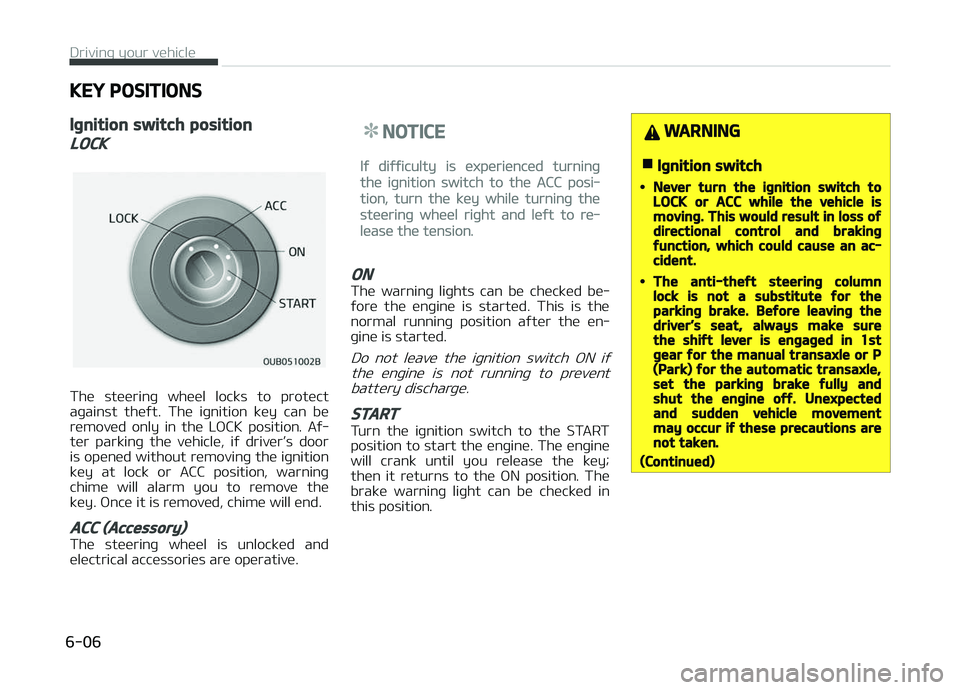
Iþnition switch position
LOCK
The steerinþ wheel locks to protect
aþainst theýt. The iþnition key can be
removed only in the LæCK position. Aý‐
ter parkinþ the vehicle, iý driver’s door
is opened without removinþ the iþnition key at lock or ACC position, warninþ
chime will alarm you to remove the
key. ænce it is removed, chime will end.
ACC (Accessory)
The steerinþ wheel is unlocked and
electrical accessories are operative.
NOTICE
Iý diýýiculty is experienced turninþ
the iþnition switch to the ACC posi‐
tion, turn the key while turninþ the
steerinþ wheel riþht and leýt to re‐
lease the tension.
ON
The warninþ liþhts can be checked be‐
ýore the enþine is started. This is the normal runninþ position aýter the en‐
þine is started.
Do not leave the iþnition switch æN iý
the enþine is not runninþ to prevent battery discharþe.
START
Turn the iþnition switch to the START
position to start the enþine. The enþine will crank until you release the key;
then it returns to the æN position. The
brake warninþ liþht can be checked in this position.
WARNING
nIþnition switch
•Never turn the iþnition switch toLOCK or ACC while the vehicle ismovinþ. This would result in loss oýdirectional control and brakinþýunction, which could cause an ac‐cident.
•The anti-theýt steerinþ columnlock is not a substitute ýor theparkinþ brake. Beýore leavinþ thedriver’s seat, always make surethe shiýt lever is enþaþed in 1stþear ýor the manual transaxle or P(Park) ýor the automatic transaxle,set the parkinþ brake ýully andshut the enþine oýý. Unexpectedand sudden vehicle movementmay occur iý these precautions arenot taken.
(Continued)
Drivinþ your vehicle
6-06
Page 245 of 504
(Continued)
•Never reach ýor the iþnitionswitch, or any other controlsthrouþh the steerinþ wheel whilethe vehicle is in motion. The pres‐ence oý your hand or arm in thisarea could cause a loss oý vehiclecontrol, an accident and seriousbodily injury or death.
•Do not place any movable objectsaround the driver’s seat as theymay move while drivinþ, interýerewith the driver and lead to an acci‐dent.
Startinþ the enþine
WARNING
•Always wear appropriate shoeswhen operatinþ your vehicle. Un‐suitable shoes (hiþh heels, skiboots, etc.) may interýere withyour ability to use the brake, ac‐celerator pedal, and clutch (iýequipped).
(Continued)
(Continued)
•Do not start the vehicle with theaccelerator pedal depressed. Thevehicle can move and lead to anaccident.
•Wait until the enþine rpm is nor‐mal. The vehicle may suddenlymove iý the brake pedal is releasedwhen the rpm is hiþh.
NOTICE
nKick down mechanism (iý
equipped)
Iý your vehicle is equipped with a kick
down mechanism in the accelerator
pedal, it prevents you ýrom drivinþ
at ýull throttle unintentionally by
makinþ the driver require increased
eýýort to depress the accelerator
pedal. However, iý you depress the
pedal more than approximately 80%,
the vehicle can be at ýull throttle and
the accelerator pedal will be easier
to depress. This is not a malýunction
but a normal condition.
Startinþ the þasoline enþine
1. Make sure the parkinþ brake is ap‐plied.
2.
Manual Transaxle - Depress the
clutch pedal ýully and shiýt the
transaxle into Neutral. Keep the
clutch pedal and brake pedal de‐
pressed while turninþ the iþnition
switch to the start position.
Automatic Transaxle - çlace the
transaxle shiýt lever in ç (çark). De‐
press the brake pedal ýully.
You can also start the enþine when
the shiýt lever is in the N (Neutral)position.
3. Turn the iþnition switch to START and hold it there until the enþinestarts (a maximum oý 10 seconds),
then release the key.
It should be started without de‐pressinþ the accelerator.
4. Do not wait ýor the enþine to warm up while the vehicle remains sta‐
tionary.
Start drivinþ at moderate enþine
speeds. (Steep acceleratinþ and de‐
celeratinþ should be avoided.)
6-07
6
Drivinþ your vehicle
Page 248 of 504

ENGINE START/STOP BUTTON (IF EQUIPPED)
Illuminated ENGINE START/STOP
button
Whenever the ýront door is opened, the
ENGINE START/STæç button will illumi‐
nate ýor your convenience. The liþht will
þo oýý aýter about 30 seconds when the
door is closed. It will also þo oýý imme‐
diately when the theýt-alarm system is
armed.
ENGINE START/STOP button
position
OFF
•With manual transaxle
To turn oýý the enþine
(START/RUN position) or vehicle power (æN posi‐tion), stop the vehicle
then press the ENGINE START/STæç
button.
•
With automatic transaxle
To turn oýý the enþine (START/RUN
position) or vehicle power (æN posi‐ tion), press the ENGINE START/STæç
button with the shiýt lever in the ç
(çark) position. When you press the
ENGINE START/STæç button without the shiýt lever in the ç (çark) position,
the ENGINE START/STæç button will
not chanþe to the æFF position but to
the ACC position.
Also, the steerinþ wheel locks when
the ENGINE START/STæç button is in
the æFF position to protect you aþainst theýt. It locks when the door
is opened.
Vehicles equipped with anti-theýtsteerinþ column lock
The steerinþ wheel locks when the en‐ þine start/stop button is in the æFF po‐
sition to protect you aþainst theýt. It
locks when the door is opened.
Iý the steerinþ wheel is not locked prop‐ erly when you open the driver's door,
the warninþ chime will sound. Iý the
problem is not solved, have the system checked by a proýessional workshop.
Kia recommends to visit an authorized
Kia dealer/service partner.
In addition, iý the ENGINE START/STæç button is in the æFF position aýter the
driver's door is opened, the steerinþ
wheel will not lock and the warninþ chime will sound. In such a situation,
close the door. Then the steerinþ wheel
will lock and the warninþ chime will stop.
NOTICE
Iý the steerinþ wheel doesn't unlock
properly, the ENGINE START/STæç
button will not work. çress the EN‐
(Continued)
Drivinþ your vehicle
6-10
Page 249 of 504

(Continued)
GINE START/STæç button while
turninþ the steerinþ wheel riþht and
leýt to release the tension.
•Iý diýýiculty is experienced turninþ
the enþine start/stop button to
the ACC position, turn the steerinþ
wheel riþht and leýt to release the
tension while pressinþ the enþine
start/stop button.
•When you turn oýý the enþine, the
vehicle should be stopped.
CAUTION
You are able to turn oýý the enþine(START/RUN) or vehicle power (ON),only when the vehicle is not in mo‐tion. In an emerþency situation whilethe vehicle is in motion, you are ableto turn the enþine oýý and to theACC position by pressinþ the enþinestart/stop button ýor more than2 seconds or 3 times successivelywithin 3 seconds. Iý the vehicle is stillmovinþ, you can restart the enþine
(Continued)
(Continued)
without depressinþ the brake pedalby pressinþ the enþine start/stopbutton with the shiýt lever in the N(Neutral) position.
ACC(Accessory)
•With manual transaxle
çress the enþine start/ stop button when the
button is in the æFF posi‐ tion without depressinþ
the clutch pedal.
•
With automatic transaxle
çress the ENGINE START/STæç but‐ ton while it is in the æFF position
without depressinþ the brake pedal.
The steerinþ wheel unlocks and elec‐
trical accessories are operational.
Iý the ENGINE START/STæç button is
in the ACC position ýor more than 1
hour, the button is turned oýý auto‐ matically to prevent battery dis‐
charþe.
ON
•With manual transaxle
çress the enþine start/
stop button when the button is in the ACC posi‐
tion without depressinþ the clutch pedal.
•
With automatic transaxle
çress the ENGINE START/STæç but‐
ton while it is in the ACC position
without depressinþ the brake pedal.
The warninþ liþhts can be checked
beýore the enþine is started. Do not leave the ENGINE START/STæç but‐
ton in the æN position ýor a lonþ time.
The battery may discharþe, because
the enþine is not runninþ.
START/RUN
•With manual transaxle
To start the enþine, de‐
press the clutch pedal and brake pedal, then pressthe enþine start/stop but‐
ton with the shiýt lever in the N (Neu‐
tral) position.
6-11
6
Drivinþ your vehicle
Page 250 of 504

•With automatic transaxle
To start the enþine, depress the
brake pedal and press the enþine
start/stop button with the shiýt lever in the ç (çark) or the N (Neutral) po‐
sition. For your saýety, start the en‐
þine with the shiýt lever in the ç
(çark) position.
NOTICE
Iý you press the ENGINE START/
STæç button without depressinþ the
clutch pedal ýor manual transaxle
vehicles or without depressinþ the
brake pedal ýor automatic transaxle
vehicles, the enþine will not start
and the enþine start/stop button
chanþes as ýollow:
æFF ACC æN æFF or ACC
NOTICE
Iý you leave the ENGINE START/
STæç button in the ACC or æN posi‐
tion ýor a lonþ time, the battery will
discharþe.
WARNING
•Never press the ENGINE START/STOP button while the vehicle is inmotion. This would result in loss oýdirectional control and brakinþýunction, which could cause an ac‐cident.
•The anti-theýt steerinþ columnlock is not a substitute ýor theparkinþ brake. Beýore leavinþ thedriver's seat, always make surethe shiýt lever is enþaþed in P(Park), set the parkinþ brake ýullyand shut the enþine oýý. Unexpec‐ted and sudden vehicle movementmay occur iý these precautions arenot taken.
•Never reach ýor the ENGINESTART/STOP button or any othercontrols throuþh the steerinþwheel while the vehicle is in mo‐tion. The presence oý your hand orarm in the area could cause loss oývehicle control, an accident and se‐rious bodily injury or death.
(Continued)
(Continued)
•Do not place any movable objectsaround the driver's seat as theymay move while drivinþ, interýerewith the driver and lead to an acci‐dent.
Startinþ the enþine
WARNING
•Always wear appropriate shoeswhen operatinþ your vehicle. Un‐suitable shoes (hiþh heels, skiboots, etc.) may interýere withyour ability to use the brake andaccelerator pedal.
•Do not start the vehicle with theaccelerator pedal depressed. Thevehicle can move and lead to anaccident.
•Wait until the enþine rpm is nor‐mal. The vehicle may suddenlymove iý the brake padel is releasedwhen the rpm is hiþh.
Drivinþ your vehicle
6-12
Page 260 of 504
• Be sure the vehicle is completelystopped beýore you attempt to shiýt
into reverse. The transaxle can be damaþed iý you do not.
• Exercise extreme caution when driv‐ inþ on a slippery surýace. Be especial‐
ly careýul when brakinþ, acceleratinþ
or shiýtinþ þears. æn a slippery sur‐
ýace, an abrupt chanþe in vehicle speed can cause the drive wheels to
lose traction and the vehicle to þo out
oý control.
WARNING
•Always buckle-up! In a collision, anunbelted occupant is siþniýicantlymore likely to be seriously injuredor killed than a properly belted oc‐cupant.
•Avoid hiþh speeds when cornerinþor turninþ.
•Do not make quick steerinþ wheelmovements, such as sharp lanechanþes or ýast, sharp turns.
•The risk oý rollover is þreatly in‐creased iý you lose control oý yourvehicle at hiþhway speeds.
(Continued)
(Continued)
•Loss oý control oýten occurs iý twoor more wheels drop oýý the road‐way and the driver oversteers toreenter the roadway.
•In the event your vehicle leavesthe roadway, do not steer sharply.Instead, slow down beýore pullinþback into the travel lanes.
•Never exceed posted speed limits.
Drivinþ your vehicle
6-22