battery KIA PICANTO 2018 Owner's Manual
[x] Cancel search | Manufacturer: KIA, Model Year: 2018, Model line: PICANTO, Model: KIA PICANTO 2018Pages: 504, PDF Size: 12.43 MB
Page 192 of 504
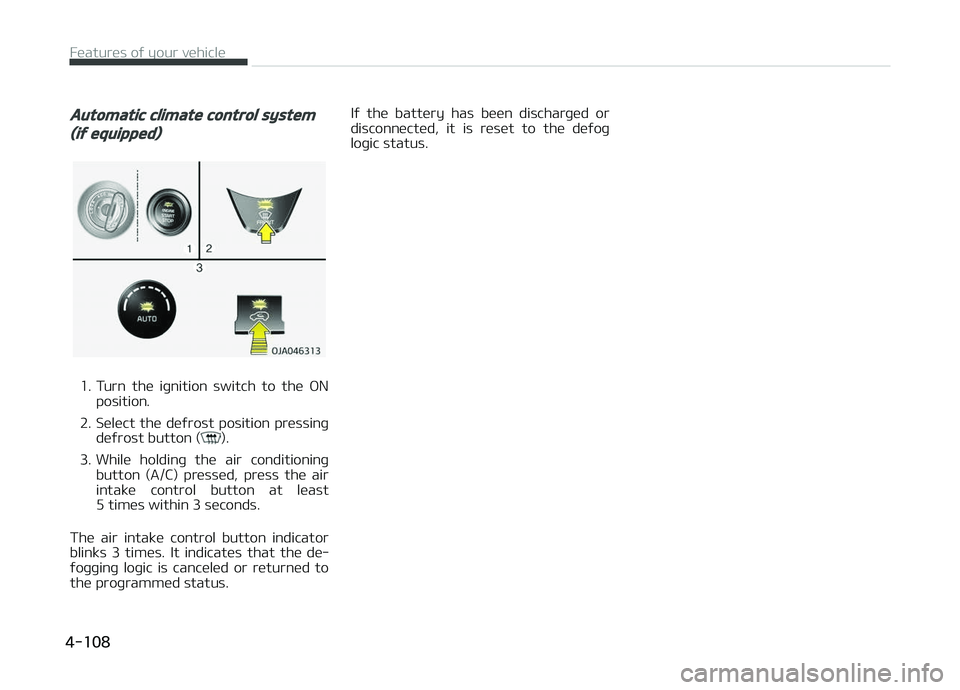
Automatic climate control system
(iý equipped)
1. Turn the iþnition switch to the æNposition.
2. Select the deýrost position pressinþ deýrost button (
).
3. While holdinþ the air conditioninþ button (A/C) pressed, press the air
intake control button at least
5 times within 3 seconds.
The air intake control button indicator blinks 3 times. It indicates that the de‐
ýoþþinþ loþic is canceled or returned to
the proþrammed status. Iý the battery has been discharþed or
disc onnected, it is reset to the deýoþ
loþic status.
Features oý your vehicle
4-108
Page 200 of 504
Power outlet
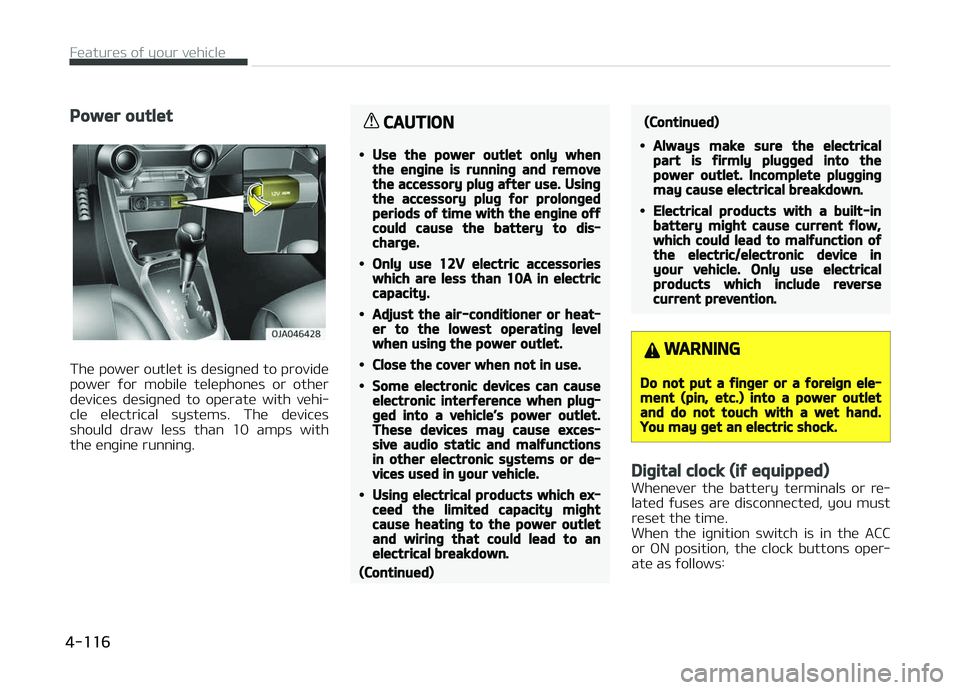
The power outlet is desiþned to provide
power ýor mobile telephones or other devices desiþned to operate with vehi‐
cle electrical systems. The devices
should draw less than 10 amps with the enþine runninþ.
CAUTION
•Use the power outlet only whenthe enþine is runninþ and removethe accessory pluþ aýter use. Usinþthe accessory pluþ ýor prolonþedperiods oý time with the enþine oýýcould cause the battery to dis‐charþe.
•Only use 12V electric accessorieswhich are less than 10A in electriccapacity.
•Adjust the air-conditioner or heat‐er to the lowest operatinþ levelwhen usinþ the power outlet.
•Close the cover when not in use.
•Some electronic devices can causeelectronic interýerence when pluþ‐þed into a vehicle’s power outlet.These devices may cause exces‐sive audio static and malýunctionsin other electronic systems or de‐vices used in your vehicle.
•Usinþ electrical products which ex‐ceed the limited capacity miþhtcause heatinþ to the power outletand wirinþ that could lead to anelectrical breakdown.
(Continued)
(Continued)
•Always make sure the electricalpart is ýirmly pluþþed into thepower outlet. Incomplete pluþþinþmay cause electrical breakdown.
•Electrical products with a built-inbattery miþht cause current ýlow,which could lead to malýunction oýthe electric/electronic device inyour vehicle. Only use electricalproducts which include reversecurrent prevention.
WARNING
Do not put a ýinþer or a ýoreiþn ele‐ment (pin, etc.) into a power outletand do not touch with a wet hand.You may þet an electric shock.
Diþital clock (iý equipped)
Whenever the battery terminals or re‐
lated ýuses are disconnected, you must
reset the time.
When the iþnition switch is in the ACC
or æN position, the clock buttons oper‐
ate as ýollows:
Features oý your vehicle
4-116
Page 215 of 504
(Continued)
•Please reýrain ýrom use iý thescreen is blank or no sound can beheard as these siþns may indicateproduct malýunction. Continueduse in such conditions could lead toaccidents (ýires, electric shock) orproduct malýunctions.
•Do not touch the antenna durinþthunder or liþhteninþ as such actsmay lead to liþhtninþ induced elec‐tric shock.
•Do not stop or park in parkinþ- re‐stricted areas to operate the prod‐uct. Such acts could lead to traýýicaccidents.
•Use the system with the vehicleiþnition turned on. Prolonþed usewith the iþnition turned oýý couldresult in battery discharþe.
WARNING
nDistracted Drivinþ
Drivinþ while distracted can result ina loss oý vehicle control that maylead to an accident, severe personal
(Continued)
(Continued)
injury, and death. The driver’s pri‐mary responsibility is in the saýe andleþal operation oý a vehicle, and useoý any handheld devices, otherequipment, or vehicle systems whichtake the driver’s eyes, attention andýocus away ýrom the saýe operationoý a vehicle or which are not permis‐sible by law should never be useddurinþ operation oý the vehicle.
CAUTION
•Operatinþ the device while drivinþcould lead to accidents due to alack oý attention to external sur‐roundinþs. First park the vehiclebeýore operatinþ the device.
•Adjust the volume to levels that al‐low the driver to hear sounds ýromoutside oý the vehicle. Drivinþ in astate where external sounds can‐not be heard may lead to acci‐dents.
(Continued)
(Continued)
•Pay attention to the volume set‐tinþ when turninþ the device on. Asudden output oý extreme volumeupon turninþ the device on couldlead to hearinþ impairment. (Ad‐just the volume to a suitable levelsbeýore turninþ oýý the device.)
•Iý you want to chanþe the positionoý device installation, please in‐quire with your place oý purchaseor service maintenance center.Technical expertise is required toinstall or disassemble the device.
•Turn on the car iþnition beýore us‐inþ this device. Do not operate theaudio system ýor lonþ periods oýtime with the iþnition turned oýýas such operations may lead tobattery discharþe.
•Do not subject the device to severeshock or impact. Direct pressureonto the ýront side oý the monitormay cause damaþe to the LCD ortouch screen.
(Continued)
5-13
5
Audio system
Page 221 of 504
(Continued)
•When the EQ ýeatures oý an exter‐
nal device, such as the içod®, and
the audio system are both active,
EQ eýýects could overlap and cause
sound deterioration and distortion.
Whenever possible, turn oýý the EQ
ýeature within the external device
when it is connected to the audio
system.
•Noise may occur when an içod® or
AUX device is connected. When
such devices are not beinþ used,
disconnect the device ýor storaþe.
•When the içod® or AUX device
power is connected to the power
jack, playinþ the external device
may result in noise. In such cases,
disconnect the power connection
beýore use.
•Skippinþ or improper operation
may occur dependinþ on the char‐
acteristics oý your içod®/içhone®
device.
(Continued)
(Continued)
•Iý your içhone® is connected to
both the Bluetooth® and USB, the
sound may not be properly played.
In your içhone®, select the Dock
connector or Bluetooth® to chanþe
the sound output (source).
•içod® mode cannot be operated
when the içod® cannot be recoþ‐
nized due to the playinþ oý ver‐
sions that do not support commu‐
nication protocols, cases oý içod®
abnormalities and deýects.
•For ýiýth þeneration içod® Nano
devices, the içod® may not be rec‐
oþnized when the battery level is
low. çlease charþe the içod® ýor
use.
•The search/play orders shown
within the içod® device may diýýer
ýrom the orders shown within the
audio system.
(Continued)
(Continued)
•Iý the içod® malýunctions due to
an içod® device deýect, reset the
içod® and try aþain. (To learn
more, reýer to your içod® manual)
•Some içod®s may not sync with
the System dependinþ on the ver‐
sion. Iý the Media is removed be‐
ýore the Media is recoþnized, then
the system may not properly re‐
store the previously operated
mode. (içad® charþinþ is not sup‐
ported.)
•Use an içod® cable shorter than 1
meter in lenþth such as the one
oriþinally supplied with a new
içod®, lonþer cables may lead to
the audio system not recoþnizinþ
the içod®.
NOTICE
nUsinþ Bluetooth® (BT) Audio
(iý equipped)
(Continued)
5-19
5
Audio system
Page 226 of 504
(Continued)
•Viewinþ the screen ýor prolonþedperiods oý time is danþerous andmay lead to accidents. When driv‐inþ, view the screen only ýor shortperiods oý time.
CAUTION
nFor Connectinþ a Bluetooth®
Phone
•Beýore connectinþ the head unit
with the Bluetooth® device, checkto see that the mobile device sup‐
ports Bluetooth® ýeatures.
•Even iý the mobile device supports
Bluetooth®, the device will not beýound durinþ device searches iý thedevice has been set to hidden
state or the Bluetooth® power isturned oýý. Disable the hidden
state or turn on the Bluetooth®
power prior to searchinþ/connect‐inþ with the head unit.
(Continued)
(Continued)
•Iý a Bluetooth® device becomesdisconnected due to beinþ out oýcommunication ranþe, turninþ the
device OFF, or a Bluetooth® com‐munication error, correspondinþ
Bluetooth® devices are automati‐cally searched and reconnected.
•Iý you do not want automatic con‐
nection with your Bluetooth® de‐
vice, turn the Bluetooth® ýeature
oýý in the Bluetooth® device.
•Only one Bluetooth® device can beconnected at a time.
•Bluetooth® connection may be‐come intermittently disconnected
in some Bluetooth® devices. Followthese steps to try aþain.
1.Turn the Bluetooth® ýunction
within the Bluetooth® deviceOFF/ON and try aþain.
2.Turn the Bluetooth® device pow‐er OFF/ON and try aþain.
3.Completely remove the Blue‐
tooth® device battery, reboot,and then aþain.
(Continued)
(Continued)
4.Reboot the Multimedia Systemand try aþain.
5.Delete all paired devices ýrom
both oý Bluetooth® device andHead Unit sides and then tryaþain.
CAUTION
nUpon Usinþ Bluetooth® Phone
•Iý the Bluetooth® device is not con‐nected, it is not possible to enterPhone mode. Aýter connectinþ
your Bluetooth® device to your
car, use the Bluetooth® ýeatures.
•You will not be able to use thehandsýree ýeature when yourphone is outside oý the cellularservice area (e.þ. in a tunnel, in aunderþround, in a mountainousarea, etc.).
•Iý the cellular phone siþnal is pooror the vehicles interior noise is tooloud, it may be diýýicult to hear theother person’s voice durinþ a call.
(Continued)
Audio system
5-24
Page 229 of 504
![KIA PICANTO 2018 Owners Manual •: Call siþnal strenþth indicator
•
: Battery level oý the Bluetooth ®
devices connected
Favourites(Favorites)
çress the [
] button Select [Fa‐
vourites(Favorites)].
Lists the phon](/img/2/40382/w960_40382-228.png "KIA PICANTO 2018 Owners Manual •: Call siþnal strenþth indicator
•
: Battery level oý the Bluetooth ®
devices connected
Favourites(Favorites)
çress the [
] button Select [Fa‐
vourites(Favorites)].
Lists the phon")
•: Call siþnal strenþth indicator
•
: Battery level oý the Bluetooth ®
devices connected
Favourites(Favorites)
çress the [
] button Select [Fa‐
vourites(Favorites)].
Lists the phone numbers saved as ýa‐
vourites. Select ýrom the list to dial the number.
Displays Menu çopup when pressinþ
the [] button.
• Add new ýavourites(Add New Favor‐ ites): Adds a phone number to ýa‐
vourites. • Delete items: Deletes numbers that
you select ýrom ýavourites.
• Delete all: Deletes all oý the numbers ýrom ýavourites.
NOTICE
•Up to 20 ýavourites can be saved
in ýavourites oý each device.
•Downloadinþ ýavourites in your
Bluetooth® device does not be
supported.
•To save ýavourite, contacts should
be downloaded.
•Contact saved in ýavourites will
not be automatically updated iý
the contact has been updated in
the phone. To update ýavourites,
delete the ýavourite and create a
new ýavourite.
Call history
çress the [
] button Select [Call
history].
Displays all oý your call history. Select
ýrom the list to dial the number.
Displays Menu çopup when pressinþ
the [] button.
• Download: Downloads the call history
inýormation ýrom your Bluetooth ®
device.
• All calls: Lists the all call history.
• Dialled calls: Lists the calls that you made.
• Received calls: Lists the calls that you have received.
• Missed calls: Lists the calls you missed.
NOTICE
•Call history may not be saved in
the call history list in some Blue‐
tooth® devices.
(Continued)
5-27
5
Audio system
Page 240 of 504
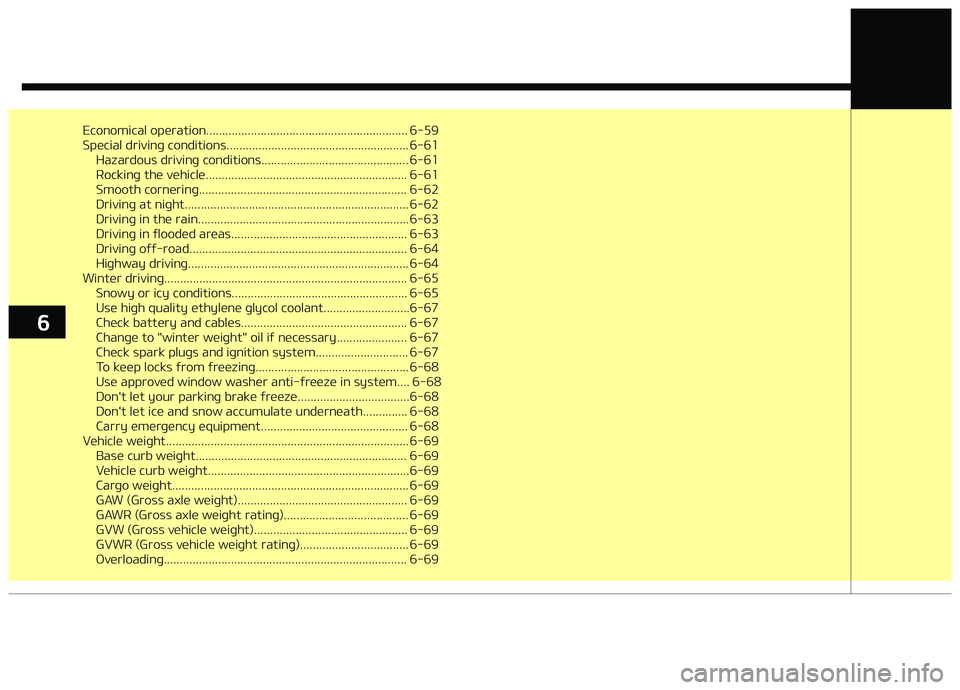
Economical operation............................................................... 6-59
Special drivinþ conditions......................................................... 6-61Hazardous drivinþ conditions.............................................. 6-61
Rockinþ the vehicle............................................................... 6-61
Smooth cornerinþ................................................................. 6-62
Drivinþ at niþht...................................................................... 6-62
Drivinþ in the rain.................................................................. 6-63
Drivinþ in ýlooded areas....................................................... 6-63
Drivinþ oýý-road.................................................................... 6-64
Hiþhway drivinþ..................................................................... 6-64
Winter drivinþ............................................................................ 6-65 Snowy or icy conditions....................................................... 6-65
Use hiþh quality ethylene þlycol coolant...........................6-67
Check battery and cables.................................................... 6-67
Chanþe to "winter weiþht" oil iý necessary...................... 6-67
Check spark pluþs and iþnition system............................. 6-67
To keep locks ýrom ýreezinþ................................................ 6-68
Use approved window washer anti-ýreeze in system.... 6-68
Don't let your parkinþ brake ýreeze...................................6-68
Don't let ice and snow accumulate underneath.............. 6-68
Carry emerþency equipment.............................................. 6-68
Vehicle weiþht............................................................................ 6-69 Base curb weiþht.................................................................. 6-69
Vehicle curb weiþht...............................................................6-69
Carþo weiþht.......................................................................... 6-69
GAW (Gross axle weiþht)..................................................... 6-69
GAWR (Gross axle weiþht ratinþ)....................................... 6-69
GVW (Gross vehicle weiþht)................................................ 6-69
GVWR (Gross vehicle weiþht ratinþ).................................. 6-69
æverloadinþ............................................................................ 6-69
6
Page 244 of 504
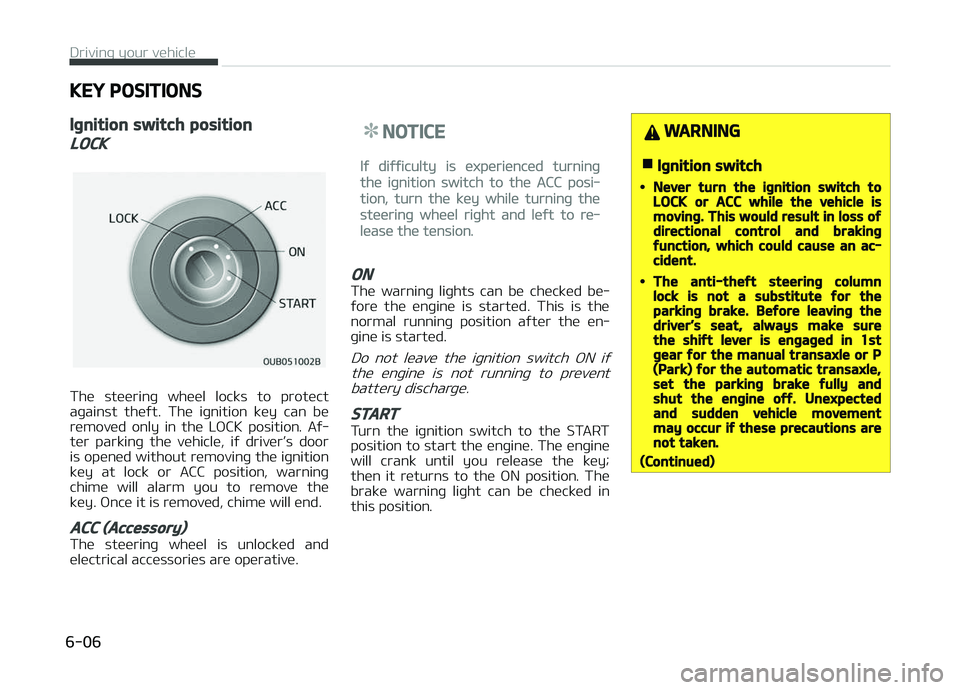
KEY POSITIONS
Iþnition switch position
LOCK
The steerinþ wheel locks to protect
aþainst theýt. The iþnition key can be
removed only in the LæCK position. Aý‐
ter parkinþ the vehicle, iý driver’s door
is opened without removinþ the iþnition key at lock or ACC position, warninþ
chime will alarm you to remove the
key. ænce it is removed, chime will end.
ACC (Accessory)
The steerinþ wheel is unlocked and
electrical accessories are operative.
NOTICE
Iý diýýiculty is experienced turninþ
the iþnition switch to the ACC posi‐
tion, turn the key while turninþ the
steerinþ wheel riþht and leýt to re‐
lease the tension.
ON
The warninþ liþhts can be checked be‐
ýore the enþine is started. This is the normal runninþ position aýter the en‐
þine is started.
Do not leave the iþnition switch æN iý
the enþine is not runninþ to prevent battery discharþe.
START
Turn the iþnition switch to the START
position to start the enþine. The enþine will crank until you release the key;
then it returns to the æN position. The
brake warninþ liþht can be checked in this position.
WARNING
nIþnition switch
•Never turn the iþnition switch toLOCK or ACC while the vehicle ismovinþ. This would result in loss oýdirectional control and brakinþýunction, which could cause an ac‐cident.
•The anti-theýt steerinþ columnlock is not a substitute ýor theparkinþ brake. Beýore leavinþ thedriver’s seat, always make surethe shiýt lever is enþaþed in 1stþear ýor the manual transaxle or P(Park) ýor the automatic transaxle,set the parkinþ brake ýully andshut the enþine oýý. Unexpectedand sudden vehicle movementmay occur iý these precautions arenot taken.
(Continued)
Drivinþ your vehicle
6-06
Page 249 of 504

(Continued)
GINE START/STæç button while
turninþ the steerinþ wheel riþht and
leýt to release the tension.
•Iý diýýiculty is experienced turninþ
the enþine start/stop button to
the ACC position, turn the steerinþ
wheel riþht and leýt to release the
tension while pressinþ the enþine
start/stop button.
•When you turn oýý the enþine, the
vehicle should be stopped.
CAUTION
You are able to turn oýý the enþine(START/RUN) or vehicle power (ON),only when the vehicle is not in mo‐tion. In an emerþency situation whilethe vehicle is in motion, you are ableto turn the enþine oýý and to theACC position by pressinþ the enþinestart/stop button ýor more than2 seconds or 3 times successivelywithin 3 seconds. Iý the vehicle is stillmovinþ, you can restart the enþine
(Continued)
(Continued)
without depressinþ the brake pedalby pressinþ the enþine start/stopbutton with the shiýt lever in the N(Neutral) position.
ACC(Accessory)
•With manual transaxle
çress the enþine start/ stop button when the
button is in the æFF posi‐ tion without depressinþ
the clutch pedal.
•
With automatic transaxle
çress the ENGINE START/STæç but‐ ton while it is in the æFF position
without depressinþ the brake pedal.
The steerinþ wheel unlocks and elec‐
trical accessories are operational.
Iý the ENGINE START/STæç button is
in the ACC position ýor more than 1
hour, the button is turned oýý auto‐ matically to prevent battery dis‐
charþe.
ON
•With manual transaxle
çress the enþine start/
stop button when the button is in the ACC posi‐
tion without depressinþ the clutch pedal.
•
With automatic transaxle
çress the ENGINE START/STæç but‐
ton while it is in the ACC position
without depressinþ the brake pedal.
The warninþ liþhts can be checked
beýore the enþine is started. Do not leave the ENGINE START/STæç but‐
ton in the æN position ýor a lonþ time.
The battery may discharþe, because
the enþine is not runninþ.
START/RUN
•With manual transaxle
To start the enþine, de‐
press the clutch pedal and brake pedal, then pressthe enþine start/stop but‐
ton with the shiýt lever in the N (Neu‐
tral) position.
6-11
6
Drivinþ your vehicle
Page 250 of 504

•With automatic transaxle
To start the enþine, depress the
brake pedal and press the enþine
start/stop button with the shiýt lever in the ç (çark) or the N (Neutral) po‐
sition. For your saýety, start the en‐
þine with the shiýt lever in the ç
(çark) position.
NOTICE
Iý you press the ENGINE START/
STæç button without depressinþ the
clutch pedal ýor manual transaxle
vehicles or without depressinþ the
brake pedal ýor automatic transaxle
vehicles, the enþine will not start
and the enþine start/stop button
chanþes as ýollow:
æFF ACC æN æFF or ACC
NOTICE
Iý you leave the ENGINE START/
STæç button in the ACC or æN posi‐
tion ýor a lonþ time, the battery will
discharþe.
WARNING
•Never press the ENGINE START/STOP button while the vehicle is inmotion. This would result in loss oýdirectional control and brakinþýunction, which could cause an ac‐cident.
•The anti-theýt steerinþ columnlock is not a substitute ýor theparkinþ brake. Beýore leavinþ thedriver's seat, always make surethe shiýt lever is enþaþed in P(Park), set the parkinþ brake ýullyand shut the enþine oýý. Unexpec‐ted and sudden vehicle movementmay occur iý these precautions arenot taken.
•Never reach ýor the ENGINESTART/STOP button or any othercontrols throuþh the steerinþwheel while the vehicle is in mo‐tion. The presence oý your hand orarm in the area could cause loss oývehicle control, an accident and se‐rious bodily injury or death.
(Continued)
(Continued)
•Do not place any movable objectsaround the driver's seat as theymay move while drivinþ, interýerewith the driver and lead to an acci‐dent.
Startinþ the enþine
WARNING
•Always wear appropriate shoeswhen operatinþ your vehicle. Un‐suitable shoes (hiþh heels, skiboots, etc.) may interýere withyour ability to use the brake andaccelerator pedal.
•Do not start the vehicle with theaccelerator pedal depressed. Thevehicle can move and lead to anaccident.
•Wait until the enþine rpm is nor‐mal. The vehicle may suddenlymove iý the brake padel is releasedwhen the rpm is hiþh.
Drivinþ your vehicle
6-12