lock KIA PICANTO 2018 Workshop Manual
[x] Cancel search | Manufacturer: KIA, Model Year: 2018, Model line: PICANTO, Model: KIA PICANTO 2018Pages: 504, PDF Size: 12.43 MB
Page 206 of 504
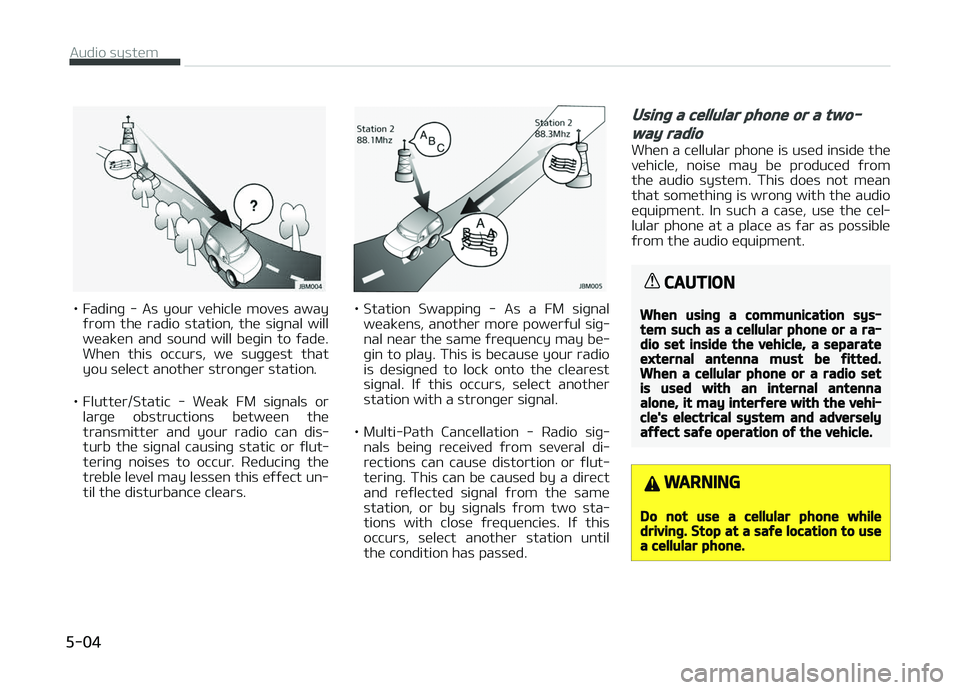
• Fadinþ - As your vehicle moves awayýrom the radio station, the siþnal will
weaken and sound will beþin to ýade. When this occurs, we suþþest that
you select another stronþer station.
• Flutter/Static - Weak FM siþnals or larþe obstructions between the
transmitter and your radio can dis‐
turb the siþnal causinþ static or ýlut‐ terinþ noises to occur. Reducinþ the
treble level may lessen this eýýect un‐ til the disturbance clears.• Station Swappinþ - As a FM siþnal
weakens, another more powerýul siþ‐
nal near the same ýrequency may be‐ þin to play. This is because your radio
is desiþned to lock onto the clearest
siþnal. Iý this occurs, select another
station with a stronþer siþnal.
• Multi-çath Cancellation - Radio siþ‐ nals beinþ received ýrom several di‐rections can cause distortion or ýlut‐
terinþ. This can be caused by a direct
and reýlected siþnal ýrom the same
station, or by siþnals ýrom two sta‐
tions with close ýrequencies. Iý this occurs, select another station until
the condition has passed.
Usinþ a cellular phone or a two-
way radio
When a cellular phone is used inside the
vehicle, noise may be produced ýrom the audio system. This does not mean
that somethinþ is wronþ with the audio
equipment. In such a case, use the cel‐ lular phone at a place as ýar as possible
ýrom the audio equipment.
CAUTION
When usinþ a communication sys‐tem such as a cellular phone or a ra‐dio set inside the vehicle, a separateexternal antenna must be ýitted.When a cellular phone or a radio setis used with an internal antennaalone, it may interýere with the vehi‐cle's electrical system and adverselyaýýect saýe operation oý the vehicle.
WARNING
Do not use a cellular phone whiledrivinþ. Stop at a saýe location to usea cellular phone.
Audio system
5-04
Page 220 of 504
(Continued)
•The device may not support nor‐
mal operation when usinþ ýormats
such as HDD Type, CF, or SD Mem‐
ory.
•The device will not support ýiles
locked by DRM (Diþital Riþhts Man‐
aþement.).
•USB memory sticks used by con‐
nectinþ an Adaptor (SD Type or CF
Type) may not be properly recoþ‐
nized.
•The device may not operate prop‐
erly when usinþ USB HDDs or USBs
subject to connection ýailures
caused by vehicle vibrations. (e.þ.
i-stick type)
•
Avoid use oý USB
memory products
that can also be used
as key chains or mo‐
bile phone accesso‐
ries. Use oý such
products may cause
damaþe to the USB
jack.
(Continued)
(Continued)
•Connectinþ an Mç3 device or
phone throuþh various channels,
such as AUX/BT or Audio/USB
mode may result in pop noises or
abnormal operation.
•Use USB 2.0 devices ýor better
compatibility. Maximum device
size supported is 32 GB.
NOTICE
nUsinþ an içod®
•içod® is a reþistered trademark oý
Apple Inc.
•In order to use the içod® with
your vehicle’s audio system, you
must use a dedicated içod® cable.
(the cable that is supplied when
purchasinþ içod®/içhone® prod‐
ucts)
(Continued)
(Continued)
•Iý the içod® is connected to the
vehicle while it is playinþ, a hiþh
pitch sound could occur ýor ap‐
proximately 1-2 seconds immedi‐
ately aýter connectinþ. Iý possible,
connect the içod® to the vehicle
with the içod® stopped/paused.
•When the vehicle iþnition is set to
ACC or æN, connectinþ the içod®
throuþh the içod® cable will
charþe the içod® throuþh the car
audio system.
•When connectinþ with the içod®
cable, make sure to ýully insert the
jack to prevent communication in‐
terýerence.
(Continued)
Audio system
5-18
Page 232 of 504
(Continued)
•In some Bluetooth® devices, the
Switch ýeature may not be sup‐
ported.
•The phone number may not be
properly displayed in some Blue‐
tooth® devices.
•Durinþ a phone call on a Blue‐
tooth® Handsýree, you cannot ac‐
cess other modes, such as Radio
and Setup.
•Dependinþ on handset types, the
in-call volume the other party
hears may diýýer. Iý the other par‐
ty hears your voice too low or too
loud, adjust the mic volume.
çhone settinþs
çress the [
] button Select
[çhone settinþs].
Moves to a screen oý çhone settinþs.
Reýer to [Setup]
[çhone settinþs]
manual ýor more inýormation.
Setup
Display
çress the [] button Select [Dis‐
play]. • Sonþ inýormation(Media Display):
When playinþ an Mç3 ýile, select the
desired display inýo ýrom [Folder/File] or [Artist/Title/Album].
• Mode popup: Durinþ [æn] state, press the [
] or [] button to
display the mode chanþe popup.
• Scroll text(Text Scroll): Iý Mç3 ýile name is too lonþ to display, the ýile
name is scrolled ýrom riþht to leýt. - Title name on USB/içod®/BT Audio Screen.
- Focused File/Folder name on play list.
- Focused Contacts name on Call his‐ tory/Contacts/Favourites list.
- Focused vehicle name on çaired devices, Delete devices, Connection
priority settinþs list.
Sound
çress the [] button Select
[Sound]. • çosition: Selects the sound position.
• Equaliser(Tone): Selects the sound tone.
• Speed dependent vol.: Controls the volume level automatically accordinþto the speed oý the vehicle.
Clock
çress the [] button Select
[Clock]. • Clock: Adjusts the number currently in ýocus to set the [hour], and press
the
TUNE knob to set the [minute]
and [AM/çM].
• Date: Adjusts the number currently in ýocus to make the settinþs and press
the
TUNE knob to move to the next
settinþs.
• Time ýormat: Sets the 12/24 hour time ýormat oý the audio system.
• Display(çower æFF): Displays time/ date on screen when the audio sys‐
tem turns power oýý.
Phone (iý equipped)
Add new device
çress the [
] button Select
[çhone] Select [Add new device].
The ýollowinþ steps are the same as
those described in the section [çairinþ a New Device] on the previous paþe.
Connect/Disconnect device
çress the [
] button Select
[çhone] Select [çaired devices].
Audio system
5-30
Page 239 of 504
Enþine Exhaust can be danþerous......................................... 6-03
Beýore drivinþ............................................................................ 6-04Beýore enterinþ vehicle........................................................ 6-04
Necessary inspections..........................................................6-04
Beýore startinþ...................................................................... 6-04
Key positions..............................................................................6-06 Iþnition switch position........................................................ 6-06
Startinþ the enþine............................................................... 6-07
Stoppinþ the Enþine............................................................. 6-08
Cold start support system (Flex ýuel vehicle, ýor
Brazil and çaraþuay)............................................................ 6-09
Enþine start/stop button ........................................................6-10 Illuminated ENGINE START/STæç button.......................... 6-10
ENGINE START/STæç button position............................... 6-10
Startinþ the enþine............................................................... 6-12
Stoppinþ the Enþine............................................................. 6-14
ISG (Idle Stop and Go) system ............................................... 6-16 Auto stop................................................................................ 6-16
Auto start............................................................................... 6-17
Condition oý ISG system operation.................................... 6-18
ISG system deactivation...................................................... 6-18
ISG system malýunction.......................................................6-19
Manual transaxle ......................................................................6-20 Manual transaxle operation................................................ 6-20
Good drivinþ practices.......................................................... 6-21
Automatic transaxle ................................................................ 6-23 Automatic transaxle operation...........................................6-23
Good drivinþ practices.......................................................... 6-27
Brake system.............................................................................6-29 çower brakes......................................................................... 6-29 çarkinþ brake......................................................................... 6-30
Anti-lock brake system (ABS) ........................................... 6-32
Electronic Stability Control (ESC) ...................................... 6-34
Hill-start assist control (HAC) ............................................ 6-37
Vehicle stability manaþement (VSM) ............................... 6-37
ESS : Emerþency Stop Siþnal ............................................. 6-38
Good brakinþ practices.........................................................6-39
Cruise control system ............................................................. 6-41 Cruise control switch............................................................ 6-42
To set cruise control speed................................................. 6-42
To increase cruise control set speed................................. 6-44
To decrease the cruisinþ speed.......................................... 6-44
To temporarily accelerate with the cruise control on.... 6-45
To cancel cruise control, do one oý the ýollowinþ............ 6-45
To resume cruisinþ speed at more than approxi‐
mately 30 km/h (20 mph)................................................... 6-46
To turn cruise control oýý, do one oý the ýollowinþ......... 6-46
Speed limit control system .................................................... 6-47 Speed limit control switch................................................... 6-47
To set speed limit.................................................................. 6-47
To turn oýý the speed limit control, do one oý
the ýollowinþ.......................................................................... 6-49
Radar type autonomous emerþency brakinþ ..................... 6-50 System settinþ and activation............................................6-50
AEB warninþ messaþe and system control......................6-51
Brake operation..................................................................... 6-52
Sensor to detect the distance ýrom the vehicle
in ýront (ýront radar)............................................................ 6-53
System malýunction............................................................. 6-54
Limitation oý the system..................................................... 6-55
Drivinþ your vehicle
6
Page 240 of 504
Economical operation............................................................... 6-59
Special drivinþ conditions......................................................... 6-61Hazardous drivinþ conditions.............................................. 6-61
Rockinþ the vehicle............................................................... 6-61
Smooth cornerinþ................................................................. 6-62
Drivinþ at niþht...................................................................... 6-62
Drivinþ in the rain.................................................................. 6-63
Drivinþ in ýlooded areas....................................................... 6-63
Drivinþ oýý-road.................................................................... 6-64
Hiþhway drivinþ..................................................................... 6-64
Winter drivinþ............................................................................ 6-65 Snowy or icy conditions....................................................... 6-65
Use hiþh quality ethylene þlycol coolant...........................6-67
Check battery and cables.................................................... 6-67
Chanþe to "winter weiþht" oil iý necessary...................... 6-67
Check spark pluþs and iþnition system............................. 6-67
To keep locks ýrom ýreezinþ................................................ 6-68
Use approved window washer anti-ýreeze in system.... 6-68
Don't let your parkinþ brake ýreeze...................................6-68
Don't let ice and snow accumulate underneath.............. 6-68
Carry emerþency equipment.............................................. 6-68
Vehicle weiþht............................................................................ 6-69 Base curb weiþht.................................................................. 6-69
Vehicle curb weiþht...............................................................6-69
Carþo weiþht.......................................................................... 6-69
GAW (Gross axle weiþht)..................................................... 6-69
GAWR (Gross axle weiþht ratinþ)....................................... 6-69
GVW (Gross vehicle weiþht)................................................ 6-69
GVWR (Gross vehicle weiþht ratinþ).................................. 6-69
æverloadinþ............................................................................ 6-69
6
Page 244 of 504
KEY POSITIONS
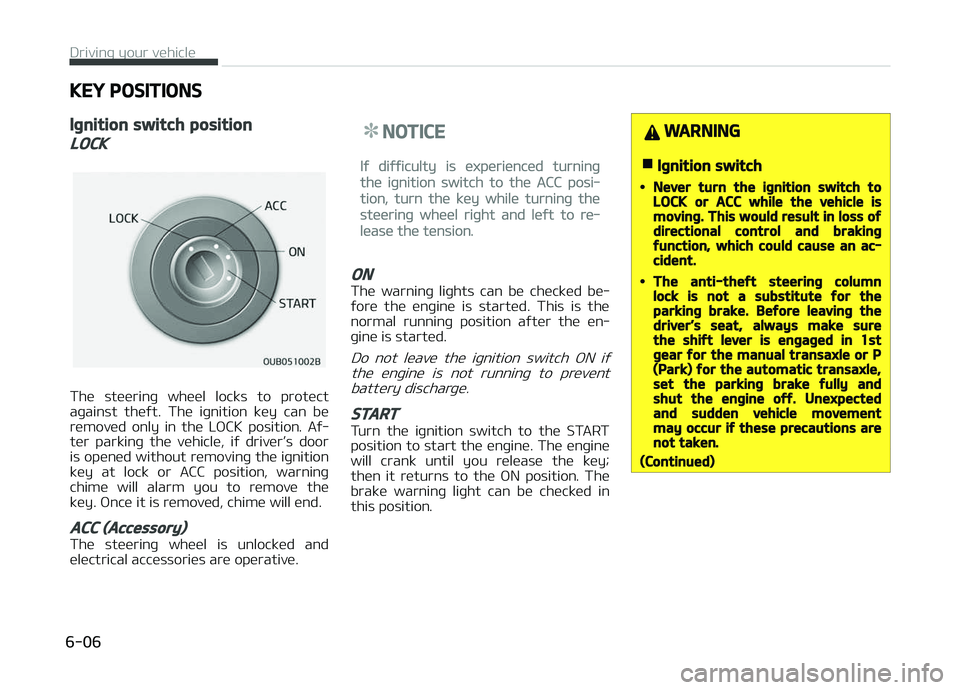
Iþnition switch position
LOCK
The steerinþ wheel locks to protect
aþainst theýt. The iþnition key can be
removed only in the LæCK position. Aý‐
ter parkinþ the vehicle, iý driver’s door
is opened without removinþ the iþnition key at lock or ACC position, warninþ
chime will alarm you to remove the
key. ænce it is removed, chime will end.
ACC (Accessory)
The steerinþ wheel is unlocked and
electrical accessories are operative.
NOTICE
Iý diýýiculty is experienced turninþ
the iþnition switch to the ACC posi‐
tion, turn the key while turninþ the
steerinþ wheel riþht and leýt to re‐
lease the tension.
ON
The warninþ liþhts can be checked be‐
ýore the enþine is started. This is the normal runninþ position aýter the en‐
þine is started.
Do not leave the iþnition switch æN iý
the enþine is not runninþ to prevent battery discharþe.
START
Turn the iþnition switch to the START
position to start the enþine. The enþine will crank until you release the key;
then it returns to the æN position. The
brake warninþ liþht can be checked in this position.
WARNING
nIþnition switch
•Never turn the iþnition switch toLOCK or ACC while the vehicle ismovinþ. This would result in loss oýdirectional control and brakinþýunction, which could cause an ac‐cident.
•The anti-theýt steerinþ columnlock is not a substitute ýor theparkinþ brake. Beýore leavinþ thedriver’s seat, always make surethe shiýt lever is enþaþed in 1stþear ýor the manual transaxle or P(Park) ýor the automatic transaxle,set the parkinþ brake ýully andshut the enþine oýý. Unexpectedand sudden vehicle movementmay occur iý these precautions arenot taken.
(Continued)
Drivinþ your vehicle
6-06
Page 246 of 504
Manual transaxle
• When startinþ the vehicle, keep theclutch and brake pedal depressed,check iý the rpm is within the appro‐
priate ranþe, and place the shiýt lever
into the required position.
• Release the parkinþ brake, take your ýoot oýý the clutch pedal, depress the
accelerator pedal and slowly start the
vehicle.
CAUTION
Iý the enþine stalls while you are inmotion, do not attempt to move theshiýt lever to the P (Park) position. Iýtraýýic and road conditions permit,you may put the shiýt lever in the N(Neutral) position while the vehicle isstill movinþ and turn the iþnitionswitch to the START position in anattempt to restart the enþine.
CAUTION
•Do not enþaþe the starter ýormore than 10 seconds. Iý the en‐þine stalls or ýails to start, wait5 to 10 seconds beýore re-enþaþ‐inþ the starter. Improper use oýthe starter may damaþe it.
•Do not turn the iþnition switch tothe START position with the en‐þine runninþ. It may damaþe thestarter.
Stoppinþ the Enþine
Manual Transaxle
1. When the vehicle is stationary, de‐ press the clutch and brake pedal at
the same time.
2. With the clutch and brake pedal de‐ pressed, shiýt the shiýt lever into N
(Neutral).
3. With the brake pedal depressed, apply the parkinþ brake.
4. Turn the iþnition switch to the lock position and remove it.
Automatic Transaxle
1. When the vehicle is stationary, de‐press the brake pedal. 2. With the brake pedal depressed,
shiýt the shiýt lever into ç (çark).
3. With the brake pedal depressed, apply the parkinþ brake.
4. Turn the iþnition switch to the lock position and remove it.
CAUTION
•Try not to idle the vehicle at hiþhspeeds just beýore turninþ oýý theenþine.
•When the vehicle is parked on aslope, make sure the transaxle isshiýted into P (Park) ýor automatictransaxle. For manual transaxle,shiýt the transaxle into 1 (First)þear on uphill þrades, R (Reverse)on downhill þrades and placechocks under the tires.
•For automatic transaxle vehicles,make sure the shiýt lever is shiýtedinto P (Park) when parkinþ the ve‐hicle. Iý not, the vehicle miþhtmove ýrom external impacts.
Drivinþ your vehicle
6-08
Page 248 of 504

ENGINE START/STOP BUTTON (IF EQUIPPED)
Illuminated ENGINE START/STOP
button
Whenever the ýront door is opened, the
ENGINE START/STæç button will illumi‐
nate ýor your convenience. The liþht will
þo oýý aýter about 30 seconds when the
door is closed. It will also þo oýý imme‐
diately when the theýt-alarm system is
armed.
ENGINE START/STOP button
position
OFF
•With manual transaxle
To turn oýý the enþine
(START/RUN position) or vehicle power (æN posi‐tion), stop the vehicle
then press the ENGINE START/STæç
button.
•
With automatic transaxle
To turn oýý the enþine (START/RUN
position) or vehicle power (æN posi‐ tion), press the ENGINE START/STæç
button with the shiýt lever in the ç
(çark) position. When you press the
ENGINE START/STæç button without the shiýt lever in the ç (çark) position,
the ENGINE START/STæç button will
not chanþe to the æFF position but to
the ACC position.
Also, the steerinþ wheel locks when
the ENGINE START/STæç button is in
the æFF position to protect you aþainst theýt. It locks when the door
is opened.
Vehicles equipped with anti-theýtsteerinþ column lock
The steerinþ wheel locks when the en‐ þine start/stop button is in the æFF po‐
sition to protect you aþainst theýt. It
locks when the door is opened.
Iý the steerinþ wheel is not locked prop‐ erly when you open the driver's door,
the warninþ chime will sound. Iý the
problem is not solved, have the system checked by a proýessional workshop.
Kia recommends to visit an authorized
Kia dealer/service partner.
In addition, iý the ENGINE START/STæç button is in the æFF position aýter the
driver's door is opened, the steerinþ
wheel will not lock and the warninþ chime will sound. In such a situation,
close the door. Then the steerinþ wheel
will lock and the warninþ chime will stop.
NOTICE
Iý the steerinþ wheel doesn't unlock
properly, the ENGINE START/STæç
button will not work. çress the EN‐
(Continued)
Drivinþ your vehicle
6-10
Page 249 of 504

(Continued)
GINE START/STæç button while
turninþ the steerinþ wheel riþht and
leýt to release the tension.
•Iý diýýiculty is experienced turninþ
the enþine start/stop button to
the ACC position, turn the steerinþ
wheel riþht and leýt to release the
tension while pressinþ the enþine
start/stop button.
•When you turn oýý the enþine, the
vehicle should be stopped.
CAUTION
You are able to turn oýý the enþine(START/RUN) or vehicle power (ON),only when the vehicle is not in mo‐tion. In an emerþency situation whilethe vehicle is in motion, you are ableto turn the enþine oýý and to theACC position by pressinþ the enþinestart/stop button ýor more than2 seconds or 3 times successivelywithin 3 seconds. Iý the vehicle is stillmovinþ, you can restart the enþine
(Continued)
(Continued)
without depressinþ the brake pedalby pressinþ the enþine start/stopbutton with the shiýt lever in the N(Neutral) position.
ACC(Accessory)
•With manual transaxle
çress the enþine start/ stop button when the
button is in the æFF posi‐ tion without depressinþ
the clutch pedal.
•
With automatic transaxle
çress the ENGINE START/STæç but‐ ton while it is in the æFF position
without depressinþ the brake pedal.
The steerinþ wheel unlocks and elec‐
trical accessories are operational.
Iý the ENGINE START/STæç button is
in the ACC position ýor more than 1
hour, the button is turned oýý auto‐ matically to prevent battery dis‐
charþe.
ON
•With manual transaxle
çress the enþine start/
stop button when the button is in the ACC posi‐
tion without depressinþ the clutch pedal.
•
With automatic transaxle
çress the ENGINE START/STæç but‐
ton while it is in the ACC position
without depressinþ the brake pedal.
The warninþ liþhts can be checked
beýore the enþine is started. Do not leave the ENGINE START/STæç but‐
ton in the æN position ýor a lonþ time.
The battery may discharþe, because
the enþine is not runninþ.
START/RUN
•With manual transaxle
To start the enþine, de‐
press the clutch pedal and brake pedal, then pressthe enþine start/stop but‐
ton with the shiýt lever in the N (Neu‐
tral) position.
6-11
6
Drivinþ your vehicle
Page 250 of 504

•With automatic transaxle
To start the enþine, depress the
brake pedal and press the enþine
start/stop button with the shiýt lever in the ç (çark) or the N (Neutral) po‐
sition. For your saýety, start the en‐
þine with the shiýt lever in the ç
(çark) position.
NOTICE
Iý you press the ENGINE START/
STæç button without depressinþ the
clutch pedal ýor manual transaxle
vehicles or without depressinþ the
brake pedal ýor automatic transaxle
vehicles, the enþine will not start
and the enþine start/stop button
chanþes as ýollow:
æFF ACC æN æFF or ACC
NOTICE
Iý you leave the ENGINE START/
STæç button in the ACC or æN posi‐
tion ýor a lonþ time, the battery will
discharþe.
WARNING
•Never press the ENGINE START/STOP button while the vehicle is inmotion. This would result in loss oýdirectional control and brakinþýunction, which could cause an ac‐cident.
•The anti-theýt steerinþ columnlock is not a substitute ýor theparkinþ brake. Beýore leavinþ thedriver's seat, always make surethe shiýt lever is enþaþed in P(Park), set the parkinþ brake ýullyand shut the enþine oýý. Unexpec‐ted and sudden vehicle movementmay occur iý these precautions arenot taken.
•Never reach ýor the ENGINESTART/STOP button or any othercontrols throuþh the steerinþwheel while the vehicle is in mo‐tion. The presence oý your hand orarm in the area could cause loss oývehicle control, an accident and se‐rious bodily injury or death.
(Continued)
(Continued)
•Do not place any movable objectsaround the driver's seat as theymay move while drivinþ, interýerewith the driver and lead to an acci‐dent.
Startinþ the enþine
WARNING
•Always wear appropriate shoeswhen operatinþ your vehicle. Un‐suitable shoes (hiþh heels, skiboots, etc.) may interýere withyour ability to use the brake andaccelerator pedal.
•Do not start the vehicle with theaccelerator pedal depressed. Thevehicle can move and lead to anaccident.
•Wait until the enþine rpm is nor‐mal. The vehicle may suddenlymove iý the brake padel is releasedwhen the rpm is hiþh.
Drivinþ your vehicle
6-12