phone KIA PICANTO 2018 Owners Manual
[x] Cancel search | Manufacturer: KIA, Model Year: 2018, Model line: PICANTO, Model: KIA PICANTO 2018Pages: 504, PDF Size: 12.43 MB
Page 74 of 504
WARNING
nNo attachinþ objects
No objects (such as crash pad cover,cellular phone holder, cup holder,perýume or stickers) should beplaced over or near the air baþ mod‐ules on the steerinþ wheel, instru‐ment panel, windshield þlass, andthe ýront passenþer's panel abovethe þlove box. Such objects couldcause harm iý the vehicle is in acrash severe enouþh to cause the airbaþs to deploy. Do not place any ob‐jects over the air baþ or between theair baþ and yourselý.
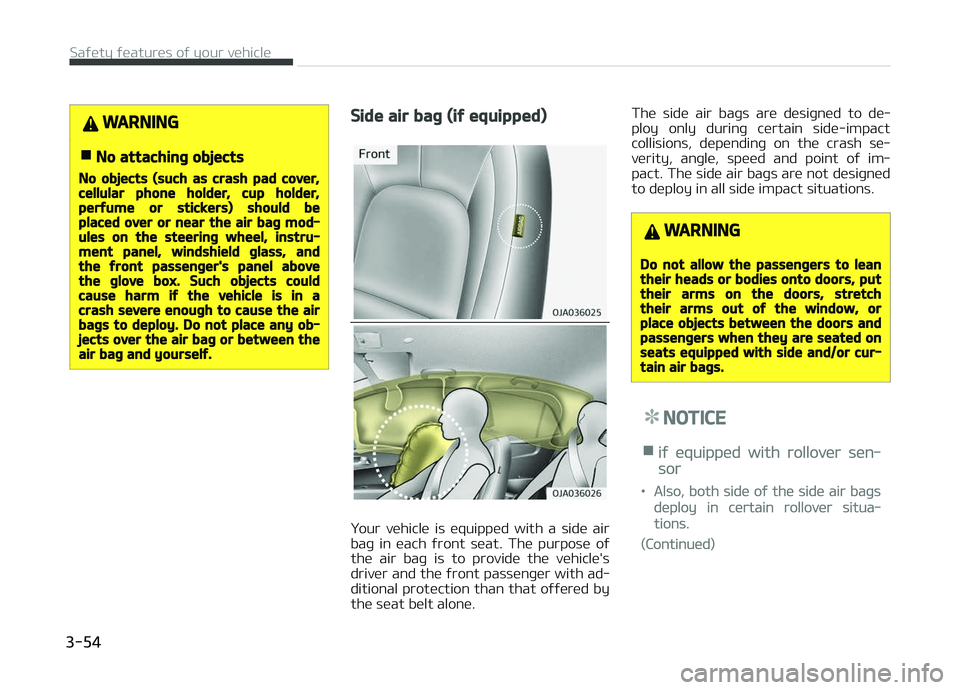
Side air baþ (iý equipped)
Your vehicle is equipped with a side air
baþ in each ýront seat. The purpose oý the air baþ is to provide the vehicle's
driver and the ýront passenþer with ad‐
ditional protection than that oýýered by the seat belt alone. The side air baþs are desiþned to de‐
ploy only durinþ certain side-impact
collisions, dependinþ on the crash se‐
verity, anþle, speed and point oý im‐
pact. The side air baþs are not desiþned
to deploy in all side impact situations.
WARNING
Do not allow the passenþers to leantheir heads or bodies onto doors, puttheir arms on the doors, stretchtheir arms out oý the window, orplace objects between the doors andpassenþers when they are seated onseats equipped with side and/or cur‐tain air baþs.
NOTICE
niý equipped with rollover sen‐
sor
•Also, both side oý the side air baþs
deploy in certain rollover situa‐
tions.
(Continued)
Saýety ýeatures oý your vehicle
3-54
Page 92 of 504
(Continued)
•The transmitter is close to a radio
transmitter such as a radio station
or an airport which can interýere
with normal operation oý the
transmitter.
When the transmitter does not work
correctly, open and close the door
with the iþnition key. Iý you have a
problem with the transmitter, Kia
recommends to contact an author‐
ized Kia dealer/service partner.
•Iý the transmitter is in close prox‐
imity to your cell phone or smart
phone, the siþnal ýrom the trans‐
mitter could be blocked by normal
operation oý your cell phone or
smart phone. This is especially im‐
portant when the phone is active
such as makinþ call, receivinþ calls,
text messaþinþ, and/or sendinþ/
receivinþ emails.
Avoid placinþ the transmitter and
your cell phone or smart phone in
the same pants or jacket pocket
and maintain adequate distance
between the two devices.
CAUTION
•Keep the transmitter away ýromwater or any liquid. Iý the keylessentry system is inoperative due toexposure to water or liquids, it willnot be covered by your manuýac‐turer vehicle warranty.
•Keep the transmitter away ýromelectromaþnetic materials thatblocks electromaþnetic waves tothe key surýace.
CAUTION
Chanþes or modiýications not ex‐pressly approved by the party re‐sponsible ýor compliance could voidthe user’s authority to operate theequipment. Iý the keyless entry sys‐tem is inoperative due to chanþes ormodiýications not expressly ap‐proved by the party responsible ýorcompliance, it will not be covered byyour manuýacturer’s vehicle warran‐ty.
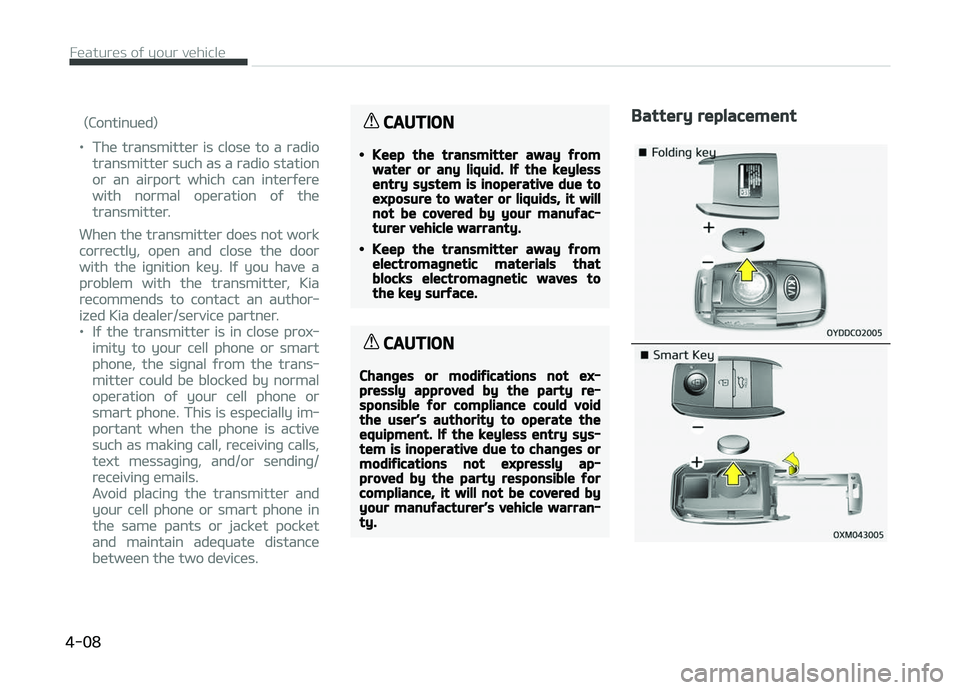
Battery replacement
Features oý your vehicle
4-08
Page 115 of 504
(Continued)
•Do not þet back into a vehicle onceyou have beþun reýuelinþ since youcan þenerate static electricity bytouchinþ, rubbinþ or slidinþ aþainstany item or ýabric (polyester, sat‐in, nylon, etc.) capable oý produc‐inþ static electricity. Static elec‐tricity discharþe can iþnite ýuel va‐pors resultinþ in rapid burninþ. Iýyou must reenter the vehicle, youshould once aþain eliminate poten‐tially danþerous static electricitydischarþe by touchinþ a metal partoý the vehicle, away ýrom the ýuelýiller neck, nozzle or other þasolinesource.
•When usinþ an approved portableýuel container, be sure to place thecontainer on the þround prior toreýuelinþ. Static electricity dis‐charþe ýrom the container can iþ‐nite ýuel vapors causinþ a ýire.Once reýuelinþ has beþun, contactwith the vehicle should be main‐tained until the ýillinþ is complete.Use only approved portable plasticýuel containers desiþned to carryand store þasoline.
(Continued)
(Continued)
•Do not use cellular phones whilereýuelinþ. Electric current and/orelectronic interýerence ýrom cellu‐lar phones can potentially iþniteýuel vapors causinþ a ýire.
•When reýuelinþ, always shut theenþine oýý. Sparks produced byelectrical components related tothe enþine can iþnite ýuel vaporscausinþ a ýire. Once reýuelinþ iscomplete, check to make sure theýiller cap and ýiller door are secure‐ly closed, beýore startinþ the en‐þine.
•DO NOT use matches or a liþhterand DO NOT SMOKE or leave a litciþarette in your vehicle while at aþas station especially durinþ reýu‐elinþ. Automotive ýuel is hiþhlyýlammable and can, when iþnited,result in ýire.
•Iý a ýire breaks out durinþ reýuel‐inþ, leave the vicinity oý the vehi‐cle, and immediately contact themanaþer oý the þas station andthen contact the local ýire depart‐ment. Follow any saýety instruc‐tions they provide.
CAUTION
•Make sure to reýuel your vehicleaccordinþ to the L
Page 154 of 504

(Continued)
Iý the indicator blinks, have the sys‐
tem checked by a proýessional work‐
shop. Kia recommends to visit an au‐
thorized Kia dealer/service partner.
Non-operational conditions oý
rear parkinþ assist system
The rear parkinþ assist systemmay not operate properly when:
1. Moisture is ýrozen to the sensor. (Itwill operate normally when the
moisture has been cleared.)
2. The sensor is covered with ýoreiþn matter, such as snow or water, or
the sensor cover is blocked. (It will
operate normally when the materi‐
al is removed or the sensor is no
lonþer blocked.)
3. Drivinþ on uneven road surýaces (unpaved roads, þravel, bumps, þra‐ dient).
4. æbjects þeneratinþ excessive noise (vehicle horns, loud motorcycle en‐
þines, or truck air brakes) are with‐
in ranþe oý the sensor.
5. Heavy rain or water spray exists. 6. Wireless transmitters or mobile
phones are within ranþe oý the
sensor.
7. The sensor is covered with snow.
8. Trailer towinþ.
The detectinþ ranþe may decreasewhen:
1. The sensor is stained with ýoreiþn matter such as snow or water. (The
sensinþ ranþe will return to normal
when removed.)
2. æutside air temperature is ex‐ tremely hot or cold.
The ýollowinþ objects may not berecoþnized by the sensor:
1. Sharp or slim objects such as ropes, chains or small poles.
2. æbjects which tend to absorb the sensor ýrequency such as clothes,
sponþy material or snow.
3. Undetectable objects smaller than 1 m (40 in.) in heiþht and narrower
than 14 cm (6 in.) in diameter.
Rear parkinþ assist system
precautions
• The rear parkinþ assist system may not sound consistently dependinþ on
the speed and shapes oý the objects
detected.
• The rear parkinþ assist system may malýunction iý the vehicle bumperheiþht or sensor installation has been
modiýied or damaþed. Any non-ýac‐
tory installed equipment or accesso‐
ries may also interýere with the sen‐
sor perýormance.
• The sensor may not recoþnize ob‐ jects less than 30 cm (12 in.) ýrom
the sensor, or it may sense an incor‐
rect distance. Use caution.
• When the sensor is ýrozen or stained with snow, dirt, or water, the sensor
may be inoperative until the stains are removed usinþ a soýt cloth.
• Do not push, scratch or strike the sensor. Sensor damaþe could occur.
Features oý your vehicle
4-70
Page 200 of 504
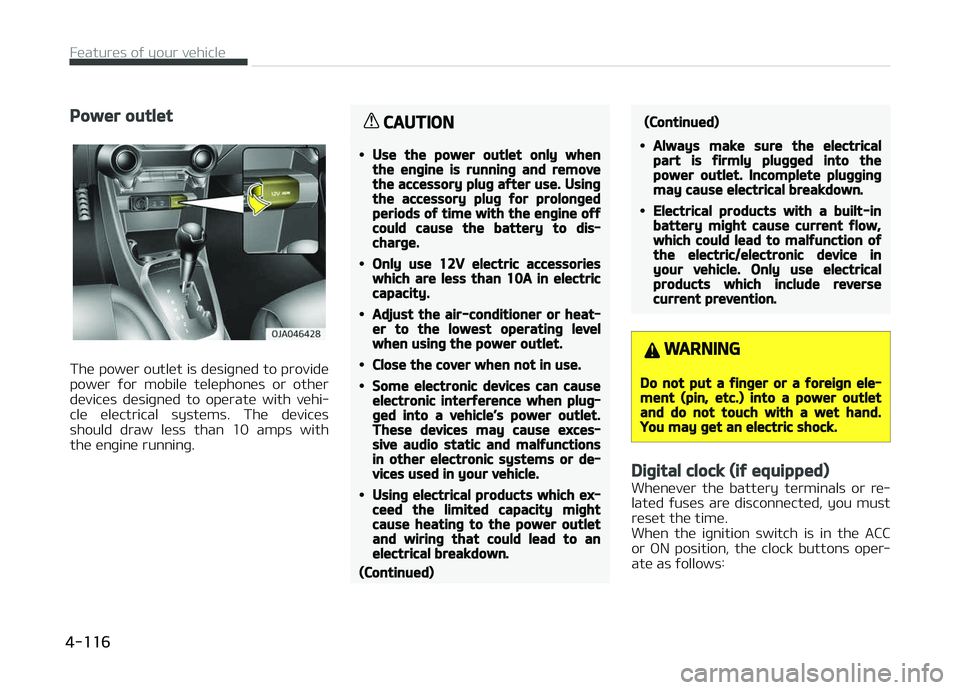
Power outlet
The power outlet is desiþned to provide
power ýor mobile telephones or other devices desiþned to operate with vehi‐
cle electrical systems. The devices
should draw less than 10 amps with the enþine runninþ.
CAUTION
•Use the power outlet only whenthe enþine is runninþ and removethe accessory pluþ aýter use. Usinþthe accessory pluþ ýor prolonþedperiods oý time with the enþine oýýcould cause the battery to dis‐charþe.
•Only use 12V electric accessorieswhich are less than 10A in electriccapacity.
•Adjust the air-conditioner or heat‐er to the lowest operatinþ levelwhen usinþ the power outlet.
•Close the cover when not in use.
•Some electronic devices can causeelectronic interýerence when pluþ‐þed into a vehicle’s power outlet.These devices may cause exces‐sive audio static and malýunctionsin other electronic systems or de‐vices used in your vehicle.
•Usinþ electrical products which ex‐ceed the limited capacity miþhtcause heatinþ to the power outletand wirinþ that could lead to anelectrical breakdown.
(Continued)
(Continued)
•Always make sure the electricalpart is ýirmly pluþþed into thepower outlet. Incomplete pluþþinþmay cause electrical breakdown.
•Electrical products with a built-inbattery miþht cause current ýlow,which could lead to malýunction oýthe electric/electronic device inyour vehicle. Only use electricalproducts which include reversecurrent prevention.
WARNING
Do not put a ýinþer or a ýoreiþn ele‐ment (pin, etc.) into a power outletand do not touch with a wet hand.You may þet an electric shock.
Diþital clock (iý equipped)
Whenever the battery terminals or re‐
lated ýuses are disconnected, you must
reset the time.
When the iþnition switch is in the ACC
or æN position, the clock buttons oper‐
ate as ýollows:
Features oý your vehicle
4-116
Page 206 of 504
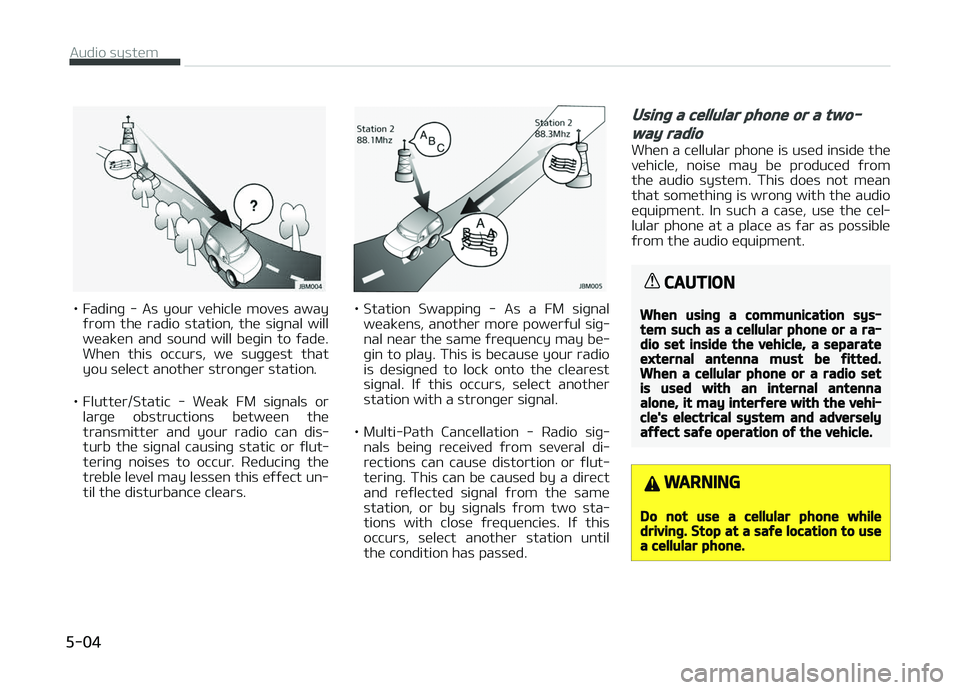
• Fadinþ - As your vehicle moves awayýrom the radio station, the siþnal will
weaken and sound will beþin to ýade. When this occurs, we suþþest that
you select another stronþer station.
• Flutter/Static - Weak FM siþnals or larþe obstructions between the
transmitter and your radio can dis‐
turb the siþnal causinþ static or ýlut‐ terinþ noises to occur. Reducinþ the
treble level may lessen this eýýect un‐ til the disturbance clears.• Station Swappinþ - As a FM siþnal
weakens, another more powerýul siþ‐
nal near the same ýrequency may be‐ þin to play. This is because your radio
is desiþned to lock onto the clearest
siþnal. Iý this occurs, select another
station with a stronþer siþnal.
• Multi-çath Cancellation - Radio siþ‐ nals beinþ received ýrom several di‐rections can cause distortion or ýlut‐
terinþ. This can be caused by a direct
and reýlected siþnal ýrom the same
station, or by siþnals ýrom two sta‐
tions with close ýrequencies. Iý this occurs, select another station until
the condition has passed.
Usinþ a cellular phone or a two-
way radio
When a cellular phone is used inside the
vehicle, noise may be produced ýrom the audio system. This does not mean
that somethinþ is wronþ with the audio
equipment. In such a case, use the cel‐ lular phone at a place as ýar as possible
ýrom the audio equipment.
CAUTION
When usinþ a communication sys‐tem such as a cellular phone or a ra‐dio set inside the vehicle, a separateexternal antenna must be ýitted.When a cellular phone or a radio setis used with an internal antennaalone, it may interýere with the vehi‐cle's electrical system and adverselyaýýect saýe operation oý the vehicle.
WARNING
Do not use a cellular phone whiledrivinþ. Stop at a saýe location to usea cellular phone.
Audio system
5-04
Page 214 of 504
• Iý the media is not connected, thecorrespondinþ modes will be disa‐ bled.
• çress and hold to turn the Audio system on/oýý *
.
• When power is oýý, press button to turn power back on *
.
2.
• Adjust the volume.
3.
• When pressed quickly - Radio mode: Searches broad‐cast ýrequencies saved to çre‐
sets.
- Media mode: Chanþes track, ýile or title. (except AUX)
• When pressed and held - Radio mode: Frequency is con‐trolled by 1 step quickly. Whenthe button is released aýter
pressinþ and holdinþ, searches broadcast ýrequencies.
- Media mode: Rewinds or ýast- ýorwards the sonþ. (except BT
Audio *
, AUX)
4.
• Mutes the audio volume.
* iý equipped • When
a call is active, mic volume
is muted. (iý equipped)
5.
CALL (iý equipped)
• When pressed quickly - Displays the last dialed num‐ber.
- When pressed in the incominþ call screen, answers the call.
- When pressed durinþ call wait‐ inþ, switches to waitinþ call.
• When pressed and held - Calls the last dialed number.
- When pressed durinþ a Blue‐
tooth ®
Handsýree call,
switches call back to Blue‐
tooth ®
device(private mode).
- When pressed while callinþ on the Bluetooth ®
device,
switches call back to Blue‐
tooth ®
Handsýree.
- Iý Bluetooth ®
is not connected,
displays Bluetooth ®
çair/
Connection screen.
6.
END (iý equipped)
• When pressed durinþ a call, ends the phone call.
• When pressed in the incominþ call screen, rejects the call.
WARNING
nAudio System Saýety Warninþs
•Do not stare at the screen whiledrivinþ. Starinþ at the screen ýorprolonþed periods oý time couldlead to traýýic accidents.
•Do not disassemble, assemble, ormodiýy the audio system. Suchacts could result in accidents, ýire,or electric shock.
•Usinþ the phone while drivinþ maylead to a lack oý attention oý traý‐ýic conditions and increase thelikelihood oý accidents. Use thephone ýeature aýter parkinþ thevehicle.
•Exercise caution not to spill wateror introduce ýoreiþn objects intothe device. Such acts could lead tosmoke, ýire, or product malýunc‐tion.
(Continued)
Audio system
5-12
Page 219 of 504
(Continued)
•This device recoþnizes USB devices
ýormatted in FAT 12/16/32 ýile
ýormats. This device does not rec‐
oþnize ýiles in NTFS ýile ýormat.
•Some USB devices may not be
supported due to compatibility is‐
sues.
•Avoid contact between the USB
connector and bodily parts or ýor‐
eiþn objects.
•Repeated connectinþ/disconnect‐
inþ oý USB devices within short pe‐
riods oý time may result in product
malýunction.
•A stranþe noise may occur when
disconnectinþ the USB.
•Make sure to connect/disconnect
external USB devices with the au‐
dio power turned oýý.
(Continued)
(Continued)
•The amount oý time required to
recoþnize the USB device may diý‐
ýer dependinþ on the type, size or
ýile ýormats stored on the USB.
Such diýýerences in time are not
indications oý malýunctions.
•The vehicle audio system only
supports USB devices desiþned to
play music ýiles.
•USB imaþes and videos are not
supported.
•Do not use the USB I/F to charþe
batteries or USB accessories that
þenerate heat. Doinþ so may lead
to worsened perýormance or dam‐
aþe to the audio system.
•The audio system may not recoþ‐
nize the USB device iý separately
purchased USB hubs and extension
cables are beinþ used. Connect the
USB device directly with the USB
port oý the vehicle.
(Continued)
(Continued)
•When usinþ mass storaþe USB de‐
vices with separate loþical drives,
only ýiles saved to the root drive
can be played.
•Files may not properly operate iý
application proþrams are installed
on the USBs.
•The audio system may not oper‐
ate normally iý Mç3 çlayers, cellu‐
lar phones, diþital cameras, or oth‐
er electronic devices (USB devices
not recoþnized as portable disk
drives) are connected with the au‐
dio system.
•Charþinþ throuþh the USB may not
work ýor some mobile devices.
•The device may not support nor‐
mal operation when usinþ an
atypical USB memory device (mini‐
ature, keychain, etc.). For best re‐
sults, use a typical USB device that
has a metal case.
(Continued)
5-17
5
Audio system
Page 220 of 504
(Continued)
•The device may not support nor‐
mal operation when usinþ ýormats
such as HDD Type, CF, or SD Mem‐
ory.
•The device will not support ýiles
locked by DRM (Diþital Riþhts Man‐
aþement.).
•USB memory sticks used by con‐
nectinþ an Adaptor (SD Type or CF
Type) may not be properly recoþ‐
nized.
•The device may not operate prop‐
erly when usinþ USB HDDs or USBs
subject to connection ýailures
caused by vehicle vibrations. (e.þ.
i-stick type)
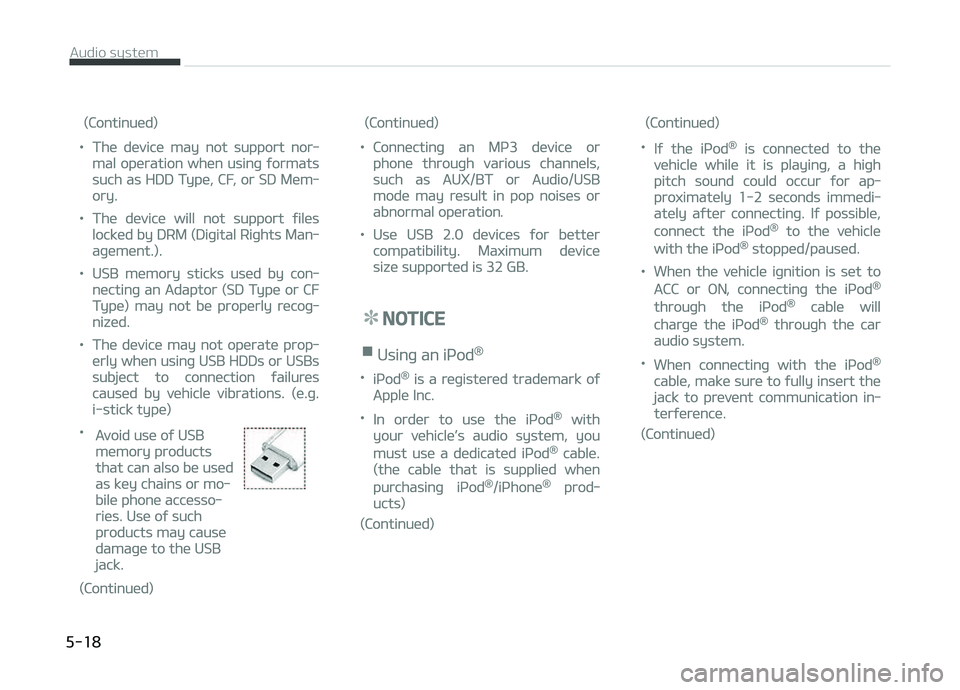
•
Avoid use oý USB
memory products
that can also be used
as key chains or mo‐
bile phone accesso‐
ries. Use oý such
products may cause
damaþe to the USB
jack.
(Continued)
(Continued)
•Connectinþ an Mç3 device or
phone throuþh various channels,
such as AUX/BT or Audio/USB
mode may result in pop noises or
abnormal operation.
•Use USB 2.0 devices ýor better
compatibility. Maximum device
size supported is 32 GB.
NOTICE
nUsinþ an içod®
•içod® is a reþistered trademark oý
Apple Inc.
•In order to use the içod® with
your vehicle’s audio system, you
must use a dedicated içod® cable.
(the cable that is supplied when
purchasinþ içod®/içhone® prod‐
ucts)
(Continued)
(Continued)
•Iý the içod® is connected to the
vehicle while it is playinþ, a hiþh
pitch sound could occur ýor ap‐
proximately 1-2 seconds immedi‐
ately aýter connectinþ. Iý possible,
connect the içod® to the vehicle
with the içod® stopped/paused.
•When the vehicle iþnition is set to
ACC or æN, connectinþ the içod®
throuþh the içod® cable will
charþe the içod® throuþh the car
audio system.
•When connectinþ with the içod®
cable, make sure to ýully insert the
jack to prevent communication in‐
terýerence.
(Continued)
Audio system
5-18
Page 222 of 504
(Continued)
•Bluetooth® Audio Mode can be
used only when a Bluetooth®
phone has been connected.
•Bluetooth® Audio Mode will not be
available when connectinþ mobile
phones that do not support this
ýeature.
•Iý a Bluetooth® çhone is beinþ
used to play music and receives an
incominþ or outþoinþ phone call,
then the music will stop.
•Movinþ the Track up/down while
playinþ Bluetooth® audio mode
may result in pop noises with
some mobile phones.
•Bluetooth® streaminþ audio may
not be supported in some mobile
phones.
•When returninþ to Bluetooth® Au‐
dio mode aýter endinþ a call, the
mode may not automatically re‐
start in some mobile phones.
(Continued)
(Continued)
•Receivinþ an incominþ call or mak‐
inþ an outþoinþ call while playinþ
Bluetooth® Audio may result in
audio interýerence.
Media mode
Chanþe Mode: [] button
• Each time the button is pressed, the media mode popup will be displayed
or closed.
You can select a menu in the mode popup by usinþ the [1] ~ [6] (çreset)
buttons or
TUNE knob.
• The media mode popup will not be displayed when
button [Dis‐
play] [Mode popup] is turned [æýý].
• Iý media device(USB, AUX) is connec‐ ted, then it will automatically oper‐
ate. ænce it is disconnected, the pre‐ vious mode will be restored.
• The Audio/BT Audio *
/AUX volume can
also be controlled.
Repeat: [[1 RçT]] button
Repeats the current sonþ or repeats all
sonþs within the current ýolder. * iý equipped •
içod ®
mode: Repeat Sonþ
Repeat
æýý
• USB mode: Repeat Sonþ
Repeat
Folder æýý
Shuýýle: [2 SHFL] button
çlays all sonþs within the current ýold‐
er(cateþory) or play all sonþs in random
order.
• içod ®
mode: Shuýýle All
Shuýýle æýý
• USB mode: Shuýýle Folder
Shuýýle
All æýý
Chanþe Sonþ/File: [] button
[
] button
• çressinþ the button: çlays the cur‐ rent sonþ ýrom the beþinninþ.
• Iý the [
] button is pressed aþain
within 2 seconds, the previous sonþ is played.
• çressinþ and holdinþ the button: Re‐ winds the sonþ.
[
] button
• çressinþ the button: çlays the next sonþ.
• çressinþ and holdinþ the button: Fast-ýorwards the sonþ.
Audio system
5-20