warning KIA QUORIS 2013 Owners Manual
[x] Cancel search | Manufacturer: KIA, Model Year: 2013, Model line: QUORIS, Model: KIA QUORIS 2013Pages: 485, PDF Size: 31.55 MB
Page 173 of 485
![KIA QUORIS 2013 Owners Manual Features of your vehicle
94
4
AUTO HOLD Indicator
Light (if equipped)
This indicator light illuminates:
[White] When you activate the auto hold system by pressing the AUTO
HOLD button.
[Green] Whe](/img/2/57975/w960_57975-172.png "KIA QUORIS 2013 Owners Manual Features of your vehicle
94
4
AUTO HOLD Indicator
Light (if equipped)
This indicator light illuminates:
[White] When you activate the auto hold system by pressing the AUTO
HOLD button.
[Green] Whe")
Features of your vehicle
94
4
AUTO HOLD Indicator
Light (if equipped)
This indicator light illuminates:
[White] When you activate the auto hold system by pressing the AUTO
HOLD button.
[Green] When you stop the vehicle completely by depressing the
brake pedal with the auto hold sys-
tem activated.
[Yellow] When there is a malfunc- tion with the auto hold system.
In this case, we recommend that
you have the vehicle inspected by
an authorized Kia dealer.
❈ For more details, refer to “Auto
Hold” in chapter 5.
Lane Departure Warning
System (LDWS) Indicator Light (if equipped)
This indicator light illuminates:
[Green] When you activate the lane departure warning system by
pressing the LDWS button.
[Yellow] When there is a malfunc- tion with the lane departure warn-ing system.
In this case, we recommend that
you have the vehicle inspected by
an authorized Kia dealer.
❈ For more details, refer to “Lane
Departure Warning System
(LDWS)” in chapter 5.
Advanced Vehicle Safety
Management (AVSM) OFF Indicator Light (if equipped)
This indicator light illuminates:
Once you set the Engine Start/Stop Button to the ON position.
- It illuminates for approximately 3seconds and then goes off.
When you deactivate the AVSM sys- tem by setting on the LCD display.
❈ For more details, refer to “LCD
Display” in this chapter.
If this indicator stays on when AVSM
OFF is not selected, the AVSM may
have malfunctioned.
In this case, we recommend that you
have the vehicle inspected by an
authorized Kia dealer. ❈ For more details, refer to “Advanced
Vehicle Safety Management
(AVSM) System” in chapter 5.
AUTO
HOLDAVSM OFF
Page 175 of 485
Features of your vehicle
96
4
Description
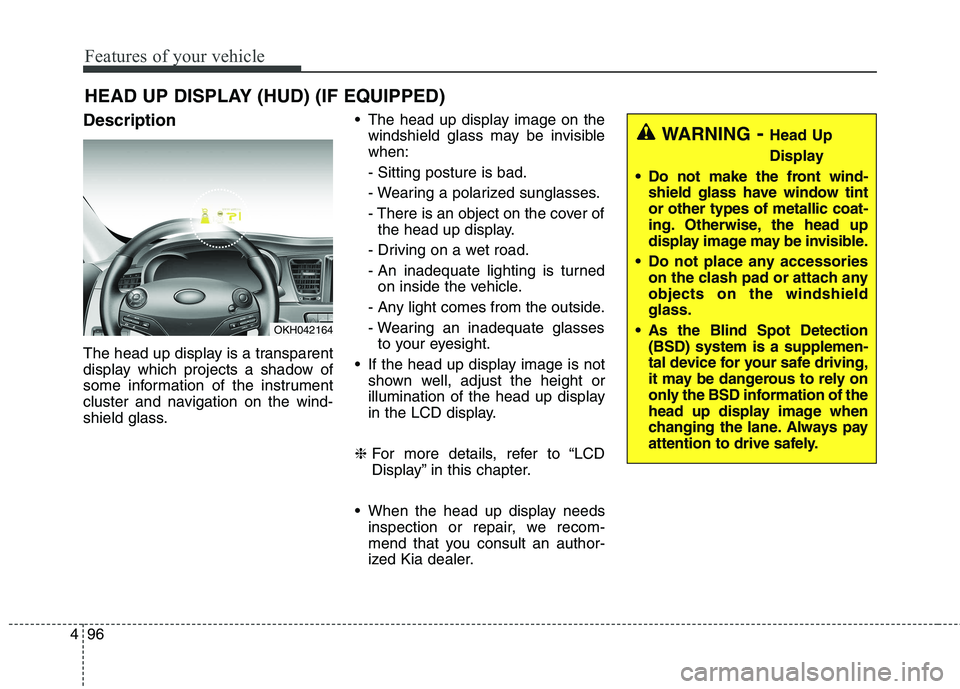
The head up display is a transparent
display which projects a shadow of
some information of the instrument
cluster and navigation on the wind-
shield glass. The head up display image on the
windshield glass may be invisiblewhen: - Sitting posture is bad.
- Wearing a polarized sunglasses.
- There is an object on the cover ofthe head up display.
- Driving on a wet road.
- An inadequate lighting is turned on inside the vehicle.
- Any light comes from the outside.
- Wearing an inadequate glasses to your eyesight.
If the head up display image is not shown well, adjust the height or
illumination of the head up display
in the LCD display.
❈ For more details, refer to “LCD
Display” in this chapter.
When the head up display needs inspection or repair, we recom-
mend that you consult an author-
ized Kia dealer.
HEAD UP DISPLAY (HUD) (IF EQUIPPED)
OKH042164
WARNING - Head Up
Display
Do not make the front wind- shield glass have window tint or other types of metallic coat-
ing. Otherwise, the head up
display image may be invisible.
Do not place any accessories on the clash pad or attach anyobjects on the windshieldglass.
As the Blind Spot Detection (BSD) system is a supplemen-
tal device for your safe driving,
it may be dangerous to rely on
only the BSD information of the
head up display image when
changing the lane. Always pay
attention to drive safely.
Page 176 of 485
497
Features of your vehicle
Head Up Display ON/OFF
The head up display is always acti-vated whenever you set the Engine
Start/Stop Button to the ON posi-tion.
To deactivate the head up display, press the HUD button. If you press
the HUD button again, the head up
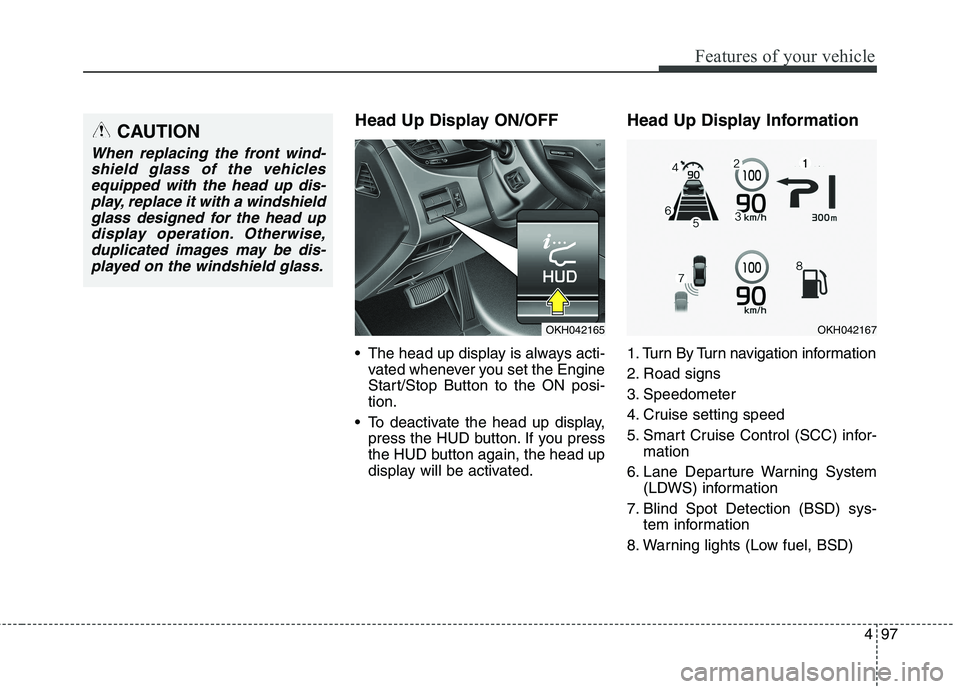
display will be activated. Head Up Display Information
1. Turn By Turn navigation information
2. Road signs
3. Speedometer
4. Cruise setting speed
5. Smart Cruise Control (SCC) infor-
mation
6. Lane Departure Warning System (LDWS) information
7. Blind Spot Detection (BSD) sys- tem information
8. Warning lights (Low fuel, BSD)CAUTION
When replacing the front wind- shield glass of the vehiclesequipped with the head up dis- play, replace it with a windshieldglass designed for the head updisplay operation. Otherwise, duplicated images may be dis-played on the windshield glass.
OKH042165OKH042167
Page 178 of 485
499
Features of your vehicle
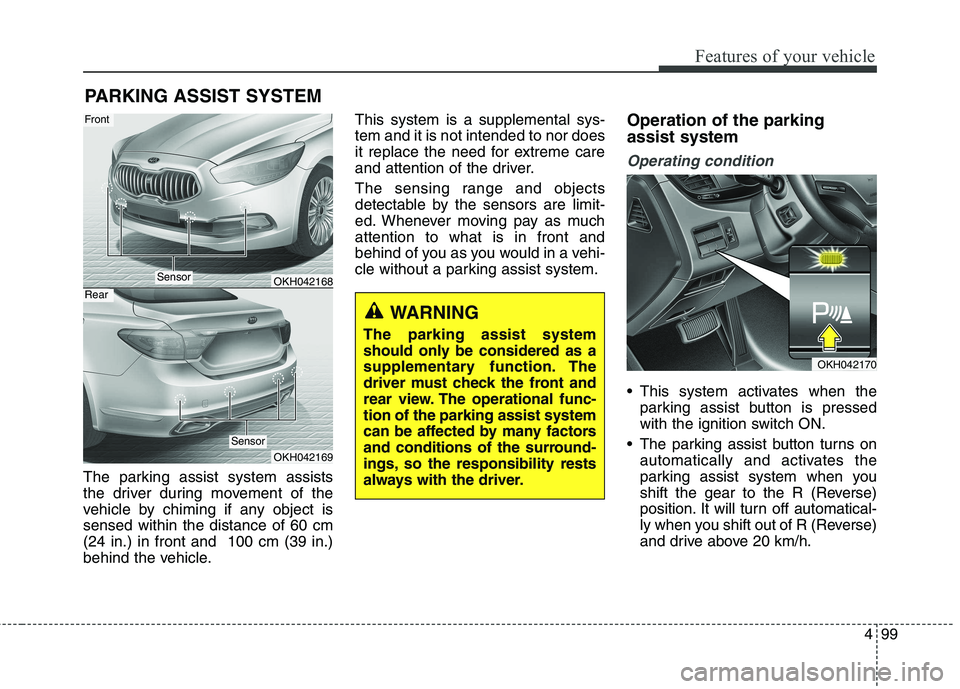
The parking assist system assists
the driver during movement of the
vehicle by chiming if any object issensed within the distance of 60 cm(24 in.) in front and 100 cm (39 in.)
behind the vehicle.This system is a supplemental sys-tem and it is not intended to nor does
it replace the need for extreme care
and attention of the driver.
The sensing range and objects
detectable by the sensors are limit-
ed. Whenever moving pay as muchattention to what is in front and
behind of you as you would in a vehi-
cle without a parking assist system.
Operation of the parking assist system
Operating condition
This system activates when the
parking assist button is pressed
with the ignition switch ON.
The parking assist button turns on automatically and activates the
parking assist system when you
shift the gear to the R (Reverse)
position. It will turn off automatical-
ly when you shift out of R (Reverse)
and drive above 20 km/h.
PARKING ASSIST SYSTEM
WARNING
The parking assist system
should only be considered as a
supplementary function. The
driver must check the front and
rear view. The operational func-tion of the parking assist system
can be affected by many factors
and conditions of the surround-
ings, so the responsibility rests
always with the driver.
OKH042168
OKH042169
Sensor
Front
Rear
Sensor
OKH042170
Page 179 of 485
Features of your vehicle
100
4
The sensing distance while back-
ing up is approximately 100 cm (39
in.) when you are driving less than10 km/h.
The sensing distance while moving forward is approximately 60 cm (24
in.) when you are driving less than10 km/h.
When more than two objects are sensed at the same time, the clos-
est one will be recognized first.
✽✽ NOTICE
It may not operate if it’s distance
from the object is already less than
approximately 25 cm when the sys-
tem is ON.
✽
✽NOTICE
The indicator may differ from the illustration as objects or sensors status.
If the indicator blinks, we recommend that the system be checked by an
authorized Kia dealer.
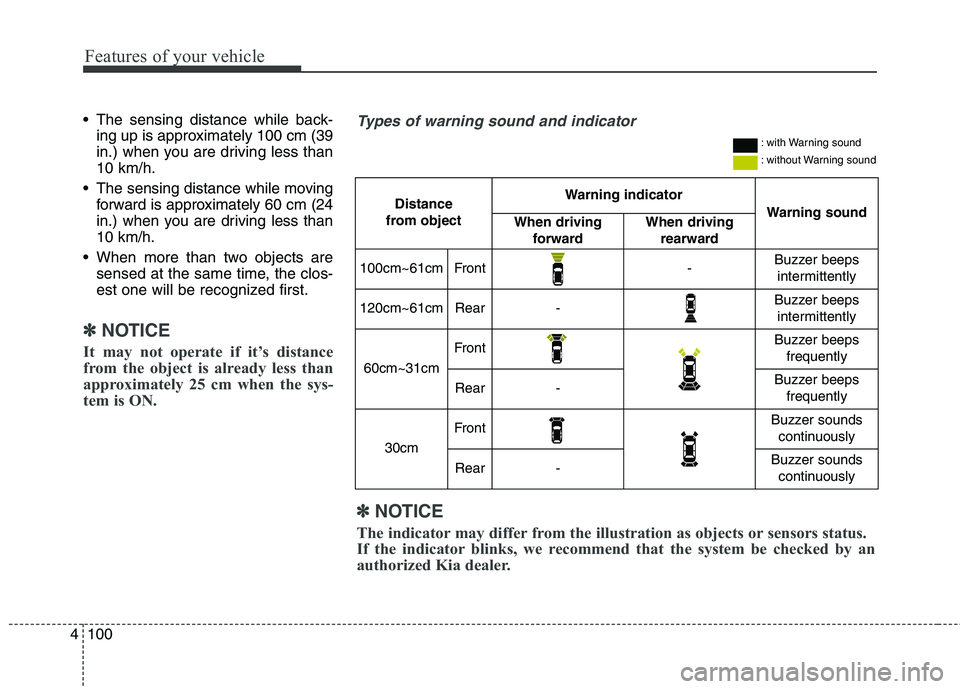
Types of warning sound and indicator
Distance
from object Warning indicator
Warning soundWhen driving forwardWhen driving rearward
100cm~61cmFront-Buzzer beeps intermittently
120cm~61cmRear-Buzzer beeps intermittently
60cm~31cm
FrontBuzzer beeps frequently
Rear-Buzzer beeps frequently
30cm
FrontBuzzer sounds continuously
Rear-Buzzer sounds continuously
: with Warning sound
: without Warning sound
Page 181 of 485
Features of your vehicle
102
4
✽✽
NOTICE
1. The warning may not sound sequentially depending on the
speed and shapes of the objects
detected.
2. The parking assist system may malfunction if the vehicle bumper
height or sensor installation has
been modified. Any non-factory
installed equipment or accessories
may also interfere with the sensor
performance.
3. Sensor may not recognize objects less than 30 cm from the sensor,
or it may sense an incorrect dis-
tance. Use with caution.
4. When the sensor is frozen or stained with snow or water, the
sensor may be inoperative until
the stains are removed using a
soft cloth.
5. Do not push, scratch or strike the sensor with any hard objects that
could damage the surface of the
sensor. Sensor damage could
occur. ✽✽
NOTICE
This system can only sense objects
within the range and location of the
sensors, it can not detect objects in
other areas where sensors are not
installed. Also, small or slim objects,
or objects located between sensors
may not be detected.
Always visually check in front and
behind the vehicle when driving.
Be sure to inform any drivers in the
vehicle that may be unfamiliar with
the system regarding the systems
capabilities and limitations.WARNING
Pay close attention when the
vehicle is driven close to
objects on the road, particularly
pedestrians, and especially
children. Be aware that some
objects may not be detected by
the sensors, due to the objects
distance, size or material, all of
which can limit the effective-
ness of the sensor. Always per-
form a visual inspection to
make sure the vehicle is clear of
all obstructions before moving
the vehicle in any direction.
Page 182 of 485
4103
Features of your vehicle
Self-diagnosis
If you don’t hear an audible warning
sound or if the buzzer sounds inter-
mittently when shifting the shift lever
into the R (Reverse) position, this
may indicate a malfunction in the
parking assist system. If this occurs,
we recommend that the system be
checked by an authorized Kia dealer.
WARNING
Your new vehicle warranty does
not cover any accidents or dam-
age to the vehicle or injuries toits occupants related to a park-
ing assist system. Always drive
safely and cautiously.
Page 183 of 485
Features of your vehicle
104
4
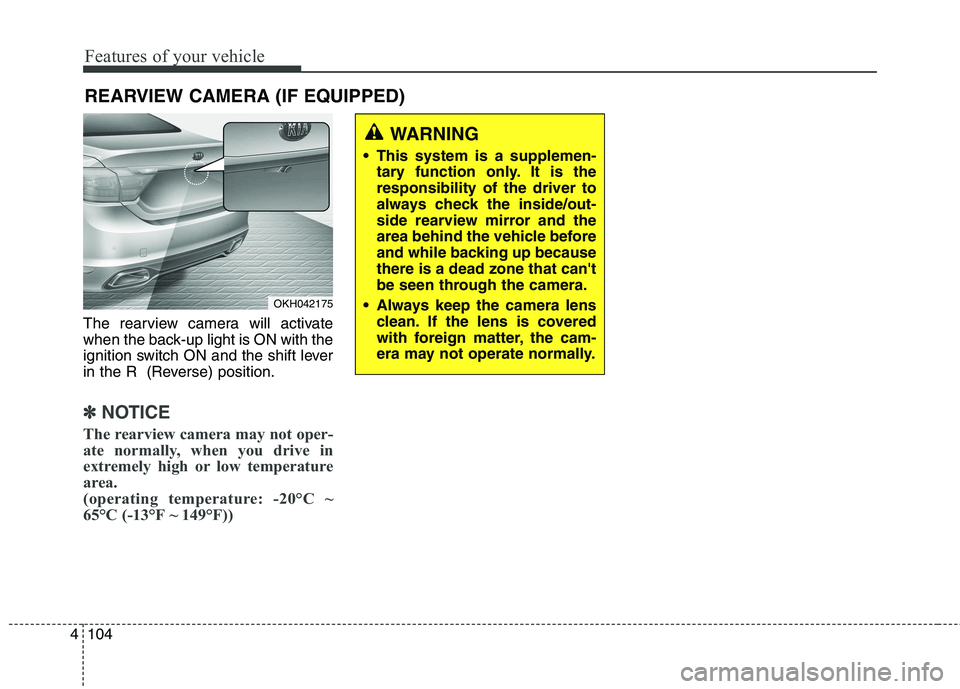
The rearview camera will activate
when the back-up light is ON with the
ignition switch ON and the shift lever
in the R (Reverse) position.
✽✽
NOTICE
The rearview camera may not oper-
ate normally, when you drive in
extremely high or low temperature
area.
(operating temperature: -20°C ~
65°C (-13°F ~ 149°F))
REARVIEW CAMERA (IF EQUIPPED)
OKH042175
WARNING
This system is a supplemen- tary function only. It is the responsibility of the driver to
always check the inside/out-
side rearview mirror and the
area behind the vehicle before
and while backing up becausethere is a dead zone that can't
be seen through the camera.
Always keep the camera lens clean. If the lens is covered
with foreign matter, the cam-
era may not operate normally.
Page 184 of 485
4105
Features of your vehicle
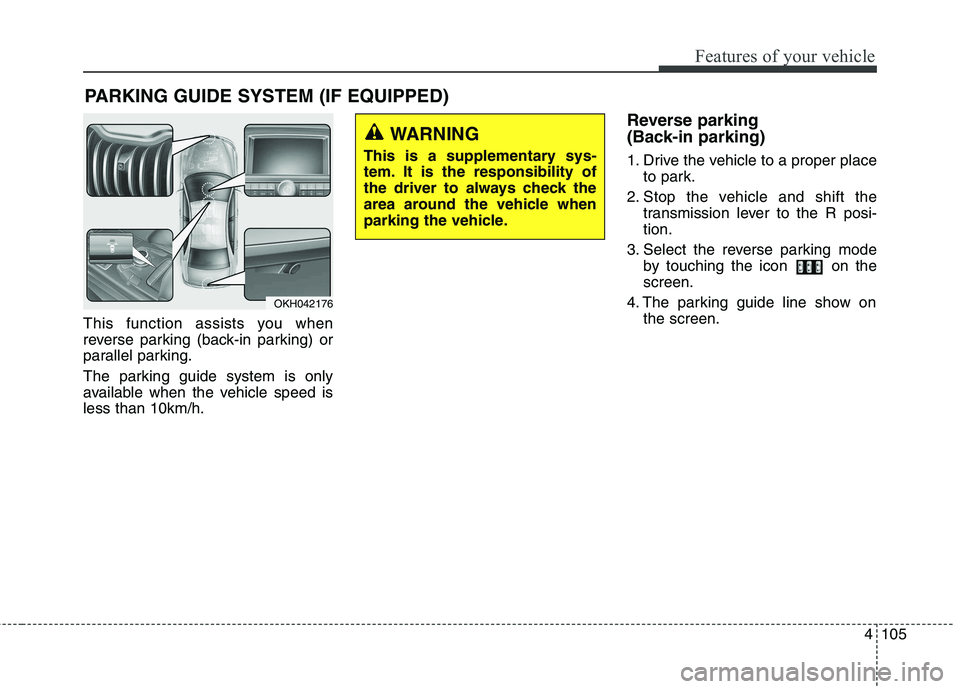
This function assists you when
reverse parking (back-in parking) or
parallel parking.
The parking guide system is only
available when the vehicle speed isless than 10km/h.Reverse parking
(Back-in parking)
1. Drive the vehicle to a proper place
to park.
2. Stop the vehicle and shift the transmission lever to the R posi- tion.
3. Select the reverse parking mode by touching the icon on thescreen.
4. The parking guide line show on the screen.
PARKING GUIDE SYSTEM (IF EQUIPPED)
WARNING
This is a supplementary sys-
tem. It is the responsibility of
the driver to always check the
area around the vehicle when
parking the vehicle.
OKH042176
Page 187 of 485
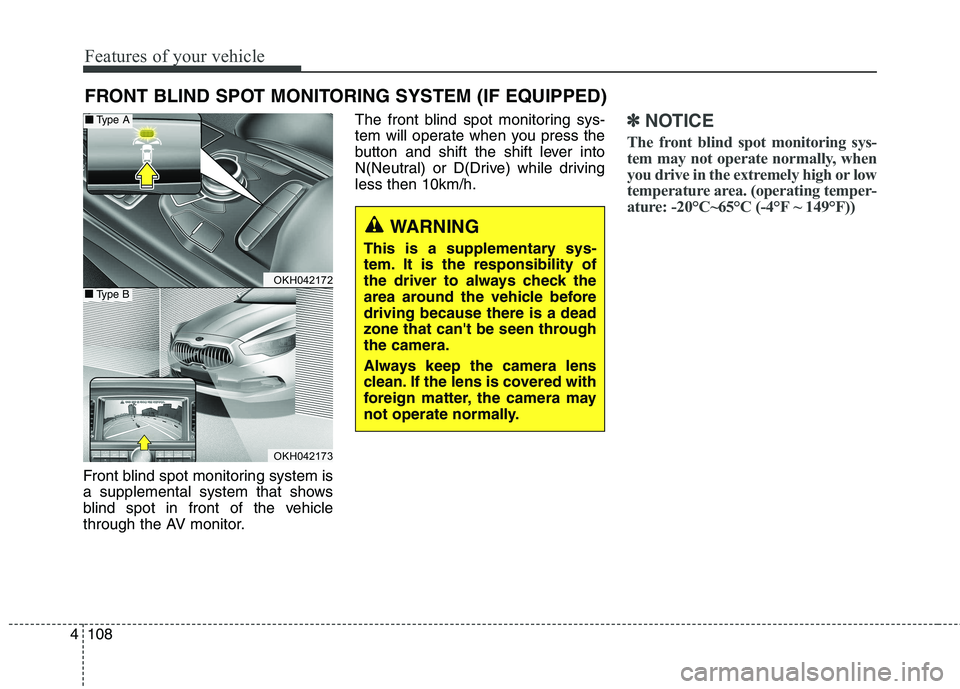
Features of your vehicle
108
4
Front blind spot monitoring system is
a supplemental system that shows
blind spot in front of the vehicle
through the AV monitor. The front blind spot monitoring sys-
tem will operate when you press the
button and shift the shift lever into
N(Neutral) or D(Drive) while drivingless then 10km/h.
✽✽
NOTICE
The front blind spot monitoring sys-
tem may not operate normally, when
you drive in the extremely high or low
temperature area. (operating temper-
ature: -20°C~65°C (-4°F ~ 149°F))
FRONT BLIND SPOT MONITORING SYSTEM (IF EQUIPPED)
WARNING
This is a supplementary sys-
tem. It is the responsibility of
the driver to always check the
area around the vehicle beforedriving because there is a dead
zone that can't be seen throughthe camera.
Always keep the camera lens
clean. If the lens is covered with
foreign matter, the camera may
not operate normally.
OKH042172
OKH042173
■■ Type A
■■Type B