change wheel KIA QUORIS 2013 User Guide
[x] Cancel search | Manufacturer: KIA, Model Year: 2013, Model line: QUORIS, Model: KIA QUORIS 2013Pages: 485, PDF Size: 31.55 MB
Page 190 of 485
4111
Features of your vehicle
Traffic change (for Europe)
Use this function when you visit a
country with opposite traffic direction.
If the traffic change is activated when
you visit a country with opposite traf-fic direction, it will decrease the daz-
zle on oncoming vehicle drivers.
Follow the below procedure.
1. Select “User Settings” by pressingthe mode button ( ) on the steer- ing wheel.
2. Select “Lamp” by pressing the move button ( ) and select but-
ton ( ) on the steering wheel.
3. Select “Travel Mode” by pressing the move button ( ) and select
button ( ) on the
steering wheel.
4. change function.
Select "Off" to deacticate the traf- fic change function.✽✽ NOTICE
If the engine is turned off with the
traffic change function activated,
and the engine turned on again, a
message "Headlamp beam pattern
set to opposite side range has been
reduced" will appear. It is to notify
the driver the function is activated.Lighting control
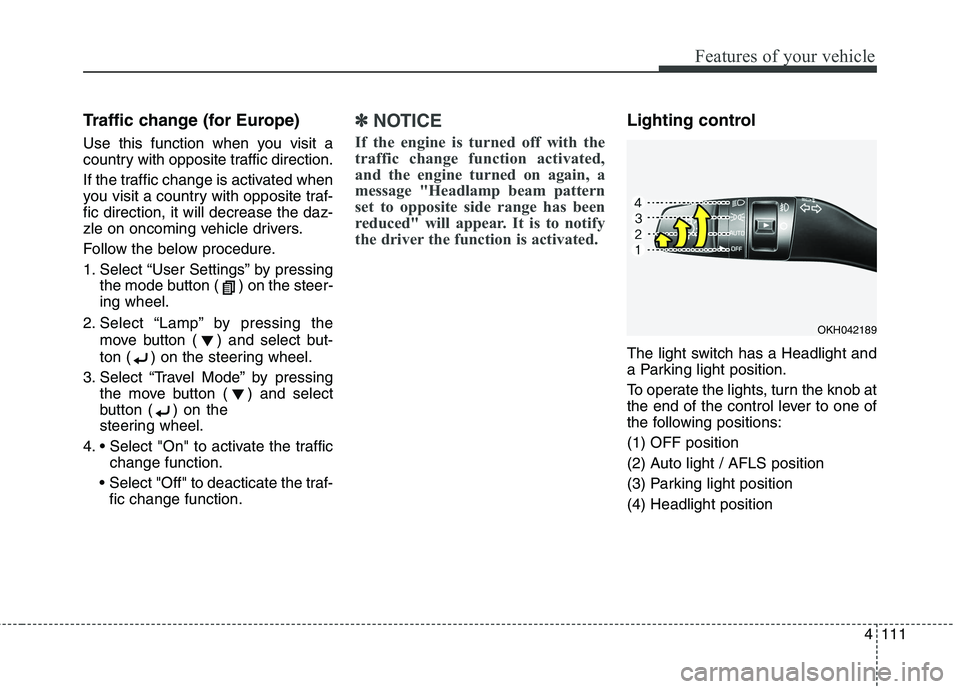
The light switch has a Headlight and
a Parking light position.
To operate the lights, turn the knob at
the end of the control lever to one of
the following positions: (1) OFF position
(2) Auto light / AFLS position
(3) Parking light position(4) Headlight position
OKH042189
Page 249 of 485
Driving your vehicle
6
5
ENGINE START/STOP BUTTON
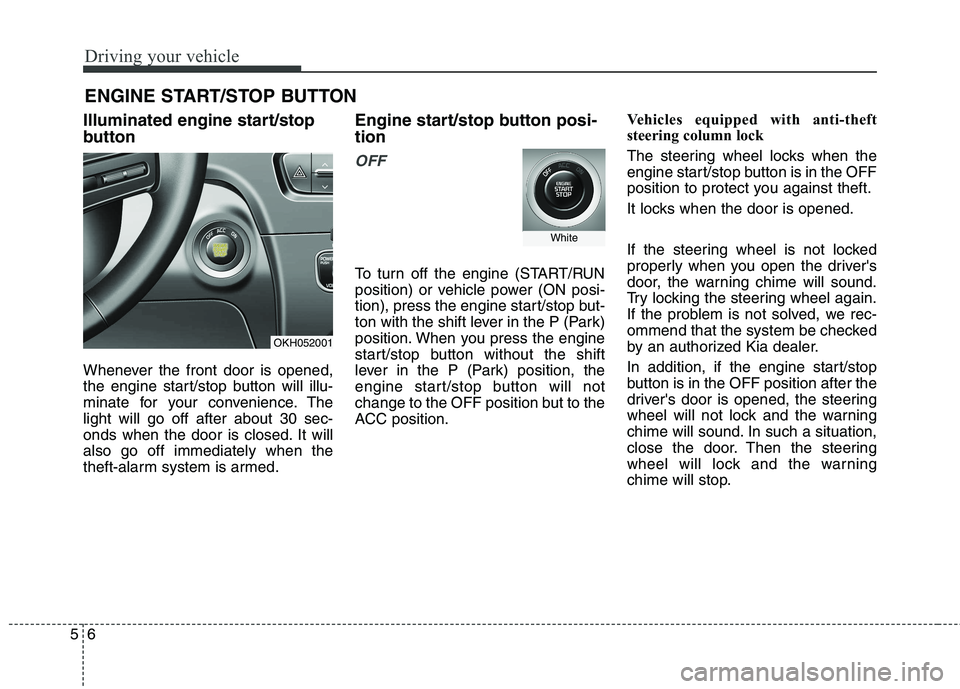
Illuminated engine start/stop
button
Whenever the front door is opened,
the engine start/stop button will illu-
minate for your convenience. Thelight will go off after about 30 sec-
onds when the door is closed. It willalso go off immediately when the
theft-alarm system is armed. Engine start/stop button posi- tion
OFF
To turn off the engine (START/RUN
position) or vehicle power (ON posi-
tion), press the engine start/stop but-
ton with the shift lever in the P (Park)
position. When you press the engine
start/stop button without the shift
lever in the P (Park) position, the
engine start/stop button will not
change to the OFF position but to the
ACC position.
Vehicles equipped with anti-theft
steering column lock
The steering wheel locks when the
engine start/stop button is in the OFF
position to protect you against theft.
It locks when the door is opened.
If the steering wheel is not locked
properly when you open the driver's
door, the warning chime will sound.
Try locking the steering wheel again.
If the problem is not solved, we rec-
ommend that the system be checked
by an authorized Kia dealer.
In addition, if the engine start/stop
button is in the OFF position after the
driver's door is opened, the steering
wheel will not lock and the warning
chime will sound. In such a situation,
close the door. Then the steering
wheel will lock and the warning
chime will stop.
OKH052001
White
Page 260 of 485
517
Driving your vehicle
Always use the parking brake. Donot depend on placing the trans-
mission in P (Park) to keep the car
from moving.
Exercise extreme caution when driving on a slippery surface. Be
especially careful when braking,
accelerating or shifting gears. On a
slippery surface, an abrupt change
in vehicle speed can cause the
drive wheels to lose traction and
the vehicle to go out of control.
Optimum vehicle performance and economy is obtained by smoothlydepressing and releasing the
accelerator pedal.
WARNING
If your vehicle becomes stuck in
snow, mud, sand, etc., then you
may attempt to rock the vehicle
free by moving it forward and
backward. Do not attempt this
procedure if people or objects
are anywhere near the vehicle.
During the rocking operation
the vehicle may suddenly move
forward or backward as it
becomes unstuck, causing
injury or damage to nearby peo-ple or objects.WARNING
Always buckle-up! In a colli- sion, an unbelted occupant is
significantly more likely to be
seriously injured or killed than
a properly belted occupant.
Avoid high speeds when cor- nering or turning.
Do not make quick steering wheel movements, such as
sharp lane changes or fast,sharp turns.
The risk of rollover is greatly increased if you lose control
of your vehicle at highwayspeeds.
Loss of control often occurs if two or more wheels drop off
the roadway and the driver
oversteers to reenter the road-
way.
In the event your vehicle leaves the roadway, do not
steer sharply. Instead, slow
down before pulling back into
the travel lanes.
Never exceed posted speed limits.
Page 264 of 485
521
Driving your vehicle
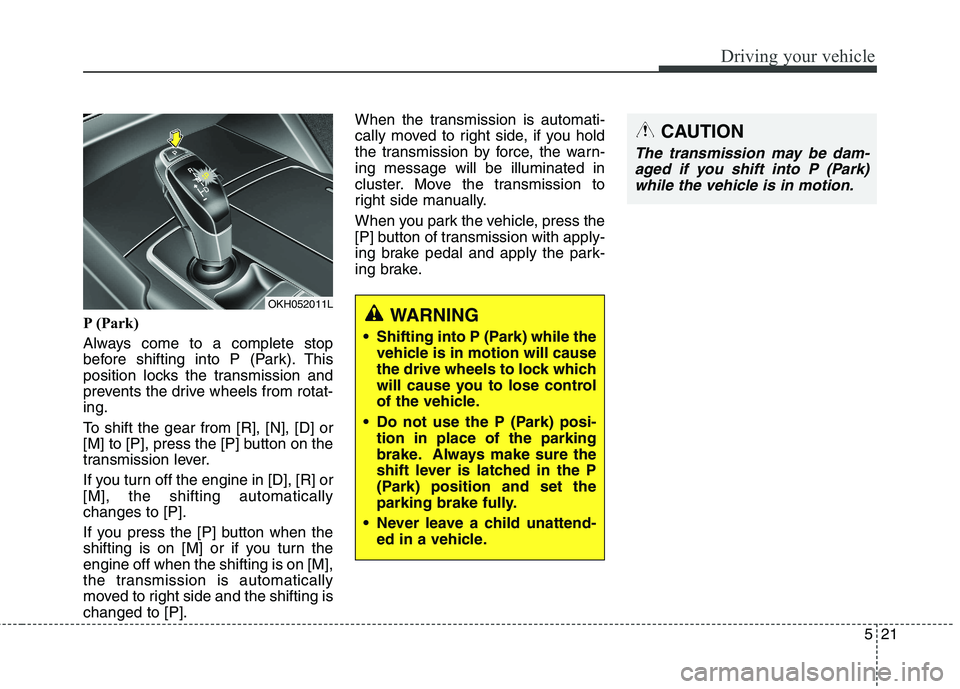
P (Park)
Always come to a complete stop
before shifting into P (Park). This
position locks the transmission and
prevents the drive wheels from rotat-ing.
To shift the gear from [R], [N], [D] or
[M] to [P], press the [P] button on the
transmission lever.
If you turn off the engine in [D], [R] or [M], the shifting automaticallychanges to [P].
If you press the [P] button when the
shifting is on [M] or if you turn theengine off when the shifting is on [M],
the transmission is automatically
moved to right side and the shifting ischanged to [P].When the transmission is automati-
cally moved to right side, if you hold
the transmission by force, the warn-ing message will be illuminated in
cluster. Move the transmission to
right side manually.
When you park the vehicle, press the
[P] button of transmission with apply-
ing brake pedal and apply the park-
ing brake.WARNING
Shifting into P (Park) while the vehicle is in motion will cause
the drive wheels to lock which
will cause you to lose control
of the vehicle.
Do not use the P (Park) posi- tion in place of the parking
brake. Always make sure the
shift lever is latched in the P
(Park) position and set the
parking brake fully.
Never leave a child unattend- ed in a vehicle.
CAUTION
The transmission may be dam-
aged if you shift into P (Park)while the vehicle is in motion.
OKH052011L
Page 272 of 485
529
Driving your vehicle
Good driving practices
Never move the shift lever from P(Park) or N (Neutral) to any other
position with the accelerator pedaldepressed.
Never move the shift lever into P (Park) when the vehicle is inmotion.
Be sure the car is completely stopped before you attempt to shift
into R (Reverse) or D (Drive).
Never take the car out of gear and coast down a hill. This may be
extremely hazardous. Always leave
the car in gear when moving.
Do not "ride" the brakes. This can cause them to overheat and mal-
function. Instead, when you are
driving down a long hill, slow down
and shift to a lower gear. When you
do this, engine braking will help
slow the car.
Slow down before shifting to a lower gear. Otherwise, the lower
gear may not be engaged. Always use the parking brake. Do
not depend on placing the trans-
mission in P (Park) to keep the car
from moving.
Exercise extreme caution when driving on a slippery surface. Be
especially careful when braking,
accelerating or shifting gears. On a
slippery surface, an abrupt change
in vehicle speed can cause the
drive wheels to lose traction and
the vehicle to go out of control.
Optimum vehicle performance and economy is obtained by smoothlydepressing and releasing the
accelerator pedal.WARNING
Always buckle-up! In a colli- sion, an unbelted occupant is
significantly more likely to be
seriously injured or killed than
a properly belted occupant.
Avoid high speeds when cor- nering or turning.
Do not make quick steering wheel movements, such as
sharp lane changes or fast,sharp turns.
The risk of rollover is greatly increased if you lose control
of your vehicle at highwayspeeds.
Loss of control often occurs if two or more wheels drop off
the roadway and the driver
oversteers to reenter the road-
way.
In the event your vehicle leaves the roadway, do not
steer sharply. Instead, slow
down before pulling back into
the travel lanes.
Never exceed posted speed limits.
Page 293 of 485
Driving your vehicle
50
5
Vehicle stability management (VSM)
This system provides further
enhancements to vehicle stability
and steering responses when a vehi-
cle is driving on a slippery road or a
vehicle detected changes in coeffi-
cient of friction between right wheels
and left wheels when braking.VSM operation
When the VSM is operating:
ESC (Electronic Stability Control)
( ) light will blink.
The steering wheel may be con- trolled.
When the vehicle stability manage-
ment is operating properly, you can
feel a slight pulsation in the vehicle.
This is only the effect of brake control
and indicates nothing unusual.
The VSM does not operate when:
Driving on bank road such as gra- dient or incline
Driving rearward
ESC OFF indicator light ( ) remains on the instrument cluster
EPS (Electronic Power Steering) indicator light remains on the
instrument cluster
VSM operation off
If you press the ESC OFF button to
turn off the ESC, the VSM will alsocancel and the ESC OFF indicator
light ( ) illuminates.
To turn on the VSM, press the button
again. The ESC OFF indicator lightgoes out.
Page 303 of 485
Driving your vehicle
60
5
SPORT mode
SPORT mode focuses on
dynamic driving by auto-matically controlling the
steering wheel, engine
and transaxle system.
button is pressed and
the SPORT mode is
selected, the SPROT
indicator (yellow) will illu-
minate.
is activated, and the
engine start/stop button
is turned off and on it willchange to NORMAL
mode. To turn on the
SPORT mode press
DRIVE MODE buttonagain.
ed:
- After speeding, it main- tains the gear and
RPM for some time
even though the accel-
erator pedal is notdepressed.
- Up-shifting is delayed.
✽✽
NOTICE
In Sport drive mode, the fuel effi-
ciency may decrease.SNOW mode (if equipped)
Snow mode helps the
driver to drive more effec-
tively on slippery roads
such as snowy or muddy
roads.
If the SNOW MODE but- ton is pressed, the
SNOW mode will operate
regardless of whicheverDRIVE mode (NOR-
MAL/SPORT/ECO) is
operating. If the button is
pressed once more, theDRIVE mode (NOR-
MAL/SPORT/ECO) that
was operating previously
will operate.
SNOWSPORT
Page 311 of 485
Driving your vehicle
68
5
To temporarily accelerate with
the cruise control on:
If you want to speed up temporarily
when the cruise control is on,
depress the accelerator pedal.
Increased speed will not interfere
with cruise control operation orchange the set speed.
To return to the set speed, take your
foot off the accelerator pedal.
If you move the lever down (to SET-)
at increased speed, the cruisingspeed will be set again. To cancel cruise control, do
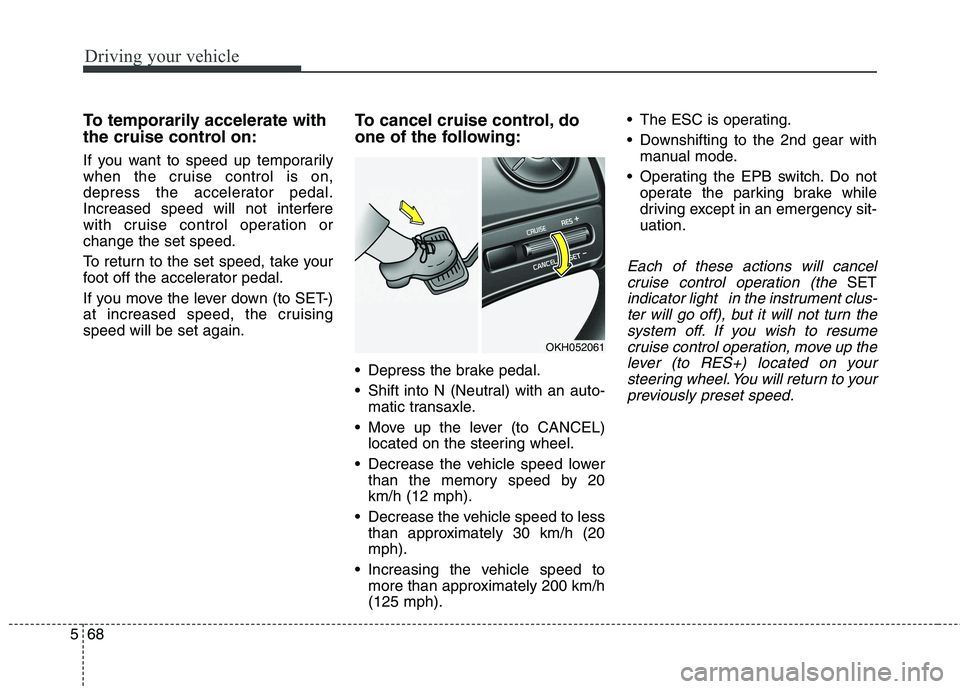
one of the following:
Depress the brake pedal.
Shift into N (Neutral) with an auto-
matic transaxle.
Move up the lever (to CANCEL) located on the steering wheel.
Decrease the vehicle speed lower than the memory speed by 20 km/h (12 mph).
Decrease the vehicle speed to less than approximately 30 km/h (20mph).
Increasing the vehicle speed to more than approximately 200 km/h(125 mph). The ESC is operating.
Downshifting to the 2nd gear with
manual mode.
Operating the EPB switch. Do not operate the parking brake while
driving except in an emergency sit-uation.
Each of these actions will cancel
cruise control operation (the
SET
indicator light in the instrument clus-ter will go off), but it will not turn thesystem off. If you wish to resumecruise control operation, move up the lever (to RES+) located on yoursteering wheel. You will return to yourpreviously preset speed.
OKH052061
Page 328 of 485
585
Driving your vehicle
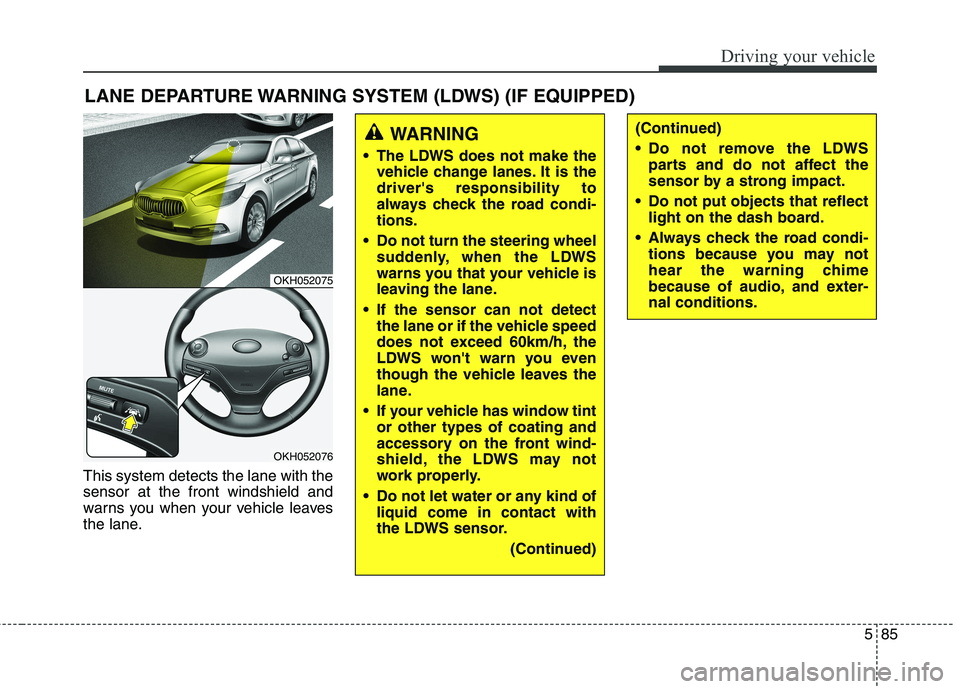
This system detects the lane with the sensor at the front windshield and
warns you when your vehicle leaves
the lane.LANE DEPARTURE WARNING SYSTEM (LDWS) (IF EQUIPPED)
OKH052075
OKH052076
WARNING
The LDWS does not make the vehicle change lanes. It is the driver's responsibility to
always check the road condi-tions.
Do not turn the steering wheel suddenly, when the LDWS
warns you that your vehicle is
leaving the lane.
If the sensor can not detect the lane or if the vehicle speed
does not exceed 60km/h, the
LDWS won't warn you even
though the vehicle leaves the
lane.
If your vehicle has window tint or other types of coating and
accessory on the front wind-
shield, the LDWS may not
work properly.
Do not let water or any kind of liquid come in contact with
the LDWS sensor.
(Continued)(Continued)
Do not remove the LDWSparts and do not affect the
sensor by a strong impact.
Do not put objects that reflect light on the dash board.
Always check the road condi- tions because you may not
hear the warning chime
because of audio, and exter-nal conditions.
Page 337 of 485
Driving your vehicle
94
5
ECONOMICAL OPERATION
Your vehicle's fuel economy depends
mainly on your style of driving, where
you drive and when you drive.
Each of these factors affects how
many kilometers (miles) you can get
from a liter (gallon) of fuel. To operate
your vehicle as economically as pos-
sible, use the following driving sug-
gestions to help save money in bothfuel and repairs:
Drive smoothly. Accelerate at a moderate rate. Do not make "jack-
rabbit" starts or full-throttle shifts
and maintain a steady cruising
speed. Do not race between stop-
lights. Try to adjust your speed to
the traffic so you do not have to
change speeds unnecessarily.
Avoid heavy traffic whenever pos-
sible. Always maintain a safe dis-
tance from other vehicles so you
can avoid unnecessary braking.
This also reduces brake wear.
Drive at a moderate speed. The faster you drive, the more fuel your
vehicle uses. Driving at a moderate
speed, especially on the highway,
is one of the most effective ways toreduce fuel consumption. Do not "ride" the brake pedal. This
can increase fuel consumption and
also increase wear on these com-
ponents. In addition, driving with
your foot resting on the brake pedal
may cause the brakes to overheat,
which reduces their effectiveness
and may lead to more serious con-
sequences.
Take care of your tires. Keep them inflated to the recommended pres-
sure. Incorrect inflation, either too
much or too little, results in unnec-
essary tire wear. Check the tirepressures at least once a month.
Be sure that the wheels are aligned correctly. Improper align-ment can result from hitting curbs
or driving too fast over irregular
surfaces. Poor alignment causes
faster tire wear and may also result
in other problems as well as
greater fuel consumption. Keep your vehicle in good condi-
tion. For better fuel economy and
reduced maintenance costs, main-
tain your vehicle in accordancewith the maintenance schedule in
section 7. If you drive your vehicle
in severe conditions, more frequentmaintenance is required (see sec-
tion 7 for details).
Keep your vehicle clean. For maxi- mum service, your vehicle should
be kept clean and free of corrosive
materials. It is especially important
that mud, dirt, ice, etc. not be
allowed to accumulate on the
underside of the vehicle. This extra
weight can result in increased fuel
consumption and also contribute tocorrosion.
Travel lightly. Do not carry unnec- essary weight in your vehicle.
Weight reduces fuel economy.
Do not let the engine idle longer than necessary. If you are waiting
(and not in traffic), turn off your
engine and restart only when
you're ready to go.