lock KIA QUORIS 2013 Owner's Manual
[x] Cancel search | Manufacturer: KIA, Model Year: 2013, Model line: QUORIS, Model: KIA QUORIS 2013Pages: 485, PDF Size: 31.55 MB
Page 85 of 485
Features of your vehicle
6
4
Trunk unlocking
Power trunk
1. Carry the smart key.
2. Press the trunk handle switch.
3. The trunk will unlock and open.
Non-powered trunk
1. Carry the smart key.
2. Press the trunk handle switch.
3. The trunk will unlock.
✽✽
NOTICE
Once the trunk is opened and then closed, the trunk will lock auto-
matically.
The button will only operate when the smart key is within 0.7 m (28
in.) from the trunk handle.
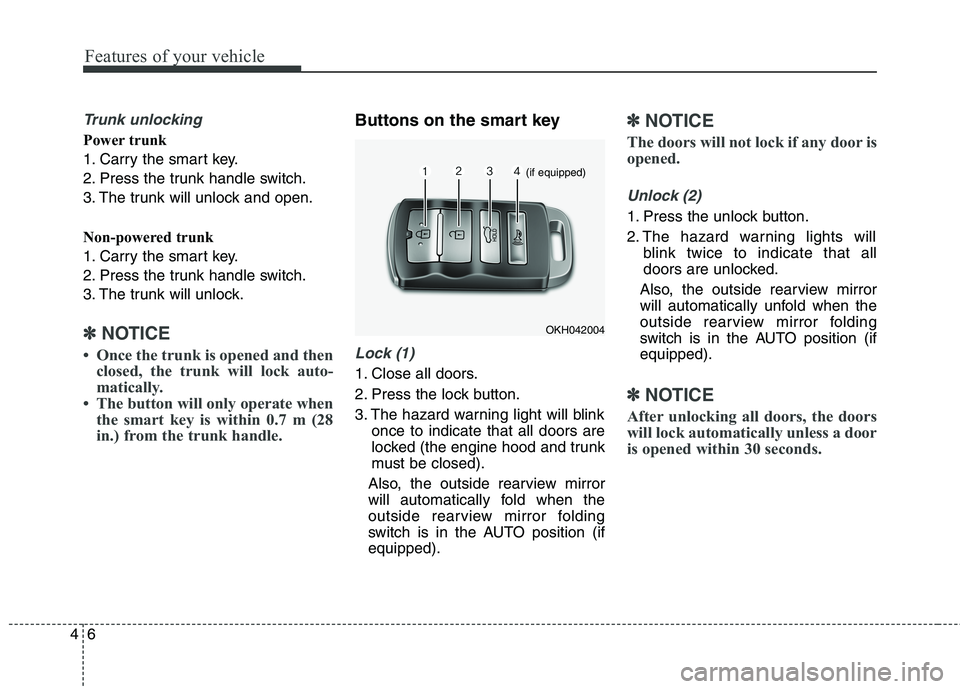
Buttons on the smart key
Lock (1)
1. Close all doors.
2. Press the lock button.
3. The hazard warning light will blink once to indicate that all doors are
locked (the engine hood and trunk
must be closed).
Also, the outside rearview mirror
will automatically fold when the
outside rearview mirror folding
switch is in the AUTO position (ifequipped).
✽✽ NOTICE
The doors will not lock if any door is
opened.
Unlock (2)
1. Press the unlock button.
2. The hazard warning lights will blink twice to indicate that all
doors are unlocked.
Also, the outside rearview mirror
will automatically unfold when the
outside rearview mirror folding
switch is in the AUTO position (ifequipped).
✽✽ NOTICE
After unlocking all doors, the doors
will lock automatically unless a door
is opened within 30 seconds.
OKH042004
(if equipped)
Page 86 of 485
47
Features of your vehicle
Trunk unlock (3)
Non-powered trunk.
1. Press the trunk unlock button formore than 1 second.
2. The hazard warning light will blink twice to indicate that the trunk is
unlocked.
✽✽ NOTICE
After unlocking the trunk, the trunk will lock automatically unless
it is opened within 30 seconds.
Once the trunk is opened and then closed, the trunk will lock auto-
matically.
The word "HOLD" is written on the button to inform you that you
must press and hold the button.
Power trunk
1. Press the trunk unlock button for more than 1 second.
2. The hazard warning light will blink and chime will sound twice to indi-
cate the trunk is unlocked andopened.
✽✽ NOTICE
Once the trunk is opened and then closed, the trunk will lock auto-
matically.
The word "HOLD" is written on the button to inform you that you
must press and hold the button.
Alarm (4)
1. Press the alarm button for more than 1 second.
2. The horn will sound and hazard warning light will sound for 27 sec-
onds.
You can activate or deactivate the
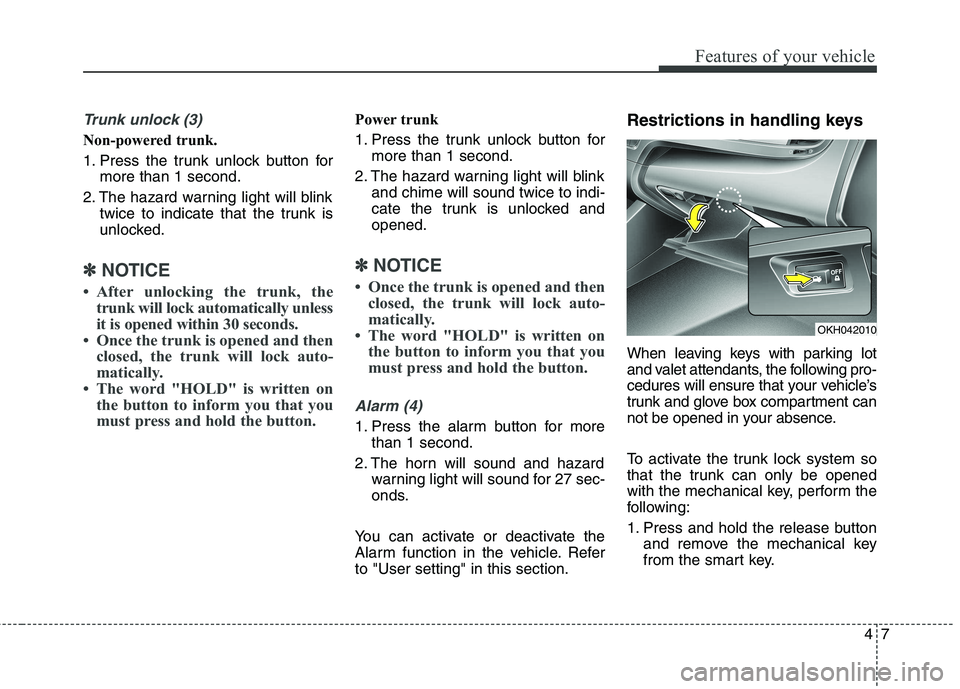
Alarm function in the vehicle. Referto "User setting" in this section. Restrictions in handling keys
When leaving keys with parking lot
and valet attendants, the following pro-
cedures will ensure that your vehicle’s
trunk and glove box compartment can
not be opened in your absence.
To activate the trunk lock system so
that the trunk can only be opened
with the mechanical key, perform the
following:
1. Press and hold the release button
and remove the mechanical key
from the smart key.
OKH042010
Page 87 of 485
Features of your vehicle
8
4
2. Unlock the glove box by using the
mechanical key then open it.
3. Set the trunk lid control button to OFF position (unpressed).
4. Close and lock the glove box using the mechanical key.
When leaving your keys with a park-
ing lot attendant or valet, perform
steps 1 to 4 above, remove the
mechanical key from the smart key
and leave the smart key with the
attendant. In this manner the smart
key can only be used to start the
engine and operate door locks.
Lock release
To release the trunk lock feature,
open the glove box with the mechan-
ical key and set the trunk lid control
button to ON position (pressed). In
this position the trunk will open with
the trunk lid button or smart key. Smart key precautions
✽✽
NOTICE
If, for some reason, you happen to lose your smart key, you will not
be able to start the engine. Tow
the vehicle, if necessary, we recom-
mend that you contact an author-
ized Kia dealer.
A maximum of 2 smart keys can be registered to a single vehicle. If
you lose a smart key, we recom-
mend that you contact an author-
ized Kia dealer.
The smart key will not work if any of the following occurs:
- The smart key is close to a radiotransmitter such as a radio sta-
tion or an airport which can
interfere with normal operation
of the smart key.
- The smart key is near a mobile two-way radio system or a cellu-
lar phone.
- Another vehicle’s smart key is being operated close to your
vehicle. (Continued)(Continued)
When the smart key does not work
properly, open and close the door
with the mechanical key. If you
have a problem with the smart key,
we recommend that you contact an
authorized Kia dealer.
If the smart key is in close proxim- ity to your cell phone or smart
phone, the signal from the smart
key could be blocked by normal
operation of your cell phone or
smart phone. This is especially
important when the phone is
active such as making call, receiv-
ing calls, text messaging, and/or
sending/receiving emails. Avoid
placing the smart key and your
cell phone or smart phone in the
same pants or jacket pocket and
maintain adequate distance
between the two devices.
CAUTION
Keep the smart key away from
water or any liquid. If the keylessentry system is inoperative dueto exposure to water or liquids, it will not be covered by your man-ufacturer’s vehicle warranty.
Page 91 of 485
Features of your vehicle
12
4
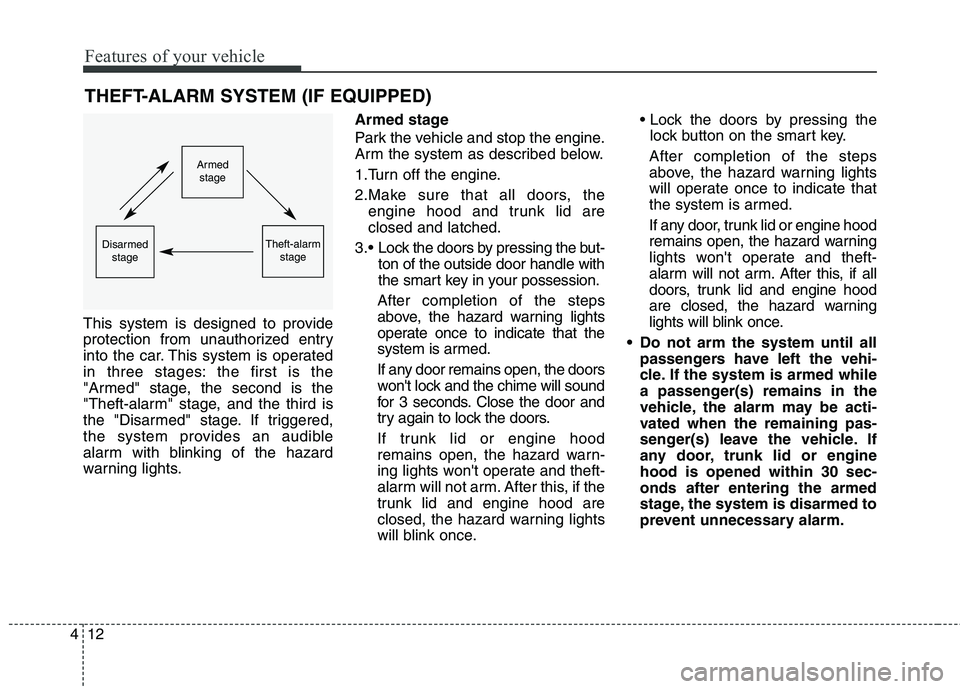
THEFT-ALARM SYSTEM (IF EQUIPPED)
This system is designed to provide
protection from unauthorized entry
into the car. This system is operated
in three stages: the first is the
"Armed" stage, the second is the
"Theft-alarm" stage, and the third is
the "Disarmed" stage. If triggered,
the system provides an audible
alarm with blinking of the hazard
warning lights. Armed stage
Park the vehicle and stop the engine.
Arm the system as described below.
1.Turn off the engine.
2.Make sure that all doors, the
engine hood and trunk lid are closed and latched.
Lock the doors by pressing the but- ton of the outside door handle with
the smart key in your possession.
After completion of the steps
above, the hazard warning lights
operate once to indicate that the
system is armed.
If any door remains open, the doors
won't lock and the chime will sound
for 3 seconds. Close the door and
try again to lock the doors.
If trunk lid or engine hood
remains open, the hazard warn-
ing lights won't operate and theft-
alarm will not arm. After this, if the
trunk lid and engine hood are
closed, the hazard warning lights
will blink once.
lock button on the smart key.
After completion of the steps
above, the hazard warning lights
will operate once to indicate that
the system is armed.
If any door, trunk lid or engine hood
remains open, the hazard warning
lights won't operate and theft-
alarm will not arm. After this, if all
doors, trunk lid and engine hood
are closed, the hazard warning
lights will blink once.
Do not arm the system until all passengers have left the vehi-
cle. If the system is armed while
a passenger(s) remains in the
vehicle, the alarm may be acti-
vated when the remaining pas-
senger(s) leave the vehicle. If
any door, trunk lid or enginehood is opened within 30 sec-onds after entering the armed
stage, the system is disarmed to
prevent unnecessary alarm.
Armedstage
Theft-alarm stageDisarmedstage
Page 92 of 485
413
Features of your vehicle
Theft-alarm stage
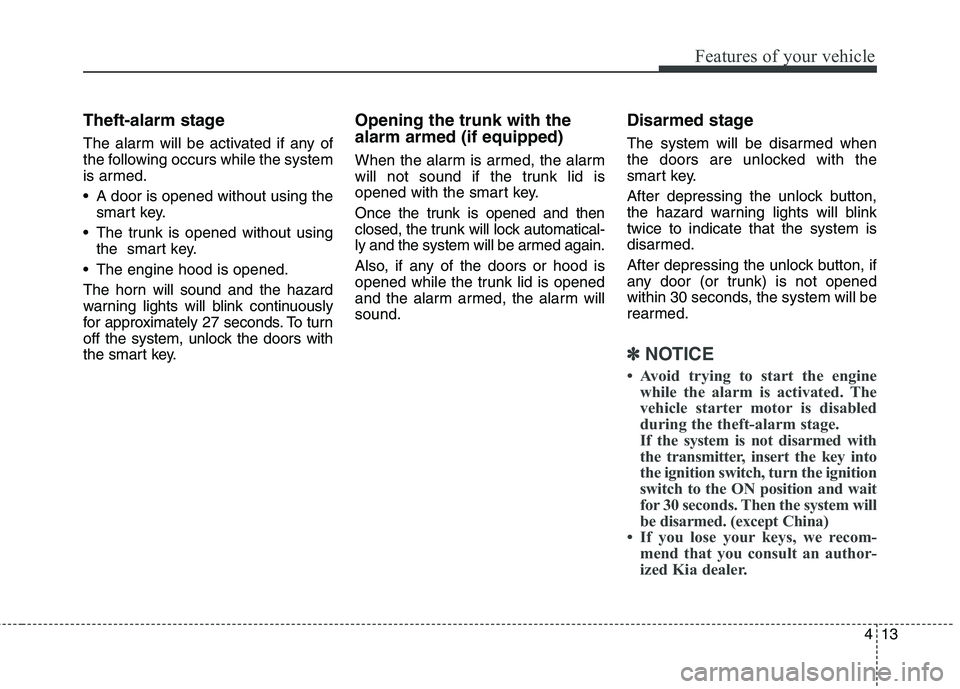
The alarm will be activated if any of
the following occurs while the system
is armed.
A door is opened without using thesmart key.
The trunk is opened without using the smart key.
The engine hood is opened.
The horn will sound and the hazard
warning lights will blink continuously
for approximately 27 seconds. To turn
off the system, unlock the doors with
the smart key. Opening the trunk with the alarm armed (if equipped)
When the alarm is armed, the alarm
will not sound if the trunk lid is
opened with the smart key.
Once the trunk is opened and then
closed, the trunk will lock automatical-
ly and the system will be armed again.
Also, if any of the doors or hood is
opened while the trunk lid is opened
and the alarm armed, the alarm willsound.
Disarmed stage
The system will be disarmed when
the doors are unlocked with the
smart key.
After depressing the unlock button,
the hazard warning lights will blinktwice to indicate that the system is
disarmed.
After depressing the unlock button, if
any door (or trunk) is not opened
within 30 seconds, the system will be
rearmed.
✽✽
NOTICE
Avoid trying to start the engine while the alarm is activated. The
vehicle starter motor is disabled
during the theft-alarm stage.
If the system is not disarmed with
the transmitter, insert the key into
the ignition switch, turn the ignition
switch to the ON position and wait
for 30 seconds. Then the system will
be disarmed. (except China)
If you lose your keys, we recom- mend that you consult an author-
ized Kia dealer.
Page 94 of 485
415
Features of your vehicle
Operating door locks from
outside the vehicle
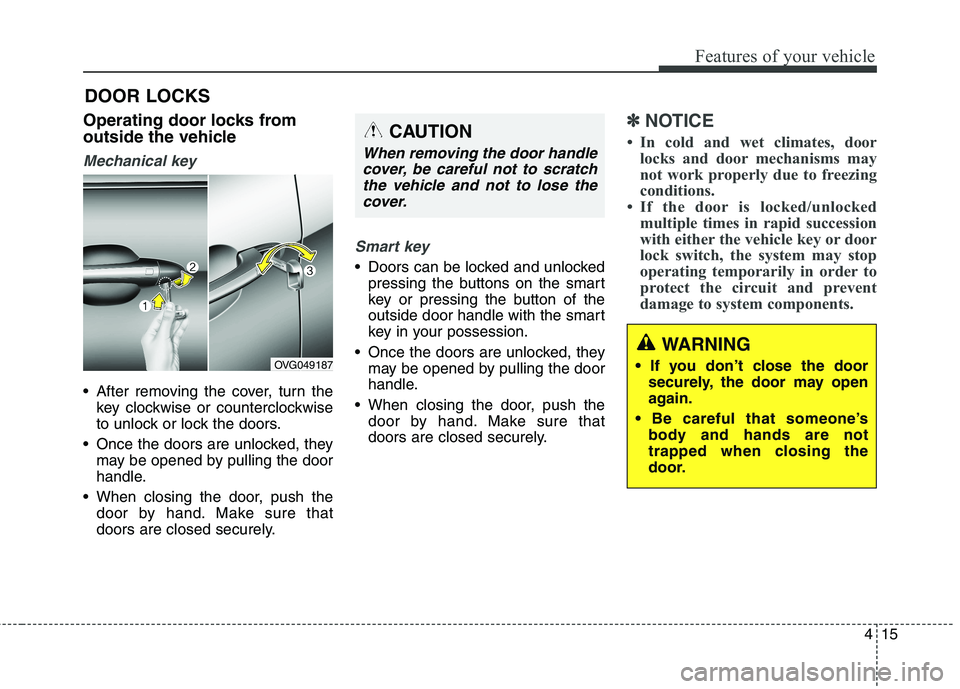
Mechanical key
After removing the cover, turn thekey clockwise or counterclockwise
to unlock or lock the doors.
Once the doors are unlocked, they may be opened by pulling the door
handle.
When closing the door, push the door by hand. Make sure that
doors are closed securely.
Smart key
Doors can be locked and unlockedpressing the buttons on the smart
key or pressing the button of the
outside door handle with the smart
key in your possession.
Once the doors are unlocked, they may be opened by pulling the door
handle.
When closing the door, push the door by hand. Make sure that
doors are closed securely.
✽✽ NOTICE
In cold and wet climates, door locks and door mechanisms may
not work properly due to freezing
conditions.
If the door is locked/unlocked multiple times in rapid succession
with either the vehicle key or door
lock switch, the system may stop
operating temporarily in order to
protect the circuit and prevent
damage to system components.
DOOR LOCKS
OVG049187
WARNING
securely, the door may open
again.
body and hands are not
trapped when closing the
door.
CAUTION
When removing the door handle
cover, be careful not to scratchthe vehicle and not to lose the cover.
Page 95 of 485
Features of your vehicle
16
4
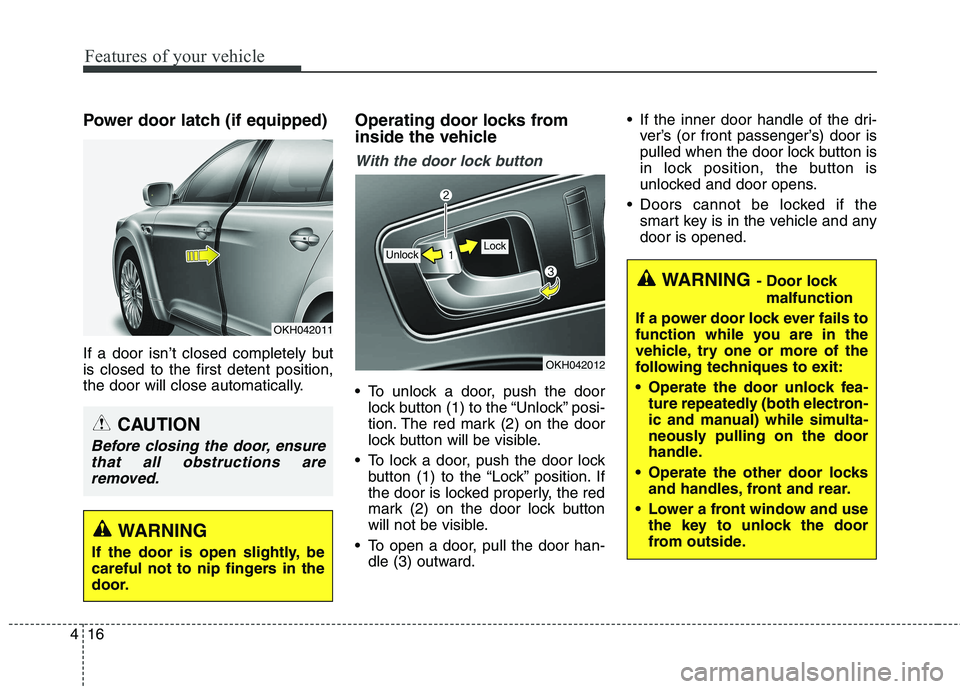
Power door latch (if equipped)
If a door isn’t closed completely but is closed to the first detent position,
the door will close automatically. Operating door locks from
inside the vehicle
With the door lock button
To unlock a door, push the door
lock button (1) to the “Unlock” posi-
tion. The red mark (2) on the door
lock button will be visible.
To lock a door, push the door lock button (1) to the “Lock” position. If
the door is locked properly, the red
mark (2) on the door lock button
will not be visible.
To open a door, pull the door han- dle (3) outward. If the inner door handle of the dri-
ver’s (or front passenger’s) door is
pulled when the door lock button is
in lock position, the button is
unlocked and door opens.
Doors cannot be locked if the smart key is in the vehicle and anydoor is opened.
OKH042012
Lock Unlock
WARNING - Door lock
malfunction
If a power door lock ever fails to
function while you are in the
vehicle, try one or more of the
following techniques to exit:
Operate the door unlock fea- ture repeatedly (both electron-
ic and manual) while simulta-
neously pulling on the door
handle.
Operate the other door locks and handles, front and rear.
Lower a front window and use the key to unlock the door
from outside.
OKH042011
WARNING
If the door is open slightly, be
careful not to nip fingers in the
door.
CAUTION
Before closing the door, ensure that all obstructions areremoved.
Page 96 of 485
417
Features of your vehicle
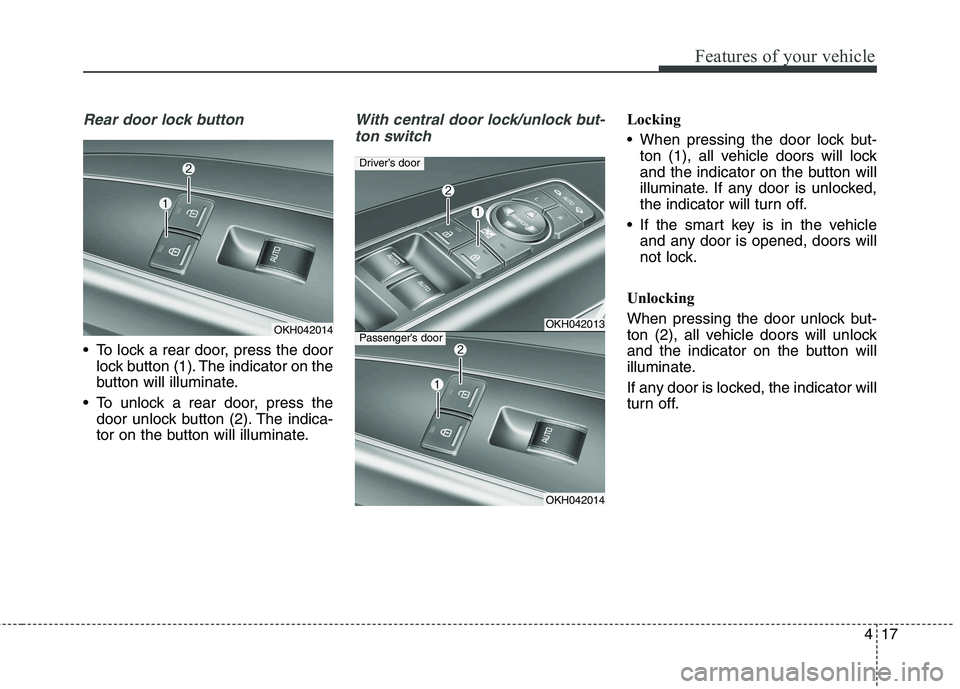
Rear door lock button
To lock a rear door, press the doorlock button (1). The indicator on the
button will illuminate.
To unlock a rear door, press the door unlock button (2). The indica-
tor on the button will illuminate.
With central door lock/unlock but-
ton switchLocking
When pressing the door lock but- ton (1), all vehicle doors will lock
and the indicator on the button will
illuminate. If any door is unlocked,
the indicator will turn off.
If the smart key is in the vehicle and any door is opened, doors will
not lock.
Unlocking
When pressing the door unlock but-
ton (2), all vehicle doors will unlock
and the indicator on the button will
illuminate.
If any door is locked, the indicator will
turn off.
OKH042014OKH042013
OKH042014
Driver’s door
Passenger’s door
Page 97 of 485
Features of your vehicle
18
4
Door lock/unlock features
Impact sensing door unlock sys-
tem
All doors will automatically unlock when an impact causes the air bags
to deploy.
Speed sensing door lock system
All doors will automatically lock after
the vehicle speed exceeds 15 km/h.
WARNING - Unlocked
vehicles
Leaving your vehicle unlocked
can invite theft or possible harm
to you or others from someone
hiding in your vehicle while you
are gone. Always remove the
ignition key, engage the parking
brake, close all windows and
lock all doors when leaving
your vehicle unattended.
WARNING - Unattended
children
An enclosed vehicle can
become extremely hot, causing
death or severe injury to unat-
tended children or animals who
cannot escape the vehicle.
Furthermore, children might
operate features of the vehicle
that could injure them, or theycould encounter other harm,
possibly from someone gaining
entry to the vehicle. Never leave
children or animals unattended
in your vehicle.
WARNING - Doors
The doors should always be fully closed and locked while
the vehicle is in motion to pre-vent accidental opening of the
door. Locked doors will also
discourage potential intruders
when the vehicle stops or
slows.
Be careful when opening doors and watch for vehicles,
motorcycles, bicycles or
pedestrians approaching the
vehicle in the path of the door.Opening a door when some-
thing is approaching can
cause damage or injury.
Page 98 of 485
419
Features of your vehicle
Engine off door unlock system
All doors will automatically unlock
when the engine start/stop button is
turned to the ACC or OFF position.
Shift lever door lock/unlock sys-tem
All doors will automatically lock when the shift lever is moved out of
P (Park).
All doors will automatically unlock when the shift lever is moved into P
(Park).
You can activate or deactivate the
auto door lock/unlock features in the
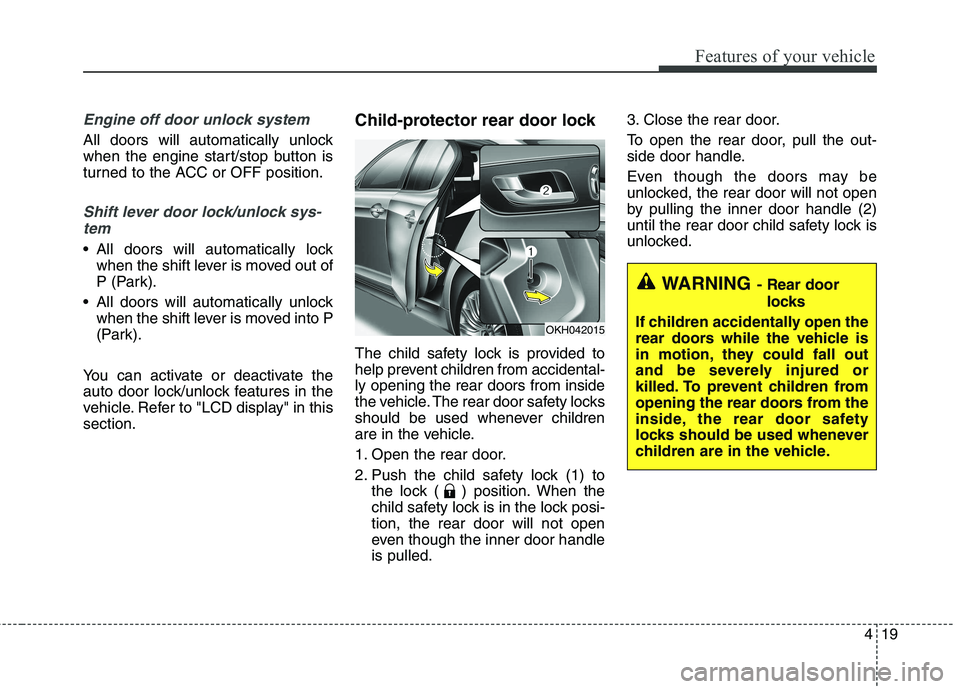
vehicle. Refer to "LCD display" in thissection. Child-protector rear door lock
The child safety lock is provided to
help prevent children from accidental-ly opening the rear doors from inside
the vehicle. The rear door safety locks
should be used whenever children
are in the vehicle.
1. Open the rear door.
2. Push the child safety lock (1) to
the lock ( ) position. When the
child safety lock is in the lock posi-tion, the rear door will not open
even though the inner door handleis pulled. 3. Close the rear door.
To open the rear door, pull the out-
side door handle.
Even though the doors may be
unlocked, the rear door will not open
by pulling the inner door handle (2)
until the rear door child safety lock is
unlocked.
WARNING
- Rear door
locks
If children accidentally open the
rear doors while the vehicle is
in motion, they could fall out
and be severely injured or
killed. To prevent children from
opening the rear doors from the
inside, the rear door safety
locks should be used whenever
children are in the vehicle.
OKH042015