engine KIA QUORIS 2014 Owner's Manual
[x] Cancel search | Manufacturer: KIA, Model Year: 2014, Model line: QUORIS, Model: KIA QUORIS 2014Pages: 486, PDF Size: 31.74 MB
Page 85 of 486
Features of your vehicle
6
4
Trunk unlocking
Power trunk
1. Carry the smart key.
2. Press the trunk handle switch.
3. The trunk will unlock and open.
Non-powered trunk
1. Carry the smart key.
2. Press the trunk handle switch.
3. The trunk will unlock.
✽✽
NOTICE
Once the trunk is opened and then closed, the trunk will lock auto-
matically.
The button will only operate when the smart key is within 0.7 m (28
in.) from the trunk handle.
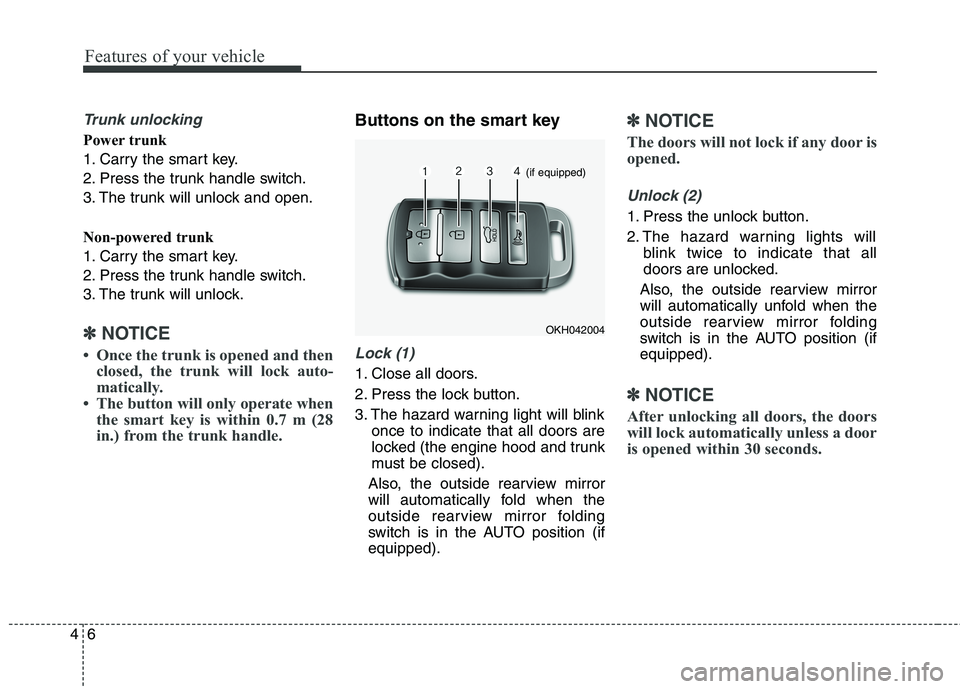
Buttons on the smart key
Lock (1)
1. Close all doors.
2. Press the lock button.
3. The hazard warning light will blink once to indicate that all doors are
locked (the engine hood and trunk
must be closed).
Also, the outside rearview mirror
will automatically fold when the
outside rearview mirror folding
switch is in the AUTO position (ifequipped).
✽✽ NOTICE
The doors will not lock if any door is
opened.
Unlock (2)
1. Press the unlock button.
2. The hazard warning lights will blink twice to indicate that all
doors are unlocked.
Also, the outside rearview mirror
will automatically unfold when the
outside rearview mirror folding
switch is in the AUTO position (ifequipped).
✽✽ NOTICE
After unlocking all doors, the doors
will lock automatically unless a door
is opened within 30 seconds.
OKH042004
(if equipped)
Page 87 of 486
Features of your vehicle
8
4
2. Unlock the glove box by using the
mechanical key then open it.
3. Set the trunk lid control button to OFF position (unpressed).
4. Close and lock the glove box using the mechanical key.
When leaving your keys with a park-
ing lot attendant or valet, perform
steps 1 to 4 above, remove the
mechanical key from the smart key
and leave the smart key with the
attendant. In this manner the smart
key can only be used to start the
engine and operate door locks.
Lock release
To release the trunk lock feature,
open the glove box with the mechan-
ical key and set the trunk lid control
button to ON position (pressed). In
this position the trunk will open with
the trunk lid button or smart key. Smart key precautions
✽✽
NOTICE
If, for some reason, you happen to lose your smart key, you will not
be able to start the engine. Tow
the vehicle, if necessary, we recom-
mend that you contact an author-
ized Kia dealer.
A maximum of 2 smart keys can be registered to a single vehicle. If
you lose a smart key, we recom-
mend that you contact an author-
ized Kia dealer.
The smart key will not work if any of the following occurs:
- The smart key is close to a radiotransmitter such as a radio sta-
tion or an airport which can
interfere with normal operation
of the smart key.
- The smart key is near a mobile two-way radio system or a cellu-
lar phone.
- Another vehicle’s smart key is being operated close to your
vehicle. (Continued)(Continued)
When the smart key does not work
properly, open and close the door
with the mechanical key. If you
have a problem with the smart key,
we recommend that you contact an
authorized Kia dealer.
If the smart key is in close proxim- ity to your cell phone or smart
phone, the signal from the smart
key could be blocked by normal
operation of your cell phone or
smart phone. This is especially
important when the phone is
active such as making call, receiv-
ing calls, text messaging, and/or
sending/receiving emails. Avoid
placing the smart key and your
cell phone or smart phone in the
same pants or jacket pocket and
maintain adequate distance
between the two devices.
Page 88 of 486

49
Features of your vehicle
Immobilizer system
Your vehicle may be equipped with
an electronic engine immobilizer sys-
tem to reduce the risk of unautho-
rized vehicle use.
Your immobilizer system is com-
prised of a small transponder in the
key and electronic devices inside the
vehicle.
Whenever the engine start/stop but- ton is changed to the ON position,
the immobilizer system checks and
verifies if the key is valid or not.
If the key is valid, the engine will
start.
If the key is invalid, the engine will not
start.To deactivate the immobilizersystem
Change the engine start/stop button to the ON position.
To activate the immobilizer system
Change the engine start/stop button
to the OFF position. The immobilizer
system activates automatically.
Without a valid smart key for your
vehicle, the engine will not start.
WARNING
In order to prevent theft of your
vehicle, do not leave spare keys
anywhere in your vehicle. Your
immobilizer password is a cus-
tomer unique password and
should be kept confidential. Do
not leave this number anywhere
in your vehicle.
CAUTION
• Keep the smart key away from water or any liquid. If the key-less entry system is inopera-tive due to exposure to wateror liquids, it will not be cov- ered by your manufacturer’svehicle warranty.
Keep the smart key away from electromagnetic materials thatblocks electromagnetic waves to the key surface.
Page 89 of 486

Features of your vehicle
10
4
✽✽
NOTICE
When starting the engine, do not use
the key with other immobilizer keys
around. Otherwise the engine may
not start or may stop soon after it
starts. Keep each key separate in
order to avoid a starting malfun-
tioin. ✽✽
NOTICE
If you need additional keys or lose
your keys, we recommend that you
consult an authorized Kia dealer.
CAUTION
The transponder in your ignition key is an important part of the immobilizer system. It isdesigned to give years of trou-ble-free service, however you should avoid exposure to mois-ture, static electricity and roughhandling. Immobilizer systemmalfunction could occur.
CAUTION
Do not change, alter or adjust the immobilizer system because itcould cause the immobilizer sys-tem to malfunction. We recom- mend that the system be serv-iced by an authorized Kia dealer.
Malfunctions caused by improp-er alterations, adjustments ormodifications to the immobilizer system are not covered by yourvehicle manufacturer warranty.
CAUTION
Do not put metal accessoriesnear the ignition switch.
The engine may not start for themetal accessories may interruptthe transponder signal from normally transmitting.
Page 91 of 486

Features of your vehicle
12
4
THEFT-ALARM SYSTEM (IF EQUIPPED)
This system is designed to provide
protection from unauthorized entry
into the car. This system is operated
in three stages: the first is the
"Armed" stage, the second is the
"Theft-alarm" stage, and the third is
the "Disarmed" stage. If triggered,
the system provides an audible
alarm with blinking of the hazard
warning lights. Armed stage
Park the vehicle and stop the engine.
Arm the system as described below.
1.Turn off the engine.
2.Make sure that all doors, the
engine hood and trunk lid are closed and latched.
Lock the doors by pressing the but- ton of the outside door handle with
the smart key in your possession.
After completion of the steps
above, the hazard warning lights
operate once to indicate that the
system is armed.
If any door remains open, the doors
won't lock and the chime will sound
for 3 seconds. Close the door and
try again to lock the doors.
If trunk lid or engine hood
remains open, the hazard warn-
ing lights won't operate and theft-
alarm will not arm. After this, if the
trunk lid and engine hood are
closed, the hazard warning lights
will blink once.
lock button on the smart key.
After completion of the steps
above, the hazard warning lights
will operate once to indicate that
the system is armed.
If any door, trunk lid or engine hood
remains open, the hazard warning
lights won't operate and theft-
alarm will not arm. After this, if all
doors, trunk lid and engine hood
are closed, the hazard warning
lights will blink once.
Do not arm the system until all passengers have left the vehi-
cle. If the system is armed while
a passenger(s) remains in the
vehicle, the alarm may be acti-
vated when the remaining pas-
senger(s) leave the vehicle. If
any door, trunk lid or enginehood is opened within 30 sec-onds after entering the armed
stage, the system is disarmed to
prevent unnecessary alarm.
Armedstage
Theft-alarm stageDisarmedstage
Page 92 of 486

413
Features of your vehicle
Theft-alarm stage
The alarm will be activated if any of
the following occurs while the system
is armed.
A door is opened without using thesmart key.
The trunk is opened without using the smart key.
The engine hood is opened.
The horn will sound and the hazard
warning lights will blink continuously
for approximately 27 seconds. To turn
off the system, unlock the doors with
the smart key. Opening the trunk with the alarm armed (if equipped)
When the alarm is armed, the alarm
will not sound if the trunk lid is
opened with the smart key.
Once the trunk is opened and then
closed, the trunk will lock automatical-
ly and the system will be armed again.
Also, if any of the doors or hood is
opened while the trunk lid is opened
and the alarm armed, the alarm willsound.
Disarmed stage
The system will be disarmed when
the doors are unlocked with the
smart key.
After depressing the unlock button,
the hazard warning lights will blinktwice to indicate that the system is
disarmed.
After depressing the unlock button, if
any door (or trunk) is not opened
within 30 seconds, the system will be
rearmed.
✽✽
NOTICE
Avoid trying to start the engine while the alarm is activated. The
vehicle starter motor is disabled
during the theft-alarm stage.
If the system is not disarmed with
the transmitter, insert the key into
the ignition switch, turn the ignition
switch to the ON position and wait
for 30 seconds. Then the system will
be disarmed. (except China)
If you lose your keys, we recom- mend that you consult an author-
ized Kia dealer.
Page 98 of 486

419
Features of your vehicle
Engine off door unlock system
All doors will automatically unlock
when the engine start/stop button is
turned to the ACC or OFF position.
Shift lever door lock/unlock sys-tem
All doors will automatically lock when the shift lever is moved out of
P (Park).
All doors will automatically unlock when the shift lever is moved into P
(Park).
You can activate or deactivate the
auto door lock/unlock features in the
vehicle. Refer to "LCD display" in thissection. Child-protector rear door lock
The child safety lock is provided to
help prevent children from accidental-ly opening the rear doors from inside
the vehicle. The rear door safety locks
should be used whenever children
are in the vehicle.
1. Open the rear door.
2. Push the child safety lock (1) to
the lock ( ) position. When the
child safety lock is in the lock posi-tion, the rear door will not open
even though the inner door handleis pulled. 3. Close the rear door.
To open the rear door, pull the out-
side door handle.
Even though the doors may be
unlocked, the rear door will not open
by pulling the inner door handle (2)
until the rear door child safety lock is
unlocked.
WARNING
- Rear door
locks
If children accidentally open the
rear doors while the vehicle is
in motion, they could fall out
and be severely injured or
killed. To prevent children from
opening the rear doors from the
inside, the rear door safety
locks should be used whenever
children are in the vehicle.
OKH042015
Page 103 of 486

Features of your vehicle
24
4
Closing the trunk
To close the power trunk, do one of
the following:
Press the close button of the power
trunk main switch until the power
trunk is closed securely (Type A).
The chime will sound twice.
Press the power trunk main switch until the power trunk is closed
securely (Type B). The chime will
sound twice.
Press the power trunk close button.
Press the power trunk lock button when all doors and engine hood
are closed with the smart key in
your possession. After closing, all
doors and trunk lock automatically.
✽✽ NOTICE
The chime sound will operate if you
press the power trunk lock button
when:
- Any door is open.
- The engine start/stop button is not in the OFF position.
- The smart key is in the vehicle.
Power trunk non-opening condi-
tions
The power trunk will not open or
close automatically, when the vehicle
is moving more than 3 km/h (2 mph).
✽✽ NOTICE
If there are obstacles such as snow
on the power trunk, it may not open
automatically. After remove the
obstacle, try to open it again. ✽
✽
NOTICE
The power trunk can be operated when the engine is not running.
However the power trunk opera-
tion consumes large amounts of
vehicle electric power. To prevent
the battery from being discharged,
do not operate it excessively e.g.:
more than approximately 10 times
repeatedly.
To prevent the battery from being discharged, do not leave the power
trunk in the open position for a
long lime.
Do not apply excessive force while operating the power trunk. This
could cause damage to the power
trunk.
Do not modify or repair any part of the power trunk by yourself. We
recommend that the system be
serviced by an authorized Kia
dealer.
When jacking up the vehicle to change a tire or repair the vehicle,
do not operate the power trunk.
This could cause the power trunk
to operate improperly.
CAUTION
The chime will sound 10 times if
you drive over 3km/h(2mph)with the trunk opened. Stop your vehicle immediately at asafe place and check if yourtrunk is opened.
Page 108 of 486
429
Features of your vehicle
Power windows
The engine start/stop button must be
in the ON position for power windows
to operate.
Each door has a power window
switch that controls the door's win-
dow. The driver has a power window
lock switch which can block the oper-
ation of rear passenger windows.
The power windows can be operated
for approximately 30 seconds after
engine is turned off. However, if the
front doors open, the power windows
cannot be operated within the 30
second period.✽✽NOTICE
While driving with the rear windows
down or with the sunroof (if
equipped) in an open (or partially
open position), your vehicle may
demonstrate a wind buffeting or
pulsation noise. This noise is a nor-
mal occurrence and can be reduced
or eliminated by taking the follow-
ing actions. If the noise occurs with
one or both of the rear windows
down, partially lower both front
windows approximately one inch. If
you experience the noise with the
sunroof open, slightly reduce the
size of the sunroof opening.Window opening and closing
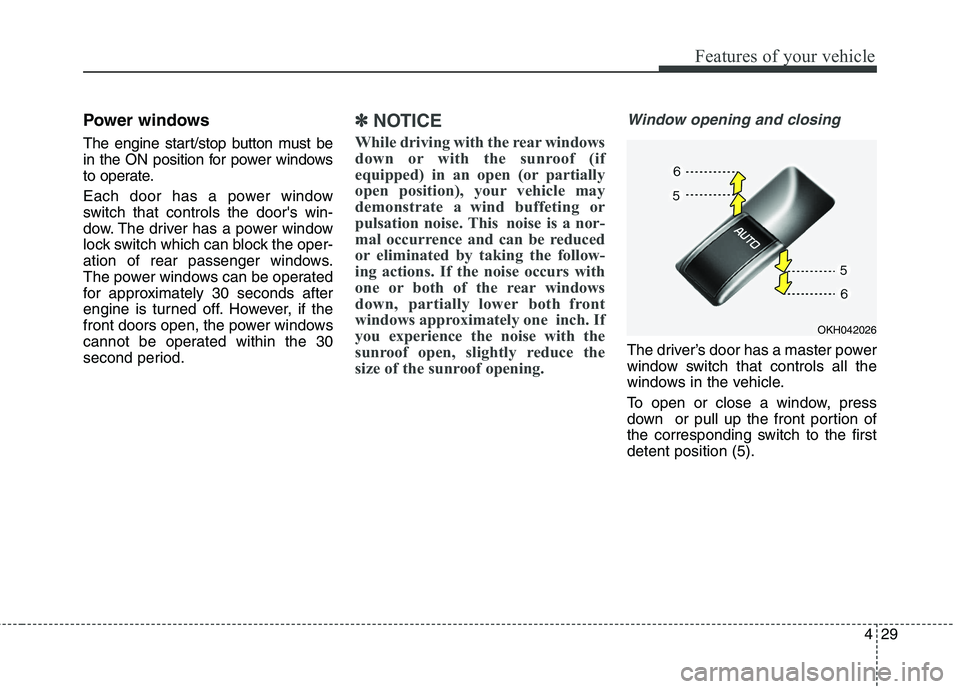
The driver’s door has a master power
window switch that controls all the
windows in the vehicle.
To open or close a window, press
down or pull up the front portion of
the corresponding switch to the firstdetent position (5).
OKH042026
Page 110 of 486

431
Features of your vehicle
Power window lock button
The driver can disable the power
window switches on the rear passen-
gers’ doors by pressing the power
window lock switch. The indicator willbe illuminated.
When the power window lock switch indicator is illuminated :
The driver’s master control canoperate all the power windows.
The front passenger’s control can operate the front passenger’s
power window.
The rear passenger’s control can- not operate the rear passenger’s
power window.
OKH042027
CAUTION
To prevent possible damage
to the power window system,do not open or close two win-dows or more at the sametime. This will also ensure the longevity of the fuse.
Never try to operate the main switch on the driver's doorand the individual door win-dow switch in opposite direc- tions at the same time. If thisis done, the window will stopand cannot be opened orclosed.
WARNING - Windows
NEVER leave the keys in your vehicle with unsupervised
children, when the engine isrunning.
NEVER leave any child unat- tended in the vehicle. Even
very young children may inad-
vertently cause the vehicle to
move, entangle themselves in
the windows, or otherwise
injure themselves or others.
Always double check to make sure all arms, hands, head and
other obstructions are safely
out of the way before closing a
window.
Do not allow children to play with the power windows. Keep
the driver’s door power window
lock button in the LOCK posi-
tion (The indicator on the but-
ton illuminates). Serious injury
can result from unintentional
window operation by the child.
Do not extend a face or arms outside through the windowopening while driving.