battery KIA QUORIS 2015 User Guide
[x] Cancel search | Manufacturer: KIA, Model Year: 2015, Model line: QUORIS, Model: KIA QUORIS 2015Pages: 486, PDF Size: 35.55 MB
Page 148 of 486
467
Features of your vehicle
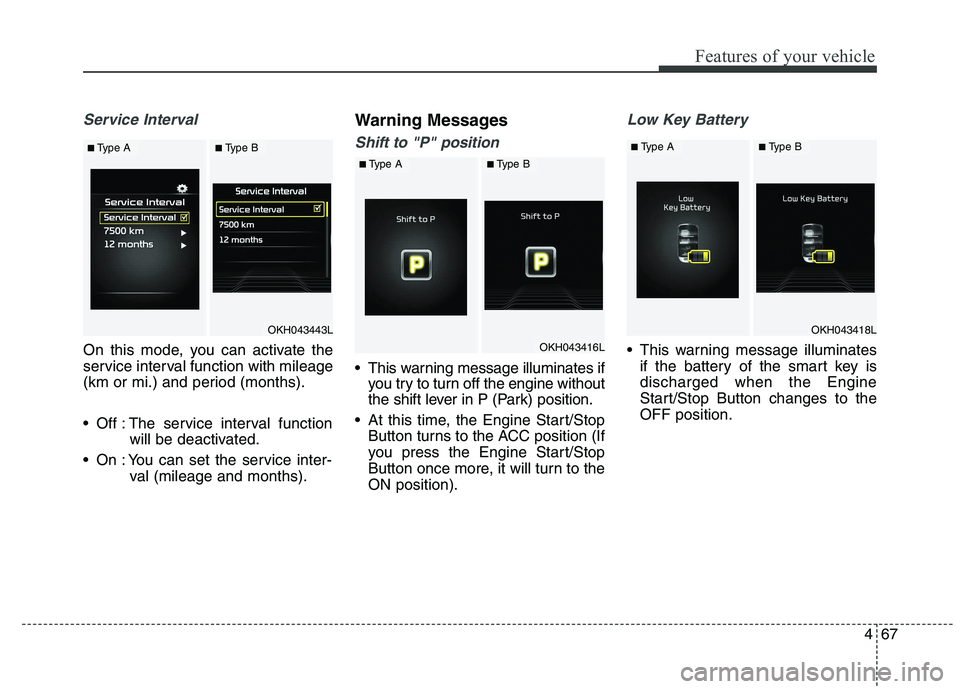
Service Interval
On this mode, you can activate the
service interval function with mileage
(km or mi.) and period (months).
Off : The service interval functionwill be deactivated.
On : You can set the service inter- val (mileage and months). Warning Messages
Shift to "P" position
This warning message illuminates if
you try to turn off the engine without
the shift lever in P (Park) position.
At this time, the Engine Start/Stop Button turns to the ACC position (If
you press the Engine Start/Stop
Button once more, it will turn to theON position).
Low Key Battery
This warning message illuminatesif the battery of the smart key is discharged when the Engine
Start/Stop Button changes to theOFF position.
OKH043443L
OKH043416L
■Type A
■Type A
■Type B
■Type B
OKH043418L
■ Type A■Type B
Page 149 of 486
Features of your vehicle
68
4
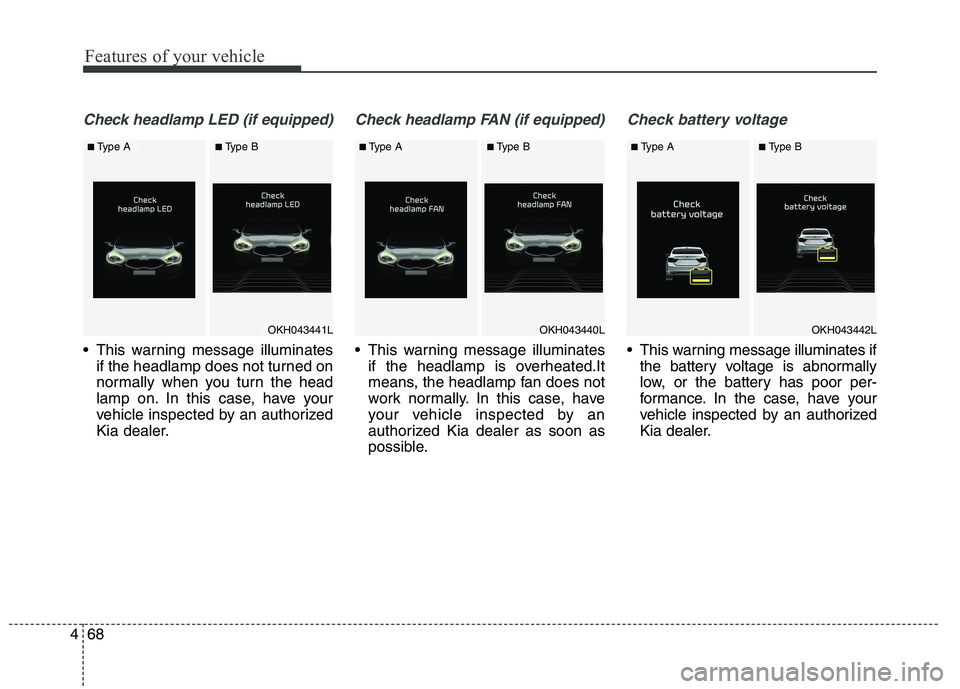
Check headlamp LED (if equipped)
This warning message illuminates
if the headlamp does not turned on
normally when you turn the head
lamp on. In this case, have your
vehicle inspected by an authorized
Kia dealer.
Check headlamp FAN (if equipped)
This warning message illuminatesif the headlamp is overheated.It
means, the headlamp fan does not
work normally. In this case, have
your vehicle inspected by an
authorized Kia dealer as soon as
possible.
Check battery voltage
This warning message illuminates ifthe battery voltage is abnormally
low, or the battery has poor per-
formance. In the case, have your
vehicle inspected by an authorized
Kia dealer.
OKH043441L
■Type A■Type B
OKH043440L
■ Type A■Type B
OKH043442L
■Type A■Type B
Page 155 of 486
Features of your vehicle
74
4
Overview
Description
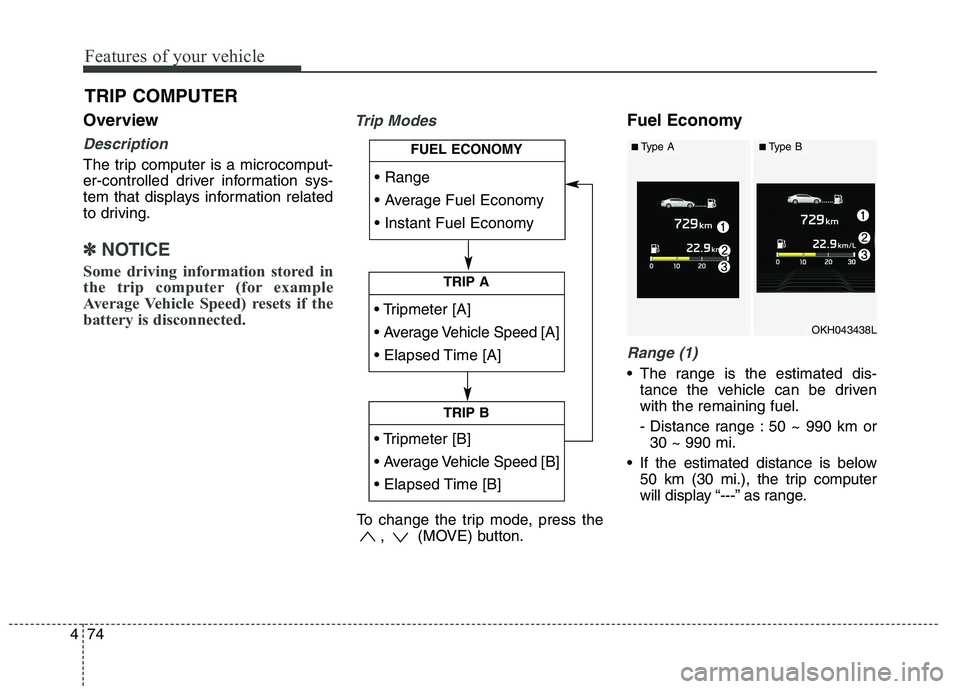
The trip computer is a microcomput-
er-controlled driver information sys-
tem that displays information related
to driving.
✽✽
NOTICE
Some driving information stored in
the trip computer (for example
Average Vehicle Speed) resets if the
battery is disconnected.
Trip ModesFuel Economy
Range (1)
The range is the estimated dis- tance the vehicle can be driven with the remaining fuel.
- Distance range : 50 ~ 990 km or30 ~ 990 mi.
If the estimated distance is below 50 km (30 mi.), the trip computer
will display “---” as range.
TRIP COMPUTER
TRIP A
TRIP B
FUEL ECONOMY
To change the trip mode, press the , (MOVE) button.
OKH043438L
■Type A■Type B
Page 156 of 486
475
Features of your vehicle
✽✽NOTICE
If the vehicle is not on level ground or the battery power has been
interrupted, the range function
may not operate correctly.
The range may differ from the actual driving distance as it is an
estimate of the available driving
distance.
The trip computer may not register additional fuel if less than 6 liters
(1.6 gallons) of fuel are added to the
vehicle.
The fuel economy and range may vary significantly based on driving
conditions, driving habits, and con-
dition of the vehicle.Average Fuel Economy (2)
The average fuel economy is calcu-lated by the total driving distance and fuel consumption since the last
average fuel economy reset.
- Fuel economy range: 0.0 ~ 99.9L/100km or MPG
The average fuel economy can be reset both manually and automati-
cally.
Manual reset
To clear the average fuel economy
manually, press the OK (RESET) but-
ton on the steering wheel for more
than 1 second when the average fuel
economy is displayed. Automatic reset
To make the average fuel economy
be reset automatically whenever refu-
eling, select the “Auto Reset” mode in
User Setting menu of the LCD display
(Refer to “LCD Display”).
Under “Auto Reset” mode, the aver-
age fuel economy will be cleared to
zero (---) when the vehicle speed
exceeds 1 km/h after refueling morethan 6 liters (1.6 gallons).
✽✽
NOTICE
The average fuel economy is not dis-
played for more accurate calculation
if the vehicle does not drive more
than 300 meters (0.19 miles) since
the Engine Start/Stop button is
turned to ON.
Page 172 of 486
491
Features of your vehicle
Immobilizer IndicatorLight
This indicator light illuminates for up
to 30 seconds:
When the vehicle detects the smart key in the vehicle properly
while the Engine Start/Stop Button
is ACC or ON.
- At this time, you can start theengine.
- The indicator light goes off after starting the engine.
This indicator light blinks for a few
seconds:
When the smart key is not in the vehicle.
- At this time, you can not start theengine. This indicator light illuminates for 2
seconds and goes off:
When the vehicle can not detect
the smart key which is in the vehi-
cle while the Engine Start/StopButton is ON.
In this case, we recommend that
you have the vehicle inspected by
an authorized Kia dealer.
This indicator light blinks:
When the battery of the smart key is weak.
- At this time, you can not start theengine. However, you can start
the engine if you press the Engine
Start/Stop Button with the smart
key. (For more details, refer to
“Starting the Engine” in section 5).
When there is a malfunction with the immobilizer system.
In this case, we recommend that you
have the vehicle inspected by an
authorized Kia dealer.
Turn Signal Indicator Light
This indicator light blinks:
When you turn the turn signal light on.
If any of the following occurs, there
may a malfunction with the turn signal
system. In this case, we recommend
that you have the vehicle inspected by
an authorized Kia dealer. - The indicator light does not blinkbut illuminates.
- The indicator light blinks more rapidly.
- The indicator light does not illumi- nate at all.
Page 189 of 486
Features of your vehicle
108
4
Battery saver function
The purpose of this feature is to
prevent the battery from being dis-
charged. The system automatically
turns off the parking lights when
the driver turns off the engine and
opens the driver-side door.
With this feature, the parking lights will be turned off automatically if
the driver parks on the side of roadat night.
If necessary, to keep the lights on
when the engine is turned off per-
form the following:
1) Open the driver-side door.
2) Turn the parking lights OFF and ON again. Headlight escort function
The headlights (and/or parking
lights) will remain on for approxi-
mately 5 minutes after the engine
start/stop button is turned to the ACC
or OFF position. However, if the dri-
ver’s door is opened and closed, the
headlights are turned off after 15
seconds.
The headlights can be turned off by
pressing the lock button on the smart
key twice or turning off the light
switch from the headlight or Autolight position.
Daytime running light (if equipped)
The Daytime Running Lights (DRL)
can make it easier for others to see
the front of your vehicle during the
day. DRL can be helpful in many dif-
ferent driving conditions, and it is
especially helpful after dawn and
before sunset.
The DRL system will turn the dedi- cated lamp OFF when:
1. The headlight or fog lamp switch is
ON.
2. The engine is OFF.
LIGHTING
CAUTION
If the driver gets out of the vehi-
cle through other doors (exceptdriver's door), the battery saver function does not operate andthe headlight escort functiondoes not turn off automatically.Therefore, It causes the battery to be discharged. In this case,make sure to turn off the lampbefore getting out of the vehicle.
Page 193 of 486
Features of your vehicle
112
4
High beam operation
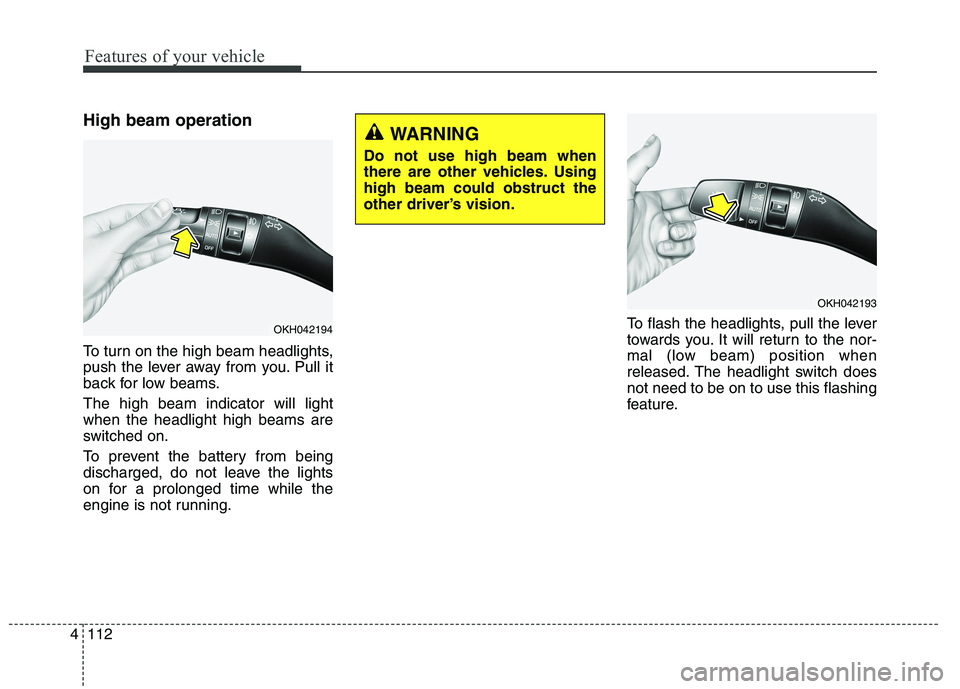
To turn on the high beam headlights,
push the lever away from you. Pull it
back for low beams. The high beam indicator will light when the headlight high beams are
switched on.
To prevent the battery from being
discharged, do not leave the lights
on for a prolonged time while the
engine is not running. To flash the headlights, pull the lever
towards you. It will return to the nor-
mal (low beam) position when
released. The headlight switch doesnot need to be on to use this flashing
feature.
OKH042194
WARNING
Do not use high beam when
there are other vehicles. Usinghigh beam could obstruct the
other driver’s vision.
OKH042193
Page 195 of 486
Features of your vehicle
114
4
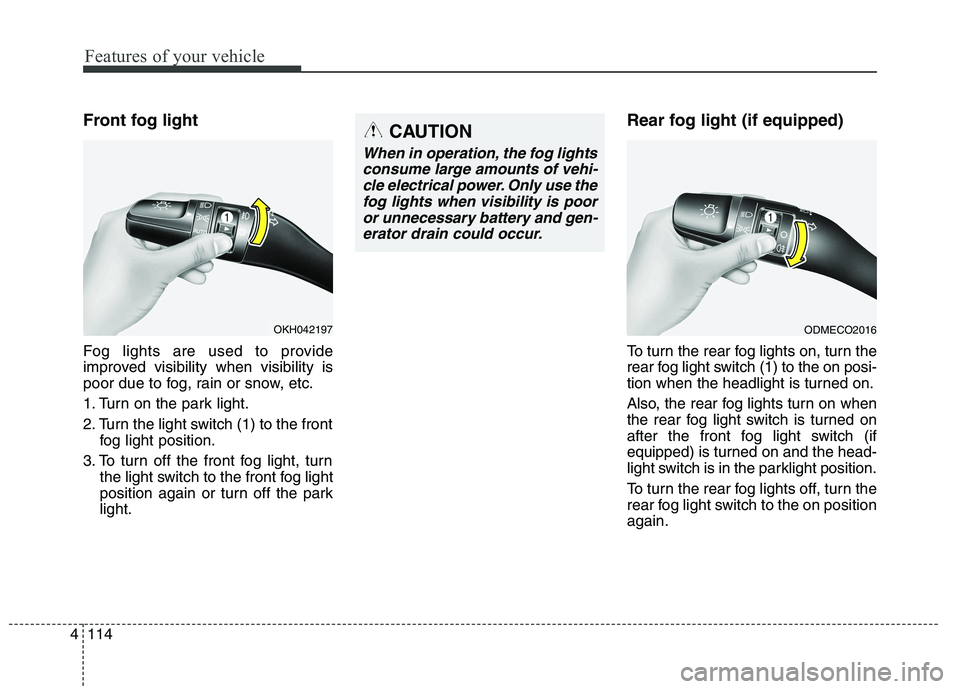
Front fog light
Fog lights are used to provide
improved visibility when visibility is
poor due to fog, rain or snow, etc.
1. Turn on the park light.
2. Turn the light switch (1) to the front
fog light position.
3. To turn off the front fog light, turn the light switch to the front fog light
position again or turn off the parklight. Rear fog light (if equipped)
To turn the rear fog lights on, turn the
rear fog light switch (1) to the on posi-
tion when the headlight is turned on.
Also, the rear fog lights turn on when
the rear fog light switch is turned on
after the front fog light switch (if
equipped) is turned on and the head-
light switch is in the parklight position.
To turn the rear fog lights off, turn the
rear fog light switch to the on positionagain.
OKH042197
CAUTION
When in operation, the fog lights
consume large amounts of vehi-cle electrical power. Only use the fog lights when visibility is pooror unnecessary battery and gen-erator drain could occur.
ODMECO2016
Page 200 of 486
4119
Features of your vehicle
INTERIOR LIGHTAutomatic turn off function (if equipped)
The interior lights automatically turn
off approximately 20 minutes after
the engine is turned off.
If your vehicle is equipped with the
theft alarm system, the interior lights
automatically turns off several sec-
onds after the system is armed stage. Type A
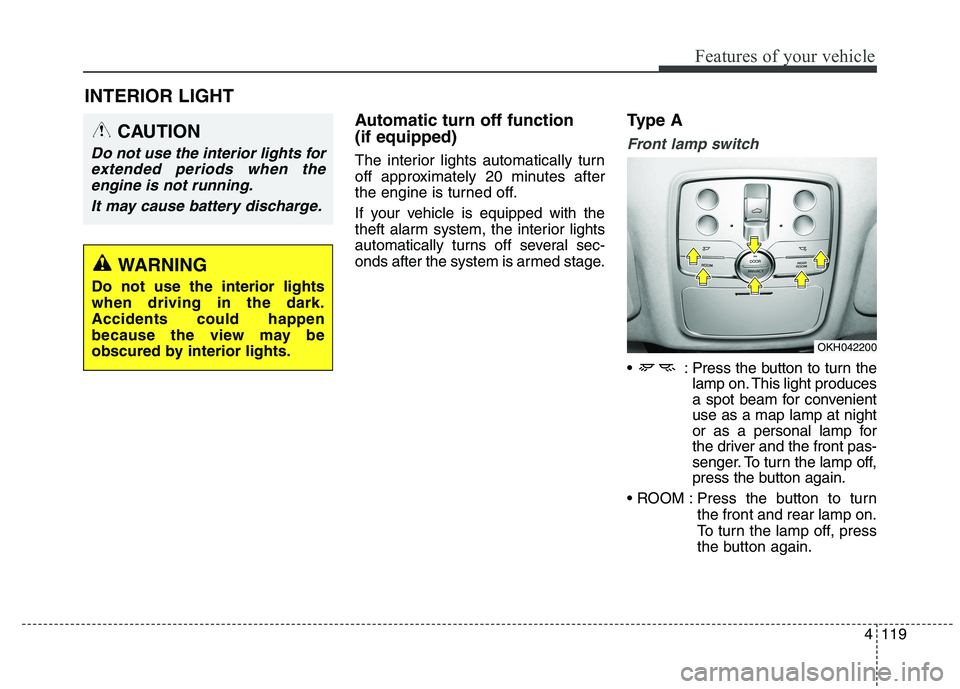
Front lamp switch
: Press the button to turn the
lamp on. This light produces
a spot beam for convenientuse as a map lamp at night
or as a personal lamp for
the driver and the front pas-
senger. To turn the lamp off,
press the button again.
Press the button to turn the front and rear lamp on.
To turn the lamp off, press
the button again.
CAUTION
Do not use the interior lights for
extended periods when theengine is not running.
It may cause battery discharge.
OKH042200
WARNING
Do not use the interior lights when driving in the dark.Accidents could happen
because the view may be
obscured by interior lights.
Page 204 of 486
4123
Features of your vehicle
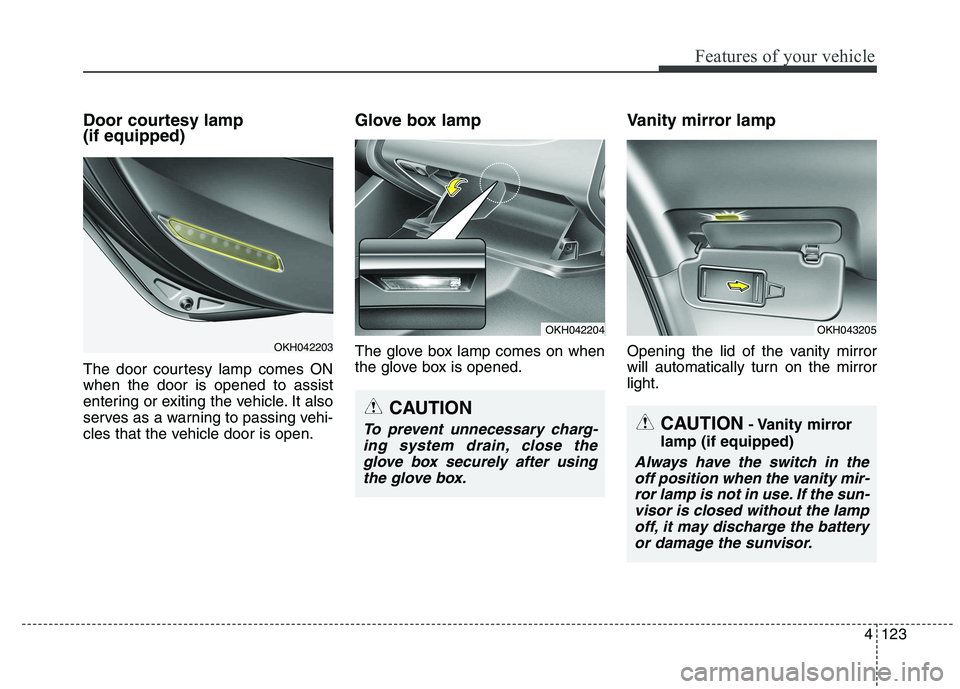
Door courtesy lamp (if equipped)
The door courtesy lamp comes ON when the door is opened to assist
entering or exiting the vehicle. It also
serves as a warning to passing vehi-
cles that the vehicle door is open.Glove box lamp
The glove box lamp comes on when
the glove box is opened.
Vanity mirror lamp
Opening the lid of the vanity mirror
will automatically turn on the mirrorlight.
CAUTION
- Vanity mirror
lamp (if equipped)
Always have the switch in the off position when the vanity mir-ror lamp is not in use. If the sun- visor is closed without the lampoff, it may discharge the batteryor damage the sunvisor.
OKH042204
CAUTION
To prevent unnecessary charg-ing system drain, close theglove box securely after using the glove box.
OKH043205
OKH042203