fuel KIA QUORIS 2015 User Guide
[x] Cancel search | Manufacturer: KIA, Model Year: 2015, Model line: QUORIS, Model: KIA QUORIS 2015Pages: 486, PDF Size: 35.55 MB
Page 131 of 486
Features of your vehicle
50
4
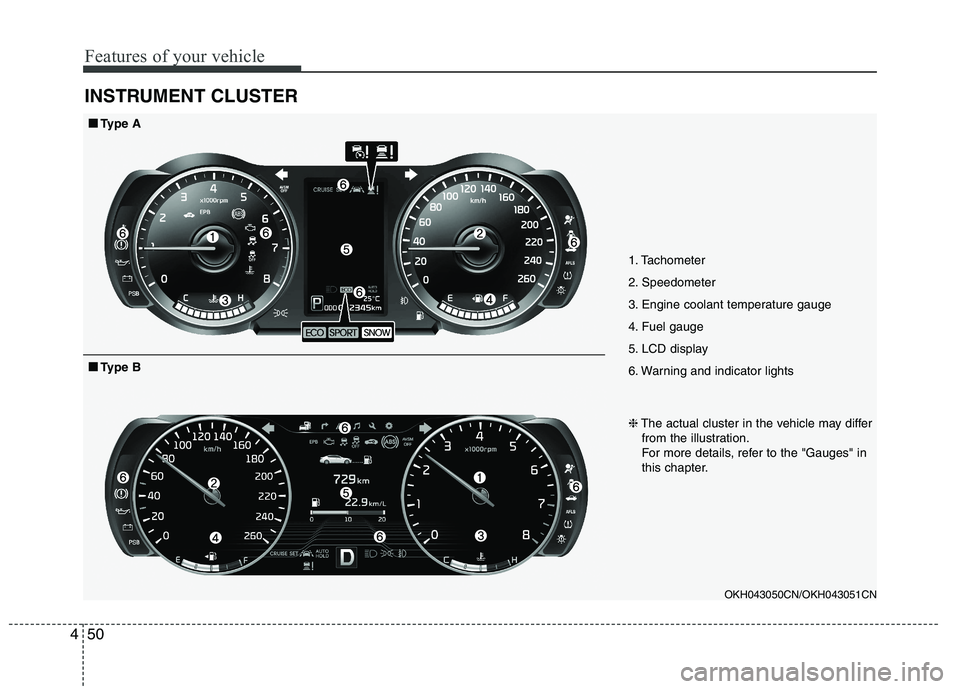
INSTRUMENT CLUSTER
1. Tachometer
2. Speedometer
3. Engine coolant temperature gauge
4. Fuel gauge
5. LCD display
6. Warning and indicator lights
OKH043050CN/OKH043051CN
■■Type A
❈The actual cluster in the vehicle may differ
from the illustration.
For more details, refer to the "Gauges" in
this chapter.
■■ Type B
Page 136 of 486
455
Features of your vehicle
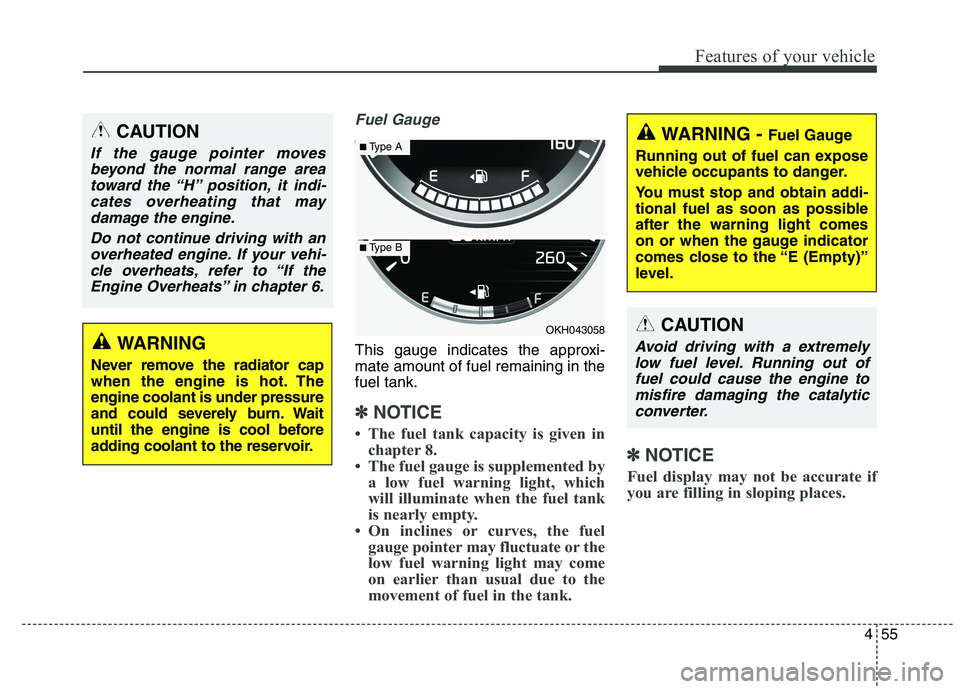
Fuel Gauge
This gauge indicates the approxi- mate amount of fuel remaining in thefuel tank.
✽✽NOTICE
The fuel tank capacity is given in chapter 8.
The fuel gauge is supplemented by a low fuel warning light, which
will illuminate when the fuel tank
is nearly empty.
On inclines or curves, the fuel gauge pointer may fluctuate or the
low fuel warning light may come
on earlier than usual due to the
movement of fuel in the tank. ✽
✽
NOTICE
Fuel display may not be accurate if
you are filling in sloping places.
WARNING
Never remove the radiator cap
when the engine is hot. Theengine coolant is under pressure
and could severely burn. Wait
until the engine is cool before
adding coolant to the reservoir.
CAUTION
If the gauge pointer moves beyond the normal range area toward the “H” position, it indi-cates overheating that maydamage the engine.
Do not continue driving with anoverheated engine. If your vehi- cle overheats, refer to “If theEngine Overheats” in chapter 6.
OKH043058
■ Type A
■Type B
WARNING - Fuel Gauge
Running out of fuel can expose
vehicle occupants to danger.
You must stop and obtain addi-
tional fuel as soon as possibleafter the warning light comes
on or when the gauge indicator
comes close to the “E (Empty)”
level.
CAUTION
Avoid driving with a extremely low fuel level. Running out offuel could cause the engine tomisfire damaging the catalytic converter.
Page 138 of 486
457
Features of your vehicle
LCD ModesLCD DISPLAY
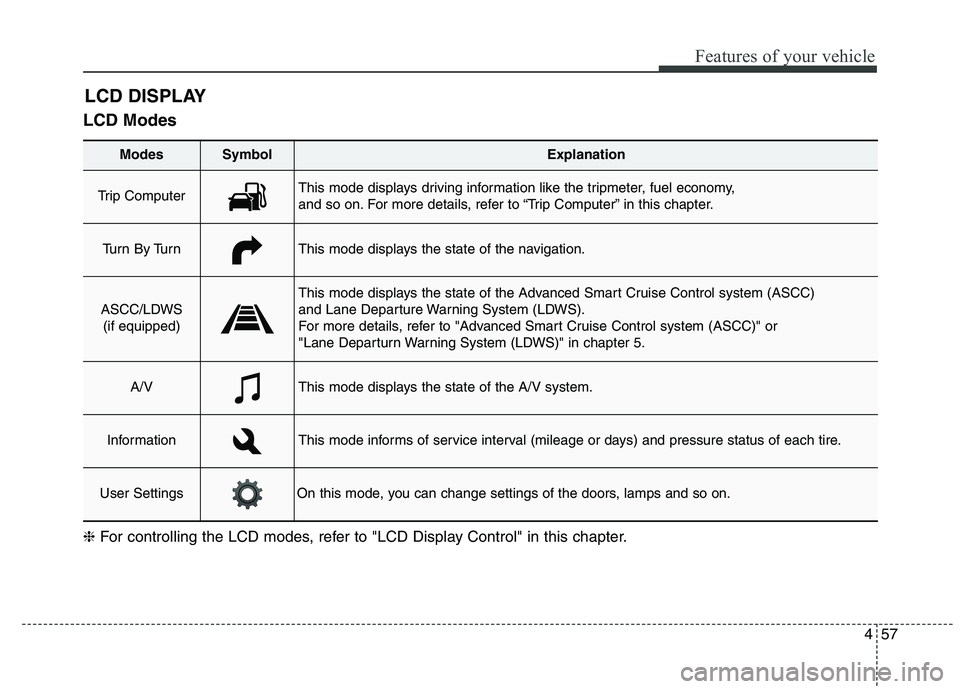
Modes SymbolExplanation
Trip Computer This mode displays driving information like the tripmeter, fuel economy,
and so on. For more details, refer to “Trip Computer” in this chapter.
Tu r n B y Tu r nThis mode displays the state of the navigation.
ASCC/LDWS
(if equipped)
This mode displays the state of the Advanced Smart Cruise Control system (ASCC)
and Lane Departure Warning System (LDWS).
For more details, refer to "Advanced Smart Cruise Control system (ASCC)" or
"Lane Departurn Warning System (LDWS)" in chapter 5.
A/VThis mode displays the state of the A/V system.
InformationThis mode informs of service interval (mileage or days) and pressure status of each tire.
User SettingsOn this mode, you can change settings of the doors, lamps and so on.
❈ For controlling the LCD modes, refer to "LCD Display Control" in this chapter.
Page 139 of 486
Features of your vehicle
58
4
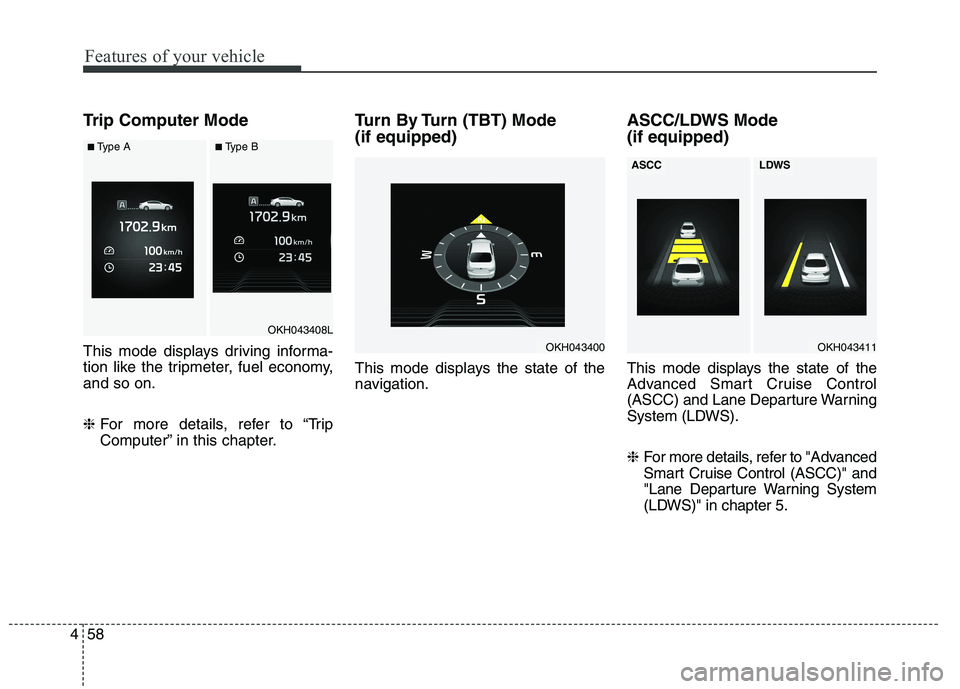
Trip Computer Mode
This mode displays driving informa-
tion like the tripmeter, fuel economy,and so on. ❈ For more details, refer to “Trip
Computer” in this chapter. Turn By Turn (TBT) Mode (if equipped)
This mode displays the state of the
navigation.
ASCC/LDWS Mode (if equipped)
This mode displays the state of the
Advanced Smart Cruise Control
(ASCC) and Lane Departure Warning
System (LDWS). ❈
For more details, refer to "Advanced
Smart Cruise Control (ASCC)" and
"Lane Departure Warning System
(LDWS)" in chapter 5.
OKH043400
OKH043408L
■Type A■Type B
OKH043411
ASCCLDWS
Page 147 of 486
Features of your vehicle
66
4
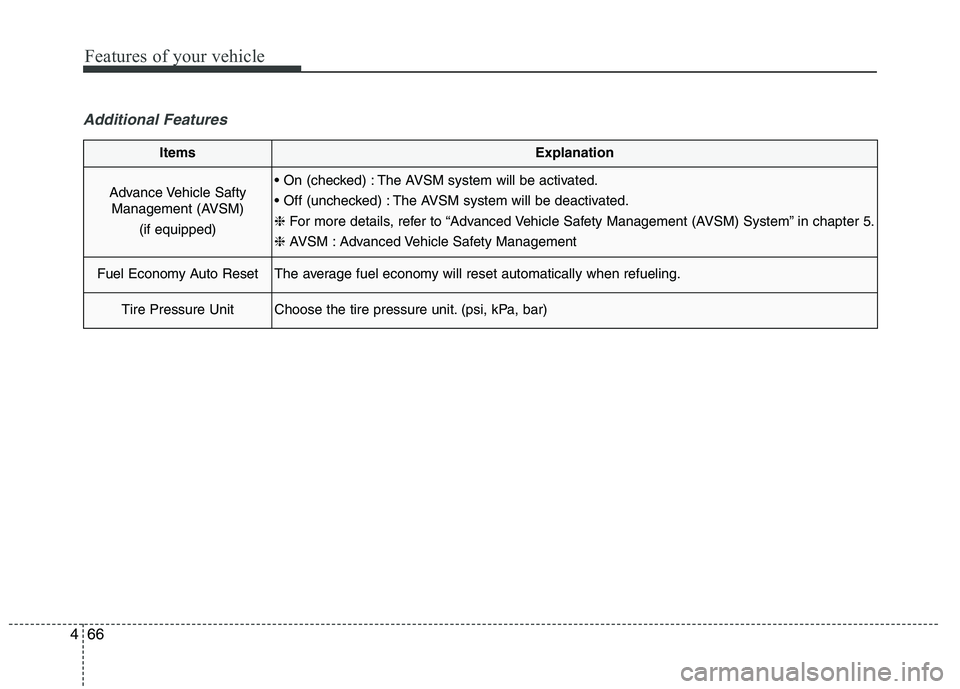
Additional Features
ItemsExplanation
Advance Vehicle Safty
Management (AVSM)
(if equipped) The AVSM system will be activated.
The AVSM system will be deactivated.❈ For more details, refer to “Advanced Vehicle Safety Management (AVSM) System” in chapter 5.
❈ AVSM : Advanced Vehicle Safety Management
Fuel Economy Auto ResetThe average fuel economy will reset automatically when refueling.
Tire Pressure UnitChoose the tire pressure unit. (psi, kPa, bar)
Page 155 of 486
Features of your vehicle
74
4
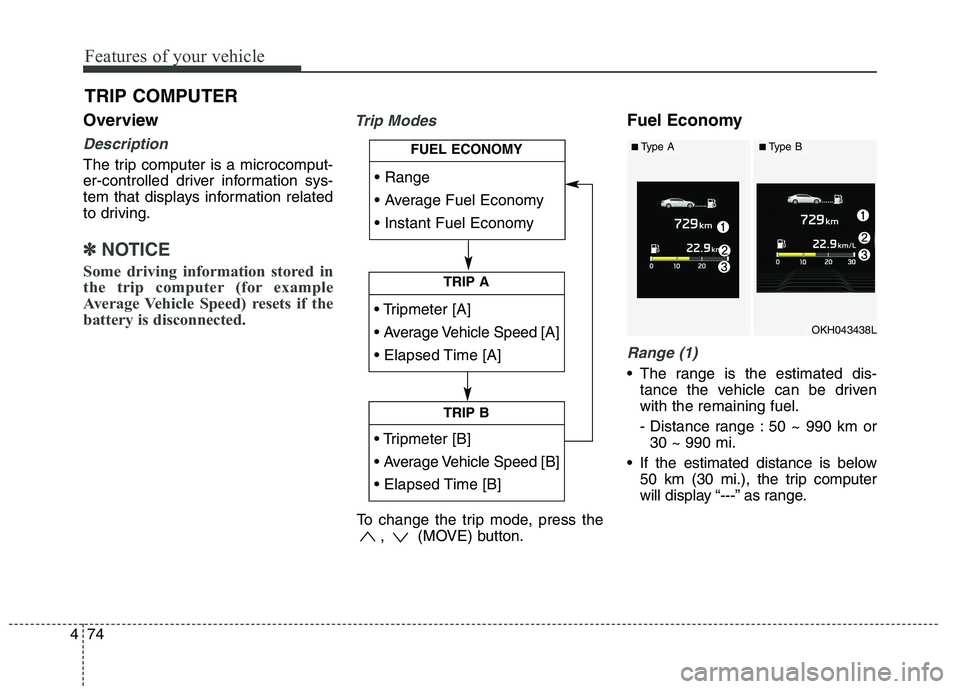
Overview
Description
The trip computer is a microcomput-
er-controlled driver information sys-
tem that displays information related
to driving.
✽✽
NOTICE
Some driving information stored in
the trip computer (for example
Average Vehicle Speed) resets if the
battery is disconnected.
Trip ModesFuel Economy
Range (1)
The range is the estimated dis- tance the vehicle can be driven with the remaining fuel.
- Distance range : 50 ~ 990 km or30 ~ 990 mi.
If the estimated distance is below 50 km (30 mi.), the trip computer
will display “---” as range.
TRIP COMPUTER
TRIP A
TRIP B
FUEL ECONOMY
To change the trip mode, press the , (MOVE) button.
OKH043438L
■Type A■Type B
Page 156 of 486
475
Features of your vehicle
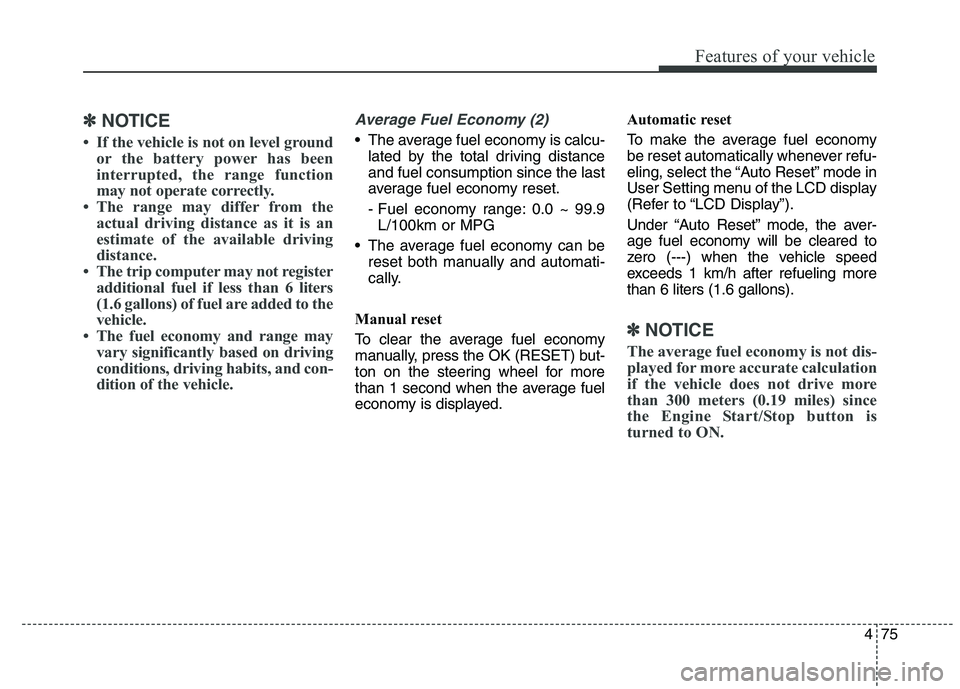
✽✽NOTICE
If the vehicle is not on level ground or the battery power has been
interrupted, the range function
may not operate correctly.
The range may differ from the actual driving distance as it is an
estimate of the available driving
distance.
The trip computer may not register additional fuel if less than 6 liters
(1.6 gallons) of fuel are added to the
vehicle.
The fuel economy and range may vary significantly based on driving
conditions, driving habits, and con-
dition of the vehicle.Average Fuel Economy (2)
The average fuel economy is calcu-lated by the total driving distance and fuel consumption since the last
average fuel economy reset.
- Fuel economy range: 0.0 ~ 99.9L/100km or MPG
The average fuel economy can be reset both manually and automati-
cally.
Manual reset
To clear the average fuel economy
manually, press the OK (RESET) but-
ton on the steering wheel for more
than 1 second when the average fuel
economy is displayed. Automatic reset
To make the average fuel economy
be reset automatically whenever refu-
eling, select the “Auto Reset” mode in
User Setting menu of the LCD display
(Refer to “LCD Display”).
Under “Auto Reset” mode, the aver-
age fuel economy will be cleared to
zero (---) when the vehicle speed
exceeds 1 km/h after refueling morethan 6 liters (1.6 gallons).
✽✽
NOTICE
The average fuel economy is not dis-
played for more accurate calculation
if the vehicle does not drive more
than 300 meters (0.19 miles) since
the Engine Start/Stop button is
turned to ON.
Page 157 of 486
Features of your vehicle
76
4
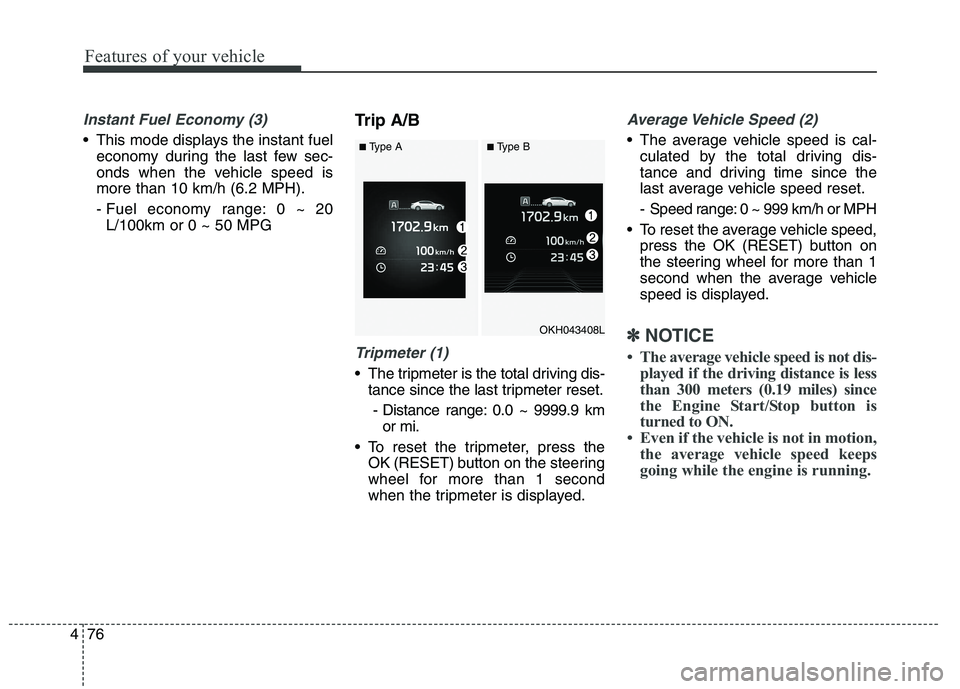
Instant Fuel Economy (3)
This mode displays the instant fuel
economy during the last few sec-
onds when the vehicle speed ismore than 10 km/h (6.2 MPH).
- Fuel economy range: 0 ~ 20L/100km or 0 ~ 50 MPG Trip A/B
Tripmeter (1)
The tripmeter is the total driving dis-
tance since the last tripmeter reset.
- Distance range: 0.0 ~ 9999.9 km or mi.
To reset the tripmeter, press the OK (RESET) b utton on the steering
wheel for more than 1 second
when the tripmeter is displayed.
Average Vehicle Speed (2)
The average vehicle speed is cal- culated by the total driving dis-
tance and driving time since the
last average vehicle speed reset.
- Speed range: 0 ~ 999 km/h or MPH
To reset the average vehicle speed, press the OK (RESET) button on
the steering wheel for more than 1
second when the average vehicle
speed is displayed.
✽✽ NOTICE
The average vehicle speed is not dis- played if the driving distance is less
than 300 meters (0.19 miles) since
the Engine Start/Stop button is
turned to ON.
Even if the vehicle is not in motion, the average vehicle speed keeps
going while the engine is running.OKH043408L
■Type A■Type B
Page 158 of 486
477
Features of your vehicle
Elapsed Time (3)
The elapsed time is the total driv-ing time since the last elapsed time reset.
- Time range (hh:mm): 00:00 ~ 99:59
To reset the elapsed time, press the OK (RESET) b utton on the steering
wheel for more than 1 second when
the elapsed time is displayed.
✽✽ NOTICE
Even if the vehicle is not in motion,
the elapsed time keeps going while
the engine is running.
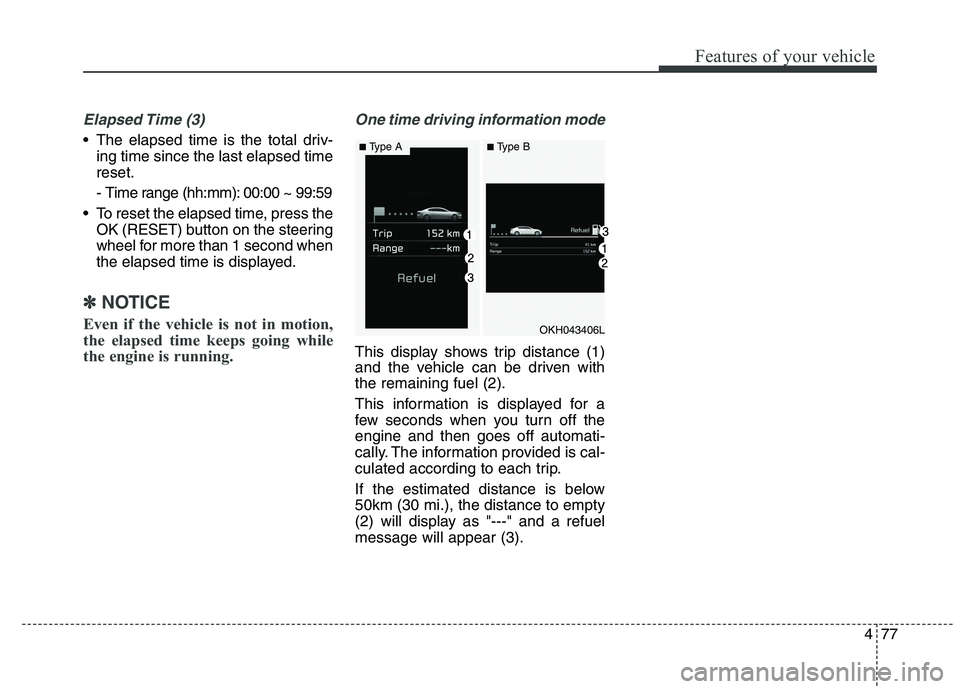
One time driving information mode
This display shows trip distance (1)
and the vehicle can be driven withthe remaining fuel (2).
This information is displayed for a
few seconds when you turn off theengine and then goes off automati-
cally. The information provided is cal-
culated according to each trip.
If the estimated distance is below 50km (30 mi.), the distance to empty
(2) will display as "---" and a refuelmessage will appear (3).
OKH043406L
■ Type A■Type B
Page 162 of 486
481
Features of your vehicle
✽✽NOTICE- Electronic Brake
force Distribution (EBD)
System Warning Light
When the ABS Warning Light is on
or both ABS and Parking Brake &
Brake Fluid Warning Lights are on,
the speedometer, odometer, or trip-
meter may not work. Also, the EPS
Warning Light may illuminate and
the steering effort may increase or
decrease.
In this case, we recommend you
have the vehicle inspected by an
authorized Kia dealer as soon as
possible.Malfunction Indicator Lamp (MIL)
This warning light illuminates:
Once you set the Engine Start/Stop Button to the ON position.
- It remains on until the engine isstarted.
When there is a malfunction with the emission control system.
In this case, we recommend that
you have the vehicle inspected by
an authorized Kia dealer.
CAUTION - Malfunction
Indicator Lamp (MIL)
Driving with the Malfunction Indicator Lamp (MIL) on maycause damage to the emissioncontrol systems which could effect drivability and/or fueleconomy.
CAUTION - Gasoline Engine
If the Malfunction Indicator
Lamp (MIL) illuminates, poten-tial catalytic converter damageis possible which could result in loss of engine power.
In this case, we recommend thatyou have the vehicle inspectedby an authorized Kia dealer assoon as possible.