steering KIA QUORIS 2015 Owner's Manual
[x] Cancel search | Manufacturer: KIA, Model Year: 2015, Model line: QUORIS, Model: KIA QUORIS 2015Pages: 486, PDF Size: 35.55 MB
Page 154 of 486
473
Features of your vehicle
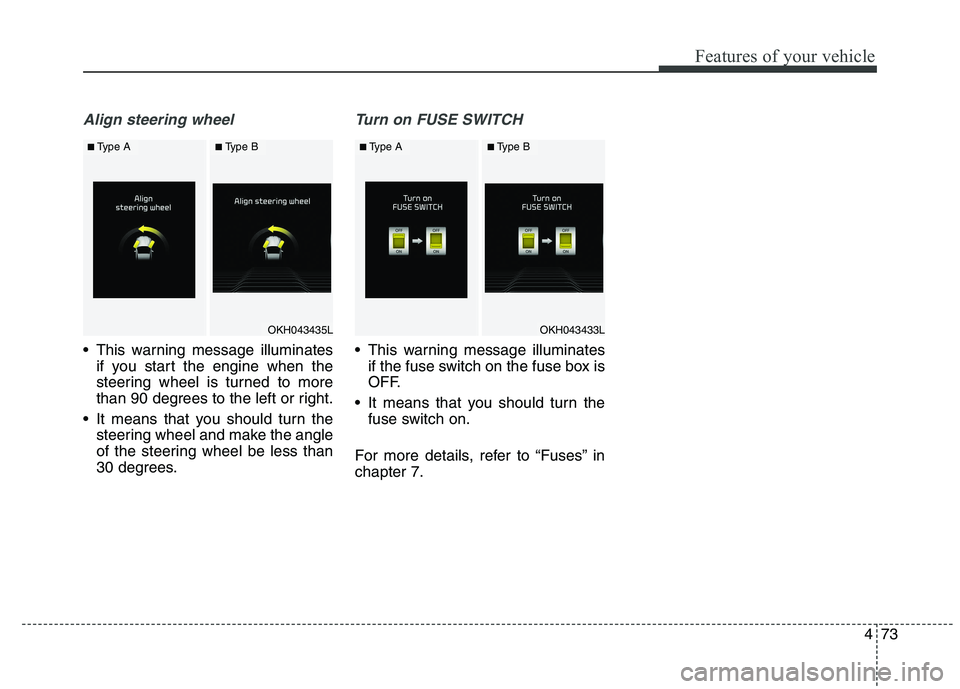
Align steering wheel
This warning message illuminatesif you start the engine when the
steering wheel is turned to more
than 90 degrees to the left or right.
It means that you should turn the steering wheel and make the angle
of the steering wheel be less than
30 degrees.
Turn on FUSE SWITCH
This warning message illuminatesif the fuse switch on the fuse box is
OFF.
It means that you should turn the fuse switch on.
For more details, refer to “Fuses” inchapter 7.
OKH043433L
■ Type A■Type B
OKH043435L
■Type A■Type B
Page 156 of 486
475
Features of your vehicle
✽✽NOTICE
If the vehicle is not on level ground or the battery power has been
interrupted, the range function
may not operate correctly.
The range may differ from the actual driving distance as it is an
estimate of the available driving
distance.
The trip computer may not register additional fuel if less than 6 liters
(1.6 gallons) of fuel are added to the
vehicle.
The fuel economy and range may vary significantly based on driving
conditions, driving habits, and con-
dition of the vehicle.Average Fuel Economy (2)
The average fuel economy is calcu-lated by the total driving distance and fuel consumption since the last
average fuel economy reset.
- Fuel economy range: 0.0 ~ 99.9L/100km or MPG
The average fuel economy can be reset both manually and automati-
cally.
Manual reset
To clear the average fuel economy
manually, press the OK (RESET) but-
ton on the steering wheel for more
than 1 second when the average fuel
economy is displayed. Automatic reset
To make the average fuel economy
be reset automatically whenever refu-
eling, select the “Auto Reset” mode in
User Setting menu of the LCD display
(Refer to “LCD Display”).
Under “Auto Reset” mode, the aver-
age fuel economy will be cleared to
zero (---) when the vehicle speed
exceeds 1 km/h after refueling morethan 6 liters (1.6 gallons).
✽✽
NOTICE
The average fuel economy is not dis-
played for more accurate calculation
if the vehicle does not drive more
than 300 meters (0.19 miles) since
the Engine Start/Stop button is
turned to ON.
Page 157 of 486
Features of your vehicle
76
4
Instant Fuel Economy (3)
This mode displays the instant fuel
economy during the last few sec-
onds when the vehicle speed ismore than 10 km/h (6.2 MPH).
- Fuel economy range: 0 ~ 20L/100km or 0 ~ 50 MPG Trip A/B
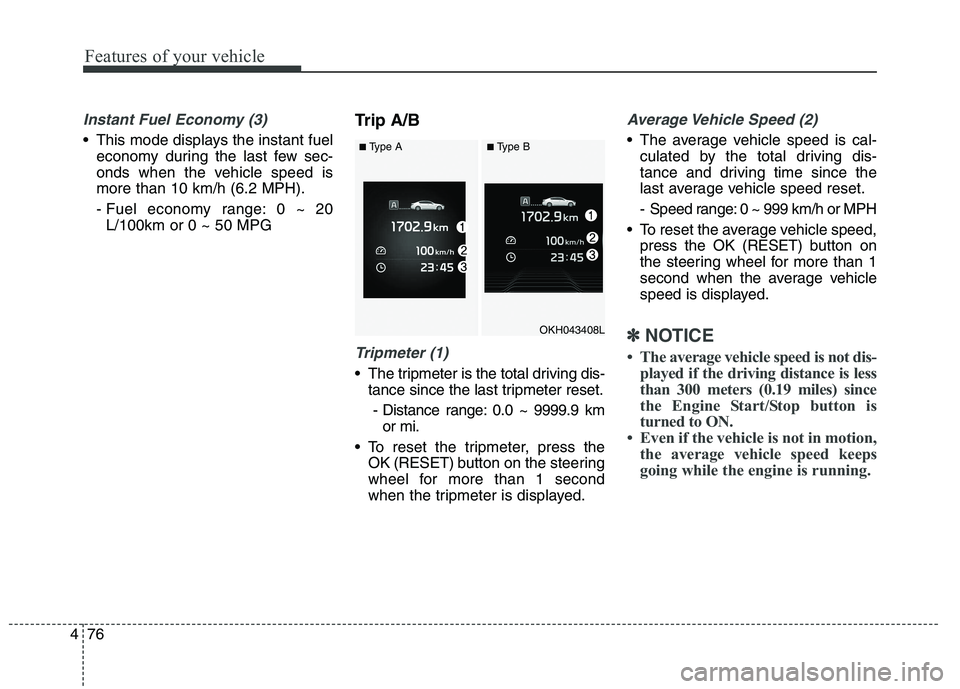
Tripmeter (1)
The tripmeter is the total driving dis-
tance since the last tripmeter reset.
- Distance range: 0.0 ~ 9999.9 km or mi.
To reset the tripmeter, press the OK (RESET) b utton on the steering
wheel for more than 1 second
when the tripmeter is displayed.
Average Vehicle Speed (2)
The average vehicle speed is cal- culated by the total driving dis-
tance and driving time since the
last average vehicle speed reset.
- Speed range: 0 ~ 999 km/h or MPH
To reset the average vehicle speed, press the OK (RESET) button on
the steering wheel for more than 1
second when the average vehicle
speed is displayed.
✽✽ NOTICE
The average vehicle speed is not dis- played if the driving distance is less
than 300 meters (0.19 miles) since
the Engine Start/Stop button is
turned to ON.
Even if the vehicle is not in motion, the average vehicle speed keeps
going while the engine is running.OKH043408L
■Type A■Type B
Page 158 of 486
477
Features of your vehicle
Elapsed Time (3)
The elapsed time is the total driv-ing time since the last elapsed time reset.
- Time range (hh:mm): 00:00 ~ 99:59
To reset the elapsed time, press the OK (RESET) b utton on the steering
wheel for more than 1 second when
the elapsed time is displayed.
✽✽ NOTICE
Even if the vehicle is not in motion,
the elapsed time keeps going while
the engine is running.
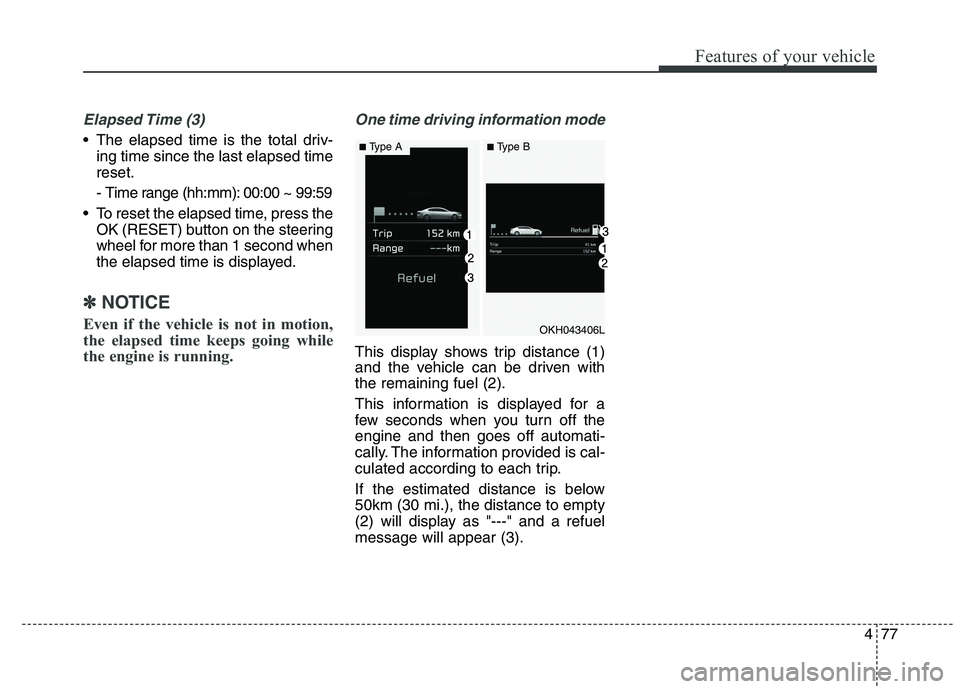
One time driving information mode
This display shows trip distance (1)
and the vehicle can be driven withthe remaining fuel (2).
This information is displayed for a
few seconds when you turn off theengine and then goes off automati-
cally. The information provided is cal-
culated according to each trip.
If the estimated distance is below 50km (30 mi.), the distance to empty
(2) will display as "---" and a refuelmessage will appear (3).
OKH043406L
■ Type A■Type B
Page 162 of 486
481
Features of your vehicle
✽✽NOTICE- Electronic Brake
force Distribution (EBD)
System Warning Light
When the ABS Warning Light is on
or both ABS and Parking Brake &
Brake Fluid Warning Lights are on,
the speedometer, odometer, or trip-
meter may not work. Also, the EPS
Warning Light may illuminate and
the steering effort may increase or
decrease.
In this case, we recommend you
have the vehicle inspected by an
authorized Kia dealer as soon as
possible.Malfunction Indicator Lamp (MIL)
This warning light illuminates:
Once you set the Engine Start/Stop Button to the ON position.
- It remains on until the engine isstarted.
When there is a malfunction with the emission control system.
In this case, we recommend that
you have the vehicle inspected by
an authorized Kia dealer.
CAUTION - Malfunction
Indicator Lamp (MIL)
Driving with the Malfunction Indicator Lamp (MIL) on maycause damage to the emissioncontrol systems which could effect drivability and/or fueleconomy.
CAUTION - Gasoline Engine
If the Malfunction Indicator
Lamp (MIL) illuminates, poten-tial catalytic converter damageis possible which could result in loss of engine power.
In this case, we recommend thatyou have the vehicle inspectedby an authorized Kia dealer assoon as possible.
Page 185 of 486
Features of your vehicle
104
4
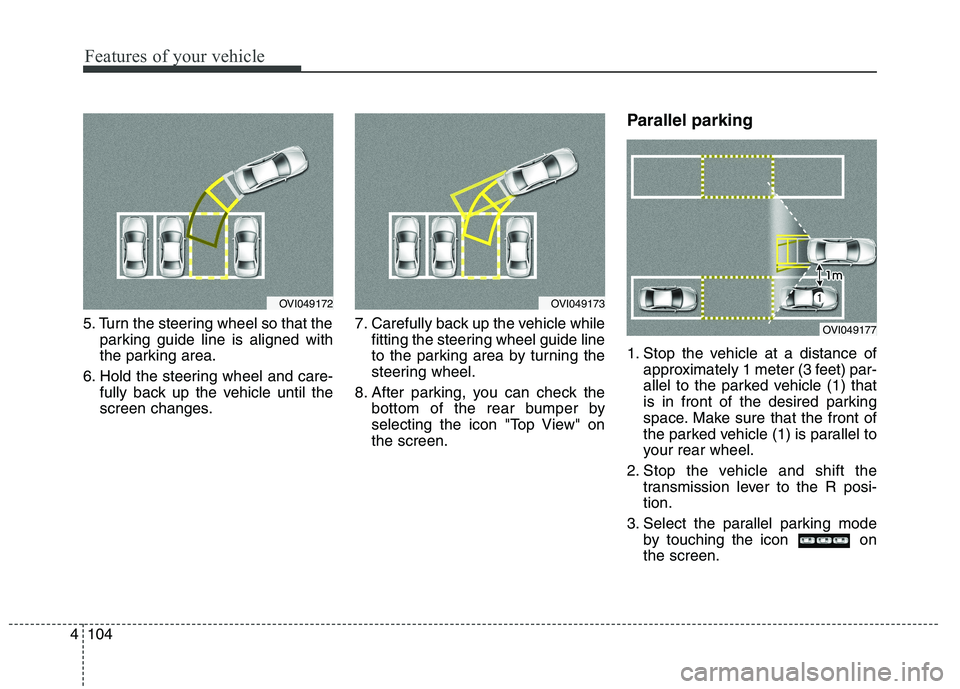
5. Turn the steering wheel so that the
parking guide line is aligned with
the parking area.
6. Hold the steering wheel and care- fully back up the vehicle until the
screen changes. 7. Carefully back up the vehicle while
fitting the steering wheel guide line
to the parking area by turning the
steering wheel.
8. After parking, you can check the bottom of the rear bumper by
selecting the icon "Top View" onthe screen. Parallel parking
1. Stop the vehicle at a distance of
approximately 1 meter (3 feet) par-
allel to the parked vehicle (1) that
is in front of the desired parking
space. Make sure that the front of
the parked vehicle (1) is parallel to
your rear wheel.
2. Stop the vehicle and shift the transmission lever to the R posi-tion.
3. Select the parallel parking mode by touching the icon onthe screen.
OVI049173OVI049172
OVI049177
Page 186 of 486
4105
Features of your vehicle
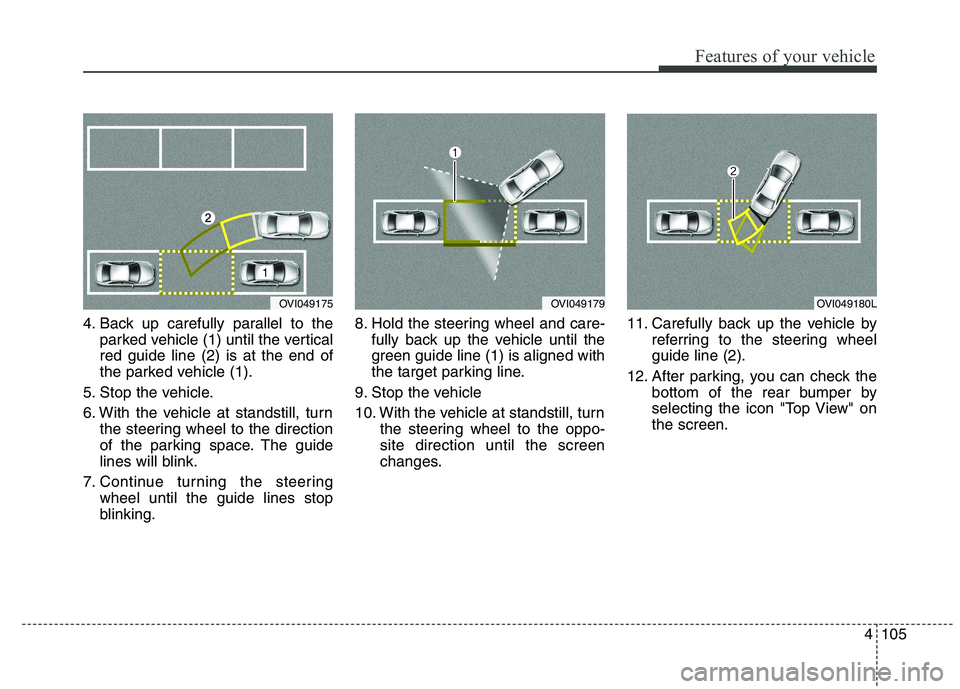
4. Back up carefully parallel to theparked vehicle (1) until the vertical red guide line (2) is at the end of
the parked vehicle (1).
5. Stop the vehicle.
6. With the vehicle at standstill, turn the steering wheel to the direction
of the parking space. The guide
lines will blink.
7. Continue turning the steering wheel until the guide lines stop
blinking. 8. Hold the steering wheel and care-
fully back up the vehicle until the
green guide line (1) is aligned with
the target parking line.
9. Stop the vehicle
10. With the vehicle at standstill, turn the steering wheel to the oppo- site direction until the screen
changes. 11. Carefully back up the vehicle by
referring to the steering wheelguide line (2).
12. After parking, you can check the bottom of the rear bumper by
selecting the icon "Top View" onthe screen.
OVI049175OVI049179OVI049180L
Page 190 of 486
4109
Features of your vehicle
Traffic change (for Europe)
Use this function when you visit a
country with opposite traffic direction.
If the traffic change is activated when
you visit a country with opposite traf-fic direction, it will decrease the daz-
zle on oncoming vehicle drivers.
Follow the below procedure.
1. Select “User Settings” by pressingthe mode button ( ) on the steer- ing wheel.
2. Select “Lamp” by pressing the move button ( ) and select but-
ton ( ) on the steering wheel.
3. Select “Travel Mode” by pressing the move button ( ) and select
button ( ) on the
steering wheel.
4. change function.
Select "Off" to deacticate the traf- fic change function.✽✽ NOTICE
If the engine is turned off with the
traffic change function activated,
and the engine turned on again, a
message "Headlamp beam pattern
set to opposite side range has been
reduced" will appear. It is to notify
the driver the function is activated.Lighting control
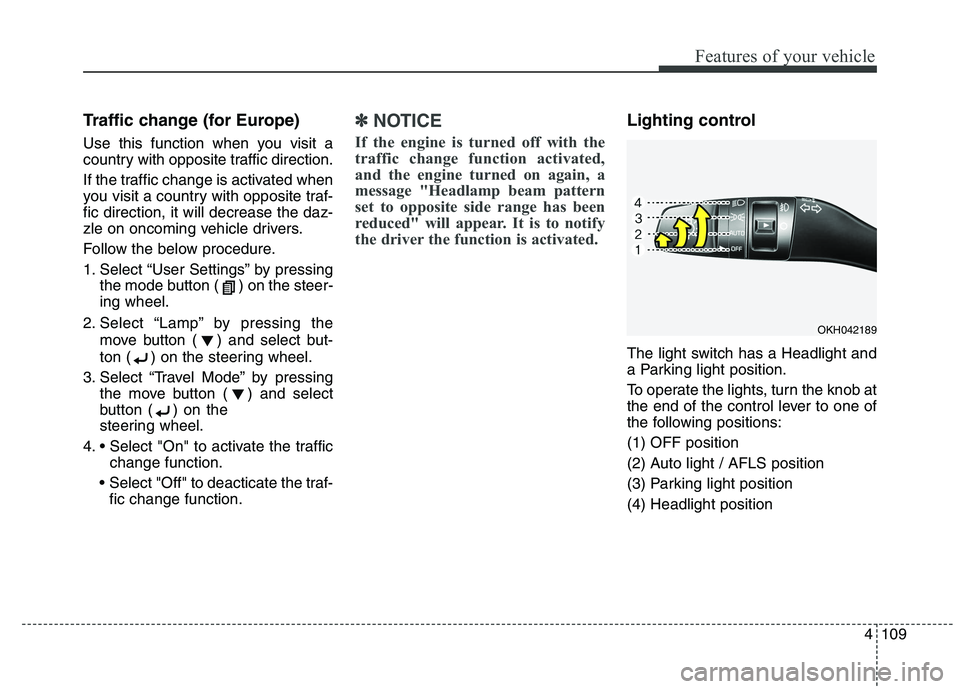
The light switch has a Headlight and
a Parking light position.
To operate the lights, turn the knob at
the end of the control lever to one of
the following positions: (1) OFF position
(2) Auto light / AFLS position
(3) Parking light position(4) Headlight position
OKH042189
Page 191 of 486
Features of your vehicle
110
4
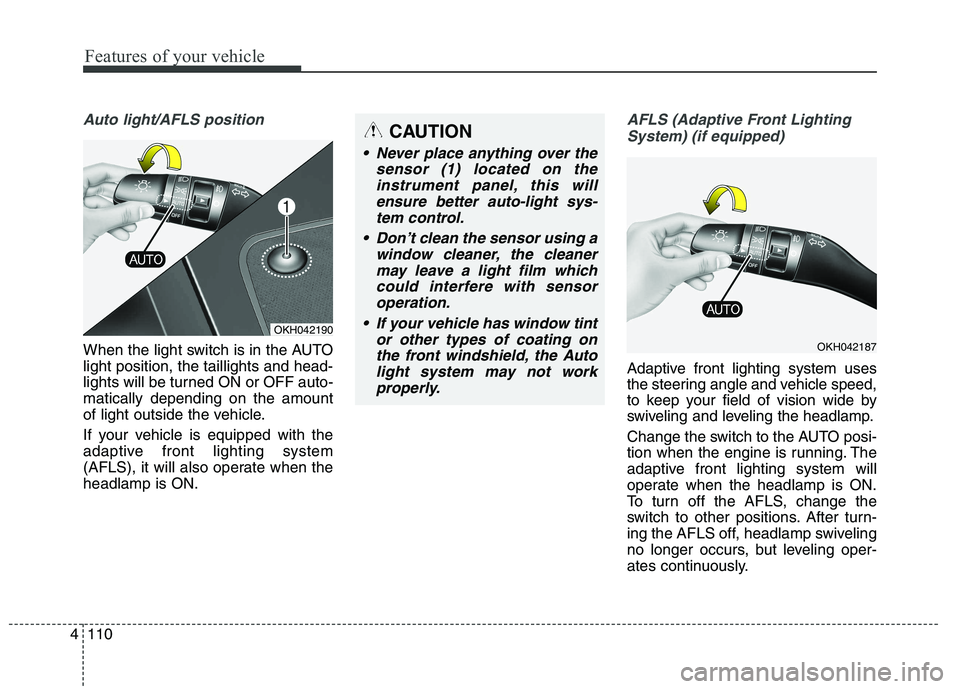
Auto light/AFLS position
When the light switch is in the AUTO light position, the taillights and head-
lights will be turned ON or OFF auto-matically depending on the amount
of light outside the vehicle.
If your vehicle is equipped with the
adaptive front lighting system
(AFLS), it will also operate when theheadlamp is ON.
AFLS (Adaptive Front Lighting
System) (if equipped)
Adaptive front lighting system uses
the steering angle and vehicle speed,
to keep your field of vision wide by
swiveling and leveling the headlamp.
Change the switch to the AUTO posi-
tion when the engine is running. The
adaptive front lighting system will
operate when the headlamp is ON.
To turn off the AFLS, change the
switch to other positions. After turn-
ing the AFLS off, headlamp swiveling
no longer occurs, but leveling oper-
ates continuously.
OKH042190
CAUTION
Never place anything over the sensor (1) located on theinstrument panel, this willensure better auto-light sys-tem control.
Don’t clean the sensor using a window cleaner, the cleanermay leave a light film whichcould interfere with sensoroperation.
If your vehicle has window tint or other types of coating onthe front windshield, the Autolight system may not workproperly.
OKH042187
Page 243 of 486
Features of your vehicle
162
4
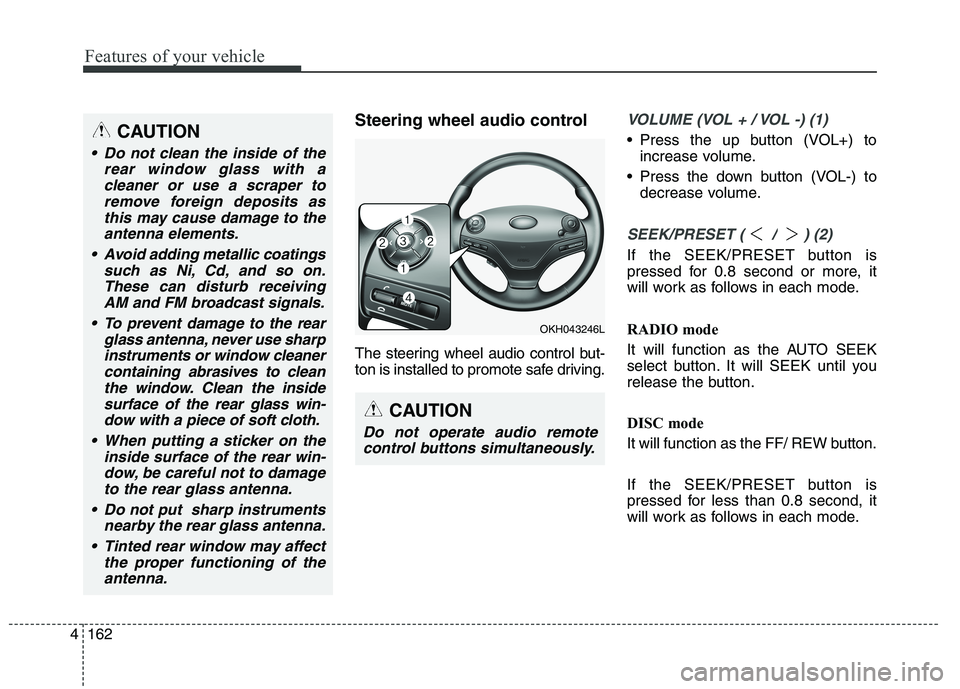
Steering wheel audio control
The steering wheel audio control but-
ton is installed to promote safe driving.VOLUME (VOL + / VOL -) (1)
Press the up button (VOL+) to
increase volume.
Press the down button (VOL-) to decrease volume.
SEEK/PRESET ( / ) (2)
If the SEEK/PRESET button is
pressed for 0.8 second or more, it
will work as follows in each mode.
RADIO mode
It will function as the AUTO SEEK
select button. It will SEEK until you
release the button.
DISC mode
It will function as the FF/ REW button.
If the SEEK/PRESET button is
pressed for less than 0.8 second, it
will work as follows in each mode.
OKH043246L
CAUTION
Do not operate audio remote
control buttons simultaneously.
CAUTION
Do not clean the inside of the rear window glass with acleaner or use a scraper toremove foreign deposits asthis may cause damage to the antenna elements.
Avoid adding metallic coatings such as Ni, Cd, and so on.These can disturb receivingAM and FM broadcast signals.
To prevent damage to the rear glass antenna, never use sharpinstruments or window cleanercontaining abrasives to cleanthe window. Clean the inside surface of the rear glass win-dow with a piece of soft cloth.
When putting a sticker on the inside surface of the rear win-dow, be careful not to damage to the rear glass antenna.
Do not put sharp instruments nearby the rear glass antenna.
Tinted rear window may affect the proper functioning of theantenna.