steering KIA QUORIS 2015 User Guide
[x] Cancel search | Manufacturer: KIA, Model Year: 2015, Model line: QUORIS, Model: KIA QUORIS 2015Pages: 486, PDF Size: 35.55 MB
Page 68 of 486
353
Safety features of your vehicle
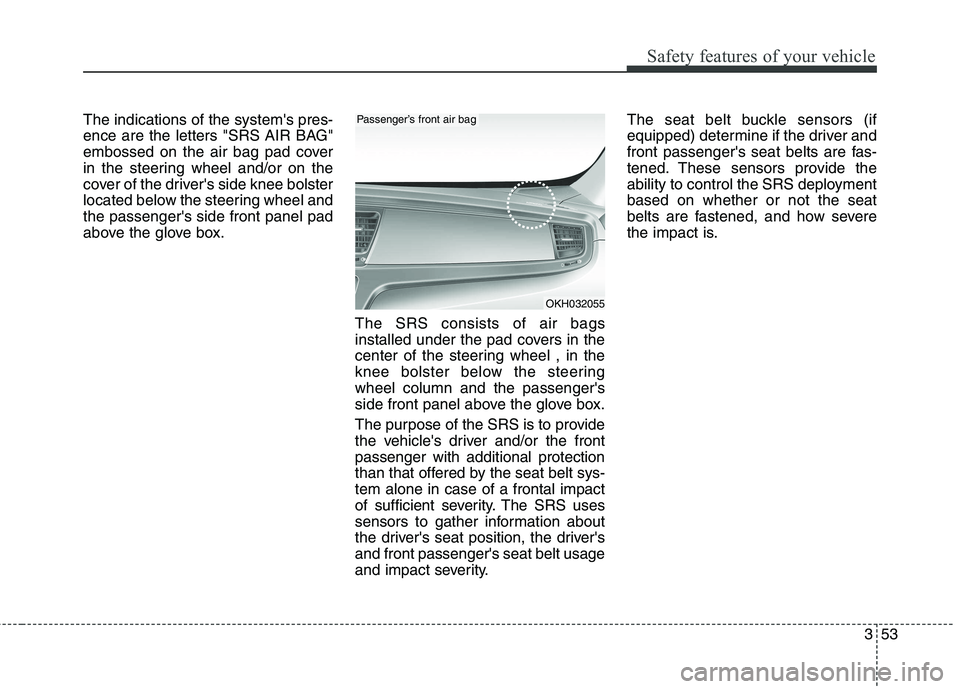
The indications of the system's pres-
ence are the letters "SRS AIR BAG"
embossed on the air bag pad cover
in the steering wheel and/or on the
cover of the driver's side knee bolster
located below the steering wheel andthe passenger's side front panel pad
above the glove box.The SRS consists of air bags
installed under the pad covers in the
center of the steering wheel , in the
knee bolster below the steeringwheel column and the passenger's
side front panel above the glove box.
The purpose of the SRS is to provide
the vehicle's driver and/or the frontpassenger with additional protection
than that offered by the seat belt sys-tem alone in case of a frontal impact
of sufficient severity. The SRS uses
sensors to gather information about
the driver's seat position, the driver'sand front passenger's seat belt usage
and impact severity.The seat belt buckle sensors (if
equipped) determine if the driver and
front passenger's seat belts are fas-
tened. These sensors provide the
ability to control the SRS deploymentbased on whether or not the seat
belts are fastened, and how severe
the impact is.
OKH032055
Passenger’s front air bag
Page 69 of 486
Safety features of your vehicle
54
3
(Continued)
No objects should be placed
over or near the air bag mod- ules on the steering wheel,
instrument panel or the front
passenger's panel above the
glove box, because any suchobject could cause harm if the
vehicle is in a crash severe
enough to cause the air bags
to deploy.
Do not tamper with or discon- nect SRS wiring or other com-ponents of the SRS system.
Doing so could result in injury,
due to accidental deployment
of the air bags or by rendering
the SRS inoperative.
If the SRS air bag warning light remains illuminated while the
vehicle is being driven, we rec-ommend that the system be
inspected by an authorized Kia
dealer.
(Continued)(Continued)
ABC – Always Buckle Childrenin the back seat. It is the safest
place for children of any age
to ride.
Front and side air bags can injure occupants improperly
positioned in the front seats.
Move your seat as far back as practical from the front air
bags, while still maintaining
control of the vehicle.
You and your passengers should never sit or lean unnec-
essarily close to the air bags.
Improperly positioned drivers
and passengers can be severe-
ly injured by inflating air bags.
Never lean agai nst the door or
center console – always sit in an upright position.
(Continued)WARNING
Always use seat belts and child
restraints – every trip, every
time, everyone! Air bags inflate
with considerable force and in
the blink of an eye. Seat belts
help keep occupants in proper
position to obtain maximum
benefit from the air bag. Even
with air bags, improperly andunbelted occupants can be
severely injured when the air
bag inflates. Always follow the
precautions about seat belts, air
bags and occupant safety con-
tained in this manual.
To reduce the chance of serious or fatal injuries and receive the
maximum safety benefit from
your restraint system:
Never place a child in any child or booster seat in the
front seat.
(Continued)
Page 71 of 486
Safety features of your vehicle
56
3
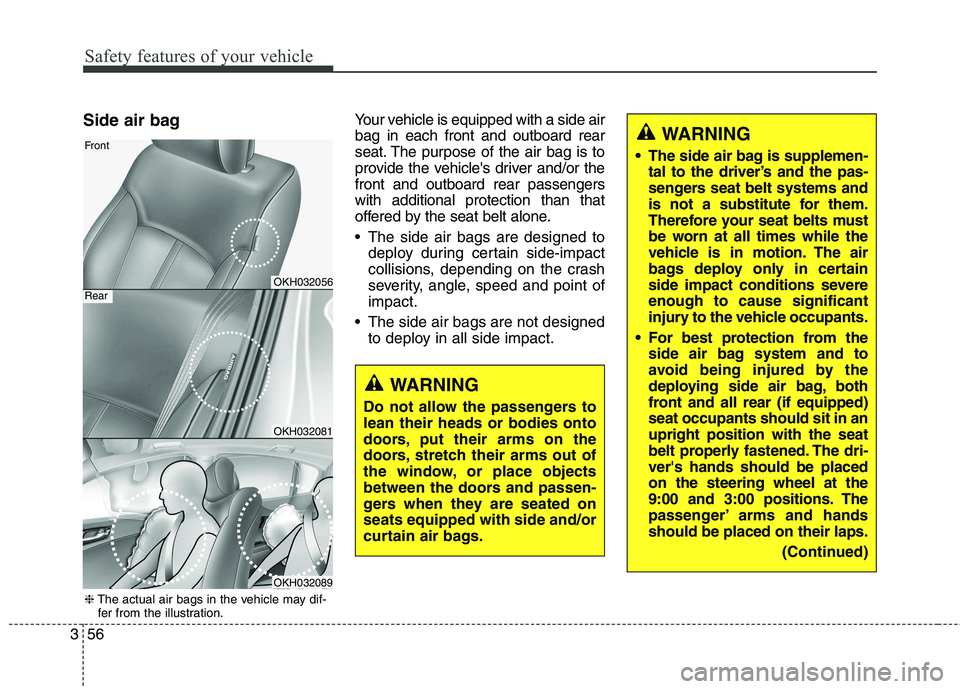
Side air bag Your vehicle is equipped with a side air bag in each front and outboard rear
seat. The purpose of the air bag is to
provide the vehicle's driver and/or thefront and outboard rear passengerswith additional protection than that
offered by the seat belt alone.
The side air bags are designed to
deploy during certain side-impact
collisions, depending on the crash
severity, angle, speed and point ofimpact.
The side air bags are not designed to deploy in all side impact.
WARNING
Do not allow the passengers to lean their heads or bodies onto
doors, put their arms on the
doors, stretch their arms out of
the window, or place objects
between the doors and passen-
gers when they are seated onseats equipped with side and/or
curtain air bags.
WARNING
The side air bag is supplemen- tal to the driver’s and the pas-
sengers seat belt systems and
is not a substitute for them.
Therefore your seat belts must
be worn at all times while the
vehicle is in motion. The air
bags deploy only in certain
side impact conditions severeenough to cause significant
injury to the vehicle occupants.
For best protection from the side air bag system and to
avoid being injured by the
deploying side air bag, both
front and all rear (if equipped)seat occupants should sit in anupright position with the seat
belt properly fastened. The dri-ver's hands should be placedon the steering wheel at the
9:00 and 3:00 positions. The
passenger’ arms and handsshould be placed on their laps.
(Continued)
OKH032056
OKH032081
OKH032089
Front
Rear
❈The actual air bags in the vehicle may dif-
fer from the illustration.
Page 79 of 486
Safety features of your vehicle
64
3
SRS Care
The SRS is virtually maintenance-free
and so there are no parts you can
safely service by yourself. If the SRS
air bag warning light does not illumi-
nate, or continuously remains on, werecommend that the system be
inspected by an authorized Kia dealer.(Continued)
No objects should be placed
over or near the air bag mod- ules on the steering wheel,
instrument panel, and the
front passenger's panel above
the glove box, because any
such object could cause harm
if the vehicle is in a crash
severe enough to cause the
air bags to inflate.
If the air bags inflate, we rec- ommend that the system be
replaced by an authorized Kia
dealer.
Do not tamper with or discon- nect SRS wiring, or othercomponents of the SRS sys-
tem. Doing so could result in
injury, due to accidental infla-
tion of the air bags or by ren-
dering the SRS inoperative.
(Continued)
WARNING
Modification to SRS compo- nents or wiring, including the
addition of any kind of badges
to the pad covers or modifica-
tions to the body structure,
can adversely affect SRS per-
formance and lead to possible
injury.
For cleaning the air bag pad covers, use only a soft, dry
cloth or one which has been
moistened with plain water.
Solvents or cleaners could
adversely affect the air bag
covers and proper deploy-ment of the system.
(Continued)
(Continued)
If components of the air bagsystem must be discarded, or
if the vehicle must be
scrapped, certain safety pre-
cautions must be observed.
An authorized Kia dealer
knows these precautions and
can give you the necessary
information. Failure to follow
these precautions and proce-dures could increase the risk
of personal injury.
If your car was flooded and has soaked carpeting or water
on flooring, you shouldn't try
to start the engine; we recom-
mend that you contact an
authorized Kia dealer.
Page 82 of 486
Features of your vehicle
Smart key . . . . . . . . . . . . . . . . . . . . . . . . . . . . . . . . . 4-4• Record your key number . . . . . . . . . . . . . . . . . . . . . . . 4-4
. . . . . . . . . . . . . . . . . . . . . . . . . . . . 4-4
. . . . . . . . . . . . . . . . . . . . . . . 4-6
. . . . . . . . . . . . . . . . . . . . . . . . . 4-8
. . . . . . . . . . . . . . . . . . . . . . . . . . . . 4-9
. . . . . . . . . . . . . . . . . . . . . . . . . . 4-11
Theft-alarm system . . . . . . . . . . . . . . . . . . . . . . . . 4-12 . . . . . . . . . . . . . . . . . . . . . . . . . . . . . . . . . 4-12
. . . . . . . . . . . . . . . . . . . . . . . . . . . . 4-13
Door locks . . . . . . . . . . . . . . . . . . . . . . . . . . . . . . . 4-15 . . . . . . . . . . . . . . . . . . . . . . . . . . . . . . . . 4-15
. . . . . . . . . . . . . . . . . . . . . . . . . . . . . 4-16
. . . . . . . . . . . . . . . . . . . . . . . . . . . . . . . . . 4-16
. . . . . . . . . . . . . . . . . 4-19
Trunk . . . . . . . . . . . . . . . . . . . . . . . . . . . . . . . . . . . . 4-20 . . . . . . . . . . . . . . . . . . . . . . . . . . . 4-20
. . . . . . . . . . . . . . . . . . . . . . . . . . . . . . . . . 4-22
. . . . . . . . . . . . . . . . . 4-27
Windows . . . . . . . . . . . . . . . . . . . . . . . . . . . . . . . . . 4-28 . . . . . . . . . . . . . . . . . . . . . . . . . . . . . . 4-29
Hood . . . . . . . . . . . . . . . . . . . . . . . . . . . . . . . . . . . . 4-32 . . . . . . . . . . . . . . . . . . . . . . . . . . . . 4-32
. . . . . . . . . . . . . . . . . . . . . . . . . . . . . 4-32 Fuel filler lid . . . . . . . . . . . . . . . . . . . . . . . . . . . . . 4-34
. . . . . . . . . . . . . . . . . . . . . . 4-34
. . . . . . . . . . . . . . . . . . . . . . . 4-34
. . . . . . . . . . . . . . . . 4-36
Panoramic sunroof . . . . . . . . . . . . . . . . . . . . . . . . . 4-37
. . . . . . . . . . . . . . . . . . . . . . . . . . . 4-38
. . . . . . . . . . . . . . . . . . . . . . . . . . . 4-38
. . . . . . . . . . . . . . . . . . . . . . . . . . . . 4-39
. . . . . . . . . . . . . . . . . . . . . . . . . . . . . . . . . . . 4-40
. . . . . . . . . . . . . . . . . . . . . . . . . 4-41
Steering wheel . . . . . . . . . . . . . . . . . . . . . . . . . . . . . 4-42 . . . . . . 4-42
. . . . . . . . . . . . . . . . . . . . . . . . . . . . . . . . . 4-42
. . . . . . . . . . . . . . . . . . . . . . . . . 4-43
. . . . . . . . . . . . . . . . . . . . . . . . . . . . . . . . . . . . . . . 4-44
Mirrors . . . . . . . . . . . . . . . . . . . . . . . . . . . . . . . . . . 4-45 . . . . . . . . . . . . . . . . . . . . . . . . 4-45
. . . . . . . . . . . . . . . . . . . . . . . 4-46
Instrument cluster . . . . . . . . . . . . . . . . . . . . . . . . . 4-50 . . . . . . . . . . . . . . . . . . . . . 4-51
. . . . . . . . . . . . . . . . . . . . . . . . . . . 4-52
. . . . . . . . . . . . . . . . . . . . . . . 4-56
LCD display . . . . . . . . . . . . . . . . . . . . . . . . . . . . . . 4-57
. . . . . . . . . . . . . . . . . . . . . . . . . . 4-58
4
Page 123 of 486

Features of your vehicle
42
4
Electronic Hydraulic Power Steering (EHPS) EHPS uses an electromotor to assist
you in steering the vehicle. It senses
the vehicle speed and road condition.
If the engine is off or if the power
steering system becomes inoperative,
the vehicle may still be steered, but it
will require increased steering effort.
Should you notice any change in the
effort required to steer during normal
vehicle operation, we recommend
that the system be checked by an
authorized Kia dealer.✽✽
NOTICE
If the power steering drive belt
breaks or if the power steering
pump malfunctions, the steering
effort will greatly increase.
✽
✽ NOTICE
If the vehicle is parked for extended
periods outside in cold weather
(below -10°C/14°F), the power steer-
ing may require increased effort
when the engine is first started. This
is caused by increased fluid viscosity
due to the cold weather and does not
indicate a malfunction.
When this happens, increase the
engine RPM by depressing accelera-
tor until the RPM reaches 1,500 rpm
then release or let the engine idle for
two or three minutes to warm up the
fluid.
Tilt steering
Tilt steering allows you to adjust the
steering wheel before you drive. You
can also raise it to give your legs
more room when you exit and enter
the vehicle.
The steering wheel should be posi-
tioned so that it is comfortable for
you to drive, while permitting you to
see the instrument panel warning
lights and gauges.
STEERING WHEEL
WARNING
Never adjust the angle of the steering wheel while driving.
You may lose steering control
and cause severe personal
injury, death or accidents.
After adjusting, push the steering wheel both up and
down to be certain it is lockedin position.
CAUTION
Never hold the steering wheel
against a stop (extreme right orleft turn) for more than 5 sec- onds with the engine running.Holding the steering wheel formore than 5 seconds in either position may cause damage tothe power steering pump.
Page 124 of 486
443
Features of your vehicle
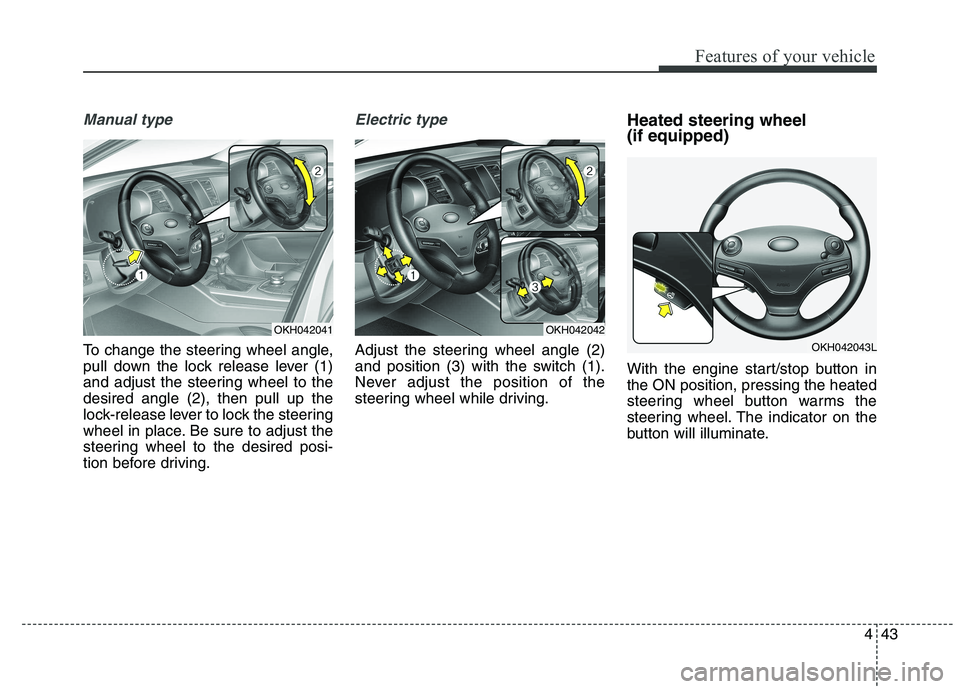
Manual type
To change the steering wheel angle,
pull down the lock release lever (1)
and adjust the steering wheel to thedesired angle (2), then pull up the
lock-release lever to lock the steering
wheel in place. Be sure to adjust the
steering wheel to the desired posi-
tion before driving.
Electric type
Adjust the steering wheel angle (2)
and position (3) with the switch (1).
Never adjust the position of the
steering wheel while driving.Heated steering wheel (if equipped)
With the engine start/stop button in the ON position, pressing the heated
steering wheel button warms the
steering wheel. The indicator on the
button will illuminate.
OKH042041OKH042042
OKH042043L
Page 125 of 486
Features of your vehicle
44
4
To turn the heated steering wheel off,
press the button once again. The
indicator on the button will turn off.
It will turn off automatically approxi-
mately 30 minutes after the heated
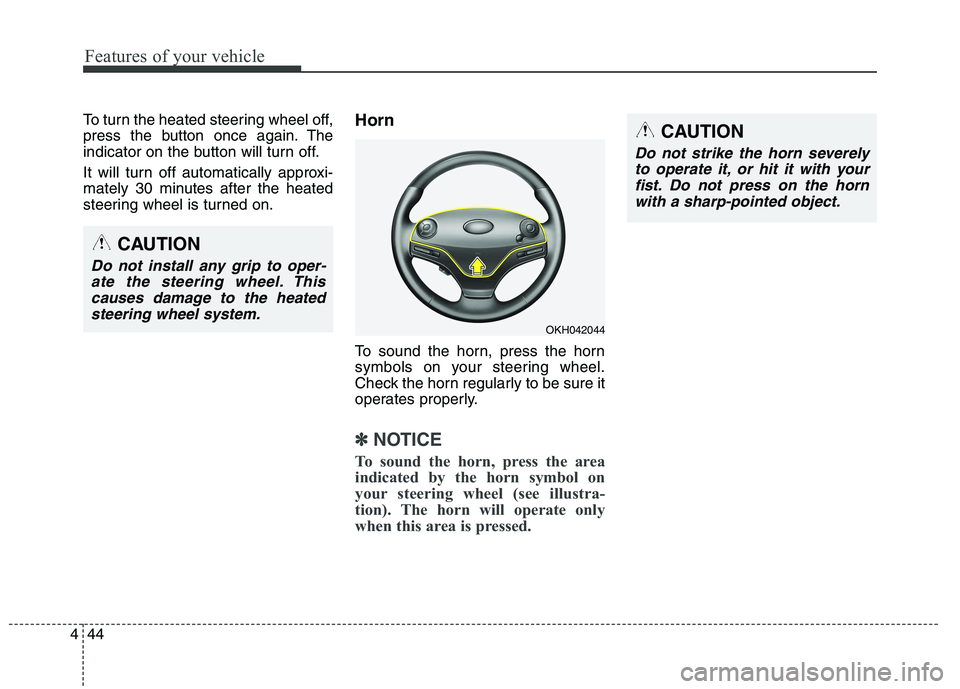
steering wheel is turned on. Horn
To sound the horn, press the horn
symbols on your steering wheel.
Check the horn regularly to be sure it
operates properly.
✽✽
NOTICE
To sound the horn, press the area
indicated by the horn symbol on
your steering wheel (see illustra-
tion). The horn will operate only
when this area is pressed.
OKH042044
CAUTION
Do not strike the horn severely to operate it, or hit it with yourfist. Do not press on the hornwith a sharp-pointed object.
CAUTION
Do not install any grip to oper-ate the steering wheel. Thiscauses damage to the heated steering wheel system.
Page 133 of 486
Features of your vehicle
52
4
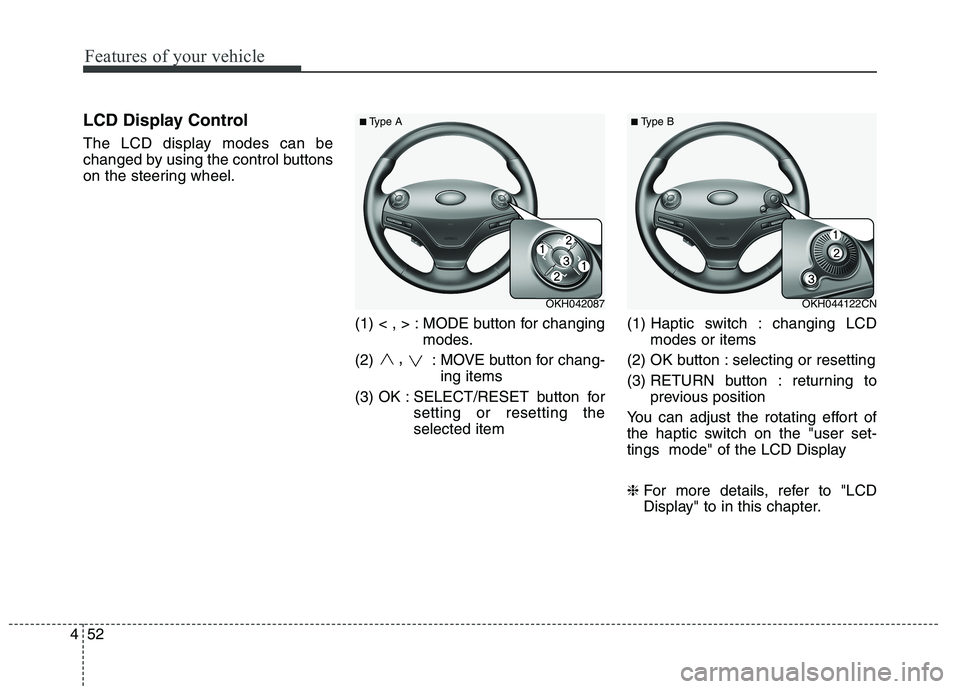
LCD Display Control
The LCD display modes can be
changed by using the control buttons
on the steering wheel.
(1) < , > : MODE button for changingmodes.
(2) ,
: MOVE button for chang-
ing items
(3) OK : SELECT/RESET button for setting or resetting theselected item (1) Haptic switch : changing LCD
modes or items
(2) OK button : selecting or resetting
(3) RETURN button : returning to previous position
You can adjust the rotating effort of
the haptic switch on the "user set-
tings mode" of the LCD Display ❈ For more details, refer to "LCD
Display" to in this chapter.
OKH042087OKH044122CN
■Type A ■
Type B
Page 146 of 486
465
Features of your vehicle
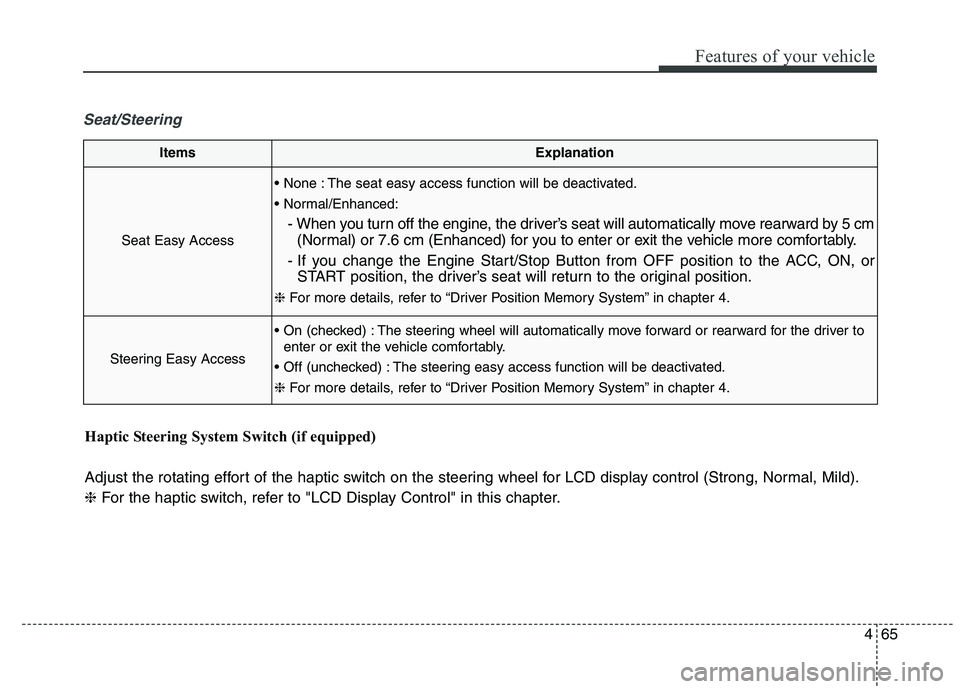
Seat/Steering
ItemsExplanation
Seat Easy Access
The seat easy access function will be deactivated.
- When you turn off the engine, the driver’s seat will automatically move rearward by 5 cm(Normal) or 7.6 cm (Enhanced) for you to enter or exit the vehicle more comfortably.
- If you change the Engine Start/Stop Button from OFF position to the ACC, ON, or START position, the driver’s seat will return to the original position.
❈ For more details, refer to “Driver Position Memory System” in chapter 4.
Steering Easy Access
The steering wheel will automatically move forward or rearward for the driver to
enter or exit the vehicle comfortably.
The steering easy access function will be deactivated. ❈ For more details, refer to “Driver Position Memory System” in chapter 4.
Haptic Steering System Switch (if equipped)
Adjust the rotating effort of the haptic switch on the steering wheel for LCD display control (Strong, Normal, Mild). ❈ For the haptic switch, refer to "LCD Display Control" in this chapter.