display KIA QUORIS 2015 Owner's Guide
[x] Cancel search | Manufacturer: KIA, Model Year: 2015, Model line: QUORIS, Model: KIA QUORIS 2015Pages: 486, PDF Size: 35.55 MB
Page 213 of 486
Features of your vehicle
132
4
Turning the rear temperature con-
trol knob will automatically switch
to the 3ZONE mode as well. At this
time, passenger side temperature
will be set to the same temperature
as the driver side.
When the driver side temperature is
set to the highest (HI) or lowest (Lo)
temperature setting, the 3ZONE
mode is deactivated for maximumheating or cooling. Adjusting the driver, passenger and
rear side temperature equally
1. Press the 3ZONE button again to
deactivate 3ZONE mode. The pas-
senger and rear side temperature
will be set to the same temperature
as the driver side temperature.
2. Press the driver side temperature control button. The driver, passen-
ger and rear side temperature will
be adjusted equally.
Temperature conversion
If the battery has been discharged or
disconnected, the temperature mode
display will reset to Centigrade.
This is a normal condition. You can
switch the temperature mode between
Centigrade to Fahrenheit as follows;
While pressing the OFF button,
depress the AUTO button for 3 sec-
onds or more. The display will change
from Centigrade to Fahrenheit, or
from Fahrenheit to Centigrade.Air intake control
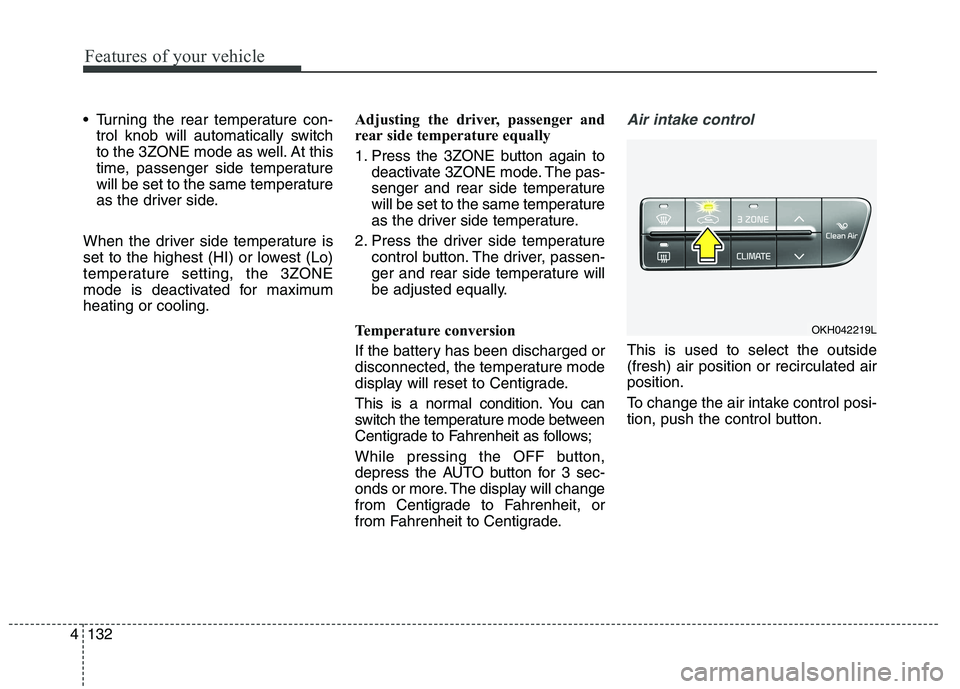
This is used to select the outside (fresh) air position or recirculated airposition.
To change the air intake control posi-
tion, push the control button.
OKH042219L
Page 252 of 486
Driving your vehicle
8
5
Starting the engine 1.Carry the smart key or leave it
inside the vehicle.
2.Make sure the parking brake is firmly applied.
3.Place the transaxle shift lever in P (Park). Depress the brake pedal fully.
You can also start the engine when
the shift lever is in the N (Neutral) position.
4.Press the engine start/stop button.
It should be started without depress-
ing the accelerator.
5.Do not wait for the engine to warm up whilst the vehicle remains sta-
tionary.
Start driving at moderate engine
speeds. (Steep accelerating and
decelerating should be avoided.) Even if the smart key is in the vehi-
cle, if it is far away from you, the
engine may not start.
When the engine start/stop button is in the ACC position or above, if
any door is opened, the system
checks for the smart key. If the
smart key is not in the vehicle, the
“ ” indicator and a message
“Key is not in the vehicle” will appear
on the instrument cluster and LCD
display. And if all doors are closed,
the chime will sound for 5 seconds.
The indicator or warning will turn off
while the vehicle is moving. Always
have the smart key with you.
WARNING
Always wear appropriate shoes when operating your
vehicle. Unsuitable shoes (high
heels, ski boots,etc.) may inter-
fere with your ability to use the
brake, accelerator pedal.
Do not start the vehicle with the accelerator pedal
depressed. The vehicle can
move and lead to an accident.
Wait until the engine rpm is nor- mal. The vehicle may suddenly
move if the brake padel isreleased when the rpm is high.
WARNING
The engine will start, only when
the smart key is in the vehicle.
Never allow children or any per- son who is unfamiliar with the
vehicle touch the engine
start/stop button or related parts.
Page 255 of 486
511
Driving your vehicle
For smooth operation, depress thebrake pedal when shifting from N(Neutral) to a forward or reverse gear.Transmission ranges
The indicator in the instrument clus-
ter displays the shift lever position
when the ignition switch is in the ONposition.
P (Park)
Always come to a complete stop
before shifting into P (Park). This posi-
tion locks the transmission and pre-
vents the drive wheels from rotating.
WARNING - Automatic
transmission
Always check the surrounding areas near your vehicle for
people, especially children,
before shifting a car into D
(Drive) or R (Reverse).
Before leaving the driver’s seat, always make sure the
shift lever is in the P (Park)
position; then set the parking
brake fully and shut the engine
off. Unexpected and sudden
vehicle movement can occur if
these precautions are not fol-
lowed in the order identified.
Do not use the engine brake (shifting from a high gear to
lower gear) rapidly on slip-
pery roads.
The vehicle may slip causing an accident.
CAUTION
To avoid damage to your
transmission, do not acceler-ate the engine in R (Reverse) or any forward gear positionwith the brakes on.
When stopped on an incline, do not hold the vehicle sta-tionary with engine power. Use the service brake or theparking brake.
Do not shift from N (Neutral) or P (Park) into D (Drive), or R(Reverse) when the engine is above idle speed.
WARNING
Shifting into P (Park) while the vehicle is in motion will cause
the drive wheels to lock which
will cause you to lose control
of the vehicle.
Do not use the P (Park) posi- tion in place of the parking
brake. Always make sure the
shift lever is latched in the P
(Park) position and set the
parking brake fully.
Never leave a child unattend- ed in a vehicle.
Page 262 of 486
Driving your vehicle
18
5
For smooth operation, depress the
brake pedal when shifting from N(Neutral) to a forward or reverse gear.Transmission ranges
The indicator in the instrument cluster
and shift lever displays the shift lever
position when the Engine Start/Stop
button is in the OFF/ACC/ON position.
WARNING - Automatic
transmission
Always check the surrounding areas near your vehicle for
people, especially children,
before shifting a car into D
(Drive) or R (Reverse).
Before leaving the driver’s seat, always make sure the
shift lever is in the P (Park)
position; then set the parking
brake fully and shut the engine
off. Unexpected and sudden
vehicle movement can occur if
these precautions are not fol-
lowed in the order identified.
CAUTION
To avoid damage to your
transmission, do not acceler-ate the engine in R (Reverse)or any forward gear positionwith the brakes on.
When stopped on an incline, do not hold the vehicle sta-tionary with engine power.Use the service brake or theparking brake.
Do not shift from N (Neutral) or P (Park) into D (Drive), or R(Reverse) when the engine isabove idle speed.
Page 286 of 486
Driving your vehicle
42
5
(Continued)
Before driving off again, press foot
brake pedal, check the surround-
ing area near your vehicle and
release parking brake manually
with the EPB switch.
If the AUTO HOLD indicator lights up yellow, the Auto Hold is
not working properly. Take your
vehicle to an authorized Kia deal-
er and have the system checked.
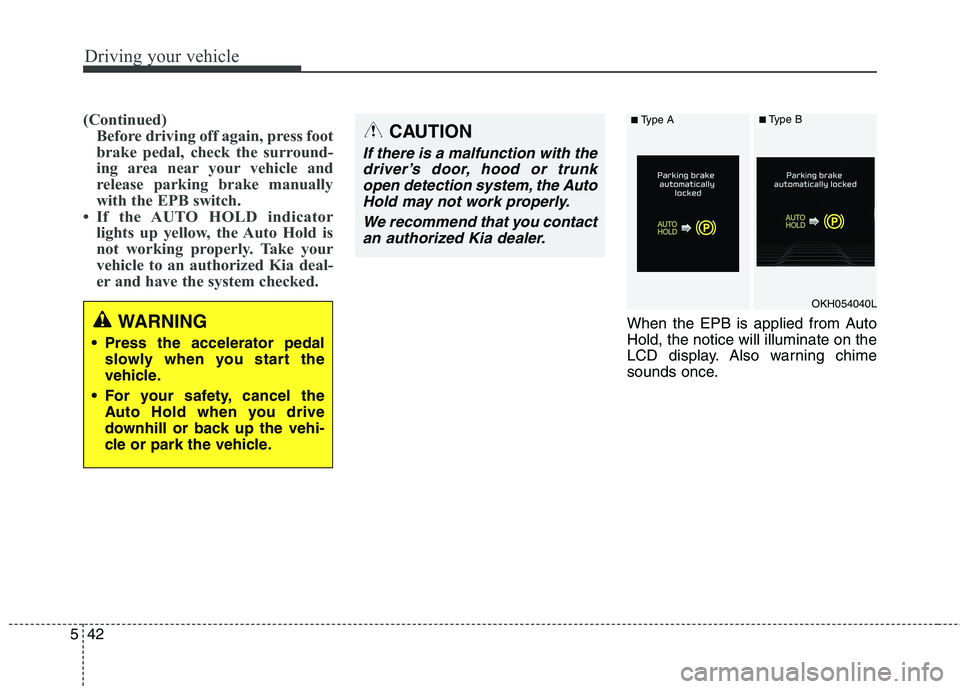
When the EPB is applied from Auto Hold, the notice will illuminate on the
LCD display. Also warning chime
sounds once.WARNING
Press the accelerator pedal slowly when you start the
vehicle.
For your safety, cancel the Auto Hold when you drive
downhill or back up the vehi-
cle or park the vehicle.
CAUTION
If there is a malfunction with the
driver’s door, hood or trunkopen detection system, the Auto Hold may not work properly.
We recommend that you contactan authorized Kia dealer.
OKH054040L
■ Type A■Type B
Page 287 of 486
543
Driving your vehicle
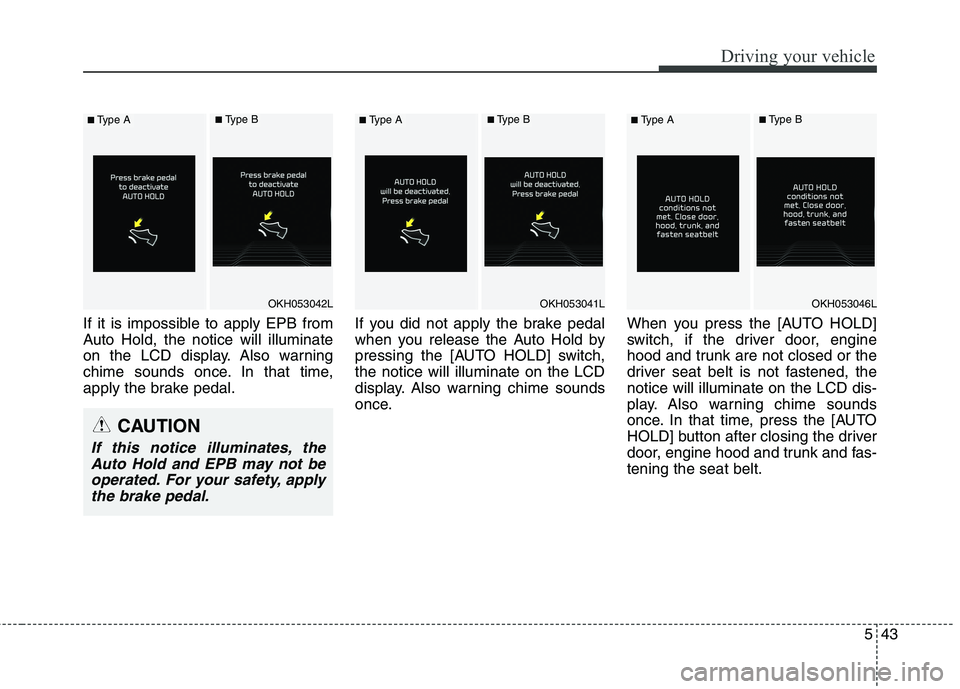
If it is impossible to apply EPB from
Auto Hold, the notice will illuminate
on the LCD display. Also warning
chime sounds once. In that time,
apply the brake pedal.If you did not apply the brake pedal
when you release the Auto Hold by
pressing the [AUTO HOLD] switch,the notice will illuminate on the LCD
display. Also warning chime sounds
once.When you press the [AUTO HOLD]
switch, if the driver door, engine
hood and trunk are not closed or the
driver seat belt is not fastened, thenotice will illuminate on the LCD dis-
play. Also warning chime sounds
once. In that time, press the [AUTO
HOLD] button after closing the driver
door, engine hood and trunk and fas-tening the seat belt.
OKH053042L
■
Type A■Type B
CAUTION
If this notice illuminates, the
Auto Hold and EPB may not beoperated. For your safety, apply the brake pedal.
OKH053041L
■ Type A■Type B
OKH053046L
■Type A■Type B
Page 298 of 486
Driving your vehicle
54
5
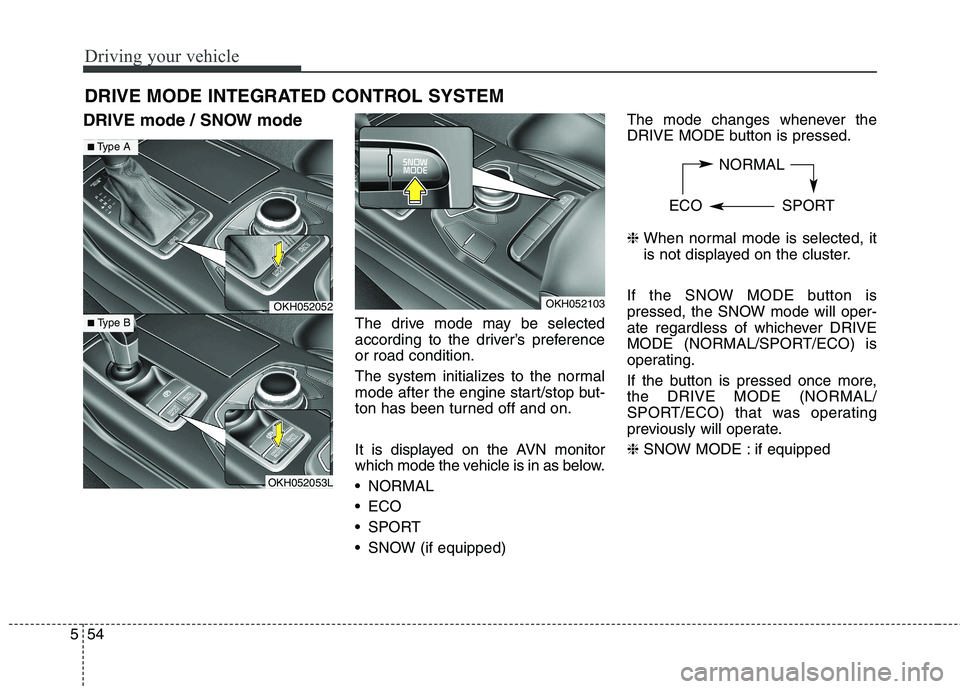
DRIVE mode / SNOW mode
The drive mode may be selected
according to the driver’s preferenceor road condition.
The system initializes to the normal
mode after the engine start/stop but-
ton has been turned off and on.
It is displayed on the AVN monitor
which mode the vehicle is in as below.
NORMAL
ECO
SPORT
SNOW (if equipped)The mode changes whenever the
DRIVE MODE button is pressed. ❈
When normal mode is selected, it
is not displayed on the cluster.
If the SNOW MODE button is
pressed, the SNOW mode will oper-
ate regardless of whichever DRIVE
MODE (NORMAL/SPORT/ECO) is
operating.
If the button is pressed once more, the DRIVE MODE (NORMAL/
SPORT/ECO) that was operating
previously will operate. ❈ SNOW MODE : if equipped
DRIVE MODE INTEGRATED CONTROL SYSTEM
OKH052052
OKH052053L
■
Type A
■ Type B
OKH052103 NORMAL
ECO SPORT
Page 312 of 486
Driving your vehicle
68
5
Smart Cruise control will be tem-
porarily canceled when:
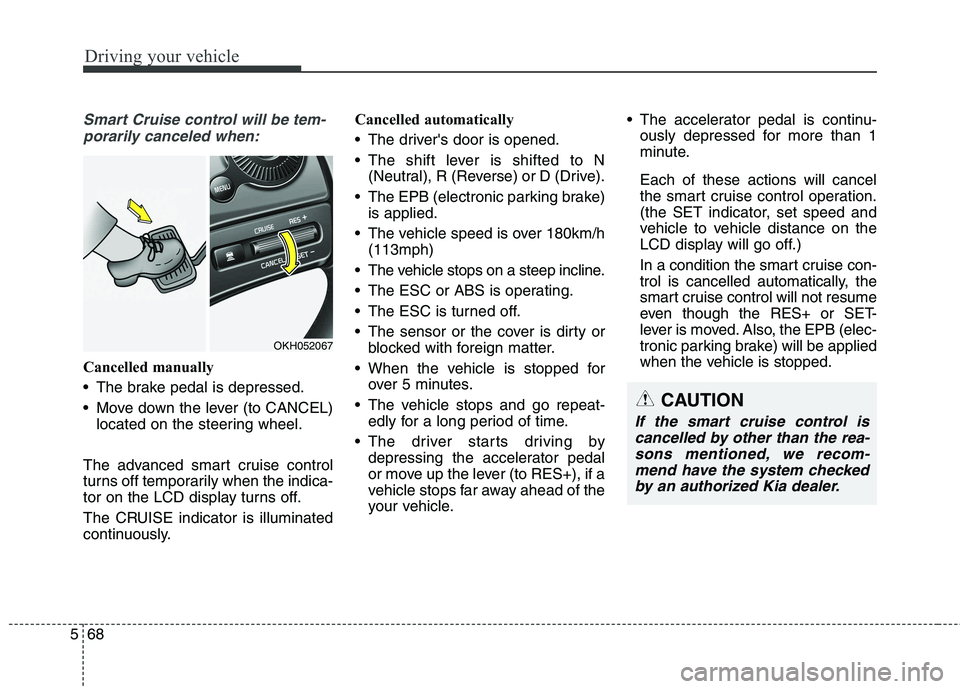
Cancelled manually
The brake pedal is depressed.
Move down the lever (to CANCEL) located on the steering wheel.
The advanced smart cruise control
turns off temporarily when the indica-
tor on the LCD display turns off.
The CRUISE indicator is illuminated
continuously. Cancelled automatically
The driver's door is opened.
The shift lever is shifted to N
(Neutral), R (Reverse) or D (Drive).
The EPB (electronic parking brake) is applied.
The vehicle speed is over 180km/h (113mph)
The vehicle stops on a steep incline.
The ESC or ABS is operating.
The ESC is turned off.
The sensor or the cover is dirty or blocked with foreign matter.
When the vehicle is stopped for over 5 minutes.
The vehicle stops and go repeat- edly for a long period of time.
The driver starts driving by depressing the accelerator pedal
or move up the lever (to RES+), if a
vehicle stops far away ahead of the
your vehicle. The accelerator pedal is continu-
ously depressed for more than 1
minute. Each of these actions will cancel
the smart cruise control operation.
(the SET indicator, set speed and
vehicle to vehicle distance on the
LCD display will go off.)
In a condition the smart cruise con- trol is cancelled automatically, the
smart cruise control will not resume
even though the RES+ or SET-
lever is moved. Also, the EPB (elec-
tronic parking brake) will be applied
when the vehicle is stopped.
CAUTION
If the smart cruise control is
cancelled by other than the rea-sons mentioned, we recom-mend have the system checked by an authorized Kia dealer.
OKH052067
Page 315 of 486
571
Driving your vehicle
■Type A■Type B
Distance 4 Distance 3
Distance 2 Distance 1
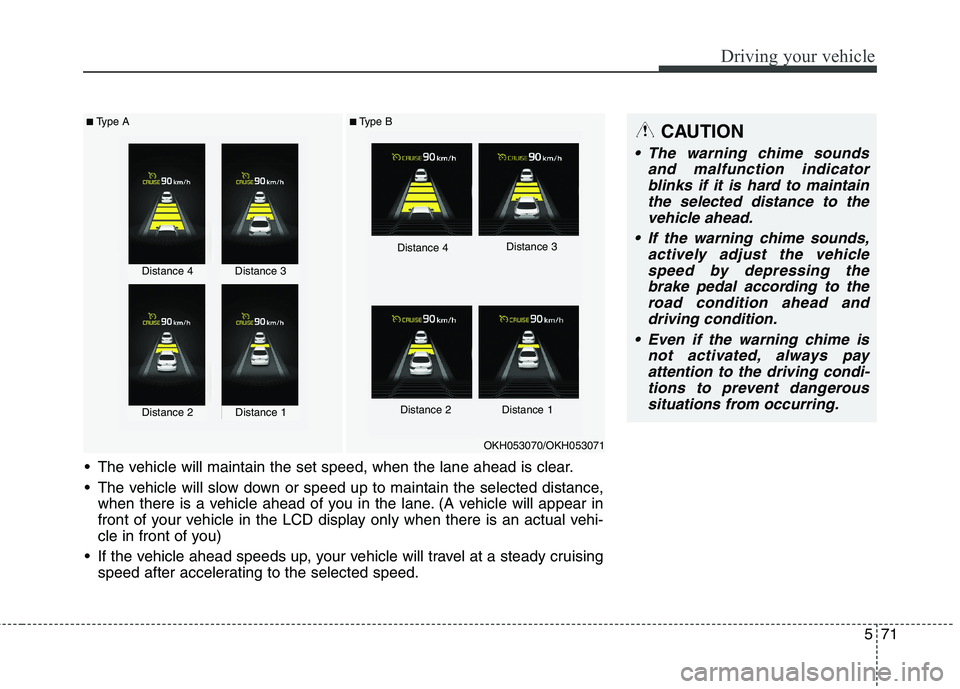
The vehicle will maintain the set speed, when the lane ahead is clear.
The vehicle will slow down or speed up to maintain the selected distance, when there is a vehicle ahead of you in the lane. (A vehicle will appear in
front of your vehicle in the LCD display only when there is an actual vehi-
cle in front of you)
If the vehicle ahead speeds up, your vehicle will travel at a steady cruising speed after accelerating to the selected speed.
OKH053070/OKH053071
CAUTION
The warning chime sounds
and malfunction indicatorblinks if it is hard to maintain the selected distance to thevehicle ahead.
If the warning chime sounds, actively adjust the vehiclespeed by depressing the brake pedal according to theroad condition ahead anddriving condition.
Even if the warning chime is not activated, always payattention to the driving condi-tions to prevent dangeroussituations from occurring.
Distance 4Distance 3
Distance 2Distance 1
Page 325 of 486
581
Driving your vehicle
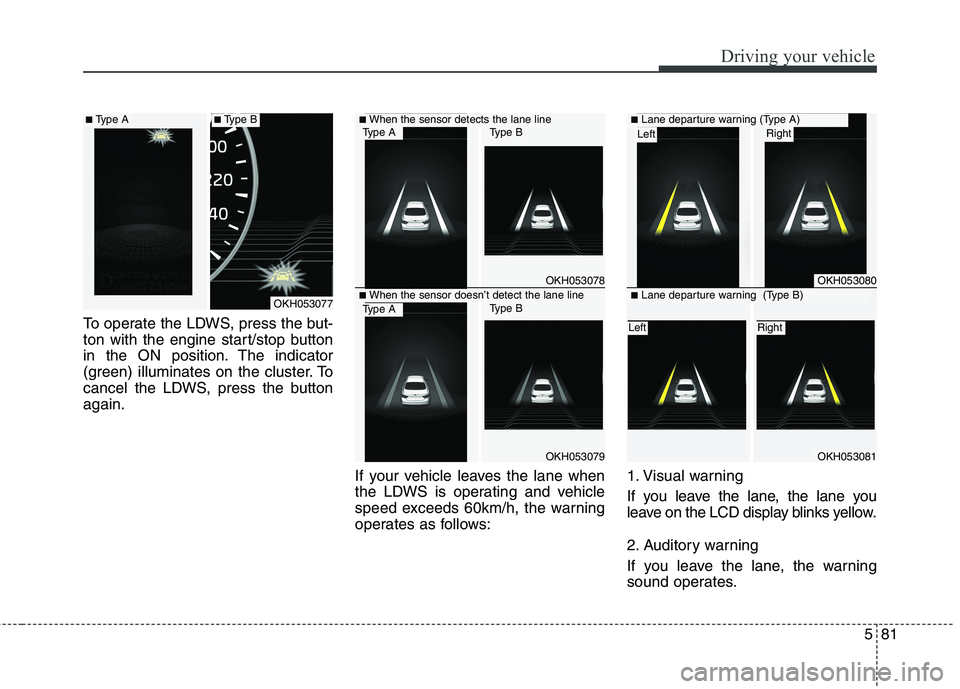
To operate the LDWS, press the but-
ton with the engine start/stop button
in the ON position. The indicator
(green) illuminates on the cluster. To
cancel the LDWS, press the buttonagain.If your vehicle leaves the lane when
the LDWS is operating and vehicle
speed exceeds 60km/h, the warning
operates as follows:1. Visual warning
If you leave the lane, the lane you
leave on the LCD display blinks yellow.
2. Auditory warning
If you leave the lane, the warning
sound operates.
OKH053078
OKH053079
■
When the sensor detects the lane line
■When the sensor doesn’t detect the lane lineOKH053077
OKH053080
OKH053081
■ Lane departure warning (Type A)Right Left
■Lane departure warning (Type B)
Right Left
■Type A■Type BType AType B
Type AType B