engine KIA QUORIS 2015 Manual Online
[x] Cancel search | Manufacturer: KIA, Model Year: 2015, Model line: QUORIS, Model: KIA QUORIS 2015Pages: 486, PDF Size: 35.55 MB
Page 200 of 486
4119
Features of your vehicle
INTERIOR LIGHTAutomatic turn off function (if equipped)
The interior lights automatically turn
off approximately 20 minutes after
the engine is turned off.
If your vehicle is equipped with the
theft alarm system, the interior lights
automatically turns off several sec-
onds after the system is armed stage. Type A
Front lamp switch
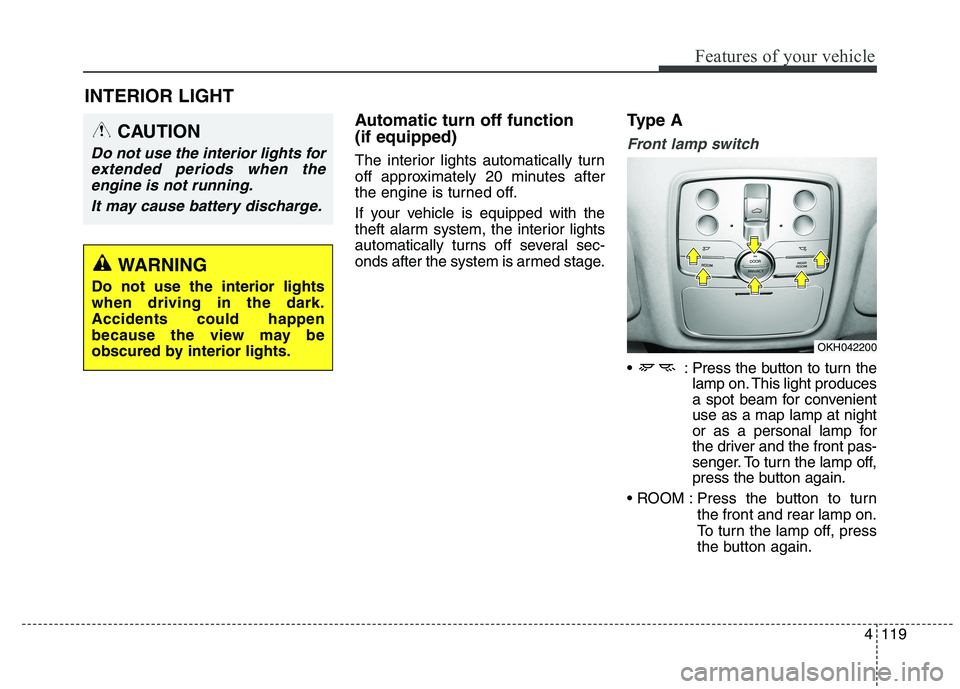
: Press the button to turn the
lamp on. This light produces
a spot beam for convenientuse as a map lamp at night
or as a personal lamp for
the driver and the front pas-
senger. To turn the lamp off,
press the button again.
Press the button to turn the front and rear lamp on.
To turn the lamp off, press
the button again.
CAUTION
Do not use the interior lights for
extended periods when theengine is not running.
It may cause battery discharge.
OKH042200
WARNING
Do not use the interior lights when driving in the dark.Accidents could happen
because the view may be
obscured by interior lights.
Page 201 of 486
Features of your vehicle
120
4
Press the button to
turn the rear lamp
on. To turn the lamp
off, press the but-ton again.
Press the button to operate the door
mode. The indicator on the button will
illuminate and lamps will turn on or off
as follows: - The front and rear lamp comeson when a door is opened. The
lamps go out after approximately
30 seconds.
- The front and rear lamp comes on for approximately 30 seconds
when doors are unlocked with the
smart key as long as the doorsare not opened.
- The front and rear lamp will stay on for approximately 20 minutes ifa door is opened with the engine
start/stop button in the ACC orOFF position.
- The front and rear lamp will stay on continuously if the door is
opened with the engine start/stop
button in the ON position. - The front and rear lamp will go out
immediately if the engine start/stop
button is changed to the ON posi-
tion or all doors are locked.
To turn off the door mode, press the
button again. The indicator on the
button will turn off.
Press the button to operate the pri-
vacy mode. The indicator on the but-
ton will illuminate and lamps will turn
on or off as follows:
- If you open any door, the lamp for the open door will illuminate.
To turn off the privacy mode, press
the button again. The indicator on the
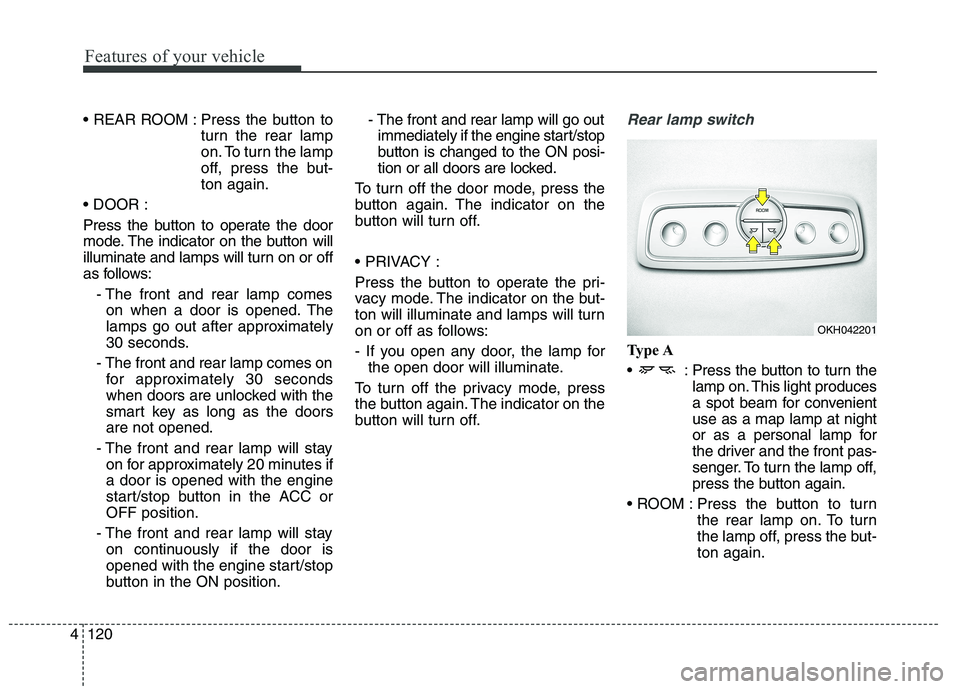
button will turn off.Rear lamp switch
Type A
: Press the button to turn the lamp on. This light produces
a spot beam for convenientuse as a map lamp at night
or as a personal lamp for
the driver and the front pas-
senger. To turn the lamp off,
press the button again.
Press the button to turn the rear lamp on. To turn
the lamp off, press the but-ton again.
OKH042201
Page 202 of 486
4121
Features of your vehicle
Type B
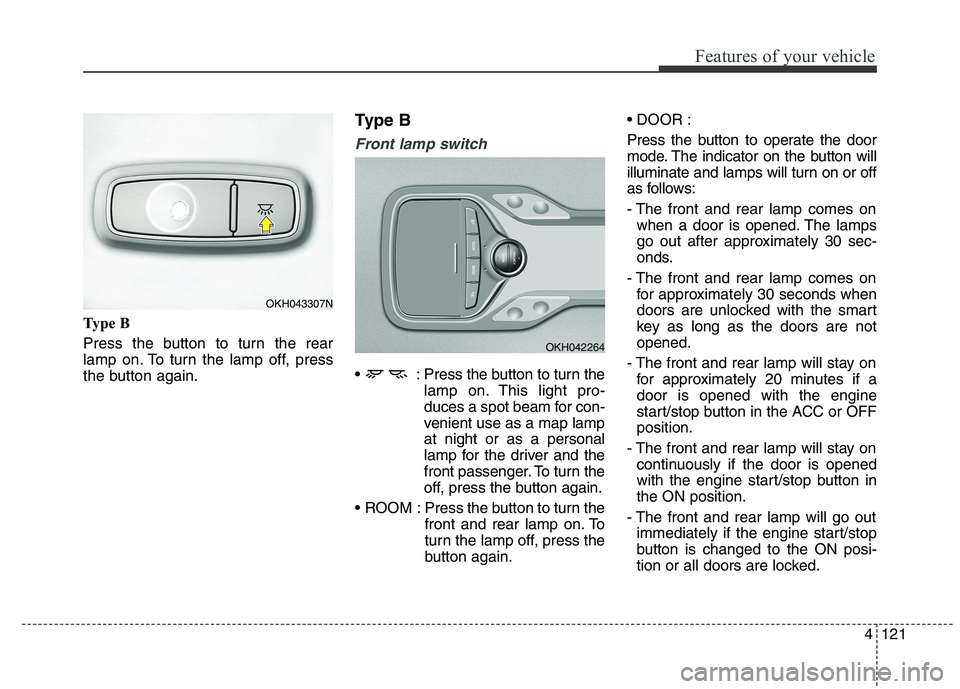
Press the button to turn the rear
lamp on. To turn the lamp off, press
the button again.Type B
Front lamp switch
: Press the button to turn the
lamp on. This light pro-
duces a spot beam for con-
venient use as a map lampat night or as a personal
lamp for the driver and the
front passenger. To turn the
off, press the button again.
ROOM : Press the button to turn the front and rear lamp on. To
turn the lamp off, press the
button again.
Press the button to operate the door
mode. The indicator on the button will
illuminate and lamps will turn on or off
as follows:
- The front and rear lamp comes on
when a door is opened. The lamps
go out after approximately 30 sec-
onds.
- The front and rear lamp comes on for approximately 30 seconds when
doors are unlocked with the smart
key as long as the doors are notopened.
- The front and rear lamp will stay on for approximately 20 minutes if adoor is opened with the engine
start/stop button in the ACC or OFFposition.
- The front and rear lamp will stay on continuously if the door is opened
with the engine start/stop button inthe ON position.
- The front and rear lamp will go out immediately if the engine start/stop
button is changed to the ON posi-
tion or all doors are locked.
OKH042264
OKH043307N
Page 206 of 486
4125
Features of your vehicle
DEFROSTER
✽✽NOTICE
If you want to defrost and defog the
front windshield, refer to
“Windshield defrosting and defog-
ging” in this section.
Rear window defroster
The defroster heats the window to
remove frost, fog and thin ice from
the rear window, while the engine is
running.
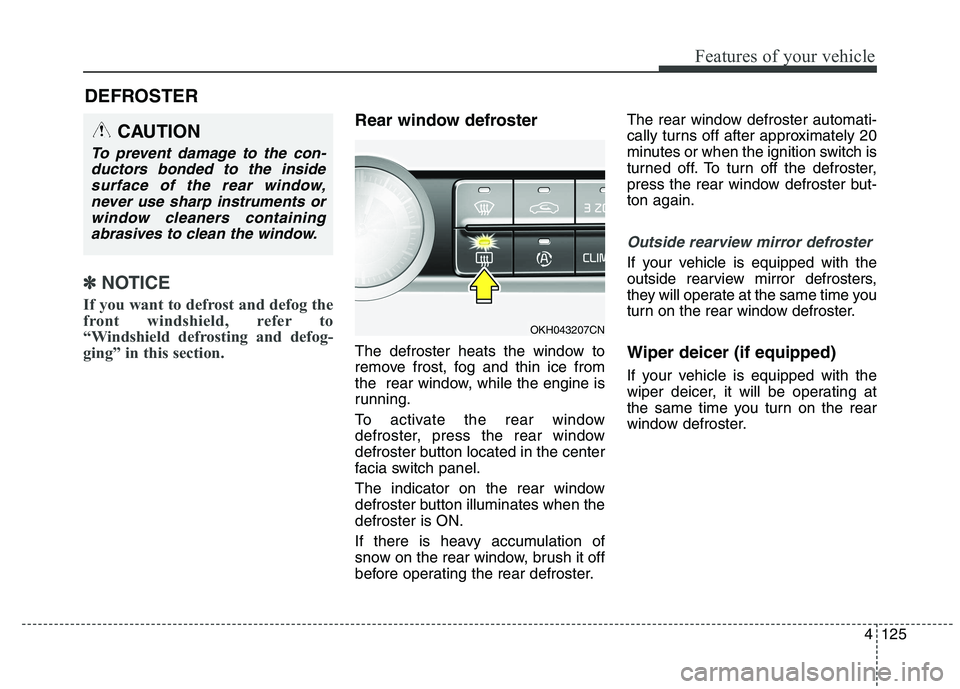
To activate the rear window
defroster, press the rear window
defroster button located in the center
facia switch panel.
The indicator on the rear window
defroster button illuminates when thedefroster is ON.
If there is heavy accumulation of
snow on the rear window, brush it off
before operating the rear defroster. The rear window defroster automati-
cally turns off after approximately 20
minutes or when the ignition switch is
turned off. To turn off the defroster,
press the rear window defroster but-ton again.
Outside rearview mirror defroster
If your vehicle is equipped with the
outside rearview mirror defrosters,
they will operate at the same time you
turn on the rear window defroster. Wiper deicer (if equipped)
If your vehicle is equipped with the
wiper deicer, it will be operating at
the same time you turn on the rear
window defroster.
CAUTION
To prevent damage to the con-
ductors bonded to the insidesurface of the rear window, never use sharp instruments orwindow cleaners containingabrasives to clean the window.
OKH043207CN
Page 207 of 486
Features of your vehicle
126
4
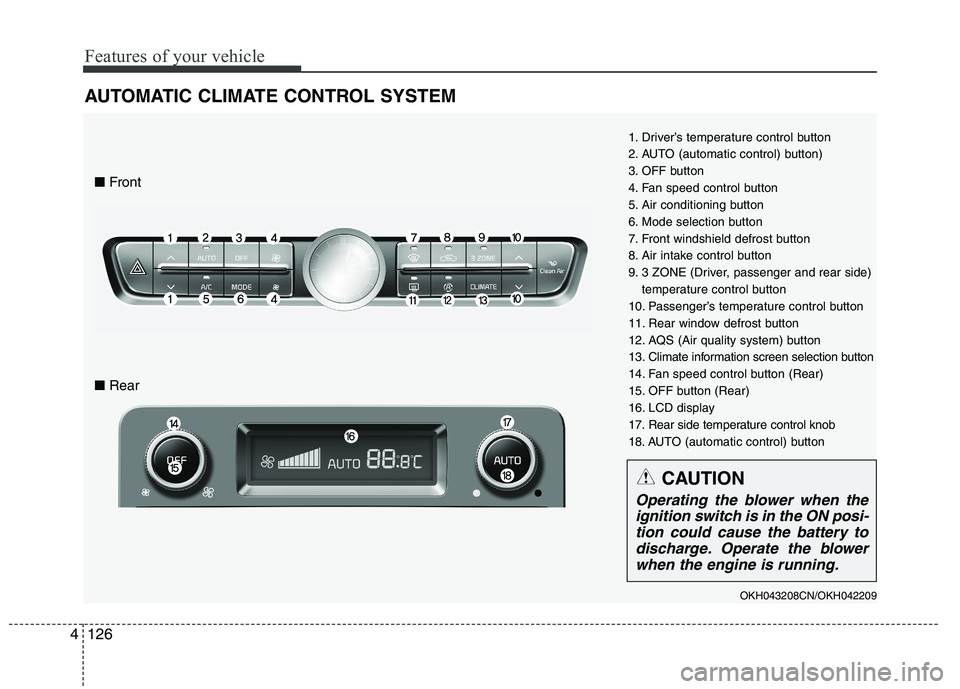
AUTOMATIC CLIMATE CONTROL SYSTEM
1. Driver’s temperature control button
2. AUTO (automatic control) button)
3. OFF button
4. Fan speed control button
5. Air conditioning button
6. Mode selection button
7. Front windshield defrost button
8. Air intake control button
9. 3 ZONE (Driver, passenger and rear side)
temperature control button
10. Passenger’s temperature control button
11. Rear window defrost button
12. AQS (Air quality system) button
13. Climate information screen selection button
14. Fan speed control button (Rear)
15. OFF button (Rear)
16. LCD display
17. Rear side temperature control knob
18. AUTO (automatic control) button
OKH043208CN/OKH042209
■ Front
■ Rear
CAUTION
Operating the blower when the
ignition switch is in the ON posi- tion could cause the battery todischarge. Operate the blowerwhen the engine is run
ning.
Page 209 of 486
Features of your vehicle
128
4
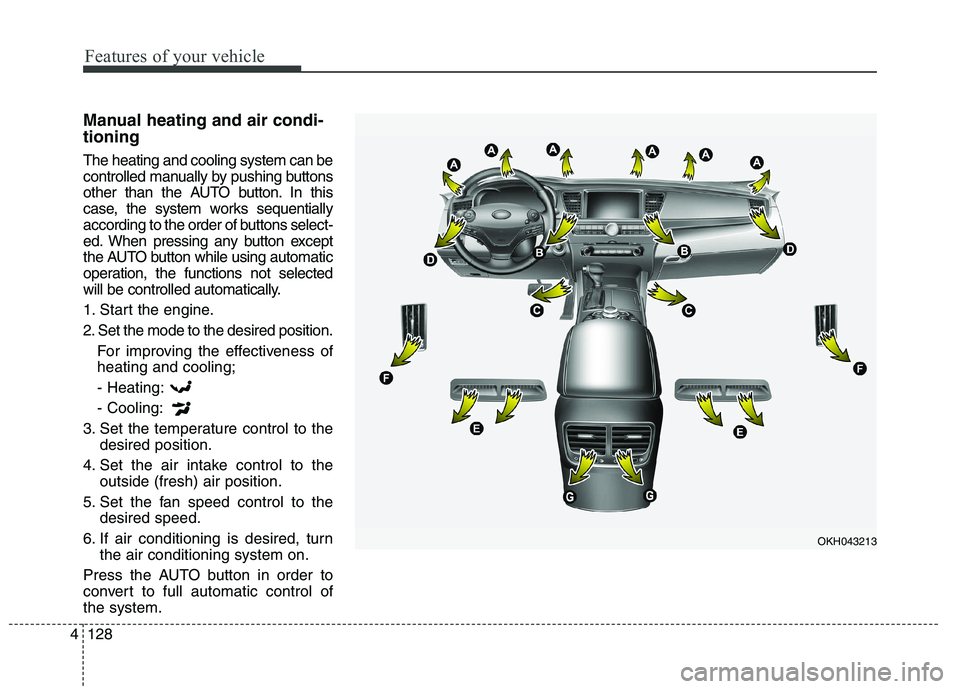
Manual heating and air condi- tioning The heating and cooling system can be
controlled manually by pushing buttons
other than the AUTO button. In this
case, the system works sequentially
according to the order of buttons select-
ed. When pressing any button except
the AUTO button while using automatic
operation, the functions not selected
will be controlled automatically.
1. Start the engine.
2. Set the mode to the desired position.
For improving the effectiveness of heating and cooling;
- Heating: - Cooling:
3. Set the temperature control to the desired position.
4. Set the air intake control to the outside (fresh) air position.
5. Set the fan speed control to the desired speed.
6. If air conditioning is desired, turn the air conditioning system on.
Press the AUTO button in order to
convert to full automatic control ofthe system.
OKH043213
Page 216 of 486
4135
Features of your vehicle
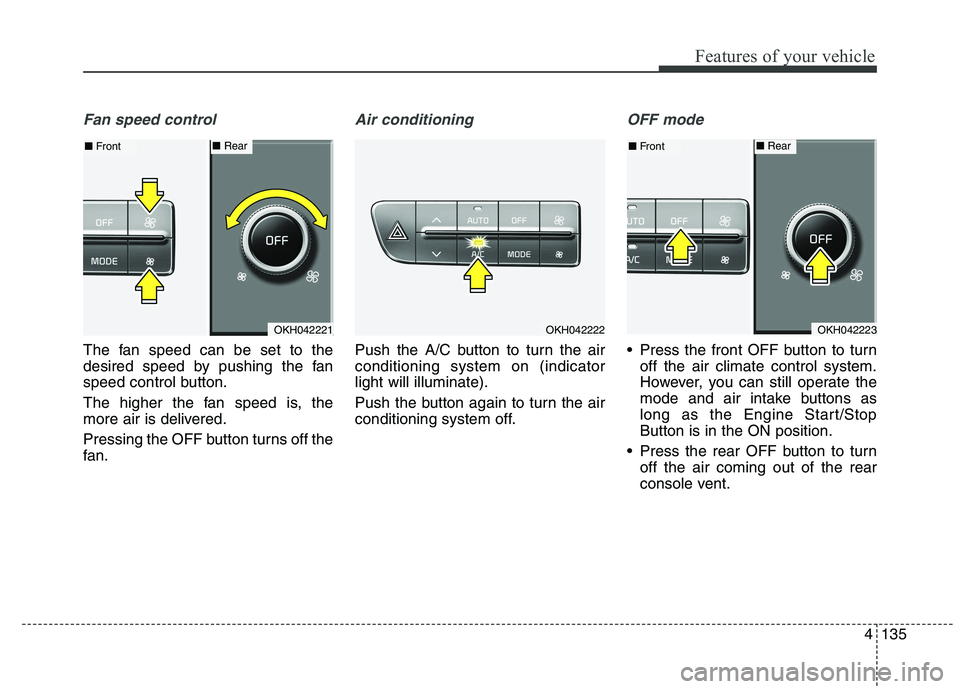
Fan speed control
The fan speed can be set to the
desired speed by pushing the fan
speed control button.
The higher the fan speed is, the
more air is delivered.
Pressing the OFF button turns off the
fan.
Air conditioning
Push the A/C button to turn the air conditioning system on (indicatorlight will illuminate).
Push the button again to turn the air
conditioning system off.
OFF mode
Press the front OFF button to turnoff the air climate control system.
However, you can still operate the
mode and air intake buttons as
long as the Engine Start/StopButton is in the ON position.
Press the rear OFF button to turn off the air coming out of the rear
console vent.
OKH042221
■Front■ Rear
OKH042222OKH042223
■Front■ Rear
Page 218 of 486
4137
Features of your vehicle
Operation Tips
To keep dust or unpleasant fumesfrom entering the car through the
ventilation system, temporarily set
the air intake control to the recircu-
lated air position. Be sure to returnthe control to the fresh air position
when the irritation has passed to
keep fresh air in the vehicle. This
will help keep the driver alert and
comfortable.
Air for the heating/cooling system is drawn in through the grilles just
ahead of the windshield. Care
should be taken that these are not
blocked by leaves, snow, ice or
other obstructions.
To prevent interior fog on the wind- shield, set the air intake control to
the fresh air position and fan speed
to the desired position, turn on theair conditioning system, and adjust
the temperature control to desired
temperature.Air conditioning
Kia Air Conditioning Systems are
filled with environmentally friendly
refrigerant.
1. Start the engine. Press the air con- ditioning button.
2. Set the mode to the position.
3. Set the air intake control to the outside air or recirculated air posi- tion.
4. Adjust the fan speed control and temperature control to maintain
maximum comfort.
✽✽ NOTICE
When using the air conditioning system, monitor the temperature
gauge closely while driving up
hills or in heavy traffic when out-
side temperatures are high. Air
conditioning system operation
may cause engine overheating.
Continue to use the blower fan but
turn the air conditioning system
off if the temperature gauge indi-
cates engine overheating.
When opening the windows in humid weather air conditioning
may create water droplets inside
the vehicle. Since excessive water
droplets may cause damage to
electrical equipment, air condi-
tioning should only be run with
the windows closed.
Page 219 of 486
Features of your vehicle
138
4
Air conditioning system operation tips
If the vehicle has been parked in
direct sunlight during hot weather,
open the windows for a short time
to let the hot air inside the vehicle
escape.
To help reduce moisture inside of the windows on rainy or humid
days, decrease the humidity inside
the vehicle by operating the airconditioning system.
During air conditioning system operation, you may occasionallynotice a slight change in enginespeed as the air conditioning com-
pressor cycles. This is a normal
system operation characteristic.
Use the air conditioning system every month only for a few minutes
to ensure maximum system per-
formance. When using the air conditioning
system, you may notice clear water
dripping (or even puddling) on the
ground under the passenger side
of the vehicle. This is a normal sys-
tem operation characteristic.
Operating the air conditioning sys- tem in the recirculated air position
provides maximum cooling, how-
ever, continual operation in this
mode may cause the air inside the
vehicle to become stale.
During cooling operation, you may occasionally notice a misty air flow
because of rapid cooling and
humid air intake. This is a normal
system operation characteristics. Climate control air filter The climate control air filter installed
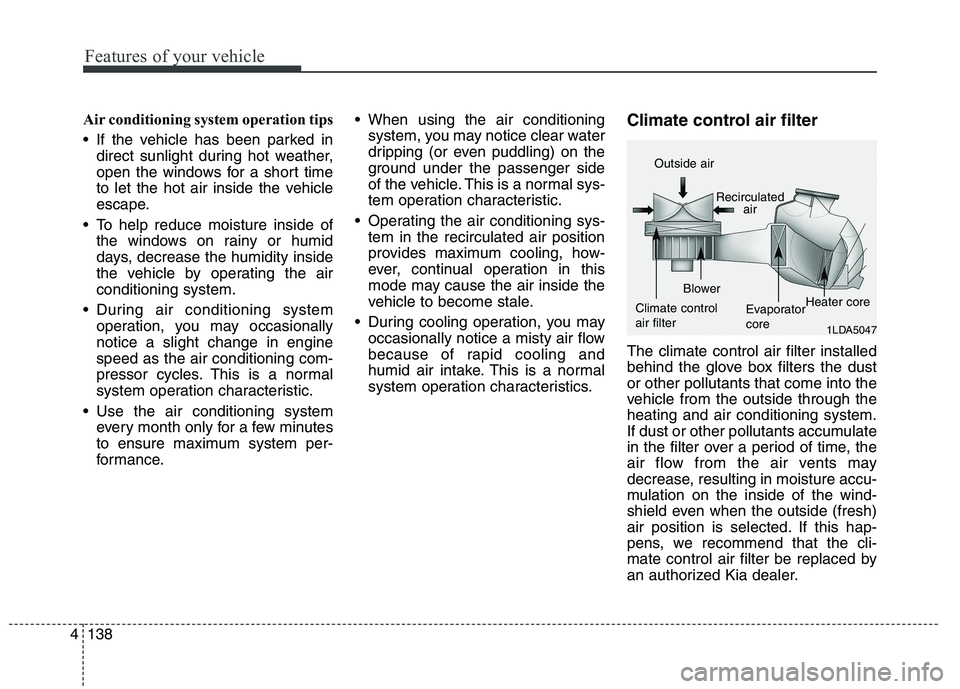
behind the glove box filters the dustor other pollutants that come into the
vehicle from the outside through theheating and air conditioning system.
If dust or other pollutants accumulate
in the filter over a period of time, the
air flow from the air vents may
decrease, resulting in moisture accu-
mulation on the inside of the wind-
shield even when the outside (fresh)
air position is selected. If this hap-
pens, we recommend that the cli-
mate control air filter be replaced by
an authorized Kia dealer.
1LDA5047
Outside air
Recirculatedair
Climate control air filter Blower
EvaporatorcoreHeater core
Page 231 of 486
Features of your vehicle
150
4
When using the sunvisor for the side
window, you can use the secondary
sunvisor (6) for the front window. Power outlet
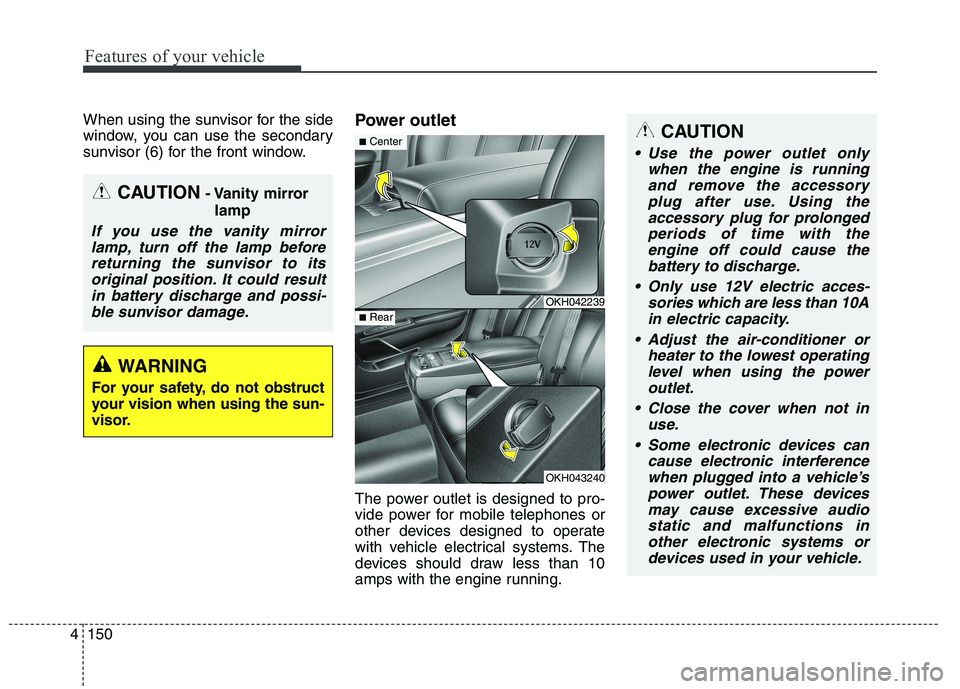
The power outlet is designed to pro-
vide power for mobile telephones or
other devices designed to operate
with vehicle electrical systems. The
devices should draw less than 10
amps with the engine running.
CAUTION
- Vanity mirror
lamp
If you use the vanity mirrorlamp, turn off the lamp beforereturning the sunvisor to its original position. It could resultin battery discharge and possi-ble sunvisor damage.
WARNING
For your safety, do not obstruct
your vision when using the sun-
visor.
OKH042239
OKH043240
■ Center
■Rear
CAUTION
Use the power outlet only
when the engine is runningand remove the accessory plug after use. Using theaccessory plug for prolongedperiods of time with the engine off could cause thebattery to discharge.
Only use 12V electric acces- sories which are less than 10Ain electric capacity.
Adjust the air-conditioner or heater to the lowest operatinglevel when using the poweroutlet.
Close the cover when not in use.
Some electronic devices can cause electronic interferencewhen plugged into a vehicle’spower outlet. These devicesmay cause excessive audiostatic and malfunctions in other electronic systems ordevices used in your vehicle.