lock KIA QUORIS 2015 Manual Online
[x] Cancel search | Manufacturer: KIA, Model Year: 2015, Model line: QUORIS, Model: KIA QUORIS 2015Pages: 486, PDF Size: 35.55 MB
Page 288 of 486
Driving your vehicle
44
5
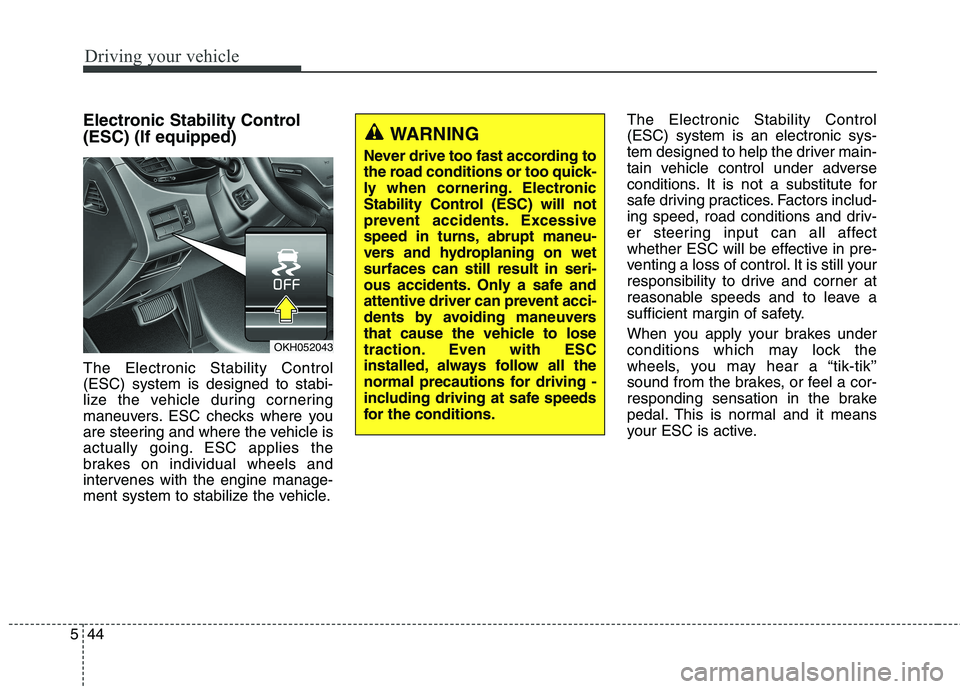
Electronic Stability Control (ESC) (If equipped) The Electronic Stability Control (ESC) system is designed to stabi-
lize the vehicle during cornering
maneuvers. ESC checks where you
are steering and where the vehicle is
actually going. ESC applies the
brakes on individual wheels and
intervenes with the engine manage-
ment system to stabilize the vehicle. The Electronic Stability Control (ESC) system is an electronic sys-
tem designed to help the driver main-
tain vehicle control under adverse
conditions. It is not a substitute for
safe driving practices. Factors includ-
ing speed, road conditions and driv-
er steering input can all affect
whether ESC will be effective in pre-
venting a loss of control. It is still your
responsibility to drive and corner at
reasonable speeds and to leave a
sufficient margin of safety.
When you apply your brakes under
conditions which may lock the
wheels, you may hear a “tik-tik’’
sound from the brakes, or feel a cor-
responding sensation in the brake
pedal. This is normal and it means
your ESC is active.
OKH052043
WARNING
Never drive too fast according to
the road conditions or too quick-
ly when cornering. Electronic
Stability Control (ESC) will not
prevent accidents. Excessive
speed in turns, abrupt maneu-
vers and hydroplaning on wetsurfaces can still result in seri-
ous accidents. Only a safe and
attentive driver can prevent acci-
dents by avoiding maneuvers
that cause the vehicle to lose
traction. Even with ESC
installed, always follow all the
normal precautions for driving -
including driving at safe speeds
for the conditions.
Page 293 of 486
549
Driving your vehicle
Do not "ride" the brake pedal.Resting your foot on the brake
pedal while driving can be danger-ous because it can result in the
brakes overheating and losing their
effectiveness. It also increases the
wear of the brake components.
If a tire goes flat while you are driv- ing, apply the brakes gently and
keep the car pointed straight
ahead while you slow down. When
you are moving slowly enough for it
to be safe to do so, pull off the road
and stop in a safe place.
If your car is equipped with an automatic transmission, don't let
your car creep forward. To avoid
creeping forward, keep your foot
firmly on the brake pedal when thecar is stopped. Be cautious when parking on a hill.
Firmly engage the parking brake
and place the shift lever in P (Park).
If your car is facing downhill, turnthe front wheels into the curb to
help keep the car from rolling. If
your car is facing uphill, turn the
front wheels away from the curb to
help keep the car from rolling. If
there is no curb or if it is required by
other conditions to keep the car
from rolling, block the wheels.
Under some conditions your park- ing brake can freeze in the
engaged position. This is most like-ly to happen when there is an accu-
mulation of snow or ice around or
near the rear brakes or if the brakes
are wet. If there is a risk that the
parking brake may freeze, apply it
only temporarily while you put the
shift lever in P (P ark) and block the
rear wheels so the car cannot roll.
Then release the parking brake. Do not hold the vehicle on the
upgrade with the accelerator
pedal. This can cause the trans-
mission to overheat. Always use
the brake pedal or parking brake.
Page 312 of 486
Driving your vehicle
68
5
Smart Cruise control will be tem-
porarily canceled when:
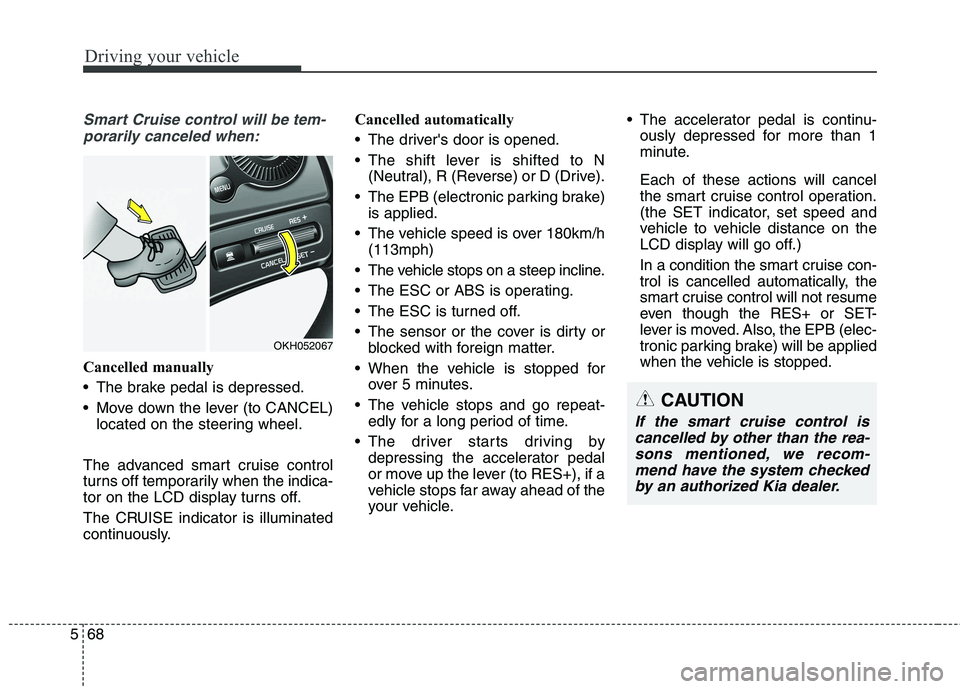
Cancelled manually
The brake pedal is depressed.
Move down the lever (to CANCEL) located on the steering wheel.
The advanced smart cruise control
turns off temporarily when the indica-
tor on the LCD display turns off.
The CRUISE indicator is illuminated
continuously. Cancelled automatically
The driver's door is opened.
The shift lever is shifted to N
(Neutral), R (Reverse) or D (Drive).
The EPB (electronic parking brake) is applied.
The vehicle speed is over 180km/h (113mph)
The vehicle stops on a steep incline.
The ESC or ABS is operating.
The ESC is turned off.
The sensor or the cover is dirty or blocked with foreign matter.
When the vehicle is stopped for over 5 minutes.
The vehicle stops and go repeat- edly for a long period of time.
The driver starts driving by depressing the accelerator pedal
or move up the lever (to RES+), if a
vehicle stops far away ahead of the
your vehicle. The accelerator pedal is continu-
ously depressed for more than 1
minute. Each of these actions will cancel
the smart cruise control operation.
(the SET indicator, set speed and
vehicle to vehicle distance on the
LCD display will go off.)
In a condition the smart cruise con- trol is cancelled automatically, the
smart cruise control will not resume
even though the RES+ or SET-
lever is moved. Also, the EPB (elec-
tronic parking brake) will be applied
when the vehicle is stopped.
CAUTION
If the smart cruise control is
cancelled by other than the rea-sons mentioned, we recom-mend have the system checked by an authorized Kia dealer.
OKH052067
Page 337 of 486
593
Driving your vehicle
Remember, your vehicle does notrequire extended warm-up. After
the engine has started, allow the
engine to run for 10 to 20 seconds
prior to placing the vehicle in gear.
In very cold weather, however, give
your engine a slightly longer warm-
up period.
Do not "lug" or "over-rev" the engine. Lugging is driving too
slowly in too high a gear resulting
engine bucking. If this happens,
shift to a lower gear. Over-revving
is racing the engine beyond its safe
limit. This can be avoided by shift-
ing at the recommended speeds.
Use your air conditioning sparingly. The air conditioning system is
operated by engine power so your
fuel economy is reduced when youuse it.
Open windows at high speeds can reduce fuel economy.
Fuel economy is less in crosswinds and headwinds. To help offset
some of this loss, slow down when
driving in these conditions. Keeping a vehicle in good operating
condition is important both for econ-
omy and safety. Therefore, we rec-
ommend that the system be serviced
by an authorized Kia dealer.
WARNING
- Engine off
during motion
Never turn the engine off to
coast down hills or anytime the
vehicle is in motion. The power
steering and power brakes will
not function properly without
the engine running. Instead,
keep the engine on and down-
shift to an appropriate gear for
engine braking effect. In addi-
tion, turning off the ignition
while driving could engage the
steering wheel lock (ifequipped) resulting in loss of
vehicle steering which could
cause serious injury or death.
Page 345 of 486
5101
Driving your vehicle
❈AutoSock ®
is a Registered trade-
mark of AutoSock ®
. Use high quality ethylene gly- col coolant
Your vehicle is delivered with high
quality ethylene glycol coolant in the
cooling system. It is the only type ofcoolant that should be used because
it helps prevent corrosion in the cool-
ing system, lubricates the water
pump and prevents freezing. Be sure
to replace or replenish your coolantin accordance with the maintenance
schedule in section 7. Before winter,
have your coolant tested to assure
that its freezing point is sufficient for
the temperatures anticipated during
the winter.
Check battery and cables
Winter puts additional burdens on
the battery system. Visually inspect
the battery and cables as described
in section 7. We recommend that the
level of charge in your battery be
checked by an authorized Kia dealer.
CAUTION
The AutoSock®(fabric snow
chain) that are the wrong size or improperly installed can damage your vehicle's brakelines, suspension, body andwheels.
Stop driving and retighten the AutoSock
®(fabric snow
chain) any time you hear them hitting the vehicle.
WARNING - Tire chains
The use of the AutoSock ®
(fab-
ric snow chain) may adversely
affect vehicle handling.
Do not exceed 30 km/h (20 mph) or the AutoSock ®
(fabric
snow chain) manufacturer’srecommended speed limit,
whichever is lower.
Drive carefully and avoid bumps, holes, sharp turns, and
other road hazards, which may
cause the vehicle to bounce.
Avoid sharp turns or locked- wheel braking.
Page 346 of 486
Driving your vehicle
102
5
Change to "winter weight" oil
if necessary In some climates it is recommended
that a lower viscosity "winter weight"
oil be used during cold weather. See
section 8 for recommendations. If
you aren't sure what weight oil you
should use, we recommend that you
consult an authorized Kia dealer.
Check spark plugs and igni- tion system
Inspect your spark plugs as described in section 7 and replace them if neces-
sary. Also check all ignition wiring and
components to be sure they are not
cracked, worn or damaged in any way.
To keep locks from freezing
To keep the locks from freezing,
squirt an approved de-icer fluid or
glycerine into the key opening. If a
lock is covered with ice, squirt it with
an approved de-icing fluid to remove
the ice. If the lock is frozen internally,
you may be able to thaw it out by
using a heated key. Handle the heat-
ed key with care to avoid injury. Use approved window washer
anti-freeze in system
To keep the water in the window
washer system from freezing, add an
approved window washer anti-freeze
solution in accordance with instruc-
tions on the container. Window wash-
er anti-freeze is available from an
authorized Kia dealer and most auto
parts outlets. Do not use engine
coolant or other types of anti-freeze
as these may damage the paint finish.
Don't let your parking brake
freeze
Under some conditions your parking
brake can freeze in the engaged
position. This is most likely to happen
when there is an accumulation of
snow or ice around or near the rear
brakes or if the brakes are wet. If
there is a risk the parking brake may
freeze, apply it only temporarily while
you put the shift lever in P and block
the rear wheels so the vehicle cannot
roll. Then release the parking brake.
Don't let ice and snow accu-
mulate underneath
Under some conditions, snow and
ice can build up under the fenders
and interfere with the steering. When
driving in severe winter conditions
where this may happen, you should
periodically check underneath the
vehicle to be sure the movement of
the front wheels and the steering
components is not obstructed.
Carry emergency equipment
Depending on the severity of the
weather, you should carry appropri-
ate emergency equipment. Some of
the items you may want to carry
include tire chains, tow straps or
chains, flashlight, emergency flares,
sand, shovel, jumper cables, window
scraper, gloves, ground cloth, cover-
alls, blanket, etc.
Page 351 of 486
What to do in an emergency
4
6
IF THE ENGINE WILL NOT START
If engine doesn't turn over or
turns over slowly
1. If your vehicle has an automatic transaxle, be sure the shift lever is
in N (Neutral) or P (Park) and the
emergency brake is set.
2. Check the battery connections to be sure they are clean and tight.
3. Turn on the interior light. If the light dims or goes out when you oper-
ate the starter, the battery is dis-charged.
4. Check the starter connections to be sure they are securely tight-ened.
5. Do not push or pull the vehicle to start it. See instructions for "Jump
starting". If engine turns over normally
but does not start
1. Check fuel level.
2. With the ignition switch in the
LOCK /OFF position, check all connectors at the ignition coils and
spark plugs. Reconnect any that
may be disconnected or loose.
3. If the engine still does not start, we recommend that you call an
authorized Kia dealer.
WARNING
If the engine will not start, do
not push or pull the car to start
it. This could result in a collision
or cause other damage.
Page 364 of 486
617
What to do in an emergency
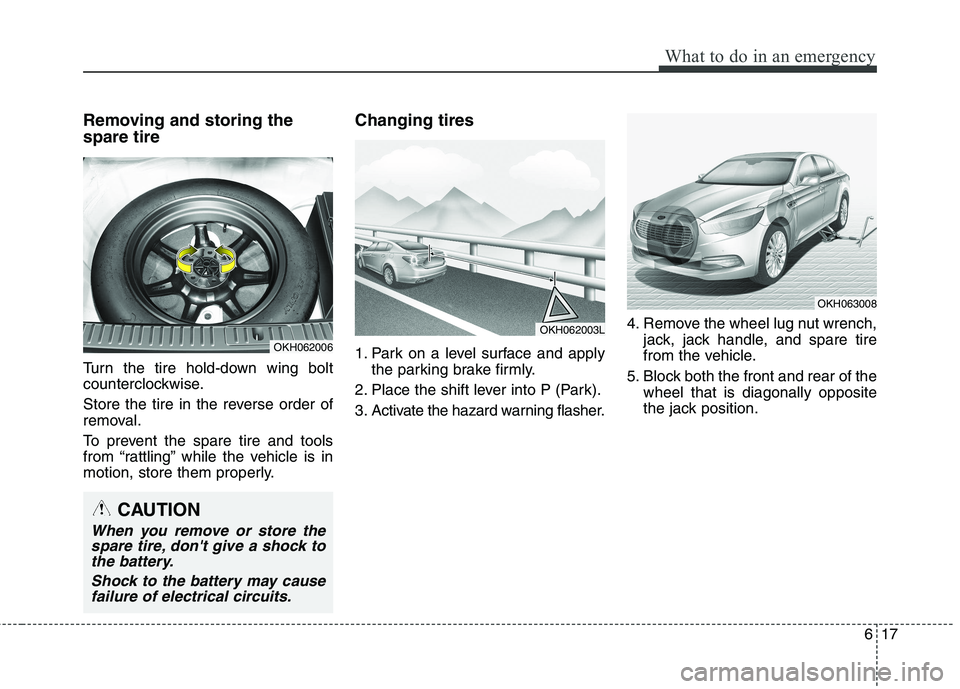
Removing and storing the spare tire
Turn the tire hold-down wing bolt
counterclockwise.
Store the tire in the reverse order of
removal.
To prevent the spare tire and tools
from “rattling” while the vehicle is in
motion, store them properly.Changing tires
1. Park on a level surface and apply
the parking brake firmly.
2. Place the shift lever into P (Park).
3. Activate the hazard warning flasher. 4. Remove the wheel lug nut wrench,
jack, jack handle, and spare tire
from the vehicle.
5. Block both the front and rear of the wheel that is diagonally opposite
the jack position.
OKH062006
OKH062003L
CAUTION
When you remove or store thespare tire, don't give a shock tothe battery.
Shock to the battery may causefailure of electrical circuits.
OKH063008
Page 365 of 486
What to do in an emergency
18
6
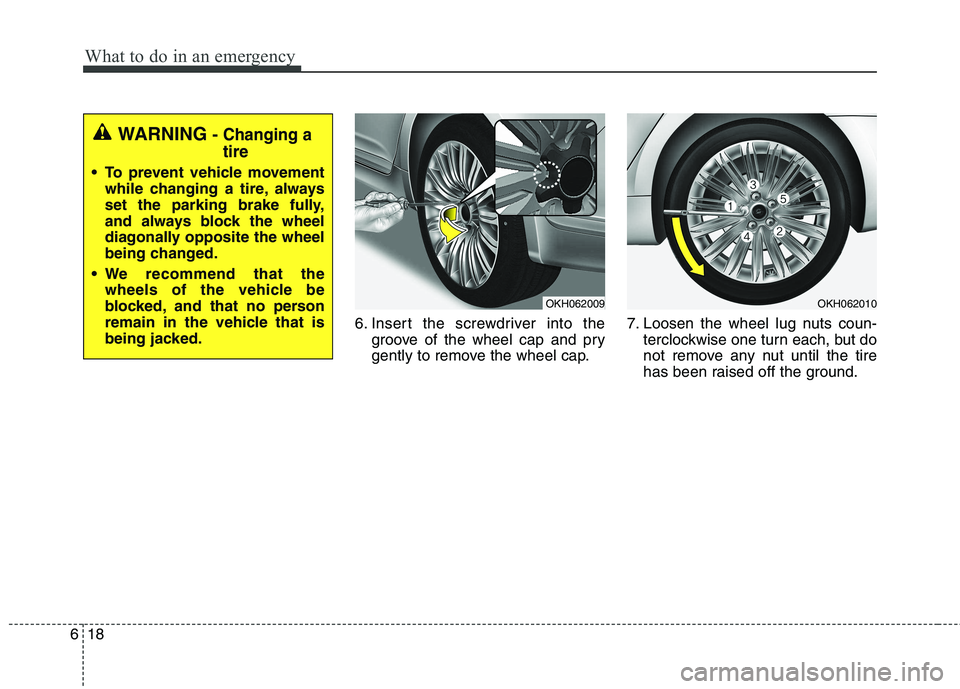
6. Insert the screwdriver into the
groove of the wheel cap and pry
gently to remove the wheel cap. 7. Loosen the wheel lug nuts coun-
terclockwise one turn each, but do
not remove any nut until the tire
has been raised off the ground.
WARNING - Changing a tire
To prevent vehicle movement
while changing a tire, always
set the parking brake fully,
and always block the wheel
diagonally opposite the wheel
being changed.
We recommend that the wheels of the vehicle be
blocked, and that no person
remain in the vehicle that is
being jacked.
OKH062009OKH062010
Page 366 of 486
619
What to do in an emergency
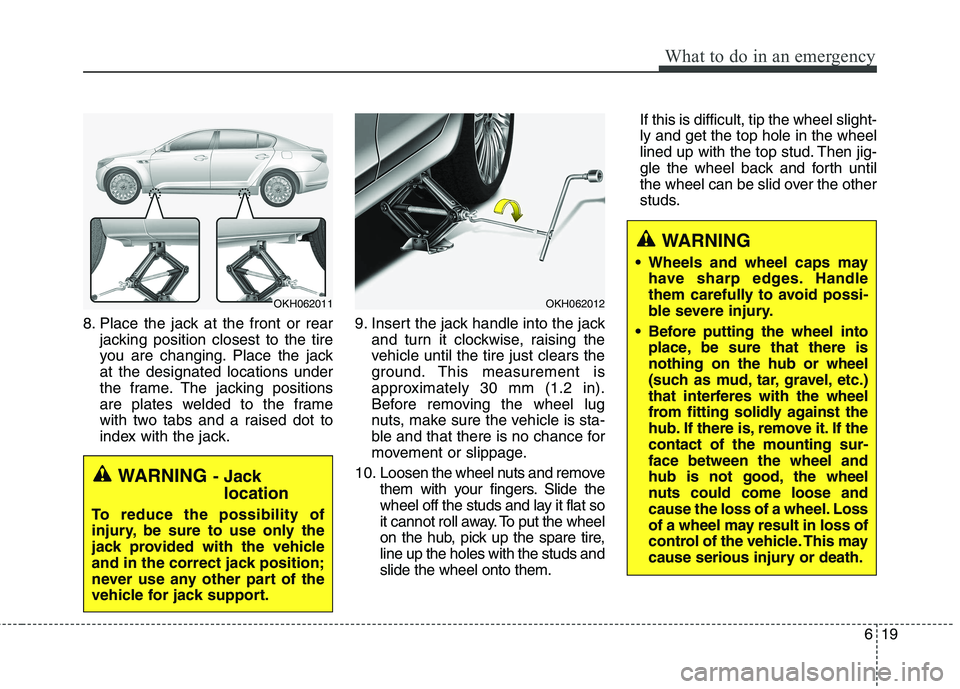
8. Place the jack at the front or rearjacking position closest to the tire
you are changing. Place the jackat the designated locations under
the frame. The jacking positions
are plates welded to the frame
with two tabs and a raised dot to
index with the jack. 9. Insert the jack handle into the jack
and turn it clockwise, raising the
vehicle until the tire just clears the
ground. This measurement is
approximately 30 mm (1.2 in).
Before removing the wheel lug
nuts, make sure the vehicle is sta-
ble and that there is no chance for
movement or slippage.
10. Loosen the wheel nuts and remove them with your fingers. Slide the
wheel off the studs and lay it flat so
it cannot roll away. To put the wheel
on the hub, pick up the spare tire,line up the holes with the studs andslide the wheel onto them. If this is difficult, tip the wheel slight-ly and get the top hole in the wheel
lined up with the top stud. Then jig-
gle the wheel back and forth until
the wheel can be slid over the other
studs.
OKH062011
WARNING
- Jack
location
To reduce the possibility of
injury, be sure to use only the
jack provided with the vehicle
and in the correct jack position;
never use any other part of the
vehicle for jack support.
OKH062012
WARNING
Wheels and wheel caps may have sharp edges. Handle
them carefully to avoid possi-
ble severe injury.
Before putting the wheel into place, be sure that there isnothing on the hub or wheel
(such as mud, tar, gravel, etc.)
that interferes with the wheel
from fitting solidly against the
hub. If there is, remove it. If thecontact of the mounting sur-face between the wheel and
hub is not good, the wheel
nuts could come loose and
cause the loss of a wheel. Loss
of a wheel may result in loss of
control of the vehicle. This may
cause serious injury or death.