height KIA QUORIS 2016 User Guide
[x] Cancel search | Manufacturer: KIA, Model Year: 2016, Model line: QUORIS, Model: KIA QUORIS 2016Pages: 513, PDF Size: 30.14 MB
Page 59 of 513
Safety features of your vehicle
42
3
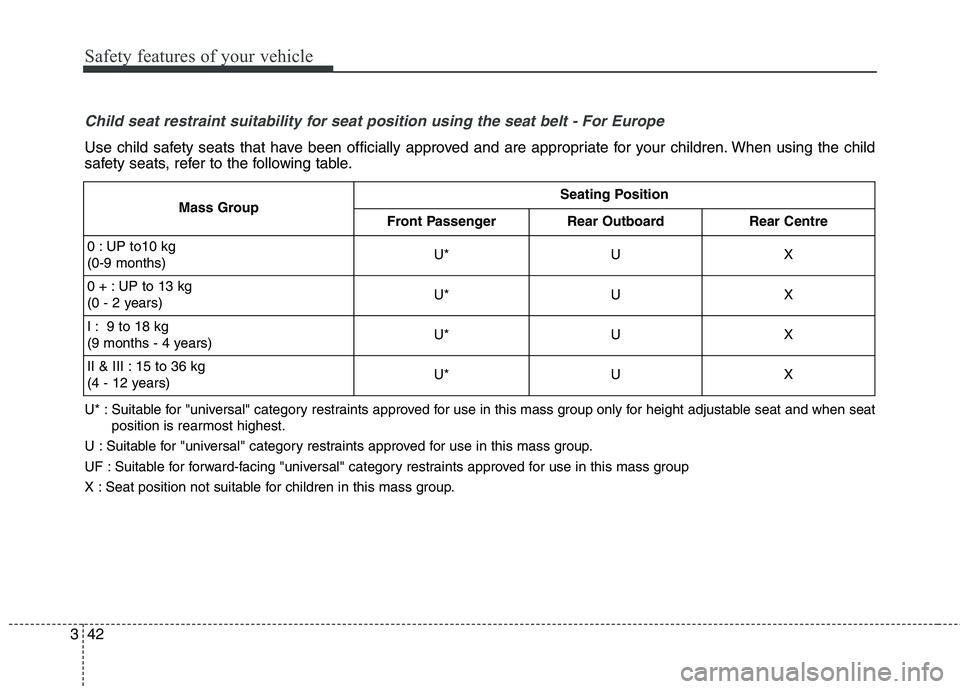
Child seat restraint suitability for seat position using the seat belt - For Europe
Use child safety seats that have been officially approved and are appropriate for your children. When using the child
safety seats, refer to the following table.
U* : Suitable for "universal" category restraints approved for use in this mass group only for height adjustable seat and when s eat
position is rearmost highest.
U : Suitable for "universal" category restraints approved for use in this mass group.
UF : Suitable for forward-facing "universal" category restraints approved for use in this mass group
X : Seat position not suitable for children in this mass group.
Mass GroupSeating Position
Front PassengerRear OutboardRear Centre
0 : UP to10 kg (0-9 months)U*UX
0 + : UP to 13 kg
(0 - 2 years)U*UX
I : 9 to 18 kg
(9 months - 4 years)U*UX
II & III : 15 to 36 kg
(4 - 12 years)U*UX
Page 87 of 513
Adding equipment to or modi-
fying your air bag-equipped
vehicle
If you modify your vehicle by chang-
ing your vehicle's frame, bumper sys-tem, front end or side sheet metal or
ride height, this may affect the opera-
tion of your vehicle's air bag system.Air bag warning label
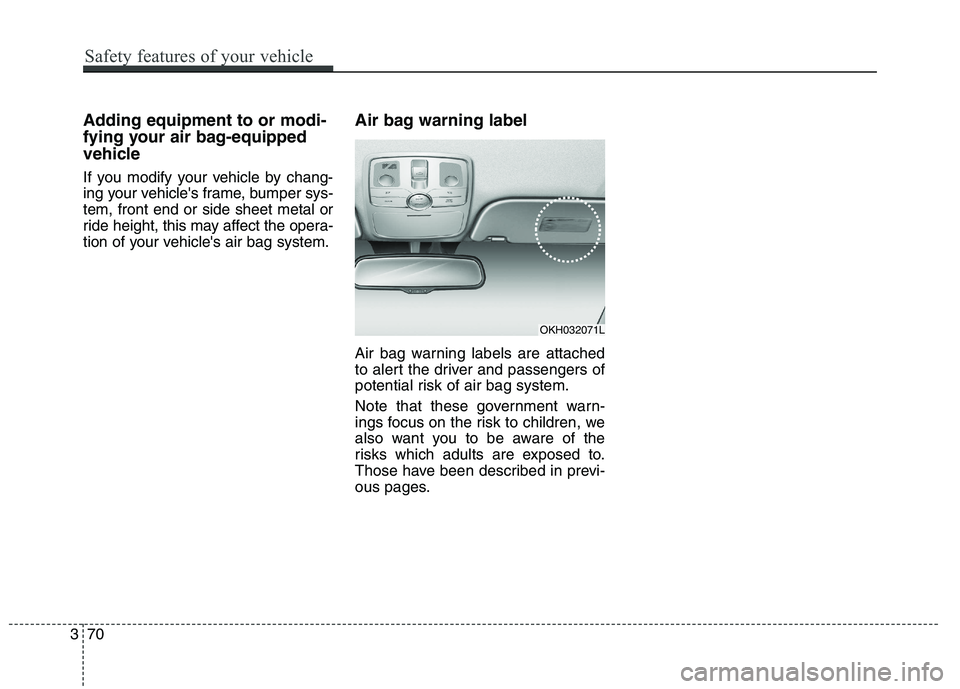
Air bag warning labels are attached
to alert the driver and passengers of
potential risk of air bag system.
Note that these government warn-
ings focus on the risk to children, we
also want you to be aware of the
risks which adults are exposed to.
Those have been described in previ-
ous pages.
370
Safety features of your vehicle
OKH032071L
Page 154 of 513
467
Features of your vehicle
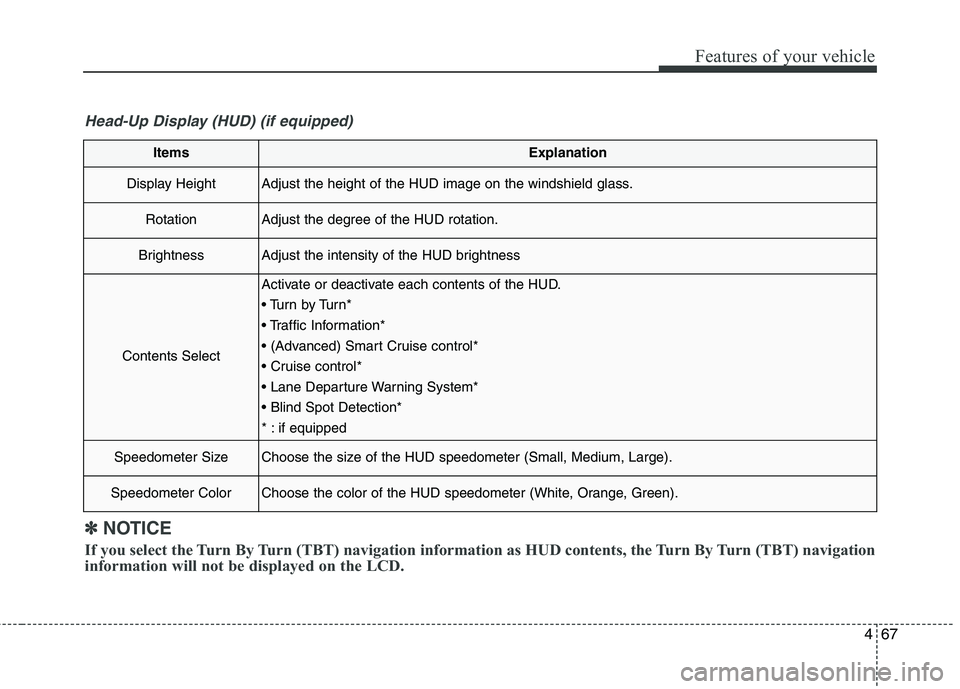
ItemsExplanation
Display HeightAdjust the height of the HUD image on the windshield glass.
RotationAdjust the degree of the HUD rotation.
BrightnessAdjust the intensity of the HUD brightness
Contents Select
Activate or deactivate each contents of the HUD.
Tu r n b y Tu r n *
* : if equipped
Speedometer SizeChoose the size of the HUD speedometer (Small, Medium, Large).
Speedometer ColorChoose the color of the HUD speedometer (White, Orange, Green).
✽✽NOTICE
If you select the Turn By Turn (TBT) navigation information as HUD contents, the Turn By Turn (TBT) navi gation
information will not be displayed on the LCD.
Head-Up Display (HUD) (if equipped)
Page 190 of 513
4103
Features of your vehicle
Description
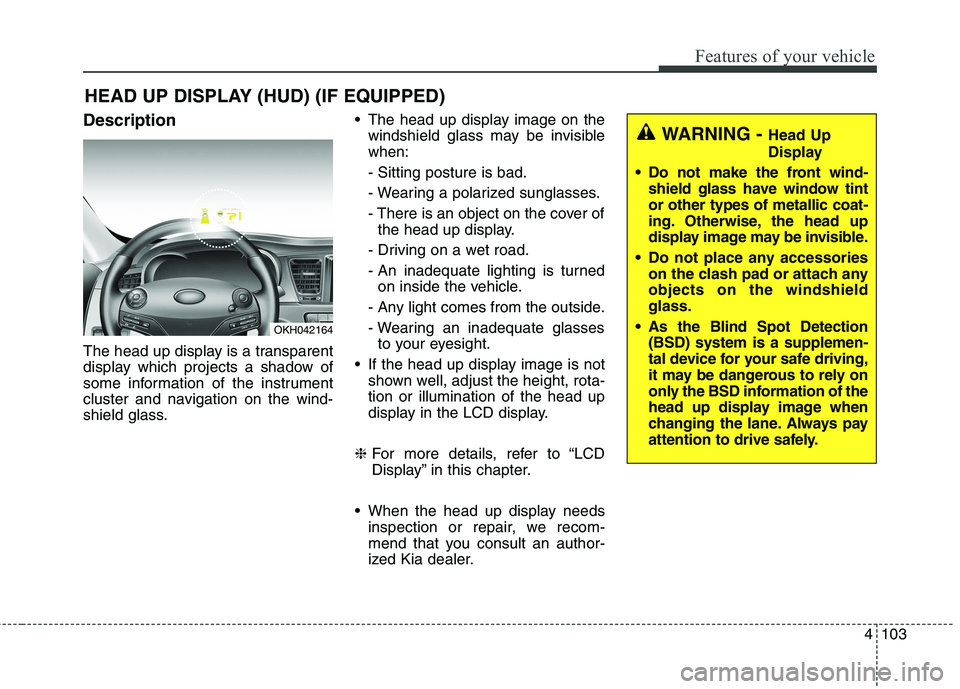
The head up display is a transparent
display which projects a shadow of
some information of the instrument
cluster and navigation on the wind-
shield glass. The head up display image on the
windshield glass may be invisible when: - Sitting posture is bad.
- Wearing a polarized sunglasses.
- There is an object on the cover ofthe head up display.
- Driving on a wet road.
- An inadequate lighting is turned on inside the vehicle.
- Any light comes from the outside.
- Wearing an inadequate glasses to your eyesight.
If the head up display image is not shown well, adjust the height, rota- tion or illumination of the head up
display in the LCD display.
❈ For more details, refer to “LCD
Display” in this chapter.
When the head up display needs inspection or repair, we recom-
mend that you consult an author-
ized Kia dealer.
HEAD UP DISPLAY (HUD) (IF EQUIPPED)
OKH042164
WARNING -
Head Up
Display
Do not make the front wind- shield glass have window tint or other types of metallic coat-
ing. Otherwise, the head up
display image may be invisible.
Do not place any accessories on the clash pad or attach anyobjects on the windshieldglass.
As the Blind Spot Detection (BSD) system is a supplemen-
tal device for your safe driving,
it may be dangerous to rely on
only the BSD information of the
head up display image when
changing the lane. Always pay
attention to drive safely.
Page 192 of 513
4105
Features of your vehicle
Head Up Display Setting
On the LCD display, you can change
the head up display settings as fol-
lows.
1. Display height
2. Rotation
3. Brightness
4. Content select
5. Speedometer size
6. Speedometer color ❈For more details, refer to “LCD
Display” in this chapter.
Page 196 of 513
4109
Features of your vehicle
✽✽NOTICE
1. The warning may not sound sequentially depending on the
speed and shapes of the objects
detected.
2. The parking assist system may malfunction if the vehicle bumper
height or sensor installation has
been modified. Any non-factory
installed equipment or accessories
may also interfere with the sensor
performance.
3. Sensor may not recognize objects less than 30 cm from the sensor,
or it may sense an incorrect dis-
tance. Use with caution.
4. When the sensor is frozen or stained with snow or water, the
sensor may be inoperative until
the stains are removed using a
soft cloth.
5. Do not push, scratch or strike the sensor with any hard objects that
could damage the surface of the
sensor. Sensor damage could
occur. ✽✽
NOTICE
This system can only sense objects
within the range and location of the
sensors, it can not detect objects in
other areas where sensors are not
installed. Also, small or slim objects,
or objects located between sensors
may not be detected.
Always visually check in front and
behind the vehicle when driving.
Be sure to inform any drivers in the
vehicle that may be unfamiliar with
the system regarding the systems
capabilities and limitations.WARNING
Pay close attention when the
vehicle is driven close to
objects on the road, particularly
pedestrians, and especially
children. Be aware that some
objects may not be detected by
the sensors, due to the objects
distance, size or material, all of
which can limit the effective-
ness of the sensor. Always per-
form a visual inspection to
make sure the vehicle is clear of
all obstructions before moving
the vehicle in any direction.
Page 303 of 513
Driving your vehicle
42
5
Anti-lock brake system (ABS)
The ABS continuously senses the
speed of the wheels. If the wheels
are going to lock, the ABS system
repeatedly modulates the hydraulic
brake pressure to the wheels.
When you apply your brakes under
conditions which may lock the wheels,
you may hear a “tik-tik’’ sound from the
brakes, or feel a corresponding sensa-
tion in the brake pedal. This is normal
and it means your ABS is active.
In order to obtain the maximum ben-
efit from your ABS in an emergencysituation, do not attempt to modulate
your brake pressure and do not try to
pump your brakes.Press your brake pedal as hard as
possible or as hard as the situation
warrants and allow the ABS to con-
trol the force being delivered to the
brakes.
✽✽
NOTICE
A click sound may be heard in the
engine compartment when the vehi-
cle begins to move after the engine is
started. These conditions are normal
and indicate that the anti-lock brake
system is functioning properly.
Even with the anti-lock brake sys- tem, your vehicle still requires suf-
ficient stopping distance. Always
maintain a safe distance from the
vehicle in front of you.
Always slow down when cornering. The anti-lock brake system cannot
prevent accidents resulting from
excessive speeds.
On loose or uneven road surfaces, operation of the anti-lock brake sys-
tem may result in a longer stopping
distance than for vehicles equipped
with a conventional brake system.
(Continued)
On roads where the road sur-face is pitted or has different surface height.
The safety features of an ABS
(or ESC) equipped vehicle
should not be tested by high
speed driving or cornering. This
could endanger the safety of
yourself or others.
WARNING
ABS (or ESC) will not prevent
accidents due to improper or
dangerous driving maneuvers.
Even though vehicle control is
improved during emergency
braking, always maintain a safe
distance between you and
objects ahead. Vehicle speeds
should always be reduced dur-
ing extreme road conditions.
The braking distance for cars
equipped with an anti-lock brak-
ing system (or Electronic
Stability Control system) may be
longer than for those without it
in the following road conditions. During these conditions the
vehicle should be driven atreduced speeds:
Rough, gravel or snow-cov- ered roads.
With tire chains installed.
(Continued)
Page 328 of 513
567
Driving your vehicle
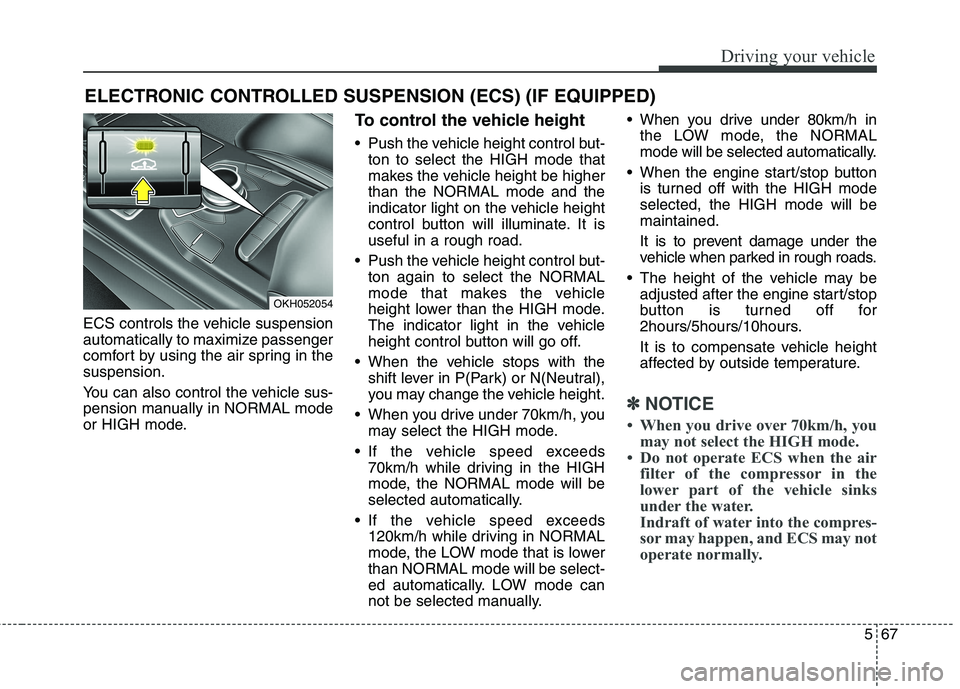
ECS controls the vehicle suspension
automatically to maximize passenger
comfort by using the air spring in thesuspension.
You can also control the vehicle sus-
pension manually in NORMAL mode
or HIGH mode.To control the vehicle height
Push the vehicle height control but-
ton to select the HIGH mode that
makes the vehicle height be higherthan the NORMAL mode and the
indicator light on the vehicle height
control button will illuminate. It isuseful in a rough road.
Push the vehicle height control but- ton again to select the NORMAL
mode that makes the vehicle
height lower than the HIGH mode.
The indicator light in the vehicle
height control button will go off.
When the vehicle stops with the shift lever in P(Park) or N(Neutral),
you may change the vehicle height.
When you drive under 70km/h, you may select the HIGH mode.
If the vehicle speed exceeds 70km/h while driving in the HIGH
mode, the NORMAL mode will be
selected automatically.
If the vehicle speed exceeds 120km/h while driving in NORMAL
mode, the LOW mode that is lowerthan NORMAL mode will be select-
ed automatically. LOW mode can
not be selected manually. When you drive under 80km/h in
the LOW mode, the NORMAL
mode will be selected automatically.
When the engine start/stop button is turned off with the HIGH modeselected, the HIGH mode will bemaintained.
It is to prevent damage under the
vehicle when parked in rough roads.
The height of the vehicle may be adjusted after the engine start/stop
button is turned off for
2hours/5hours/10hours.
It is to compensate vehicle height
affected by outside temperature.
✽✽
NOTICE
When you drive over 70km/h, you may not select the HIGH mode.
Do not operate ECS when the air filter of the compressor in the
lower part of the vehicle sinks
under the water.
Indraft of water into the compres-
sor may happen, and ECS may not
operate normally.
ELECTRONIC CONTROLLED SUSPENSION (ECS) (IF EQUIPPED)
OKH052054
Page 329 of 513
Driving your vehicle
68
5
ECS (electronic controlled suspension) malfunction
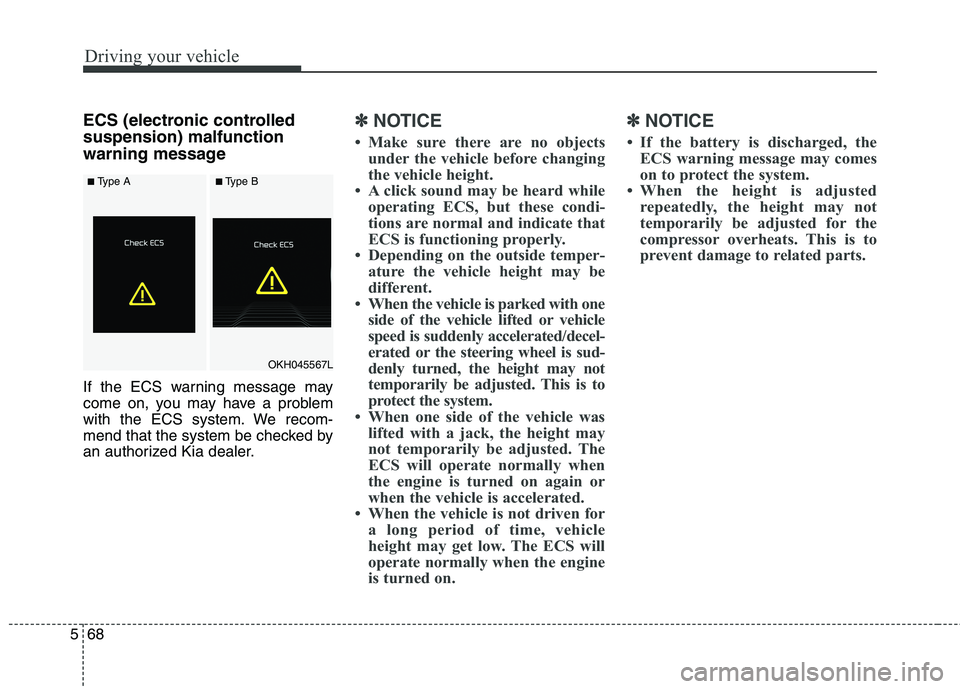
warning message
If the ECS warning message may
come on, you may have a problem
with the ECS system. We recom-
mend that the system be checked by
an authorized Kia dealer.✽✽
NOTICE
Make sure there are no objects under the vehicle before changing
the vehicle height.
A click sound may be heard while operating ECS, but these condi-
tions are normal and indicate that
ECS is functioning properly.
Depending on the outside temper- ature the vehicle height may be
different.
When the vehicle is parked with one side of the vehicle lifted or vehicle
speed is suddenly accelerated/decel-
erated or the steering wheel is sud-
denly turned, the height may not
temporarily be adjusted. This is to
protect the system.
When one side of the vehicle was lifted with a jack, the height may
not temporarily be adjusted. The
ECS will operate normally when
the engine is turned on again or
when the vehicle is accelerated.
When the vehicle is not driven for a long period of time, vehicle
height may get low. The ECS will
operate normally when the engine
is turned on. ✽✽
NOTICE
If the battery is discharged, the ECS warning message may comes
on to protect the system.
When the height is adjusted repeatedly, the height may not
temporarily be adjusted for the
compressor overheats. This is to
prevent damage to related parts.
OKH045567L
■Type A■Type A■Type B■Type B
Page 330 of 513
569
Driving your vehicle
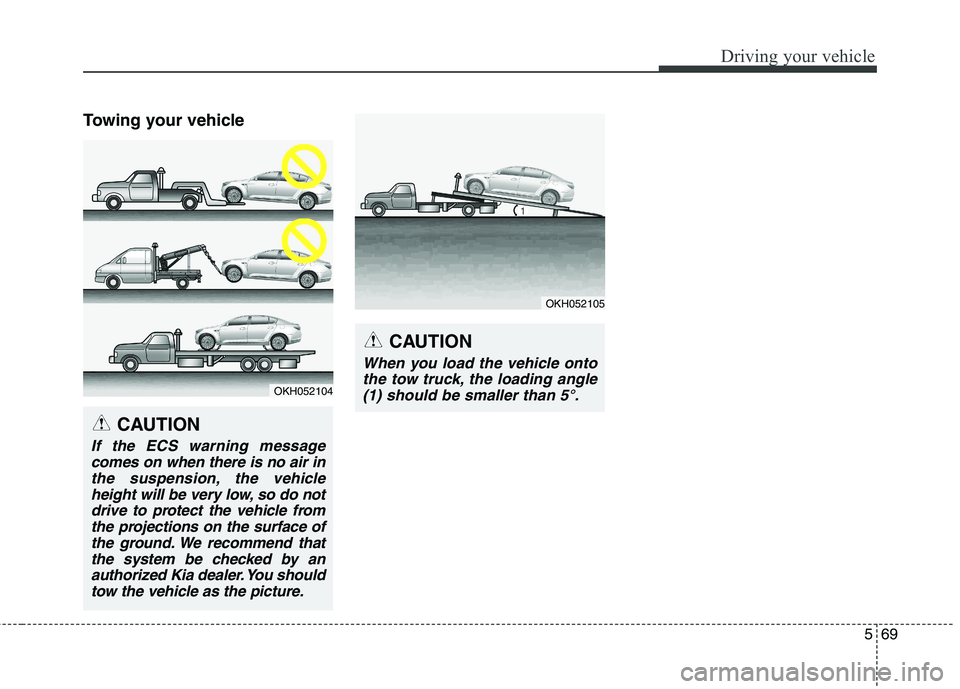
Towing your vehicle
OKH052104
CAUTION
If the ECS warning messagecomes on when there is no air inthe suspension, the vehicle height will be very low, so do notdrive to protect the vehicle fromthe projections on the surface of the ground. We recommend thatthe system be checked by anauthorized Kia dealer. You should tow the vehicle as the picture.
CAUTION
When you load the vehicle ontothe tow truck, the loading angle(1) should be smaller than 5°.
OKH052105