tow KIA QUORIS 2016 User Guide
[x] Cancel search | Manufacturer: KIA, Model Year: 2016, Model line: QUORIS, Model: KIA QUORIS 2016Pages: 513, PDF Size: 30.14 MB
Page 213 of 513
Features of your vehicle
126
4
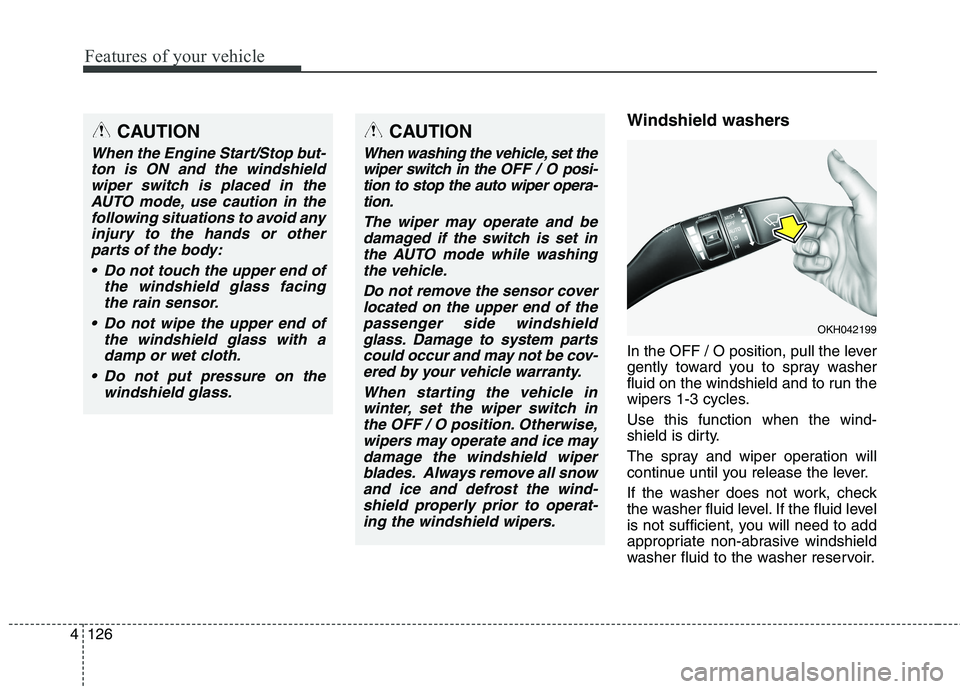
Windshield washers
In the OFF / O position, pull the lever
gently toward you to spray washer
fluid on the windshield and to run the
wipers 1-3 cycles. Use this function when the wind-
shield is dirty.
The spray and wiper operation will
continue until you release the lever.
If the washer does not work, check
the washer fluid level. If the fluid level
is not sufficient, you will need to add
appropriate non-abrasive windshield
washer fluid to the washer reservoir.CAUTION
When the Engine Start/Stop but-
ton is ON and the windshieldwiper switch is placed in the AUTO mode, use caution in thefollowing situations to avoid anyinjury to the hands or other parts of the body:
Do not touch the upper end of the windshield glass facingthe rain sensor.
Do not wipe the upper end of the windshield glass with adamp or wet cloth.
Do not put pressure on the windshield glass.
OKH042199
CAUTION
When washing the vehicle, set thewiper switch in the OFF / Oposi-
tion to stop the auto wiper opera- tion.
The wiper may operate and bedamaged if the switch is set inthe AUTO mode while washingthe vehicle.
Do not remove the sensor coverlocated on the upper end of the passenger side windshieldglass. Damage to system partscould occur and may not be cov- ered by your vehicle warranty.
When starting the vehicle inwinter, set the wiper switch inthe OFF / O position. Otherwise,wipers may operate and ice may damage the windshield wiperblades. Always remove all snowand ice and defrost the wind-shield properly prior to operat- ing the windshield wipers.
Page 225 of 513
Features of your vehicle
138
4
Mode selection
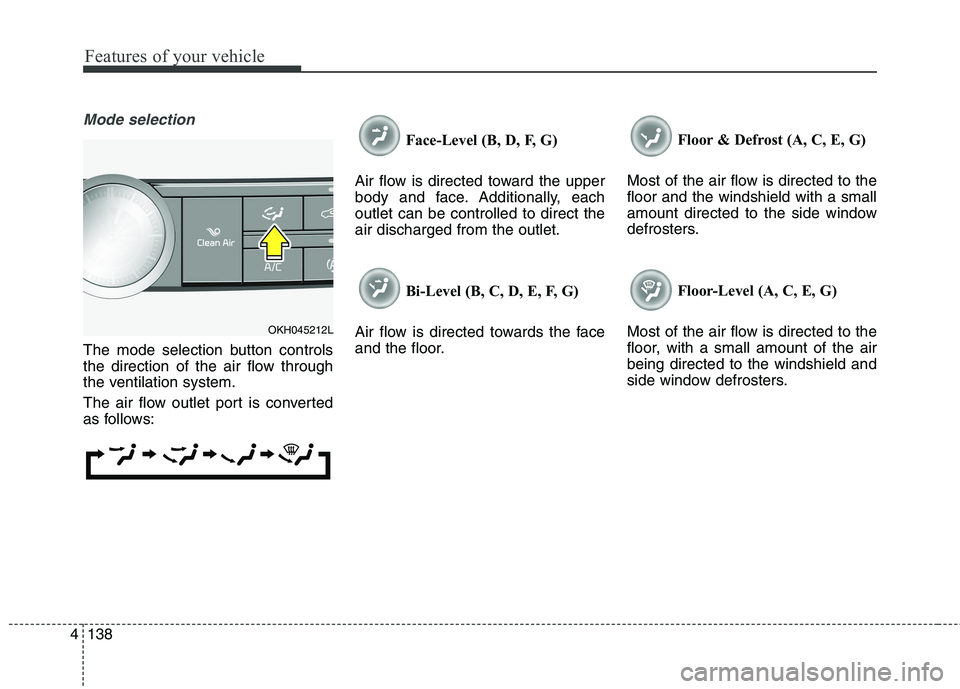
The mode selection button controls
the direction of the air flow through
the ventilation system.
The air flow outlet port is converted
as follows: Face-Level (B, D, F, G)
Air flow is directed toward the upper
body and face. Additionally, eachoutlet can be controlled to direct theair discharged from the outlet.
Bi-Level (B, C, D, E, F, G)
Air flow is directed towards the face
and the floor. Floor & Defrost (A, C, E, G)
Most of the air flow is directed to thefloor and the windshield with a small
amount directed to the side window
defrosters.
Floor-Level (A, C, E, G)
Most of the air flow is directed to the
floor, with a small amount of the airbeing directed to the windshield and
side window defrosters.
OKH045212L
Page 238 of 513
4151
Features of your vehicle
This indicator illuminates
when the auto defoggingsystem senses the mois-ture of inside the wind-
shield and operates.
If more moisture is in the vehicle, the
higher steps operate as follow. For
example if auto defogging does not
defog inside the windshield at step 2
Outside air position, it tries to defog
again at step 1 Blowing air towardthe windshield. Step 1 : Operating the air conditioning
Step 2 : Outside air position
Step 3 : Blowing air toward the wind- shield
Step 4 : Increasing air flow toward the windshield To cancel or reset the Auto Defogging
System Press the front windshield defroster
button for 3 seconds when the
Engine Start/Stop button is in the ON
position. When the Auto Defogging
System is canceled, Front defroster
button will blink 6 times.
When the Auto Defogging System is
reset, Front defroster button will blink3 times without a signal.
✽✽
NOTICE
If the A/C off is manually selected while the auto defogging system is
on, the auto defogging indicator
will blink 3 times to give notice
that manual operation is canceled.
If the air quality system (AQS) is selected while the auto defogging
system is operating at the step 1
outside air position, the recirculat-
ed air position may operate when
the outside air is polluted.
CAUTION
Do not remove the sensor cover
located on the upper end of thepassenger side windshield glass. Damage to system partscould occur and may not be cov-ered by your vehicle warranty.
Page 250 of 513
4163
Features of your vehicle
You can activate or deactivate therear seat warmer button by using the
REAR LOCK button on the rear arm-
rest or “System Settings” in
AVN(Audio, Video, and Navigation).
Detailed information for “System
Settings” is described in a separate-
ly supplied manual. If the REAR
LOCK button activated (LED “ON”),
you can not activate the rear seat
warmer button.
After deactivating (LED “OFF”) the
REAR LOCK button, you can acti-
vate the rear seat warmer button.
If the REAR LOCK button has acti-
vated through AVN, you can deac-
tivate the REAR LOCK button only
Through AVN.
✽✽ NOTICE
With the seat warmer switch in ON
position, the heating system in the
seat turns off or on automatically
depending on the seat temperature.
CAUTION - Seat damage
When cleaning the seats, do
not use an organic solventsuch as paint thinner, ben- zene, alcohol and gasoline.Doing so may damage the sur-face of the heater or seats.
To prevent overheating the seat warmer, do not place any-thing on the seats that insu-lates against heat, such asblankets, cushions or seat covers on the seats while theseat warmer is in operation.
Do not place heavy or sharp objects on the seat. Thosethings may damage the seat warmer system.
Be careful not to spill liquid such as water or beverages onthe seat. If you spill some liquid,wipe the seat with a dry towel. Before using the seat warmer,dry the seat completely.
Do not change the seat cover. It may damage the seat warmeror airventilation system.
WARNING - Seat warmer
burns
Passengers should use extreme caution when using seat warm-
ers due to the possibility of
excess heating or burns. The
occupants must be able to feelif the seat is becoming toowarm and to turn the seat
warmer off. The seat warmer
may cause burns even at low
temperatures, especially if used
for long periods of time.
In particular, the driver must
exercise extreme care for the
following types of passengers:
1. Infants, children, elderly or disabled persons, or hospital outpatients
2. Persons with sensitive skin or those that burn easily
3. Fatigued individuals
4. Intoxicated individuals
5. Individuals taking medication that can cause drowsiness or sleepiness (sleeping pills,
cold tablets, etc.)
Page 252 of 513
4165
Features of your vehicle
Clock
You can set the clock by using the
AVN (Audio or Navigation)
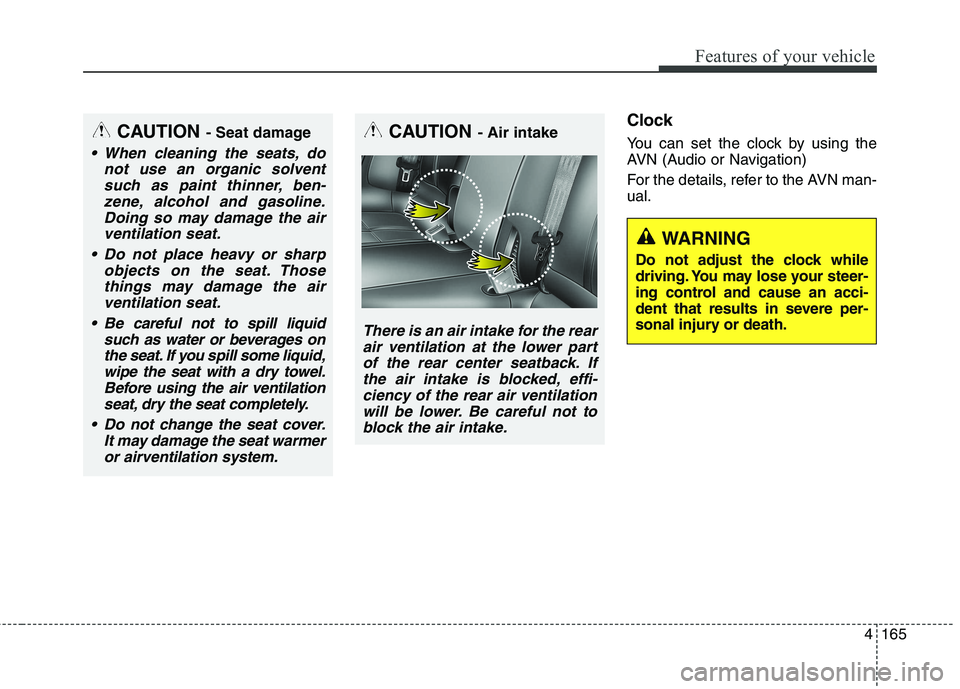
For the details, refer to the AVN man- ual.CAUTION - Air intake
There is an air intake for the rear
air ventilation at the lower part of the rear center seatback. Ifthe air intake is blocked, effi-ciency of the rear air ventilation will be lower. Be careful not toblock the air intake.
CAUTION - Seat damage
When cleaning the seats, do
not use an organic solventsuch as paint thinner, ben-zene, alcohol and gasoline.Doing so may damage the air ventilation seat.
Do not place heavy or sharp objects on the seat. Thosethings may damage the airventilation seat.
Be careful not to spill liquid such as water or beverages onthe seat. If you spill some liquid,wipe the seat with a dry towel.Before using the air ventilation seat, dry the seat completely.
Do not change the seat cover. It may damage the seat warmeror airventilation system.
WARNING
Do not adjust the clock while
driving. You may lose your steer-
ing control and cause an acci-
dent that results in severe per-
sonal injury or death.
Page 284 of 513
![KIA QUORIS 2016 User Guide 523
Driving your vehicle
■■When the battery is discharged:
When the battery is discharged, the
automatic transmission (shift by wire)is not shifted.
In emergency, if you want to shift into
[N],](/img/2/57973/w960_57973-283.png "KIA QUORIS 2016 User Guide 523
Driving your vehicle
■■When the battery is discharged:
When the battery is discharged, the
automatic transmission (shift by wire)is not shifted.
In emergency, if you want to shift into
[N],")
523
Driving your vehicle
■■When the battery is discharged:
When the battery is discharged, the
automatic transmission (shift by wire)is not shifted.
In emergency, if you want to shift into
[N], follow actionsYou can shift into [N] by using the
driver if the jump starting is impossi-
ble to do.
1) Open the storage cover.
2) Remove the rubber on bottom of
storage box.
3) Insert the driver (-) to service hole as direction of clockwise 10 times. The shifting is changed to [N] from
[P] position. If you want to shift to
[P] position, turn the driver count-
er-clockwise.
OKH055045L
WARNING
Always fully depress the brake
pedal before and while shifting
out of the P (Park) position into
another position to avoid inad-
vertent motion of the vehicle
which could injure persons in
or around the car.CAUTION
If the electric parking brake is not released, we recommendthat the vehicle is towed as flat-bed towing.
Page 299 of 513

Driving your vehicle
38
5
When the EPB (electric parking brake)
is not released
If the EPB does not release normally,
we recommend that you contact an
authorized Kia dealer by loading the
vehicle on a flatbed tow truck and
have the system checked. AUTO HOLD (if equipped)
The Auto Hold maintains the vehicle
in a standstill even though the brake
pedal is not depressed after the driv-
er brings the vehicle to a complete
stop by depressing the brake pedal.Set up
1. With the driver's door, engine hood
and trunk closed, fasten the driver's
seat belt or depress the brake
pedal and then press the Auto Hold
button. The white AUTO HOLD indi-cator will come on and the system
will be in the standby position.
2. When you stop the vehicle com- pletely by depressing the brake
pedal, the AUTO HOLD indicator
changes from white to green.
3. The vehicle will remain stationary even if you release the brake pedal.
4. If EPB is applied, Auto Hold will be released.
OKH052035
OKH055036L
■Type A
■Type BOKH052037
Page 325 of 513
Driving your vehicle
64
5
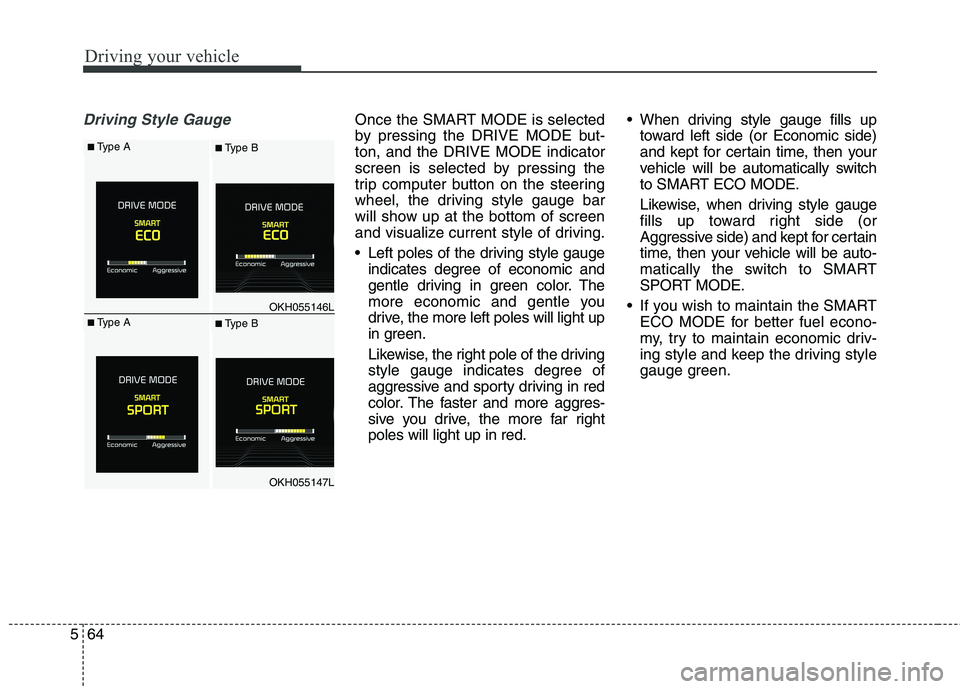
Driving Style GaugeOnce the SMART MODE is selected
by pressing the DRIVE MODE but-ton, and the DRIVE MODE indicator
screen is selected by pressing the
trip computer button on the steering
wheel, the driving style gauge bar
will show up at the bottom of screen
and visualize current style of driving.
Left poles of the driving style gauge
indicates degree of economic and
gentle driving in green color. The
more economic and gentle you
drive, the more left poles will light up
in green.
Likewise, the right pole of the driving
style gauge indicates degree of
aggressive and sporty driving in red
color. The faster and more aggres-
sive you drive, the more far rightpoles will light up in red. When driving style gauge fills up
toward left side (or Economic side)
and kept for certain time, then your
vehicle will be automatically switch
to SMART ECO MODE.
Likewise, when driving style gauge
fills up toward right side (or
Aggressive side) and kept for certain
time, then your vehicle will be auto-
matically the switch to SMART
SPORT MODE.
If you wish to maintain the SMART ECO MODE for better fuel econo-
my, try to maintain economic driv-
ing style and keep the driving style
gauge green.
OKH055146L
OKH055147L
■Type A■ Type B
■Type A■ Type B
Page 330 of 513
569
Driving your vehicle
Towing your vehicle
OKH052104
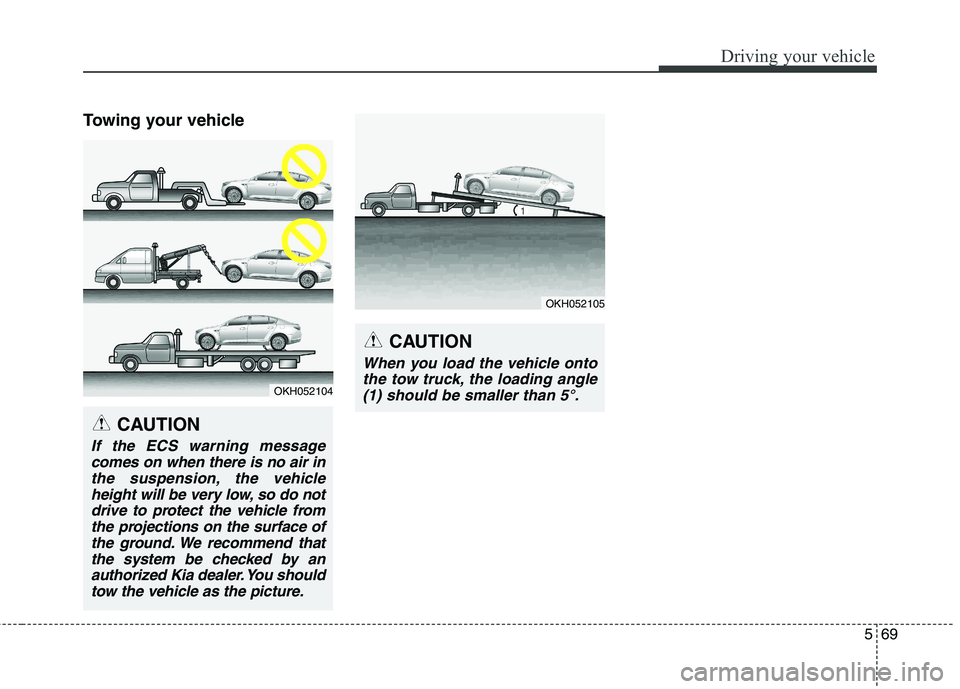
CAUTION
If the ECS warning messagecomes on when there is no air inthe suspension, the vehicle height will be very low, so do notdrive to protect the vehicle fromthe projections on the surface of the ground. We recommend thatthe system be checked by anauthorized Kia dealer. You should tow the vehicle as the picture.
CAUTION
When you load the vehicle ontothe tow truck, the loading angle(1) should be smaller than 5°.
OKH052105
Page 361 of 513
Driving your vehicle
100
5
Hazardous driving conditions
When hazardous driving conditions
are encountered such as water,
snow, ice, mud, sand, or similar haz-
ards, follow these suggestions:
Drive cautiously and allow extra
distance for braking.
Avoid sudden braking or steering.
If stalled in snow, mud, or sand, use second gear. Accelerate slowly to
avoid spinning the drive wheels.
Use sand, rock salt, tire chains, or other non-slip material under the
drive wheels to provide traction
when stalled in ice, snow, or mud. Rocking the vehicle
If it is necessary to rock the vehicle
to free it from snow, sand, or mud,
first turn the steering wheel right and
left to clear the area around your
front wheels. Then, shift back and
forth between R (Reverse) and any
forward gear in vehicles equipped
with an automatic transaxle. Do not
race the engine, and spin the wheels
as little as possible. If you are still
stuck after a few tries, have the vehi-
cle pulled out by a tow vehicle to
avoid engine overheating and possi-
ble damage to the transaxle.
SPECIAL DRIVING CONDITIONS WARNING
- Downshifting
Downshifting with an automatic
transaxle, while driving on slip-
pery surfaces can cause an
accident. The sudden change intire speed could cause the tires
to skid. Be careful when down-
shifting on slippery surfaces.
WARNING - ABS
Do not pump the brake pedal on
a vehicle equipped with ABS.
CAUTION
Prolonged rocking may cause engine over-heating, transaxledamage or failure, and tire dam-age.