battery KIA QUORIS 2016 Owner's Manual
[x] Cancel search | Manufacturer: KIA, Model Year: 2016, Model line: QUORIS, Model: KIA QUORIS 2016Pages: 513, PDF Size: 30.14 MB
Page 218 of 513
4131
Features of your vehicle
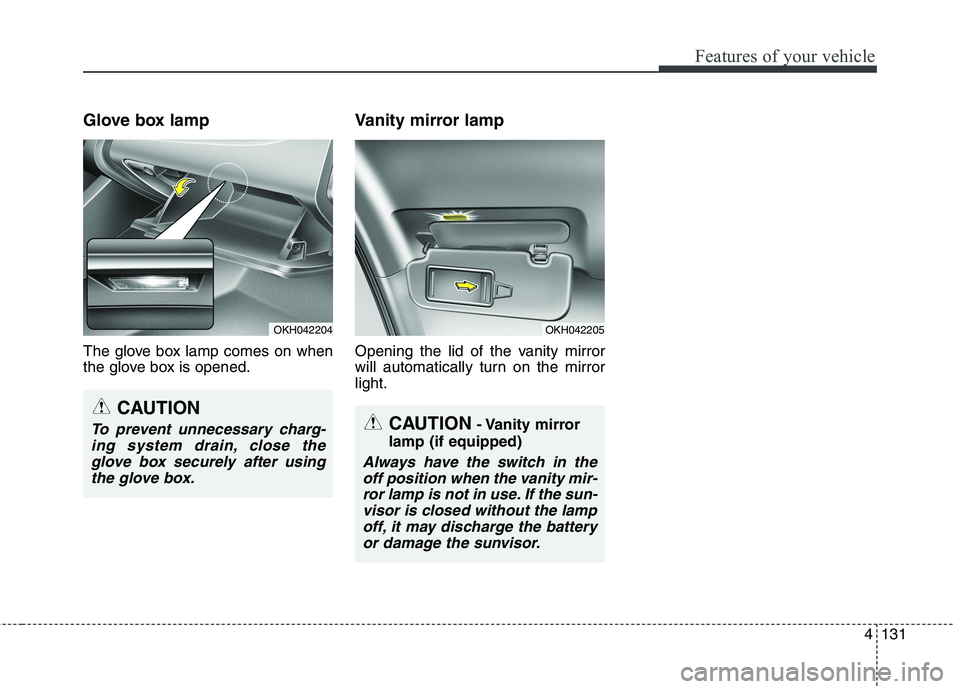
Glove box lamp
The glove box lamp comes on when
the glove box is opened.Vanity mirror lamp
Opening the lid of the vanity mirror
will automatically turn on the mirrorlight.
CAUTION
- Vanity mirror
lamp (if equipped)
Always have the switch in the off position when the vanity mir-ror lamp is not in use. If the sun- visor is closed without the lampoff, it may discharge the batteryor damage the sunvisor.
OKH042204
CAUTION
To prevent unnecessary charg-ing system drain, close theglove box securely after using the glove box.
OKH042205
Page 221 of 513
Features of your vehicle
134
4
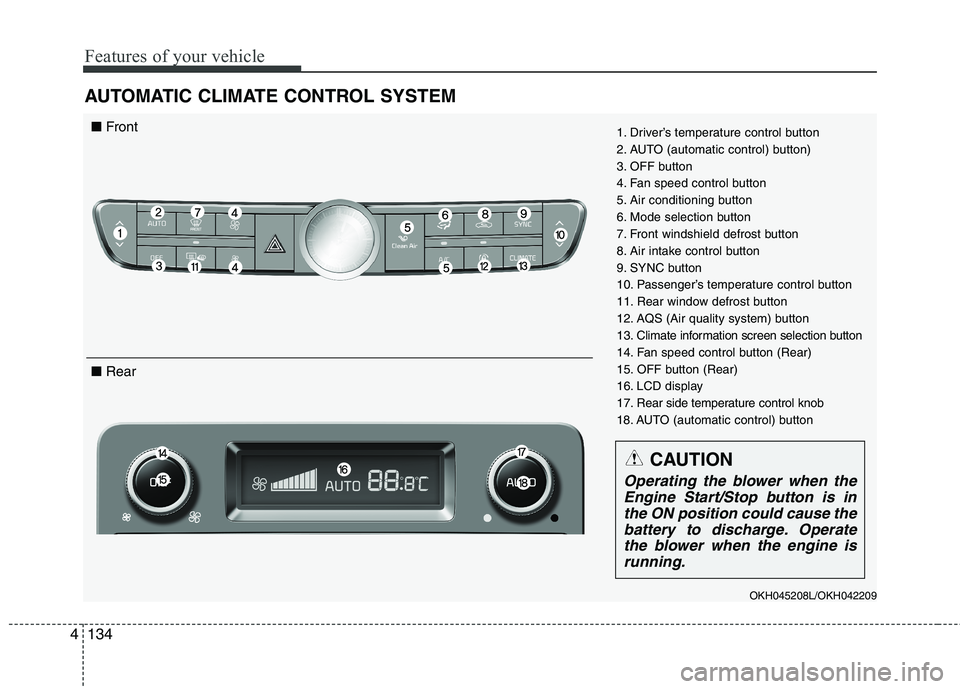
AUTOMATIC CLIMATE CONTROL SYSTEM
1. Driver’s temperature control button
2. AUTO (automatic control) button)
3. OFF button
4. Fan speed control button
5. Air conditioning button
6. Mode selection button
7. Front windshield defrost button
8. Air intake control button
9. SYNC button
10. Passenger’s temperature control button
11. Rear window defrost button
12. AQS (Air quality system) button
13. Climate information screen selection button
14. Fan speed control button (Rear)
15. OFF button (Rear)
16. LCD display
17. Rear side temperature control knob
18. AUTO (automatic control) button
OKH045208L/OKH042209■ Front
■ Rear
CAUTION
Operating the blower when the
Engine Start/Stop button is inthe ON position could cause thebattery to discharge. Operate the blower when the engine isrunning.
Page 227 of 513
Features of your vehicle
140
4
The temperature will decrease to the
minimum (Lo) by pushing the down
( ) button (for front) or turn the knob
to the left (for rear).
When pushing the button (for front) or
turning the knob (for rear), the tem-
perature will increase or decrease by
0.5°C/1°F. When set to the lowest
temperature setting, the air condition-
ing will operate continuously.
Adjusting the driver and passenger
side temperature equally
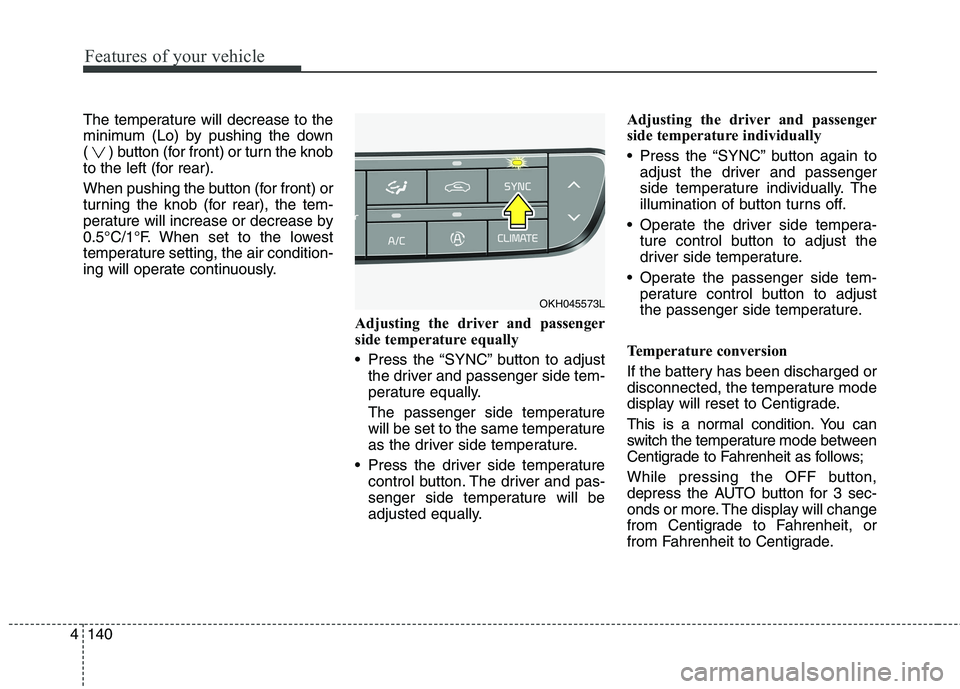
Press the “SYNC” button to adjustthe driver and passenger side tem-
perature equally.
The passenger side temperature
will be set to the same temperature
as the driver side temperature.
Press the driver side temperature control button. The driver and pas-
senger side temperature will be
adjusted equally. Adjusting the driver and passenger
side temperature individually
Press the “SYNC” button again to
adjust the driver and passenger
side temperature individually. The
illumination of button turns off.
Operate the driver side tempera- ture control button to adjust the
driver side temperature.
Operate the passenger side tem- perature control button to adjust
the passenger side temperature.
Temperature conversion
If the battery has been discharged or
disconnected, the temperature mode
display will reset to Centigrade.
This is a normal condition. You can
switch the temperature mode between
Centigrade to Fahrenheit as follows;
While pressing the OFF button,
depress the AUTO button for 3 sec-
onds or more. The display will change
from Centigrade to Fahrenheit, or
from Fahrenheit to Centigrade.
OKH045573L
Page 237 of 513
Features of your vehicle
150
4
Defogging logic
To reduce the probability of fogging up the inside of the windshield, the
air intake or air conditioning are con-trolled automatically according to
certain conditions such as or
position. To cancel or return the
defogging logic, do the following.
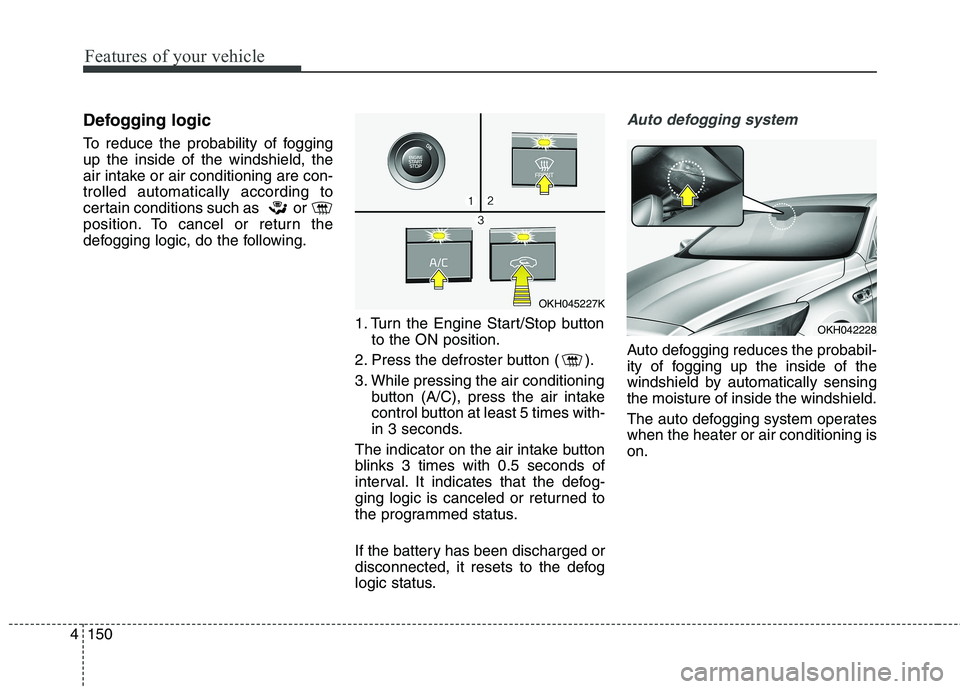
1. Turn the Engine Start/Stop buttonto the ON position.
2. Press the defroster button ( ).
3. While pressing the air conditioning button (A/C), press the air intake
control button at least 5 times with-
in 3 seconds.
The indicator on the air intake button
blinks 3 times with 0.5 seconds of
interval. It indicates that the defog-
ging logic is canceled or returned to
the programmed status.
If the battery has been discharged or
disconnected, it resets to the defog
logic status.Auto defogging system
Auto defogging reduces the probabil-
ity of fogging up the inside of the
windshield by automatically sensingthe moisture of inside the windshield.
The auto defogging system operates when the heater or air conditioning ison.
OKH045227K
OKH042228
Page 239 of 513
Features of your vehicle
152
4
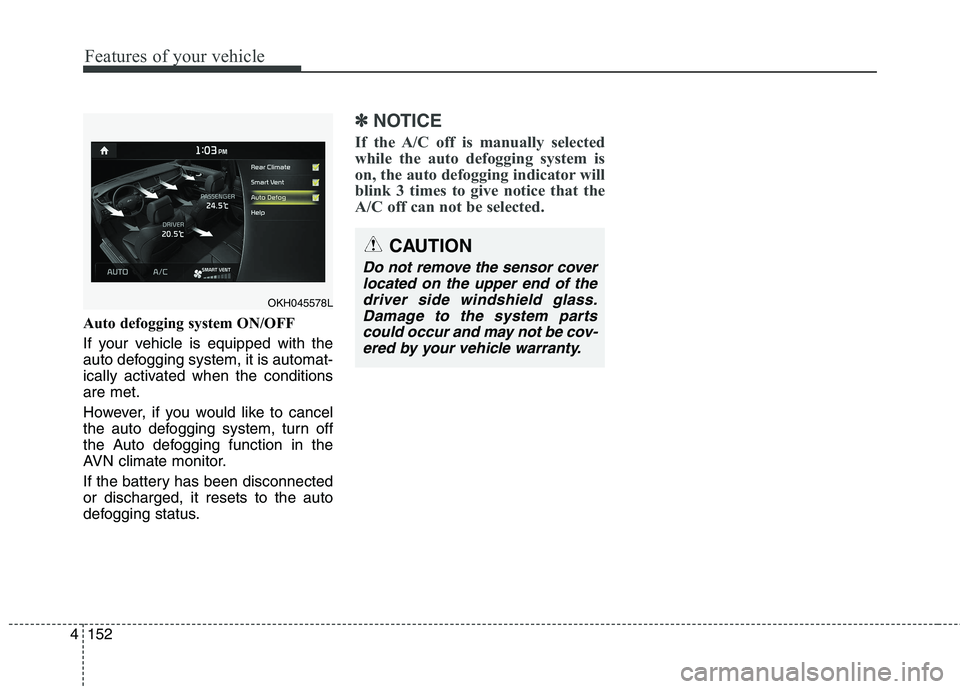
Auto defogging system ON/OFF
If your vehicle is equipped with the
auto defogging system, it is automat-
ically activated when the conditionsare met.
However, if you would like to cancel
the auto defogging system, turn off
the Auto defogging function in the
AVN climate monitor.
If the battery has been disconnected or discharged, it resets to the auto
defogging status.
✽✽
NOTICE
If the A/C off is manually selected
while the auto defogging system is
on, the auto defogging indicator will
blink 3 times to give notice that the
A/C off can not be selected.
CAUTION
Do not remove the sensor cover located on the upper end of thedriver side windshield glass. Damage to the system partscould occur and may not be cov-ered by your vehicle warranty.
OKH045578L
Page 247 of 513
Features of your vehicle
160
4
Sunvisor
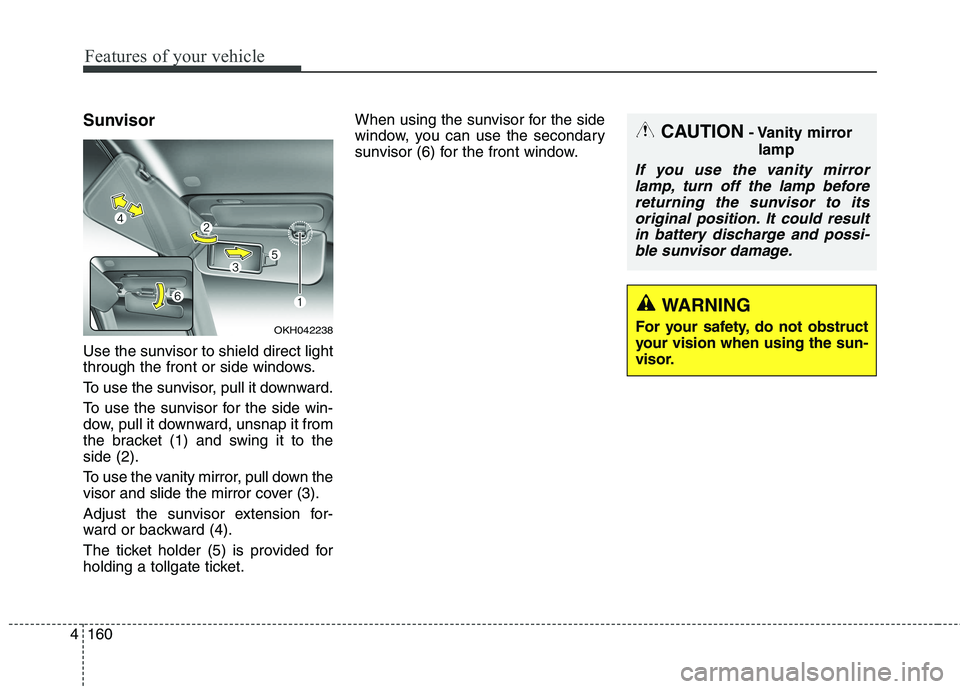
Use the sunvisor to shield direct light
through the front or side windows.
To use the sunvisor, pull it downward.
To use the sunvisor for the side win-
dow, pull it downward, unsnap it from
the bracket (1) and swing it to theside (2).
To use the vanity mirror, pull down the
visor and slide the mirror cover (3).
Adjust the sunvisor extension for-
ward or backward (4).
The ticket holder (5) is provided for
holding a tollgate ticket. When using the sunvisor for the side
window, you can use the secondary
sunvisor (6) for the front window.
OKH042238
CAUTION
- Vanity mirror
lamp
If you use the vanity mirrorlamp, turn off the lamp beforereturning the sunvisor to itsoriginal position. It could result in battery discharge and possi-ble sunvisor damage.
WARNING
For your safety, do not obstruct
your vision when using the sun-
visor.
Page 248 of 513
4161
Features of your vehicle
Power outlet
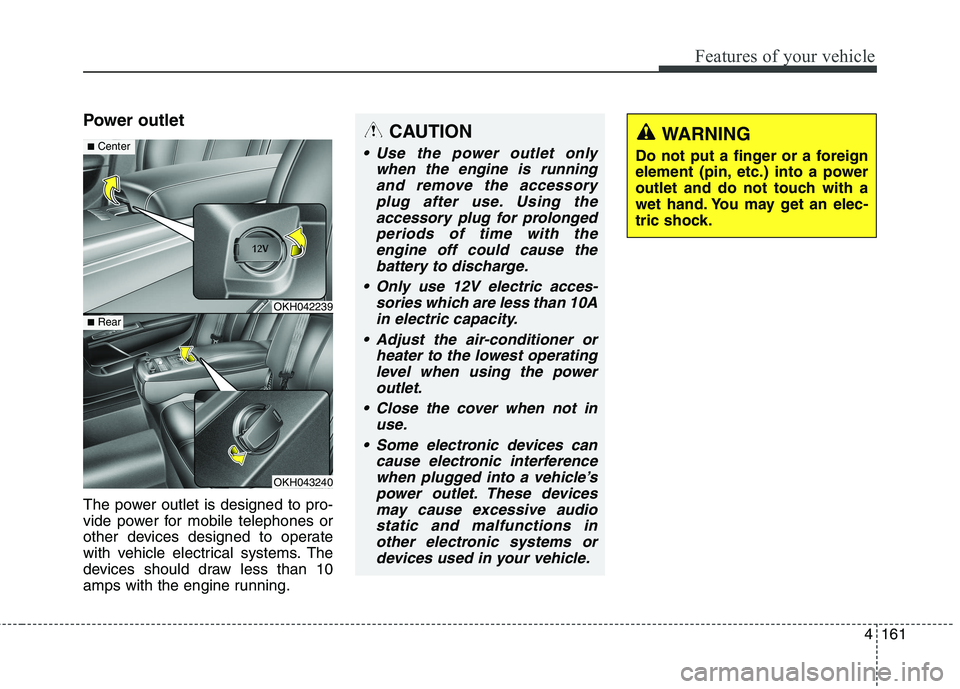
The power outlet is designed to pro-
vide power for mobile telephones or
other devices designed to operate
with vehicle electrical systems. The
devices should draw less than 10
amps with the engine running.CAUTION
Use the power outlet onlywhen the engine is runningand remove the accessory plug after use. Using theaccessory plug for prolongedperiods of time with the engine off could cause thebattery to discharge.
Only use 12V electric acces- sories which are less than 10Ain electric capacity.
Adjust the air-conditioner or heater to the lowest operatinglevel when using the poweroutlet.
Close the cover when not in use.
Some electronic devices can cause electronic interferencewhen plugged into a vehicle’spower outlet. These devicesmay cause excessive audiostatic and malfunctions in other electronic systems ordevices used in your vehicle.
OKH042239
OKH043240
■ Center
■Rear
WARNING
Do not put a finger or a foreign
element (pin, etc.) into a power
outlet and do not touch with a
wet hand. You may get an elec-
tric shock.
Page 254 of 513
4167
Features of your vehicle
Rear mirror (if equipped)
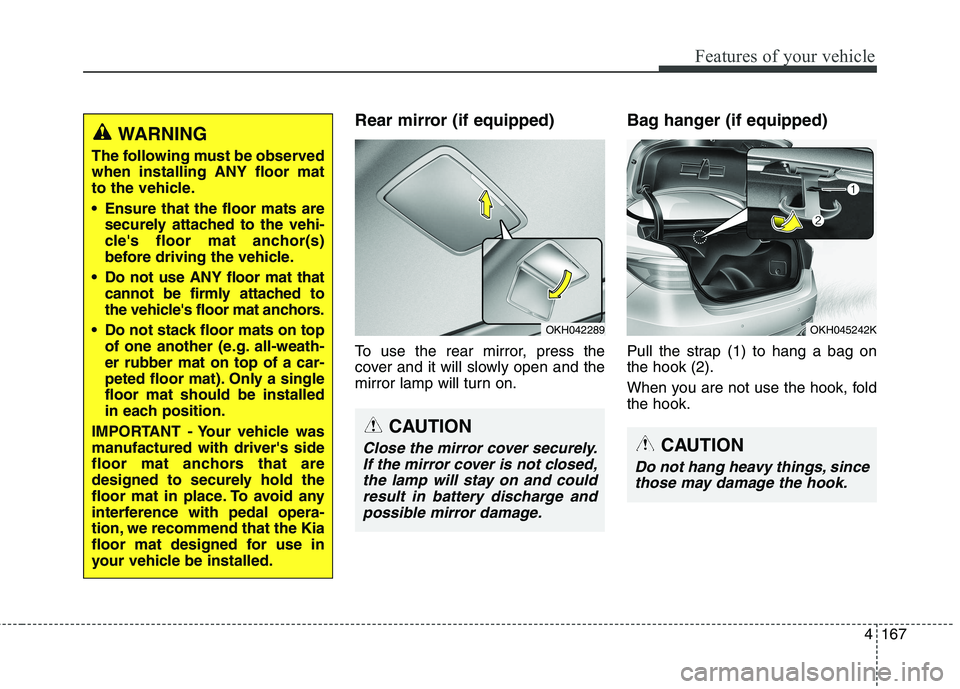
To use the rear mirror, press the
cover and it will slowly open and the
mirror lamp will turn on.Bag hanger (if equipped)
Pull the strap (1) to hang a bag on the hook (2).
When you are not use the hook, fold the hook.WARNING
The following must be observed when installing ANY floor mat
to the vehicle.
Ensure that the floor mats are securely attached to the vehi-
cle's floor mat anchor(s)
before driving the vehicle.
Do not use ANY floor mat that cannot be firmly attached to
the vehicle's floor mat anchors.
Do not stack floor mats on top of one another (e.g. all-weath-er rubber mat on top of a car-
peted floor mat). Only a singlefloor mat should be installed
in each position.
IMPORTANT - Your vehicle was
manufactured with driver's side
floor mat anchors that are
designed to securely hold the
floor mat in place. To avoid any
interference with pedal opera-
tion, we recommend that the Kia
floor mat designed for use in
your vehicle be installed.
OKH042289
CAUTION
Close the mirror cover securely. If the mirror cover is not closed,the lamp will stay on and could result in battery discharge andpossible mirror damage.
OKH045242K
CAUTION
Do not hang heavy things, since those may damage the hook.
Page 257 of 513
Features of your vehicle
170
4
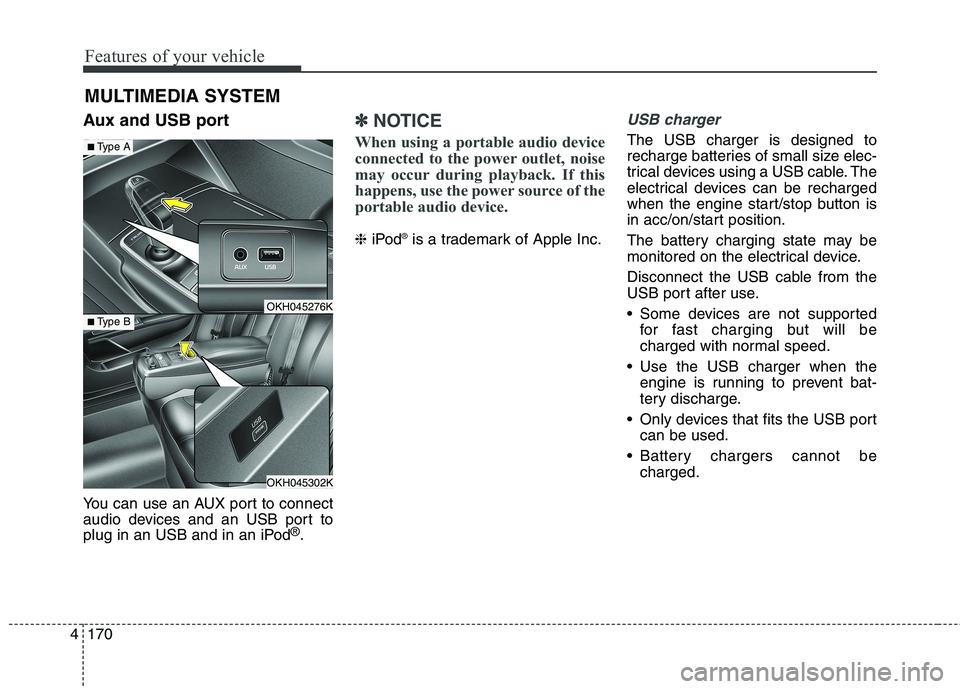
Aux and USB port
You can use an AUX port to connect
audio devices and an USB port to
plug in an USB and in an iPod ®
.✽✽ NOTICE
When using a portable audio device
connected to the power outlet, noise
may occur during playback. If this
happens, use the power source of the
portable audio device.
❈ iPod ®
is a trademark of Apple Inc.
USB charger
The USB charger is designed to
recharge batteries of small size elec-
trical devices using a USB cable. The
electrical devices can be recharged
when the engine start/stop button is
in acc/on/start position.
The battery charging state may be
monitored on the electrical device.
Disconnect the USB cable from the
USB port after use.
Some devices are not supported
for fast charging but will be
charged with normal speed.
Use the USB charger when the engine is running to prevent bat-
tery discharge.
Only devices that fits the USB port can be used.
Battery chargers cannot be charged.
MULTIMEDIA SYSTEM
OKH045276K
OKH045302K
■
Type A
■Type B
Page 267 of 513
Driving your vehicle
6
5
✽✽
NOTICE
If the steering wheel doesn't unlock
properly, the engine start/stop but-
ton will not work. Press the engine
start/stop button while turning the
steering wheel right and left to
release the tension.
✽
✽
NOTICE
You are able to turn off the engine
(START/RUN) or vehicle power (ON),
only when the vehicle is not in motion.
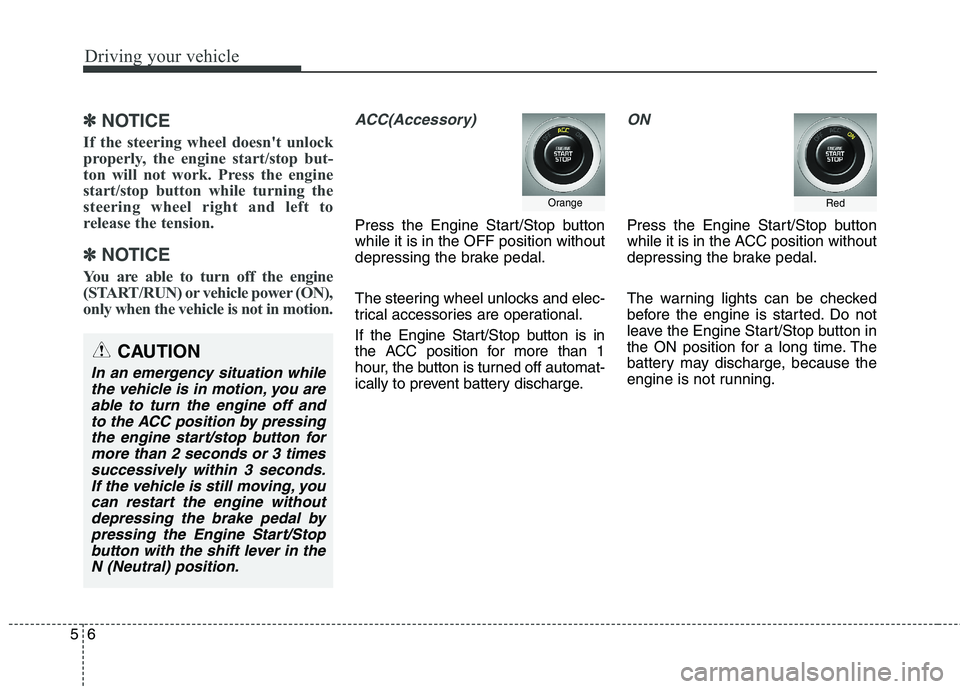
ACC(Accessory)
Press the Engine Start/Stop button while it is in the OFF position without
depressing the brake pedal.
The steering wheel unlocks and elec-
trical accessories are operational.
If the Engine Start/Stop button is in
the ACC position for more than 1
hour, the button is turned off automat-
ically to prevent battery discharge.
ON
Press the Engine Start/Stop button
while it is in the ACC position without
depressing the brake pedal.
The warning lights can be checked
before the engine is started. Do not
leave the Engine Start/Stop button in
the ON position for a long time. The
battery may discharge, because the
engine is not running.
Orange
CAUTION
In an emergency situation while the vehicle is in motion, you areable to turn the engine off and to the ACC position by pressingthe engine start/stop button formore than 2 seconds or 3 times successively within 3 seconds.If the vehicle is still moving, youcan restart the engine withoutdepressing the brake pedal by pressing the Engine Start/Stopbutton with the shift lever in theN (Neutral) position.
Red