mirror KIA QUORIS 2016 Owner's Manual
[x] Cancel search | Manufacturer: KIA, Model Year: 2016, Model line: QUORIS, Model: KIA QUORIS 2016Pages: 513, PDF Size: 30.14 MB
Page 254 of 513
4167
Features of your vehicle
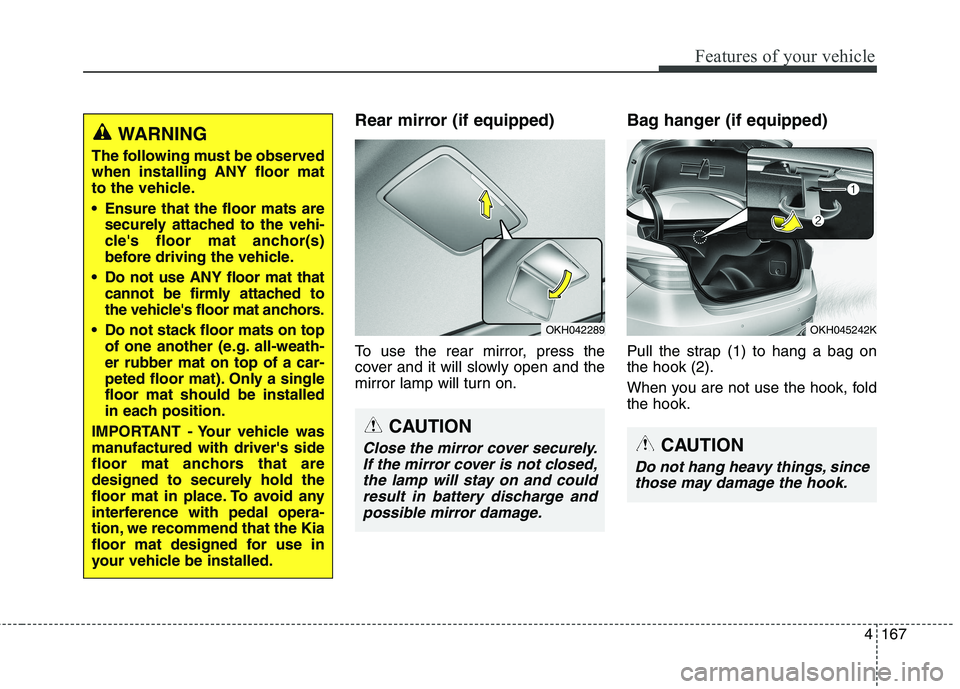
Rear mirror (if equipped)
To use the rear mirror, press the
cover and it will slowly open and the
mirror lamp will turn on.Bag hanger (if equipped)
Pull the strap (1) to hang a bag on the hook (2).
When you are not use the hook, fold the hook.WARNING
The following must be observed when installing ANY floor mat
to the vehicle.
Ensure that the floor mats are securely attached to the vehi-
cle's floor mat anchor(s)
before driving the vehicle.
Do not use ANY floor mat that cannot be firmly attached to
the vehicle's floor mat anchors.
Do not stack floor mats on top of one another (e.g. all-weath-er rubber mat on top of a car-
peted floor mat). Only a singlefloor mat should be installed
in each position.
IMPORTANT - Your vehicle was
manufactured with driver's side
floor mat anchors that are
designed to securely hold the
floor mat in place. To avoid any
interference with pedal opera-
tion, we recommend that the Kia
floor mat designed for use in
your vehicle be installed.
OKH042289
CAUTION
Close the mirror cover securely. If the mirror cover is not closed,the lamp will stay on and could result in battery discharge andpossible mirror damage.
OKH045242K
CAUTION
Do not hang heavy things, since those may damage the hook.
Page 264 of 513
53
Driving your vehicle
Before entering vehicle
• Be sure that all windows, outsidemirror(s), and outside lights are clean.
Check the condition of the tires.
Check under the vehicle for any sign of leaks.
Be sure there are no obstacles behind you if you intend to back up. Necessary inspections
Fluid levels, such as engine oil,
engine coolant, brake fluid, and
washer fluid should be checked on a
regular basis, with the exact interval
depending on the fluid. Further
details are provided in section 7,“Maintenance”.
Before starting
Close and lock all doors.
Position the seat so that all con-
trols are easily reached.
Adjust the inside and outside rearview mirrors.
Be sure that all lights work.
Check all gauges.
Check the operation of warning lights when the Engine Start/Stop
button is in the ON position.
Release the parking brake and make sure the brake warning lightgoes out.
For safe operation, be sure you are
familiar with your vehicle and itsequipment.
BEFORE DRIVING
WARNING
Driving while distracted can
result in a loss of vehicle control,
that may lead to an accident,
severe personal injury, and
death. The driver’s primary
responsibility is in the safe and
legal operation of a vehicle, and
use of any handheld devices,
other equipment, or vehicle sys-
tems which take the driver’s
eyes, attention and focus away
from the safe operation of a vehi-
cle or which are not permissible
by law should never be used dur-
ing operation of the vehicle.
Page 352 of 513
591
Driving your vehicle
BSD (Blind Spot Detection) /
LCA (Lane Change Assist)
Operating conditions
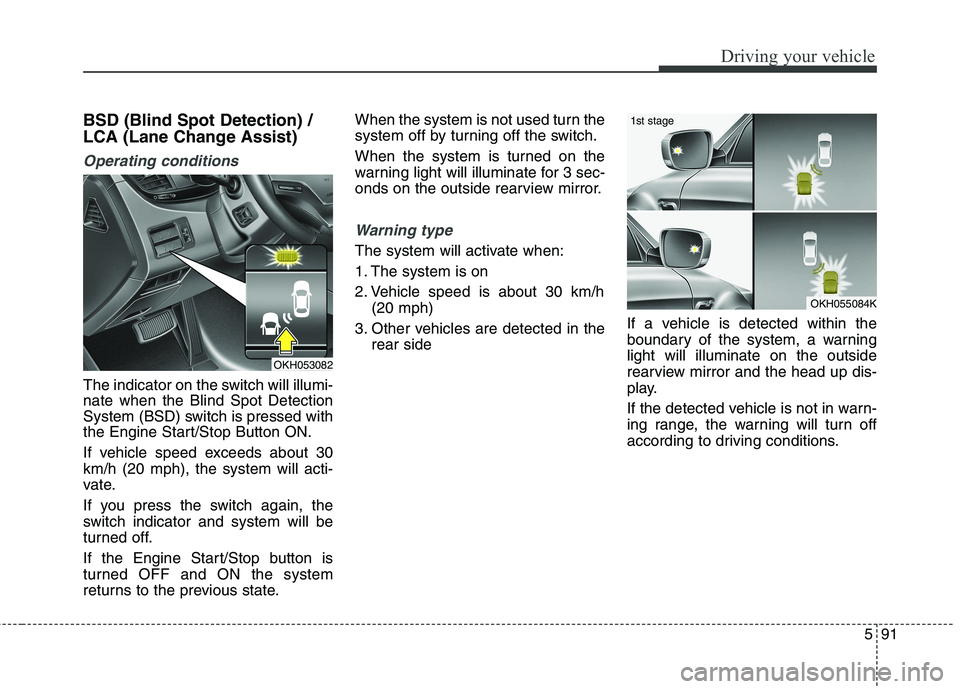
The indicator on the switch will illumi- nate when the Blind Spot Detection
System (BSD) switch is pressed with
the Engine Start/Stop Button ON.
If vehicle speed exceeds about 30 km/h (20 mph), the system will acti-
vate.
If you press the switch again, the
switch indicator and system will be
turned off.
If the Engine Start/Stop button is
turned OFF and ON the system
returns to the previous state.When the system is not used turn the
system off by turning off the switch.
When the system is turned on the
warning light will illuminate for 3 sec-
onds on the outside rearview mirror.
Warning type
The system will activate when:
1. The system is on
2. Vehicle speed is about 30 km/h
(20 mph)
3. Other vehicles are detected in the rear side If a vehicle is detected within the
boundary of the system, a warninglight will illuminate on the outside
rearview mirror and the head up dis-
play.
If the detected vehicle is not in warn-
ing range, the warning will turn off
according to driving conditions.
OKH053082
OKH055084K
1st stage
Page 353 of 513
Driving your vehicle
92
5
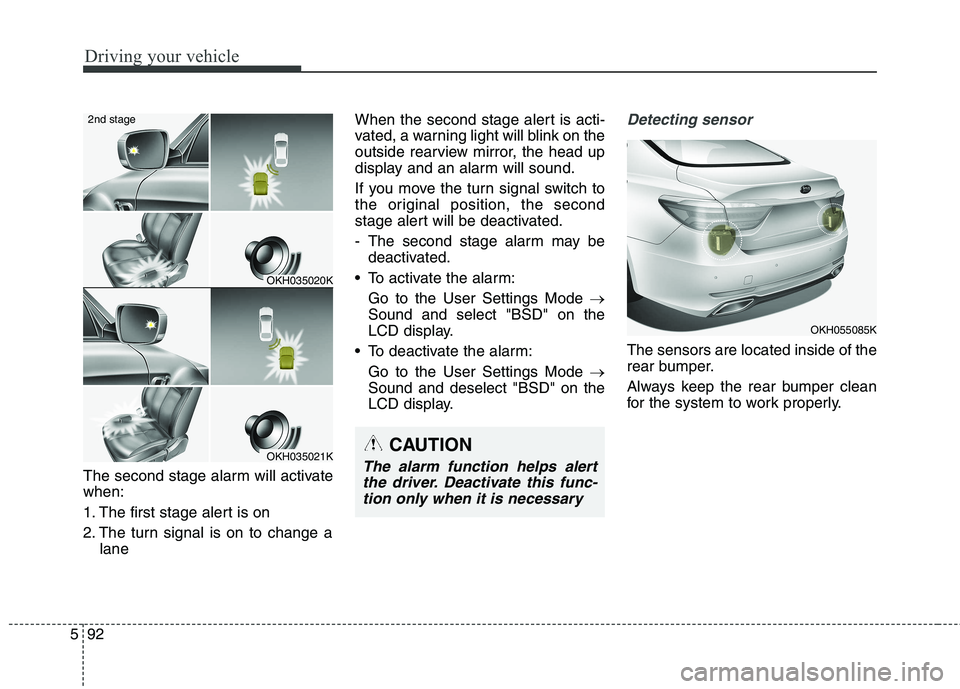
The second stage alarm will activate when:
1. The first stage alert is on
2. The turn signal is on to change a
lane When the second stage alert is acti-
vated, a warning light will blink on the
outside rearview mirror, the head up
display and an alarm will sound.
If you move the turn signal switch to
the original position, the second
stage alert will be deactivated.
- The second stage alarm may be
deactivated.
To activate the alarm: Go to the User Settings Mode
Sound and select "BSD" on the
LCD display.
To deactivate the alarm: Go to the User Settings Mode
Sound and deselect "BSD" on the
LCD display.
Detecting sensor
The sensors are located inside of the
rear bumper.
Always keep the rear bumper clean
for the system to work properly.
OKH035020K
OKH035021K
2nd stage
CAUTION
The alarm function helps alert
the driver. Deactivate this func-tion only when it is necessary
OKH055085K
Page 356 of 513
595
Driving your vehicle
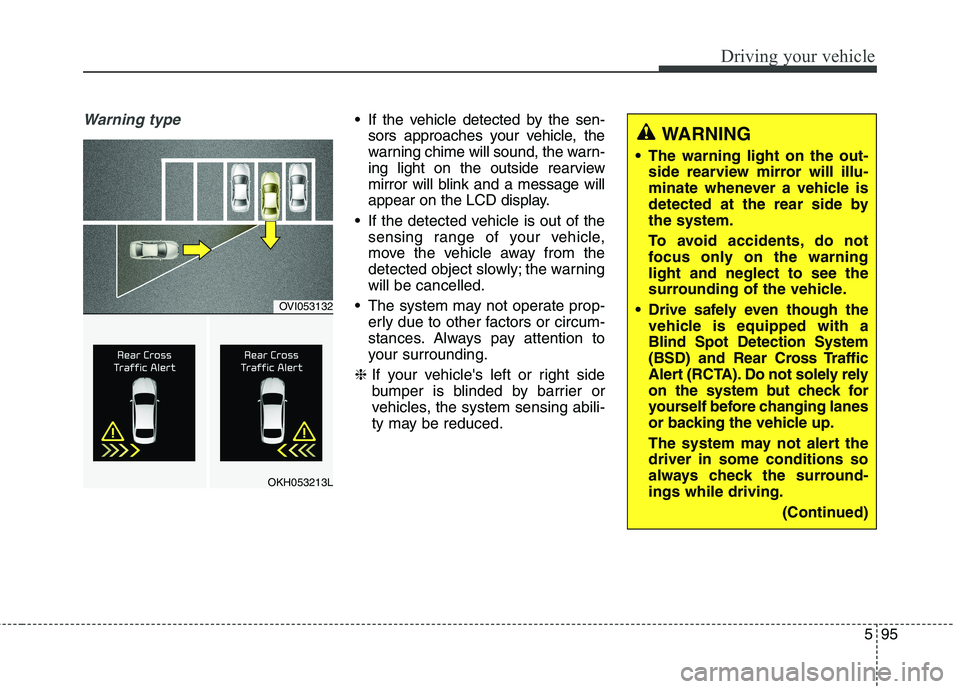
Warning type If the vehicle detected by the sen-sors approaches your vehicle, the
warning chime will sound, the warn-
ing light on the outside rearview
mirror will blink and a message will
appear on the LCD display.
If the detected vehicle is out of the sensing range of your vehicle,
move the vehicle away from the
detected object slowly; the warningwill be cancelled.
The system may not operate prop- erly due to other factors or circum-
stances. Always pay attention to
your surrounding.
❈ If your vehicle's left or right side
bumper is blinded by barrier or
vehicles, the system sensing abili-
ty may be reduced.
WARNING
The warning light on the out- side rearview mirror will illu-
minate whenever a vehicle is
detected at the rear side bythe system.
To avoid accidents, do not
focus only on the warninglight and neglect to see the
surrounding of the vehicle.
Drive safely even though the vehicle is equipped with aBlind Spot Detection System
(BSD) and Rear Cross Traffic
Alert (RCTA). Do not solely rely
on the system but check for
yourself before changing lanes
or backing the vehicle up.
The system may not alert the driver in some conditions so
always check the surround-ings while driving.
(Continued)
OVI053132
OKH053213L
Page 358 of 513
597
Driving your vehicle
- Metal substances are near thevehicles such as in a construction area.
- A big vehicle is near such as a bus or truck.
- A motorcycle or bicycle is near.
- A flat trailer like vehicle is near.
- If the vehicle has started at the same time as the vehicle next to it
and has accelerated.
- When the other vehicle passes by very fast.
- When changing lanes.
- When going down or up a steep road where the height of the lane is
different.
- When the other vehicle drives at the rear very nearby or drives very
close.
- When a trailer or carrier is installed.
- When the temperature of the rear bumper is high.
- When the sensors are covered by the vehicle, wall or a pillar of park- ing lot. - When your vehicle is backing up, if
the detected vehicle approaches
your vehicle or also backs up.
- Small objects like shopping carts and baby carriages.
- If there is a vehicle with decreased ride height (lowered).
- When the vehicle is close to anoth- er vehicle.
- When the vehicle in the next lane moves two lanes away from my
vehicle OR when the vehicle two
lanes away moves to the next lane
from my vehicle.
- When exiting rearward from a parking space with pillars or metal
structures.
- When driving through a narrow road with many trees or bushes.Outside rearview mirror may not
alert the driver when:
- The outside rearview mirror hous- ing is damaged or covered with
debris.
- The window is covered with debris.
- The windows are severely tinted.
Page 363 of 513
Driving your vehicle
102
5
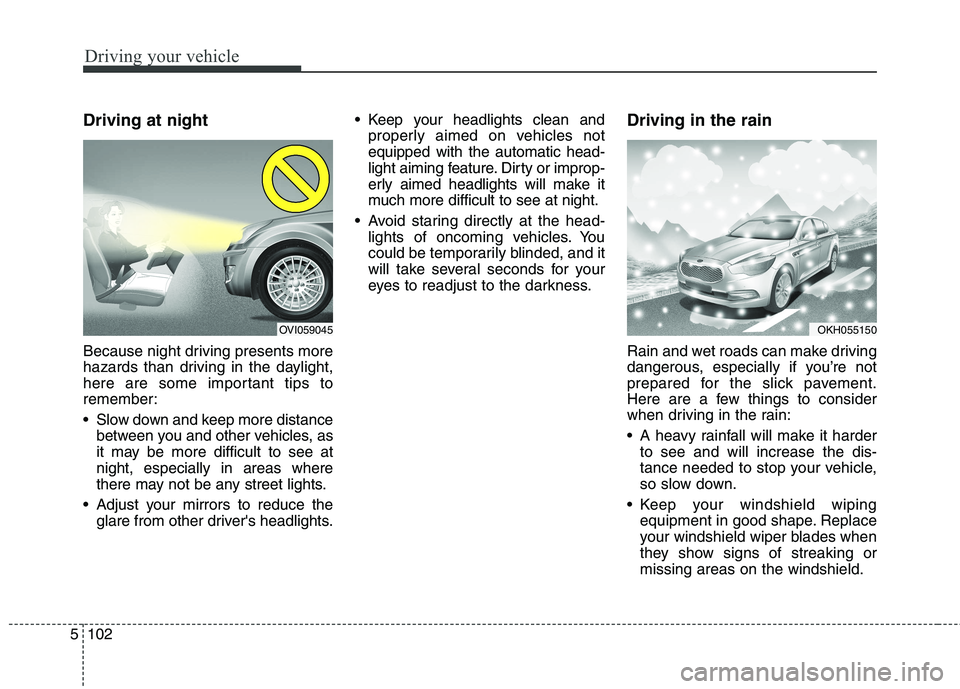
Driving at night
Because night driving presents more
hazards than driving in the daylight,
here are some important tips to
remember:
Slow down and keep more distance
between you and other vehicles, as
it may be more difficult to see atnight, especially in areas where
there may not be any street lights.
Adjust your mirrors to reduce the glare from other driver's headlights. Keep your headlights clean and
properly aimed on vehicles notequipped with the automatic head-
light aiming feature. Dirty or improp-
erly aimed headlights will make it
much more difficult to see at night.
Avoid staring directly at the head- lights of oncoming vehicles. You
could be temporarily blinded, and it
will take several seconds for your
eyes to readjust to the darkness. Driving in the rain
Rain and wet roads can make driving
dangerous, especially if you’re not
prepared for the slick pavement.
Here are a few things to consider
when driving in the rain:
A heavy rainfall will make it harder
to see and will increase the dis-
tance needed to stop your vehicle,
so slow down.
Keep your windshield wiping equipment in good shape. Replace
your windshield wiper blades when
they show signs of streaking ormissing areas on the windshield.
OKH055150OVI059045
Page 463 of 513

763
Maintenance
Fuse NameSymbolFuse rastingCircuit Protected
AUDIO 22AUDIO10AA/V & Navigation Head Unit
MODULE 33MODULE10A
A/C Control Module, Electro Chromic Mirror, Rear Seat Console Switch, Driver Haptic Control
Module, Rear CCS Control Module LH/RH, Driver/Passenger IMS Control Module,
Driver Power Seat Module, Rear Seat Warmer Control Module LH/RH,
Rear Smart Junction Box (IPS Control Module)
MODULE 22MODULE10ASteering Tilt & Telescopic Module, LDWS Camera Module, Crash Pad Switch, Stop Lamp Switch,
A/T Console Switch, Electric Parking Brake Switch, Console Switch, Smart Cruse Control Radar,
Air Sus, Active Air Flap, TPMS, PAS
SPARE10ASpare
WIPER10AAuto Light & Rain Sensor
MODULE 11MODULE10ABCM, Trunk Lid Main Switch, Low Panel Switch
MEMORY 22 MEMORY10AExternal Buzzer, Driver Smart Connector, Passenger Smart Connector
DRV HEAT15ADriver Haptic Control Module, Driver CCS Module
PASS HEAT15APassenger CCS Module
WINDOW LH30ARear Power Window Module LH, Rear Power Window Module LH
HEADREST15AActive Headrest Sensor
BCM10ABCM, Multifunction Switch, Driver/Passenger Power Seat Switch, Rear Door Module LH/RH
EPB 215AElectric Parking Brake Module
P/HANDLEPOWER
HANDLE15ASteering Tilt & Telescopic Module
Page 469 of 513
769
Maintenance
Fuse NameSymbolFuse rastingCircuit Protected
Vaccum10AE/R Fuse & Relay Box LH (RLY.10), Vacuum Pump SW
20AE/R Fuse & Relay Box LH (RLY.10)
ECU 110AECU
EHPS 110AEHPS Module
Inhibitor 22INHIBITOR10AA/T Console Switch, Electric ATM Shift Lever
Washer15AE/R Fuse & Relay Box LH (RLY.8)
Wiper 210AE/R Fuse & Relay Box LH (RLY.1)
B/UP Lamp 210ABack View Camera & Back-Up Lamp, A/T Console Switch, Electro Chromic Mirror,
A/V & Navigation Head Unit
Page 494 of 513
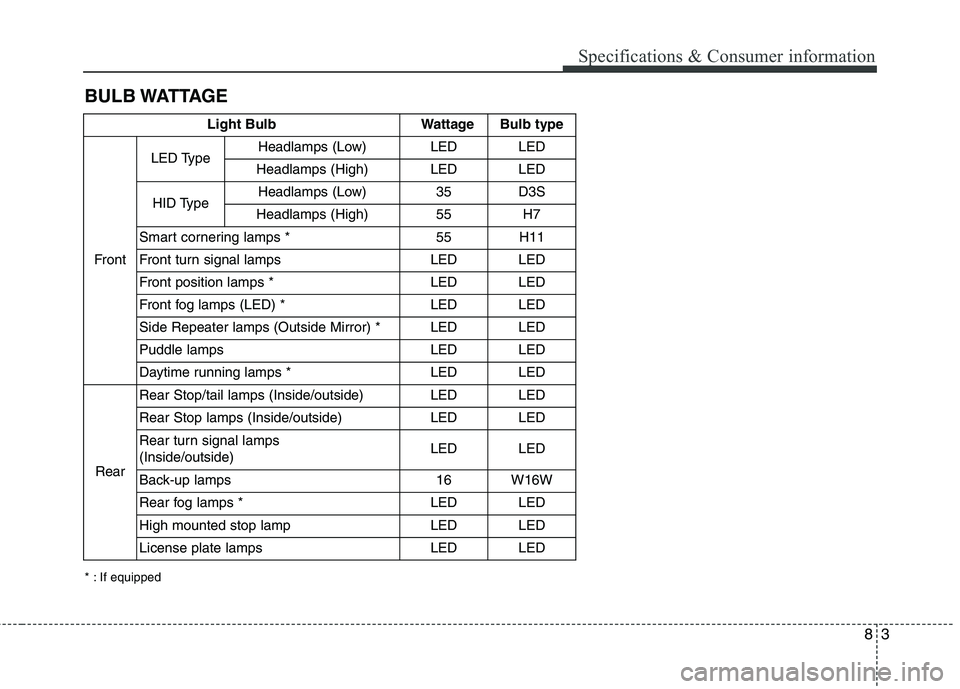
83
Specifications & Consumer information
BULB WATTAGE
* : If equippedLight Bulb Wattage Bulb type
Front LED Type
Headlamps (Low) LED LED
Headlamps (High) LED LED
HID Type Headlamps (Low) 35 D3S
Headlamps (High) 55 H7
Smart cornering lamps * 55 H11
Front turn signal lamps LED LED
Front position lamps * LED LED
Front fog lamps (LED) * LED LED
Side Repeater lamps (Outside Mirror) * LED LED
Puddle lamps LED LED
Daytime running lamps * LED LED
Rear Rear Stop/tail lamps (Inside/outside) LED LED
Rear Stop lamps (Inside/outside) LED LED
Rear turn signal lamps (Inside/outside)
LED LED
Back-up lamps 16 W16W
Rear fog lamps * LED LED
High mounted stop lamp LED LED
License plate lamps LED LED