transmission KIA QUORIS 2016 Owner's Manual
[x] Cancel search | Manufacturer: KIA, Model Year: 2016, Model line: QUORIS, Model: KIA QUORIS 2016Pages: 513, PDF Size: 30.14 MB
Page 321 of 513
Driving your vehicle
60
5
ECO (ACTIVE ECO) MODE
enhances fuel efficiency through eco control of
the engine and trans-
mission. The actual fuelefficiency will depend on
personal driving style
and habits.
MODE button andselecting ECO MODE,
green ECO indicator
light will illuminate. ECO MODE Driving:
The vehicle engine and transmission
will operate in fuel economy oriented
mode.
ACTIVE ECO MODE system will
restrain fuel economy worsening
driving habits, such as suddenly
starts and accelerations, compare tothe NORMAL MODE.
Conditions that limit Active ECO MODE:
Below are a list of conditions in which
when in ACTIVE ECO MODE, the
indicator light will not change, but the
internal system may operate differ-
ently.
When engine coolant temperature
is low:
When temperature of the transaxle
oil is below the normal range, the
ACTIVE ECO MODE may become
temporarily unavailable until the
transaxle oil heats up after vehicleignition.
When in an uphill gradient:
Since the ACTIVE ECO MODE
partially limits the engine torque,
ACTIVE ECO MODE may become
temporarily unavailable when more
torque is essential for going uphill.
When using the manual transmis- sion operation mode:
If transmission operation is
changed from automatic to manual,
vehicle will reflect it and automati-
cally stop the ACTIVE ECO MODE.
Page 324 of 513
563
Driving your vehicle
DRIVE MODE Indicator Screen The DRIVE MODE indicator screen
can be displayed by using the trip com-
puter button on the steering wheel. DRIVE MODE indicator screen dis-
plays status of current drive mode.
DRIVE MODE button is located onthe lower part of the transmission
lever for selecting drive mode.
If drive mode is selected manually
by the user, the drive mode indica-
tor screen will show user-selected
drive mode. (NORMAL, ECO, or
SPORT)
If SMART MODE is selected by
DRIVE MODE button, the drive
mode indicator screen will show
current drive mode automatically
selected by SMART MODE sys-
tem. (SMART NORMAL, SMART
ECO, or SMART SPORT) When the trip computer mode is
selected to show DRIVE MODE
and the SMART MODE is in oper-ation, an automatically selected
driving mode SMART ECO,
SMART NORMAL, or SMART
SPORT, will be selected on the
cluster's center.
And right below is the horizontal
driving style gauge which reflects
the driving style in real time.
If you drive carefully and slowly in SMART MODE, the left side of the
driving style gauge will illuminate,and be automatically shifted to the
SMART ECO MODE.
When the driver accelerates more
frequently, the right side of the driv-
ing style gauge will fill up, and shift
to SMART NORMAL MODE.
In addition, if the rate of accelera-
tion and speed is high, drive mode
will change to SMART SPORTMODE. If the auto cruise control function is
operated or the transmission is
shifted to manual mode while
SMART MODE is on, the SMART
MODE will stop temporarily, and
the DRIVE MODE will be displayed
as OFF. The driving style gauge
light will be turned off accordingly.
If the trip computer is not set to show DRIVE MODE indicator
screen, and you want to know the
on/off status of the SMART MODE,
simply check whether the letters
'SMART' is lighten up on the
screen or not (green - ECO MODE,white - NORMAL MODE, red -
SPORT MODE).
Page 327 of 513
Driving your vehicle
66
5
Conditions which Limit SMART
MODE
In following conditions your vehicle will
temporarily stop the SMART Mode
and the indicator light will turn off.
When using the manual transmis- sion operation mode: If the
transaxle system is changed from
automatic to manual, your vehicle
will automatically stop the SMARTMODE.
If transmission operation is
changed from automatic to manu-
al, vehicle will reflect it and auto-
matically stop the SMART MODE.
When the Cruise Control system is turned on:
When the driver sets a target
cruise control speed, your vehicle
will automatically stop the SMART
MODE. (The SMART MODE will
stop not immediately after you
press the cruise control button, but
when the cruise control system
takes control of the vehicle speed.) If the temperature of the transaxle
oil is very high or low:
The SMART MODE control system
will operate in nearly all driving
conditions. But when the tempera-
ture of the transaxle oil is out of the
normal range, the SMART MODE
system may become temporarily
unavailable.
Page 392 of 513
What to do in an emergency
22
6
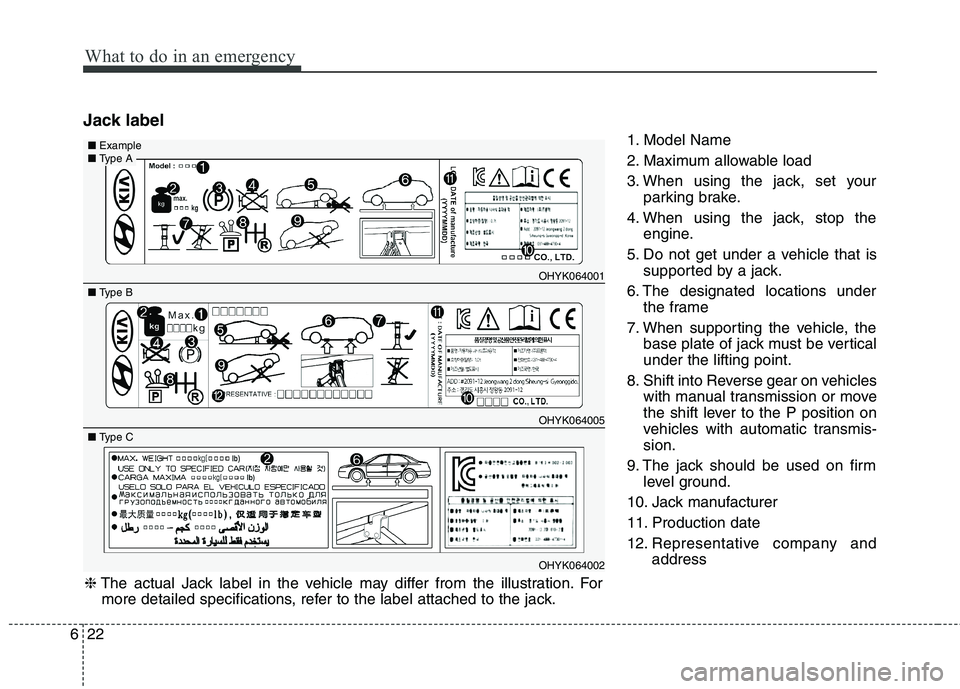
Jack label
1. Model Name
2. Maximum allowable load
3. When using the jack, set yourparking brake.
4. When using the jack, stop the engine.
5. Do not get under a vehicle that is supported by a jack.
6. The designated locations under the frame
7. When supporting the vehicle, the base plate of jack must be vertical under the lifting point.
8. Shift into Reverse gear on vehicles with manual transmission or move
the shift lever to the P position on
vehicles with automatic transmis-sion.
9. The jack should be used on firm level ground.
10. Jack manufacturer
11. Production date
12. Representative company and address
OHYK064001
OHYK064005
■ Type A■Example
■ Type B
OHYK064002
■ Type C
❈ The actual Jack label in the vehicle may differ from the illustration. For
more detailed specifications, refer to the label attached to the jack.
Page 423 of 513
723
Maintenance
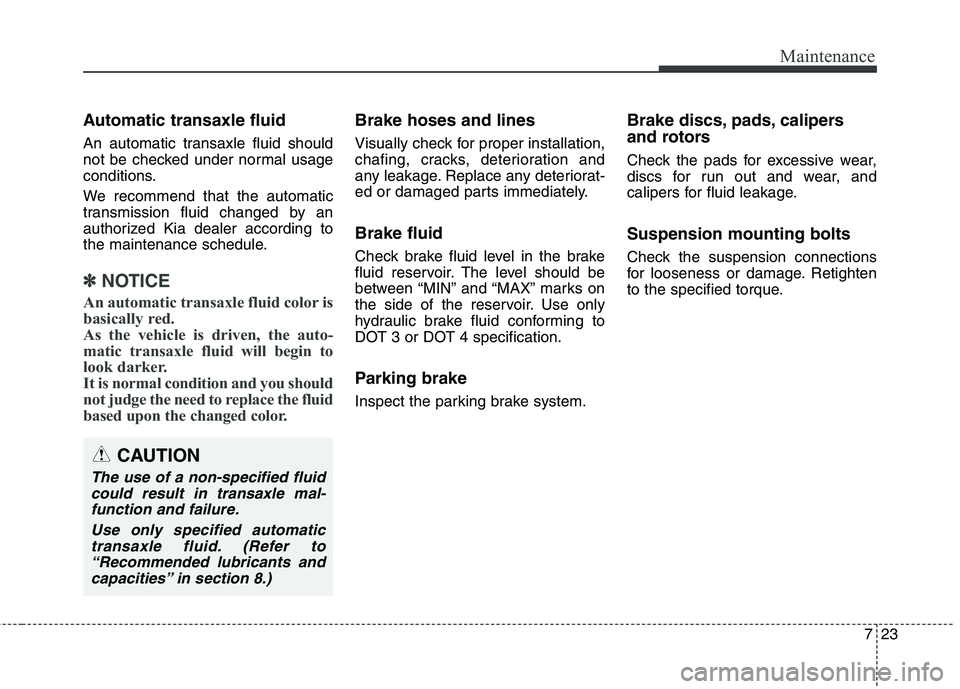
Automatic transaxle fluid
An automatic transaxle fluid should
not be checked under normal usage
conditions.
We recommend that the automatic
transmission fluid changed by an
authorized Kia dealer according to
the maintenance schedule.
✽✽NOTICE
An automatic transaxle fluid color is
basically red.
As the vehicle is driven, the auto-
matic transaxle fluid will begin to
look darker.
It is normal condition and you should
not judge the need to replace the fluid
based upon the changed color.
Brake hoses and lines
Visually check for proper installation,
chafing, cracks, deterioration and
any leakage. Replace any deteriorat-
ed or damaged parts immediately. Brake fluid
Check brake fluid level in the brake
fluid reservoir. The level should be
between “MIN” and “MAX” marks on
the side of the reservoir. Use only
hydraulic brake fluid conforming to
DOT 3 or DOT 4 specification.
Parking brake
Inspect the parking brake system. Brake discs, pads, calipers
and rotors
Check the pads for excessive wear,
discs for run out and wear, and
calipers for fluid leakage. Suspension mounting bolts
Check the suspension connections
for looseness or damage. Retighten
to the specified torque.
CAUTION
The use of a non-specified fluid
could result in transaxle mal-function and failure.
Use only specified automatictransaxle fluid. (Refer to “Recommended lubricants andcapacities” in section 8.)
Page 468 of 513
Maintenance
68
7
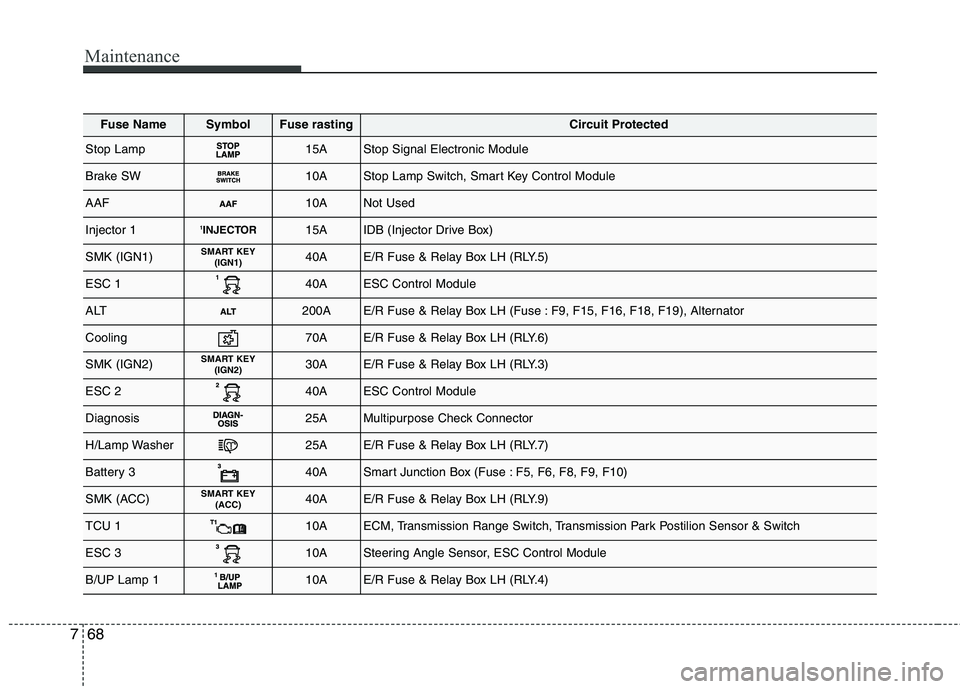
Fuse NameSymbolFuse rastingCircuit Protected
Stop Lamp15AStop Signal Electronic Module
Brake SW10AStop Lamp Switch, Smart Key Control Module
AAF10ANot Used
Injector 11
INJECTOR15AIDB (Injector Drive Box)
SMK (IGN1)SMART KEY
(IGN1)40AE/R Fuse & Relay Box LH (RLY.5)
ESC 140AESC Control Module
ALT200AE/R Fuse & Relay Box LH (Fuse : F9, F15, F16, F18, F19), Alternator
Cooling70AE/R Fuse & Relay Box LH (RLY.6)
SMK (IGN2)SMART KEY(IGN2)30AE/R Fuse & Relay Box LH (RLY.3)
ESC 240AESC Control Module
Diagnosis25AMultipurpose Check Connector
H/Lamp Washer25AE/R Fuse & Relay Box LH (RLY.7)
Battery 340ASmart Junction Box (Fuse : F5, F6, F8, F9, F10)
SMK (ACC)SMART KEY (ACC)40AE/R Fuse & Relay Box LH (RLY.9)
TCU 110AECM, Transmission Range Switch, Transmission Park Postilion Sensor & Switch
ESC 310ASteering Angle Sensor, ESC Control Module
B/UP Lamp 110AE/R Fuse & Relay Box LH (RLY.4)