trunk KIA QUORIS 2016 Owner's Manual
[x] Cancel search | Manufacturer: KIA, Model Year: 2016, Model line: QUORIS, Model: KIA QUORIS 2016Pages: 513, PDF Size: 30.14 MB
Page 114 of 513
427
Features of your vehicle
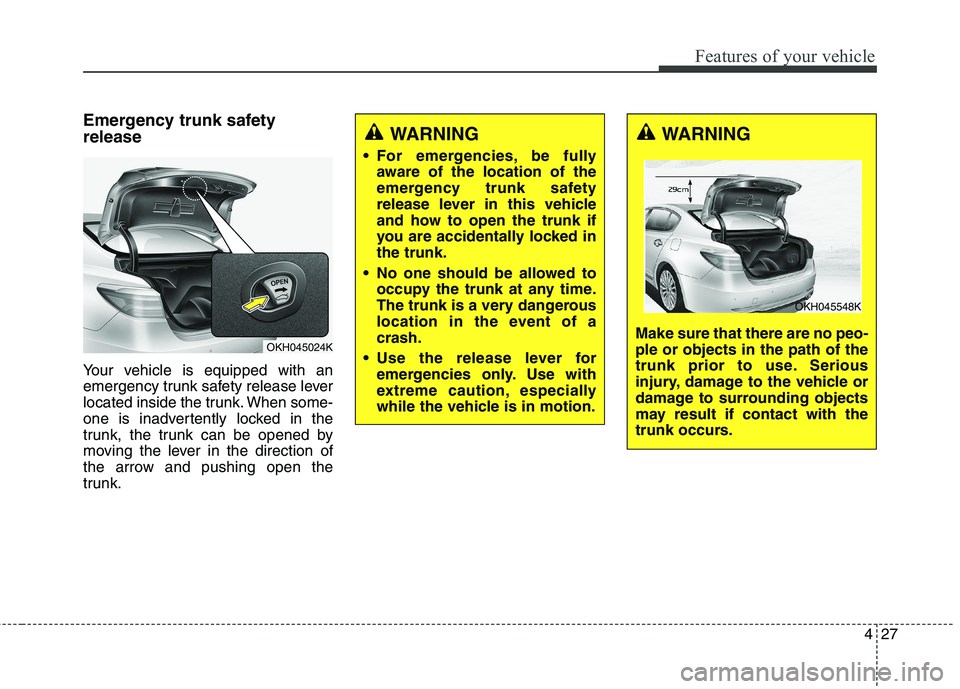
Emergency trunk safety release
Your vehicle is equipped with an
emergency trunk safety release lever
located inside the trunk. When some-
one is inadvertently locked in the
trunk, the trunk can be opened by
moving the lever in the direction of
the arrow and pushing open the
trunk.
OKH045024K
WARNING
For emergencies, be fully aware of the location of the
emergency trunk safety
release lever in this vehicle
and how to open the trunk if
you are accidentally locked inthe trunk.
No one should be allowed to occupy the trunk at any time.
The trunk is a very dangerous
location in the event of acrash.
Use the release lever for emergencies only. Use with
extreme caution, especially
while the vehicle is in motion.WARNING
Make sure that there are no peo- ple or objects in the path of the
trunk prior to use. Serious
injury, damage to the vehicle or
damage to surrounding objects
may result if contact with the
trunk occurs.
OKH045548K
Page 115 of 513
Features of your vehicle
28
4
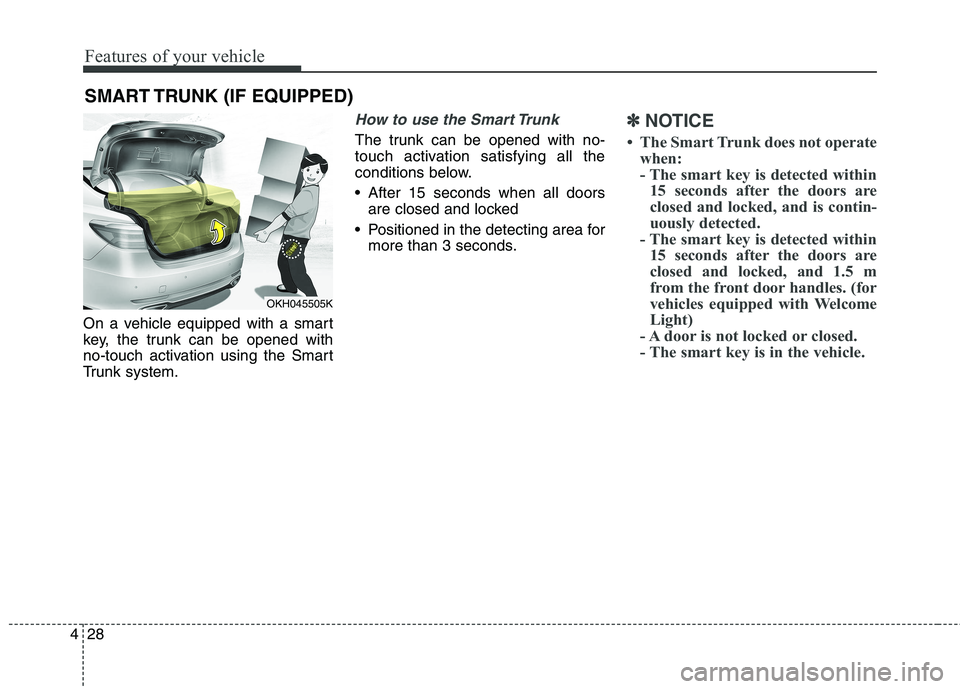
On a vehicle equipped with a smart
key, the trunk can be opened with
no-touch activation using the Smart
Trunk system.
How to use the Smart Trunk
The trunk can be opened with no-
touch activation satisfying all the
conditions below.
After 15 seconds when all doors
are closed and locked
Positioned in the detecting area for more than 3 seconds.
✽✽ NOTICE
The Smart Trunk does not operate when:
- The smart key is detected within15 seconds after the doors are
closed and locked, and is contin-
uously detected.
- The smart key is detected within 15 seconds after the doors are
closed and locked, and 1.5 m
from the front door handles. (for
vehicles equipped with Welcome
Light)
- A door is not locked or closed.
- The smart key is in the vehicle.
SMART TRUNK (IF EQUIPPED)
OKH045505K
Page 116 of 513
429
Features of your vehicle
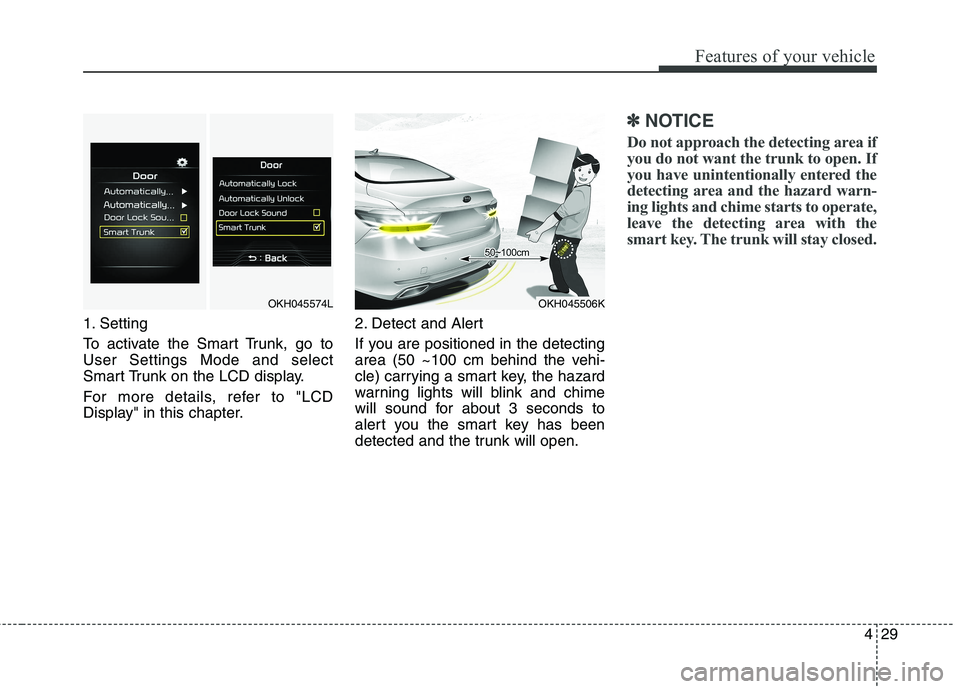
1. Setting
To activate the Smart Trunk, go to User Settings Mode and select
Smart Trunk on the LCD display.
For more details, refer to "LCD
Display" in this chapter.2. Detect and Alert
If you are positioned in the detecting
area (50 ~100 cm behind the vehi-
cle) carrying a smart key, the hazard
warning lights will blink and chime
will sound for about 3 seconds to
alert you the smart key has been
detected and the trunk will open.
✽✽
NOTICE
Do not approach the detecting area if
you do not want the trunk to open. If
you have unintentionally entered the
detecting area and the hazard warn-
ing lights and chime starts to operate,
leave the detecting area with the
smart key. The trunk will stay closed.
OKH045574LOKH045506K
Page 117 of 513
Features of your vehicle
30
4
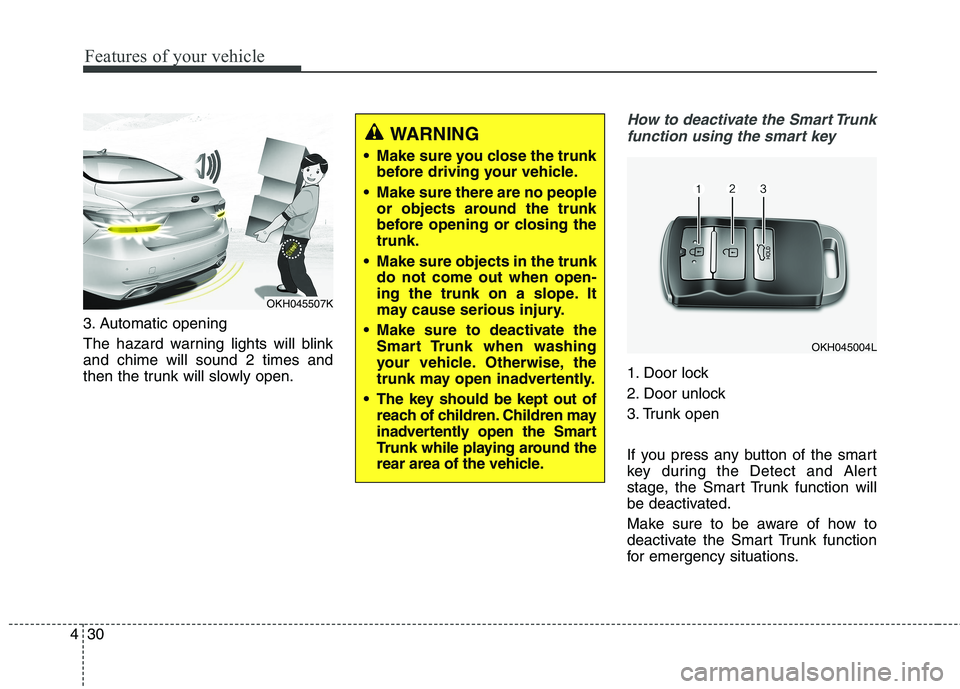
3. Automatic opening
The hazard warning lights will blink and chime will sound 2 times and
then the trunk will slowly open.
How to deactivate the Smart Trunk
function using the smart key
1. Door lock
2. Door unlock
3. Trunk open
If you press any button of the smart
key during the Detect and Alert
stage, the Smart Trunk function will
be deactivated.
Make sure to be aware of how to
deactivate the Smart Trunk function
for emergency situations.
OKH045004L
OKH045507K
WARNING
Make sure you close the trunk before driving your vehicle.
Make sure there are no people or objects around the trunk
before opening or closing thetrunk.
Make sure objects in the trunk do not come out when open-
ing the trunk on a slope. It
may cause serious injury.
Make sure to deactivate the Smart Trunk when washing
your vehicle. Otherwise, the
trunk may open inadvertently.
The key should be kept out of reach of children. Children may
inadvertently open the Smart
Trunk while playing around the
rear area of the vehicle.
Page 118 of 513
431
Features of your vehicle
✽✽NOTICE
If you press the door unlock but- ton (2), the Smart Trunk function
will be deactivated temporarily.
But, if you do not open any door
for 30 seconds, the smart trunk
function will be activated again.
If you press the trunk open button (3) for more than 1 second, the
trunk opens.
If you press the door lock button (1) or trunk open button (3) when
the Smart Trunk function is not in
the Detect and Alert stage, the
smart trunk function will not be
deactivated.
In case you have deactivated the Smart Trunk function by pressing
the smart key button and opened a
door, the smart trunk function can
be activated again by closing and
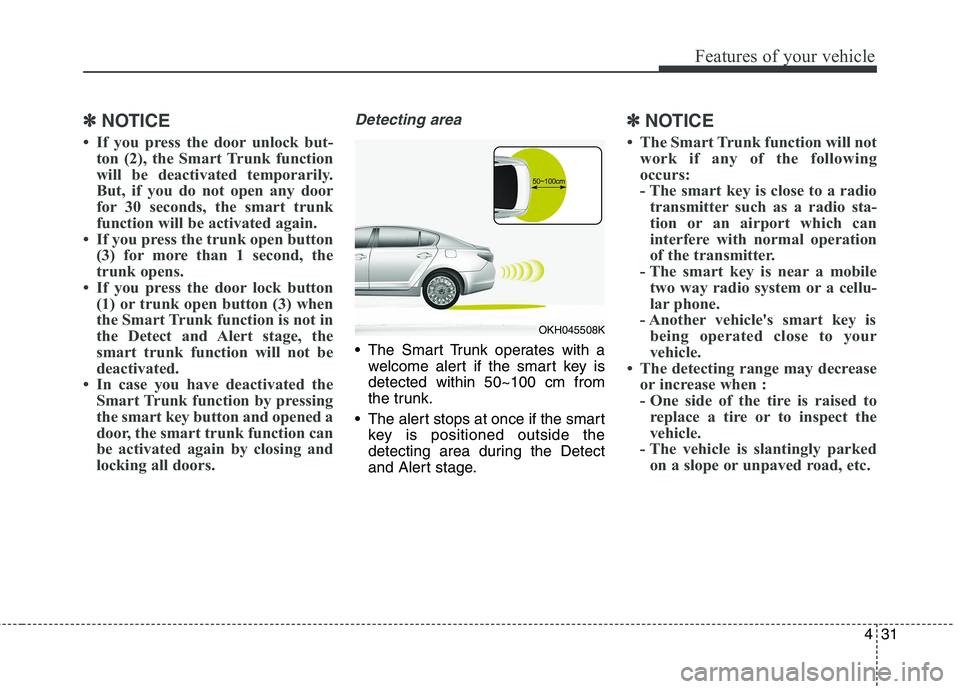
locking all doors.Detecting area
The Smart Trunk operates with awelcome alert if the smart key is detected within 50~100 cm from
the trunk.
The alert stops at once if the smart key is positioned outside the
detecting area during the Detect
and Alert stage.
✽✽ NOTICE
The Smart Trunk function will not work if any of the following
occurs:
- The smart key is close to a radiotransmitter such as a radio sta-
tion or an airport which can
interfere with normal operation
of the transmitter.
- The smart key is near a mobile two way radio system or a cellu-
lar phone.
- Another vehicle's smart key is being operated close to your
vehicle.
The detecting range may decrease or increase when :
- One side of the tire is raised toreplace a tire or to inspect the
vehicle.
- The vehicle is slantingly parked on a slope or unpaved road, etc.
OKH045508K
Page 156 of 513
469
Features of your vehicle
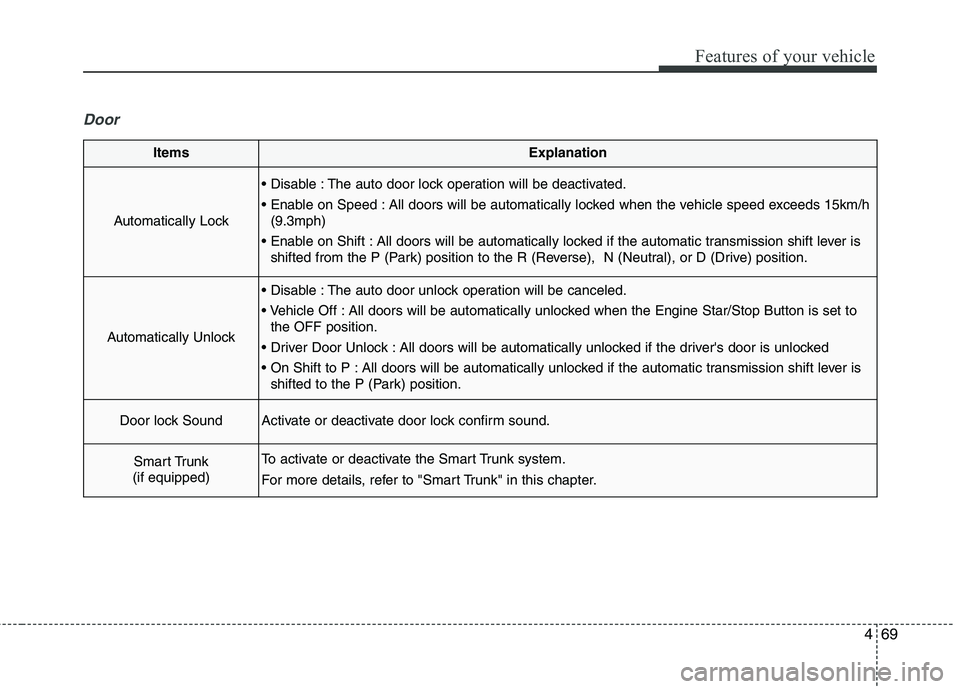
Door
ItemsExplanation
Automatically Lock
The auto door lock operation will be deactivated.
All doors will be automatically locked when the vehicle speed exceeds 15km/h(9.3mph)
All doors will be automatically locked if the automatic transmission shift lever is shifted from the P (Park) position to the R (Reverse), N (Neutral), or D (Drive) position.
Automatically Unlock
The auto door unlock operation will be canceled.
All doors will be automatically unlocked when the Engine Star/Stop Button is set tothe OFF position.
All doors will be automatically unlocked if the driver's door is unlocked
All doors will be automatically unlocked if the automatic transmission shift lever is shifted to the P (Park) position.
Door lock SoundActivate or deactivate door lock confirm sound.
Smart Trunk
(if equipped)To activate or deactivate the Smart Trunk system.
For more details, refer to "Smart Trunk" in this chapter.
Page 166 of 513
479
Features of your vehicle
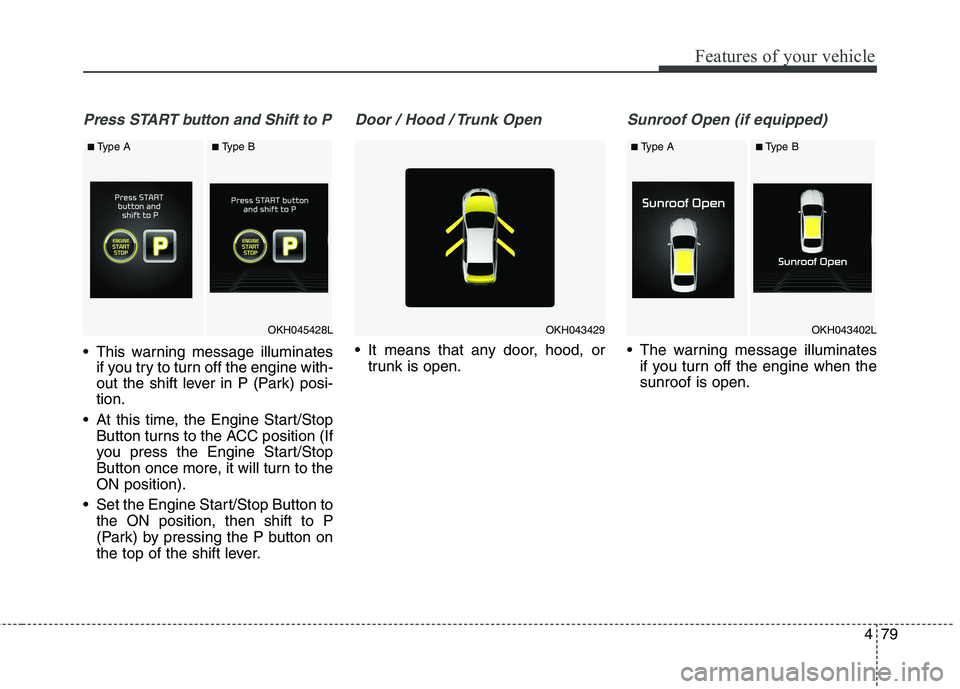
Press START button and Shift to P
This warning message illuminatesif you try to turn off the engine with-
out the shift lever in P (Park) posi-tion.
At this time, the Engine Start/Stop Button turns to the ACC position (If
you press the Engine Start/Stop
Button once more, it will turn to theON position).
Set the Engine Start/Stop Button to the ON position, then shift to P
(Park) by pressing the P button on
the top of the shift lever.
Door / Hood / Trunk Open
It means that any door, hood, ortrunk is open.
Sunroof Open (if equipped)
The warning message illuminatesif you turn off the engine when the sunroof is open.
OKH045428L
■Type A■Type B
OKH043429OKH043402L
■ Type A■Type B
Page 183 of 513
Features of your vehicle
96
4
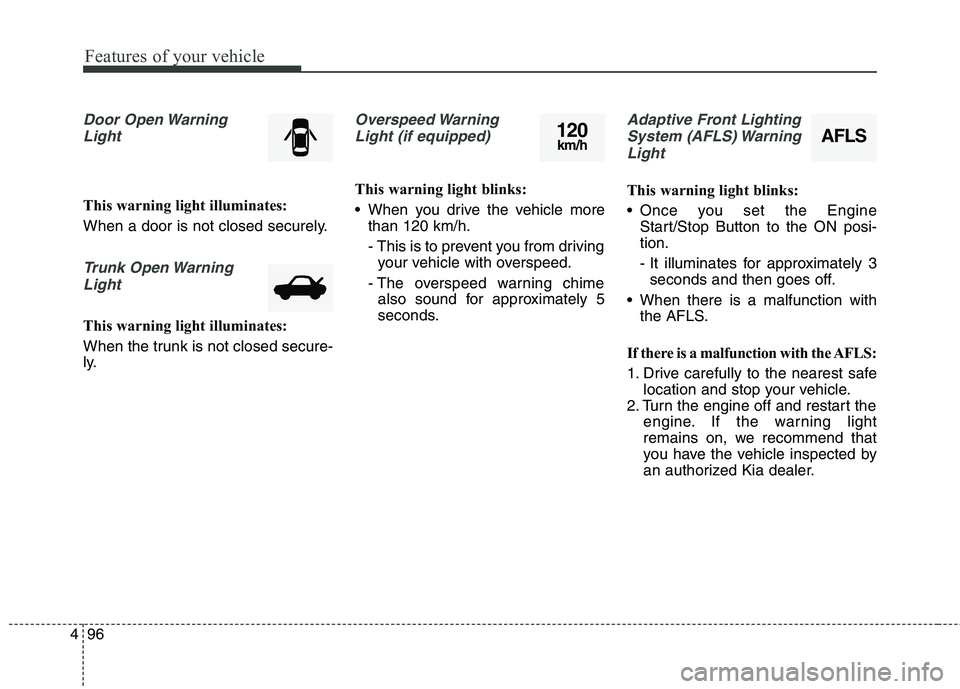
Door Open Warning
Light
This warning light illuminates:
When a door is not closed securely.
Trunk Open WarningLight
This warning light illuminates:
When the trunk is not closed secure-
ly.
Overspeed WarningLight (if equipped)
This warning light blinks:
When you drive the vehicle more than 120 km/h.
- This is to prevent you from drivingyour vehicle with overspeed.
- The overspeed warning chime also sound for approximately 5
seconds.
Adaptive Front Lighting
System (AFLS) Warning Light
This warning light blinks:
Once you set the Engine Start/Stop Button to the ON posi- tion.
- It illuminates for approximately 3seconds and then goes off.
When there is a malfunction with the AFLS.
If there is a malfunction with the AFLS:
1. Drive carefully to the nearest safe location and stop your vehicle.
2. Turn the engine off and restart the engine. If the warning light
remains on, we recommend that
you have the vehicle inspected by
an authorized Kia dealer.
AFLS120km/h
Page 203 of 513
![KIA QUORIS 2016 Owners Manual Features of your vehicle
116
4
This is the parking support system to
show around circumstance when you
park the vehicle in monitor. When
you push the button in [ON] position,
it is operated. To cance](/img/2/57973/w960_57973-202.png "KIA QUORIS 2016 Owners Manual Features of your vehicle
116
4
This is the parking support system to
show around circumstance when you
park the vehicle in monitor. When
you push the button in [ON] position,
it is operated. To cance")
Features of your vehicle
116
4
This is the parking support system to
show around circumstance when you
park the vehicle in monitor. When
you push the button in [ON] position,
it is operated. To cancel the system,push again.
Operating conditions
- When Engine Start/Stop button is
ON
- When the transaxle is on D, N or R
- When the vehicle speed is not over 20km/h When the vehicle speed is over
20km/h, the SVM system is turned
off. If the vehicle speed is not over
20km/h after turning off the SVM
by over speed, the SVM is not
turned on. To operate again, push
the button.
When the vehicle moves back- wards, regardless of On/Off of but-
ton and vehicle speed, the SVM is
operated.
When the trunk and driver/passen- ger door are opened and the out-
side mirror is folded, the warning isilluminated in SVM system.
If the SVM system is not normally operated, we recommend that you
contact an authorized Kia dealer.
* SVM : Surround View Monitoring
SURROUND VIEW MONITORING SYSTEM (SVM) (IF EQUIPPED)
OKH042184
Page 217 of 513
Features of your vehicle
130
4
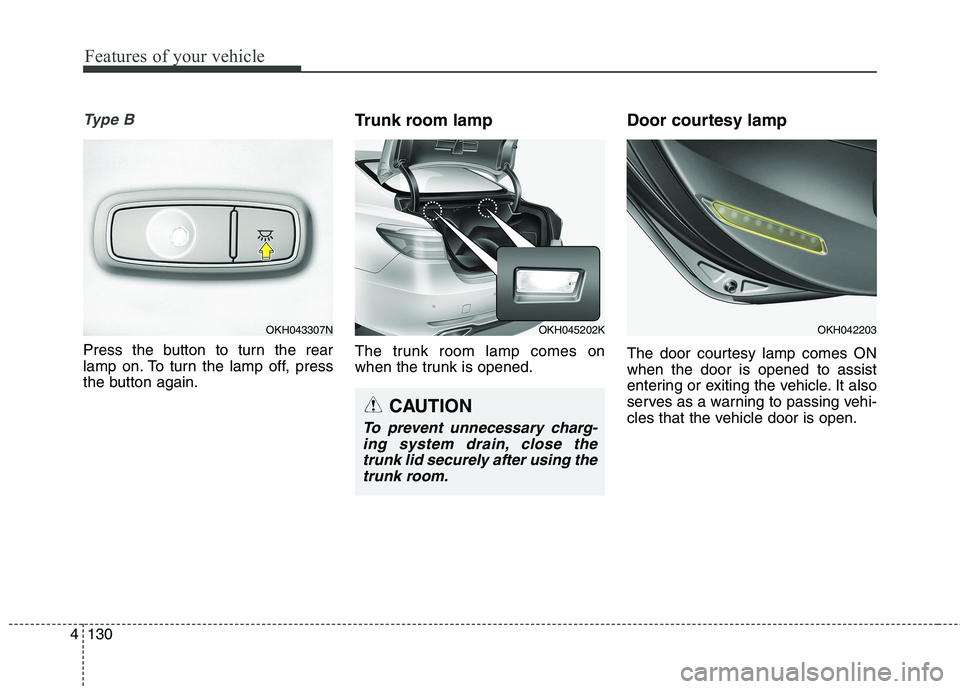
Ty p e B
Press the button to turn the rear
lamp on. To turn the lamp off, press
the button again. Trunk room lamp
The trunk room lamp comes on
when the trunk is opened.
Door courtesy lamp
The door courtesy lamp comes ON when the door is opened to assist
entering or exiting the vehicle. It also
serves as a warning to passing vehi-
cles that the vehicle door is open.
OKH043307N
CAUTION
To prevent unnecessary charg-
ing system drain, close thetrunk lid securely after using the trunk room.
OKH045202KOKH042203