rear view mirror KIA QUORIS 2017 User Guide
[x] Cancel search | Manufacturer: KIA, Model Year: 2017, Model line: QUORIS, Model: KIA QUORIS 2017Pages: 514, PDF Size: 35.2 MB
Page 140 of 514

453
Features of your vehicle
Center (AUTO):
The mirror will fold or unfold auto-
matically as follows:
- The mirror will fold or unfold when the door is locked or unlocked by
the smart key.
- The mirror will fold or unfold when the door is locked or unlocked by
the button on the outside door han-
dle.
- The mirror will unfold when you approach the vehicle (all doors
closed and locked) with a smart
key in possession.
CAUTION
In case it is an electric type out-
side rearview mirror, don’t fold itby hand. It could cause motor failure.
CAUTION
The electric type outsiderearview mirror operates eventhough the Engine Start/Stop button is in the OFF position.However, to prevent unneces-sary battery discharge, do notadjust the mirrors longer than necessary while the engine isnot running.
Page 198 of 514

4111
Features of your vehicle
The rearview camera will activate
when the back-up light is ON with the
Engine Start/Stop button ON and the
shift lever in the R (Reverse) posi-tion.
✽✽NOTICE
The rearview camera may not oper-
ate normally, when you drive in
extremely high or low temperature
area.
(operating temperature: -20°C ~
65°C (-13°F ~ 149°F))
REARVIEW CAMERA (IF EQUIPPED)
WARNING
This system is a supplemen- tary function only. It is the responsibility of the driver to
always check the inside/out-
side rearview mirror and the
area behind the vehicle before
and while backing up becausethere is a dead zone that can't
be seen through the camera.
Always keep the camera lens clean. If the lens is covered
with foreign matter, the cam-
era may not operate normally.
OKH045175K
OKH045263K
Page 219 of 514

Features of your vehicle
132
4
Puddle lamp and door handle lamp
When all the doors (and trunk) are
locked and closed, the puddle lampand door handle lamp will come on
for about 15 seconds if any of the
below is performed.
- When the door unlock button is
pressed on the smart key.
- When the button of the outside door handle is pressed.
- When the vehicle is approached with the smart key in possession. Also, if the outside rearview mirror
folding switch is in the AUTO posi-
tion, the outside rearview mirror will
unfold automatically. Headlight
When the headlight(light switch in the
headlight or AUTO position) is on and
all doors (and trunk) are locked andclosed, the position light and head-
light will come on for 15 seconds if
any of the below is performed.
- When the door unlock button is
pressed on the smart key.
At this time, if you press the door lock
or unlock button, the position light and
headlight will turn off immediately. Interior light
When the interior light switch is in the DOOR position and all doors (and
trunk) are locked and closed, the
room lamp will come on for 30 sec-
onds if any of the below is performed.
- When the door unlock button is
pressed on the smart key.
- When the button of the outside door handle is pressed.
At this time, if you press the door lock
or unlock button, the room lamp will
turn off immediately.
WELCOME SYSTEM
OKH045285K
Page 220 of 514

4133
Features of your vehicle
DEFROSTER
✽✽NOTICE
If you want to defrost and defog the
front windshield, refer to
“Windshield defrosting and defog-
ging” in this section.
Rear window defroster
The defroster heats the window to
remove frost, fog and thin ice from
the rear window, while the engine is
running.
To activate the rear window
defroster, press the rear window
defroster button located in the center
facia switch panel.
The indicator on the rear window
defroster button illuminates when thedefroster is ON.
To turn off the defroster, press the
rear window defroster button again. If there is heavy accumulation of
snow on the rear window, brush it off
before operating the rear defroster.
The rear window defroster automati-
cally turns off after approximately 20
minutes or when the Engine
Start/Stop button is turned off. To
turn off the defroster, press the rear
window defroster button again.
Outside rearview mirror defroster
If your vehicle is equipped with the
outside rearview mirror defrosters,
they will operate at the same time you
turn on the rear window defroster. Wiper deicer (if equipped)
If your vehicle is equipped with the
wiper deicer, it will be operating at
the same time you turn on the rear
window defroster.
CAUTION
To prevent damage to the con-
ductors bonded to the insidesurface of the rear window, never use sharp instruments orwindow cleaners containingabrasives to clean the window.
OKH045207K
Page 235 of 514

Features of your vehicle
148
4
For maximum defrosting, set the
temperature control to the extreme
right/hot position and the fan speedcontrol to the highest speed.
If warm air to the floor is desired while defrosting or defogging, setthe mode to the floor-defrost posi-tion.
Before driving, clear all snow and ice from the windshield, rear win-
dow, outside rear view mirrors, and
all side windows.
Clear all snow and ice from the hood and air inlet in the cowl grill to
improve heater and defroster effi-ciency and to reduce the probabili-
ty of fogging up the inside of thewindshield. To defog inside windshield
1. Set the fan speed to the desired
position.
2. Select desired temperature.
3. Press the defrost button ( ).
4. The air conditioning will be turned on according to the detected ambi-
ent temperature and outside(fresh) air position will be selected
automatically.
WINDSHIELD DEFROSTING AND DEFOGGING
WARNING - Windshield heating
Do not use the or posi- tion during cooling operation in
extremely humid weather. The
difference between the temper-ature of the outside air and thatof the windshield could causethe outer surface of the wind-
shield to fog up, causing loss of
visibility. In this case, set the
mode selection knob or button
to the position and fan
speed control knob or button to
the lower speed.
OKH045225L
Page 243 of 514

Features of your vehicle
156
4
Sunglass holder
To open the sunglass holder, press
the cover and the holder will slowly
open. Place your sunglasses with the
lenses facing out.
To close the sunglass holder push it
up. Seatback pocket
The seatback pocket is provided on
the back of the front passenger’s and
driver’s seatbacks.WARNING
Do not keep objects except sunglasses inside the sun-
glass holder. Such objects can
be thrown from the holder in
the event of a sudden stop or
an accident, possibly injuring
the passengers in the vehicle.
Do not open the sunglass holder while the vehicle is
moving. The rear view mirror
of the vehicle can be blocked
by an open sunglass holder.
Do not put the glasses forcibly into a sunglass holder
to prevent breakage or defor-
mation of glasses. It may
cause personal injury if you
try to open it forcibly when the
glasses are jammed in holder.
OKH032016OKH042233
Page 264 of 514

53
Driving your vehicle
Before entering vehicle
• Be sure that all windows, outsidemirror(s), and outside lights are clean.
Check the condition of the tires.
Check under the vehicle for any sign of leaks.
Be sure there are no obstacles behind you if you intend to back up. Necessary inspections
Fluid levels, such as engine oil,
engine coolant, brake fluid, and
washer fluid should be checked on a
regular basis, with the exact interval
depending on the fluid. Further
details are provided in section 7,“Maintenance”.
Before starting
Close and lock all doors.
Position the seat so that all con-
trols are easily reached.
Adjust the inside and outside rearview mirrors.
Be sure that all lights work.
Check all gauges.
Check the operation of warning lights when the Engine Start/Stop
button is in the ON position.
Release the parking brake and make sure the brake warning lightgoes out.
For safe operation, be sure you are
familiar with your vehicle and itsequipment.
BEFORE DRIVING
WARNING
Driving while distracted can
result in a loss of vehicle control,
that may lead to an accident,
severe personal injury, and
death. The driver’s primary
responsibility is in the safe and
legal operation of a vehicle, and
use of any handheld devices,
other equipment, or vehicle sys-
tems which take the driver’s
eyes, attention and focus away
from the safe operation of a vehi-
cle or which are not permissible
by law should never be used dur-
ing operation of the vehicle.
Page 352 of 514

591
Driving your vehicle
BSD (Blind Spot Detection) /
LCA (Lane Change Assist)
Operating conditions
The indicator on the switch will illumi- nate when the Blind Spot Detection
System (BSD) switch is pressed with
the Engine Start/Stop Button ON.
If vehicle speed exceeds about 30 km/h (20 mph), the system will acti-
vate.
If you press the switch again, the
switch indicator and system will be
turned off.
If the Engine Start/Stop button is
turned OFF and ON the system
returns to the previous state.When the system is not used turn the
system off by turning off the switch.
When the system is turned on the
warning light will illuminate for 3 sec-
onds on the outside rearview mirror.
Warning type
The system will activate when:
1. The system is on
2. Vehicle speed is about 30 km/h
(20 mph)
3. Other vehicles are detected in the rear side If a vehicle is detected within the
boundary of the system, a warninglight will illuminate on the outside
rearview mirror and the head up dis-
play.
If the detected vehicle is not in warn-
ing range, the warning will turn off
according to driving conditions.
OKH053082
OKH055084K
1st stage
Page 353 of 514
Driving your vehicle
92
5
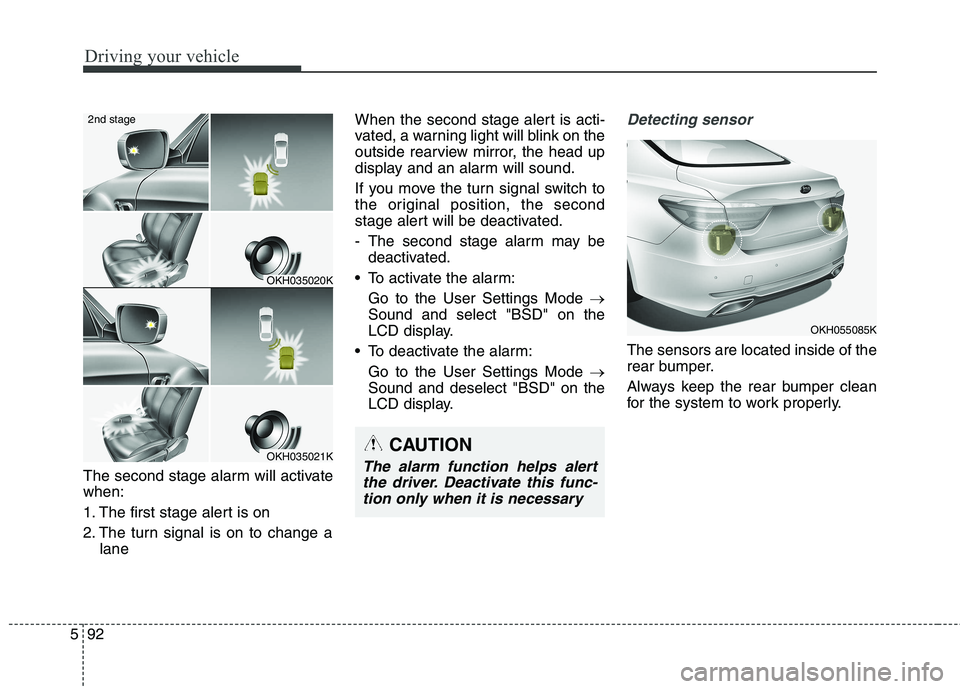
The second stage alarm will activate when:
1. The first stage alert is on
2. The turn signal is on to change a
lane When the second stage alert is acti-
vated, a warning light will blink on the
outside rearview mirror, the head up
display and an alarm will sound.
If you move the turn signal switch to
the original position, the second
stage alert will be deactivated.
- The second stage alarm may be
deactivated.
To activate the alarm: Go to the User Settings Mode
Sound and select "BSD" on the
LCD display.
To deactivate the alarm: Go to the User Settings Mode
Sound and deselect "BSD" on the
LCD display.
Detecting sensor
The sensors are located inside of the
rear bumper.
Always keep the rear bumper clean
for the system to work properly.
OKH035020K
OKH035021K
2nd stage
CAUTION
The alarm function helps alert
the driver. Deactivate this func-tion only when it is necessary
OKH055085K
Page 356 of 514

595
Driving your vehicle
Warning type If the vehicle detected by the sen-sors approaches your vehicle, the
warning chime will sound, the warn-
ing light on the outside rearview
mirror will blink and a message will
appear on the LCD display.
If the detected vehicle is out of the sensing range of your vehicle,
move the vehicle away from the
detected object slowly; the warningwill be cancelled.
The system may not operate prop- erly due to other factors or circum-
stances. Always pay attention to
your surrounding.
❈ If your vehicle's left or right side
bumper is blinded by barrier or
vehicles, the system sensing abili-
ty may be reduced.
WARNING
The warning light on the out- side rearview mirror will illu-
minate whenever a vehicle is
detected at the rear side bythe system.
To avoid accidents, do not
focus only on the warninglight and neglect to see the
surrounding of the vehicle.
Drive safely even though the vehicle is equipped with aBlind Spot Detection System
(BSD) and Rear Cross Traffic
Alert (RCTA). Do not solely rely
on the system but check for
yourself before changing lanes
or backing the vehicle up.
The system may not alert the driver in some conditions so
always check the surround-ings while driving.
(Continued)
OVI053132
OKH053213L