air condition KIA QUORIS 2017 Owner's Manual
[x] Cancel search | Manufacturer: KIA, Model Year: 2017, Model line: QUORIS, Model: KIA QUORIS 2017Pages: 514, PDF Size: 35.2 MB
Page 237 of 514

Features of your vehicle
150
4
Defogging logic
To reduce the probability of fogging up the inside of the windshield, the
air intake or air conditioning are con-trolled automatically according to
certain conditions such as or
position. To cancel or return the
defogging logic, do the following.
1. Turn the Engine Start/Stop buttonto the ON position.
2. Press the defroster button ( ).
3. While pressing the air conditioning button (A/C), press the air intake
control button at least 5 times with-
in 3 seconds.
The indicator on the air intake button
blinks 3 times with 0.5 seconds of
interval. It indicates that the defog-
ging logic is canceled or returned to
the programmed status.
If the battery has been discharged or
disconnected, it resets to the defog
logic status.Auto defogging system
Auto defogging reduces the probabil-
ity of fogging up the inside of the
windshield by automatically sensingthe moisture of inside the windshield.
The auto defogging system operates when the heater or air conditioning ison.
OKH045227K
OKH042228
Page 238 of 514
4151
Features of your vehicle
This indicator illuminates
when the auto defoggingsystem senses the mois-ture of inside the wind-
shield and operates.
If more moisture is in the vehicle, the
higher steps operate as follow. For
example if auto defogging does not
defog inside the windshield at step 2
Outside air position, it tries to defog
again at step 1 Blowing air towardthe windshield. Step 1 : Operating the air conditioning
Step 2 : Outside air position
Step 3 : Blowing air toward the wind- shield
Step 4 : Increasing air flow toward the windshield To cancel or reset the Auto Defogging
System Press the front windshield defroster
button for 3 seconds when the
Engine Start/Stop button is in the ON
position. When the Auto Defogging
System is canceled, Front defroster
button will blink 6 times.
When the Auto Defogging System is
reset, Front defroster button will blink3 times without a signal.
✽✽
NOTICE
If the A/C off is manually selected while the auto defogging system is
on, the auto defogging indicator
will blink 3 times to give notice
that manual operation is canceled.
If the air quality system (AQS) is selected while the auto defogging
system is operating at the step 1
outside air position, the recirculat-
ed air position may operate when
the outside air is polluted.
CAUTION
Do not remove the sensor cover
located on the upper end of thepassenger side windshield glass. Damage to system partscould occur and may not be cov-ered by your vehicle warranty.
Page 240 of 514
4153
Features of your vehicle
Cluster ionizer
When the Engine Start/Stop button is in the ON position, the clean air
function turns on automatically.
Also, the clean air function turns off
automatically, when the Engine
Start/Stop button is in the OFF posi-tion.
Smart ventilation
When driving and the heater and air
conditioning system is off, the smart
ventilation system maintains pleas-
ant indoor aerial environment by
controlling the temperature, humidity
and CO2 of interior.
“SMART VENTILATION ON” mes-
sage is displayed on the AVN climate
monitor for 5 seconds when the
smart ventilation system operates.Smart ventilation system ON/OFF
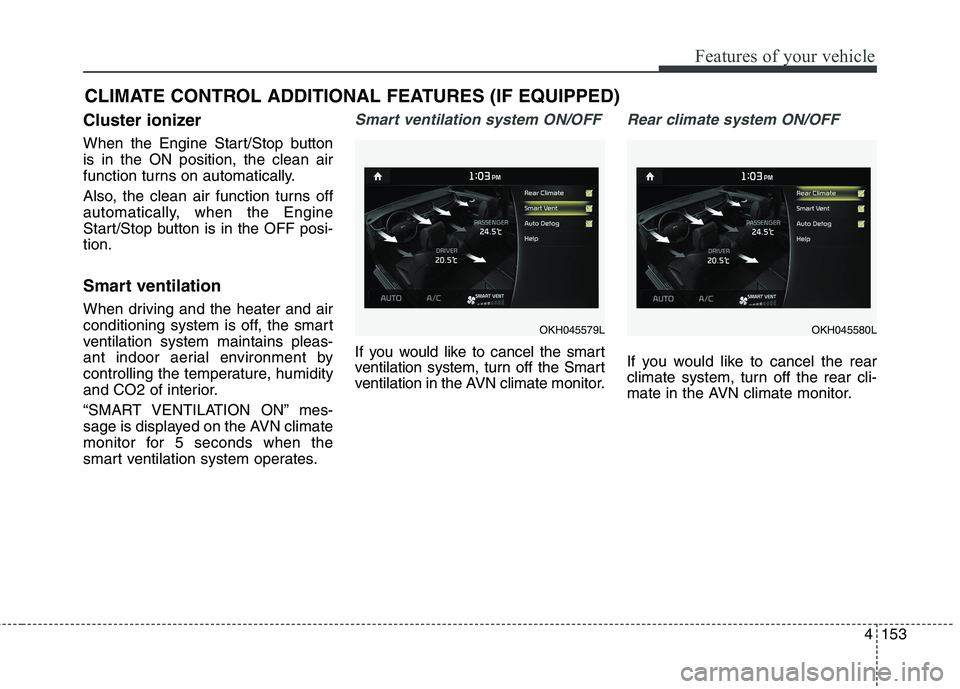
If you would like to cancel the smart
ventilation system, turn off the Smart
ventilation in the AVN climate monitor.
Rear climate system ON/OFF
If you would like to cancel the rear
climate system, turn off the rear cli-
mate in the AVN climate monitor.
CLIMATE CONTROL ADDITIONAL FEATURES (IF EQUIPPED)
OKH045579LOKH045580L
Page 248 of 514

4161
Features of your vehicle
Power outlet
The power outlet is designed to pro-
vide power for mobile telephones or
other devices designed to operate
with vehicle electrical systems. The
devices should draw less than 10
amps with the engine running.CAUTION
Use the power outlet onlywhen the engine is runningand remove the accessory plug after use. Using theaccessory plug for prolongedperiods of time with the engine off could cause thebattery to discharge.
Only use 12V electric acces- sories which are less than 10Ain electric capacity.
Adjust the air-conditioner or heater to the lowest operatinglevel when using the poweroutlet.
Close the cover when not in use.
Some electronic devices can cause electronic interferencewhen plugged into a vehicle’spower outlet. These devicesmay cause excessive audiostatic and malfunctions in other electronic systems ordevices used in your vehicle.
OKH042239
OKH043240
■ Center
■Rear
WARNING
Do not put a finger or a foreign
element (pin, etc.) into a power
outlet and do not touch with a
wet hand. You may get an elec-
tric shock.
Page 291 of 514

Driving your vehicle
30
5
In the event of brake failure
If service brakes fail to operate while
the vehicle is in motion, you can
make an emergency stop with the
parking brake. The stopping dis-
tance, however, will be much greater
than normal.
Disc brakes wear indicator
Your vehicle has disc brakes.
When your brake pads are worn and
new pads are required, you will hear
a high-pitched warning sound from
your front brakes or rear brakes. You
may hear this sound come and go or
it may occur whenever you depress
the brake pedal.
Please remember that some driving
conditions or climates may cause a
brake squeal when you first apply (or
lightly apply) the brakes. This is nor-
mal and does not indicate a problem
with your brakes.
WARNING - Parking brake
Applying the parking brake while
the vehicle is moving at normal
speeds can cause a sudden loss
of control of the vehicle. If you
must use the parking brake to
stop the vehicle, use great cau-
tion in applying the brake.
CAUTION
Do not operate the parking brake while the vehicle is movingexcept in an emergency situa- tion. It could damage the vehiclesystem and make endanger driv-ing safety.
WARNING - Brake wear
This brake wear warning sound
means your vehicle needs serv-
ice. If you ignore this audible
warning, you will eventually lose
braking performance, whichcould lead to a serious accident.
CAUTION
To avoid costly brake repairs, do not continue to drive withworn brake pads.
Always replace the front or rear brake pads as pairs.
Page 357 of 514

Driving your vehicle
96
5
Non-operating condition
Driver's Attention
The driver must be cautious in the
below situations for the system may
not assist the driver and may not
work properly.
- Curved roads, tollgates, etc.
- The surrounding of the sensor is
polluted with rain, snow, mud, etc
- The rear bumper near the sensor is covered or hidden with a foreign
matter such as a sticker, bumperguard, bicycle stand etc.
- The rear bumper is damaged or the sensor is out of place.
- The height of the vehicle is altered such as when the trunk is loaded
with heavy objects, or there is lowtire pressure etc.
- Bad weather such as heavy rain or snow.
- A fixed object is near such as a guardrail, tunnel, human and ani-mal etc.
CAUTION
The system may not work prop-
erly if the bumper has beenreplaced or if repair work has been done near the sensor.
The detection area differs according to the roads width.If the road is narrow the sys-tem may detect other vehicles in the next lane.
in addition, if the road is very wide the system may notdetect other vehicles.
The system may turn off due to strong electromagnetic waves.
(Continued)
The Blind Spot DetectionSystem (BSD) and Rear Cross
Traffic Alert (RCTA) are not a
substitute for proper and safe
driving. Always drive safely
and use caution when chang-
ing lanes or backing the vehi-
cles up. The Blind Spot
Detection System (BSD) may
not detect every object along-
side the vehicle.
Page 359 of 514

Driving your vehicle
98
5
ECONOMICAL OPERATION
Your vehicle's fuel economy depends
mainly on your style of driving, where
you drive and when you drive.
Each of these factors affects how
many kilometers (miles) you can get
from a liter (gallon) of fuel. To operate
your vehicle as economically as pos-
sible, use the following driving sug-
gestions to help save money in bothfuel and repairs:
Drive smoothly. Accelerate at a moderate rate. Do not make "jack-
rabbit" starts or full-throttle shifts and
maintain a steady cruising speed.
Do not race between stoplights. Try
to adjust your speed to the traffic so
you do not have to change speeds
unnecessarily. Avoid heavy traffic
whenever possible. Always maintain
a safe distance from other vehicles
so you can avoid unnecessary brak-
ing. This also reduces brake wear.
Drive at a moderate speed. The faster you drive, the more fuel your
vehicle uses. Driving at a moderate
speed, especially on the highway,
is one of the most effective ways toreduce fuel consumption. Do not "ride" the brake pedal. This
can increase fuel consumption and
also increase wear on these com-
ponents. In addition, driving with
your foot resting on the brake pedal
may cause the brakes to overheat,
which reduces their effectiveness
and may lead to more serious con-
sequences.
Take care of your tires. Keep them inflated to the recommended pres-
sure. Incorrect inflation, either too
much or too little, results in unnec-
essary tire wear. Check the tirepressures at least once a month.
Be sure that the wheels are aligned correctly. Improper align-ment can result from hitting curbs
or driving too fast over irregular
surfaces. Poor alignment causes
faster tire wear and may also result
in other problems as well as
greater fuel consumption. Keep your vehicle in good condi-
tion. For better fuel economy and
reduced maintenance costs, main-
tain your vehicle in accordancewith the maintenance schedule in
section 7. If you drive your vehicle
in severe conditions, more frequentmaintenance is required (see sec-
tion 7 for details).
Keep your vehicle clean. For maxi- mum service, your vehicle should
be kept clean and free of corrosive
materials. It is especially important
that mud, dirt, ice, etc. not be
allowed to accumulate on the
underside of the vehicle. This extra
weight can result in increased fuel
consumption and also contribute tocorrosion.
Travel lightly. Do not carry unnec- essary weight in your vehicle.
Weight reduces fuel economy.
Do not let the engine idle longer than necessary. If you are waiting
(and not in traffic), turn off your
engine and restart only when
you're ready to go.
Page 360 of 514

599
Driving your vehicle
Remember, your vehicle does notrequire extended warm-up. After
the engine has started, allow the
engine to run for 10 to 20 seconds
prior to placing the vehicle in gear.
In very cold weather, however, give
your engine a slightly longer warm-
up period.
Do not "lug" or "over-rev" the engine. Lugging is driving too
slowly in too high a gear resulting
engine bucking. If this happens,
shift to a lower gear. Over-revving
is racing the engine beyond its safe
limit. This can be avoided by shift-
ing at the recommended speeds.
Use your air conditioning sparingly. The air conditioning system is
operated by engine power so your
fuel economy is reduced when youuse it.
Open windows at high speeds can reduce fuel economy.
Fuel economy is less in crosswinds and headwinds. To help offset
some of this loss, slow down when
driving in these conditions. Keeping a vehicle in good operating
condition is important both for econ-
omy and safety. Therefore, we rec-
ommend that the system be serviced
by an authorized Kia dealer.
WARNING
- Engine off
during motion
Never turn the engine off to
coast down hills or anytime the
vehicle is in motion. The power
steering and power brakes will
not function properly without
the engine running. Instead,
keep the engine on and down-
shift to an appropriate gear for
engine braking effect. In addi-
tion, turning off the engine
while driving could engage the
steering wheel lock (ifequipped) resulting in loss of
vehicle steering which could
cause serious injury or death.
Page 378 of 514

What to do in an emergency
8
6
IF THE ENGINE OVERHEATS
If your temperature gauge indicates
overheating, you will experience a
loss of power, or hear loud pinging or
knocking, the engine is probably too
hot. If this happens, you should:
1. Pull off the road and stop as soon as it is safe to do so.
2. Place the shift lever in P (Park) and set the parking brake. If the air
conditioning is on, turn it off.
3. If engine coolant is running out under the car or steam is coming
out from the hood, stop the engine.Do not open the hood until the
coolant has stopped running or the
steaming has stopped. If there is no
visible loss of engine coolant and
no steam, leave the engine running
and check to be sure the engine
cooling fan is operating. If the fan is
not running, turn the engine off. 4. Check to see if the water pump
drive belt is missing. If it is not
missing, check to see that it is
tight. If the drive belt seems to be
satisfactory, check for coolant leak-
ing from the radiator, hoses or
under the car. (If the air condition-
ing had been in use, it is normal for
cold water to be draining from it
when you stop). 5. If the water pump drive belt is bro-
ken or engine coolant is leakingout, stop the engine immediately
and we recommend that you call
an authorized Kia dealer.
WARNING
While the engine is running,
keep hair, hands and clothing
away from moving parts suchas the fan and drive belts to pre-
vent injury.
WARNING
Do not remove the radiator cap
when the engine is hot. This can
allow coolant to blow out of theopening and cause serious
burns.
Page 382 of 514

What to do in an emergency
12
6
If either telltale illuminates, immedi-
ately reduce your speed, avoid hard
cornering and anticipate increased
stopping distances. You should stop
and check your tires as soon as pos-
sible. Inflate the tires to the proper
pressure as indicated on the vehicle’splacard or tire inflation pressure label
located on the driver’s side center pil-
lar outer panel. If you cannot reach a
service station or if the tire cannot
hold the newly added air, replace the
low pressure tire with a spare tire.
If you drive the vehicle for about 10
minutes at speeds above 25 km/h
after replaceing the low pressure tire
with the spare tire, the below willhappen:
The TPMS malfunction indicator
may blink for approximately 1
minute and then remain continu-ously illuminated because theTPMS sensor is not mounted onthe spare wheel.
✽✽ NOTICE
The spare tire is not equipped with a
tire pressure sensor.
WARNING - Low
pressure damage
Significantly low tire pressure
makes the vehicle unstable and
can contribute to loss of vehicle
control and increased brakingdistances.
Continued driving on low pres- sure tires can cause the tires to
overheat and fail.
CAUTION
In winter or cold weather, the low tire pressure telltale mayilluminate if the tire pressurewas adjusted to the recom-mended tire inflation pressure in warm weather. It does notmean your TPMS is malfunc-tioning because the decreasedtemperature leads to a lower- ing of tire pressure.
When you drive your vehicle from a warm area to a coldarea or from a cold area to awarm area, or the outside tem- perature is higher or lower,you should check the tireinflation pressure and adjust the tires to the recommendedtire inflation pressure.
The tire pressure may vary depending on various factorsincluding the temperature con- ditions of parking area, drivingconditions and ambient tem-perature, altitude above sea level.
(Continued)
(Continued)
The low tire pressure position telltale warning may illuminatewhen the tire pressure issame or higher than nearby tires. This is normal since thetire pressure changes alongwith the Internal temperature of each tire.
The tire pressure displayed on the instrument panel may bedifferent from the tire pres-sure measured by a tire pres- sure gauge.