fuel KIA QUORIS 2017 Owner's Manual
[x] Cancel search | Manufacturer: KIA, Model Year: 2017, Model line: QUORIS, Model: KIA QUORIS 2017Pages: 514, PDF Size: 35.2 MB
Page 175 of 514

Features of your vehicle
88
4
Elapsed Time (3)
The elapsed time is the total driv-
ing time since the last elapsed time reset.
- Time range (hh:mm): 00:00 ~ 99:59
To reset the elapsed time, press the OK (RESET) b utton on the steering
wheel for more than 1 second when
the elapsed time is displayed.
✽✽ NOTICE
Even if the vehicle is not in motion,
the elapsed time keeps going while
the engine is running.
One time driving information mode
This display shows trip distance (1),
average fuel economy (2) and the
vehicle can be driven with theremaining fuel (3).
This information is displayed for a
few seconds when you turn off theengine and then goes off automati-
cally. The information provided is cal-
culated according to each trip.
If the estimated distance is below 1km (1 mi.), the distance to empty
(3) will display as "---" and a refuelmessage will appear (4). Drive Mode
By selecting the drive mode screen,
the driver can personalize the drive
mode based on vehicle control pref-
erence and driving style.
For more details, refer to "Drive
Mode Integrated Control System" inChapter 5.
OKH045406
■
Type A■Type B
OKH055149L
■Type A■Type B
Page 179 of 514
Features of your vehicle
92
4
✽✽
NOTICE- Electronic Brake
force Distribution (EBD)
System Warning Light
When the ABS Warning Light is on
or both ABS and Parking Brake &
Brake Fluid Warning Lights are on,
the speedometer, odometer, or trip-
meter may not work. Also, the EPS
Warning Light may illuminate and
the steering effort may increase or
decrease.
In this case, we recommend you
have the vehicle inspected by an
authorized Kia dealer as soon as
possible.Malfunction Indicator Lamp (MIL)
This warning light illuminates:
Once you set the Engine Start/Stop Button to the ON position.
- It remains on until the engine isstarted.
When there is a malfunction with the emission control system.
In this case, we recommend that
you have the vehicle inspected by
an authorized Kia dealer.
CAUTION - Malfunction
Indicator Lamp (MIL)
Driving with the Malfunction Indicator Lamp (MIL) on maycause damage to the emissioncontrol systems which could effect drivability and/or fueleconomy.
CAUTION - Gasoline Engine
If the Malfunction Indicator
Lamp (MIL) illuminates, poten-tial catalytic converter damageis possible which could result in loss of engine power.
In this case, we recommend thatyou have the vehicle inspectedby an authorized Kia dealer assoon as possible.
Page 181 of 514

Features of your vehicle
94
4
Engine Oil Pressure
Warning Light
This warning light illuminates:
Once you set the Engine Start/Stop Button to the ON position.
- It remains on until the engine isstarted.
When the engine oil pressure is low.
If the engine oil pressure is low:
1.Drive carefully to the nearest safe location and stop your vehicle.
2.Turn the engine off and check the engine oil level (For more details,
refer to “Engine Oil” in section 7). If
the level is low, add oil as required.
If the warning light remains on after
adding oil or if oil is not available,
we recommend that you have the
vehicle inspected by an authorized
Kia dealer as soon as possible.
Low Fuel Level Warning
Light
This warning light illuminates:
When the fuel tank is nearly empty.
When the fuel tank is nearly empty, the color of the fuel level symbol will change (white → orange). (for
type B cluster)
If the fuel tank is nearly empty:
Add fuel as soon as possible.
CAUTION - Engine Oil
Pressure Warning Light
If the engine does not stop immediately after the EngineOil Pressure Warning Light isilluminated, severe damage could result.
If the warning light stays onwhile the engine is running, itindicates that there may beserious engine damage or malfunction. In this case,
1. Stop the vehicle as soon as it is safe to do so.
2. Turn off the engine and check the oil level. If the oillevel is low, fill the engineoil to the proper level.
3. Start the engine again. If the warning light stays on afterthe engine is started, turnthe engine off immediately.In this case, we recommend that you have the vehicleinspected by an authorizedKia dealer.
CAUTION - Low Fuel
Level
Driving with the Low Fuel Level
warning light on or with the fuellevel below “E” can cause theengine to misfire and damage the catalytic converter (if equipped).
Page 191 of 514
Features of your vehicle
104
4
Head Up Display ON/OFF
The head up display is always acti-
vated whenever you set the Engine
Start/Stop Button to the ON posi-tion.
To deactivate the head up display, press the HUD button. If you press
the HUD button again, the head up
display will be activated. Head Up Display Information
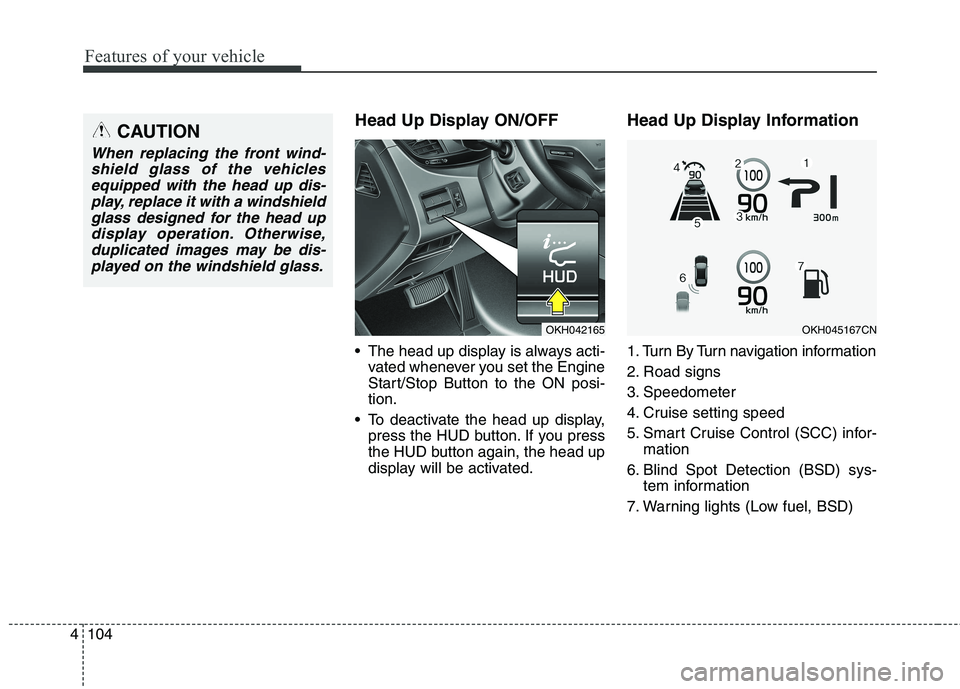
1. Turn By Turn navigation information
2. Road signs
3. Speedometer
4. Cruise setting speed
5. Smart Cruise Control (SCC) infor-
mation
6. Blind Spot Detection (BSD) sys- tem information
7. Warning lights (Low fuel, BSD)CAUTION
When replacing the front wind- shield glass of the vehiclesequipped with the head up dis- play, replace it with a windshieldglass designed for the head updisplay operation. Otherwise, duplicated images may be dis-played on the windshield glass.
OKH045167CNOKH042165
Page 274 of 514
513
Driving your vehicle
D (Drive)
This is the normal forward driving
position. The transmission will auto-matically shift through a 8-gear
sequence, providing the best fuel
economy and power.
For extra power when passing anoth-
er vehicle or climbing grades,
depress the accelerator fully, at which
time the transmission will automati-
cally downshift to the lower gear.
✽✽NOTICE
Always come to a complete stop
before shifting into D (Drive).
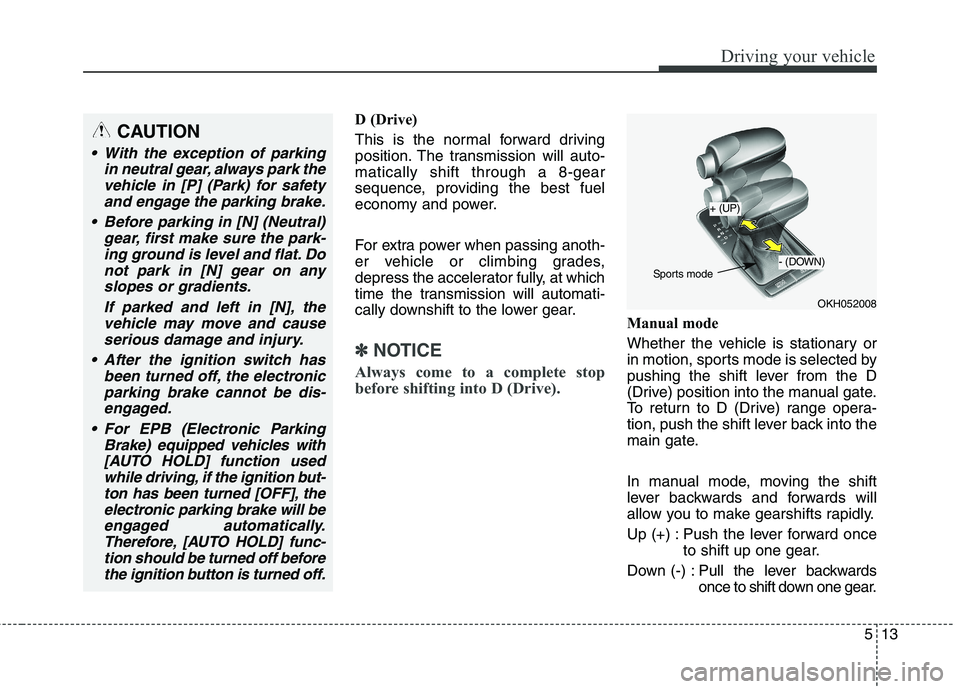
Manual mode
Whether the vehicle is stationary or
in motion, sports mode is selected by
pushing the shift lever from the D
(Drive) position into the manual gate.
To return to D (Drive) range opera-
tion, push the shift lever back into the
main gate.
In manual mode, moving the shift
lever backwards and forwards will
allow you to make gearshifts rapidly.
Up (+) : Push the lever forward once to shift up one gear.
Down (-) : Pull the lever backwards
once to shift down one gear.
OKH052008
+ (UP)
- (DOWN)
Sports mode
CAUTION
With the exception of parking
in neutral gear, always park thevehicle in [P] (Park) for safetyand engage the parking brake.
Before parking in [N] (Neutral) gear, first make sure the park-ing ground is level and flat. Do not park in [N] gear on anyslopes or gradients.
If parked and left in [N], thevehicle may move and causeserious damage and injury.
After the ignition switch has been turned off, the electronicparking brake cannot be dis-engaged.
For EPB (Electronic Parking Brake) equipped vehicles with[AUTO HOLD] function used while driving, if the ignition but-ton has been turned [OFF], theelectronic parking brake will be engaged automatically.Therefore, [AUTO HOLD] func-tion should be turned off before the ignition button is turned off.
Page 282 of 514
![KIA QUORIS 2017 Owners Manual 521
Driving your vehicle
To turn off engine :
1. Press the engine start/stop buttonagain to the ON position.
2. Press the [P] button on the shift lever.
3. Press the engine start/stop button again, t](/img/2/57976/w960_57976-281.png "KIA QUORIS 2017 Owners Manual 521
Driving your vehicle
To turn off engine :
1. Press the engine start/stop buttonagain to the ON position.
2. Press the [P] button on the shift lever.
3. Press the engine start/stop button again, t")
521
Driving your vehicle
To turn off engine :
1. Press the engine start/stop buttonagain to the ON position.
2. Press the [P] button on the shift lever.
3. Press the engine start/stop button again, the engine start/stop button will change to the OFF position.
However, when you open the door
with the shift lever in N (Neutral) and
the engine start/stop button in the
ACC position, the shift lever will auto-
matically move to P (Park) and the
engine start/stop button will changeto the OFF position. D (Drive)
This is the normal forward driving
position. The shift lever will automat-ically shift through a 8-gear
sequence, providing the best fuel
economy and power.
For extra power when passing anoth-
er vehicle or climbing grades,
depress the accelerator fully, at
which time the shift lever will auto-
matically downshift to the lower gear.
To shift into [D], depress the brake
pedal and press the [UNLOCK] but-
ton of shift lever. And then move the
shift lever to backward.
To shift into [D], from [N] you must
depress the brake pedal.
✽✽
NOTICE
Always come to a complete stop
before shifting into D (Drive).
Manual mode
Whether the vehicle is stationary or
in motion, sports mode is selected by
pushing the shift lever from the D
(Drive) position into the manual gate.
To return to D (Drive) range opera-
tion, push the shift lever back into the
main gate.
In manual mode, moving the shift
lever backwards and forwards will
allow you to make gearshifts rapidly.
Up (+) : Push the lever forward once to shift up one gear.
Down (-) : Pull the lever backwards
once to shift down one gear.
OKH055018L
+ (UP)
- (DOWN)
Manual mode
Page 321 of 514
Driving your vehicle
60
5
ECO (ACTIVE ECO) MODE
enhances fuel efficiency through eco control of
the engine and trans-
mission. The actual fuelefficiency will depend on
personal driving style
and habits.
MODE button andselecting ECO MODE,
green ECO indicator
light will illuminate. ECO MODE Driving:
The vehicle engine and transmission
will operate in fuel economy oriented
mode.
ACTIVE ECO MODE system will
restrain fuel economy worsening
driving habits, such as suddenly
starts and accelerations, compare tothe NORMAL MODE.
Conditions that limit Active ECO MODE:
Below are a list of conditions in which
when in ACTIVE ECO MODE, the
indicator light will not change, but the
internal system may operate differ-
ently.
When engine coolant temperature
is low:
When temperature of the transaxle
oil is below the normal range, the
ACTIVE ECO MODE may become
temporarily unavailable until the
transaxle oil heats up after vehicleignition.
When in an uphill gradient:
Since the ACTIVE ECO MODE
partially limits the engine torque,
ACTIVE ECO MODE may become
temporarily unavailable when more
torque is essential for going uphill.
When using the manual transmis- sion operation mode:
If transmission operation is
changed from automatic to manual,
vehicle will reflect it and automati-
cally stop the ACTIVE ECO MODE.
Page 322 of 514
561
Driving your vehicle
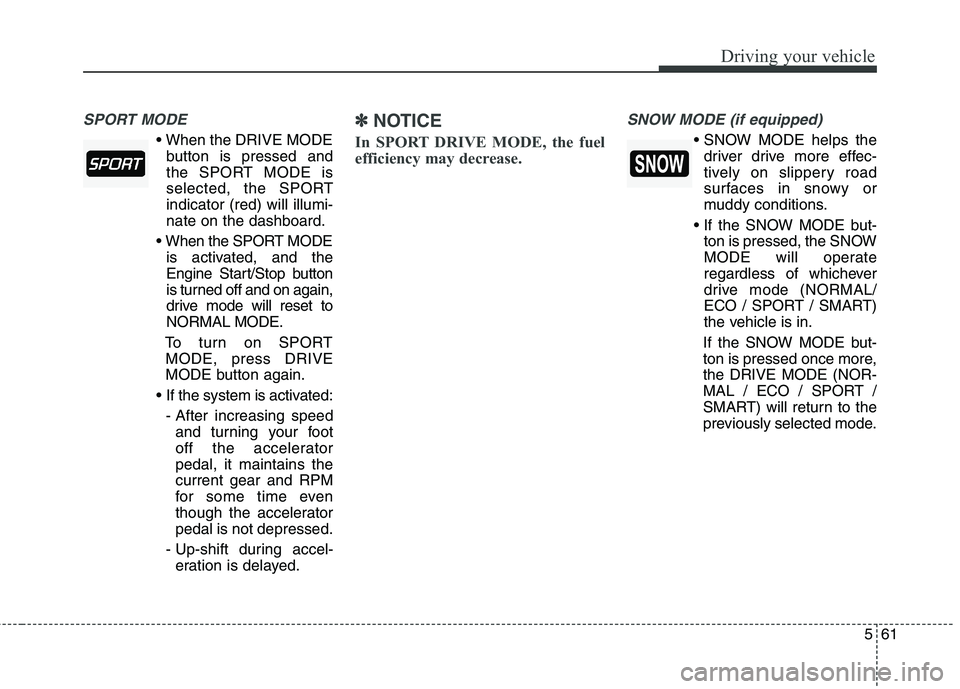
SPORT MODE
button is pressed and
the SPORT MODE is
selected, the SPORTindicator (red) will illumi-nate on the dashboard.
is activated, and the
Engine Start/Stop button
is turned off and on again,
drive mode will reset toNORMAL MODE.
To turn on SPORT MODE, press DRIVE
MODE button again.
- After increasing speed and turning your foot
off the acceleratorpedal, it maintains thecurrent gear and RPM
for some time even
though the acceleratorpedal is not depressed.
- Up-shift during accel- eration is delayed.
✽✽ NOTICE
In SPORT DRIVE MODE, the fuel
efficiency may decrease. SNOW MODE (if equipped)
driver drive more effec-
tively on slippery road
surfaces in snowy or
muddy conditions.
ton is pressed, the SNOW
MODE will operate
regardless of whichever
drive mode (NORMAL/
ECO / SPORT / SMART)
the vehicle is in.
If the SNOW MODE but-
ton is pressed once more,the DRIVE MODE (NOR-
MAL / ECO / SPORT /
SMART) will return to the
previously selected mode.
Page 323 of 514
Driving your vehicle
62
5
SMART MODE
SMART MODE is an intel-
ligent driving mode which automatically selects the
most appropriate drivemode (Economic ↔
Aggressive) by measuring
usage of steering wheel,
and accelerator pedal.
ton is pressed and the
SMART MODE is select-
ed, SMART indicator willilluminate on the dash-board.
MODE indicator light will
depend on the driving
style. If the driving style is
economic, average, and
speedy, the indicator light
will be green, white, and
red in respective order.
is activated, and the
Engine Start/Stop button
is turned off and on again,
your car will still maintain
the SMART MODE.
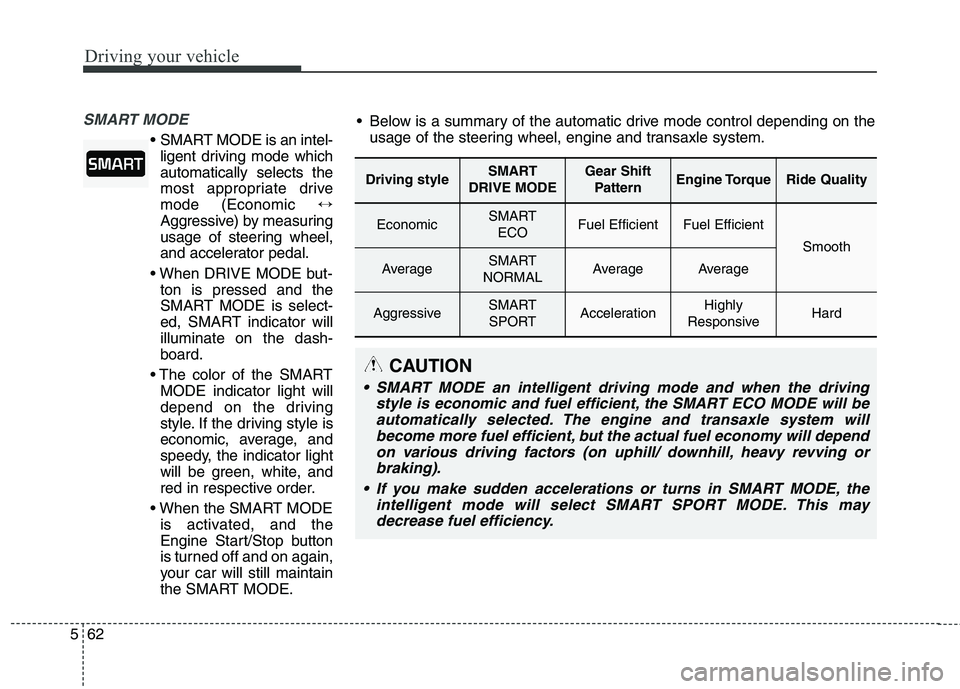
Driving styleSMART
DRIVE MODEGear Shift PatternEngine TorqueRide Quality
EconomicSMART ECOFuel EfficientFuel Efficient
Smooth
AverageSMART
NORMALAverageAverage
AggressiveSMART SPORTAccelerationHighly
ResponsiveHard
Below is a summary of the automatic drive mode control depending on the usage of the steering wheel, engine and transaxle system.
CAUTION
SMART MODE an intelligent driving mode and when the driving
style is economic and fuel efficient, the SMART ECO MODE will beautomatically selected. The engine and transaxle system will become more fuel efficient, but the actual fuel economy will dependon various driving factors (on uphill/ downhill, heavy revving orbraking).
If you make sudden accelerations or turns in SMART MODE, the intelligent mode will select SMART SPORT MODE. This maydecrease fuel efficiency.
Page 325 of 514
Driving your vehicle
64
5
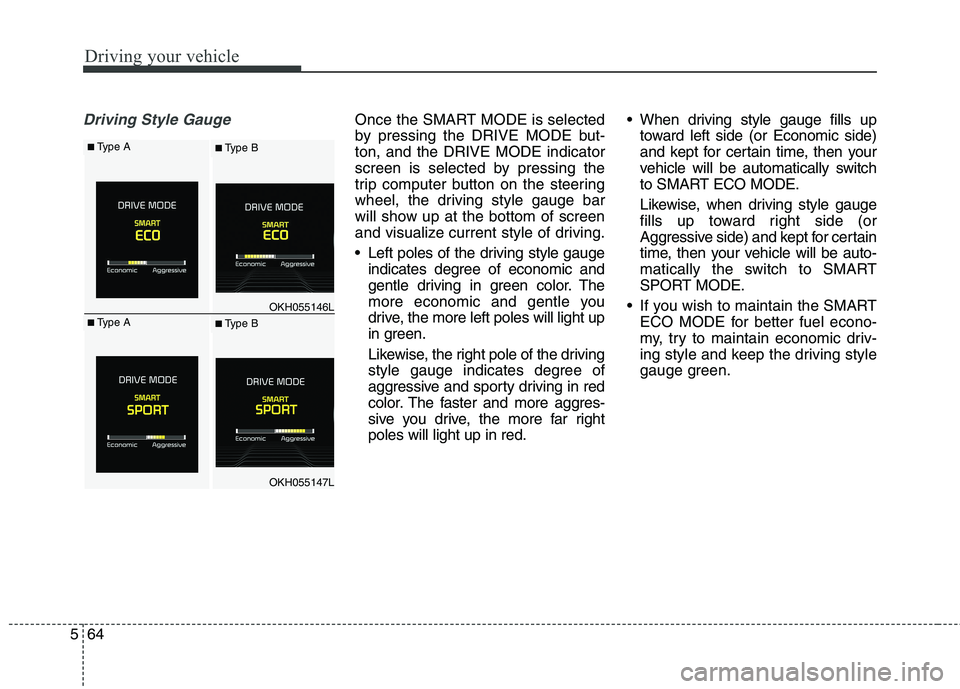
Driving Style GaugeOnce the SMART MODE is selected
by pressing the DRIVE MODE but-ton, and the DRIVE MODE indicator
screen is selected by pressing the
trip computer button on the steering
wheel, the driving style gauge bar
will show up at the bottom of screen
and visualize current style of driving.
Left poles of the driving style gauge
indicates degree of economic and
gentle driving in green color. The
more economic and gentle you
drive, the more left poles will light up
in green.
Likewise, the right pole of the driving
style gauge indicates degree of
aggressive and sporty driving in red
color. The faster and more aggres-
sive you drive, the more far rightpoles will light up in red. When driving style gauge fills up
toward left side (or Economic side)
and kept for certain time, then your
vehicle will be automatically switch
to SMART ECO MODE.
Likewise, when driving style gauge
fills up toward right side (or
Aggressive side) and kept for certain
time, then your vehicle will be auto-
matically the switch to SMART
SPORT MODE.
If you wish to maintain the SMART ECO MODE for better fuel econo-
my, try to maintain economic driv-
ing style and keep the driving style
gauge green.
OKH055146L
OKH055147L
■Type A■ Type B
■Type A■ Type B