USB KIA Rio 2016 3.G User Guide
[x] Cancel search | Manufacturer: KIA, Model Year: 2016, Model line: Rio, Model: KIA Rio 2016 3.GPages: 449, PDF Size: 14.93 MB
Page 219 of 449
Features of your vehicle
148
4
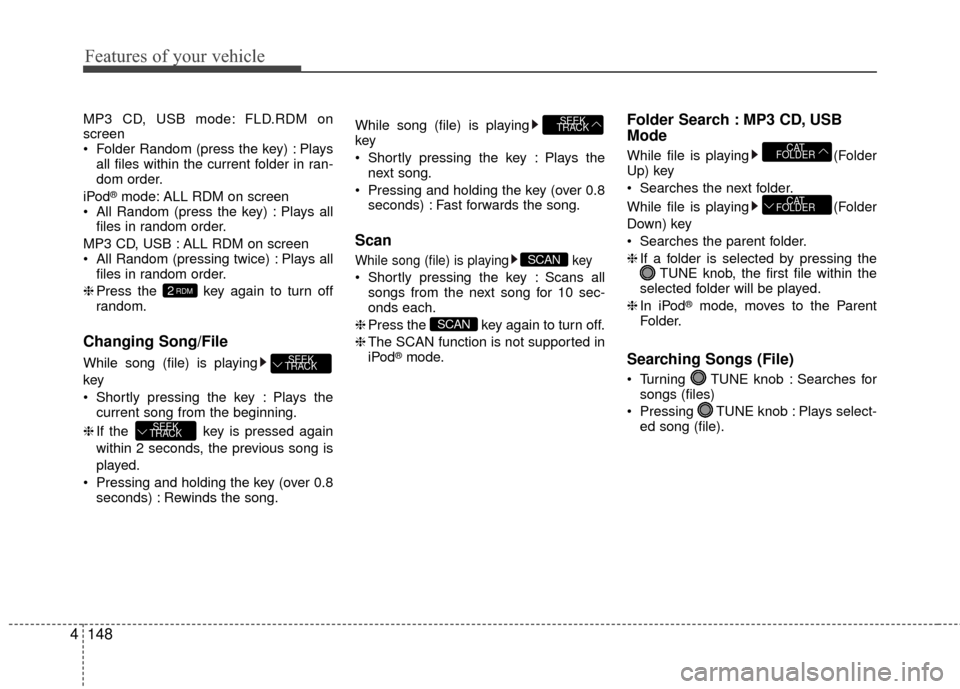
MP3 CD, USB mode: FLD.RDM on
screen
Folder Random (press the key) : Plays
all files within the current folder in ran-
dom order.
iPod
®mode: ALL RDM on screen
All Random (press the key) : Plays all files in random order.
MP3 CD, USB : ALL RDM on screen
All Random (pressing twice) : Plays all files in random order.
❈ Press the key again to turn off
random.
Changing Song/File
While song (file) is playing
key
Shortly pressing the key : Plays the
current song from the beginning.
❈ If the key is pressed again
within 2 seconds, the previous song is
played.
Pressing and holding the key (over 0.8 seconds) : Rewinds the song. While song (file) is playing
key
Shortly pressing the key : Plays the
next song.
Pressing and holding the key (over 0.8 seconds) : Fast forwards the song.
Scan
While song (file) is playing key
Shortly pressing the key : Scans allsongs from the next song for 10 sec-
onds each.
❈ Press the key again to turn off.
❈ The SCAN function is not supported in
iPod
®mode.
Folder Search : MP3 CD, USB
Mode
While file is playing (Folder
Up) key
Searches the next folder.
While file is playing (Folder
Down) key
Searches the parent folder.
❈ If a folder is selected by pressing the
TUNE knob, the first file within the
selected folder will be played.
❈ In iPod
®mode, moves to the Parent
Folder.
Searching Songs (File)
Turning TUNE knob : Searches for songs (files)
Pressing TUNE knob : Plays select- ed song (file).
CAT
FOLDER
CAT
FOLDER
SCAN
SCAN
SEEK
TRACK
SEEK
TRACK
SEEK
TRACK
2RDM
Page 220 of 449
![KIA Rio 2016 3.G User Guide Features of your vehicle
4149
MENU : Audio CD
Press the CD MP3 mode key to
set the Repeat, Random, Information
features.
Repeat
Press the key Set [ RPT]
through the TUNE knob or key
to repeat the](/img/2/2975/w960_2975-219.png "KIA Rio 2016 3.G User Guide Features of your vehicle
4149
MENU : Audio CD
Press the CD MP3 mode key to
set the Repeat, Random, Information
features.
Repeat
Press the key Set [ RPT]
through the TUNE knob or key
to repeat the")
Features of your vehicle
4149
MENU : Audio CD
Press the CD MP3 mode key to
set the Repeat, Random, Information
features.
Repeat
Press the key Set [ RPT]
through the TUNE knob or key
to repeat the current song.
❈ Press RPT again to turn off.
Random
Press the key Set [ RDM]
through the TUNEknob or key to
randomly play songs within the current
folder.
❈ Press RDM again to turn off.
Information
Press the key Set [ Info]
through the TUNEknob or key to
display information of the current song.
❈ Press the key to turn off info
display.
MENU : MP3 CD / USB
Press the CD MP3 mode key to
set the Repeat, Folder Random, F older
Repeat, All Random, Information, and Copy
features.
Repeat
Press the key Set [ RPT]
through the TUNEknob or key to
repeat the current song.
❈ Press RPT again to turn off.
Folder Random
Press the key Set [ F.RDM]
through the
TUNEknob or key to
randomly play songs within the current
folder.
❈ Press F.RDM again to turn off.
Folder Repeat
Press the key Set [ F.RPT]
through the TUNEknob or key to
repeat songs within the current folder.
❈ Press F.RPT again to turn off.
All Random
Press the key Set [ A.RDM]
through the TUNEknob or key to
randomly play all songs within the CD.
❈ Press A.RDM again to turn off.4MENU
3MENU
2 RDM
MENU
1 RPTMENU
MENU
MENU
3MENU
2 RDMMENU
1 RPT
MENU
MENU
Page 221 of 449
![KIA Rio 2016 3.G User Guide Features of your vehicle
150
4 Information
Press the key Set [ Info]
through the TUNEknob or key to
display information of the current song.
❈ Press the key to turn off info
display.
Copy (if eq](/img/2/2975/w960_2975-220.png "KIA Rio 2016 3.G User Guide Features of your vehicle
150
4 Information
Press the key Set [ Info]
through the TUNEknob or key to
display information of the current song.
❈ Press the key to turn off info
display.
Copy (if eq")
Features of your vehicle
150
4 Information
Press the key Set [ Info]
through the TUNEknob or key to
display information of the current song.
❈ Press the key to turn off info
display.
Copy (if equipped)
Press the key Set [ Copy]
through the
TUNEknob or key.
This is used to copy the current song into
My Music. You can play the copied Music
in My Music mode.
❈ If another key is pressed while copying
is in progress, a pop up asking you
whether to cancel copying is displayed.
❈ If another media is connected or
inserted (USB, CD, iPod
®, AUX) while
copying is in progress, copying is can-
celed.
❈ Music will not be played while copying
is in progress.
MENU : iPod®
In iPod®mode, press the key to
set the Repeat, Random, Information and
Search features.
Repeat
Press the key Set [ RPT]
through the TUNEknob or key to
repeat the current song.
❈ Press RPT again to turn repeat off.
Random
Press the key Set [ RDM]
through the TUNEknob or key.
Plays all songs within the currently play-
ing category in random order.
❈Press RDM again to turn off.
Information
Press the key Set [ Info]
through the TUNEknob or key.
Displays information of the current song.
❈ Press the key to turn off info
display.
Search
Press the key Set [ Search]
through the TUNEknob or key.
Displays iPod®category list.
❈ Searching iPod®category is
key pressed, move to parent category.MENU
4MENU
MENU
3MENU
2 RDMMENU
1 RPTMENU
MENU
6
MENU
MENU
5MENU
Page 224 of 449
Features of your vehicle
4153
The Bluetooth®word mark and logos
are registered trademarks owned by
Bluetooth SIG, Inc. and any use of such
marks by Kia is under license. Other
trademarks and trade names are those
of their respective owners. A Bluetooth
®
enabled cell phone is required to useBluetooth®Wireless Technology.
Bluetooth®Wireless Technology
audio
can be used only when the [Audio
Streaming] of Phone is turned .
❈
Setting Bluetooth®Wireless TechnologyAudio Streaming : Press the key Select[Phone]
Select [Audio Streaming] through
the TUNE knob Set /
Starting Bluetooth®Wireless
Technology Audio
key to change the
mode in order of CD ➟ USB ➟ AUX ➟My Music ➟ BT Audio.
Bluetooth®
Wireless Technology audio w ill start
playing.
❈ Audio may not automatically start play-
ing in some mobile phones.
Using the Bluetooth®Wireless
Technology audio features
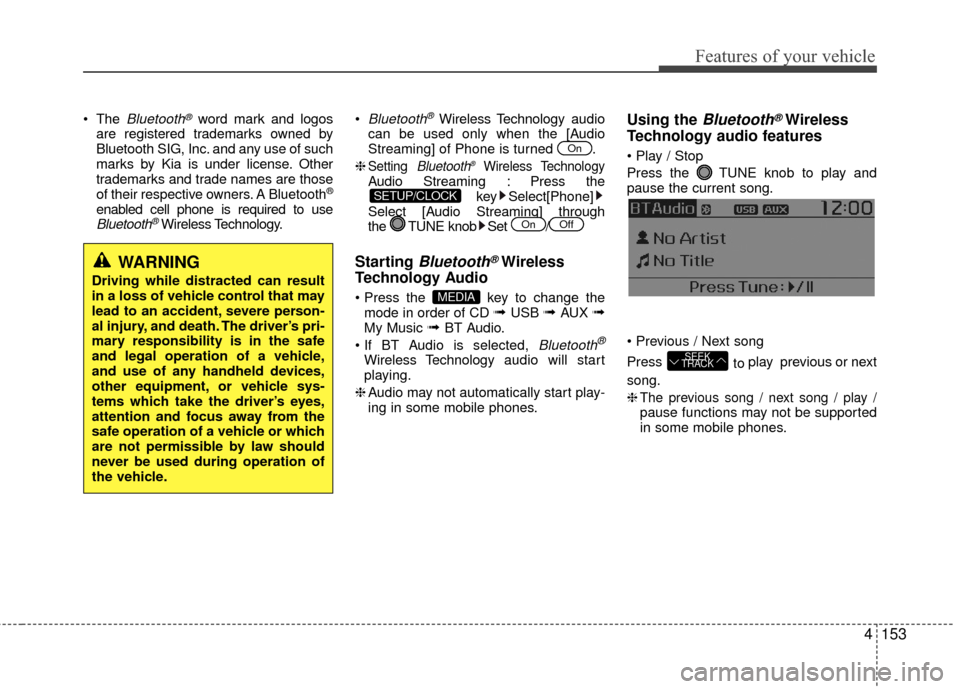
Press the TUNE knob to play and
pause the current song.
Press to play previous or next
song.
❈
The previous song / next song / play /pause functions may not be supported
in some mobile phones.
SEEK
TRACK
MEDIA
OffOn
SETUP/CLOCK
On
WARNING
Driving while distracted can result
in a loss of vehicle control that may
lead to an accident, severe person-
al injury, and death. The driver’s pri-
mary responsibility is in the safe
and legal operation of a vehicle,
and use of any handheld devices,
other equipment, or vehicle sys-
tems which take the driver’s eyes,
attention and focus away from the
safe operation of a vehicle or which
are not permissible by law should
never be used during operation of
the vehicle.
Page 240 of 449
Features of your vehicle
4169
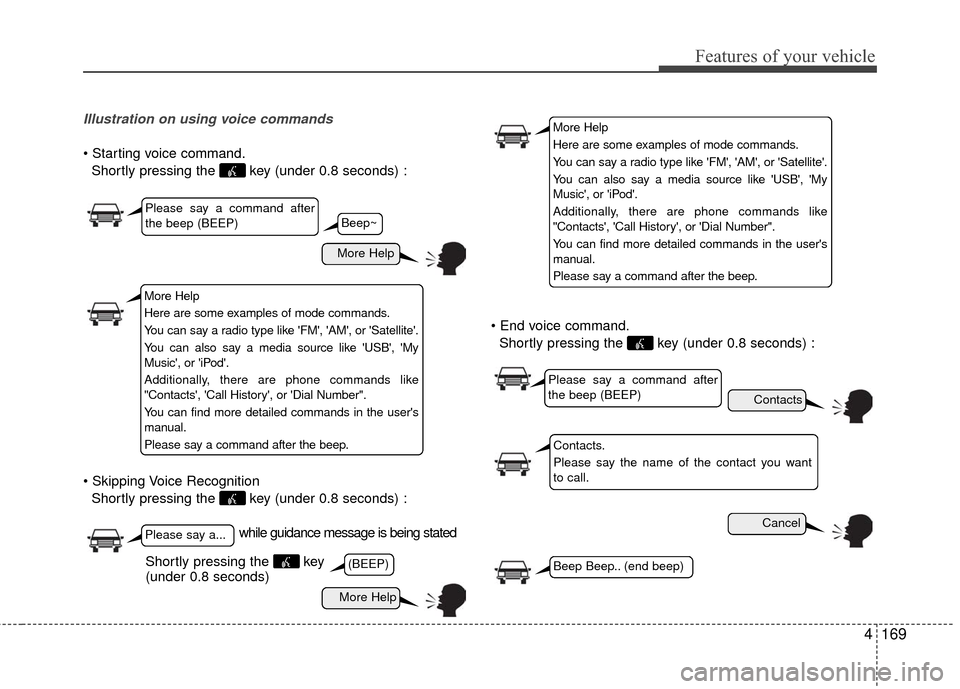
Illustration on using voice commands
Shortly pressing the key (under 0.8 seconds) :
Shortly pressing the key (under 0.8 seconds) :
Shortly pressing the key (under 0.8 seconds) :
while guidance message is being stated
More Help
Contacts
Cancel
More Help
Please say a command after
the beep (BEEP)
Please say a...
Contacts.
Please say the name of the contact you want
to call.
(BEEP)Beep Beep.. (end beep)Shortly pressing the key
(under 0.8 seconds)
Beep~
More Help
Here are some examples of mode commands.
You can say a radio type like 'FM', 'AM', or 'Satellite'.
You can also say a media source like 'USB', 'My
Music', or 'iPod'.
Additionally, there are phone commands like
"Contacts', 'Call History', or 'Dial Number".
You can find more detailed commands in the user's
manual.
Please say a command after the beep.
More Help
Here are some examples of mode commands.
You can say a radio type like 'FM', 'AM', or 'Satellite'.
You can also say a media source like 'USB', 'My
Music', or 'iPod'.
Additionally, there are phone commands like
"Contacts', 'Call History', or 'Dial Number".
You can find more detailed commands in the user's
manual.
Please say a command after the beep.
Please say a command after
the beep (BEEP)
Page 242 of 449
Features of your vehicle
4171
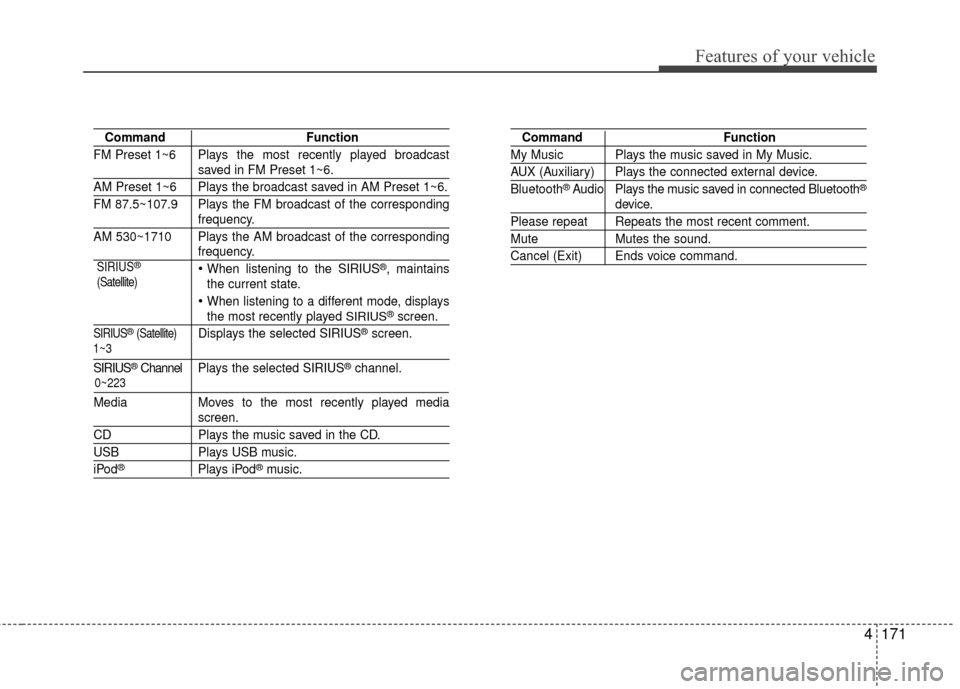
CommandFunction
FM Preset 1~6 Plays the most recently played broadcast
saved in FM Preset 1~6.
AM Preset 1~6 Plays the broadcast saved in AM Preset 1~6.
FM 87.5~107.9 Plays the FM broadcast of the corresponding
frequency.
AM 530~1710 Plays the AM broadcast of the corresponding
frequency.
When listening to the SIRIUS®, maintains
the current state.
When listening to a different mode, displaysthe most recently played SIRIUS®screen.
SIRIUS®(Satellite)Displays the selected SIRIUS®screen.
SIRIUS®Channel P l ay s the selected SIRIUS®channel.
Media Moves to the most recently played media
screen.
CD Plays the music saved in the CD.
USBPlays USB music.
iPod®Plays iPod®music.
Command Function
My Music Plays the music saved in My Music.
AUX (Auxiliary) Plays the connected external device.
Bluetooth®Audio Plays the music saved in connected Bluetooth®
device.
Please repeat Repeats the most recent comment.
Mute Mutes the sound.
Cancel (Exit) Ends voice command.
0~223
1~3 SIRIUS
®
(Satellite)
Page 244 of 449
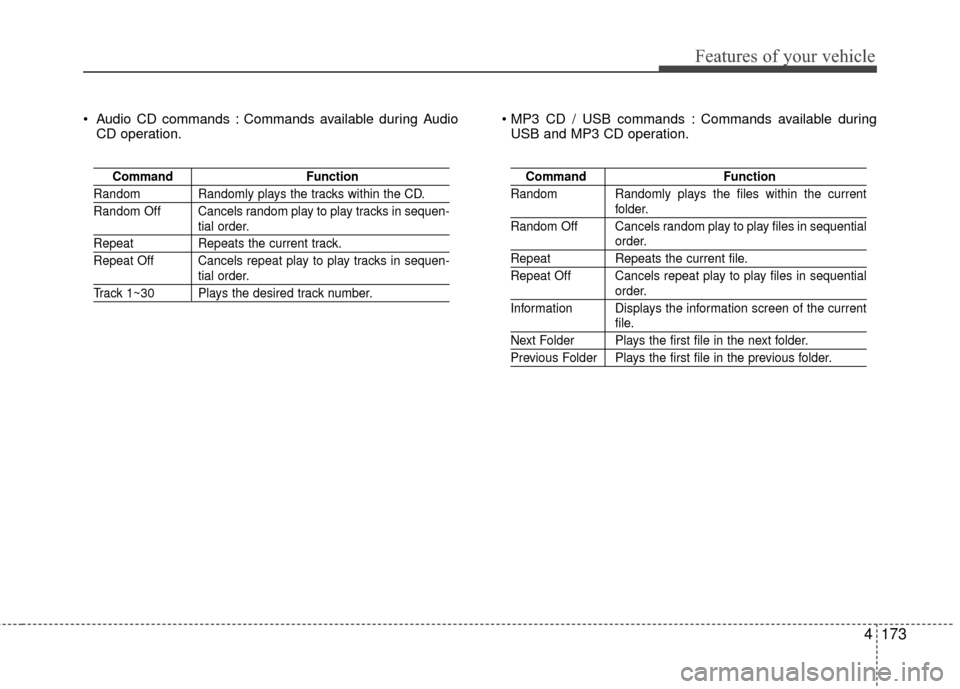
Features of your vehicle
4173
Audio CD commands : Commands available during AudioCD operation. Commands available during
USB and MP3 CD operation.
Command Function
Random Randomly plays the tracks within the CD.
Random Off Cancels random play to play tracks in sequen-
tial order.
RepeatRepeats the current track.
Repeat Off Cancels repeat play to play tracks in sequen-
tial order.
Track 1~30 Plays the desired track number.
Command Function
Random Randomly plays the files within the current
folder.
Random Off Cancels random play to play files in sequential
order.
Repeat Repeats the current file.
Repeat Off Cancels repeat play to play files in sequential
order.
Information Displays the information screen of the current
file.
Next Folder Plays the first file in the next folder.
Previous Folder Plays the first file in the previous folder.
Page 442 of 449

Index
2I
Active ECO system··················\
··················\
··················\
··5-43Active ECO operation ··················\
··················\
·············5-43
Limitation of Active ECO operation: ··················\
········5-43
AIR BAG - advanced supplemental restraint system ····3-33 Adding equipment to or modifying your airbag-equipped vehicle··················\
··················\
·············3-55
Air bag warning label ··················\
··················\
··············3-56
Air bag warning light ··················\
··················\
··············3-36
Curtain air bag ··················\
··················\
··················\
·······3-49
Driver's and passenger's front air bag··········\
················3-44
How does the air bag system operate ··················\
········3-34
Occupant detection system ··················\
··················\
······3-39
Side impact air bag ··················\
··················\
··················\
3-47
SRS Care ··················\
··················\
··················\
···············3-55
SRS components and functions ··················\
·················3-36\
Why didn’t my air bag go off in a collision? (Inflation and non-inflation conditions of the air bag) ···3-50
Air cleaner ··················\
··················\
··················\
···············7-41 Filter replacement ··················\
··················\
··················\
··7-41
Air conditioning system··················\
··················\
···············8-6
Appearance care··················\
··················\
··················\
·······7-86 Exterior care ··················\
··················\
··················\
··········7-86
Interior care ··················\
··················\
··················\
···········7-91
Audio system ··················\
··················\
··················\
·········4-121 Antenna··················\
··················\
··················\
················4-121
Aux, USB and iPod
®··················\
··················\
·············4-123
Bluetooth
®Wireless Technology ··················\
·············4-122
How vehicle audio works ··················\
··················\
······4-123
Steering wheel audio control ··················\
··················\
·4-122
Automatic climate control system ··················\
···············4-94 Automatic heating and air conditioning ··················\
····4-95
Checking the amount of air conditioner refrigerantand compressor lubricant ··················\
··················\
····4-104
Climate control air filter ··················\
··················\
········4-103
Manual heating and air conditioning··················\
·········4-96
System operation ··················\
··················\
··················\
·4-101
Automatic transaxle brake system ··················\
···············5-16 Automatic transaxle operation··················\
··················\
·5-16
Good driving practices ··················\
··················\
············5-21
Automatic transaxle fluid ··················\
··················\
··········7-40
Battery··················\
··················\
··················\
··················\
····7-45 Battery recharging ··················\
··················\
··················\
·7-46
For best battery service ··················\
··················\
···········7-45
Reset items ··················\
··················\
··················\
············7-47
Before driving ··················\
··················\
··················\
············5-3 Before entering vehicle ··················\
··················\
·············5-3
Before starting ··················\
··················\
··················\
········5-3
Necessary inspections··················\
··················\
················5-3
A
B