reset KIA Rio 2016 3.G Owner's Guide
[x] Cancel search | Manufacturer: KIA, Model Year: 2016, Model line: Rio, Model: KIA Rio 2016 3.GPages: 449, PDF Size: 14.93 MB
Page 214 of 449
Features of your vehicle
4143
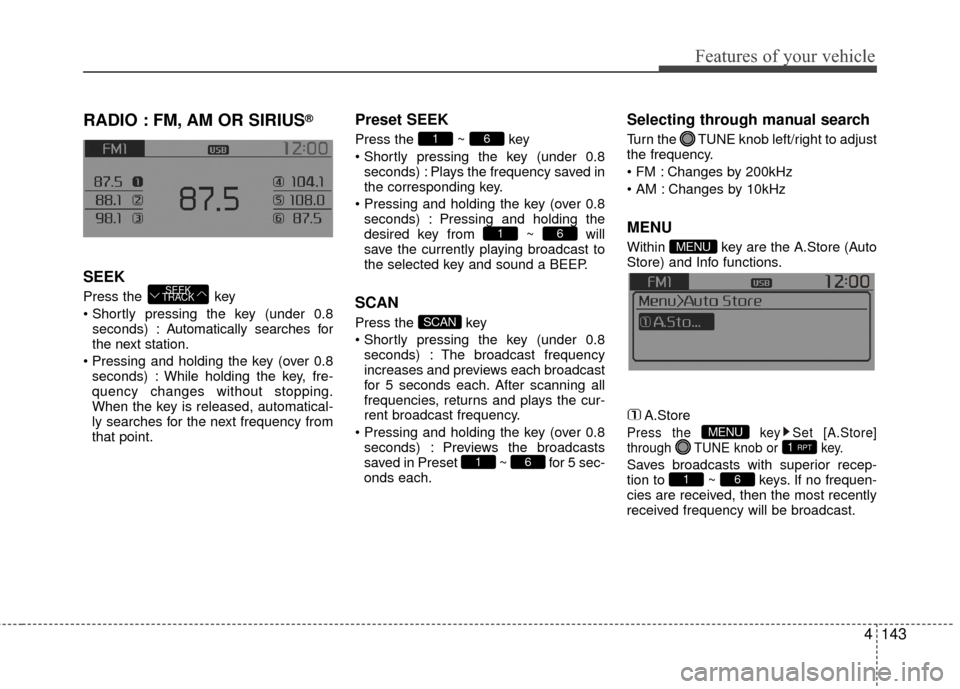
RADIO : FM, AM OR SIRIUS®
SEEK
Press the key
seconds) : A utomatically searches for
the next station.
seconds) : While holding the key, fre-
quency changes without stopping.
When the key is released, automatical-
ly searches for the next frequency from
that point.
Preset SEEK
Press the ~ key
seconds) : Plays the frequency saved in
the corresponding key.
seconds) : Pressing and holding the
desired key from ~ will
save the currently playing broadcast to
the selected key and sound a BEEP.
SCAN
Press the key
seconds) : The broadcast frequency
increases and previews each broadcast
for 5 seconds each. After scanning all
frequencies, returns and plays the cur-
rent broadcast frequency.
seconds) : Previews the broadcasts
saved in Preset ~ for 5 sec-
onds each.
Selecting through manual search
Turn the TUNE knob left/right to adjust
the frequency.
Changes by 200kHz
Changes by 10kHz
MENU
Within key are the A.Store (Auto
Store) and Info functions.
A.Store
Press the key Set [A.Store]
through TUNE knob or key.
Saves broadcasts with superior recep-
tion to ~ keys. If no frequen-
cies are received, then the most recently
received frequency will be broadcast.61
1 RPTMENU
MENU
61
SCAN
61
61
SEEK
TRACK
Page 217 of 449
Features of your vehicle
146
4 Preset
Press the key ~
Shortly pressing the key (under 0.8
seconds) : Plays the frequency saved
in the corresponding key.
Pressing and holding the key (over 0.8 seconds) : Pressing and holding the
desired key from ~ will
save the current broadcast to the
selected key and sound a BEEP.
✽ ✽ Troubleshooting
1. Antenna Error
If this message is displayed, the anten-
na or antenna cable is broken or
unplugged. Please consult with your
Kia dealership.
2. Acquiring Signal If this message is displayed, it means
that the antenna is covered and that
the SIRIUS
®Satellite Radio signal is
not available. Ensure the antenna is
uncovered and has a clear view of the
sky.
Tune
Rotate TUNE knob : Changes the
channel number or scrolls category
list.
Press TUNE knob : Selects the menu.
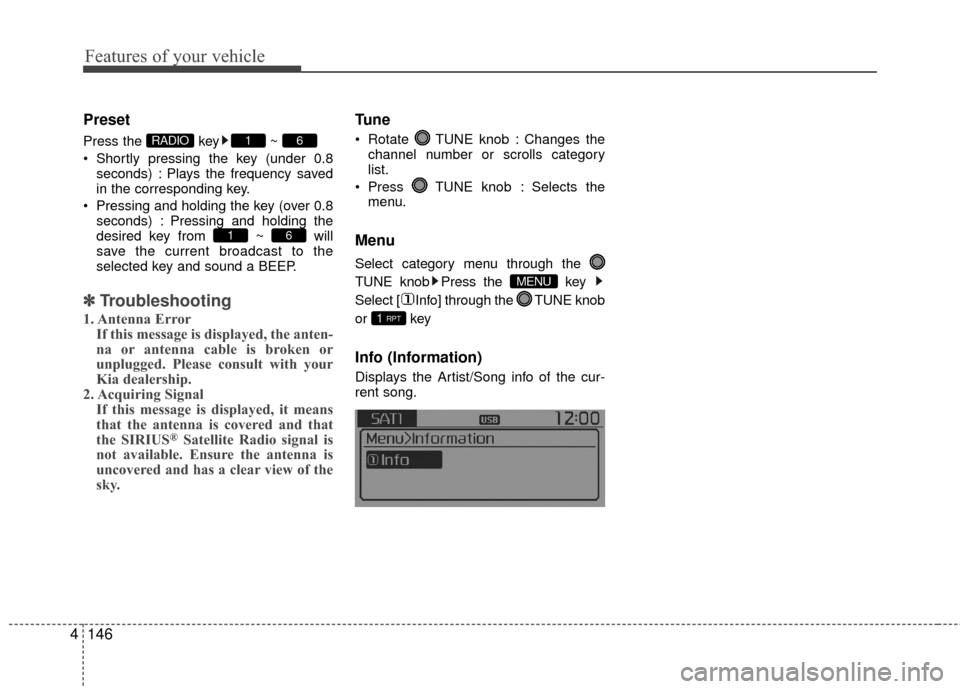
Menu
Select category menu through the
TUNE knob Press the key
Select [ Info] through the TUNE knob
or key
Info (Information)
Displays the Artist/Song info of the cur-
rent song.
1 RPT
MENU
61
61RADIO
Page 228 of 449
![KIA Rio 2016 3.G Owners Guide Features of your vehicle
4157
Pairing through [PHONE] Setup
Press the key Select
[Phone] Select [Pair Phone] Select TUNE knob
1. The following steps are the same as those described in the section "W](/img/2/2975/w960_2975-227.png "KIA Rio 2016 3.G Owners Guide Features of your vehicle
4157
Pairing through [PHONE] Setup
Press the key Select
[Phone] Select [Pair Phone] Select TUNE knob
1. The following steps are the same as those described in the section \"W")
Features of your vehicle
4157
Pairing through [PHONE] Setup
Press the key Select
[Phone] Select [Pair Phone] Select TUNE knob
1. The following steps are the same as those described in the section "When
No Devices have been Paired" on the
previous page.
Bluetooth®Wireless Technology fea-
tures supported within the vehicle are
as follows. Some features may not be
supported depending on your
Bluetooth®Wireless Technology
device.
- Outgoing/Incoming Handsfree calls
- Operations during a call (Switch to Private, Switch to call waiting, MIC
on/off)
- Downloading Call History
- Downloading Mobile Contacts
-
Bluetooth®Wireless Technology
device auto connection
- Bluetooth Audio Streaming
Up to five
Bluetooth®Wireless
Technology devices can be paired to
the Car Handsfree system.
Only one
Bluetooth®device can be
connected at a time.
Only one
Bluetooth®Wireless
Technology device can be connected
at a time.
Other devices cannot be paired while a
Bluetooth®Wireless Technology device
is connected.
Only
Bluetooth®Wireless Technology
Handsfree and Bluetooth audio related
features are supported. Bluetooth related operations are possi-
ble only within devices that support
Handsfree or audio features, such as a
Bluetooth®Wireless Technology
mobile phone or a Bluetooth audio
device.
If a connected
Bluetooth®Wireless
Technology device becomes discon-
nected due to being out of communica-
tion range, turning the device OFF, or a
Bluetooth®Wireless Technology com-
munication error, corresponding
Bluetooth®Wireless Technology
devices are automatically searched
and reconnected.
If the system becomes unstable due to communication errors between the car
Handsfree and the
Bluetooth®
Wireless Technology device, reset the
device by turning off and back on
again. Upon resetting
Bluetooth®
Wireless Technology device, the sys-
tem will be restored.
After pairing is complete, a contacts download request is sent once to the
mobile phone. Some mobile phones
may require confirmation upon receiv-
ing a download request, ensure your
mobile phone accepts the connection.
Refer to your phones user’s manual for
additional information regarding phone
pairing and connections.
SETUP/CLOCK
Page 242 of 449
Features of your vehicle
4171
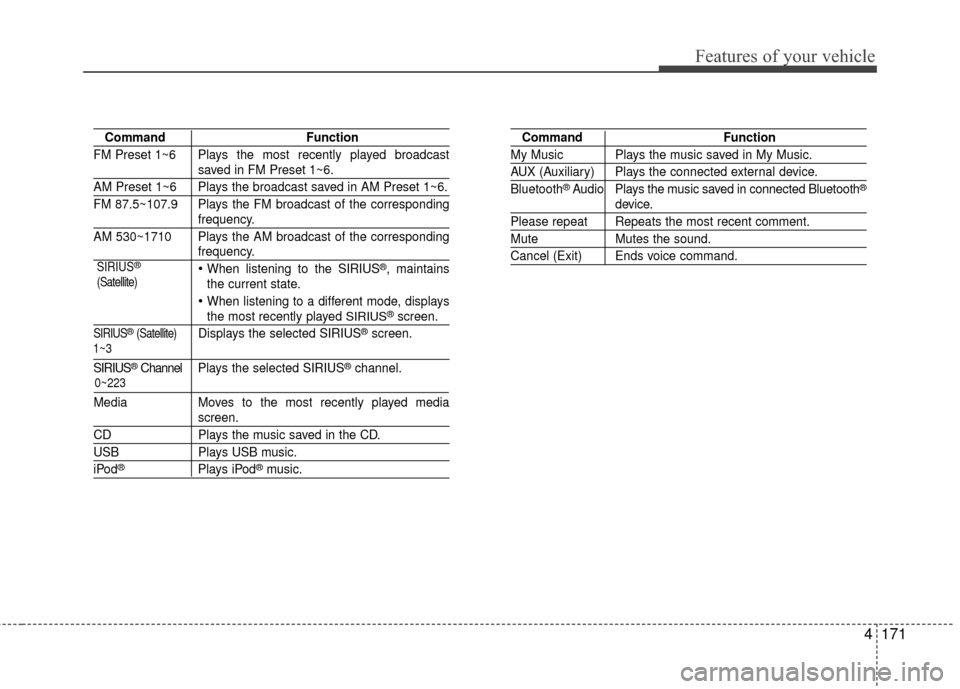
CommandFunction
FM Preset 1~6 Plays the most recently played broadcast
saved in FM Preset 1~6.
AM Preset 1~6 Plays the broadcast saved in AM Preset 1~6.
FM 87.5~107.9 Plays the FM broadcast of the corresponding
frequency.
AM 530~1710 Plays the AM broadcast of the corresponding
frequency.
When listening to the SIRIUS®, maintains
the current state.
When listening to a different mode, displaysthe most recently played SIRIUS®screen.
SIRIUS®(Satellite)Displays the selected SIRIUS®screen.
SIRIUS®Channel P l ay s the selected SIRIUS®channel.
Media Moves to the most recently played media
screen.
CD Plays the music saved in the CD.
USBPlays USB music.
iPod®Plays iPod®music.
Command Function
My Music Plays the music saved in My Music.
AUX (Auxiliary) Plays the connected external device.
Bluetooth®Audio Plays the music saved in connected Bluetooth®
device.
Please repeat Repeats the most recent comment.
Mute Mutes the sound.
Cancel (Exit) Ends voice command.
0~223
1~3 SIRIUS
®
(Satellite)
Page 243 of 449
Features of your vehicle
172
4
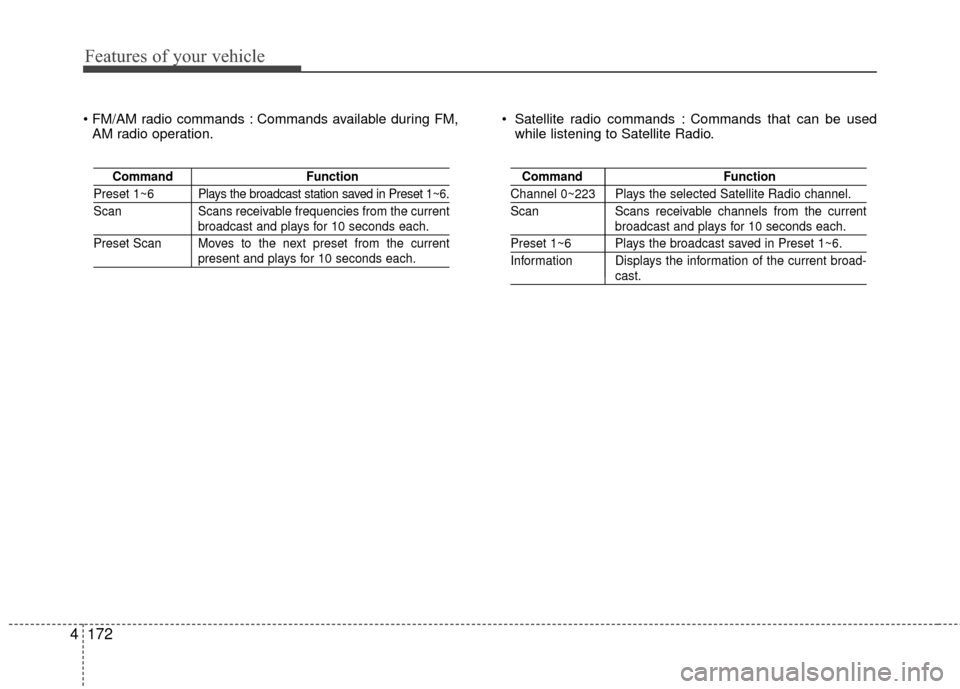
Commands available during FM,
AM radio operation. Satellite radio commands : Commands that can be used
while listening to Satellite Radio.
Command Function
Preset 1~6 Plays the broadcast station saved in Preset 1~6.
Scan Scans receivable frequencies from the current
broadcast and plays for 10 seconds each.
Preset Scan Moves to the next preset from the current
present and plays for 10 seconds each.
Command Function
Channel 0~223 Plays the selected Satellite Radio channel.
Scan Scans receivable channels from the current
broadcast and plays for 10 seconds each.
Preset 1~6 Plays the broadcast saved in Preset 1~6.
Information Displays the information of the current broad-
cast.
Page 284 of 449
537
Driving your vehicle
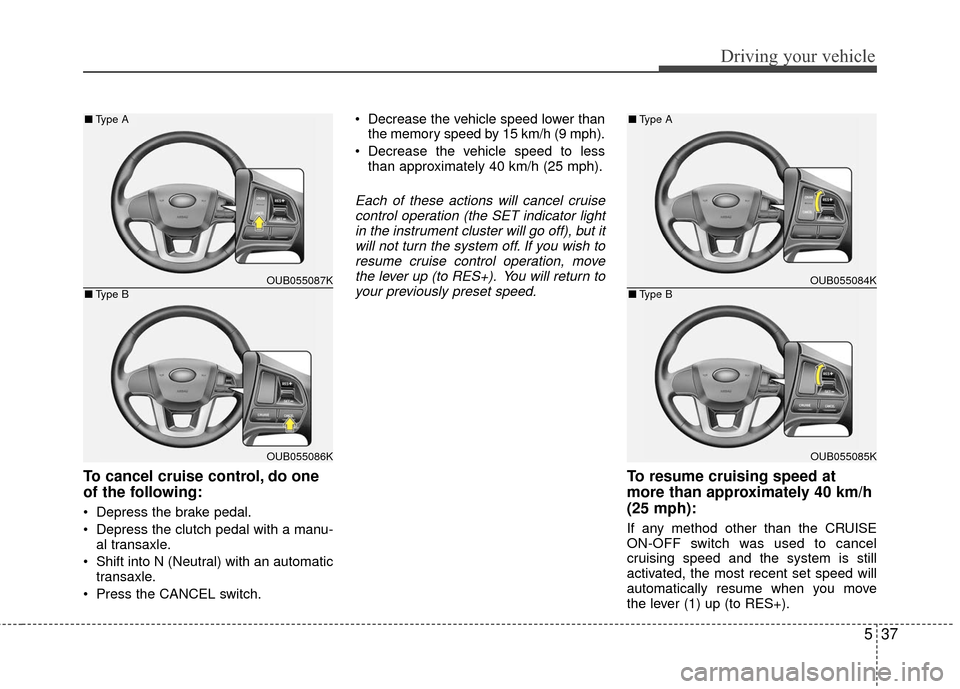
To cancel cruise control, do one
of the following:
Depress the brake pedal.
Depress the clutch pedal with a manu-al transaxle.
Shift into N (Neutral) with an automatic transaxle.
Press the CANCEL switch. Decrease the vehicle speed lower than
the memory speed by 15 km/h (9 mph).
Decrease the vehicle speed to less than approximately 40 km/h (25 mph).
Each of these actions will cancel cruisecontrol operation (the SET indicator lightin the instrument cluster will go off), but itwill not turn the system off. If you wish toresume cruise control operation, movethe lever up (to RES+). You will return toyour previously preset speed.
To resume cruising speed at
more than approximately 40 km/h
(25 mph):
If any method other than the CRUISE
ON-OFF switch was used to cancel
cruising speed and the system is still
activated, the most recent set speed will
automatically resume when you move
the lever (1) up (to RES+).
OUB055087K
OUB055086K
■ Type A
■Type BOUB055084K
OUB055085K
■Type A
■Type B
Page 383 of 449
747
Maintenance
Reset items
Items should be reset after the battery
has been discharged or the battery has
been disconnected.
Auto down window (See section 4)
Sunroof (See section 4)
Trip computer (See section 4)
Climate control system (See section 4)
Clock (See section 4)
Audio (See section 4)
Page 387 of 449
751
Maintenance
Rotate radial tires that have an
asymmetric tread pattern only from
front to rear and not from right to left.
Do not use the compact spare tire for
tire rotation.Wheel alignment and tire balance
The wheels on your vehicle were
aligned and balanced carefully at the
factory to give you the longest tire life
and best overall performance.
In most cases, you will not need to
have your wheels aligned again.
However, if you notice unusual tire
wear or your vehicle pulling one way
or the other, the alignment may need
to be reset.
If you notice your vehicle vibrating
when driving on a smooth road, your
wheels may need to be rebalanced.
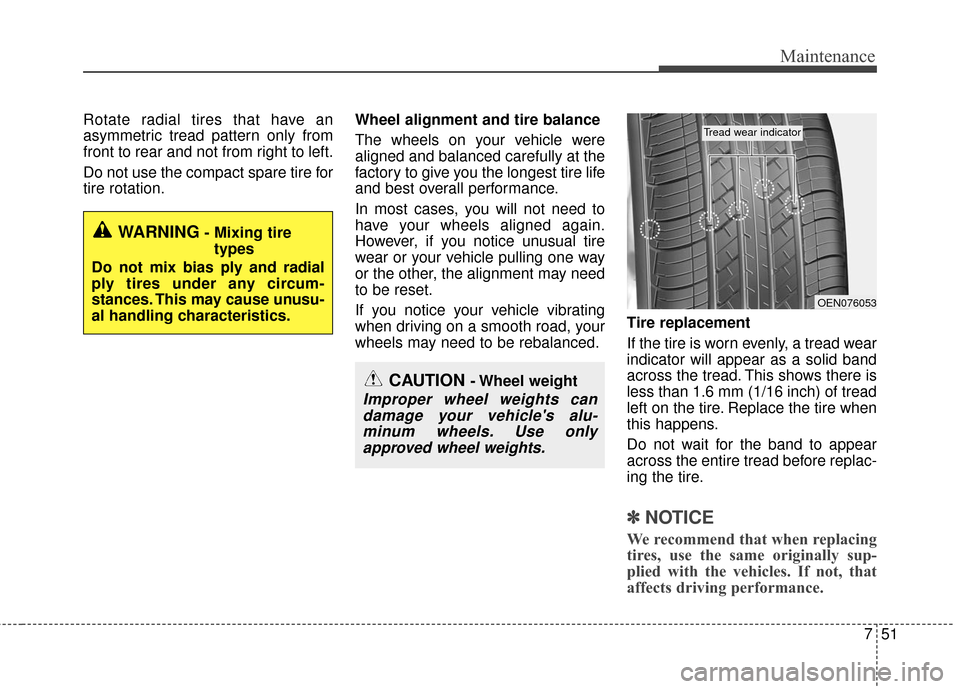
Tire replacement
If the tire is worn evenly, a tread wear
indicator will appear as a solid band
across the tread. This shows there is
less than 1.6 mm (1/16 inch) of tread
left on the tire. Replace the tire when
this happens.
Do not wait for the band to appear
across the entire tread before replac-
ing the tire.
✽ ✽
NOTICE
We recommend that when replacing
tires, use the same originally sup-
plied with the vehicles. If not, that
affects driving performance.
WARNING- Mixing tire
types
Do not mix bias ply and radial
ply tires under any circum-
stances. This may cause unusu-
al handling characteristics.
CAUTION - Wheel weight
Improper wheel weights can damage your vehicle's alu-minum wheels. Use onlyapproved wheel weights.
OEN076053
Tread wear indicator
Page 399 of 449
763
Maintenance
If it fits loosely, consult an authorized Kia
dealer.
If you do not have a spare, use a fuse ofthe same rating from a circuit you maynot need for operating the vehicle, suchas the cigar lighter fuse.
If the headlights or other electrical com-
ponents do not work and the fuses are
OK, check the fuse block in the engine
compartment. If a fuse is blown, it must
be replaced.
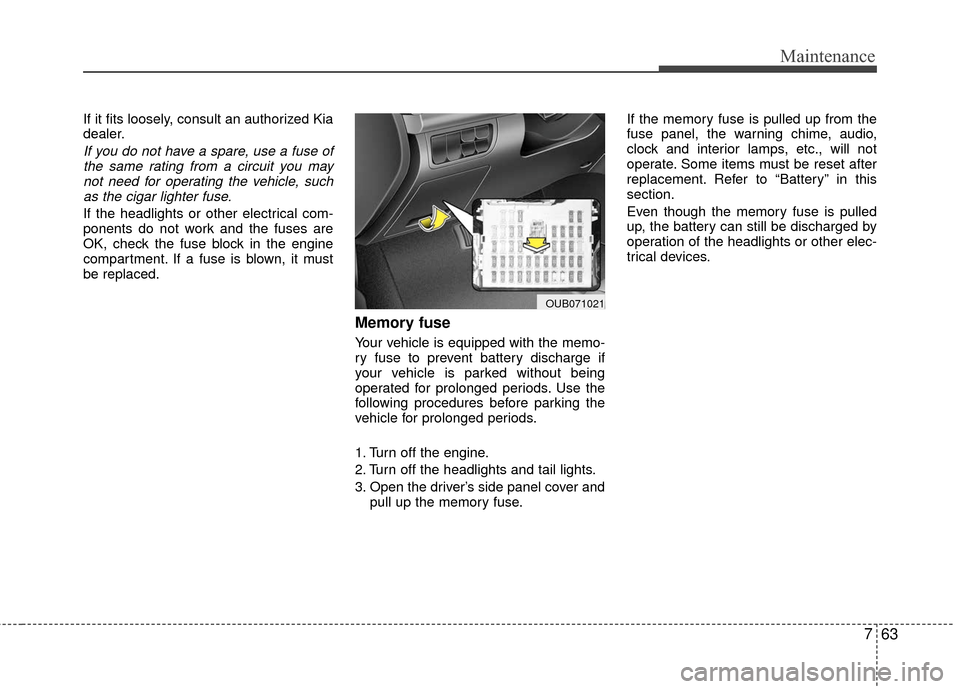
Memory fuse
Your vehicle is equipped with the memo-
ry fuse to prevent battery discharge if
your vehicle is parked without being
operated for prolonged periods. Use the
following procedures before parking the
vehicle for prolonged periods.
1. Turn off the engine.
2. Turn off the headlights and tail lights.
3. Open the driver’s side panel cover and pull up the memory fuse. If the memory fuse is pulled up from the
fuse panel, the warning chime, audio,
clock and interior lamps, etc., will not
operate. Some items must be reset after
replacement. Refer to “Battery” in this
section.
Even though the memory fuse is pulled
up, the battery can still be discharged by
operation of the headlights or other elec-
trical devices.
OUB071021
Page 442 of 449

Index
2I
Active ECO system··················\
··················\
··················\
··5-43Active ECO operation ··················\
··················\
·············5-43
Limitation of Active ECO operation: ··················\
········5-43
AIR BAG - advanced supplemental restraint system ····3-33 Adding equipment to or modifying your airbag-equipped vehicle··················\
··················\
·············3-55
Air bag warning label ··················\
··················\
··············3-56
Air bag warning light ··················\
··················\
··············3-36
Curtain air bag ··················\
··················\
··················\
·······3-49
Driver's and passenger's front air bag··········\
················3-44
How does the air bag system operate ··················\
········3-34
Occupant detection system ··················\
··················\
······3-39
Side impact air bag ··················\
··················\
··················\
3-47
SRS Care ··················\
··················\
··················\
···············3-55
SRS components and functions ··················\
·················3-36\
Why didn’t my air bag go off in a collision? (Inflation and non-inflation conditions of the air bag) ···3-50
Air cleaner ··················\
··················\
··················\
···············7-41 Filter replacement ··················\
··················\
··················\
··7-41
Air conditioning system··················\
··················\
···············8-6
Appearance care··················\
··················\
··················\
·······7-86 Exterior care ··················\
··················\
··················\
··········7-86
Interior care ··················\
··················\
··················\
···········7-91
Audio system ··················\
··················\
··················\
·········4-121 Antenna··················\
··················\
··················\
················4-121
Aux, USB and iPod
®··················\
··················\
·············4-123
Bluetooth
®Wireless Technology ··················\
·············4-122
How vehicle audio works ··················\
··················\
······4-123
Steering wheel audio control ··················\
··················\
·4-122
Automatic climate control system ··················\
···············4-94 Automatic heating and air conditioning ··················\
····4-95
Checking the amount of air conditioner refrigerantand compressor lubricant ··················\
··················\
····4-104
Climate control air filter ··················\
··················\
········4-103
Manual heating and air conditioning··················\
·········4-96
System operation ··················\
··················\
··················\
·4-101
Automatic transaxle brake system ··················\
···············5-16 Automatic transaxle operation··················\
··················\
·5-16
Good driving practices ··················\
··················\
············5-21
Automatic transaxle fluid ··················\
··················\
··········7-40
Battery··················\
··················\
··················\
··················\
····7-45 Battery recharging ··················\
··················\
··················\
·7-46
For best battery service ··················\
··················\
···········7-45
Reset items ··················\
··················\
··················\
············7-47
Before driving ··················\
··················\
··················\
············5-3 Before entering vehicle ··················\
··················\
·············5-3
Before starting ··················\
··················\
··················\
········5-3
Necessary inspections··················\
··················\
················5-3
A
B