ignition KIA RIO 2017 Workshop Manual
[x] Cancel search | Manufacturer: KIA, Model Year: 2017, Model line: RIO, Model: KIA RIO 2017Pages: 449, PDF Size: 14.88 MB
Page 179 of 449
Features of your vehicle
108
4
Automatic climate control system
(if equipped)
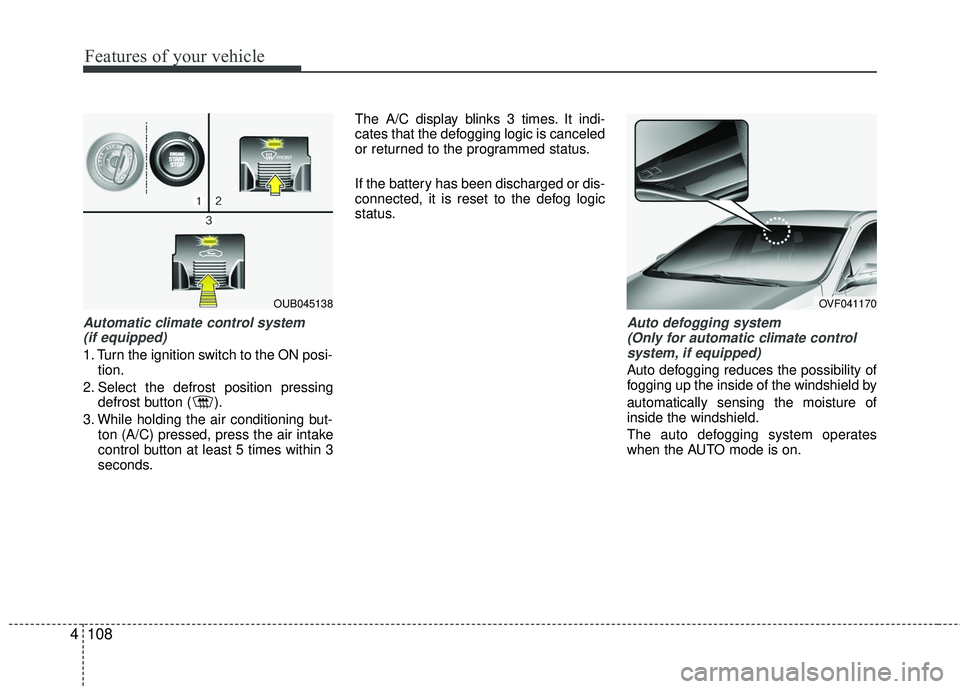
1. Turn the ignition switch to the ON posi- tion.
2. Select the defrost position pressing defrost button ( ).
3. While holding the air conditioning but- ton (A/C) pressed, press the air intake
control button at least 5 times within 3
seconds. The A/C display blinks 3 times. It indi-
cates that the defogging logic is canceled
or returned to the programmed status.
If the battery has been discharged or dis-
connected, it is reset to the defog logic
status.
Auto defogging system
(Only for automatic climate controlsystem, if equipped)
Auto defogging reduces the possibility of
fogging up the inside of the windshield by
automatically sensing the moisture of
inside the windshield.
The auto defogging system operates
when the AUTO mode is on.
OUB045138OVF041170
Page 189 of 449
Features of your vehicle
118
4
Digital clock and calendar
(if equipped)
Whenever the battery terminals or relat-
ed fuses are disconnected, you must
reset the clock and the calendar.
When the ignition switch is in the ACC or
ON position, the clock buttons operate as
follows:
Setup the clock and calender
With audio off
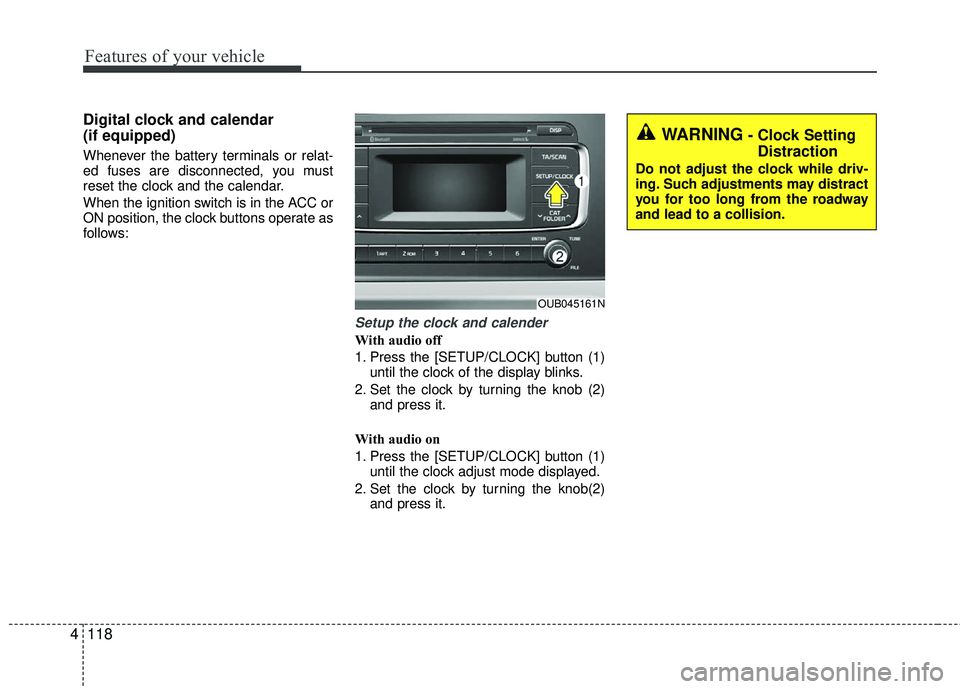
1. Press the [SETUP/CLOCK] button (1)
until the clock of the display blinks.
2. Set the clock by turning the knob (2) and press it.
With audio on
1. Press the [SETUP/CLOCK] button (1) until the clock adjust mode displayed.
2. Set the clock by turning the knob(2) and press it.
OUB045161N
WARNING- Clock SettingDistraction
Do not adjust the clock while driv-
ing. Such adjustments may distract
you for too long from the roadway
and lead to a collision.
Page 198 of 449
Features of your vehicle
4127
Adjust the volume to levels that allowthe driver to hear sounds from outside
of the vehicle. Driving in a state where
external sounds cannot be heard may
lead to accidents.
Pay attention to the volume setting when turning the device on. A sudden
output of extreme volume upon turning
the device on could lead to hearing
impairment. (Adjust the volume to a
suitable levels before turning off the
device.) Turn on the car ignition before using
the audio system. Do not operate the
audio system for long periods of time
with the ignition turned off; such opera-
tions may lead to battery discharge.
In case of product malfunction, please contact your place of purchase or After
Service center.
Placing the audio system within an electromagnetic environment may
result in noise interference.CAUTION
Do not subject the device to severe shock or impact. Directpressure onto the front side of the monitor may cause damage tothe LCD or touch screen.
When cleaning the device, make sure to turn off the audio systemand use a dry and smooth cloth.Never use tough materials, chem- ical cloths, or solvents (alcohol,benzene, thinners, etc.) as such materials may damage the devicepanel or cause color/quality dete- rioration
Do not place beverages close to the audio system. Spilling bever-ages may lead to system mal-function.
Prevent caustic solutions such as perfume and cosmetic oil fromcontacting the dashboard because they may cause damageor discoloration.
Page 225 of 449
Features of your vehicle
154
4
PHONE
Before using the Bluetooth®Wireless
Technology phone features
Bluetooth®Wireless
Technology phone, you must first pair
and connect the
Bluetooth®Wireless
Technology mobile phone.
If the mobile phone is not paired or connected, it is not possible to enter
Phone mode. Once a phone is paired
or connected, the guidance screen will
be displayed.
If Priority is set upon vehicle ignition (IGN/ACC ON), the
Bluetooth®
Wireless Technology phone will be
automatically connected. Even if you
are outside, the
Bluetooth®Wireless
Technology phone will be automatically
connected once you are in the vicinity
of the vehicle. If you do not want auto-
matic
Bluetooth®Wireless Technology
phone connection, set the Bluetooth®
Wireless Technology power to OFF.
Making a call using the Steering-
wheel mount controls
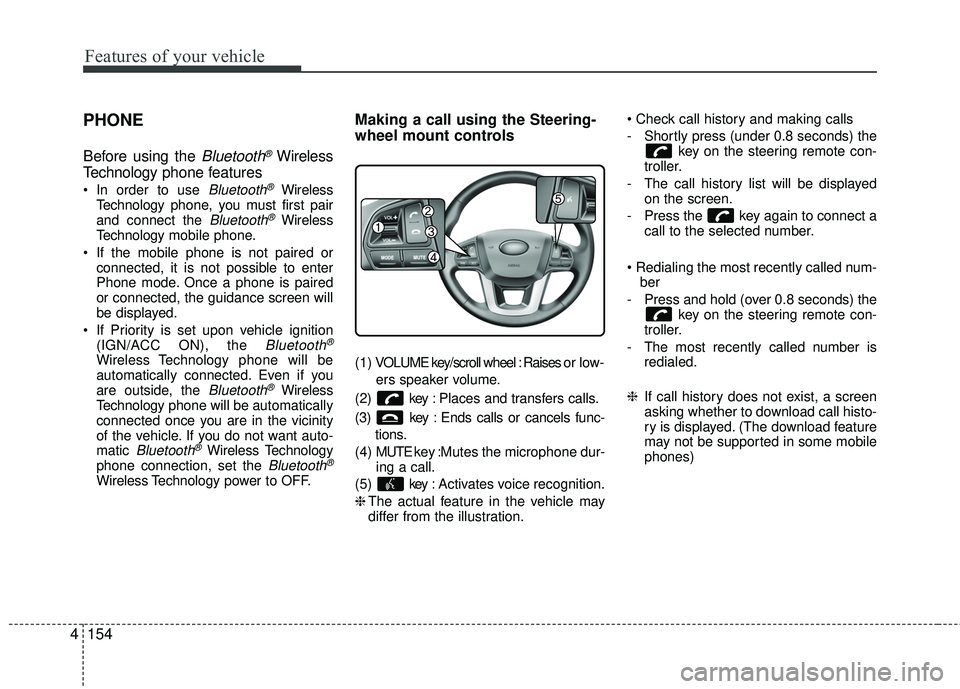
( 1 ) VOLUME key/scroll wheel : Raises o r l ow -
ers speaker volume.
(2) key : Places and transfers calls.
(3) key : Ends calls or cancels func- tions.
(4) MUTE key : Mutes the microphone dur-
ing a call.
(5) key : Activates voice recognition.
❈ The actual feature in the vehicle may
differ from the illustration.
- Shortly press (under 0.8 seconds) the
key on the steering remote con-
troller.
- The call history list will be displayed on the screen.
- Press the key again to connect a call to the selected number.
ber
- Press and hold (over 0.8 seconds) the key on the steering remote con-
troller.
- The most recently called number is redialed.
❈ If call history does not exist, a screen
asking whether to download call histo-
ry is displayed. (The download feature
may not be supported in some mobile
phones)
Page 250 of 449
53
Driving your vehicle
Before entering vehicle
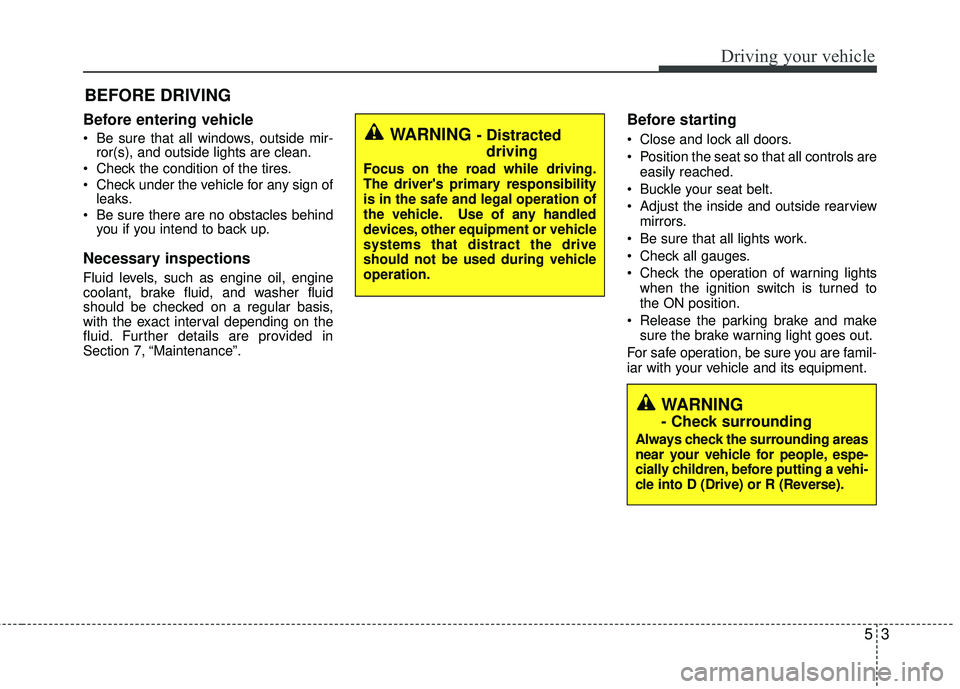
• Be sure that all windows, outside mir-ror(s), and outside lights are clean.
Check the condition of the tires.
Check under the vehicle for any sign of leaks.
Be sure there are no obstacles behind you if you intend to back up.
Necessary inspections
Fluid levels, such as engine oil, engine
coolant, brake fluid, and washer fluid
should be checked on a regular basis,
with the exact interval depending on the
fluid. Further details are provided in
Section 7, “Maintenance”.
Before starting
Close and lock all doors.
Position the seat so that all controls are
easily reached.
Buckle your seat belt.
Adjust the inside and outside rearview mirrors.
Be sure that all lights work.
Check all gauges.
Check the operation of warning lights when the ignition switch is turned to
the ON position.
Release the parking brake and make sure the brake warning light goes out.
For safe operation, be sure you are famil-
iar with your vehicle and its equipment.
BEFORE DRIVING
WARNING - Distracted driving
Focus on the road while driving.
The driver's primary responsibility
is in the safe and legal operation of
the vehicle. Use of any handled
devices, other equipment or vehicle
systems that distract the drive
should not be used during vehicle
operation.
WARNING
- Check surrounding
Always check the surrounding areas
near your vehicle for people, espe-
cially children, before putting a vehi-
cle into D (Drive) or R (Reverse).
Page 252 of 449
55
Driving your vehicle
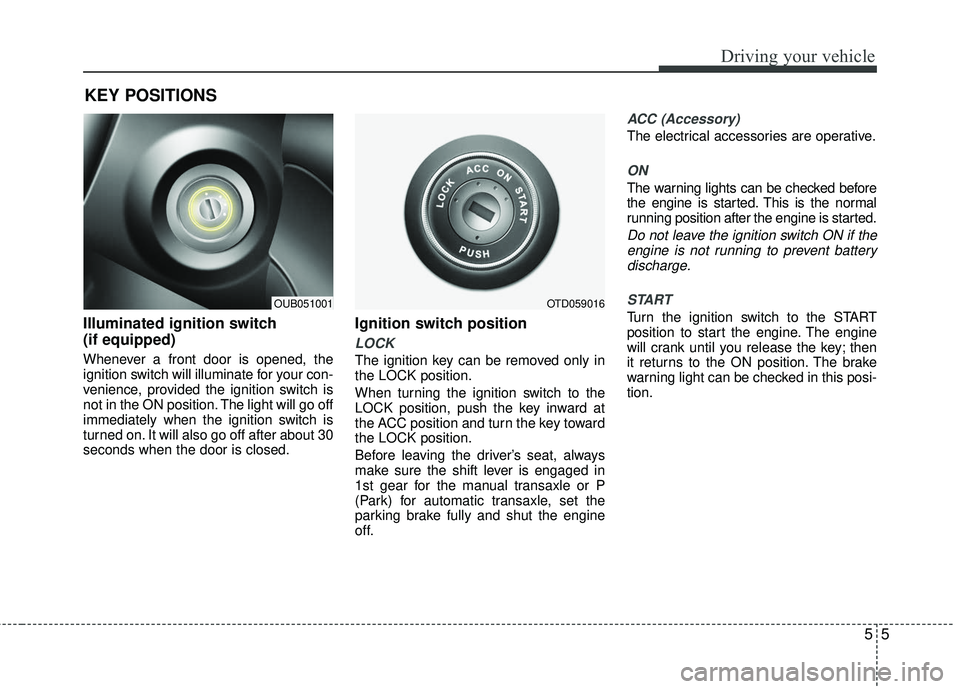
Illuminated ignition switch
(if equipped)
Whenever a front door is opened, the
ignition switch will illuminate for your con-
venience, provided the ignition switch is
not in the ON position. The light will go off
immediately when the ignition switch is
turned on. It will also go off after about 30
seconds when the door is closed.
Ignition switch position
LOCK
The ignition key can be removed only in
the LOCK position.
When turning the ignition switch to the
LOCK position, push the key inward at
the ACC position and turn the key toward
the LOCK position.
Before leaving the driver’s seat, always
make sure the shift lever is engaged in
1st gear for the manual transaxle or P
(Park) for automatic transaxle, set the
parking brake fully and shut the engine
off.
ACC (Accessory)
The electrical accessories are operative.
ON
The warning lights can be checked before
the engine is started. This is the normal
running position after the engine is started.
Do not leave the ignition switch ON if theengine is not running to prevent batterydischarge.
START
Turn the ignition switch to the START
position to start the engine. The engine
will crank until you release the key; then
it returns to the ON position. The brake
warning light can be checked in this posi-
tion.
KEY POSITIONS
OUB051001OTD059016
Page 253 of 449
Driving your vehicle
65
WARNING- Ignition switch
Never turn the ignition switch to
LOCK or ACC while the vehicle is
moving. This would result in loss of
directional control and braking
function, which could cause an
accident.
WARNING- Steering wheel
Never reach for any controls
through the steering wheel while
the vehicle is in motion. The pres-
ence of your hand or arm in this
area could cause a loss of vehicle
control.
Page 257 of 449
Driving your vehicle
10
5
Starting the engine with an igni-
tion key (if equipped)
1. Make sure the parking brake is
applied.
2. Manual Transaxle - Depress the
clutch pedal fully and shift the
transaxle into Neutral. Keep the clutch
pedal and brake pedal depressed
while turning the ignition switch to the
start position.
Automatic Transaxle - Place the
transaxle shift lever in P (Park).
Depress the brake pedal fully.
You can also start the engine when the shift lever is in the N (Neutral) position.
3. Turn the ignition switch to START and hold it there until the engine starts (a
maximum of 10 seconds), then
release the key.
It should be started without depress-ing the accelerator.
4. Do not wait for the engine to warm up while the vehicle remains stationary.
Start driving at moderate engine
speeds. (Steep accelerating and decel-
erating should be avoided.) If the engine stalls while the vehicle is in
motion, do not attempt to move the shift
lever to the P (Park) position. If traffic and
road conditions permit, you may put the
shift lever in the N (Neutral) position
while the vehicle is still moving and turn
the ignition switch to the START position
in an attempt to restart the engine.
STARTING THE ENGINE
WARNING- Proper
footwear
Always wear appropriate shoes
when operating your vehicle.
Unsuitable shoes (high heels, ski
boots, sandals, etc.) may interfere
with your ability to use the brake
and accelerator pedal.
CAUTION - Starter
Do not engage the starter for more
than 10 seconds. If the engine stallsor fails to start, wait 5 to 10 seconds before re-engaging the starter.Improper use of the starter may damage it.
Page 264 of 449
517
Driving your vehicle
For smooth operation, depress the brakepedal when shifting from N (Neutral) to aforward or reverse gear.
When stopped on an upgrade, do not
hold the vehicle with engine power. Use
the service brake or the parking brake.
Transaxle ranges
The indicator light in the instrument clus-
ter displays the shift lever position when
the ignition switch is in the ON position.
P (Park)
Always come to a complete stop before
shifting into P (Park). This position locks
the transaxle and prevents the front
wheels from rotating.
Shifting into P (Park) while the vehicle is
in motion will cause the drive wheels to
lock which will cause you to lose control
of the vehicle.
WARNING- Automatic transaxle
Before leaving the driver’s seat,
always make sure the shift lever is
in the P (Park) position; then set the
parking brake fully and shut the
engine off. Do not use the P posi-
tion in place of the parking brake.
Always make sure the shift lever is
latched in the P position and set the
parking brake fully. Unexpected
and sudden vehicle movement can
occur if these precautions are not
followed.
CAUTION - Transaxle
To avoid damage to your transaxle,
do not accelerate the engine in R(Reverse) or any forward gear posi-tion with the brakes on. Thetransaxle may be damaged if you shift into P (Park) while the vehicleis in motion.
Page 267 of 449
Driving your vehicle
20
5
Shift lock system (if equipped)
Shift-lock override (without smart key
system)
For your safety, the automatic transaxle
has a shift lock system which prevents
shifting the transaxle out of P (Park)
unless the brake pedal is depressed.
To shift the transaxle from P (Park) into R
(Reverse):
1. Depress and hold the brake pedal.
2. Start the engine or turn the ignition
switch to the ON position.
3. Move the shift lever.
If the brake pedal is repeatedly
depressed and released with the shift
lever in the P (Park) position, a chattering
noise near the shift lever may be heard.
This is a normal condition. Shift-lock override (with smart key system)
If the shift lever cannot be moved from
the P (Park) or N (Neutral) position into
the R (Reverse) position with the brake
pedal depressed, continue depressing
the brake, then do the following:
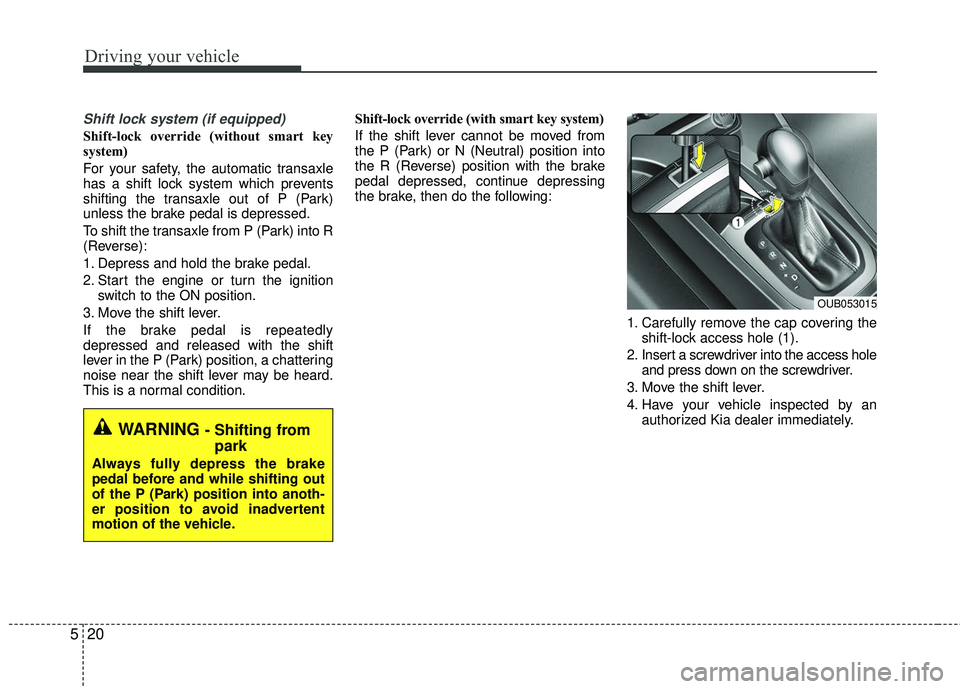
1. Carefully remove the cap covering theshift-lock access hole (1).
2. Insert a screwdriver into the access hole and press down on the screwdriver.
3. Move the shift lever.
4. Have your vehicle inspected by an authorized Kia dealer immediately.
OUB053015
WARNING - Shifting frompark
Always fully depress the brake
pedal before and while shifting out
of the P (Park) position into anoth-
er position to avoid inadvertent
motion of the vehicle.