service KIA RIO 2020 User Guide
[x] Cancel search | Manufacturer: KIA, Model Year: 2020, Model line: RIO, Model: KIA RIO 2020Pages: 516, PDF Size: 10.49 MB
Page 196 of 516
Features of your vehicle
116
4
Air conditioning
Kia Air Conditioning Systems are
filled with R-1234yf refrigerant.
1. Start the engine. Push the air con-
ditioning button.
2. Set the mode to the position.
3. Set the air intake control to the recirculated air position. However,
prolonged operation in the recircu-
lated air position will excessively
dry the air. In this case, change the
air position.
4. Adjust the fan speed control and temperature control to maintain
maximum comfort.
The refrigerant system should only be serviced by trained and certified
technicians to ensure proper and
safe operation.
The refrigerant system should be serviced in a well-ventilated place. The air conditioning evaporator
(cooling coil) shall never be
repaired or replaced with one
removed from a used or salvaged
vehicle and new replacement MAC
evaporators should be certified
(and labeled) as meeting SAE
Standard J2842.
✽ ✽ NOTICE
When opening the windows in
humid weather, air conditioning
may create water droplets inside the
vehicle. Since excessive water
droplets may cause damage to elec-
trical equipment, air conditioning
should only be used with the win-
dows closed.
CAUTION - Excessive A/C
While using the air conditioning
system, monitor the tempera-ture gauge closely while drivingup hills or in heavy traffic whenoutside temperatures are high.Air conditioning system opera-tion may cause engine over-heating and potential enginedamage. Continue to use theblower fan but turn the air con-ditioning system off if the tem-perature gauge indicates engineoverheating.
SC CAN (ENG) 4.QXP 12/12/2019 5:14 PM Page 116
Page 199 of 516
4119
Features of your vehicle
The air conditioning system should
be serviced by an authorized Kia
dealer.
Sunroof inside air recircula-
tion (if equipped)
The outside (fresh) air position is
automatically selected, when the
sunroof is opened.
When you select the recirculated air
position, the system maintains the
recirculated air position for 3 minutes
and then automatically converts to
the outside (fresh) air position.
When the sunroof is closed, the air
intake position will return to the orig-
inal position that was selected.
WARNING
The oil and refrigerant in your
vehicle’s air conditioning sys-
tem is under very high pressure.
If proper service procedures are
not followed an explosion may
result. To reduce the risk of seri-
ous injury or death, the air con-
ditioning system in your vehicle
should only be serviced by
trained and certified technicians.
CAUTION- AC Repair
It is important that the correcttype and amount of oil andrefrigerant is used, otherwisedamage to the vehicle mayoccur. To prevent damage, theair conditioning system in yourvehicle should only be servicedby trained and certified techni-cians.
WARNING - Vehicles
equipped with R-1234yf
Since the refrigerantis mildly flammable
and operated at high
pressure, the air con-
ditioning system
should only be serv-
iced by trained and
certified technicians.
(Refer to the SAE
J2845)
It is important that the correct
type and amount of oil and
refrigerant are used.
All refrigerants should be
reclaimed with proper equip-
ment.
Venting refrigerants directly to
the atmosphere is harmful to
individuals and environment.
Failure to heed these warnings
can lead to serious injuries.
SC CAN (ENG) 4.QXP 12/12/2019 5:14 PM Page 119
Page 207 of 516
4127
Features of your vehicle
Operation Tips
To keep dust or unpleasant fumesfrom entering the vehicle through
the ventilation system, temporarily
set the air intake control to the
recirculated air position. Be sure to
return the control to the fresh air
position when the dust or fumes
has passed to keep fresh air in the
vehicle. This will help keep the driv-
er alert and comfortable.
Air for the heating/cooling system is drawn in through the grilles just
ahead of the windshield. Care
should be taken that these are not
blocked by leaves, snow, ice or
other obstructions.
To prevent interior fog on the wind- shield, set the air intake control to
the fresh air position and fan speed
to the desired position, turn on the
air conditioning system, and adjust
the temperature control to the
desired temperature.Air conditioning
Kia Air Conditioning Systems are
filled with R-1234yf refrigerant.
1. Start the engine. Press the air con- ditioning button.
2. Set the mode to the position.
3. Set the air intake control to the out- side air or recirculated air position.
4. Adjust the fan speed control and temperature control to maintain
maximum comfort.
The refrigerant system should only be serviced by trained and certified
technicians to insure proper and
safe operation.
The refrigerant system should be serviced in a well-ventilated place.
The air conditioning evaporator (cooling coil) shall never be
repaired or replaced with one
removed from a used or salvaged
vehicle and new replacement MAC
evaporators should be certified
(and labeled) as meeting SAE
Standard J2842.CAUTION
When using the air condition- ing system, monitor the tem-perature gauge closely whiledriving up hills or in heavy traf-fic when outside temperaturesare high. Air conditioning sys-tem operation may causeengine overheating. Continueto use the blower fan but turnthe air conditioning system offif the temperature gauge indi-cates engine overheating.
When opening the windows in humid weather air conditioningmay create water dropletsinside the vehicle. Since exces-sive water droplets may causedamage to electrical equip-ment, air conditioning shouldonly be used with the windowsclosed.
SC CAN (ENG) 4.QXP 12/12/2019 5:15 PM Page 127
Page 210 of 516
Features of your vehicle
130
4
The air conditioning system should
be serviced by an authorized Kia
dealer.
Sunroof inside air recircula-
tion (if equipped)
The outside (fresh) air position is
automatically selected, when the
sunroof is opened.
When you select the recirculated air
position, the system maintains the
recirculated air position for 3 minutes
and then automatically converts to
the outside (fresh) air position.
When the sunroof is closed, the air
intake position will return to the orig-
inal position that was selected.
WARNING
The oil and refrigerant in your
vehicle’s air conditioning sys-
tem is under very high pressure.
If proper service procedures are
not followed an explosion may
result. To reduce the risk of seri-
ous injury or death, the air con-
ditioning system in your vehicle
should only be serviced by
trained and certified technicians.
CAUTION- AC Repair
It is important that the correct
type and amount of oil andrefrigerant is used, otherwisedamage to the vehicle mayoccur. To prevent damage, theair conditioning system in yourvehicle should only be servicedby trained and certified techni-cians.
WARNING - Vehicles
equipped with R-1234yf
Since the refrigerantis mildly flammable
and operated at high
pressure, the air con-
ditioning system
should only be serv-
iced by trained and
certified technicians.
(Refer to the SAE
J2845)
It is important that the correct
type and amount of oil and
refrigerant are used.
All refrigerants should be
reclaimed with proper equip-
ment.
Venting refrigerants directly to
the atmosphere is harmful to
individuals and environment.
Failure to heed these warnings
can lead to serious injuries.
SC CAN (ENG) 4.QXP 12/12/2019 5:15 PM Page 130
Page 237 of 516
Audio system
512 Pressing and holding the button
- If not in
Bluetooth®Wireless
Technology Handsfree mode or
receiving a phone call, the most
recently Dialed Call number is
dialed.
- Press in
Bluetooth®Wireless
Technology Handsfree mode to
transfer the call to your cell
phone.
- Press in cell phone mode to switch to
Bluetooth®Wireless
Technology Handsfree mode.
(6) END
Press in
Bluetooth®Wireless
Technology Handsfree mode to
end the phone call.
Press in the incoming call screen to reject the call. Adjust the volume to levels that
allow the driver to hear sounds
from outside of the vehicle. Driving
in a state where external sounds
cannot be heard may lead to acci-
dents.
Pay attention to the volume setting when turning the device on. A sud-
den output of extreme volume
upon turning the device on could
lead to hearing impairment. (Adjust
the volume to a suitable levels
before turning off the device.)
Turn on the car ignition before using this device. Do not operate
the audio system for long periods
of time with the ignition turned off
as such operations may lead to
battery discharge.
In case of product malfunction, please contact your place of pur-
chase or customer service center.
Placing the audio system within an electromagnetic environment may
result in noise interference.
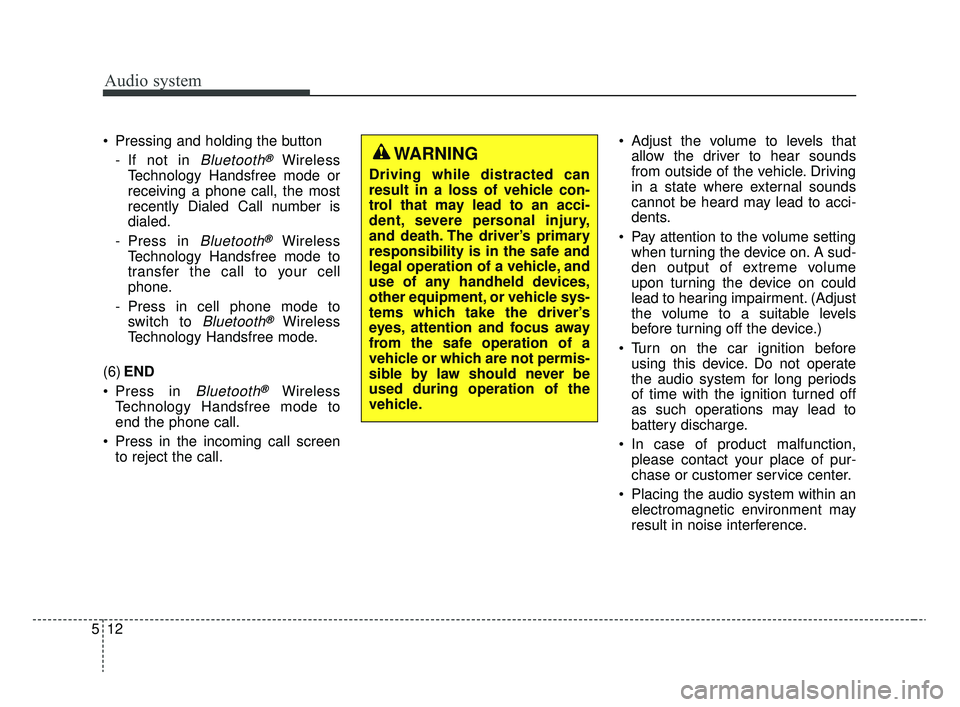
WARNING
Driving while distracted can
result in a loss of vehicle con-
trol that may lead to an acci-
dent, severe personal injury,
and death. The driver’s primary
responsibility is in the safe and
legal operation of a vehicle, and
use of any handheld devices,
other equipment, or vehicle sys-
tems which take the driver’s
eyes, attention and focus away
from the safe operation of a
vehicle or which are not permis-
sible by law should never be
used during operation of the
vehicle.
SC CAN (ENG) 5(audio).qxp 6/7/2019 9:52 AM Page 12
Page 241 of 516
![KIA RIO 2020 User Guide Audio system
516Menu
Select [Menu], and select the desired
function.
Presets: Save up to 40 frequently
used stations.
To listen to a preset, select the
desired station.
Press and hold the desired slo](/img/2/40413/w960_40413-240.png "KIA RIO 2020 User Guide Audio system
516Menu
Select [Menu], and select the desired
function.
Presets: Save up to 40 frequently
used stations.
To listen to a preset, select the
desired station.
Press and hold the desired slo")
Audio system
516Menu
Select [Menu], and select the desired
function.
Presets: Save up to 40 frequently
used stations.
To listen to a preset, select the
desired station.
Press and hold the desired slot
from 1 through 40. This saves the
current station in the selected slot.
If the slot is empty, simply selecting
saves the station to the slot.
Scan: All stations available in the current location of the vehicle are
played for five seconds each.
Information: View detailed station information.
Sound Settings: Audio sound set- tings can be changed.
Station Info: Set whether to receive station information such as Station
Name, Program Type or Information.
✽ ✽ NOTICE - SiriusXM®Satellite
Radio information
• Satellite Radio channels: Enjoy SiriusXM Satellite Radio
with a 3-month trial subscription
to the Sirius Select package. You’ll
get over variable channels, includ-
ing commercialfree music, plus all
your favorite sports, exclusive
talk, entertainment, and a selec-
tion of premium programming.
For more information and a com-
plete list of SiriusXM channels,
visit siriusxm.com in the United
States, siriusxm.ca in Canada, or
call SiriusXM at 1-888-539-7474.
• Satellite Radio reception factors: To receive the satellite signal, your
vehicle has been equipped with a
satellite radio antenna located on
the roof of your vehicle. The vehi-
cle roof provides the best location
for an unobstructed, open view of
the sky, a requirement of a satellite
radio system. Like AM/FM, there
are several factors that can affect
satellite radio reception perform-
ance: (Continued)(Continued)
- Antenna obstructions: For opti-mal reception performance, keep
the antenna clear of snow and
ice build-up and keep luggage
and other material as far away
from the antenna as possible.
• SiriusXM Satellite Radio service: SiriusXM is a subscription-based
satellite radio service that broad-
casts music, sports, news and
entertainment programming to
radio receivers, which are avail-
able for installation in motor vehi-
cles or factory installed, as well as
for the home, portable and wire-
less devices, and through an Internet
connection on a personal computer.
Vehicles that are equipped with a
factory installed SiriusXM Satellite
Radio system include:
- Hardware and an introductorytrial subscription term, which
begins on the date of sale or lease
of the vehicle.
- For a small upgrade fee, access to SiriusXM music channels, and
other select channels over the
Internet using any computer con-
nected to the Internet (U.S. cus-
tomers only).
(Continued)
SC CAN (ENG) 5(audio).qxp 6/7/2019 9:52 AM Page 16
Page 242 of 516
Audio system
17
5
(Continued)
• SiriusXM services require a sub-
scription sold separately, or as a
package, by Sirius XM Radio Inc.
If you decide to continue service
after your trial, the subscription
plan you choose will automatically
renew thereafter and you will be
charged according to your chosen
payment method at then-current
rates. Fees and taxes apply. To
cancel you must call SiriusXM at
1-866-635-2349. See SiriusXM
Customer Agreement for complete
terms at www.siriusxm.com.
SiriusXM U.S. satellite and data
services are available only in the
48 contiguous states, DC and
Puerto Rico (with coverage limita-
tions). SiriusXM satellite service is
also available in Canada; see
www.siriusxm.ca. All fees and pro-
gramming subject to change.
Sirius, XM and all related marks
and logos are trademarks of Sirius
XM Radio Inc.
SC CAN (ENG) 5(audio).qxp 6/7/2019 9:52 AM Page 17
Page 260 of 516
Audio system
35
5
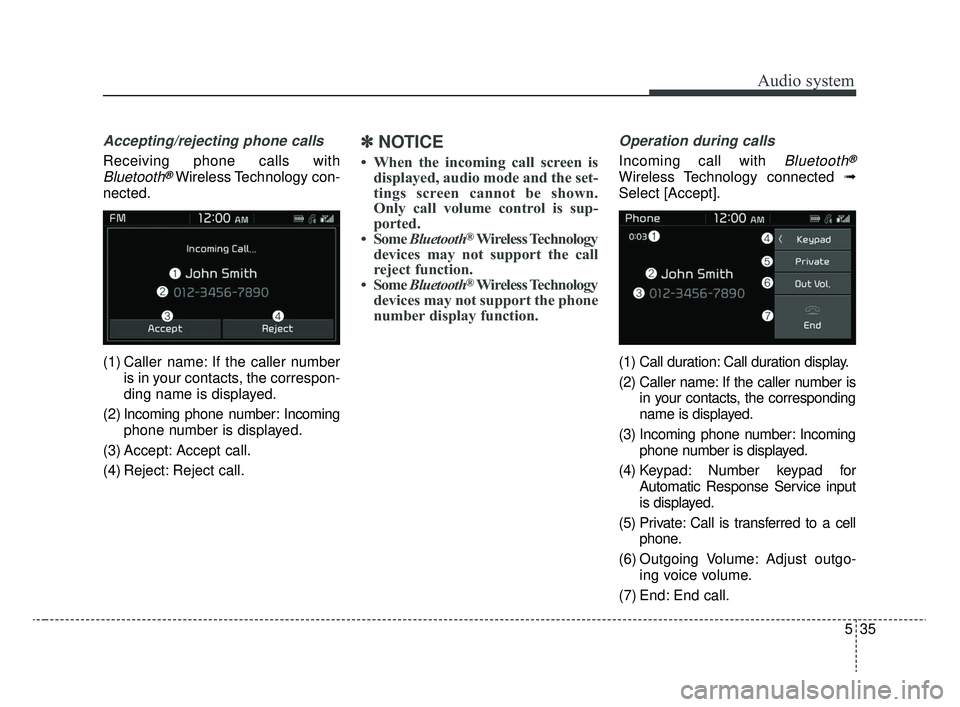
Accepting/rejecting phone calls
Receiving phone calls with
Bluetooth®Wireless Technology con-
nected.
(1) Caller name: If the caller number is in your contacts, the correspon-
ding name is displayed.
(2) Incoming phone number: Incoming phone number is displayed.
(3) Accept: Accept call.
(4) Reject: Reject call.
✽ ✽ NOTICE
• When the incoming call screen is
displayed, audio mode and the set-
tings screen cannot be shown.
Only call volume control is sup-
ported.
• Some Bluetooth
®Wireless Technology
devices may not support the call
reject function.
• Some Bluetooth
®Wireless Technology
devices may not support the phone
number display function.
Operation during calls
Incoming call with Bluetooth®
Wireless Technology connected ➟
Select [Accept].
(1) Call duration: Call duration display.
(2) Caller name: If the caller number is in your contacts, the corresponding
name is displayed.
(3) Incoming phone number: Incoming phone number is displayed.
(4) Keypad: Number keypad for Automatic Response Service input
is displayed.
(5) Private: Call is transferred to a cell phone.
(6) Outgoing Volume: Adjust outgo- ing voice volume.
(7) End: End call.
SC CAN (ENG) 5(audio).qxp 6/7/2019 9:52 AM Page 35
Page 286 of 516
619
Driving your vehicle
For smooth operation, depress thebrake pedal when shifting from N(Neutral) to a forward or reverse gear. Transmission ranges
The indicator in the instrument clus-
ter displays the shift lever position
when the ignition switch is in the ON
position.
P (Park)
Always come to a complete stop
before shifting into P (Park). This
position locks the transmission and
prevents the front wheels from rotat-
ing.
WARNING
- Intelligent Variable
Transmission (IVT)
Always check the surrounding areas near your vehicle for
people, especially children,
before shifting a car into D
(Drive) or R (Reverse).
Before leaving the driver’s seat, always make sure the
shift lever is in the P (Park)
position; then set the parking
brake fully and shut the engine
off. Unexpected and sudden
vehicle movement can occur if
these precautions are not fol-
lowed in the order identified.
Do not use the engine brake (shifting from a high gear to
lower gear) rapidly on slip-
pery roads.
The vehicle may slip, causing
an accident.
CAUTION
To avoid damage to your transmission, do not acceler-ate the engine in R (Reverse)or any forward gear positionwith the brakes on.
When stopped on an incline, do not hold the vehicle sta-tionary with engine power.Use the service brake or theparking brake.
Do not shift from N (Neutral) or P (Park) into D (Drive), or R(Reverse) when the engine isabove idle speed.
WARNING
Shifting into P (Park) while the vehicle is in motion will cause
the drive wheels to lock which
will cause you to lose control
of the vehicle.
Do not use the P (Park) posi- tion in place of the parking
brake. Always make sure the
shift lever is latched in the P
(Park) position and set the
parking brake fully.
Never leave a child unattend- ed in a vehicle.
SC CAN (ENG) 6.QXP 6/7/2019 9:49 AM Page 19
Page 287 of 516
Driving your vehicle
20
6
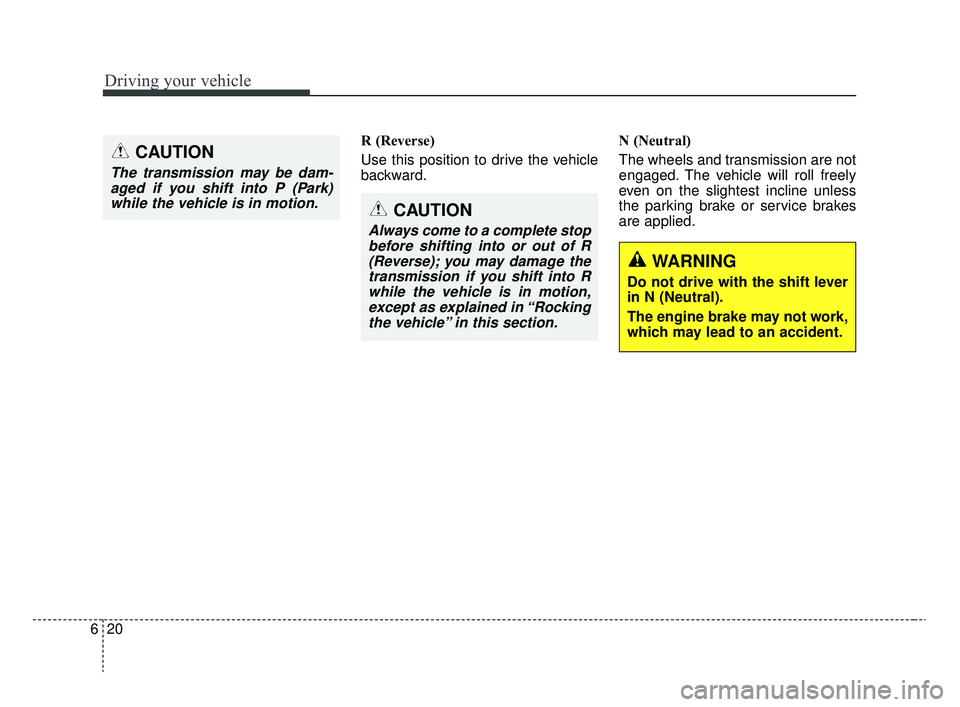
R (Reverse)
Use this position to drive the vehicle
backward. N (Neutral)
The wheels and transmission are not
engaged. The vehicle will roll freely
even on the slightest incline unless
the parking brake or service brakes
are applied.CAUTION
The transmission may be dam-
aged if you shift into P (Park)while the vehicle is in motion.
CAUTION
Always come to a complete stopbefore shifting into or out of R(Reverse); you may damage thetransmission if you shift into Rwhile the vehicle is in motion,except as explained in “Rockingthe vehicle” in this section.
WARNING
Do not drive with the shift lever
in N (Neutral).
The engine brake may not work,
which may lead to an accident.
SC CAN (ENG) 6.QXP 6/7/2019 9:49 AM Page 20