door lock KIA RIO 2020 Owner's Manual
[x] Cancel search | Manufacturer: KIA, Model Year: 2020, Model line: RIO, Model: KIA RIO 2020Pages: 516, PDF Size: 10.49 MB
Page 100 of 516
Features of your vehicle
20
4
Operating door locks from
inside the vehicle
With the door lock button
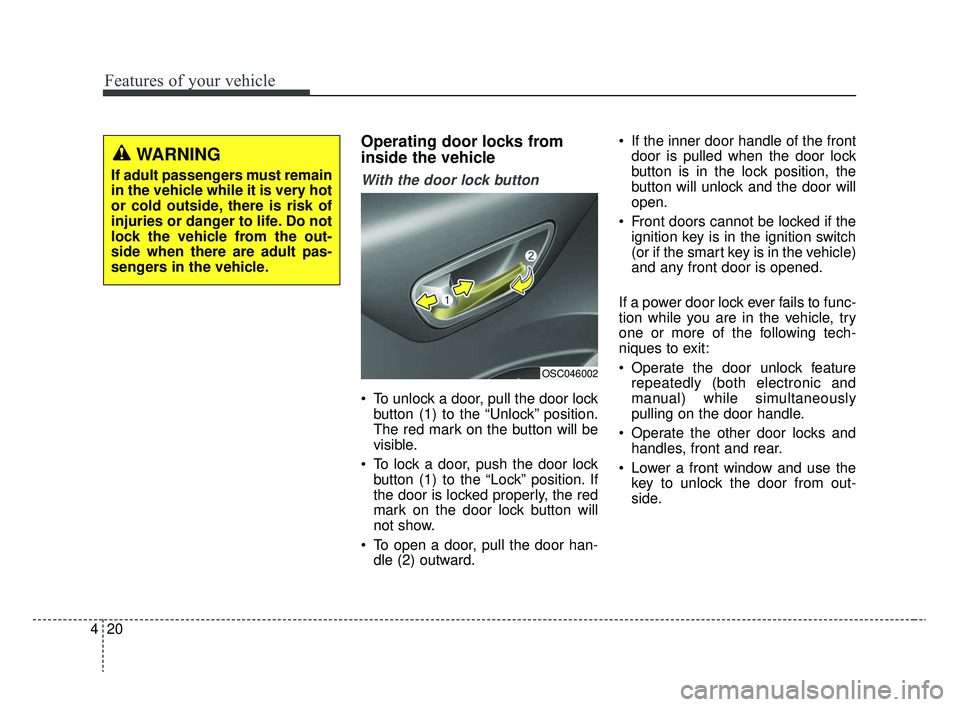
To unlock a door, pull the door lock
button (1) to the “Unlock” position.
The red mark on the button will be
visible.
To lock a door, push the door lock button (1) to the “Lock” position. If
the door is locked properly, the red
mark on the door lock button will
not show.
To open a door, pull the door han- dle (2) outward. If the inner door handle of the front
door is pulled when the door lock
button is in the lock position, the
button will unlock and the door will
open.
Front doors cannot be locked if the ignition key is in the ignition switch
(or if the smart key is in the vehicle)
and any front door is opened.
If a power door lock ever fails to func-
tion while you are in the vehicle, try
one or more of the following tech-
niques to exit:
Operate the door unlock feature repeatedly (both electronic and
manual) while simultaneously
pulling on the door handle.
Operate the other door locks and handles, front and rear.
Lower a front window and use the key to unlock the door from out-
side.
OSC046002
WARNING
If adult passengers must remain
in the vehicle while it is very hot
or cold outside, there is risk of
injuries or danger to life. Do not
lock the vehicle from the out-
side when there are adult pas-
sengers in the vehicle.
SC CAN (ENG) 4.QXP 12/12/2019 5:08 PM Page 20
Page 101 of 516
421
Features of your vehicle
With central door lock switch (if equipped)
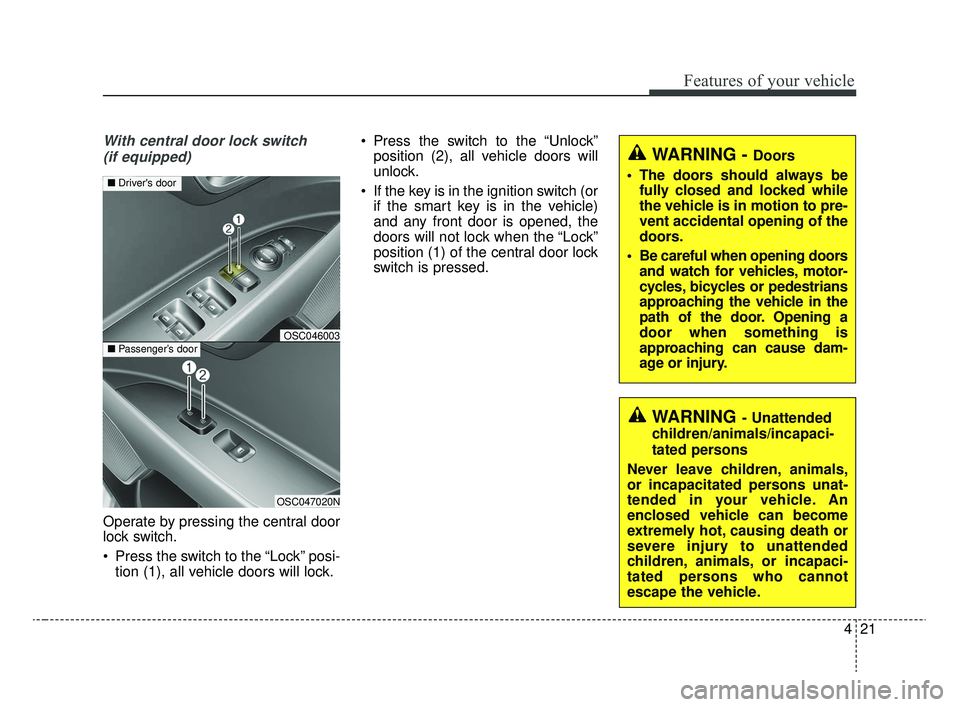
Operate by pressing the central door
lock switch.
Press the switch to the “Lock” posi- tion (1), all vehicle doors will lock. Press the switch to the “Unlock”
position (2), all vehicle doors will
unlock.
If the key is in the ignition switch (or if the smart key is in the vehicle)
and any front door is opened, the
doors will not lock when the “Lock”
position (1) of the central door lock
switch is pressed.
WARNING - Doors
The doors should always be fully closed and locked while
the vehicle is in motion to pre-
vent accidental opening of the
doors.
Be careful when opening doors and watch for vehicles, motor-
cycles, bicycles or pedestrians
approaching the vehicle in the
path of the door. Opening a
door when something is
approaching can cause dam-
age or injury.
WARNING- Unattended
children/animals/incapaci-
tated persons
Never leave children, animals,
or incapacitated persons unat-
tended in your vehicle. An
enclosed vehicle can become
extremely hot, causing death or
severe injury to unattended
children, animals, or incapaci-
tated persons who cannot
escape the vehicle.
OSC047020N
■ Passenger’s door
■Driver's door
OSC046003
SC CAN (ENG) 4.QXP 12/12/2019 5:08 PM Page 21
Page 102 of 516
Features of your vehicle
22
4
Impact sensing door unlock
system (if equipped)
All doors will automatically unlock
when an impact causes the air bags
to deploy.
Auto door lock/unlock feature
(if equipped)
All doors will automatically lock
when the transmission shift lever is
shifted out of P (Park).
All doors will automatically unlock when the transmission shift lever is
shifted into P (Park).
Speed sensing door lock sys-
tem (if equipped)
All doors will be automatically locked
after the vehicle speed exceeds 15
km/h (9 mph). And all doors will be
automatically unlocked when you
turn the engine off or when you
remove the ignition key.
An authorized Kia dealer can acti-
vate or deactivate some auto door
lock/unlock features as follows;
Auto door unlock by using the dri-ver's door lock button
Auto door lock/unlock by shifting the transmission shift lever out of P
(Park) or into P (Park)
Auto door unlock when the ignition key is removed from the ignition
switch (for smart key, when the
ENGINE START/STOP button is
turned to the OFF position)
If you want to activate or deactivate
some door lock/unlock feature, con-
sult an authorized Kia dealer.
Child-protector rear door lock
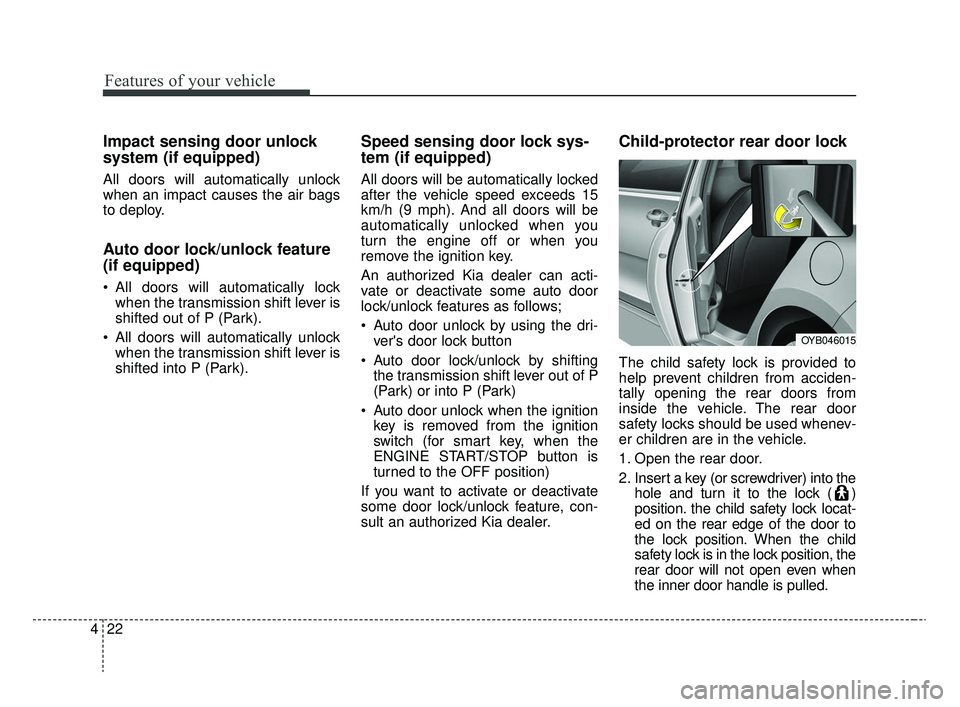
The child safety lock is provided to
help prevent children from acciden-
tally opening the rear doors from
inside the vehicle. The rear door
safety locks should be used whenev-
er children are in the vehicle.
1. Open the rear door.
2. Insert a key (or screwdriver) into the hole and turn it to the lock ( )
position. the child safety lock locat-
ed on the rear edge of the door to
the lock position. When the child
safety lock is in the lock position, the
rear door will not open even when
the inner door handle is pulled.
OYB046015
SC CAN (ENG) 4.QXP 12/12/2019 5:09 PM Page 22
Page 103 of 516
423
Features of your vehicle
3. Close the rear door.
To open the rear door, pull the out-
side door handle.
Even though the doors may be
unlocked, the rear door will not open
by pulling the inner door handle until
the rear door child safety lock is
unlocked.
WARNING- Rear doorlocks
Use the rear door safety locks
whenever children are in the
vehicle. If a child accidently
opens the rear doors while the
vehicle is motion, he can fall out.
SC CAN (ENG) 4.QXP 12/12/2019 5:09 PM Page 23
Page 104 of 516
Features of your vehicle
24
4
Opening the trunk
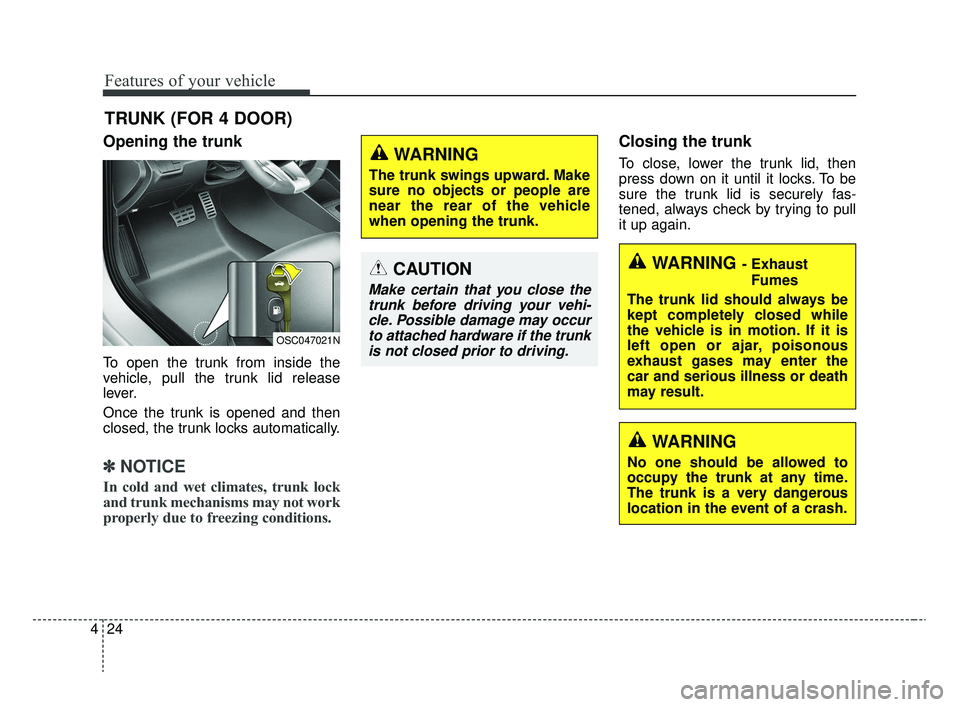
To open the trunk from inside the
vehicle, pull the trunk lid release
lever.
Once the trunk is opened and then
closed, the trunk locks automatically.
✽ ✽
NOTICE
In cold and wet climates, trunk lock
and trunk mechanisms may not work
properly due to freezing conditions.
Closing the trunk
To close, lower the trunk lid, then
press down on it until it locks. To be
sure the trunk lid is securely fas-
tened, always check by trying to pull
it up again.
TRUNK (FOR 4 DOOR)
OSC047021N
CAUTION
Make certain that you close the
trunk before driving your vehi-cle. Possible damage may occurto attached hardware if the trunkis not closed prior to driving.
WARNING
The trunk swings upward. Make
sure no objects or people are
near the rear of the vehicle
when opening the trunk.
WARNING - Exhaust
Fumes
The trunk lid should always be
kept completely closed while
the vehicle is in motion. If it is
left open or ajar, poisonous
exhaust gases may enter the
car and serious illness or death
may result.
WARNING
No one should be allowed to
occupy the trunk at any time.
The trunk is a very dangerous
location in the event of a crash.
SC CAN (ENG) 4.QXP 12/12/2019 5:09 PM Page 24
Page 106 of 516
Features of your vehicle
26
4
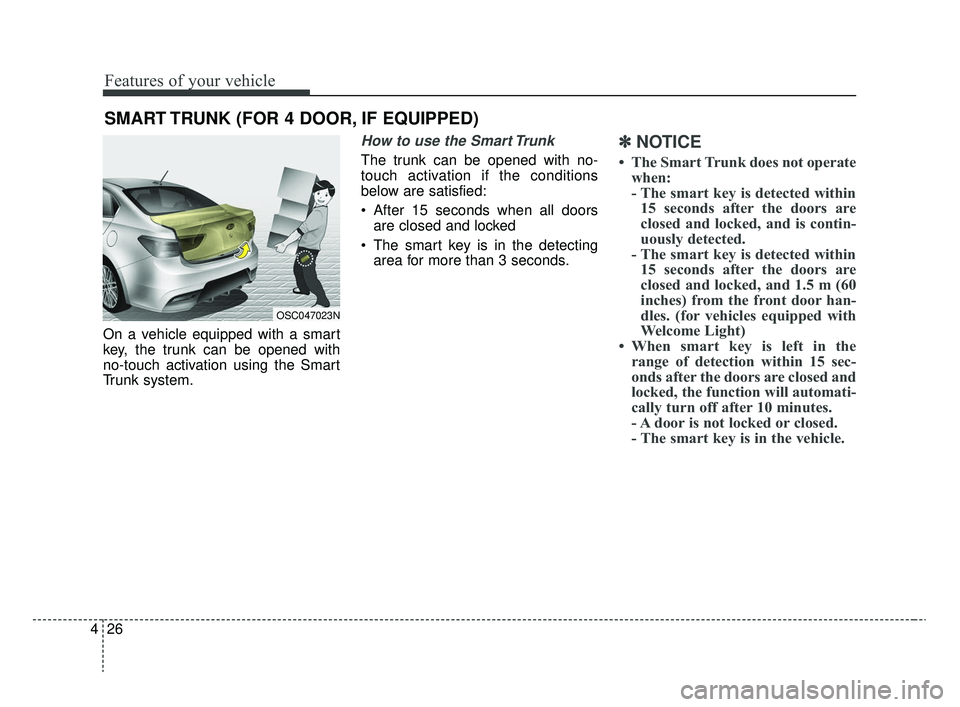
On a vehicle equipped with a smart
key, the trunk can be opened with
no-touch activation using the Smart
Trunk system.
How to use the Smart Trunk
The trunk can be opened with no-
touch activation if the conditions
below are satisfied:
After 15 seconds when all doors
are closed and locked
The smart key is in the detecting area for more than 3 seconds.
✽ ✽ NOTICE
• The Smart Trunk does not operate
when:
- The smart key is detected within15 seconds after the doors are
closed and locked, and is contin-
uously detected.
- The smart key is detected within 15 seconds after the doors are
closed and locked, and 1.5 m (60
inches) from the front door han-
dles. (for vehicles equipped with
Welcome Light)
• When smart key is left in the range of detection within 15 sec-
onds after the doors are closed and
locked, the function will automati-
cally turn off after 10 minutes.
- A door is not locked or closed.
- The smart key is in the vehicle.
SMART TRUNK (FOR 4 DOOR, IF EQUIPPED)
OSC047023N
SC CAN (ENG) 4.QXP 12/12/2019 5:09 PM Page 26
Page 108 of 516
Features of your vehicle
28
4
✽ ✽
NOTICE
The key should be kept out of reach of
children. Children may inadvertently
open the Smart Trunk while playing
around the rear area of the vehicle.
Make certain that you close the
trunk before driving your vehicle.
Make sure there are no people or objects around the trunkbefore
opening or closing the trunk.
Make sure to deactivate the Smart trunk function when washing your
vehicle.
Otherwise, the trunk may open
inadvertently.
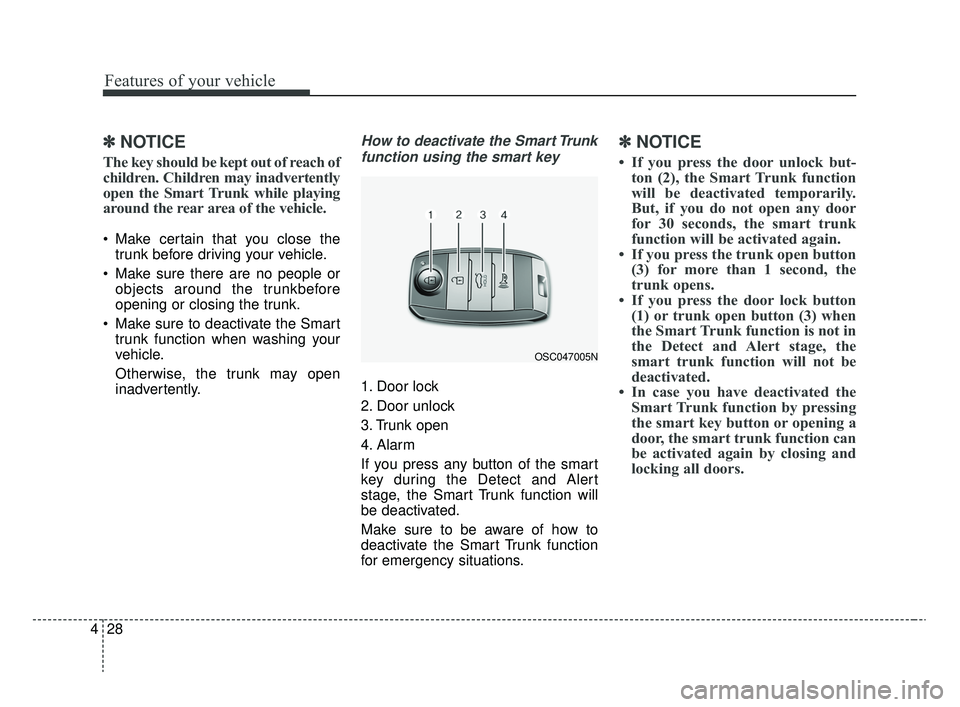
How to deactivate the Smart Trunk
function using the smart key
1. Door lock
2. Door unlock
3. Trunk open
4. Alarm
If you press any button of the smart
key during the Detect and Alert
stage, the Smart Trunk function will
be deactivated.
Make sure to be aware of how to
deactivate the Smart Trunk function
for emergency situations.
✽ ✽ NOTICE
• If you press the door unlock but-
ton (2), the Smart Trunk function
will be deactivated temporarily.
But, if you do not open any door
for 30 seconds, the smart trunk
function will be activated again.
• If you press the trunk open button (3) for more than 1 second, the
trunk opens.
• If you press the door lock button (1) or trunk open button (3) when
the Smart Trunk function is not in
the Detect and Alert stage, the
smart trunk function will not be
deactivated.
• In case you have deactivated the Smart Trunk function by pressing
the smart key button or opening a
door, the smart trunk function can
be activated again by closing and
locking all doors.
OSC047005N
SC CAN (ENG) 4.QXP 12/12/2019 5:09 PM Page 28
Page 110 of 516
Features of your vehicle
30
4
Opening the liftgate
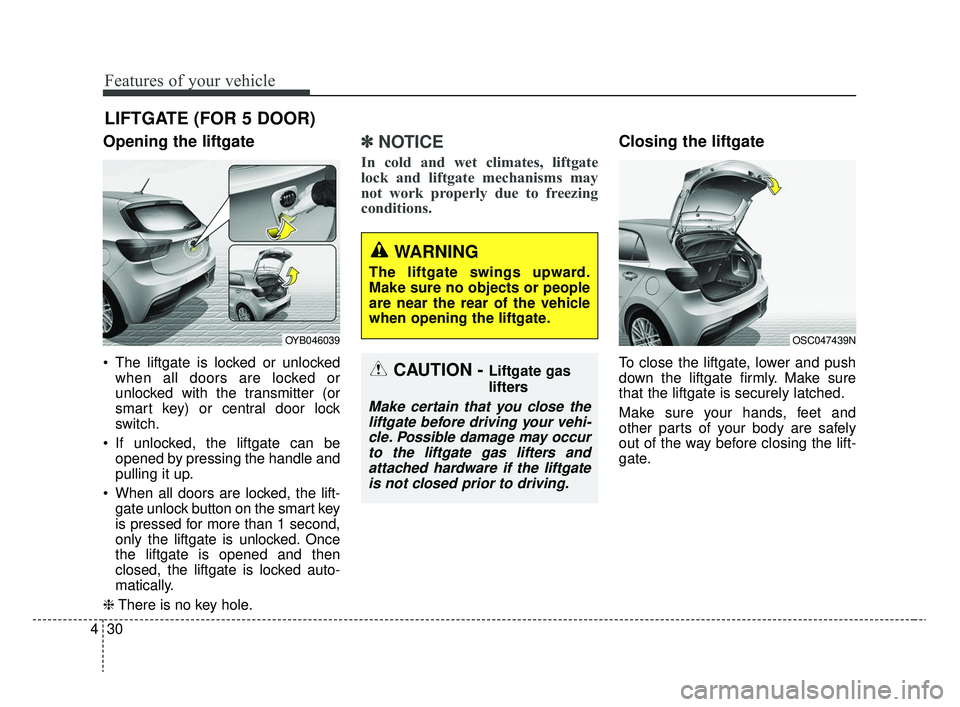
The liftgate is locked or unlocked
when all doors are locked or
unlocked with the transmitter (or
smart key) or central door lock
switch.
If unlocked, the liftgate can be opened by pressing the handle and
pulling it up.
When all doors are locked, the lift- gate unlock button on the smart key
is pressed for more than 1 second,
only the liftgate is unlocked. Once
the liftgate is opened and then
closed, the liftgate is locked auto-
matically.
❈ There is no key hole.
✽ ✽
NOTICE
In cold and wet climates, liftgate
lock and liftgate mechanisms may
not work properly due to freezing
conditions.
Closing the liftgate
To close the liftgate, lower and push
down the liftgate firmly. Make sure
that the liftgate is securely latched.
Make sure your hands, feet and
other parts of your body are safely
out of the way before closing the lift-
gate.
LIFTGATE (FOR 5 DOOR)
CAUTION - Liftgate gas
lifters
Make certain that you close the
liftgate before driving your vehi-cle. Possible damage may occurto the liftgate gas lifters andattached hardware if the liftgateis not closed prior to driving.
OSC047439NOYB046039
WARNING
The liftgate swings upward.
Make sure no objects or people
are near the rear of the vehicle
when opening the liftgate.
SC CAN (ENG) 4.QXP 12/12/2019 5:09 PM Page 30
Page 113 of 516
433
Features of your vehicle
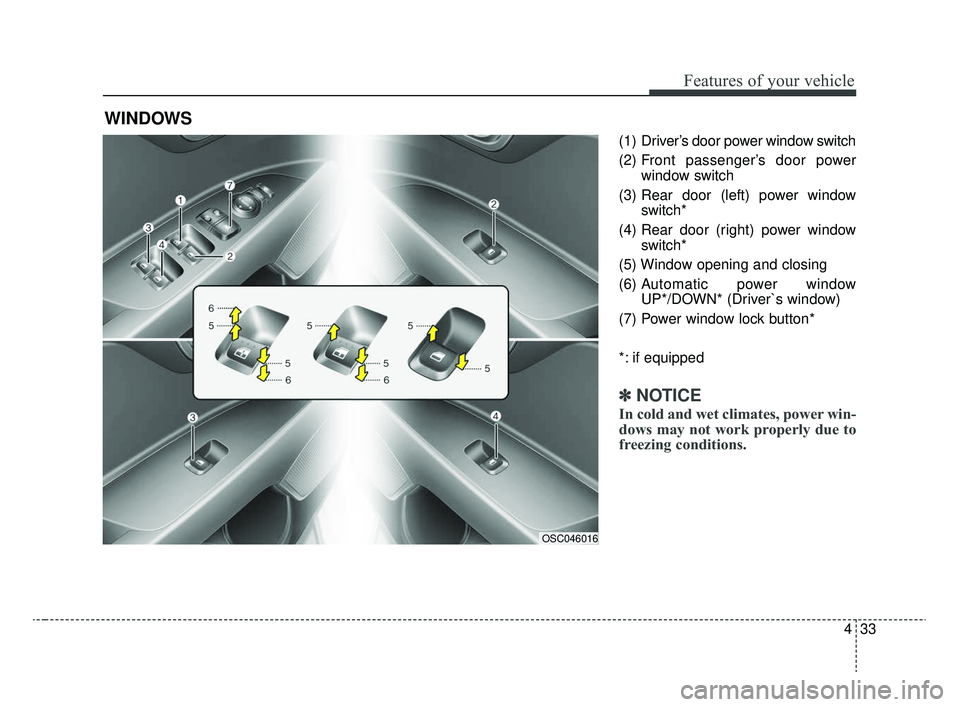
(1) Driver’s door power window switch
(2) Front passenger’s door powerwindow switch
(3) Rear door (left) power window switch*
(4) Rear door (right) power window switch*
(5) Window opening and closing
(6) Automatic power window UP*/DOWN* (Driver`s window)
(7) Power window lock button*
*: if equipped
✽ ✽ NOTICE
In cold and wet climates, power win-
dows may not work properly due to
freezing conditions.
WINDOWS
OSC046016
SC CAN (ENG) 4.QXP 12/12/2019 5:09 PM Page 33
Page 114 of 516
Features of your vehicle
34
4
Power windows (if equipped)
The ignition switch must be in the ON
position for power windows to oper-
ate. Each door has a power window
switch that controls the door’s win-
dow. The driver has a power window
lock switch which can block the oper-
ation of rear passenger windows.
The power windows can be operated
for approximately 30 seconds after the
ignition key is removed or is set to the
ACC or LOCK position. However, if the
front doors are opened, the power
windows cannot be operated even
within the 30 second period.
If a window cannot be closed
because it is blocked by objects,
remove the objects and close the
window.
✽ ✽
NOTICE
While driving with the rear windows
down or with the sunroof (if
equipped) in an open (or partially
open) position, your vehicle may
demonstrate a wind buffeting or
pulsation noise. This noise is a nor-
mal occurrence and can be reduced
or eliminated by taking the follow-
ing actions. If the noise occurs with
one or both of the rear windows
down, partially lower both front
windows approximately 2.5 cm (1
in). If you experience the noise with
the sunroof open, slightly reduce the
size of the sunroof opening.
Window opening and closing
(if equipped)
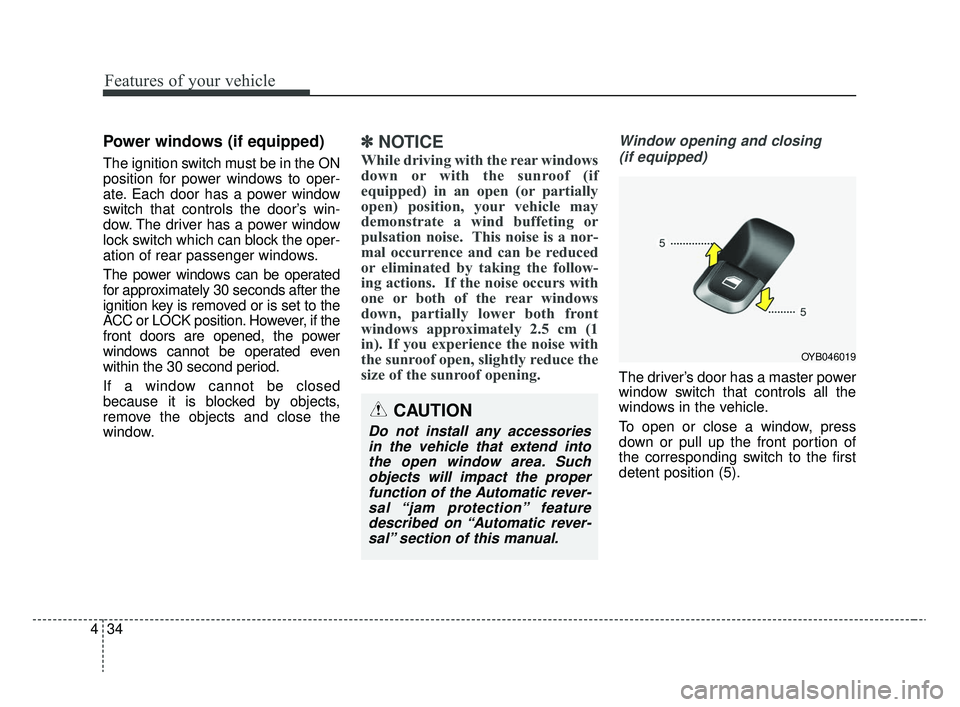
The driver’s door has a master power
window switch that controls all the
windows in the vehicle.
To open or close a window, press
down or pull up the front portion of
the corresponding switch to the first
detent position (5).
OYB046019
CAUTION
Do not install any accessoriesin the vehicle that extend intothe open window area. Suchobjects will impact the properfunction of the Automatic rever-sal “jam protection” featuredescribed on “Automatic rever-sal” section of this manual.
SC CAN (ENG) 4.QXP 12/12/2019 5:09 PM Page 34