USB port KIA RIO 2020 Owners Manual
[x] Cancel search | Manufacturer: KIA, Model Year: 2020, Model line: RIO, Model: KIA RIO 2020Pages: 516, PDF Size: 10.49 MB
Page 16 of 516
Your vehicle at a glance
62
INSTRUMENT PANEL OVERVIEW
OSC018004N
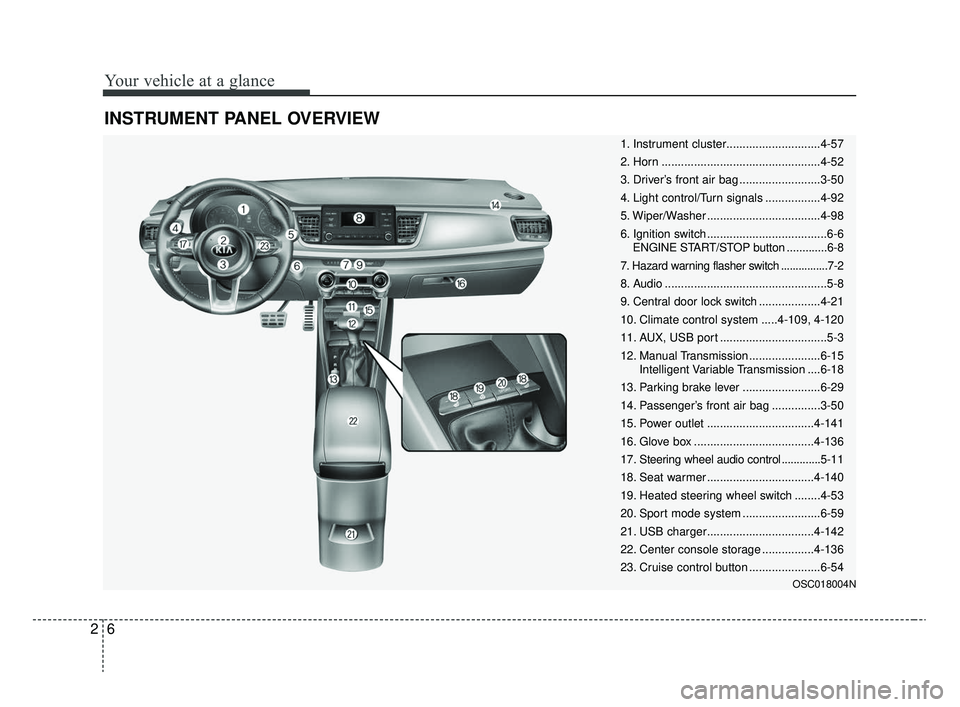
1. Instrument cluster.............................4-57
2. Horn .................................................4-52
3. Driver’s front air bag .........................3-50
4. Light control/Turn signals .................4-92
5. Wiper/Washer ...................................4-98
6. Ignition switch .....................................6-6ENGINE START/STOP button .............6-8
7. Hazard warning flasher switch ................7-2
8. Audio ..................................................5-8
9. Central door lock switch ...................4-21
10. Climate control system .....4-109, 4-120
11. AUX, USB port .................................5-3
12. Manual Transmission ......................6-15 Intelligent Variable Transmission ....6-18
13. Parking brake lever ........................6-29
14. Passenger’s front air bag ...............3-50
15. Power outlet .................................4-141
16. Glove box .....................................4-136
17. Steering wheel audio control ............. 5-11
18. Seat warmer .................................4-140
19. Heated steering wheel switch ........4-53
20. Sport mode system ........................6-59
21. USB charger.................................4-142
22. Center console storage ................4-136
23. Cruise control button ......................6-54
SC CAN (ENG) 2.qxp 8/2/2019 2:55 PM Page 6
Page 222 of 516
Features of your vehicle
142
4
Close the cover when not in use.
Some electronic devices can cause
electronic interference when plugged
into a vehicle’s power outlet. These
devices may cause excessive audio
static and malfunctions in other elec-
tronic systems or devices used in
your vehicle.
Using electrical products which
exceed the limited capacity might
cause heating to the power outlet
and wiring that could lead to an elec-
trical breakdown. Always make sure
the electrical part is firmly plugged
into the power outlet. Incomplete
plugging may cause electrical break-
down.
Electrical products with a built-in bat-
tery might cause current flow, which
could lead to malfunction of the elec-
tric/electronic device in your vehicle.
Only use electrical products which
include reverse current preventionUSB charger (if equipped)
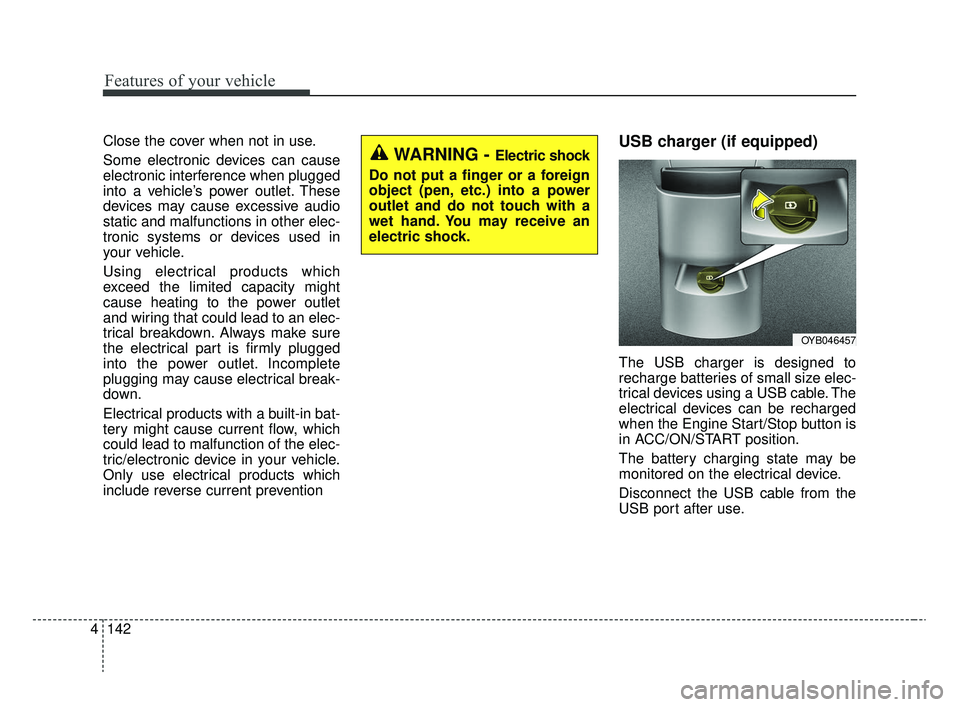
The USB charger is designed to
recharge batteries of small size elec-
trical devices using a USB cable. The
electrical devices can be recharged
when the Engine Start/Stop button is
in ACC/ON/START position.
The battery charging state may be
monitored on the electrical device.
Disconnect the USB cable from the
USB port after use.
OYB046457
WARNING - Electric shock
Do not put a finger or a foreign
object (pen, etc.) into a power
outlet and do not touch with a
wet hand. You may receive an
electric shock.
SC CAN (ENG) 4.QXP 12/12/2019 5:15 PM Page 142
Page 223 of 516
4143
Features of your vehicle
Some devices are not supportedfor fast charging but will be
charged with normal speed.
Use the USB charger when the engine is running to prevent bat-
tery discharge.
Only devices that fit the USB port can be used.
The USB charger can be used only for battery charging purposes.
Battery chargers cannot be charged.Clothes hanger (if equipped)
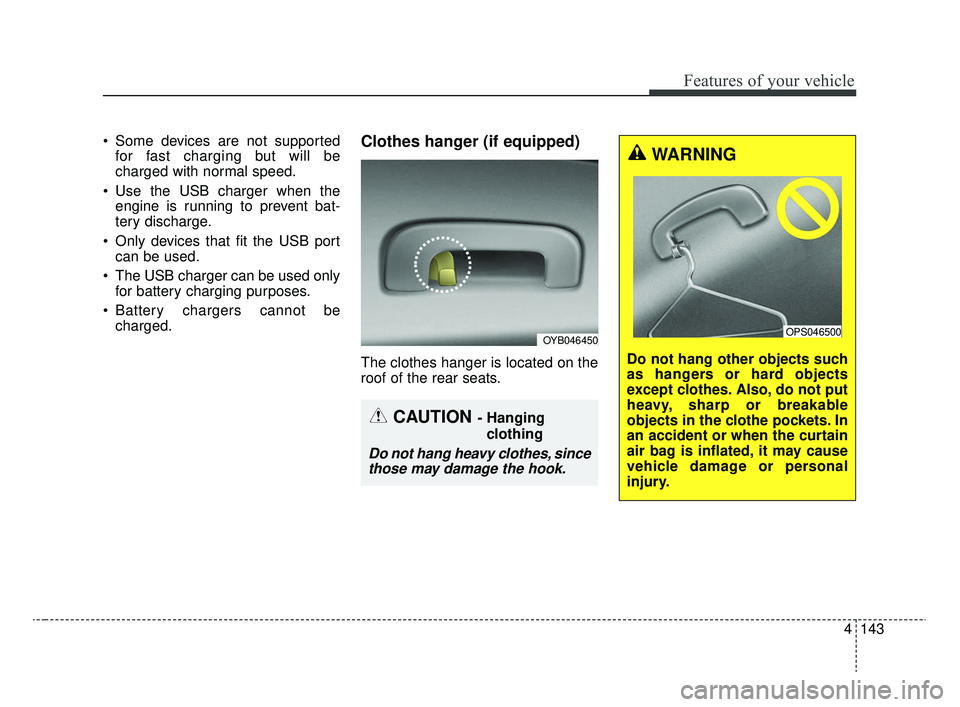
The clothes hanger is located on the
roof of the rear seats.
OYB046450
CAUTION - Hanging
clothing
Do not hang heavy clothes, sincethose may damage the hook.
WARNING
Do not hang other objects such
as hangers or hard objects
except clothes. Also, do not put
heavy, sharp or breakable
objects in the clothe pockets. In
an accident or when the curtain
air bag is inflated, it may cause
vehicle damage or personal
injury.
OPS046500
SC CAN (ENG) 4.QXP 12/12/2019 5:16 PM Page 143
Page 226 of 516

Audio system
Audio system . . . . . . . . . . . . . . . . . . . . . . . . . . . . . . . 5-2
• Antenna . . . . . . . . . . . . . . . . . . . . . . . . . . . . . . . . . . . . \
. 5-2
• AUX, USB port . . . . . . . . . . . . . . . . . . . . . . . . . . . . . . . 5-3
• How vehicle audio works . . . . . . . . . . . . . . . . . . . . . . . 5-3
Audio (with touch screen) . . . . . . . . . . . . . . . . . . . . 5-8
• Feature of your audio . . . . . . . . . . . . . . . . . . . . . . . . . . 5-9
• Radio . . . . . . . . . . . . . . . . . . . . . . . . . . . . . . . . . . . . \
. . . 5-15
• SiriusXM . . . . . . . . . . . . . . . . . . . . . . . . . . . . . . . . . . . 5-\
18
• Media . . . . . . . . . . . . . . . . . . . . . . . . . . . . . . . . . . . . \
. . 5-20
• Phone . . . . . . . . . . . . . . . . . . . . . . . . . . . . . . . . . . . . \
. . 5-30
• Setup . . . . . . . . . . . . . . . . . . . . . . . . . . . . . . . . . . . . \
. . . 5-39
Declaration of conformity . . . . . . . . . . . . . . . . . . . 5-42
• IC . . . . . . . . . . . . . . . . . . . . . . . . . . . . . . . . . . . . \
. . . . . 5-42
5
SC CAN (ENG) 5(audio).qxp 6/7/2019 9:52 AM Page 1
Page 228 of 516
Audio system
35
AUX, USB port (if equipped)
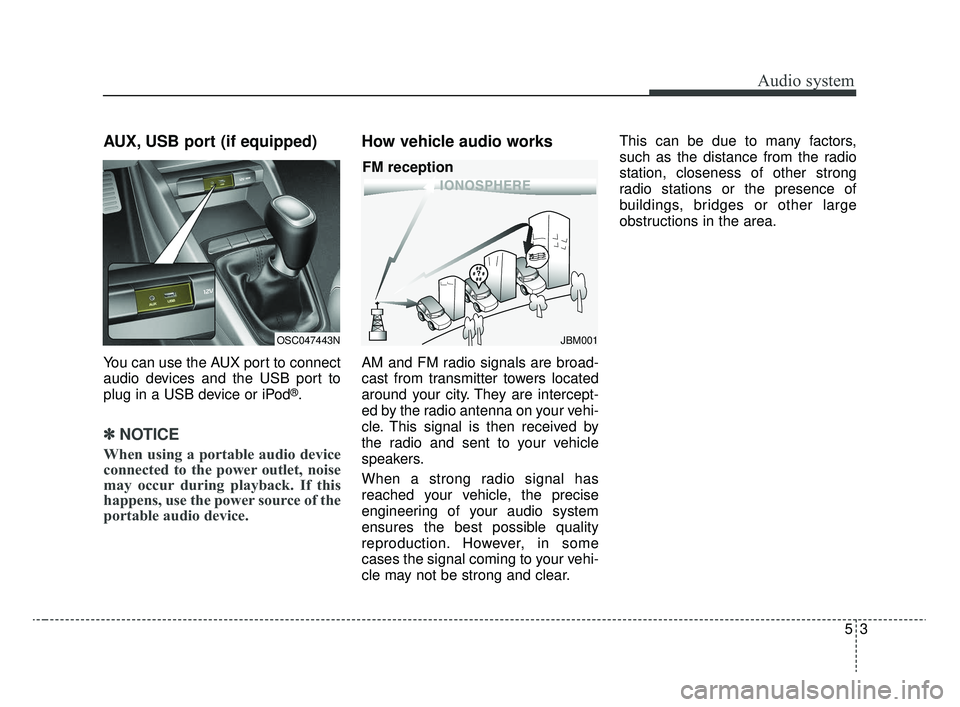
You can use the AUX port to connect
audio devices and the USB port to
plug in a USB device or iPod
®.
✽ ✽NOTICE
When using a portable audio device
connected to the power outlet, noise
may occur during playback. If this
happens, use the power source of the
portable audio device.
How vehicle audio works
AM and FM radio signals are broad-
cast from transmitter towers located
around your city. They are intercept-
ed by the radio antenna on your vehi-
cle. This signal is then received by
the radio and sent to your vehicle
speakers.
When a strong radio signal has
reached your vehicle, the precise
engineering of your audio system
ensures the best possible quality
reproduction. However, in some
cases the signal coming to your vehi-
cle may not be strong and clear. This can be due to many factors,
such as the distance from the radio
station, closeness of other strong
radio stations or the presence of
buildings, bridges or other large
obstructions in the area.
OSC047443NJBM001
FM reception
SC CAN (ENG) 5(audio).qxp 6/7/2019 9:52 AM Page 3
Page 245 of 516
Audio system
520
Media
MP3
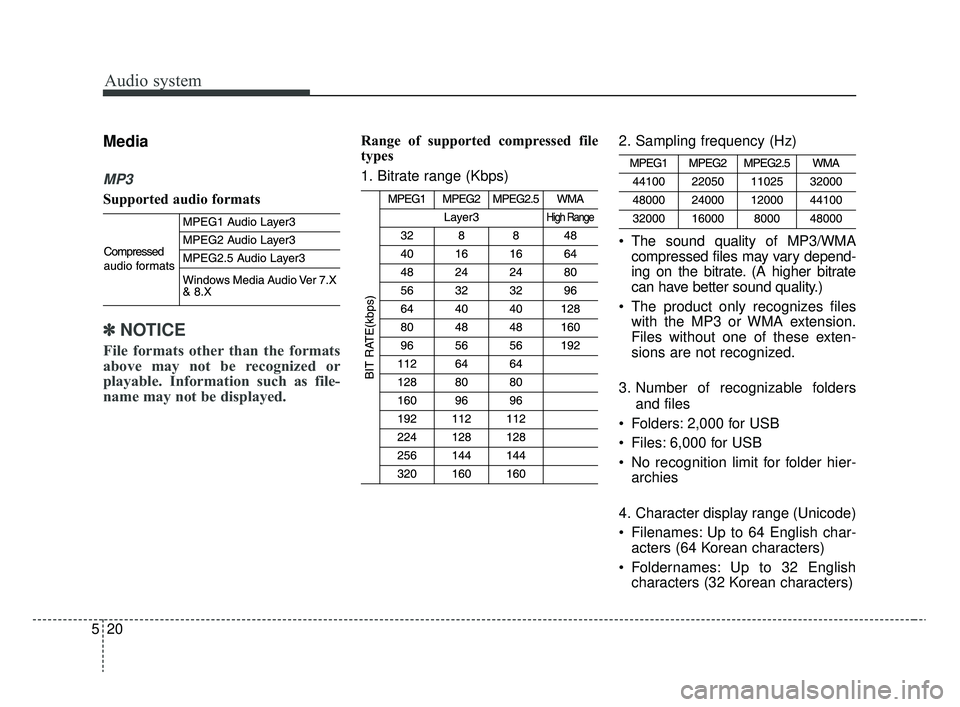
Supported audio formats
✽ ✽NOTICE
File formats other than the formats
above may not be recognized or
playable. Information such as file-
name may not be displayed.
Range of supported compressed file
types
1. Bitrate range (Kbps) 2. Sampling frequency (Hz)
The sound quality of MP3/WMA
compressed files may vary depend-
ing on the bitrate. (A higher bitrate
can have better sound quality.)
The product only recognizes files with the MP3 or WMA extension.
Files without one of these exten-
sions are not recognized.
3. Number of recognizable folders and files
Folders: 2,000 for USB
Files: 6,000 for USB
No recognition limit for folder hier- archies
4. Character display range (Unicode)
Filenames: Up to 64 English char- acters (64 Korean characters)
Foldernames: Up to 32 English characters (32 Korean characters)
SC CAN (ENG) 5(audio).qxp 6/7/2019 9:52 AM Page 20
Page 246 of 516
Audio system
21
5
Languages supported (Unicode support)
Korean: 2,604 characters
English: 94 characters
Common Chinese characters: 4,888
characters
Special symbols: 986 characters
✽ ✽ NOTICE
Japanese/Simplified Chinese char-
acters are not supported.
✽ ✽NOTICE - Using the USB
Devices
• Starting the vehicle while a USB
device is connected can damage
the device. Please disconnect USB
devices before starting the vehicle.
• Starting the vehicle or stopping the engine while an external USB
device is connected can result in
failure of the external USB device
to operate.
• Be cautious of static electricity when connecting/disconnecting
external USB devices.
• An encrypted MP3 player is not recognized when connected as an
external device.
• External USB devices may not be recognized, depending on the state
of the external USB device.
• Only products with byte/sectors formatted at 4 KB or lower are
recognized.
• Only USB devices in FAT12/16/32 format are recognized; NTFS and
ExFAT file systems are not recog-
nized.
• Some USB devices are not recog- nized due to compatibility issues. (Continued)(Continued)
• Do not touch the USB connections.
• Connecting and disconnecting
USB devices rapidly over a short
period of time can cause equip-
ment failure.
• Abnormal sounds may be audible when the USB device is discon-
nected.
• Turn the audio off before connect- ing or disconnecting external USB
devices.
• Recognition may take longer depending on the type, capacity or
file format of the external USB
device.
• Image display and video playback are not supported.
• Use of USB accessories, including charge and heat though the USB
I/F, can lead to reduced product
performance or malfunctions. Do
not use USB devices or accessories
for these purposes. (Continued)
SC CAN (ENG) 5(audio).qxp 6/7/2019 9:52 AM Page 21
Page 247 of 516
Audio system
522
(Continued)
• Use of aftermarket USB hubs andextension cables can result in the
vehicle’s audio system failing to
recognize your USB device.
Connect the USB device directly to
the USB port of your vehicle.
• When using high-capacity USB devices with logical drive divi-
sions, only files saved on the high-
est level logical drive can be
played.
If applications are loaded on a
USB drive, file playback may fail.
• Some MP3 players, cell phones, digital cameras, etc. (USB devices
that are not recognized as mobile
storage) may not operate normally
when connected.
• USB charging may not be sup- ported by some mobile devices.
• Operation is guaranteed only for standard (Metal Cover Type) USB
Memory drives.
• Operation of HDD, CF, SD and memory stick devices is not guar-
anteed. (Continued)(Continued)
• DRM (Digital Rights Management)
files cannot be played.
• SD-type USB memory, CF-type USB memory, and other USB
memory devices that require
adapters for connection are not
supported.
• Proper operation of USB HDDs or USB drives with connectors that
loosen due to vehicle vibrations is
not guaranteed. (iStick, etc.)
• USB products that are used as key chains or
cell phone accessories
may damage the USB
jack and affect proper
file playback. Please refrain from
use. Use only products with plug
connectors, as shown in the follow-
ing illustration.
• When MP3 devices or cell phones are connected simultaneously
through AUX, BT Audio and USB
modes, a popping noise or mal-
function may occur.
SC CAN (ENG) 5(audio).qxp 6/7/2019 9:52 AM Page 22
Page 248 of 516
Audio system
23
5
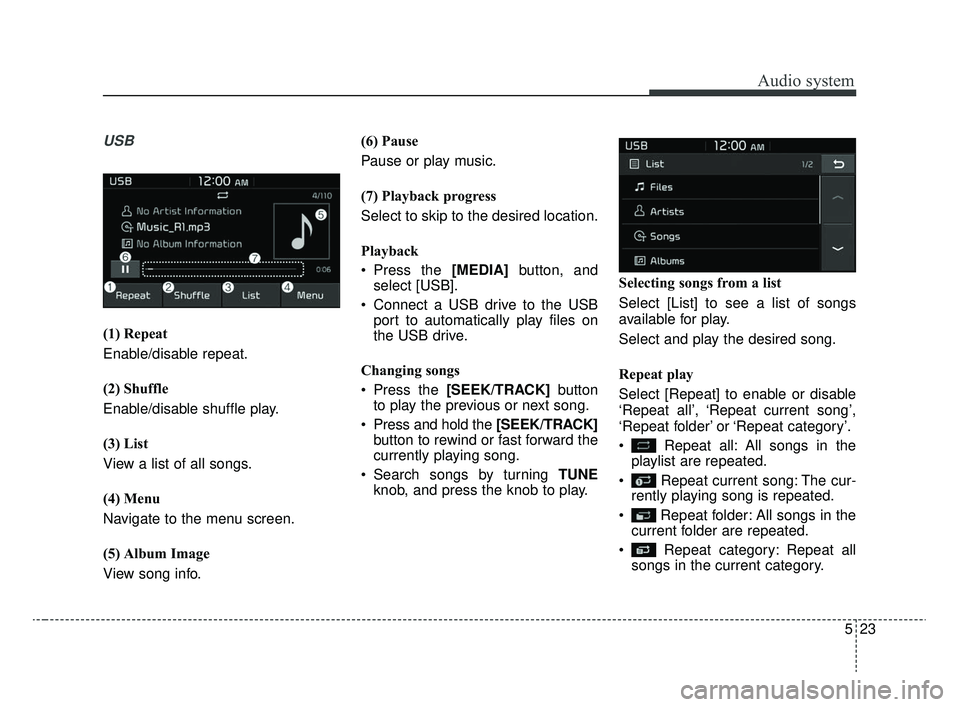
USB
(1) Repeat
Enable/disable repeat.
(2) Shuffle
Enable/disable shuffle play.
(3) List
View a list of all songs.
(4) Menu
Navigate to the menu screen.
(5) Album Image
View song info. (6) Pause
Pause or play music.
(7) Playback progress
Select to skip to the desired location.
Playback
Press the [MEDIA]
button, and
select [USB].
Connect a USB drive to the USB port to automatically play files on
the USB drive.
Changing songs
Press the [SEEK/TRACK] button
to play the previous or next song.
Press and hold the [SEEK/TRACK] button to rewind or fast forward the
currently playing song.
Search songs by turning TUNE knob, and press the knob to play. Selecting songs from a list
Select [List] to see a list of songs
available for play.
Select and play the desired song.
Repeat play
Select [Repeat] to enable or disable
‘Repeat all’, ‘Repeat current song’,
‘Repeat folder’ or ‘Repeat category’.
Repeat all: All songs in the
playlist are repeated.
Repeat current song: The cur- rently playing song is repeated.
Repeat folder: All songs in the current folder are repeated.
Repeat category: Repeat all songs in the current category.
SC CAN (ENG) 5(audio).qxp 6/7/2019 9:52 AM Page 23
Page 249 of 516
![KIA RIO 2020 Owners Manual Audio system
524
✽ ✽NOTICE
The repeat folder function is avail-
able only when songs are playing
from the [File] category under
[List].
Shuffle play
Select [Shuffle] to enable/disable
‘Shuffleâ€](/img/2/40413/w960_40413-248.png "KIA RIO 2020 Owners Manual Audio system
524
✽ ✽NOTICE
The repeat folder function is avail-
able only when songs are playing
from the [File] category under
[List].
Shuffle play
Select [Shuffle] to enable/disable
‘Shuffleâ€")
Audio system
524
✽ ✽NOTICE
The repeat folder function is avail-
able only when songs are playing
from the [File] category under
[List].
Shuffle play
Select [Shuffle] to enable/disable
‘Shuffle’, ‘Shuffle folder’ or ‘Shuffle
category’ play.
Shuffle: Songs are played in
random order.
Shuffle folder: Songs within the current folder are played in ran-
dom order.
Shuffle category: Songs within the current category are played in
random order.
Menu
Select [Menu], and select the desired
function.
Information: Detailed information on the currently playing song is dis-
played.
Sound Settings: Audio sound set- tings can be changed.
✽ ✽ NOTICE - Using the iPod®
Devices
• To use the audio system’s iPod®
control function, use the dedicated
cable provided with your iPod®.
• Connecting the iPod®to the vehi-
cle during play may result in a
loud noise that lasts about one to
two seconds. Connect the iPod
®to
the vehicle after stopping or paus-
ing play.
• Connect the iPod
®with the vehicle
in the ACC ON state to begin
charging.
• When connecting the iPod
®cable,
be sure to fully push the cable into
the port.
• When EQ effects are enabled simultaneously on external
devices, such as iPod
®s and the
audio system, the EQ effects may
overlap, causing sound quality
deterioration or distortion.
Deactivate the EQ function for all
external devices, if possible.
• Noise may occur when your iPod
®
or the AUX port is connected.
Disconnect and store separately
when not in use. (Continued)(Continued)
• There may be noise if the audio
system is used with an iPod
®or
AUX external device connected to
the power jack. In these cases, dis-
connect the iPod
®or external
device from the power jack.
• Play may be interrupted, or device malfunctions may occur depend-
ing on the characteristics of your
iPod
®/iPhone®.
• Play may fail if your iPhone®is
connected through both Bluetooth®
Wireless Technology and USB. In
this case, select Dock connector or
Bluetooth
®Wireless Technology
on your iPhone®to change the
sound output settings.
• If your software version does not support the communication proto-
col or your iPod
®is not recognized
due to device failure, anomalies or
defects, iPod
®mode cannot be
used. (Continued)
SC CAN (ENG) 5(audio).qxp 6/7/2019 9:52 AM Page 24