light KIA RIO 2021 Owner's Manual
[x] Cancel search | Manufacturer: KIA, Model Year: 2021, Model line: RIO, Model: KIA RIO 2021Pages: 534, PDF Size: 13.49 MB
Page 88 of 534
47
Features of your vehicle
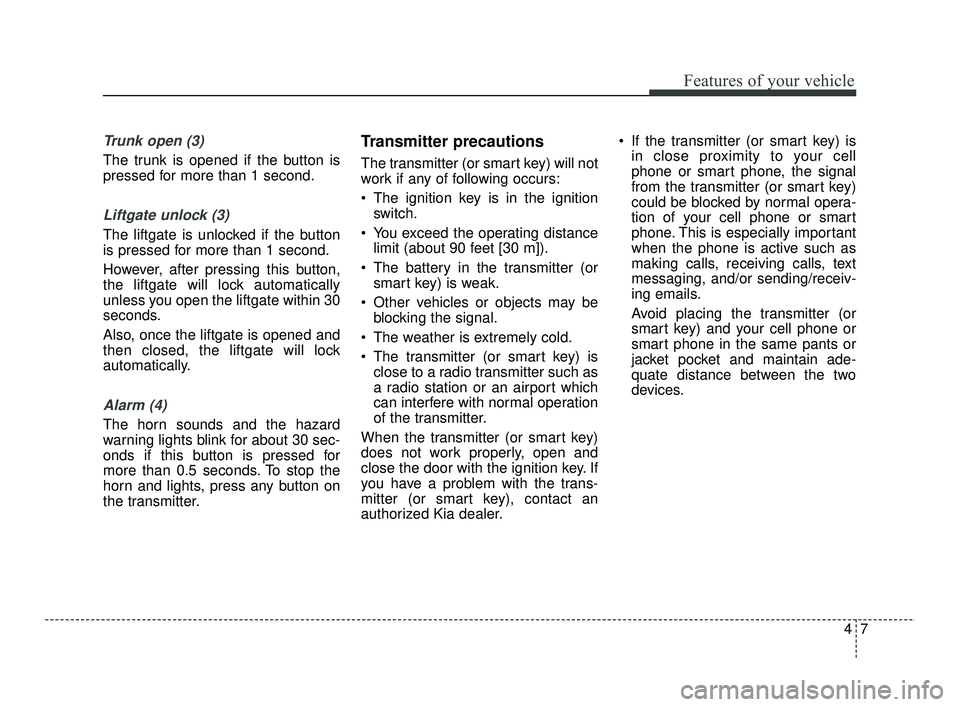
Trunk open (3)
The trunk is opened if the button is
pressed for more than 1 second.
Liftgate unlock (3)
The liftgate is unlocked if the button
is pressed for more than 1 second.
However, after pressing this button,
the liftgate will lock automatically
unless you open the liftgate within 30
seconds.
Also, once the liftgate is opened and
then closed, the liftgate will lock
automatically.
Alarm (4)
The horn sounds and the hazard
warning lights blink for about 30 sec-
onds if this button is pressed for
more than 0.5 seconds. To stop the
horn and lights, press any button on
the transmitter.
Transmitter precautions
The transmitter (or smart key) will not
work if any of following occurs:
The ignition key is in the ignitionswitch.
You exceed the operating distance limit (about 90 feet [30 m]).
The battery in the transmitter (or smart key) is weak.
Other vehicles or objects may be blocking the signal.
The weather is extremely cold.
The transmitter (or smart key) is close to a radio transmitter such as
a radio station or an airport which
can interfere with normal operation
of the transmitter.
When the transmitter (or smart key)
does not work properly, open and
close the door with the ignition key. If
you have a problem with the trans-
mitter (or smart key), contact an
authorized Kia dealer. If the transmitter (or smart key) is
in close proximity to your cell
phone or smart phone, the signal
from the transmitter (or smart key)
could be blocked by normal opera-
tion of your cell phone or smart
phone. This is especially important
when the phone is active such as
making calls, receiving calls, text
messaging, and/or sending/receiv-
ing emails.
Avoid placing the transmitter (or
smart key) and your cell phone or
smart phone in the same pants or
jacket pocket and maintain ade-
quate distance between the two
devices.
SC PE USA 4.QXP 10/23/2020 5:39 PM Page 7
Page 90 of 534
49
Features of your vehicle
Folding key
1. Insert a slim tool into the slot andgently pry open the transmitter
cover.
2. Using a slim tool, gently pry open the battery cover (Type B).
3. Replace the battery with a new battery (CR2032). When replacing
the battery, make sure the battery
position is correct.
4. Install the battery in the reverse order of removal.
Smart key
1. Remove the mechanical key.
2. Insert a slim tool into the slot andgently pry open the rear cover.
3. Replace the battery with a new battery (CR2032). When replacing
the battery, make sure the battery
position is correct.
4. Install the battery in the reverse order of removal. The transmitter is designed to give
you years of trouble-free use, how-
ever it can malfunction if exposed
to moisture or static electricity. If
you are unsure how to use or
replace the battery, contact an
authorized Kia dealer.
Using the wrong battery can cause the transmitter to malfunction. Be
sure to use the correct battery.
An inappropriately dis- posed battery can be harm-
ful to the environment and
human health. Dispose the
battery according to your
local law(s) or regulation.
Immobilizer system
Your vehicle may be equipped with
an electronic engine immobilizer sys-
tem to reduce the risk of unautho-
rized vehicle use.
Your immobilizer system is com-
prised of a small transponder in the
ignition key and electronic devices
inside the vehicle.
With the immobilizer system, when-
ever you insert your ignition key into
the ignition switch and turn it to ON,
it checks and determines and verifies
that the ignition key is valid.
If the key is determined to be valid,
the engine will start.
If the key is determined to be invalid,
the engine will not start.
CAUTION- Transmitter
damage
The transmitter can malfunctionif dropped, exposed to moisture,static electricity, heat or directsunlight.
SC PE USA 4.QXP 10/23/2020 5:40 PM Page 9
Page 92 of 534
411
Features of your vehicle
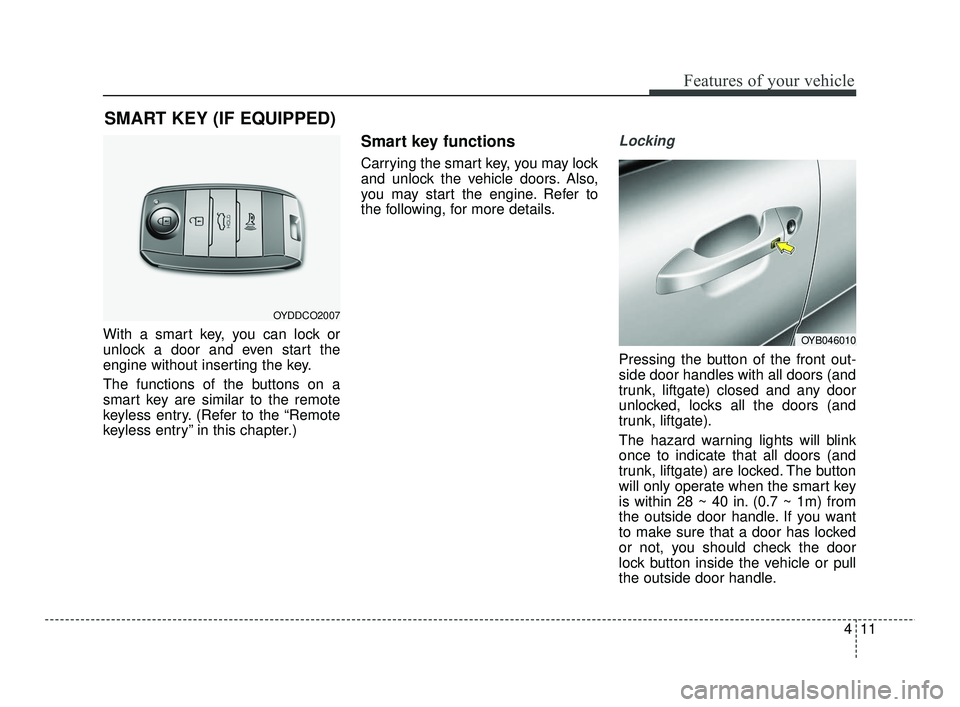
With a smart key, you can lock or
unlock a door and even start the
engine without inserting the key.
The functions of the buttons on a
smart key are similar to the remote
keyless entry. (Refer to the “Remote
keyless entry” in this chapter.)
Smart key functions
Carrying the smart key, you may lock
and unlock the vehicle doors. Also,
you may start the engine. Refer to
the following, for more details.
Locking
Pressing the button of the front out-
side door handles with all doors (and
trunk, liftgate) closed and any door
unlocked, locks all the doors (and
trunk, liftgate).
The hazard warning lights will blink
once to indicate that all doors (and
trunk, liftgate) are locked. The button
will only operate when the smart key
is within 28 ~ 40 in. (0.7 ~ 1m) from
the outside door handle. If you want
to make sure that a door has locked
or not, you should check the door
lock button inside the vehicle or pull
the outside door handle.
SMART KEY (IF EQUIPPED)
OYDDCO2007
OYB046010
SC PE USA 4.QXP 10/23/2020 5:40 PM Page 11
Page 93 of 534
Features of your vehicle
12
4
Even though you press the button,
the doors will not lock and the chime
will sound for 3 seconds if any of the
following occurs:
The smart key is in the vehicle.
The ENGINE START/STOP button
is in the ACC or ON position.
Any door except the trunk (liftgate) is open.Unlocking
Pressing the button of the driver's (or
front passenger’s) outside door han-
dle with all doors closed and locked,
unlocks the driver's door.
The hazard warning lights will blink
twice to indicate that the driver's door
is unlocked.
The button will only operate when
the smart key is within 28 ~ 40 in.
(0.7 ~ 1 m) from the outside door
handle.
When Two press unlock function is
activated,
- If you press the driver's outsidedoor handle button, the driver's
door will unlock.
- If you press the driver's outside door handle button within four sec-
onds again, then all the doors and
trunk will unlock.
Trunk (Liftgate) unlocking
If you are within 28 ~ 40 in (0.7 ~ 1 m)
from the outside trunk (liftgate) han-
dle, with your smart key in posses-
sion, the trunk (liftgate) will unlock
and open when you press the trunk
(liftgate) handle switch.
The hazard warning lights will blink
twice to indicate that the trunk (lift-
gate) is unlocked.
Also, once the trunk (liftgate) is
opened and then closed, the trunk
(liftgate) will lock automatically.
SC PE USA 4.QXP 10/23/2020 5:40 PM Page 12
Page 96 of 534
415
Features of your vehicle
This system is designed to provide
protection from unauthorized entry
into the vehicle. This system is operat-
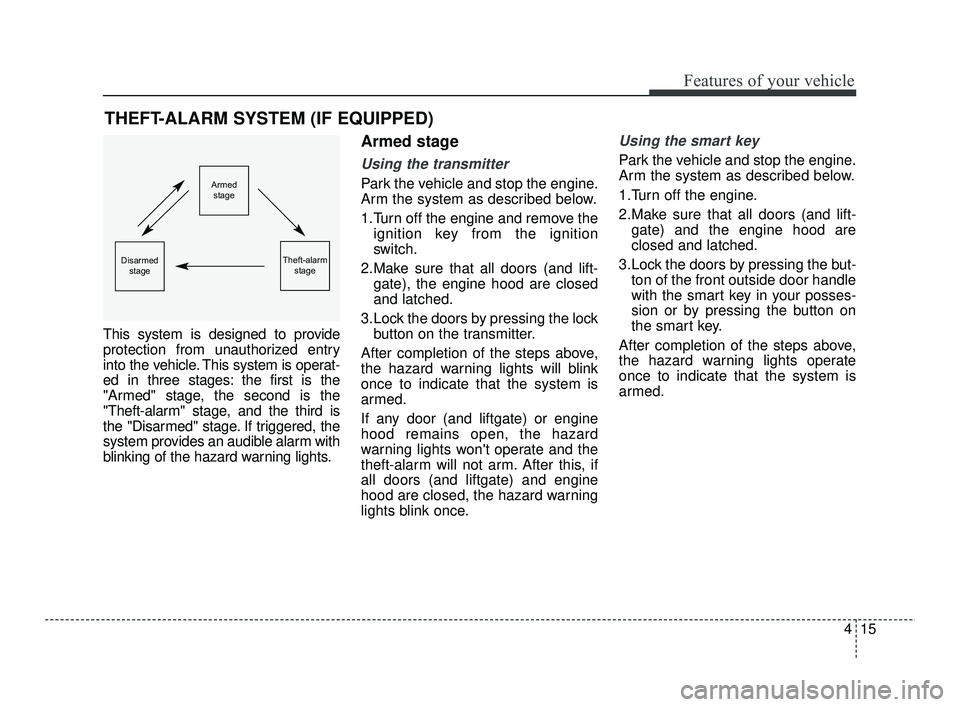
ed in three stages: the first is the
"Armed" stage, the second is the
"Theft-alarm" stage, and the third is
the "Disarmed" stage. If triggered, the
system provides an audible alarm with
blinking of the hazard warning lights.
Armed stage
Using the transmitter
Park the vehicle and stop the engine.
Arm the system as described below.
1.Turn off the engine and remove theignition key from the ignition
switch.
2.Make sure that all doors (and lift- gate), the engine hood are closed
and latched.
3.Lock the doors by pressing the lock button on the transmitter.
After completion of the steps above,
the hazard warning lights will blink
once to indicate that the system is
armed.
If any door (and liftgate) or engine
hood remains open, the hazard
warning lights won't operate and the
theft-alarm will not arm. After this, if
all doors (and liftgate) and engine
hood are closed, the hazard warning
lights blink once.
Using the smart key
Park the vehicle and stop the engine.
Arm the system as described below.
1.Turn off the engine.
2.Make sure that all doors (and lift- gate) and the engine hood are
closed and latched.
3.Lock the doors by pressing the but- ton of the front outside door handle
with the smart key in your posses-
sion or by pressing the button on
the smart key.
After completion of the steps above,
the hazard warning lights operate
once to indicate that the system is
armed.
THEFT-ALARM SYSTEM (IF EQUIPPED)
Armed stage
Theft-alarm stageDisarmedstage
SC PE USA 4.QXP 10/23/2020 5:40 PM Page 15
Page 97 of 534
Features of your vehicle
16
4
If any door remains open, the doors
won't lock and the chime will sound
for 3 seconds. Close the door and try
again to lock the doors.
If liftgate or engine hood remains
open, the hazard warning lights
won't operate and theft-alarm will not
arm. After this, if the liftgate and
engine hood are closed, the hazard
warning lights will blink once and the
theft-alarm will arm. Do not arm the system until all
passengers have left the vehicle. If
the system is armed while a pas-
senger(s) remains in the vehicle,
the alarm may be activated when
the remaining passenger(s) leave
the vehicle. If any door, liftgate or
engine hood is opened within 30
seconds after entering the armed
stage, the system is disarmed to
prevent unnecessary alarm.Theft-alarm stage
The alarm will be activated if any of
the following occurs while the system
is armed.
A front or rear door is opened without
using the ignition key or transmitter
(or smart key).
The trunk/liftgate is opened without using the ignition key or transmitter
(or smart key).
The engine hood is opened.
The horn will sound and the hazard
warning lights will blink continuously for
approximately 27 seconds. To turn off
the system, unlock the doors with the
ignition key or transmitter (or smart
key).
SC PE USA 4.QXP 10/23/2020 5:40 PM Page 16
Page 98 of 534

417
Features of your vehicle
Disarmed stage
The system will be disarmed when:
Transmitter
- The door unlock button is pressed.
- The engine is started. (within 3seconds)
- The ignition switch is in the "ON" position for 30 seconds or more.
Smart key
- The door unlock button is pressed.
- The button of the front outside dooris pressed while carrying the smart
key.
- The engine is started. (within 3 seconds)
After the doors are unlocked, the haz-
ard warning lights will blink twice to
indicate that the system is disarmed.
After pressing the unlock button, if any
door (or trunk/liftgate) is not opened
within 30 seconds, the system will be
rearmed.
✽ ✽ NOTICE
• Avoid trying to start the engine
while the alarm is activated. The
vehicle starting motor is disabled
during the theft-alarm stage.
- If the system is not disarmedwith the transmitter, insert the
key into the ignition switch, turn
the ignition switch to the ON
position and wait for 30 seconds.
Then, the system will be dis-
armed.
- If the system is not disarmed with the smart key, press the
ENGINE START/STOP button
with the smart key. The side with
the lock button should contact
the ENGINE START/STOP but-
ton directly.
• If you lose your keys, consult your authorized Kia dealer.
✽ ✽
NOTICE
Malfunctions caused by improper
alterations, adjustments or modifi-
cations to the theft-alarm system are
not covered by your vehicle manu-
facturer warranty.
CAUTION - Adjusting
alarm system
Do not change, alter or adjust
the theft-alarm system becauseit could cause the theft-alarmsystem to malfunction andshould only be serviced by anauthorized Kia dealer.
SC PE USA 4.QXP 10/23/2020 5:40 PM Page 17
Page 107 of 534
Features of your vehicle
26
4
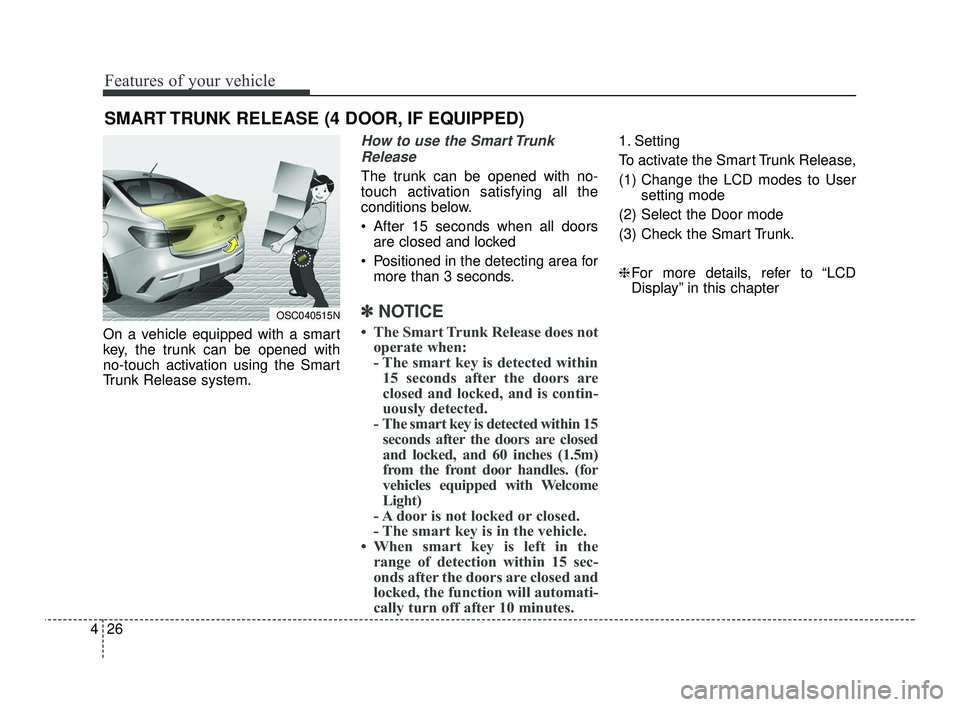
On a vehicle equipped with a smart
key, the trunk can be opened with
no-touch activation using the Smart
Trunk Release system.
How to use the Smart Trunk
Release
The trunk can be opened with no-
touch activation satisfying all the
conditions below.
After 15 seconds when all doors are closed and locked
Positioned in the detecting area for more than 3 seconds.
✽ ✽ NOTICE
• The Smart Trunk Release does not
operate when:
- The smart key is detected within15 seconds after the doors are
closed and locked, and is contin-
uously detected.
- The smart key is detected within 15 seconds after the doors are closed
and locked, and 60 inches (1.5m)
from the front door handles. (for
vehicles equipped with Welcome
Light)
- A door is not locked or closed.
- The smart key is in the vehicle.
• When smart key is left in the range of detection within 15 sec-
onds after the doors are closed and
locked, the function will automati-
cally turn off after 10 minutes.
1. Setting
To activate the Smart Trunk Release,
(1) Change the LCD modes to User
setting mode
(2) Select the Door mode
(3) Check the Smart Trunk.
❈ For more details, refer to “LCD
Display” in this chapter
SMART TRUNK RELEASE (4 DOOR, IF EQUIPPED)
OSC040515N
SC PE USA 4.QXP 10/23/2020 5:40 PM Page 26
Page 108 of 534
427
Features of your vehicle
2. Detect and Alert
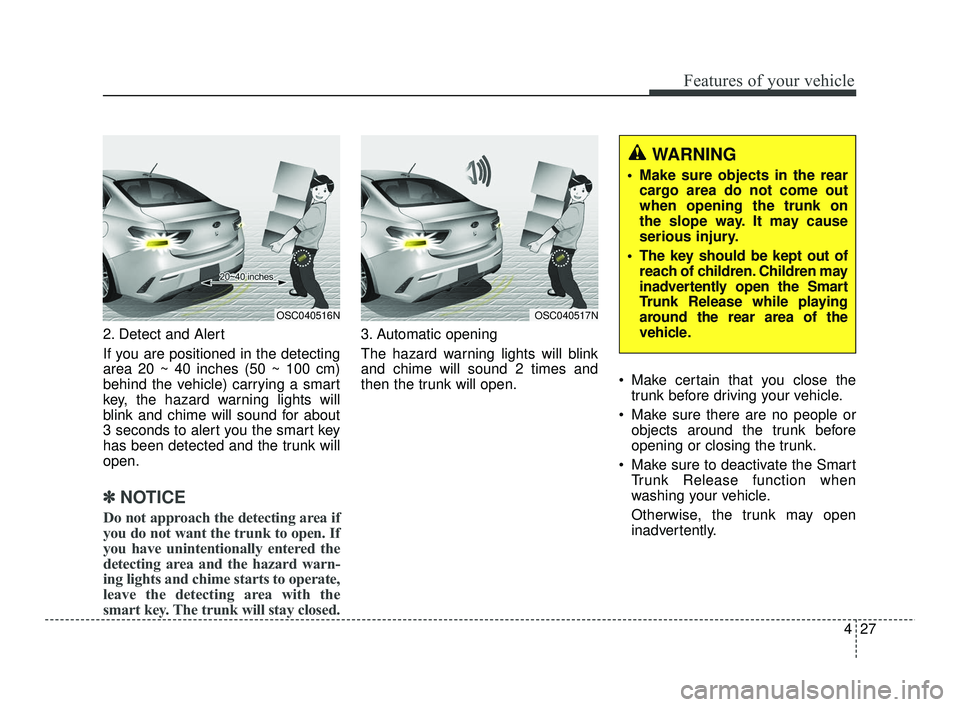
If you are positioned in the detecting
area 20 ~ 40 inches (50 ~ 100 cm)
behind the vehicle) carrying a smart
key, the hazard warning lights will
blink and chime will sound for about
3 seconds to alert you the smart key
has been detected and the trunk will
open.
✽ ✽NOTICE
Do not approach the detecting area if
you do not want the trunk to open. If
you have unintentionally entered the
detecting area and the hazard warn-
ing lights and chime starts to operate,
leave the detecting area with the
smart key. The trunk will stay closed.
3. Automatic opening
The hazard warning lights will blink
and chime will sound 2 times and
then the trunk will open. Make certain that you close the
trunk before driving your vehicle.
Make sure there are no people or objects around the trunk before
opening or closing the trunk.
Make sure to deactivate the Smart Trunk Release function when
washing your vehicle.
Otherwise, the trunk may open
inadvertently.
OSC040516NOSC040517N
WARNING
Make sure objects in the rearcargo area do not come out
when opening the trunk on
the slope way. It may cause
serious injury.
The key should be kept out of reach of children. Children may
inadvertently open the Smart
Trunk Release while playing
around the rear area of the
vehicle.
SC PE USA 4.QXP 10/23/2020 5:40 PM Page 27
Page 120 of 534
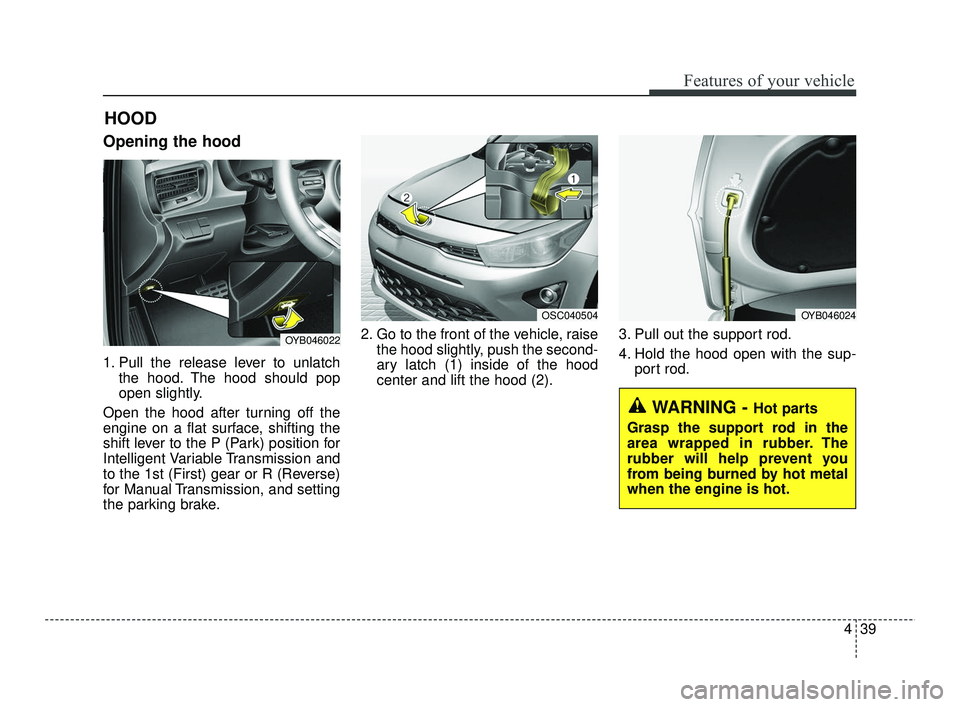
439
Features of your vehicle
Opening the hood
1. Pull the release lever to unlatchthe hood. The hood should pop
open slightly.
Open the hood after turning off the
engine on a flat surface, shifting the
shift lever to the P (Park) position for
Intelligent Variable Transmission and
to the 1st (First) gear or R (Reverse)
for Manual Transmission, and setting
the parking brake. 2. Go to the front of the vehicle, raise
the hood slightly, push the second-
ary latch (1) inside of the hood
center and lift the hood (2). 3. Pull out the support rod.
4. Hold the hood open with the sup-
port rod.
HOOD
OYB046022
OSC040504OYB046024
WARNING - Hot parts
Grasp the support rod in the
area wrapped in rubber. The
rubber will help prevent you
from being burned by hot metal
when the engine is hot.
SC PE USA 4.QXP 10/23/2020 5:41 PM Page 39