instrument panel KIA RIO 2022 User Guide
[x] Cancel search | Manufacturer: KIA, Model Year: 2022, Model line: RIO, Model: KIA RIO 2022Pages: 528, PDF Size: 11.8 MB
Page 125 of 528
Features of your vehicle
46
4
If the Electric Power Steering System
does not operate normally, the warn-
ing light will illuminate on the instru-
ment cluster. The steering wheel may
require increased steering effort.
Take your vehicle to an authorized
Kia dealer and have the vehicle
checked as soon as possible.Tilt steering (if equipped)
Tilt steering allows you to adjust the
steering wheel before you drive. You
can also raise it to give your legs
more room when you exit and enter
the vehicle.
The steering wheel should be posi-
tioned so that it is comfortable for
you to drive, while permitting you to
see the instrument panel warning
lights and gauges.
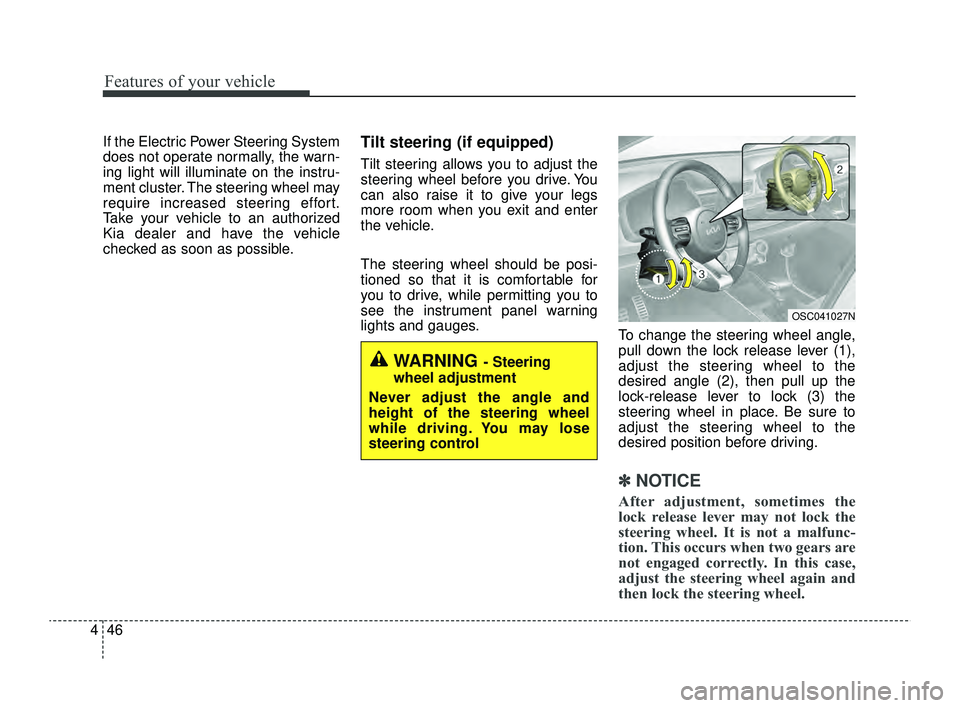
To change the steering wheel angle,
pull down the lock release lever (1),
adjust the steering wheel to the
desired angle (2), then pull up the
lock-release lever to lock (3) the
steering wheel in place. Be sure to
adjust the steering wheel to the
desired position before driving.
✽ ✽NOTICE
After adjustment, sometimes the
lock release lever may not lock the
steering wheel. It is not a malfunc-
tion. This occurs when two gears are
not engaged correctly. In this case,
adjust the steering wheel again and
then lock the steering wheel.
WARNING - Steering
wheel adjustment
Never adjust the angle and
height of the steering wheel
while driving. You may lose
steering control
OSC041027N
SC PE USA 4.QXP 9/9/2021 6:03 PM Page 46
Page 131 of 528
Features of your vehicle
52
4
Instrument Cluster Control
Adjusting Instrument Cluster
Illumination
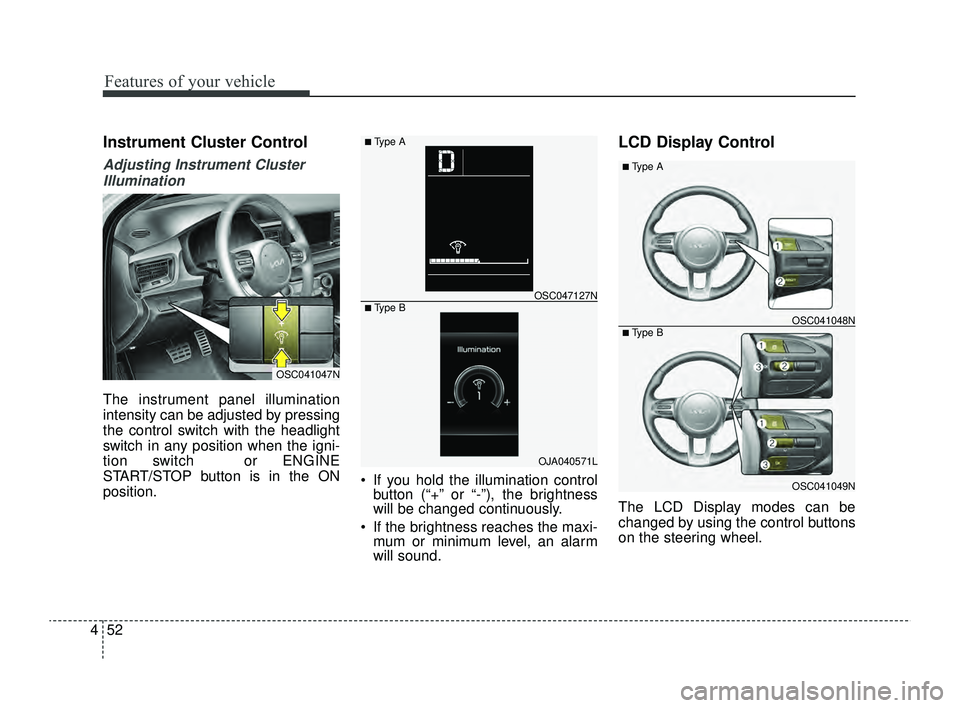
The instrument panel illumination
intensity can be adjusted by pressing
the control switch with the headlight
switch in any position when the igni-
tion switch or ENGINE
START/STOP button is in the ON
position. If you hold the illumination control
button (“+” or “-”), the brightness
will be changed continuously.
If the brightness reaches the maxi- mum or minimum level, an alarm
will sound.
LCD Display Control
The LCD Display modes can be
changed by using the control buttons
on the steering wheel.
OSC041047N
OJA040571L
OSC047127N
■ Type A
■ Type B
OSC041049N
OSC041048N
■ Type A
■ Type B
SC PE USA 4.QXP 9/9/2021 6:04 PM Page 52
Page 172 of 528
493
Features of your vehicle
Lighting control
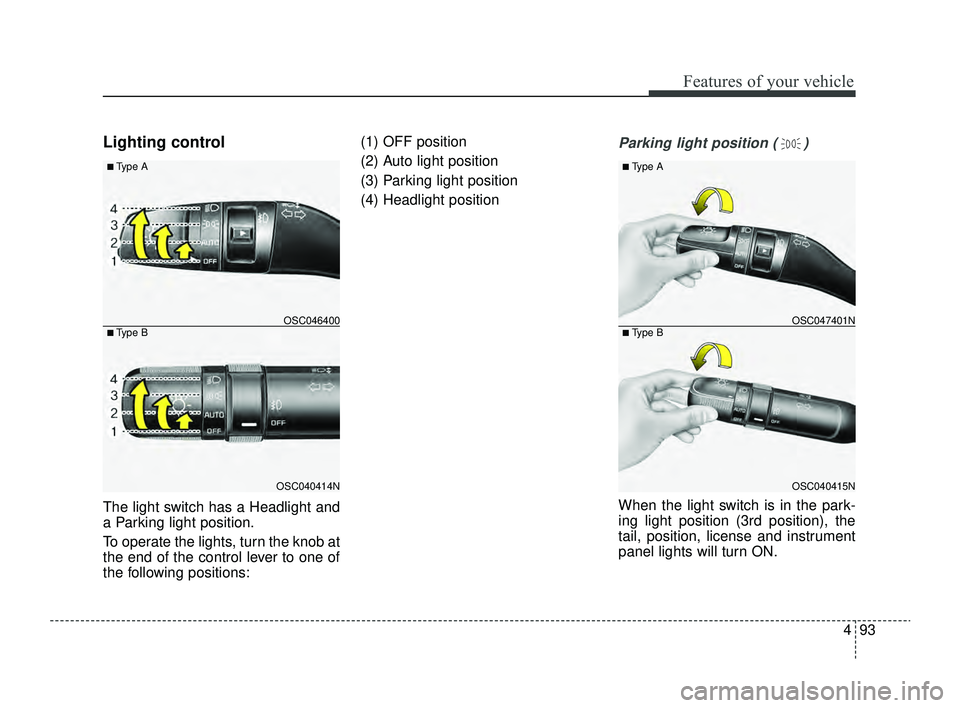
The light switch has a Headlight and
a Parking light position.
To operate the lights, turn the knob at
the end of the control lever to one of
the following positions:(1) OFF position
(2) Auto light position
(3) Parking light position
(4) Headlight position
Parking light position ( )
When the light switch is in the park-
ing light position (3rd position), the
tail, position, license and instrument
panel lights will turn ON.
OSC040414N
OSC046400
■ Type A
■ Type B
OSC040415N
OSC047401N
■ Type A
■ Type B
SC PE USA 4.QXP 9/9/2021 6:05 PM Page 93
Page 173 of 528
Features of your vehicle
94
4
CAUTION
Never place anything over the
sensor (1) located on the instru-ment panel. This will ensure bet-ter auto-light system control.
Do not clean the sensor using awindow cleaner, the cleaner mayleave a light film which couldinterfere with sensor operation.
If your vehicle has window tintor other types of metallic coat-ing on the front windshield, theAuto light system may not workproperly.
Headlight position ( )
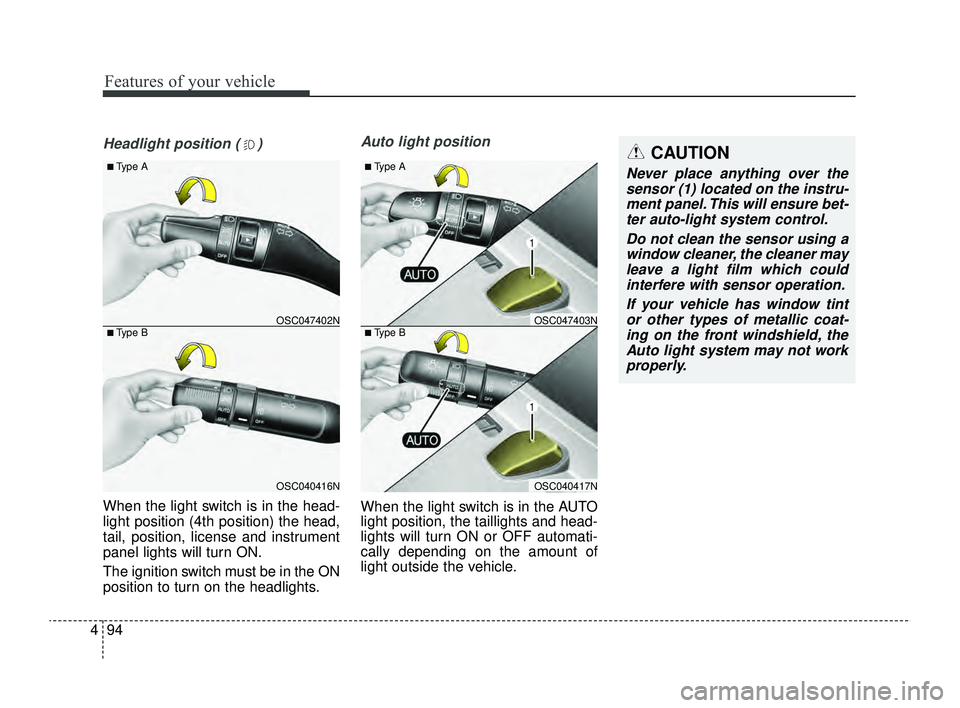
When the light switch is in the head-
light position (4th position) the head,
tail, position, license and instrument
panel lights will turn ON.
The ignition switch must be in the ON
position to turn on the headlights.
Auto light position
When the light switch is in the AUTO
light position, the taillights and head-
lights will turn ON or OFF automati-
cally depending on the amount of
light outside the vehicle.
OSC040416N
OSC047402N
■ Type A
■ Type B
OSC040417N
OSC047403N
■ Type A
■ Type B
SC PE USA 4.QXP 9/9/2021 6:05 PM Page 94
Page 176 of 528
497
Features of your vehicle
Turn signals and lane change
signals
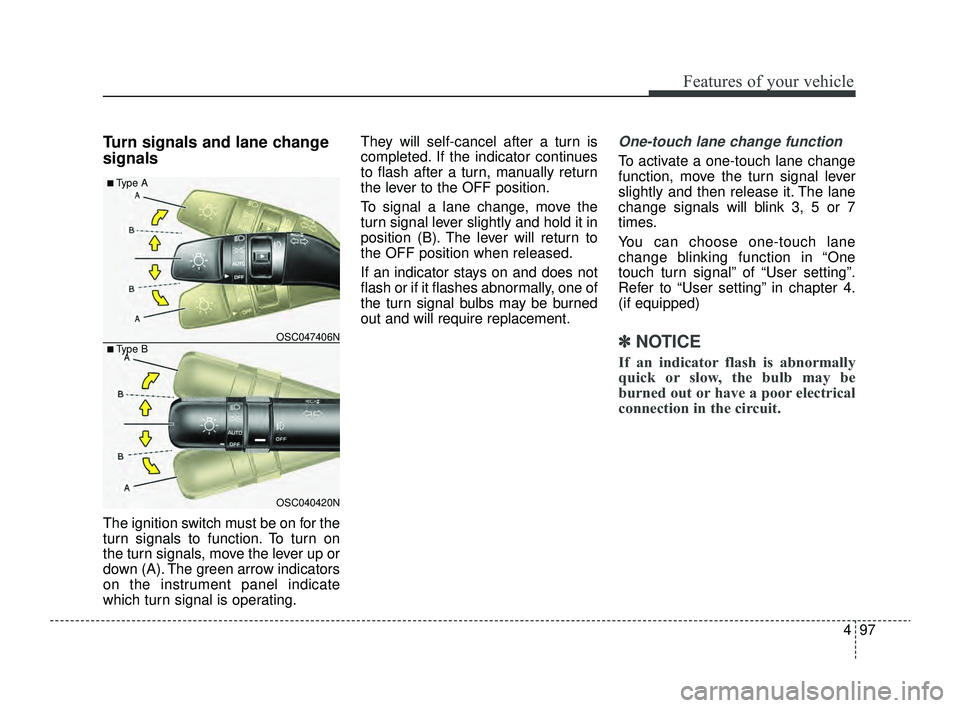
The ignition switch must be on for the
turn signals to function. To turn on
the turn signals, move the lever up or
down (A). The green arrow indicators
on the instrument panel indicate
which turn signal is operating.They will self-cancel after a turn is
completed. If the indicator continues
to flash after a turn, manually return
the lever to the OFF position.
To signal a lane change, move the
turn signal lever slightly and hold it in
position (B). The lever will return to
the OFF position when released.
If an indicator stays on and does not
flash or if it flashes abnormally, one of
the turn signal bulbs may be burned
out and will require replacement.
One-touch lane change function
To activate a one-touch lane change
function, move the turn signal lever
slightly and then release it. The lane
change signals will blink 3, 5 or 7
times.
You can choose one-touch lane
change blinking function in “One
touch turn signal” of “User setting”.
Refer to “User setting” in chapter 4.
(if equipped)
✽ ✽
NOTICE
If an indicator flash is abnormally
quick or slow, the bulb may be
burned out or have a poor electrical
connection in the circuit.
OSC040420N
OSC047406N
■ Type A
■ Type B
SC PE USA 4.QXP 9/9/2021 6:05 PM Page 97
Page 188 of 528
4109
Features of your vehicle
If you want to defrost and defog the
front windshield, refer to “Windshield
Defrosting and Defogging” in this
section.
Rear window defroster
The defroster heats the window to
remove frost, fog and thin ice from
the interior and exterior of the rear
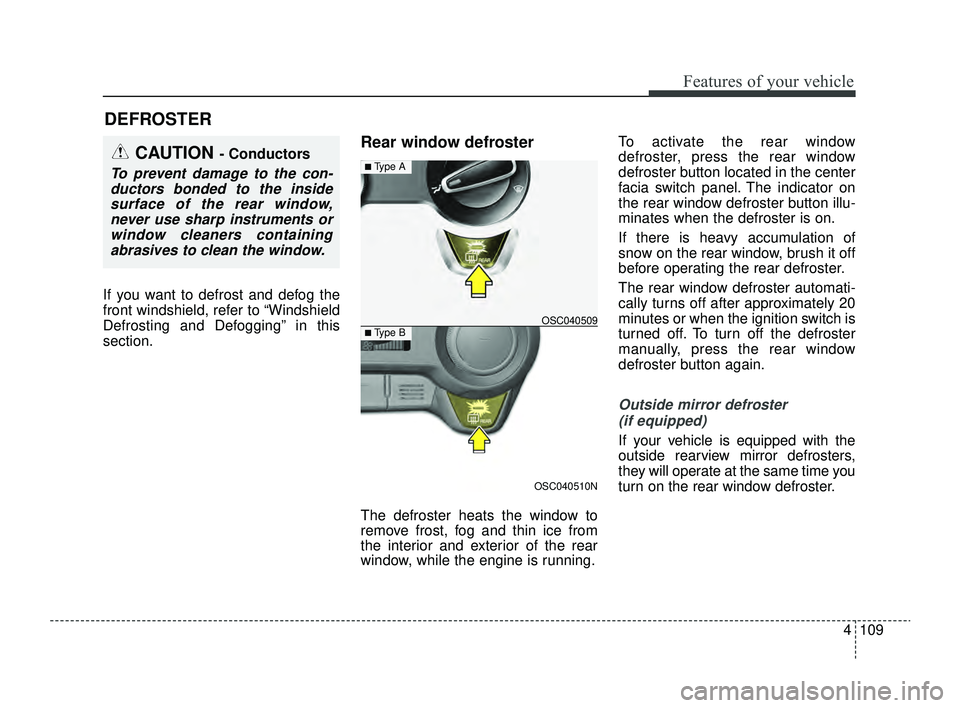
window, while the engine is running.To activate the rear window
defroster, press the rear window
defroster button located in the center
facia switch panel. The indicator on
the rear window defroster button illu-
minates when the defroster is on.
If there is heavy accumulation of
snow on the rear window, brush it off
before operating the rear defroster.
The rear window defroster automati-
cally turns off after approximately 20
minutes or when the ignition switch is
turned off. To turn off the defroster
manually, press the rear window
defroster button again.
Outside mirror defroster
(if equipped)
If your vehicle is equipped with the
outside rearview mirror defrosters,
they will operate at the same time you
turn on the rear window defroster.
DEFROSTER
CAUTION - Conductors
To prevent damage to the con-ductors bonded to the insidesurface of the rear window,never use sharp instruments orwindow cleaners containingabrasives to clean the window.
OSC040510N
OSC040509
■ Type A
■ Type B
SC PE USA 4.QXP 9/9/2021 6:06 PM Page 109
Page 192 of 528
4113
Features of your vehicle
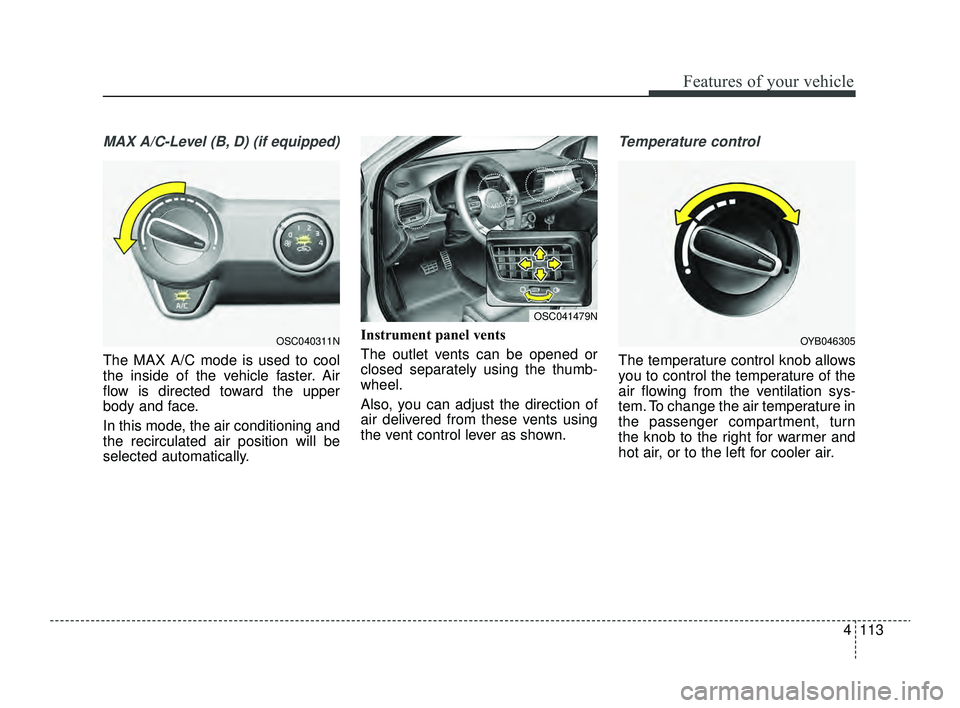
MAX A/C-Level (B, D) (if equipped)
The MAX A/C mode is used to cool
the inside of the vehicle faster. Air
flow is directed toward the upper
body and face.
In this mode, the air conditioning and
the recirculated air position will be
selected automatically.Instrument panel vents
The outlet vents can be opened or
closed separately using the thumb-
wheel.
Also, you can adjust the direction of
air delivered from these vents using
the vent control lever as shown.
Temperature control
The temperature control knob allows
you to control the temperature of the
air flowing from the ventilation sys-
tem. To change the air temperature in
the passenger compartment, turn
the knob to the right for warmer and
hot air, or to the left for cooler air.
OSC040311NOYB046305
OSC041479N
SC PE USA 4.QXP 9/9/2021 6:07 PM Page 113
Page 203 of 528
Features of your vehicle
124
4
✽ ✽
NOTICE
Never place anything over the sen-
sor located on the instrument panel
to ensure better control of the heat-
ing and cooling system.
Manual heating and air condi-
tioning
The heating and cooling system can
be controlled manually by pushing
buttons other than the AUTO button.
In this case, the system works
sequentially according to the order of
buttons selected.
1. Start the engine.
2. Set the mode to the desired position.
To improve the effectiveness ofheating and cooling :
- Heating:
- Cooling:
3. Set the temperature control to the desired position.
4. Set the air intake control to the outside (fresh) air or recirculated
air position.
5. Set the fan speed control to the desired speed.
6. If air conditioning is desired, turn the air conditioning system on.
Press the AUTO button in order to
convert to full automatic control of
the system.
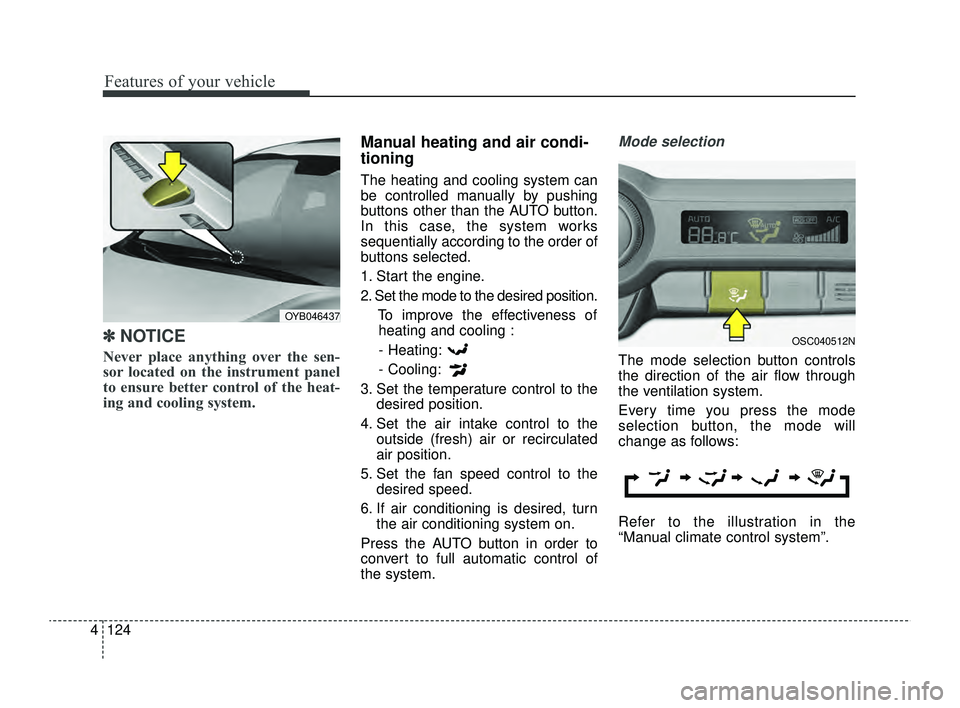
Mode selection
The mode selection button controls
the direction of the air flow through
the ventilation system.
Every time you press the mode
selection button, the mode will
change as follows:
Refer to the illustration in the
“Manual climate control system”.
OYB046437
OSC040512N
SC PE USA 4.QXP 9/9/2021 6:07 PM Page 124
Page 205 of 528
Features of your vehicle
126
4
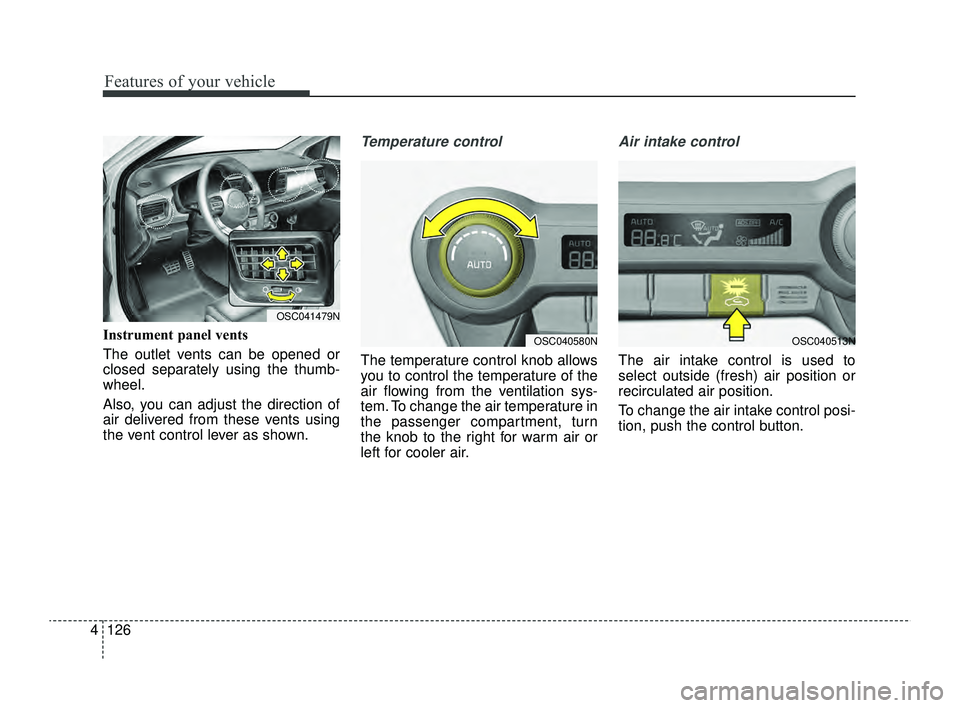
Instrument panel vents
The outlet vents can be opened or
closed separately using the thumb-
wheel.
Also, you can adjust the direction of
air delivered from these vents using
the vent control lever as shown.
Temperature control
The temperature control knob allows
you to control the temperature of the
air flowing from the ventilation sys-
tem. To change the air temperature in
the passenger compartment, turn
the knob to the right for warm air or
left for cooler air.
Air intake control
The air intake control is used to
select outside (fresh) air position or
recirculated air position.
To change the air intake control posi-
tion, push the control button.
OSC041479N
OSC040513NOSC040580N
SC PE USA 4.QXP 9/9/2021 6:08 PM Page 126
Page 451 of 528
Maintenance
64
7
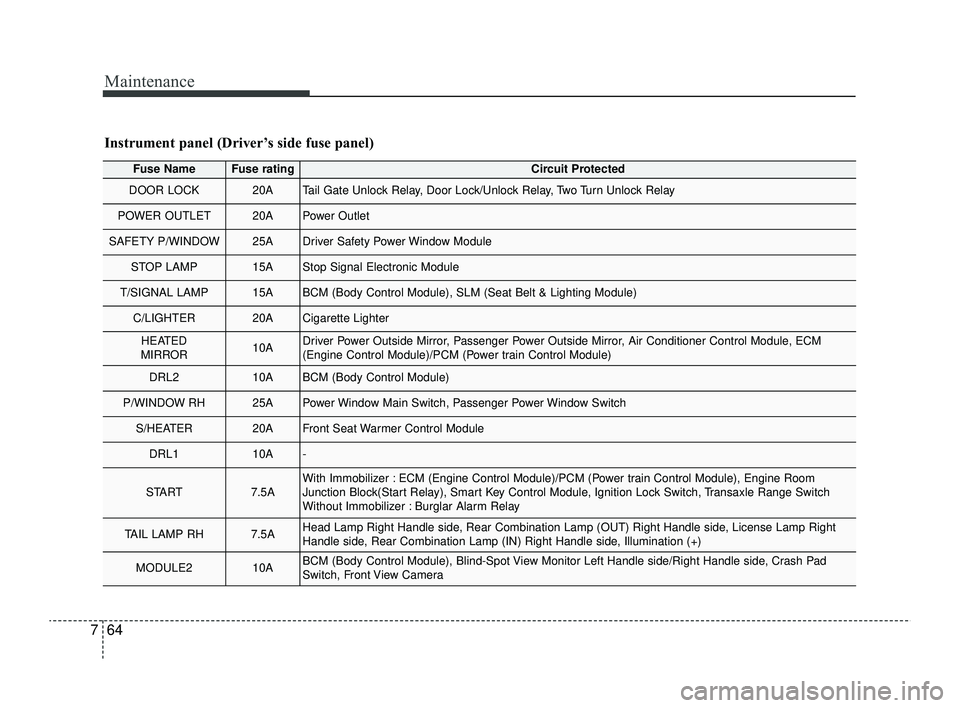
Fuse NameFuse ratingCircuit Protected
DOOR LOCK20ATail Gate Unlock Relay, Door Lock/Unlock Relay, Two Turn Unlock Relay
POWER OUTLET20APower Outlet
SAFETY P/WINDOW25ADriver Safety Power Window Module
STOP LAMP15AStop Signal Electronic Module
T/SIGNAL LAMP15ABCM (Body Control Module), SLM (Seat Belt & Lighting Module)
C/LIGHTER20ACigarette Lighter
HEATED
MIRROR10ADriver Power Outside Mirror, Passenger Power Outside Mirror, Air Conditioner Control Module, ECM
(Engine Control Module)/PCM (Power train Control Module)
DRL210ABCM (Body Control Module)
P/WINDOW RH25APower Window Main Switch, Passenger Power Window Switch
S/HEATER20AFront Seat Warmer Control Module
DRL110A-
START7.5AWith Immobilizer : ECM (Engine Control Module)/PCM (Power train Control Module), Engine Room
Junction Block(Start Relay), Smart Key Control Module, Ignition Lock Switch, Transaxle Range Switch
Without Immobilizer : Burglar Alarm Relay
TAIL LAMP RH7.5AHead Lamp Right Handle side, Rear Combination Lamp (OUT) Right Handle side, License Lamp Right
Handle side, Rear Combination Lamp (IN) Right Handle side, Illumination (+)
MODULE210ABCM (Body Control Module), Blind-Spot View Monitor Left Handle side/Right Handle side, Crash Pad
Switch, Front View Camera
Instrument panel (Driver’s side fuse panel)
SC PE USA 7.qxp 9/9/2021 6:28 PM Page 64