lights KIA RIO 2022 User Guide
[x] Cancel search | Manufacturer: KIA, Model Year: 2022, Model line: RIO, Model: KIA RIO 2022Pages: 528, PDF Size: 11.8 MB
Page 95 of 528
Features of your vehicle
16
4
If any door remains open, the doors
won't lock and the chime will sound
for 3 seconds. Close the door and try
again to lock the doors.
If liftgate or engine hood remains
open, the hazard warning lights
won't operate and theft-alarm will not
arm. After this, if the liftgate and
engine hood are closed, the hazard
warning lights will blink once and the
theft-alarm will arm. Do not arm the system until all
passengers have left the vehicle. If
the system is armed while a pas-
senger(s) remains in the vehicle,
the alarm may be activated when
the remaining passenger(s) leave
the vehicle. If any door, liftgate or
engine hood is opened within 30
seconds after entering the armed
stage, the system is disarmed to
prevent unnecessary alarm.Theft-alarm stage
The alarm will be activated if any of
the following occurs while the system
is armed.
A front or rear door is opened without
using the ignition key or transmitter
(or smart key).
The trunk/liftgate is opened without using the ignition key or transmitter
(or smart key).
The engine hood is opened.
The horn will sound and the hazard
warning lights will blink continuously for
approximately 27 seconds. To turn off
the system, unlock the doors with the
ignition key or transmitter (or smart
key).
SC PE USA 4.QXP 9/9/2021 6:01 PM Page 16
Page 96 of 528
417
Features of your vehicle
Disarmed stage
The system will be disarmed when:
Transmitter
- The door unlock button is pressed.
- The engine is started. (within 3seconds)
- The ignition switch is in the "ON" position for 30 seconds or more.
Smart key
- The door unlock button is pressed.
- The button of the front outside dooris pressed while carrying the smart
key.
- The engine is started. (within 3 seconds)
After the doors are unlocked, the haz-
ard warning lights will blink twice to
indicate that the system is disarmed.
After pressing the unlock button, if any
door (or trunk/liftgate) is not opened
within 30 seconds, the system will be
rearmed.
✽ ✽ NOTICE
• Avoid trying to start the engine
while the alarm is activated. The
vehicle starting motor is disabled
during the theft-alarm stage.
- If the system is not disarmedwith the transmitter, insert the
key into the ignition switch, turn
the ignition switch to the ON
position and wait for 30 seconds.
Then, the system will be dis-
armed.
- If the system is not disarmed with the smart key, press the
ENGINE START/STOP button
with the smart key. The side with
the lock button should contact
the ENGINE START/STOP but-
ton directly.
• If you lose your keys, consult your authorized Kia dealer.
✽ ✽
NOTICE
Malfunctions caused by improper
alterations, adjustments or modifi-
cations to the theft-alarm system are
not covered by your vehicle manu-
facturer warranty.
CAUTION - Adjusting
alarm system
Do not change, alter or adjust
the theft-alarm system becauseit could cause the theft-alarmsystem to malfunction andshould only be serviced by anauthorized Kia dealer.
SC PE USA 4.QXP 9/9/2021 6:01 PM Page 17
Page 106 of 528
427
Features of your vehicle
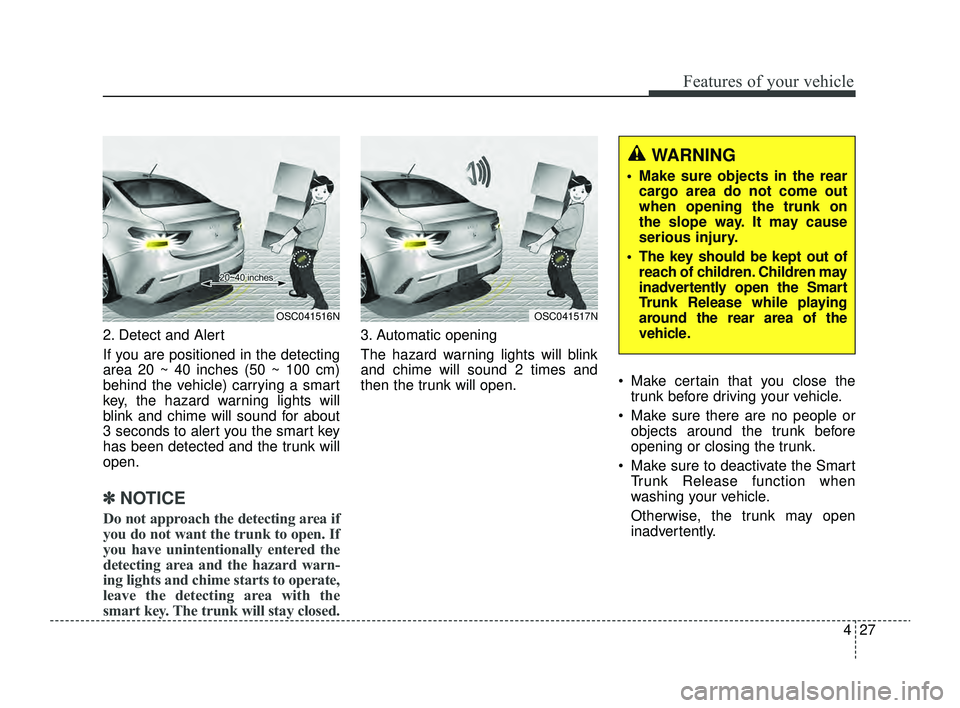
2. Detect and Alert
If you are positioned in the detecting
area 20 ~ 40 inches (50 ~ 100 cm)
behind the vehicle) carrying a smart
key, the hazard warning lights will
blink and chime will sound for about
3 seconds to alert you the smart key
has been detected and the trunk will
open.
✽ ✽NOTICE
Do not approach the detecting area if
you do not want the trunk to open. If
you have unintentionally entered the
detecting area and the hazard warn-
ing lights and chime starts to operate,
leave the detecting area with the
smart key. The trunk will stay closed.
3. Automatic opening
The hazard warning lights will blink
and chime will sound 2 times and
then the trunk will open. Make certain that you close the
trunk before driving your vehicle.
Make sure there are no people or objects around the trunk before
opening or closing the trunk.
Make sure to deactivate the Smart Trunk Release function when
washing your vehicle.
Otherwise, the trunk may open
inadvertently.
OSC041516NOSC041517N
WARNING
Make sure objects in the rearcargo area do not come out
when opening the trunk on
the slope way. It may cause
serious injury.
The key should be kept out of reach of children. Children may
inadvertently open the Smart
Trunk Release while playing
around the rear area of the
vehicle.
SC PE USA 4.QXP 9/9/2021 6:02 PM Page 27
Page 125 of 528
Features of your vehicle
46
4
If the Electric Power Steering System
does not operate normally, the warn-
ing light will illuminate on the instru-
ment cluster. The steering wheel may
require increased steering effort.
Take your vehicle to an authorized
Kia dealer and have the vehicle
checked as soon as possible.Tilt steering (if equipped)
Tilt steering allows you to adjust the
steering wheel before you drive. You
can also raise it to give your legs
more room when you exit and enter
the vehicle.
The steering wheel should be posi-
tioned so that it is comfortable for
you to drive, while permitting you to
see the instrument panel warning
lights and gauges.
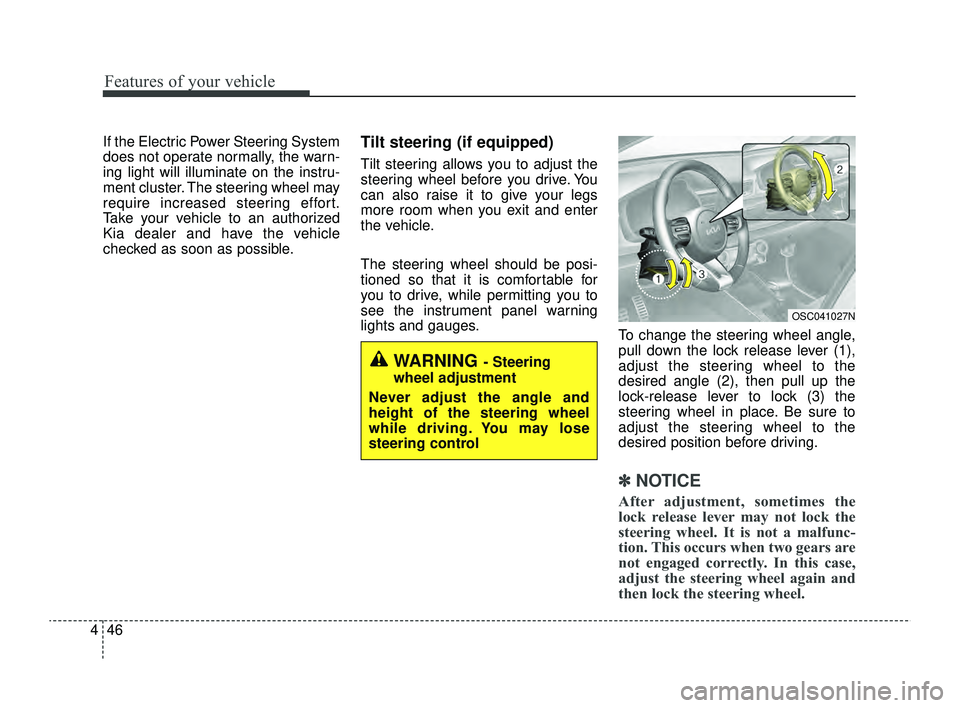
To change the steering wheel angle,
pull down the lock release lever (1),
adjust the steering wheel to the
desired angle (2), then pull up the
lock-release lever to lock (3) the
steering wheel in place. Be sure to
adjust the steering wheel to the
desired position before driving.
✽ ✽NOTICE
After adjustment, sometimes the
lock release lever may not lock the
steering wheel. It is not a malfunc-
tion. This occurs when two gears are
not engaged correctly. In this case,
adjust the steering wheel again and
then lock the steering wheel.
WARNING - Steering
wheel adjustment
Never adjust the angle and
height of the steering wheel
while driving. You may lose
steering control
OSC041027N
SC PE USA 4.QXP 9/9/2021 6:03 PM Page 46
Page 127 of 528
Features of your vehicle
48
4
Inside rearview mirror
Adjust the rearview mirror so that the
center view through the rear window
is seen. Make this adjustment before
you start driving.
Do not place objects in the rear seat
which would interfere with your vision
through the rear window.
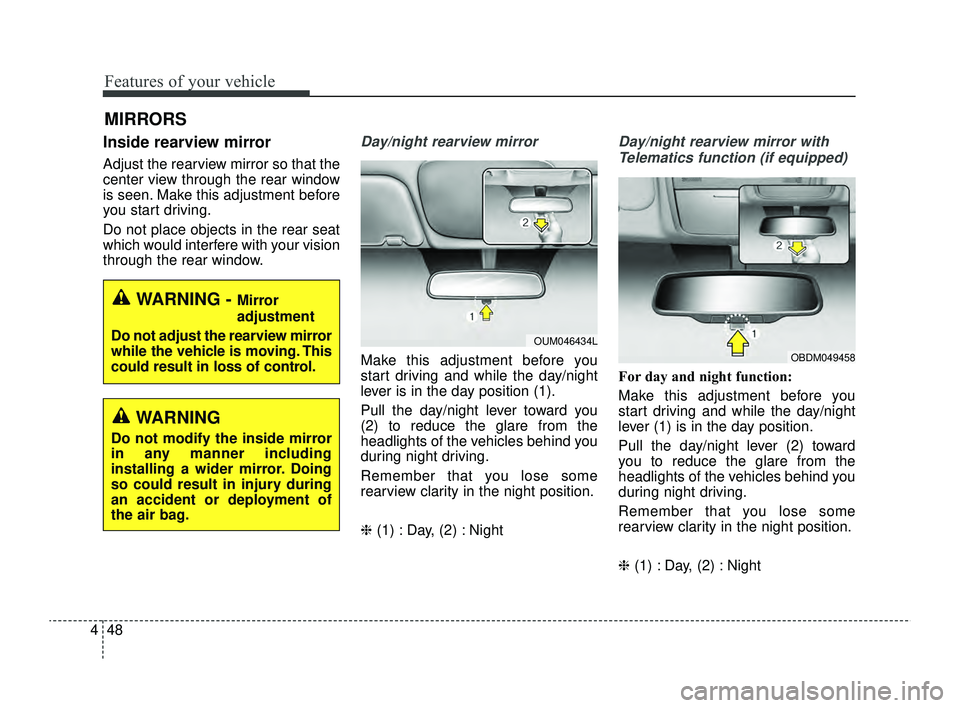
Day/night rearview mirror
Make this adjustment before you
start driving and while the day/night
lever is in the day position (1).
Pull the day/night lever toward you
(2) to reduce the glare from the
headlights of the vehicles behind you
during night driving.
Remember that you lose some
rearview clarity in the night position.
❈ (1) : Day, (2) : Night
Day/night rearview mirror with
Telematics function (if equipped)
For day and night function:
Make this adjustment before you
start driving and while the day/night
lever (1) is in the day position.
Pull the day/night lever (2) toward
you to reduce the glare from the
headlights of the vehicles behind you
during night driving.
Remember that you lose some
rearview clarity in the night position.
❈ (1) : Day, (2) : Night
MIRRORS
WARNING - Mirror
adjustment
Do not adjust the rearview mirror
while the vehicle is moving. This
could result in loss of control.
OUM046434L
WARNING
Do not modify the inside mirror
in any manner including
installing a wider mirror. Doing
so could result in injury during
an accident or deployment of
the air bag.
OBDM049458
SC PE USA 4.QXP 9/9/2021 6:03 PM Page 48
Page 130 of 528
451
Features of your vehicle
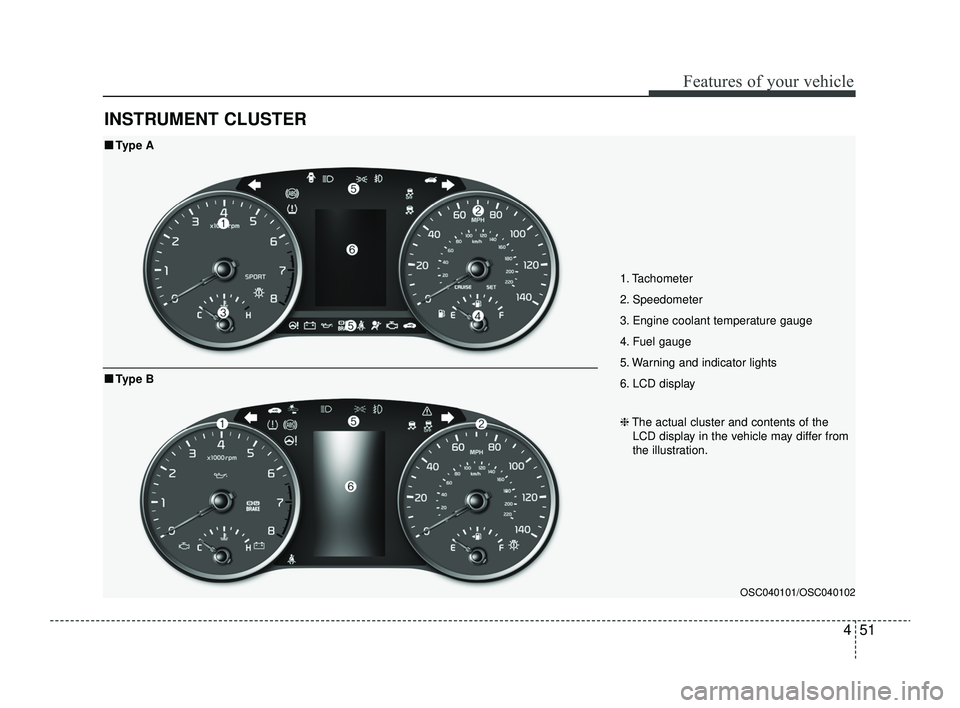
INSTRUMENT CLUSTER
1. Tachometer
2. Speedometer
3. Engine coolant temperature gauge
4. Fuel gauge
5. Warning and indicator lights
6. LCD display
OSC040101/OSC040102
■ ■Type A
❈The actual cluster and contents of the
LCD display in the vehicle may differ from
the illustration.
■ ■ Type B
SC PE USA 4.QXP 9/9/2021 6:03 PM Page 51
Page 147 of 528
Features of your vehicle
68
4
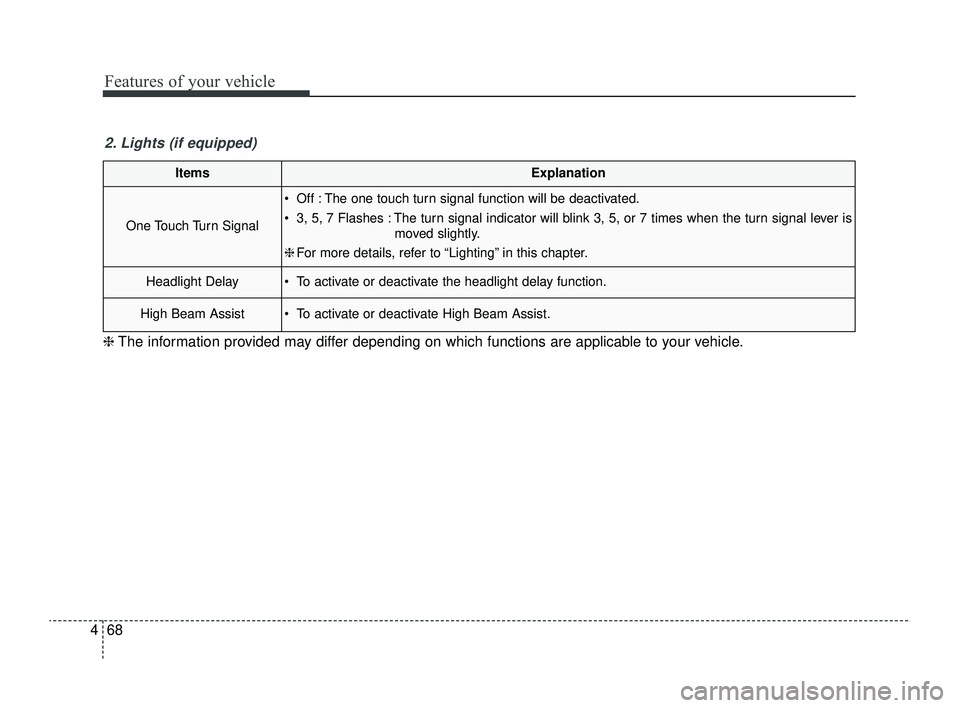
ItemsExplanation
One Touch Turn Signal
Off : The one touch turn signal function will be deactivated.
3, 5, 7 Flashes : The turn signal indicator will blink 3, 5, or 7 times when the turn signal lever is
moved slightly.
❈ For more details, refer to “Lighting” in this chapter.
Headlight Delay To activate or deactivate the headlight delay function.
High Beam Assist To activate or deactivate High Beam Assist.
2. Lights (if equipped)
❈ The information provided may differ depending on which functions are applicable to your vehicle.
SC PE USA 4.QXP 9/9/2021 6:05 PM Page 68
Page 149 of 528
Features of your vehicle
70
4
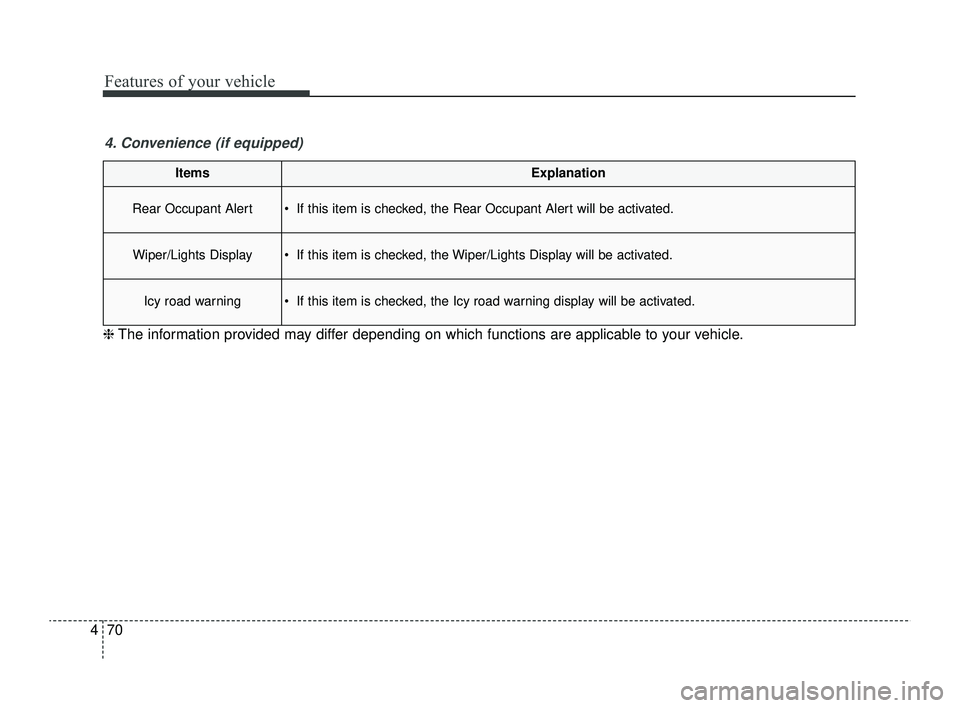
ItemsExplanation
Rear Occupant Alert If this item is checked, the Rear Occupant Alert will be activated.
Wiper/Lights Display If this item is checked, the Wiper/Lights Display will be activated.
Icy road warning If this item is checked, the Icy road warning display will be activated.
4. Convenience (if equipped)
❈ The information provided may differ depending on which functions are applicable to your vehicle.
SC PE USA 4.QXP 9/9/2021 6:05 PM Page 70
Page 153 of 528
Features of your vehicle
74
4
Warning messages (for type B
cluster)
Warning messages appear on the
LCD to warn the driver. It is located in
the center of the instrument cluster.
The warning message may appear
differently depending on the type of
instrument cluster and some may not
show the warning message at all.
The warning message is shown in
either symbol, symbol and text, or
text type only.
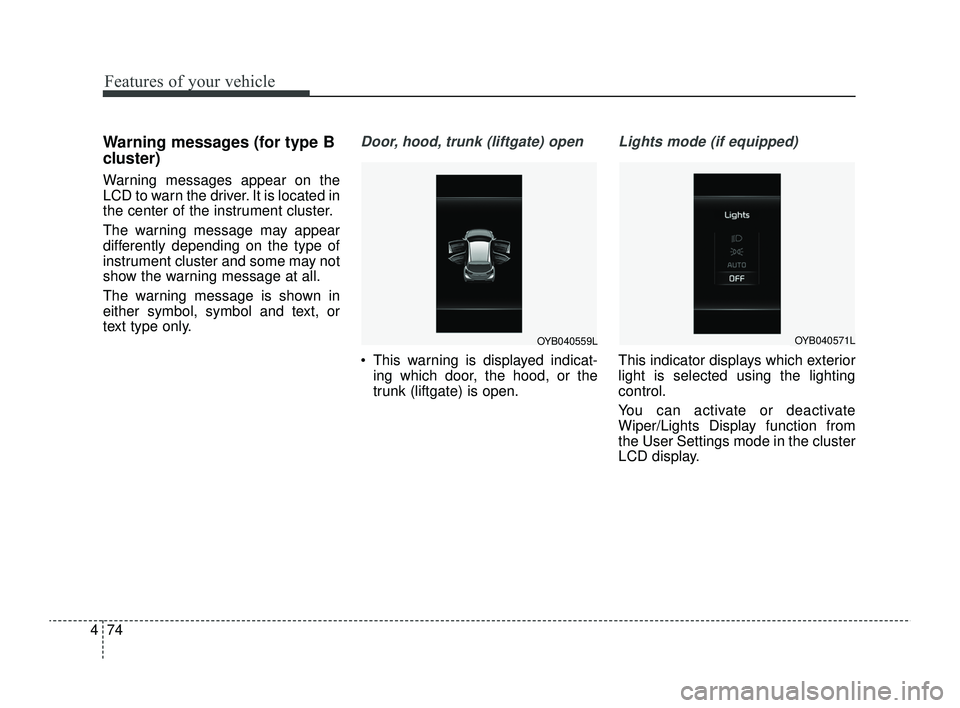
Door, hood, trunk (liftgate) open
This warning is displayed indicat-
ing which door, the hood, or the
trunk (liftgate) is open.
Lights mode (if equipped)
This indicator displays which exterior
light is selected using the lighting
control.
You can activate or deactivate
Wiper/Lights Display function from
the User Settings mode in the cluster
LCD display.
OYB040559LOYB040571L
SC PE USA 4.QXP 9/9/2021 6:05 PM Page 74
Page 154 of 528
475
Features of your vehicle
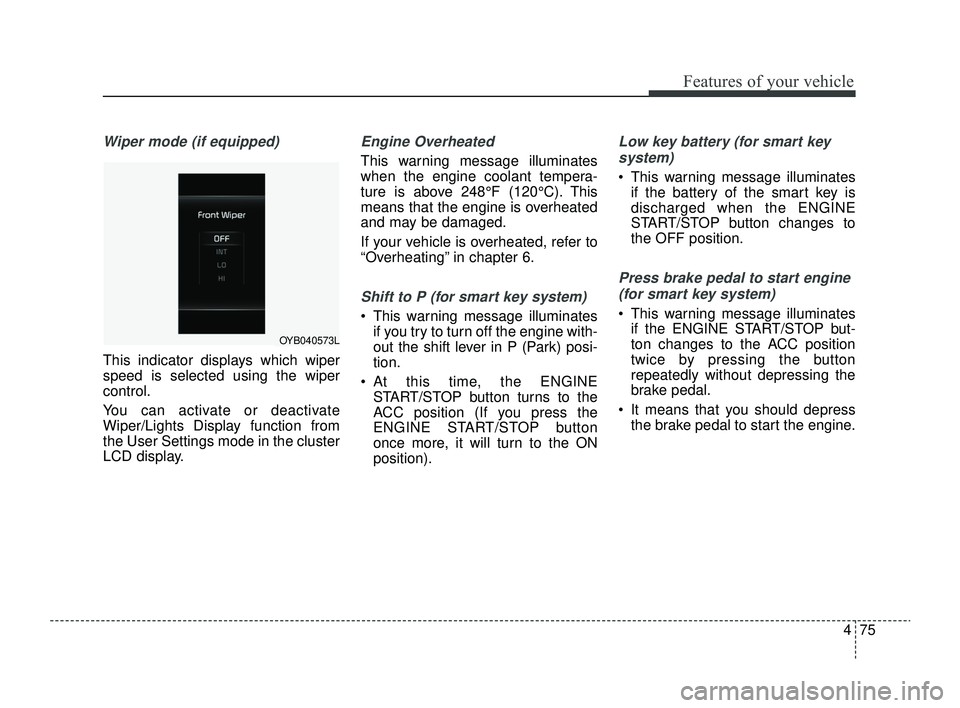
Wiper mode (if equipped)
This indicator displays which wiper
speed is selected using the wiper
control.
You can activate or deactivate
Wiper/Lights Display function from
the User Settings mode in the cluster
LCD display.
Engine Overheated
This warning message illuminates
when the engine coolant tempera-
ture is above 248°F (120°C). This
means that the engine is overheated
and may be damaged.
If your vehicle is overheated, refer to
“Overheating” in chapter 6.
Shift to P (for smart key system)
This warning message illuminatesif you try to turn off the engine with-
out the shift lever in P (Park) posi-
tion.
At this time, the ENGINE START/STOP button turns to the
ACC position (If you press the
ENGINE START/STOP button
once more, it will turn to the ON
position).
Low key battery (for smart key
system)
This warning message illuminates if the battery of the smart key is
discharged when the ENGINE
START/STOP button changes to
the OFF position.
Press brake pedal to start engine
(for smart key system)
This warning message illuminates if the ENGINE START/STOP but-
ton changes to the ACC position
twice by pressing the button
repeatedly without depressing the
brake pedal.
It means that you should depress the brake pedal to start the engine.
OYB040573L
SC PE USA 4.QXP 9/9/2021 6:05 PM Page 75