reset KIA RIO 2022 User Guide
[x] Cancel search | Manufacturer: KIA, Model Year: 2022, Model line: RIO, Model: KIA RIO 2022Pages: 528, PDF Size: 11.8 MB
Page 142 of 528
463
Features of your vehicle
If the engine is running, the informa-tion will be accumulated even when
the vehicle is not in motion.Service Mode (for Type A clus-
ter)
Service in
If the remaining mileage or time
reaches 900 miles (1,500 km) or 30
days, the service symbol ( ) will
blink for several seconds each time
you set the ignition switch or
ENGINE START/STOP button to the
ON position.
Service required
If you exceed the specified service
interval, the service symbol ( ) will
blink each time you turn ON the vehi-
cle.
To reset the service interval, press
the RESET button for more than 5
seconds and then when the miles
and days blink press the RESET but-
ton for more than 1 second.
If the service interval is not set, the
service symbol ( ) will not be dis-
played.
✽ ✽ NOTICE
To change or deactivate the service
interval, consult an authorized Kia
dealer.
SC PE USA 4.QXP 9/9/2021 6:04 PM Page 63
Page 150 of 528
471
Features of your vehicle
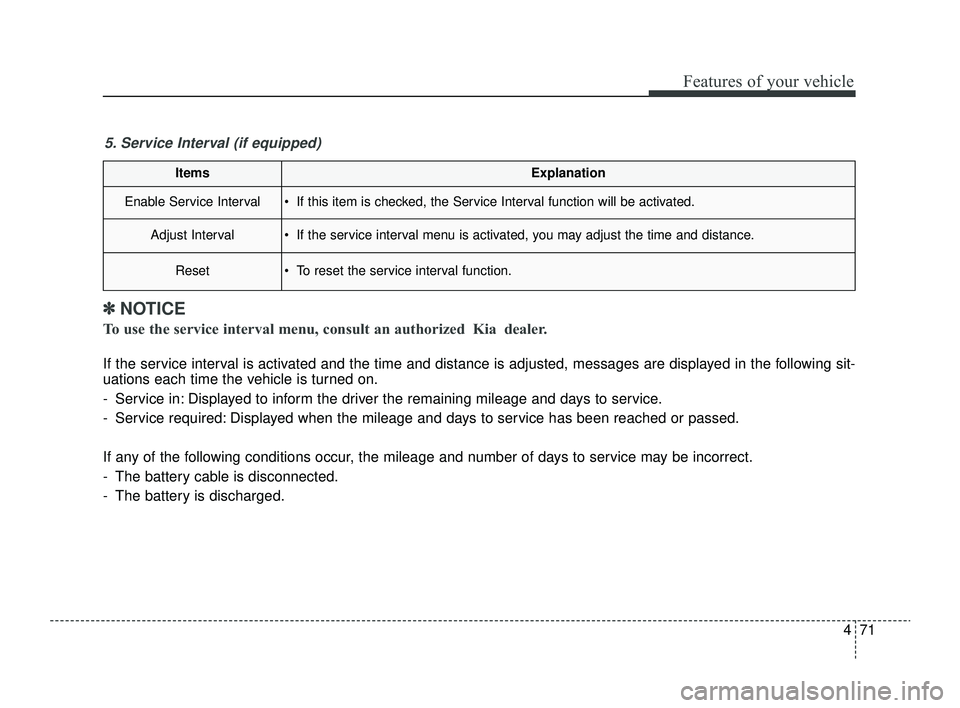
ItemsExplanation
Enable Service Interval If this item is checked, the Service Interval function will be activated.
Adjust Interval If the service interval menu is activated, you may adjust the time and distance.
Reset To reset the service interval function.
5. Service Interval (if equipped)
✽ ✽NOTICE
To use the service interval menu, consult an authorized Kia dealer.
If the service interval is activated and the time and distance is adjusted, messages are displayed in the following sit-
uations each time the vehicle is turned on.
- Service in: Displayed to inform the driver the remaining mileage and days to service.
- Service required: Displayed when the mileage and days to service has been reached or passed.
If any of the following conditions occur, the mileage and number of days to service may be incorrect.
- The battery cable is disconnected.
- The battery is discharged.
SC PE USA 4.QXP 9/9/2021 6:05 PM Page 71
Page 151 of 528
Features of your vehicle
72
4
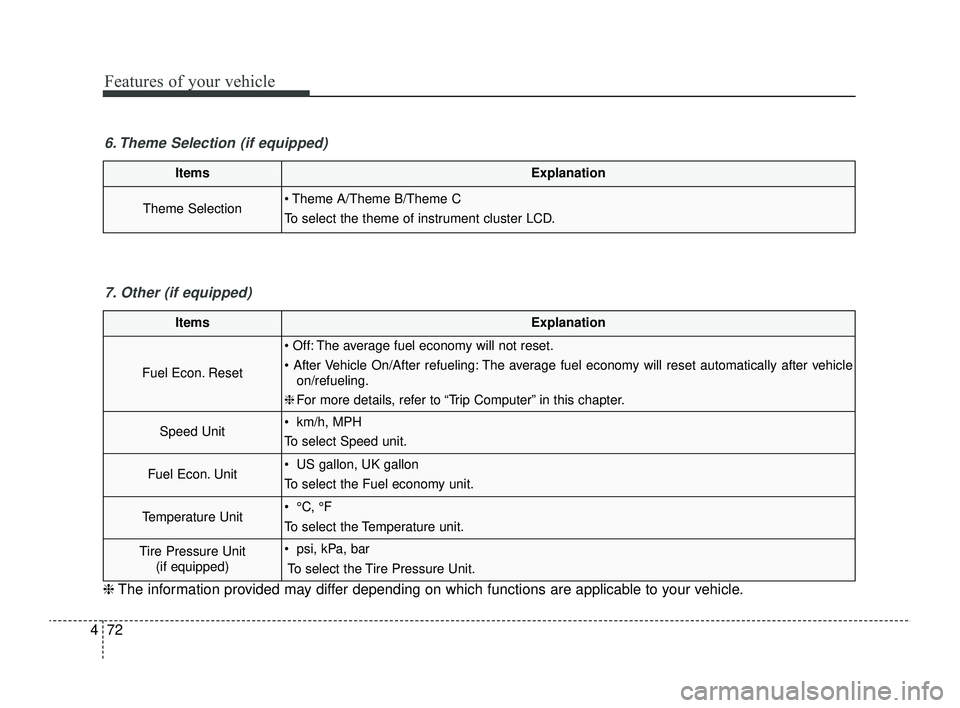
ItemsExplanation
Theme Selection Theme A/Theme B/Theme C
To select the theme of instrument cluster LCD.
6. Theme Selection (if equipped)
ItemsExplanation
Fuel Econ. Reset
Off: The average fuel economy will not reset.
After Vehicle On/After refueling: The average fuel economy will reset automatically after vehicle
on/refueling.
❈ For more details, refer to “Trip Computer” in this chapter.
Speed Unit km/h, MPH
To select Speed unit.
Fuel Econ. Unit US gallon, UK gallon
To select the Fuel economy unit.
Temperature Unit °C, °F
To select the Temperature unit.
Tire Pressure Unit
(if equipped) psi, kPa, bar
To select the Tire Pressure Unit.
7. Other (if equipped)
❈ The information provided may differ depending on which functions are applicable to your vehicle.
SC PE USA 4.QXP 9/9/2021 6:05 PM Page 72
Page 152 of 528
473
Features of your vehicle
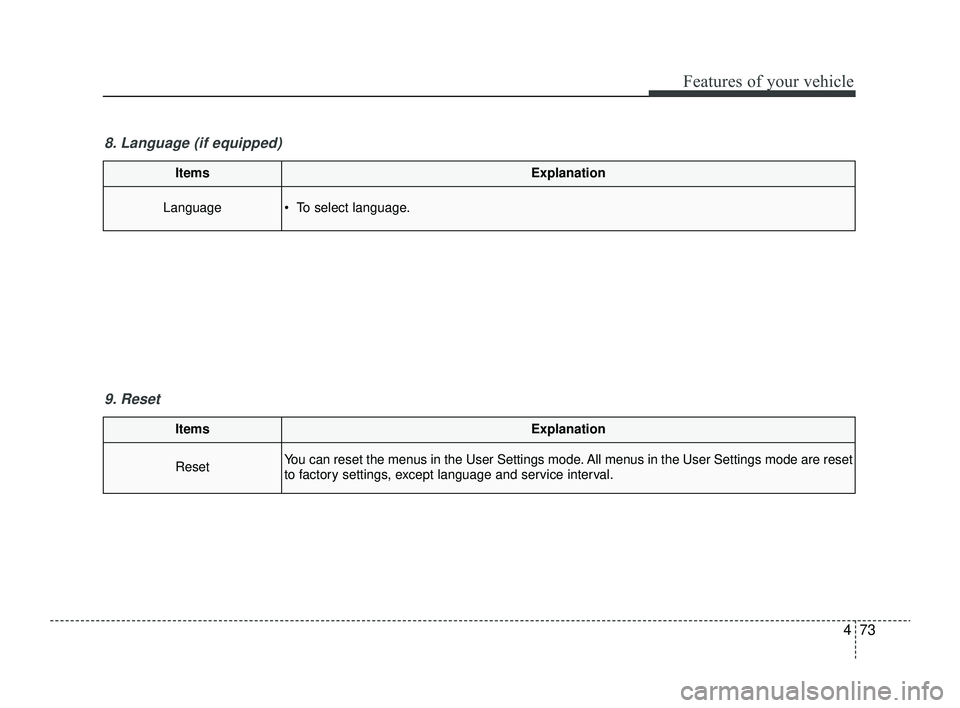
ItemsExplanation
ResetYou can reset the menus in the User Settings mode. All menus in the User Settings mode are reset
to factory settings, except language and service interval.
9. Reset
ItemsExplanation
Language To select language.
8. Language (if equipped)
SC PE USA 4.QXP 9/9/2021 6:05 PM Page 73
Page 216 of 528
4137
Features of your vehicle
Defogging Logic
To reduce the probability of fogging
up inside of the windshield, the air
intake or air conditioning are con-
trolled automatically according to
certain conditions such as or
position. Logic can be disabled and
enabled by doing following :
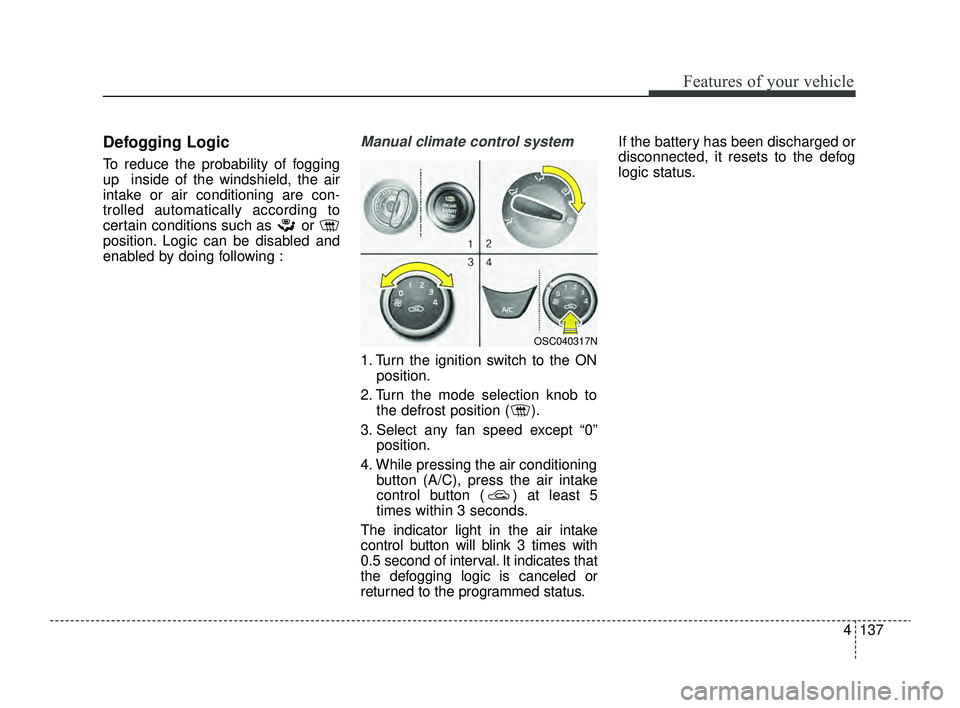
Manual climate control system
1. Turn the ignition switch to the ONposition.
2. Turn the mode selection knob to the defrost position ( ).
3. Select any fan speed except “0” position.
4. While pressing the air conditioning button (A/C), press the air intake
control button ( ) at least 5
times within 3 seconds.
The indicator light in the air intake
control button will blink 3 times with
0.5 second of interval. It indicates that
the defogging logic is canceled or
returned to the programmed status. If the battery has been discharged or
disconnected, it resets to the defog
logic status.
OSC040317N
SC PE USA 4.QXP 9/9/2021 6:08 PM Page 137
Page 217 of 528
Features of your vehicle
138
4
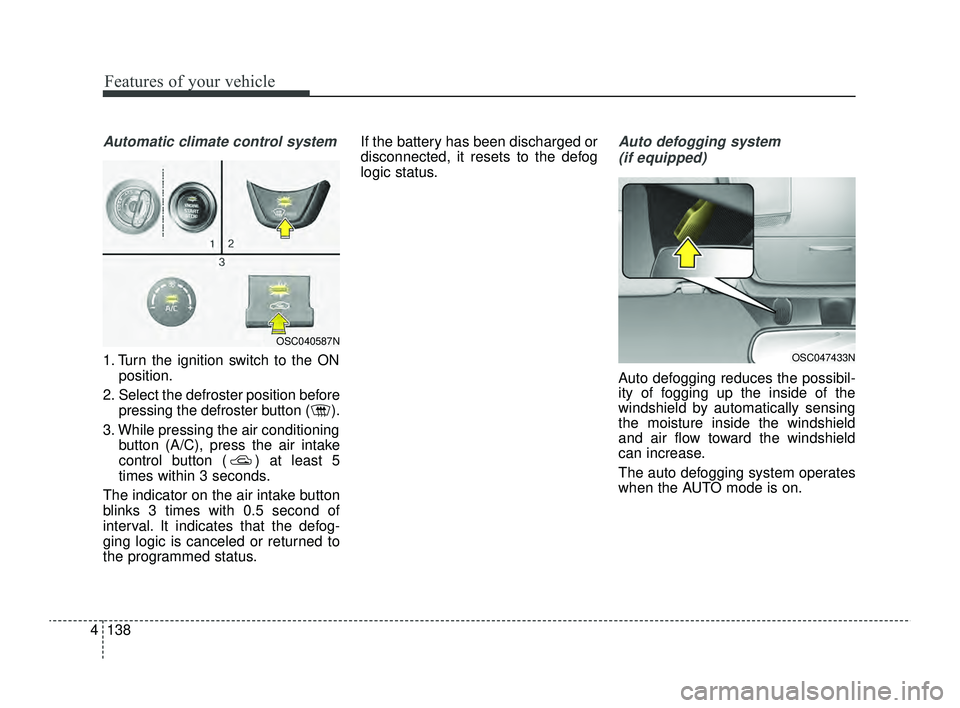
Automatic climate control system
1. Turn the ignition switch to the ON
position.
2. Select the defroster position before pressing the defroster button ( ).
3. While pressing the air conditioning button (A/C), press the air intake
control button ( ) at least 5
times within 3 seconds.
The indicator on the air intake button
blinks 3 times with 0.5 second of
interval. It indicates that the defog-
ging logic is canceled or returned to
the programmed status. If the battery has been discharged or
disconnected, it resets to the defog
logic status.
Auto defogging system
(if equipped)
Auto defogging reduces the possibil-
ity of fogging up the inside of the
windshield by automatically sensing
the moisture inside the windshield
and air flow toward the windshield
can increase.
The auto defogging system operates
when the AUTO mode is on.
OSC047433N
OSC040587N
SC PE USA 4.QXP 9/9/2021 6:08 PM Page 138
Page 218 of 528
4139
Features of your vehicle
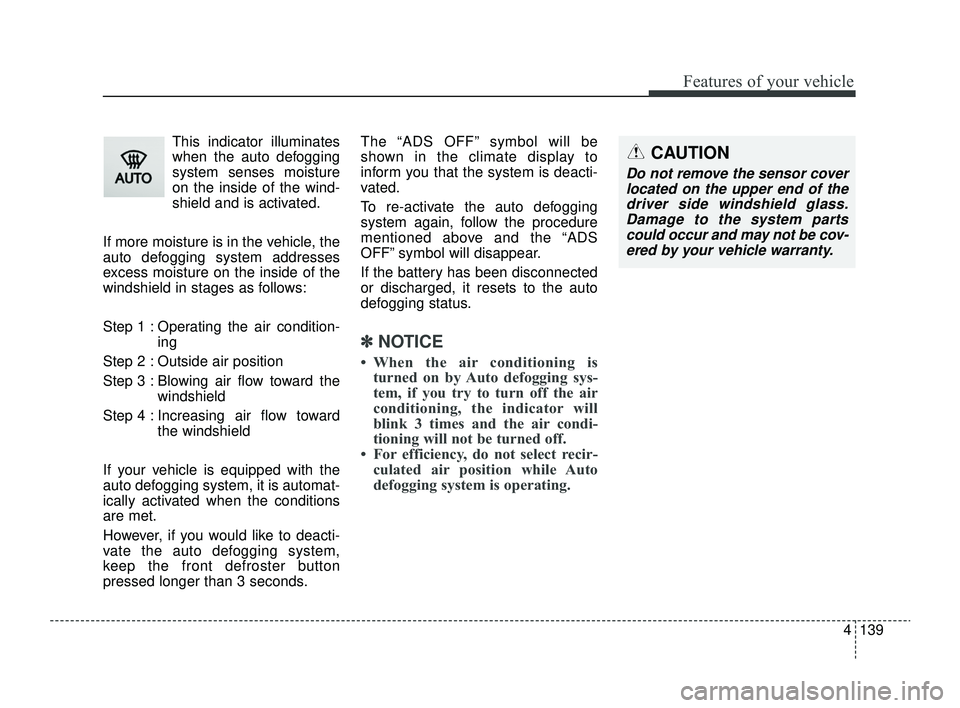
This indicator illuminates
when the auto defogging
system senses moisture
on the inside of the wind-
shield and is activated.
If more moisture is in the vehicle, the
auto defogging system addresses
excess moisture on the inside of the
windshield in stages as follows:
Step 1 : Operating the air condition- ing
Step 2 : Outside air position
Step 3 : Blowing air flow toward the windshield
Step 4 : Increasing air flow toward the windshield
If your vehicle is equipped with the
auto defogging system, it is automat-
ically activated when the conditions
are met.
However, if you would like to deacti-
vate the auto defogging system,
keep the front defroster button
pressed longer than 3 seconds. The “ADS OFF” symbol will be
shown in the climate display to
inform you that the system is deacti-
vated.
To re-activate the auto defogging
system again, follow the procedure
mentioned above and the “ADS
OFF” symbol will disappear.
If the battery has been disconnected
or discharged, it resets to the auto
defogging status.
✽ ✽
NOTICE
• When the air conditioning is
turned on by Auto defogging sys-
tem, if you try to turn off the air
conditioning, the indicator will
blink 3 times and the air condi-
tioning will not be turned off.
• For efficiency, do not select recir- culated air position while Auto
defogging system is operating.
CAUTION
Do not remove the sensor cover
located on the upper end of thedriver side windshield glass.Damage to the system partscould occur and may not be cov-ered by your vehicle warranty.
SC PE USA 4.QXP 9/9/2021 6:08 PM Page 139
Page 314 of 528
Driving your vehicle
80
5
✽ ✽
NOTICE
• For more details on setting the
functions in the infotainment sys-
tem, refer to "Instrument cluster"
in chapter 4.
• Driver Attention Warning will reset the last break time to 00:00
in the following situations:
- The engine is turned off
- The driver unfastens the seat beltand opens the driver's door.
- The vehicle is stopped for more than 10 minutes.
• When the driver resets Driver Attention Warning, the last break
time is set to 00:00 and the driver's
attention level is set to High.
Leading Vehicle Departure Alert
This reminds the driver the leading
vehicle's driving departure after stop-
ping.
WARNING
If any other function's warn-
ing message is displayed or
audible warning is generated,
Leading Vehicle Departure
Warning message may not be
displayed and audible warn-
ing may not be generated.
The driver should hold the responsibility to safely drive
and control the vehicle.
CAUTION
Leading Vehicle Departure Warning is a supplementalfunction and may not alert thedriver whenever the frontvehicle departs from a stop.
Always check the front of the vehicle and road conditionsbefore departure.
SC PE USA 5.QXP 9/9/2021 6:20 PM Page 80
Page 321 of 528
587
Driving your vehicle
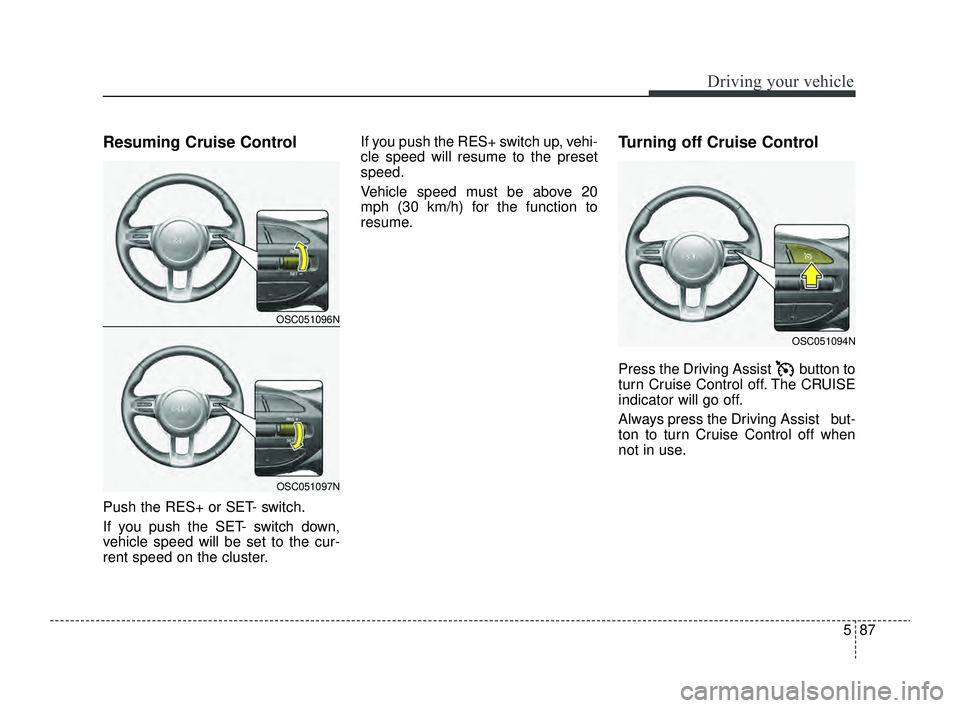
Resuming Cruise Control
Push the RES+ or SET- switch.
If you push the SET- switch down,
vehicle speed will be set to the cur-
rent speed on the cluster.If you push the RES+ switch up, vehi-
cle speed will resume to the preset
speed.
Vehicle speed must be above 20
mph (30 km/h) for the function to
resume.
Turning off Cruise Control
Press the Driving Assist button to
turn Cruise Control off. The CRUISE
indicator will go off.
Always press the Driving Assist but-
ton to turn Cruise Control off when
not in use.
OSC051094N
OSC051096N
OSC051097N
SC PE USA 5.QXP 9/9/2021 6:21 PM Page 87
Page 388 of 528
Maintenance
Engine compartment . . . . . . . . . . . . . . . . . . . . . . . . 7-4
Maintenance services . . . . . . . . . . . . . . . . . . . . . . . . 7-5
• Owner’s responsibility . . . . . . . . . . . . . . . . . . . . . . . . . 7-5
• Owner maintenance precautions . . . . . . . . . . . . . . . . 7-6
Owner maintenance . . . . . . . . . . . . . . . . . . . . . . . . . 7-7
• Owner maintenance schedule . . . . . . . . . . . . . . . . . . . 7-7
Scheduled maintenance service. . . . . . . . . . . . . . . . 7-9
• Scheduled maintenance service precaution . . . . . . . . 7-9
Explanation of scheduled maintenance items . . . 7-15
Checking fluid levels . . . . . . . . . . . . . . . . . . . . . . . 7-20
Engine oil. . . . . . . . . . . . . . . . . . . . . . . . . . . . . . . . . 7-21
• Checking the engine oil level . . . . . . . . . . . . . . . . . . . 7-21
• Changing the engine oil and filter . . . . . . . . . . . . . . . 7-22
Engine coolant . . . . . . . . . . . . . . . . . . . . . . . . . . . . 7-24
• Checking the coolant level . . . . . . . . . . . . . . . . . . . . . 7-24
• Changing the coolant . . . . . . . . . . . . . . . . . . . . . . . . . 7-26
Brake fluid . . . . . . . . . . . . . . . . . . . . . . . . . . . . . . . 7-27
• Checking the brake fluid level . . . . . . . . . . . . . . . . . . 7-27
Washer fluid . . . . . . . . . . . . . . . . . . . . . . . . . . . . . . 7-29
• Checking the washer fluid level . . . . . . . . . . . . . . . . 7-29
Parking brake . . . . . . . . . . . . . . . . . . . . . . . . . . . . . 7-30
• Checking the parking brake. . . . . . . . . . . . . . . . . . . . 7-30
Air cleaner. . . . . . . . . . . . . . . . . . . . . . . . . . . . . . . . 7-31
• Filter replacement . . . . . . . . . . . . . . . . . . . . . . . . . . . 7-31
Climate control air filter . . . . . . . . . . . . . . . . . . . . 7-33
• Filter inspection . . . . . . . . . . . . . . . . . . . . . . . . . . . . . . 7-33
Wiper blades . . . . . . . . . . . . . . . . . . . . . . . . . . . . . . 7-35
• Blade inspection . . . . . . . . . . . . . . . . . . . . . . . . . . . . . . 7-35
• Blade replacement . . . . . . . . . . . . . . . . . . . . . . . . . . . 7-35
Battery . . . . . . . . . . . . . . . . . . . . . . . . . . . . . . . . . . . 7-\
39
• For best battery service . . . . . . . . . . . . . . . . . . . . . . . 7-39
• Recharging the battery . . . . . . . . . . . . . . . . . . . . . . . . 7-40
• Reset items . . . . . . . . . . . . . . . . . . . . . . . . . . . . . . . . . . 7-41\
Tires and wheels . . . . . . . . . . . . . . . . . . . . . . . . . . . 7-42
• Tire care . . . . . . . . . . . . . . . . . . . . . . . . . . . . . . . . . . . 7-\
42
• Recommended cold tire inflation pressures . . . . . . 7-42
• Tire pressure . . . . . . . . . . . . . . . . . . . . . . . . . . . . . . . . 7-43
• Checking tire inflation pressure. . . . . . . . . . . . . . . . . 7-43
• Tire rotation . . . . . . . . . . . . . . . . . . . . . . . . . . . . . . . . 7-44
• Wheel alignment and tire balance . . . . . . . . . . . . . . 7-45
• Tire replacement . . . . . . . . . . . . . . . . . . . . . . . . . . . . . 7-46
• Wheel replacement . . . . . . . . . . . . . . . . . . . . . . . . . . . 7-47
• Tire traction . . . . . . . . . . . . . . . . . . . . . . . . . . . . . . . . . 7-47
• Tire maintenance . . . . . . . . . . . . . . . . . . . . . . . . . . . . 7-47
• Tire sidewall labeling . . . . . . . . . . . . . . . . . . . . . . . . . 7-47
• All season tires . . . . . . . . . . . . . . . . . . . . . . . . . . . . . . 7-54
• Summer tires . . . . . . . . . . . . . . . . . . . . . . . . . . . . . . . . 7-54
• Snow tires . . . . . . . . . . . . . . . . . . . . . . . . . . . . . . . . . . . 7-\
54
• Tire chains . . . . . . . . . . . . . . . . . . . . . . . . . . . . . . . . . . 7-55\
7
SC PE USA 7.qxp 9/9/2021 6:26 PM Page 1