warning light KIA RIO 2022 Workshop Manual
[x] Cancel search | Manufacturer: KIA, Model Year: 2022, Model line: RIO, Model: KIA RIO 2022Pages: 528, PDF Size: 11.8 MB
Page 164 of 528
485
Features of your vehicle
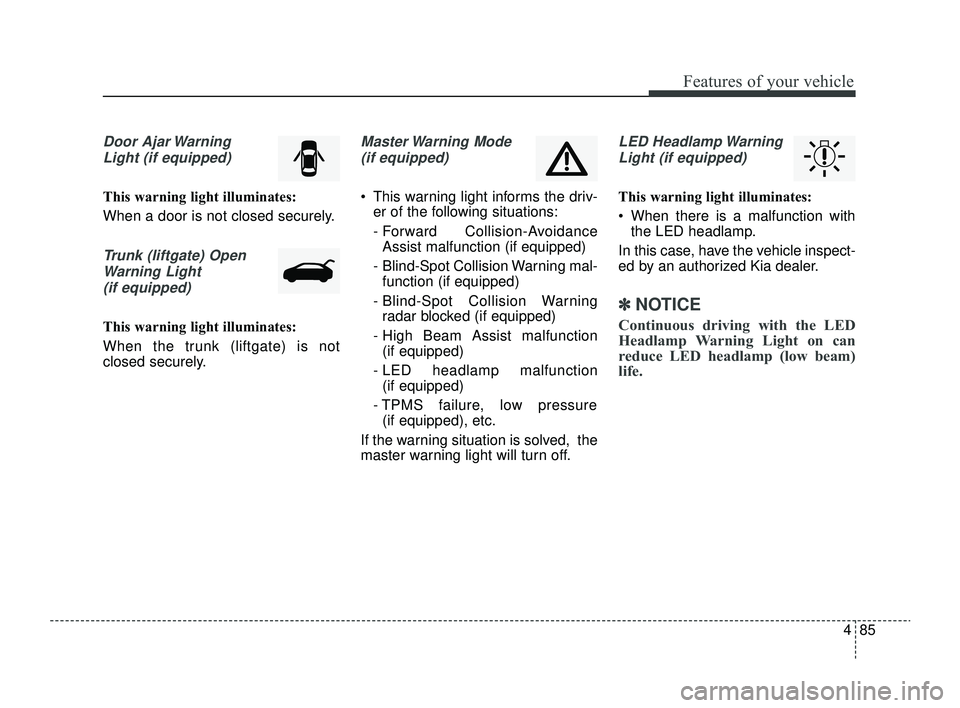
Door Ajar WarningLight (if equipped)
This warning light illuminates:
When a door is not closed securely.
Trunk (liftgate) OpenWarning Light(if equipped)
This warning light illuminates:
When the trunk (liftgate) is not
closed securely.
Master Warning Mode (if equipped)
This warning light informs the driv- er of the following situations:
- Forward Collision-AvoidanceAssist malfunction (if equipped)
- Blind-Spot Collision Warning mal- function (if equipped)
- Blind-Spot Collision Warning radar blocked (if equipped)
- High Beam Assist malfunction (if equipped)
- LED headlamp malfunction (if equipped)
- TPMS failure, low pressure (if equipped), etc.
If the warning situation is solved, the
master warning light will turn off.
LED Headlamp Warning Light (if equipped)
This warning light illuminates:
When there is a malfunction with the LED headlamp.
In this case, have the vehicle inspect-
ed by an authorized Kia dealer.
✽ ✽ NOTICE
Continuous driving with the LED
Headlamp Warning Light on can
reduce LED headlamp (low beam)
life.
SC PE USA 4.QXP 9/9/2021 6:05 PM Page 85
Page 165 of 528
Features of your vehicle
86
4
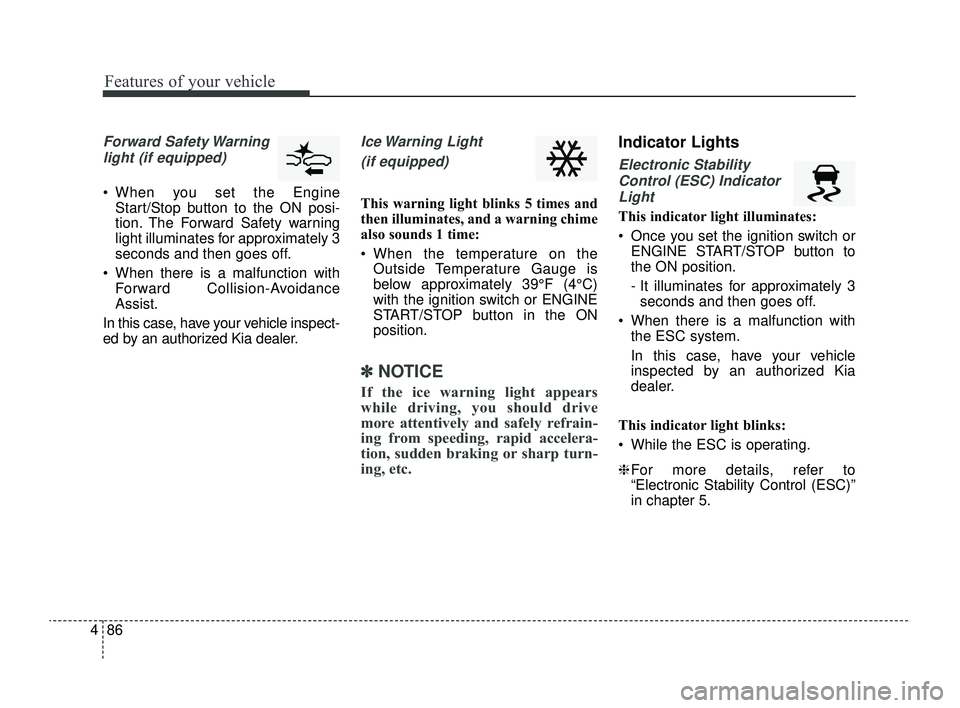
Forward Safety Warning
light (if equipped)
When you set the Engine Start/Stop button to the ON posi-
tion. The Forward Safety warning
light illuminates for approximately 3
seconds and then goes off.
When there is a malfunction with Forward Collision-Avoidance
Assist.
In this case, have your vehicle inspect-
ed by an authorized Kia dealer.
Ice Warning Light
(if equipped)
This warning light blinks 5 times and
then illuminates, and a warning chime
also sounds 1 time:
When the temperature on the Outside Temperature Gauge is
below approximately 39°F (4°C)
with the ignition switch or ENGINE
START/STOP button in the ON
position.
✽ ✽ NOTICE
If the ice warning light appears
while driving, you should drive
more attentively and safely refrain-
ing from speeding, rapid accelera-
tion, sudden braking or sharp turn-
ing, etc.
Indicator Lights
Electronic Stability
Control (ESC) IndicatorLight
This indicator light illuminates:
Once you set the ignition switch or ENGINE START/STOP button to
the ON position.
- It illuminates for approximately 3seconds and then goes off.
When there is a malfunction with the ESC system.
In this case, have your vehicle
inspected by an authorized Kia
dealer.
This indicator light blinks:
While the ESC is operating.
❈ For more details, refer to
“Electronic Stability Control (ESC)”
in chapter 5.
SC PE USA 4.QXP 9/9/2021 6:05 PM Page 86
Page 168 of 528
489
Features of your vehicle
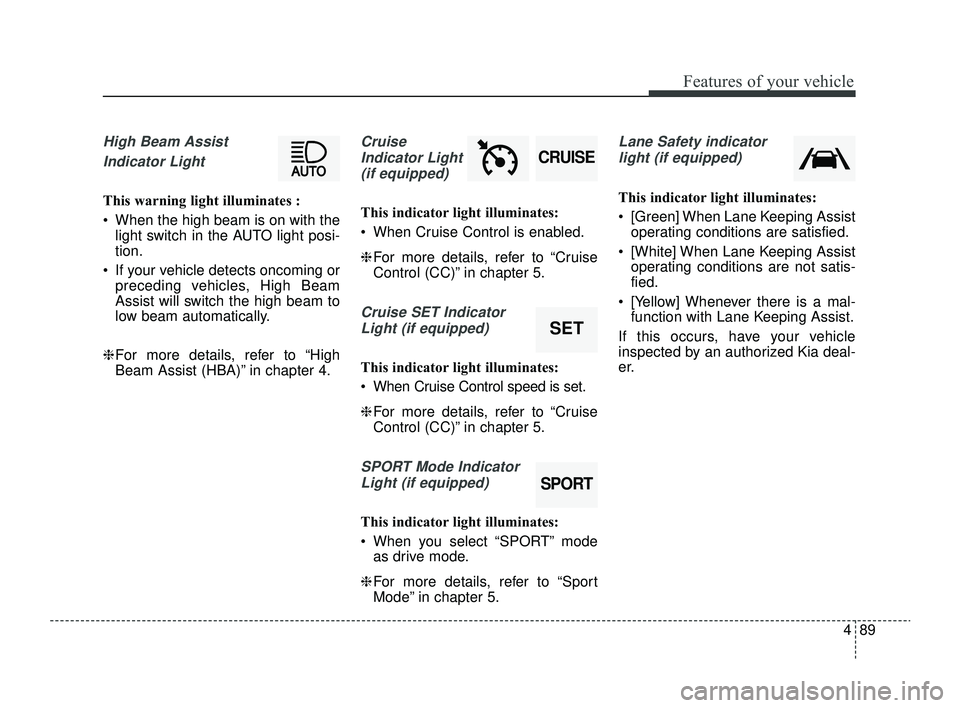
High Beam Assist Indicator Light
This warning light illuminates :
When the high beam is on with the light switch in the AUTO light posi-
tion.
If your vehicle detects oncoming or preceding vehicles, High Beam
Assist will switch the high beam to
low beam automatically.
❈ For more details, refer to “High
Beam Assist (HBA)” in chapter 4.
Cruise
Indicator Light (if equipped)
This indicator light illuminates:
When Cruise Control is enabled.
❈ For more details, refer to “Cruise
Control (CC)” in chapter 5.
Cruise SET Indicator
Light (if equipped)
This indicator light illuminates:
When Cruise Control speed is set.
❈ For more details, refer to “Cruise
Control (CC)” in chapter 5.
SPORT Mode Indicator
Light (if equipped)
This indicator light illuminates:
When you select “SPORT” mode as drive mode.
❈ For more details, refer to “Sport
Mode” in chapter 5.
Lane Safety indicator
light (if equipped)
This indicator light illuminates:
[Green] When Lane Keeping Assist operating conditions are satisfied.
[White] When Lane Keeping Assist operating conditions are not satis-
fied.
[Yellow] Whenever there is a mal- function with Lane Keeping Assist.
If this occurs, have your vehicle
inspected by an authorized Kia deal-
er.
SPORT
SET
CRUISE
SC PE USA 4.QXP 9/9/2021 6:05 PM Page 89
Page 174 of 528
495
Features of your vehicle
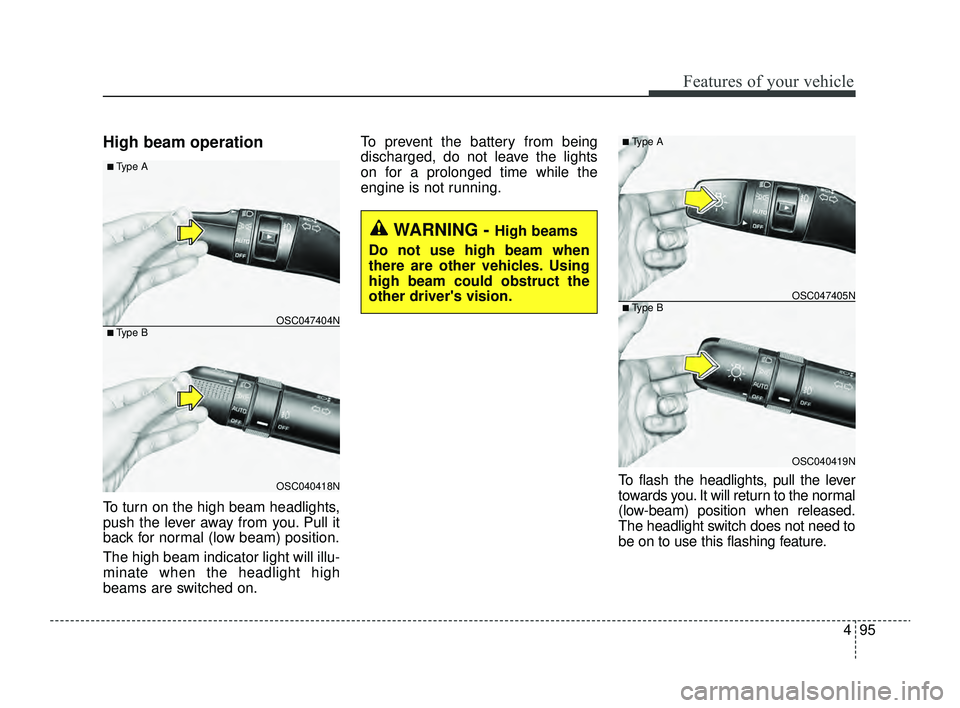
High beam operation
To turn on the high beam headlights,
push the lever away from you. Pull it
back for normal (low beam) position.
The high beam indicator light will illu-
minate when the headlight high
beams are switched on.To prevent the battery from being
discharged, do not leave the lights
on for a prolonged time while the
engine is not running.
To flash the headlights, pull the lever
towards you. It will return to the normal
(low-beam) position when released.
The headlight switch does not need to
be on to use this flashing feature.
WARNING - High beams
Do not use high beam when
there are other vehicles. Using
high beam could obstruct the
other driver's vision.
OSC040418N
OSC047404N
■ Type A
■ Type B
OSC040419N
OSC047405N
■ Type A
■ Type B
SC PE USA 4.QXP 9/9/2021 6:05 PM Page 95
Page 183 of 528
Features of your vehicle
104
4
Do not use the interior lights for
extended periods when the engine is
not running as this may cause bat-
tery discharge.Automatic turn off function
(if equipped)
The interior lights automatically turn
off approximately 20 minutes after
the ignition switch is turned off.
If your vehicle is equipped with the
theft alarm system, the interior lights
automatically turn off approximately
5 seconds after the system is in
armed stage.
Map lamp (if equipped)
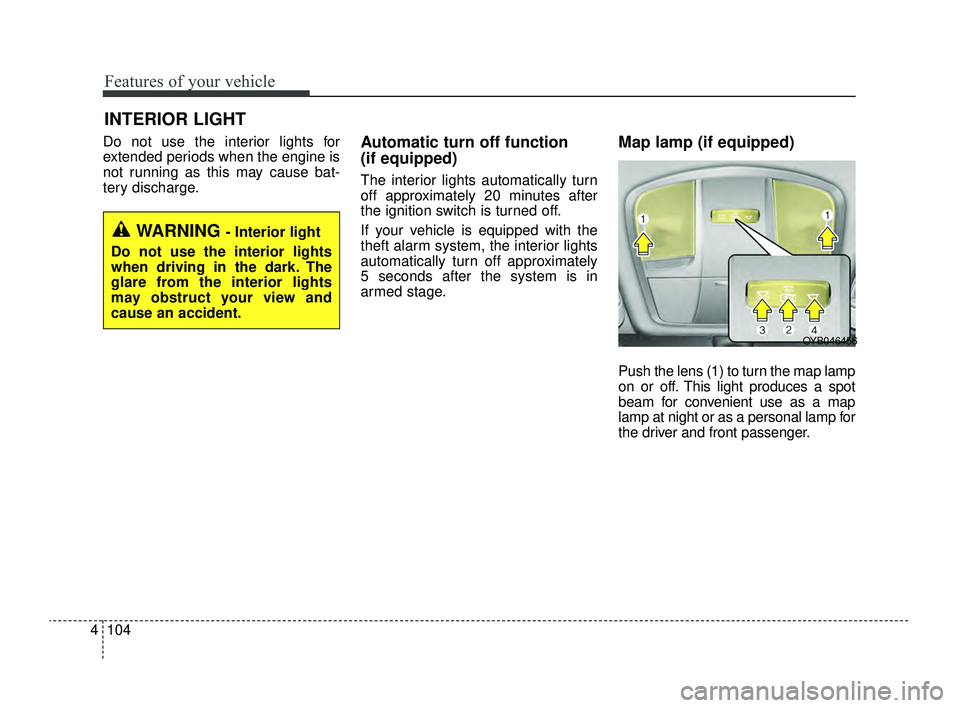
Push the lens (1) to turn the map lamp
on or off. This light produces a spot
beam for convenient use as a map
lamp at night or as a personal lamp for
the driver and front passenger.
INTERIOR LIGHT
WARNING - Interior light
Do not use the interior lights
when driving in the dark. The
glare from the interior lights
may obstruct your view and
cause an accident.
OYB046456
SC PE USA 4.QXP 9/9/2021 6:06 PM Page 104
Page 222 of 528
4143
Features of your vehicle
Cup holder
✽ ✽NOTICE
When cleaning spilled liquids, do
not dry the cup holder at high tem-
perature. This may damage the cup
holder.
Cups or small beverage cans may be
placed in the cup holders.
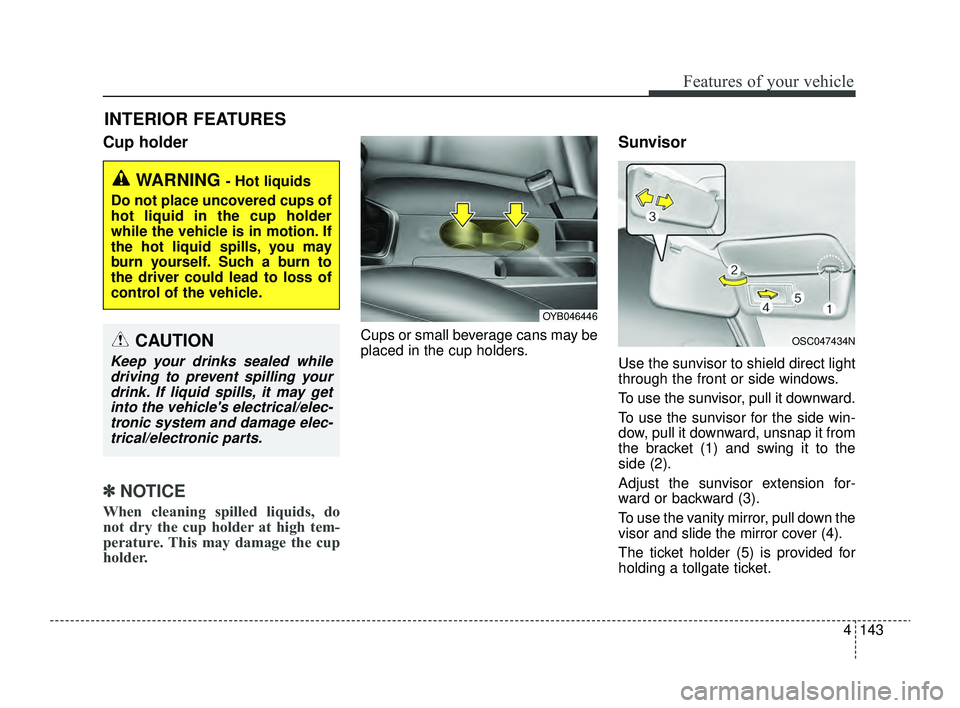
Sunvisor
Use the sunvisor to shield direct light
through the front or side windows.
To use the sunvisor, pull it downward.
To use the sunvisor for the side win-
dow, pull it downward, unsnap it from
the bracket (1) and swing it to the
side (2).
Adjust the sunvisor extension for-
ward or backward (3).
To use the vanity mirror, pull down the
visor and slide the mirror cover (4).
The ticket holder (5) is provided for
holding a tollgate ticket.
INTERIOR FEATURES
WARNING - Hot liquids
Do not place uncovered cups of
hot liquid in the cup holder
while the vehicle is in motion. If
the hot liquid spills, you may
burn yourself. Such a burn to
the driver could lead to loss of
control of the vehicle.
OYB046446
OSC047434NCAUTION
Keep your drinks sealed while driving to prevent spilling yourdrink. If liquid spills, it may getinto the vehicle's electrical/elec-tronic system and damage elec-trical/electronic parts.
SC PE USA 4.QXP 9/9/2021 6:08 PM Page 143
Page 232 of 528
4153
Features of your vehicle
WARNING - Audio
System
Do not disassemble, assemble,
or modify this audio system.
Such acts could result in fire or
electric shock.
WARNING - Antenna
Do not touch the antenna dur-
ing thunder or lightning as such
acts may lead to lightning
induced electric shock.
SC PE USA 4.QXP 9/9/2021 6:09 PM Page 153
Page 235 of 528
Driving your vehicle
Before driving . . . . . . . . . . . . . . . . . . . . . . . . . . . . . . 5-5
• Before entering vehicle . . . . . . . . . . . . . . . . . . . . . . . . . 5-5
• Necessary inspections . . . . . . . . . . . . . . . . . . . . . . . . . 5-5
• Before starting . . . . . . . . . . . . . . . . . . . . . . . . . . . . . . . 5-5
Key positions . . . . . . . . . . . . . . . . . . . . . . . . . . . . . . . 5-7
• Ignition switch position . . . . . . . . . . . . . . . . . . . . . . . . . 5-7
• Starting the engine. . . . . . . . . . . . . . . . . . . . . . . . . . . . . 5-9
ENGINE START/STOP button . . . . . . . . . . . . . . 5-10
• Illuminated ENGINE START/STOP button . . . . . . 5-10
• ENGINE START/STOP button position . . . . . . . . . . 5-10
• Starting the engine. . . . . . . . . . . . . . . . . . . . . . . . . . . . 5-13
Intelligent Variable Transmission (IVT) . . . . . . . 5-17
• Intelligent Variable Transmission (IVT) operation . 5-17
• Good driving practices . . . . . . . . . . . . . . . . . . . . . . . . 5-22
Brake system . . . . . . . . . . . . . . . . . . . . . . . . . . . . . . 5-25
• Power brakes . . . . . . . . . . . . . . . . . . . . . . . . . . . . . . . 5-25
• Parking brake . . . . . . . . . . . . . . . . . . . . . . . . . . . . . . . 5-27
• Anti-lock Brake System (ABS). . . . . . . . . . . . . . . . . . 5-30
• Electronic Stability Control (ESC) . . . . . . . . . . . . . . 5-31
• Hill-start Assist Control (HAC) . . . . . . . . . . . . . . . . . 5-35
• Vehicle Stability Management (VSM) . . . . . . . . . . . . 5-36
• Good braking practices. . . . . . . . . . . . . . . . . . . . . . . . 5-38
Sport mode integrated control system . . . . . . . . . 5-40
• SPORT mode . . . . . . . . . . . . . . . . . . . . . . . . . . . . . . . . 5-40
Forward Collision-Avoidance Assist (FCA). . . . . 5-41
• Detecting sensor . . . . . . . . . . . . . . . . . . . . . . . . . . . . . . 5-41
• Forward Collision-Avoidance Assist settings . . . . . . 5-42
• Forward Collision-Avoidance Assist warning messageand function control . . . . . . . . . . . . . . . . . . . . . . . . . 5-44
• Brake operation . . . . . . . . . . . . . . . . . . . . . . . . . . . . . . 5-46
• Warning message and warning light . . . . . . . . . . . . . 5-47
• Forward Collision-Avoidance Assist malfunction . . 5-48
• Limitations of Forward Collision-Avoidance Assist 5-50
Lane Keeping Assist (LKA). . . . . . . . . . . . . . . . . . 5-58
• Detecting sensor . . . . . . . . . . . . . . . . . . . . . . . . . . . . . . 5-58
• Lane Keeping Assist settings . . . . . . . . . . . . . . . . . . . 5-59
• Lane Keeping Assist operation. . . . . . . . . . . . . . . . . . 5-60
• Lane Keeping Assist malfunction and limitations . . 5-63
Blind-Spot Collision Warning (BCW) . . . . . . . . . 5-65
• Detecting sensor . . . . . . . . . . . . . . . . . . . . . . . . . . . . . . 5-66
• Blind-Spot Collision Warning settings . . . . . . . . . . . 5-67
• Blind-Spot Collision Warning operation. . . . . . . . . . 5-69
• Blind-Spot Collision Warning malfunction and limitations. . . . . . . . . . . . . . . . . . . . . . . . . . . . . . . . . . 5-70\
Driver Attention Warning (DAW) . . . . . . . . . . . . 5-75
• Basic function. . . . . . . . . . . . . . . . . . . . . . . . . . . . . . . . \
5-75
• Leading Vehicle Departure Alert . . . . . . . . . . . . . . . . 5-75
• Detecting sensor . . . . . . . . . . . . . . . . . . . . . . . . . . . . . . 5-75
• Driver Attention Warning settings . . . . . . . . . . . . . . 5-76
5
SC PE USA 5.QXP 9/9/2021 6:17 PM Page 1
Page 239 of 528
55
Driving your vehicle
Before entering vehicle
• Be sure that all windows, outsidemirror(s), and outside lights are
clean.
Check the condition of the tires.
Check under the vehicle for any sign of leaks.
Be sure there are no obstacles behind you if you intend to back up.
Necessary inspections
Fluid levels, such as engine oil,
engine coolant, brake fluid, and
washer fluid should be checked on a
regular basis, with the exact interval
depending on the fluid. Further
details are provided in chapter 7,
“Maintenance”.
Before starting
Close and lock all doors.
Position the seat so that all con-trols are easily reached.
Buckle your seat belt.
Adjust the inside and outside rearview mirrors.
Be sure that all lights work.
Check all gauges.
Check the operation of warning lights when the ignition switch or
ENGINE START/STOP button is
turned to the ON position.
Release the parking brake and make sure the brake warning light
goes off.
For safe operation, be sure you are
familiar with your vehicle and its
equipment.
BEFORE DRIVING
WARNING- Distracted driving
Focus on the road while driving.
The driver's primary responsi-
bility is in the safe and legal
operation of the vehicle. Use of
any hand held devices, other
equipment or vehicle systems
that distract the driver should
not be used during vehicle
operation.
SC PE USA 5.QXP 9/9/2021 6:17 PM Page 5
Page 241 of 528
57
Driving your vehicle
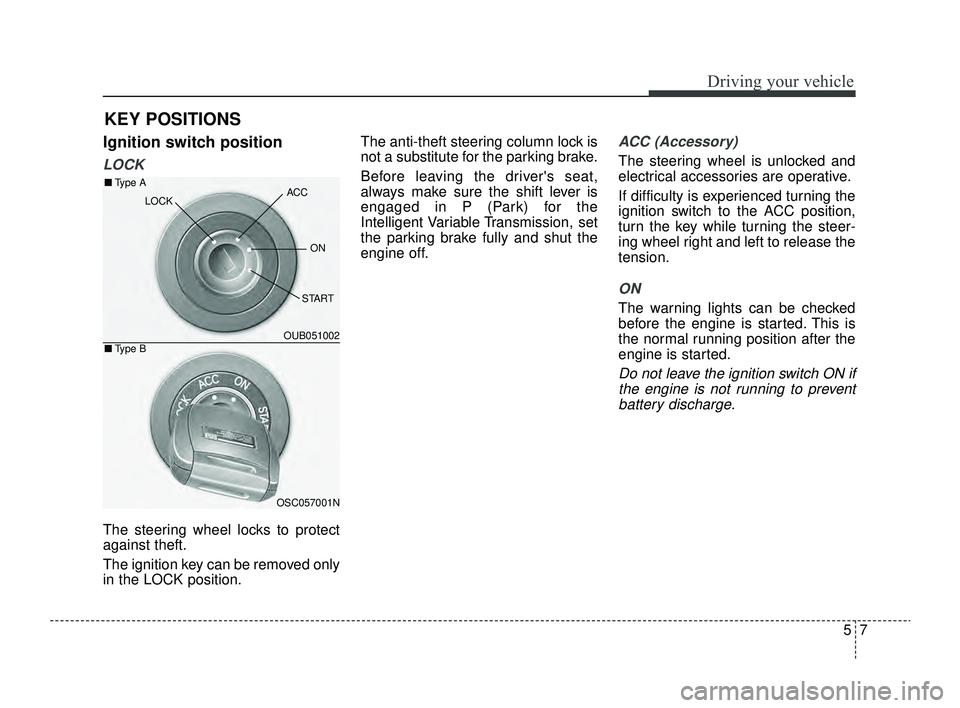
Ignition switch position
LOCK
The steering wheel locks to protect
against theft.
The ignition key can be removed only
in the LOCK position.The anti-theft steering column lock is
not a substitute for the parking brake.
Before leaving the driver's seat,
always make sure the shift lever is
engaged in P (Park) for the
Intelligent Variable Transmission, set
the parking brake fully and shut the
engine off.
ACC (Accessory)
The steering wheel is unlocked and
electrical accessories are operative.
If difficulty is experienced turning the
ignition switch to the ACC position,
turn the key while turning the steer-
ing wheel right and left to release the
tension.
ON
The warning lights can be checked
before the engine is started. This is
the normal running position after the
engine is started.
Do not leave the ignition switch ON if
the engine is not running to preventbattery discharge.
KEY POSITIONS
OUB051002
OSC057001N
■ Type A
■Type B
ACC
ON
START
LOCK
SC PE USA 5.QXP 9/9/2021 6:17 PM Page 7