manual transmission KIA RIO 2022 Owners Manual
[x] Cancel search | Manufacturer: KIA, Model Year: 2022, Model line: RIO, Model: KIA RIO 2022Pages: 528, PDF Size: 11.8 MB
Page 16 of 528
Your vehicle at a glance
62
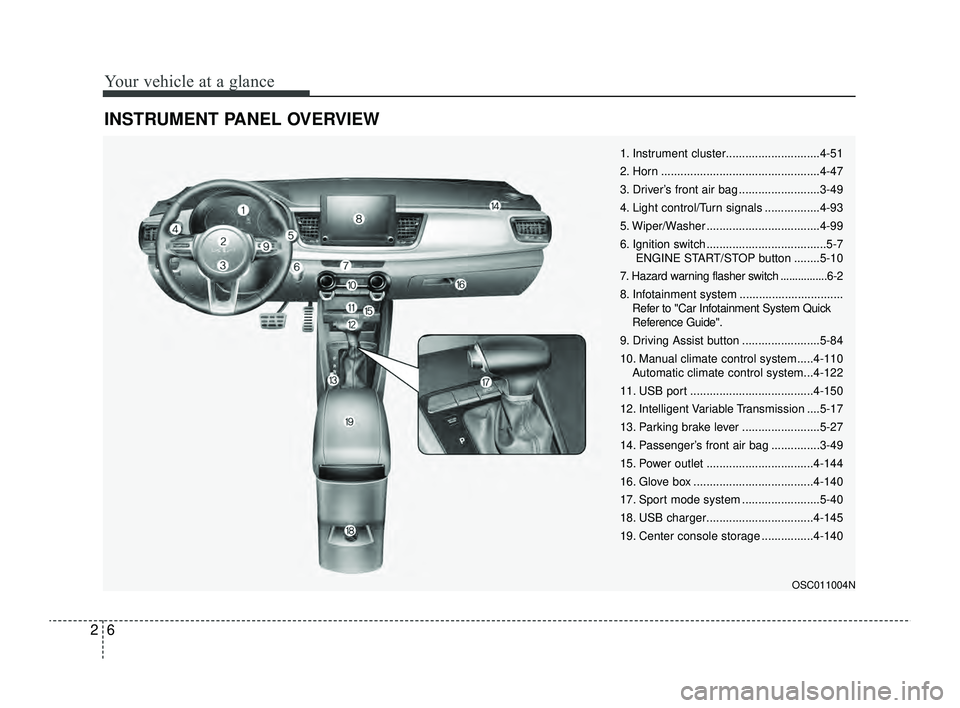
INSTRUMENT PANEL OVERVIEW
OSC011004N
1. Instrument cluster.............................4-51
2. Horn .................................................4-47
3. Driver’s front air bag .........................3-49
4. Light control/Turn signals .................4-93
5. Wiper/Washer ...................................4-99
6. Ignition switch .....................................5-7ENGINE START/STOP button ........5-10
7. Hazard warning flasher switch ................6-2
8. Infotainment system ................................ Refer to "Car Infotainment System Quick
Reference Guide".
9. Driving Assist button ........................5-84
10. Manual climate control system.....4-110 Automatic climate control system...4-122
11. USB port ......................................4-150
12. Intelligent Variable Transmission ....5-17
13. Parking brake lever ........................5-27
14. Passenger’s front air bag ...............3-49
15. Power outlet .................................4-144
16. Glove box .....................................4-140
17. Sport mode system ........................5-40
18. USB charger.................................4-145
19. Center console storage ................4-140
SC PE USA 2.qxp 8/23/2021 5:23 PM Page 6
Page 81 of 528
Instrument cluster . . . . . . . . . . . . . . . . . . . . . . . . . 4-51
• Instrument Cluster Control . . . . . . . . . . . . . . . . . . . . 4-52
• LCD Display Control . . . . . . . . . . . . . . . . . . . . . . . . . 4-52
• Gauges . . . . . . . . . . . . . . . . . . . . . . . . . . . . . . . . . . . . \
. 4-53
• Transmission Shift Indicator . . . . . . . . . . . . . . . . . . . 4-57
Trip computer . . . . . . . . . . . . . . . . . . . . . . . . . . . . . 4-58
• Trip information (Trip computer) . . . . . . . . . . . . . . . 4-58
• Service Mode (For type A cluster) . . . . . . . . . . . . . . . 4-63
LCD display (For Type B cluster) . . . . . . . . . . . . 4-64
• LCD Display Mode . . . . . . . . . . . . . . . . . . . . . . . . . . . 4-64
• Driving Assist mode. . . . . . . . . . . . . . . . . . . . . . . . . . . 4-65
• User Settings Mode (For type B cluster) . . . . . . . . . 4-66
• Warning messages (For type B cluster) . . . . . . . . . . 4-74
Warning and indicator lights . . . . . . . . . . . . . . . . 4-78
• Warning lights . . . . . . . . . . . . . . . . . . . . . . . . . . . . . . . 4-78
• Indicator Lights . . . . . . . . . . . . . . . . . . . . . . . . . . . . . . 4-86
Rear View Monitor (RVM) . . . . . . . . . . . . . . . . . . 4-90
• Rear View Monitor malfunction and limitations . . . 4-90
Lighting . . . . . . . . . . . . . . . . . . . . . . . . . . . . . . . . . . 4-92\
• Battery saver function. . . . . . . . . . . . . . . . . . . . . . . . . 4-92
• Headlight escort function . . . . . . . . . . . . . . . . . . . . . . 4-92
• Headlight welcome function . . . . . . . . . . . . . . . . . . . . 4-92
• Lighting control . . . . . . . . . . . . . . . . . . . . . . . . . . . . . . 4-93
• High beam operation. . . . . . . . . . . . . . . . . . . . . . . . . . 4-95
• High Beam Assist (HBA) . . . . . . . . . . . . . . . . . . . . . . 4-96• Turn signals and lane change signals . . . . . . . . . . . . 4-97
• Front fog light . . . . . . . . . . . . . . . . . . . . . . . . . . . . . . . 4-98
Wipers and washers . . . . . . . . . . . . . . . . . . . . . . . . 4-99
• Windshield wipers . . . . . . . . . . . . . . . . . . . . . . . . . . . 4-100
• Windshield washers (front) . . . . . . . . . . . . . . . . . . . 4-101
• Rear window wiper and washer switch (for 5 door) .
4-103
Interior light . . . . . . . . . . . . . . . . . . . . . . . . . . . . . 4-104
• Automatic turn off function . . . . . . . . . . . . . . . . . . . 4-104
• Map lamp . . . . . . . . . . . . . . . . . . . . . . . . . . . . . . . . . 4-104
• Room lamp . . . . . . . . . . . . . . . . . . . . . . . . . . . . . . . . . 4-105
• Trunk/Liftgate room lamp . . . . . . . . . . . . . . . . . . . . 4-107
• Glove box lamp . . . . . . . . . . . . . . . . . . . . . . . . . . . . . 4-107
• Vanity mirror lamp . . . . . . . . . . . . . . . . . . . . . . . . . . 4-108
Defroster . . . . . . . . . . . . . . . . . . . . . . . . . . . . . . . . 4-109
• Rear window defroster . . . . . . . . . . . . . . . . . . . . . . . 4-109
Manual climate control system . . . . . . . . . . . . . . 4-110
• Heating and air conditioning . . . . . . . . . . . . . . . . . . 4-111
• System operation . . . . . . . . . . . . . . . . . . . . . . . . . . . . 4-116
• Climate control air filter . . . . . . . . . . . . . . . . . . . . . . 4-118
• Checking the amount of air conditioner refrigerant
and compressor lubricant . . . . . . . . . . . . . . . . . . . . 4-119
• Air Conditioning refrigerant label . . . . . . . . . . . . . 4-120
• Activate upon Washer Fluid Use . . . . . . . . . . . . . . 4-121
4
SC PE USA 4.QXP 9/9/2021 6:01 PM Page 2
Page 136 of 528
457
Features of your vehicle
The outside temperature on the dis-
play may not change immediately
like a general thermometer to pre-
vent the driver from being inattentive.
To change the temperature unit (from
°C to °F or from °F to °C)
Type A Cluster
Press the TRIP button for 5 seconds,
the temperature unit is blink. And
then press the RESET button, the
temperature unit is changed. Press
the TRIP button for more than one
second.
Type B Cluster
The temperature unit can be
changed by using the “User Settings”
mode of the LCD Display.
❈For more details, refer to “LCD
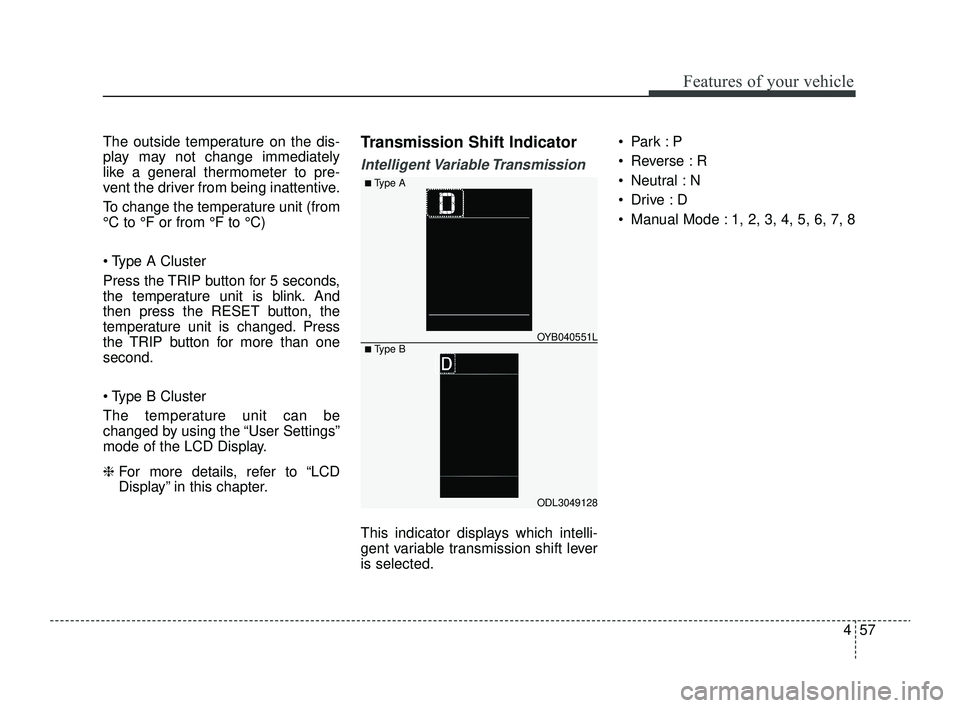
Display” in this chapter.Transmission Shift Indicator
Intelligent Variable Transmission
This indicator displays which intelli-
gent variable transmission shift lever
is selected. Park :P
Reverse : R
Neutral : N
Drive :D
Manual Mode : 1, 2, 3, 4, 5, 6, 7, 8
ODL3049128
OYB040551L
■ Type A
■ Type B
SC PE USA 4.QXP 9/9/2021 6:04 PM Page 57
Page 251 of 528
517
Driving your vehicle
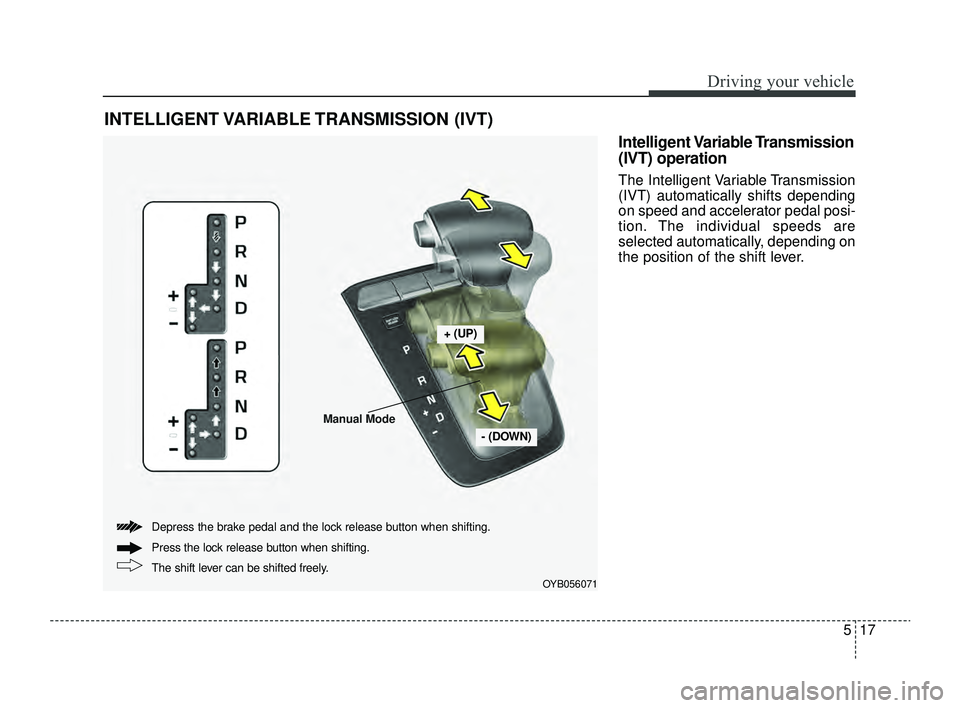
Intelligent Variable Transmission
(IVT) operation
The Intelligent Variable Transmission
(IVT) automatically shifts depending
on speed and accelerator pedal posi-
tion. The individual speeds are
selected automatically, depending on
the position of the shift lever.
INTELLIGENT VARIABLE TRANSMISSION (IVT)
OYB056071
+ (UP)
- (DOWN)
The shift lever can be shifted freely. Press the lock release button when shifting.
Depress the brake pedal and the lock release button when shifting.
Manual Mode
SC PE USA 5.QXP 9/9/2021 6:17 PM Page 17
Page 254 of 528
Driving your vehicle
20
5
D (Drive)
This is the normal forward driving
position. The transmission will auto-
matically shift, providing the best fuel
economy and power.
For extra power when passing anoth-
er vehicle or climbing grades,
depress the accelerator fully, at which
time the transmission will automati-
cally downshift to the next lower gear.
✽ ✽
NOTICE
Always come to a complete stop
before shifting into D (Drive).
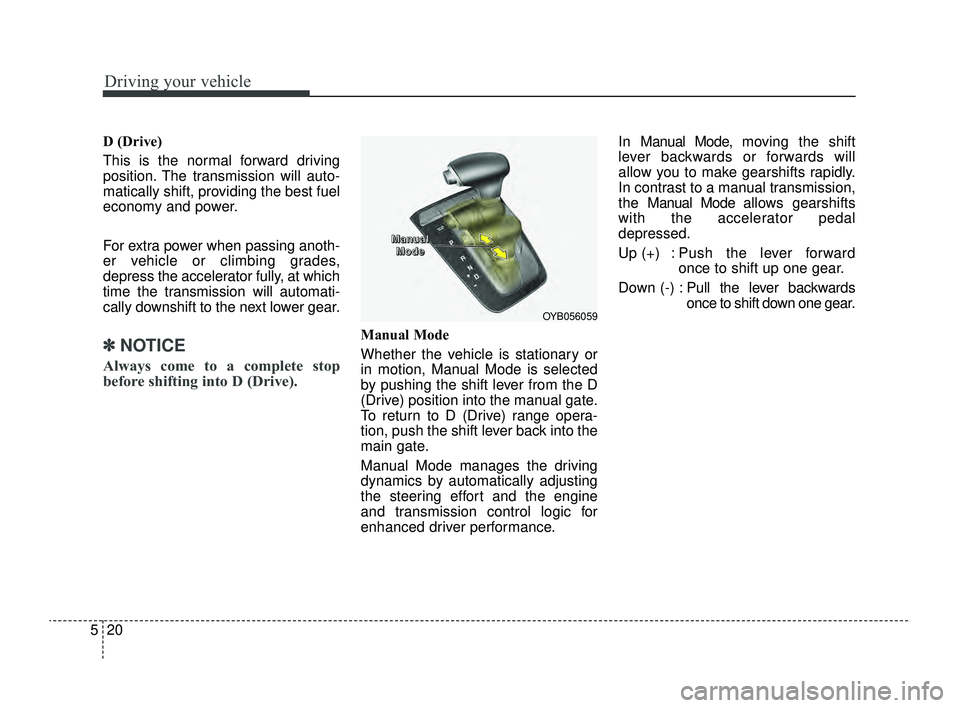
Manual Mode
Whether the vehicle is stationary or
in motion, Manual Mode is selected
by pushing the shift lever from the D
(Drive) position into the manual gate.
To return to D (Drive) range opera-
tion, push the shift lever back into the
main gate.
Manual Mode manages the driving
dynamics by automatically adjusting
the steering effort and the engine
and transmission control logic for
enhanced driver performance. In Manual Mode, mo
ving the shift
lever backwards or forwards will
allow you to make gearshifts rapidly.
In contrast to a manual transmission,
the Man ual Mode allows gearshifts
with the accelerator pedal
depressed.
Up (+) : Push the lever forward once to shift up one gear.
Down (-) : Pull the lever backwards
once to shift down one gear.
OYB056059
M M
M M
a a
a a
n n
n n
u u
u u
a a
a a
l l
l l
M M
M M
o o
o o
d d
d d
e e
e e
SC PE USA 5.QXP 9/9/2021 6:18 PM Page 20
Page 255 of 528
521
Driving your vehicle
✽ ✽NOTICE
• In Manual Mode, the driver must
execute upshifts in accordance
with road conditions, being care-
ful to keep the engine speed below
the red zone.
• In Manual Mode, only the 8 for- ward gears can be selected. To
reverse or park the vehicle, move
the shift lever to the R (Reverse)
or P (Park) position as required.
• In Manual Mode, downshifts are made automatically when the
vehicle slows down. When the
vehicle stops, 1st gear is automati-
cally selected.
• In Manual Mode, when the engine rpm approaches the red zone, shift
points are varied to upshift auto-
matically.
• To maintain the required levels of vehicle performance and safety,
the system may not execute cer-
tain gearshifts when the shift lever
is operated. (Continued)(Continued)
• When driving on a slippery road,
push the shift lever forward into
the +(up) position. This causes the
transmission to shift into the 2nd
gear which is better for smooth
driving on a slippery road. Push
the shift lever to the -(down) side
to shift back to the 1st gear.
• When Manual Mode is activated: - The engine rpm will tend toremain raised over a certain
length of time even after releas-
ing the accelerator
- Upshifts are delayed when accel- erating
• In Manual Mode, the fuel efficien- cy may decrease.
Shift lock system
For your safety, the Intelligent
Variable Transmission (IVT) has a
shift lock system which prevents
shifting the transmission from P
(Park) into R (Reverse) unless the
brake pedal is depressed.
To shift the transmission from P
(Park) into R (Reverse):
1. Depress and hold the brake pedal.
2. Start the engine or turn the ignition
switch or ENGINE START/STOP
button to the ON position.
3. Move the shift lever.
If the brake pedal is repeatedly
depressed and released with the shift
lever in the P (Park) position, a chat-
tering noise near the shift lever may
be heard. This is a normal condition.
WARNING
Always fully depress the brake
pedal before and while shifting
out of the P (Park) position into
another position to avoid inad-
vertent motion of the vehicle,
which could injure persons in
or around the vehicle.
SC PE USA 5.QXP 9/9/2021 6:18 PM Page 21