park assist KIA RIO 2022 Owners Manual
[x] Cancel search | Manufacturer: KIA, Model Year: 2022, Model line: RIO, Model: KIA RIO 2022Pages: 528, PDF Size: 11.8 MB
Page 16 of 528
Your vehicle at a glance
62
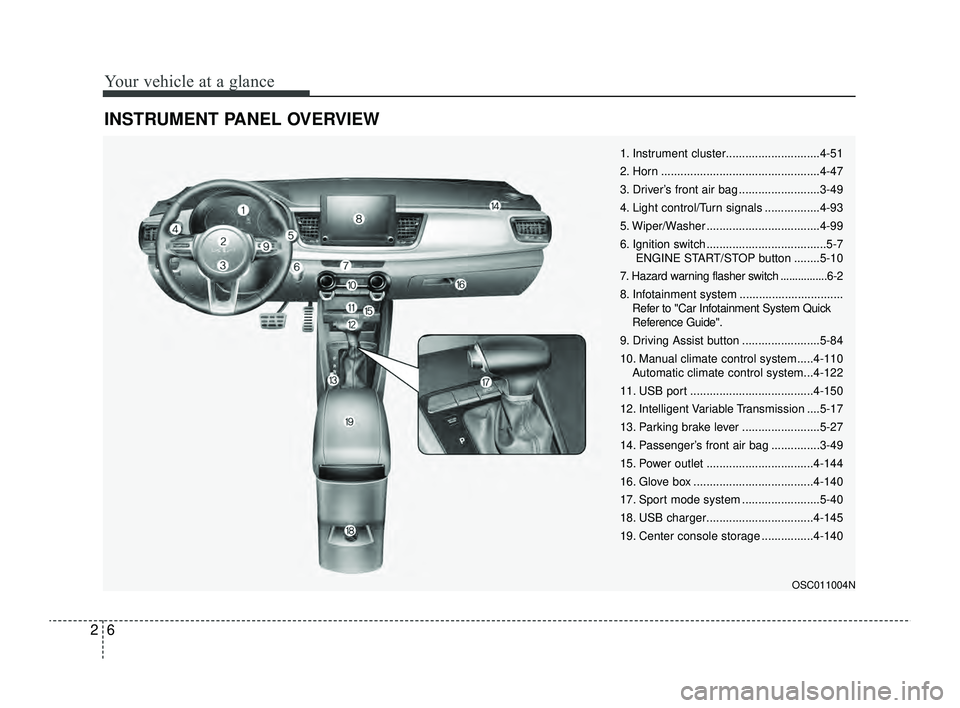
INSTRUMENT PANEL OVERVIEW
OSC011004N
1. Instrument cluster.............................4-51
2. Horn .................................................4-47
3. Driver’s front air bag .........................3-49
4. Light control/Turn signals .................4-93
5. Wiper/Washer ...................................4-99
6. Ignition switch .....................................5-7ENGINE START/STOP button ........5-10
7. Hazard warning flasher switch ................6-2
8. Infotainment system ................................ Refer to "Car Infotainment System Quick
Reference Guide".
9. Driving Assist button ........................5-84
10. Manual climate control system.....4-110 Automatic climate control system...4-122
11. USB port ......................................4-150
12. Intelligent Variable Transmission ....5-17
13. Parking brake lever ........................5-27
14. Passenger’s front air bag ...............3-49
15. Power outlet .................................4-144
16. Glove box .....................................4-140
17. Sport mode system ........................5-40
18. USB charger.................................4-145
19. Center console storage ................4-140
SC PE USA 2.qxp 8/23/2021 5:23 PM Page 6
Page 145 of 528
Features of your vehicle
66
4
✽ ✽
NOTICE
The information provided may dif-
fer depending on which functions
are applicable to your vehicle.
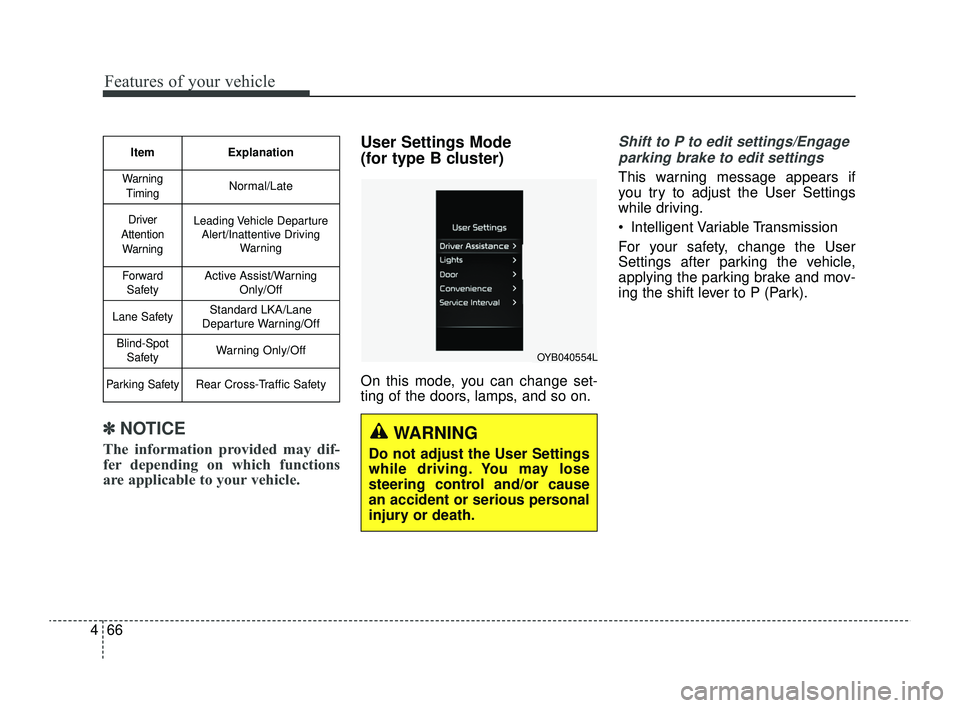
User Settings Mode
(for type B cluster)
On this mode, you can change set-
ting of the doors, lamps, and so on.
Shift to P to edit settings/Engage
parking brake to edit settings
This warning message appears if
you try to adjust the User Settings
while driving.
Intelligent Variable Transmission
For your safety, change the User
Settings after parking the vehicle,
applying the parking brake and mov-
ing the shift lever to P (Park).
Item Explanation
Warning
TimingNormal/Late
Driver
Attention WarningLeading Vehicle Departure Alert/Inattentive Driving Warning
ForwardSafetyActive Assist/Warning Only/Off
Lane SafetyStandard LKA/Lane
Departure Warning/Off
Blind-Spot SafetyWarning Only/Off
Parking SafetyRear Cross-Traffic Safety
WARNING
Do not adjust the User Settings
while driving. You may lose
steering control and/or cause
an accident or serious personal
injury or death.
OYB040554L
SC PE USA 4.QXP 9/9/2021 6:05 PM Page 66
Page 146 of 528
467
Features of your vehicle
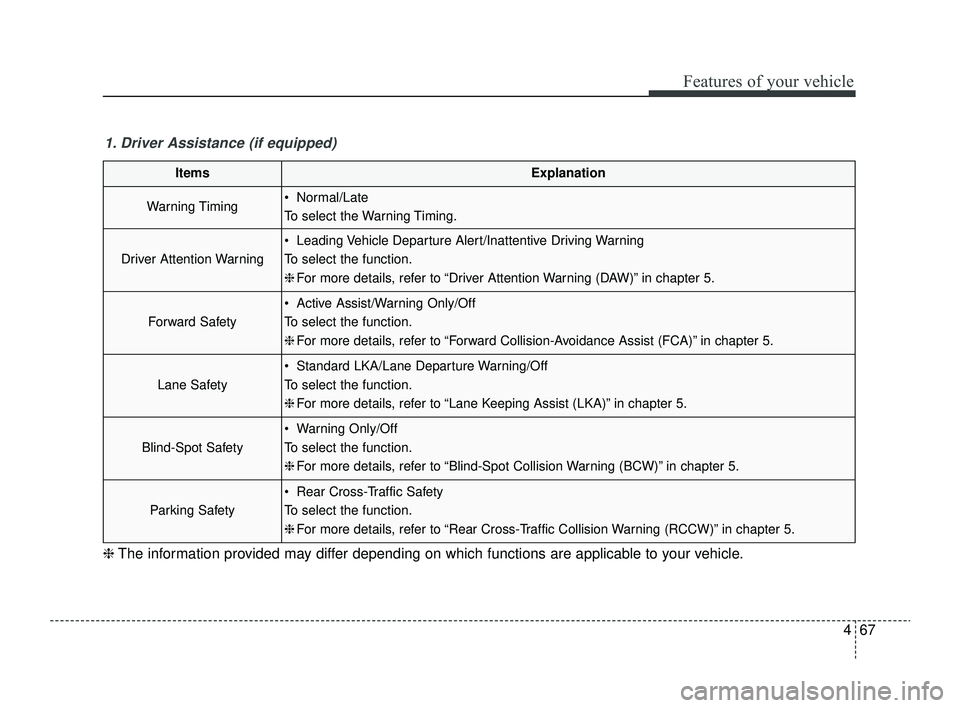
1. Driver Assistance (if equipped)
ItemsExplanation
Warning Timing Normal/Late
To select the Warning Timing.
Driver Attention Warning
Leading Vehicle Departure Alert/Inattentive Driving Warning
To select the function.
❈For more details, refer to “Driver Attention Warning (DAW)” in chapter 5.
Forward Safety
Active Assist/Warning Only/Off
To select the function.
❈For more details, refer to “Forward Collision-Avoidance Assist (FCA)” in chapter 5.
Lane Safety
Standard LKA/Lane Departure Warning/Off
To select the function.
❈For more details, refer to “Lane Keeping Assist (LKA)” in chapter 5.
Blind-Spot Safety
Warning Only/Off
To select the function.
❈For more details, refer to “Blind-Spot Collision Warning (BCW)” in chapter 5.
Parking Safety
Rear Cross-Traffic Safety
To select the function.
❈For more details, refer to “Rear Cross-Traffic Collision Warning (RCCW)” in chapter 5.
❈ The information provided may differ depending on which functions are applicable to your vehicle.
SC PE USA 4.QXP 9/9/2021 6:05 PM Page 67
Page 159 of 528
Features of your vehicle
80
4
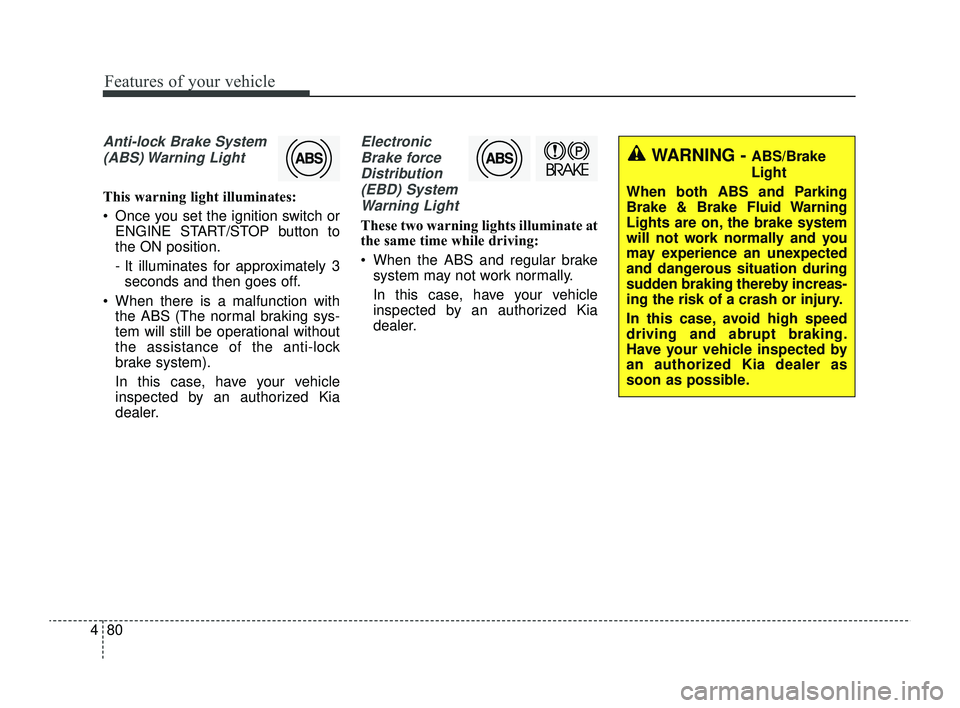
Anti-lock Brake System
(ABS) Warning Light
This warning light illuminates:
Once you set the ignition switch or ENGINE START/STOP button to
the ON position.
- It illuminates for approximately 3seconds and then goes off.
When there is a malfunction with the ABS (The normal braking sys-
tem will still be operational without
the assistance of the anti-lock
brake system).
In this case, have your vehicle
inspected by an authorized Kia
dealer.
Electronic
Brake forceDistribution(EBD) SystemWarning Light
These two warning lights illuminate at
the same time while driving:
When the ABS and regular brake system may not work normally.
In this case, have your vehicle
inspected by an authorized Kia
dealer.
WARNING - ABS/Brake
Light
When both ABS and Parking
Brake & Brake Fluid Warning
Lights are on, the brake system
will not work normally and you
may experience an unexpected
and dangerous situation during
sudden braking thereby increas-
ing the risk of a crash or injury.
In this case, avoid high speed
driving and abrupt braking.
Have your vehicle inspected by
an authorized Kia dealer as
soon as possible.
SC PE USA 4.QXP 9/9/2021 6:05 PM Page 80
Page 169 of 528
Features of your vehicle
90
4
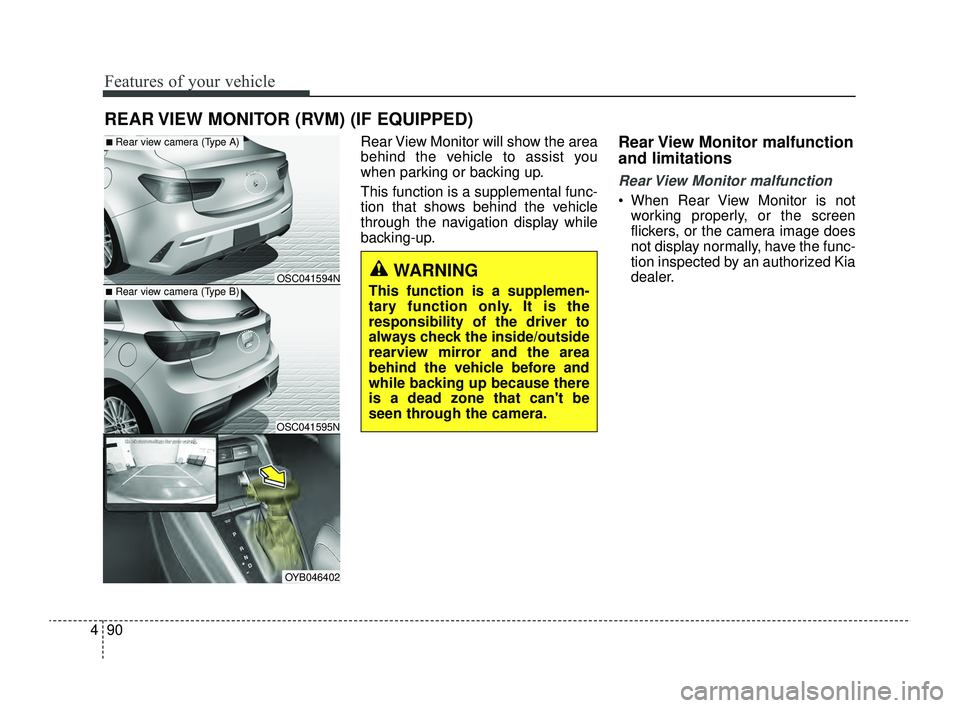
Rear View Monitor will show the area
behind the vehicle to assist you
when parking or backing up.
This function is a supplemental func-
tion that shows behind the vehicle
through the navigation display while
backing-up.Rear View Monitor malfunction
and limitations
Rear View Monitor malfunction
When Rear View Monitor is not
working properly, or the screen
flickers, or the camera image does
not display normally, have the func-
tion inspected by an authorized Kia
dealer.
REAR VIEW MONITOR (RVM) (IF EQUIPPED)
■Rear view camera (Type B)
■Rear view camera (Type A)
OSC041595N
OSC041594N
OYB046402
WARNING
This function is a supplemen-
tary function only. It is the
responsibility of the driver to
always check the inside/outside
rearview mirror and the area
behind the vehicle before and
while backing up because there
is a dead zone that can't be
seen through the camera.
SC PE USA 4.QXP 9/9/2021 6:05 PM Page 90
Page 170 of 528
491
Features of your vehicle
Limitations of Rear View Monitor
When the vehicle is stopped for along time in winter or when the
vehicle is parked in an indoor park-
ing lot, the exhaust fumes may
temporarily blur the image.WARNING
Rear View Monitor is not a
safety device. It only serves to
assist the driver in identifying
objects directly behind the
middle of the vehicle. The
camera does not cover the
complete area behind the
vehicle.
Never rely solely on the rear
view monitor. As there are
blind spots that do not appear
on the camera while backing
up and parking, You must
always use methods of view-
ing the area behind you
including looking over both
shoulders as well as continu-
ously checking all three rear
view mirrors.
(Continued)
(Continued)
Always look around your vehi-
cle to make sure there are no
objects or obstacles before
moving the vehicle in any
direction to prevent a colli-
sion.
Always pay close attention
when the vehicle is driven
close to objects, particularly
pedestrians, and especially
children.
If the camera lens is covered
with foreign material, Rear
View Monitor may not operate
normally. Always keep the
camera lens clean. However,
do not use chemical solvents
such as strong detergents
containing high alkaline or
volatile organic solvents
(gasoline, acetone etc.). This
may damage the camera lens.
When stopping for a long time
in winter or parking in an
indoor parking lot, the image
may temporarily be blurry due
to the exhaust gas.
SC PE USA 4.QXP 9/9/2021 6:05 PM Page 91
Page 235 of 528
Driving your vehicle
Before driving . . . . . . . . . . . . . . . . . . . . . . . . . . . . . . 5-5
• Before entering vehicle . . . . . . . . . . . . . . . . . . . . . . . . . 5-5
• Necessary inspections . . . . . . . . . . . . . . . . . . . . . . . . . 5-5
• Before starting . . . . . . . . . . . . . . . . . . . . . . . . . . . . . . . 5-5
Key positions . . . . . . . . . . . . . . . . . . . . . . . . . . . . . . . 5-7
• Ignition switch position . . . . . . . . . . . . . . . . . . . . . . . . . 5-7
• Starting the engine. . . . . . . . . . . . . . . . . . . . . . . . . . . . . 5-9
ENGINE START/STOP button . . . . . . . . . . . . . . 5-10
• Illuminated ENGINE START/STOP button . . . . . . 5-10
• ENGINE START/STOP button position . . . . . . . . . . 5-10
• Starting the engine. . . . . . . . . . . . . . . . . . . . . . . . . . . . 5-13
Intelligent Variable Transmission (IVT) . . . . . . . 5-17
• Intelligent Variable Transmission (IVT) operation . 5-17
• Good driving practices . . . . . . . . . . . . . . . . . . . . . . . . 5-22
Brake system . . . . . . . . . . . . . . . . . . . . . . . . . . . . . . 5-25
• Power brakes . . . . . . . . . . . . . . . . . . . . . . . . . . . . . . . 5-25
• Parking brake . . . . . . . . . . . . . . . . . . . . . . . . . . . . . . . 5-27
• Anti-lock Brake System (ABS). . . . . . . . . . . . . . . . . . 5-30
• Electronic Stability Control (ESC) . . . . . . . . . . . . . . 5-31
• Hill-start Assist Control (HAC) . . . . . . . . . . . . . . . . . 5-35
• Vehicle Stability Management (VSM) . . . . . . . . . . . . 5-36
• Good braking practices. . . . . . . . . . . . . . . . . . . . . . . . 5-38
Sport mode integrated control system . . . . . . . . . 5-40
• SPORT mode . . . . . . . . . . . . . . . . . . . . . . . . . . . . . . . . 5-40
Forward Collision-Avoidance Assist (FCA). . . . . 5-41
• Detecting sensor . . . . . . . . . . . . . . . . . . . . . . . . . . . . . . 5-41
• Forward Collision-Avoidance Assist settings . . . . . . 5-42
• Forward Collision-Avoidance Assist warning messageand function control . . . . . . . . . . . . . . . . . . . . . . . . . 5-44
• Brake operation . . . . . . . . . . . . . . . . . . . . . . . . . . . . . . 5-46
• Warning message and warning light . . . . . . . . . . . . . 5-47
• Forward Collision-Avoidance Assist malfunction . . 5-48
• Limitations of Forward Collision-Avoidance Assist 5-50
Lane Keeping Assist (LKA). . . . . . . . . . . . . . . . . . 5-58
• Detecting sensor . . . . . . . . . . . . . . . . . . . . . . . . . . . . . . 5-58
• Lane Keeping Assist settings . . . . . . . . . . . . . . . . . . . 5-59
• Lane Keeping Assist operation. . . . . . . . . . . . . . . . . . 5-60
• Lane Keeping Assist malfunction and limitations . . 5-63
Blind-Spot Collision Warning (BCW) . . . . . . . . . 5-65
• Detecting sensor . . . . . . . . . . . . . . . . . . . . . . . . . . . . . . 5-66
• Blind-Spot Collision Warning settings . . . . . . . . . . . 5-67
• Blind-Spot Collision Warning operation. . . . . . . . . . 5-69
• Blind-Spot Collision Warning malfunction and limitations. . . . . . . . . . . . . . . . . . . . . . . . . . . . . . . . . . 5-70\
Driver Attention Warning (DAW) . . . . . . . . . . . . 5-75
• Basic function. . . . . . . . . . . . . . . . . . . . . . . . . . . . . . . . \
5-75
• Leading Vehicle Departure Alert . . . . . . . . . . . . . . . . 5-75
• Detecting sensor . . . . . . . . . . . . . . . . . . . . . . . . . . . . . . 5-75
• Driver Attention Warning settings . . . . . . . . . . . . . . 5-76
5
SC PE USA 5.QXP 9/9/2021 6:17 PM Page 1
Page 236 of 528

• Driver Attention Warning operation . . . . . . . . . . . . 5-78
• Driver Attention Warning malfunction andlimitations. . . . . . . . . . . . . . . . . . . . . . . . . . . . . . . . . . 5-81\
Cruise Control (CC). . . . . . . . . . . . . . . . . . . . . . . . 5-84
• Cruise Control operation . . . . . . . . . . . . . . . . . . . . . . 5-84
• Increasing set speed. . . . . . . . . . . . . . . . . . . . . . . . . . . 5-85
• Decreasing set speed . . . . . . . . . . . . . . . . . . . . . . . . . . 5-85
• Accelerating temporarily . . . . . . . . . . . . . . . . . . . . . . 5-86
• Temporarily pausing Cruise Control . . . . . . . . . . . . 5-86
• Resuming Cruise Control . . . . . . . . . . . . . . . . . . . . . . 5-87
• Turning off Cruise Control. . . . . . . . . . . . . . . . . . . . . 5-87
Lane Following Assist (LFA) . . . . . . . . . . . . . . . . . 5-89
• Detecting sensor . . . . . . . . . . . . . . . . . . . . . . . . . . . . . . 5-89
• Lane Following Assist settings . . . . . . . . . . . . . . . . . 5-89
• Lane Following Assist operation . . . . . . . . . . . . . . . . 5-90
• Lane Following Assist malfunction and limitations . 5-93
Rear Cross-Traffic Collision Warning (RCCW) . 5-94
• Detecting sensor . . . . . . . . . . . . . . . . . . . . . . . . . . . . . . 5-94
• Rear Cross-Traffic Collision Warning settings . . . . 5-95
• Rear Cross-Traffic Collision Warning operation . . . 5-96
• Rear Cross-Traffic Collision Warning malfunction
and limitations . . . . . . . . . . . . . . . . . . . . . . . . . . . . . . 5-97
Declaration of conformity . . . . . . . . . . . . . . . . . . 5-102
• The radio frequency components (Rear Corner Radar)complies . . . . . . . . . . . . . . . . . . . . . . . . . . . . . . . . . . 5-10\
2
Economical operation . . . . . . . . . . . . . . . . . . . . . 5-103
Special driving conditions . . . . . . . . . . . . . . . . . . 5-105
• Hazardous driving conditions . . . . . . . . . . . . . . . . . 5-105
• Rocking the vehicle . . . . . . . . . . . . . . . . . . . . . . . . . . 5-105
• Smooth cornering . . . . . . . . . . . . . . . . . . . . . . . . . . . 5-106
• Driving at night . . . . . . . . . . . . . . . . . . . . . . . . . . . . 5-106
• Driving in the rain . . . . . . . . . . . . . . . . . . . . . . . . . . . 5-107
• Driving in flooded areas . . . . . . . . . . . . . . . . . . . . . . 5-108
• Driving off-road . . . . . . . . . . . . . . . . . . . . . . . . . . . . . 5-108
• Highway driving . . . . . . . . . . . . . . . . . . . . . . . . . . . . 5-108
Winter driving . . . . . . . . . . . . . . . . . . . . . . . . . . . 5-110
• Snowy or Icy conditions . . . . . . . . . . . . . . . . . . . . . . 5-110
• Use high quality ethylene glycol coolant . . . . . . . . . 5-112
• Check battery and cables . . . . . . . . . . . . . . . . . . . . . 5-112
• Change to "winter weight" oil if necessary . . . . . . 5-113
• Check spark plugs and ignition system . . . . . . . . . . 5-113
• To keep locks from freezing . . . . . . . . . . . . . . . . . . . 5-113
• Use approved window washer anti-freeze in system5-113
• Don't let your parking brake freeze . . . . . . . . . . . . 5-113
• Don't let ice and snow accumulate underneath . . . 5-113
• Carry emergency equipment . . . . . . . . . . . . . . . . . . 5-114
• Trailer Towing . . . . . . . . . . . . . . . . . . . . . . . . . . . . . . 5-114
5
SC PE USA 5.QXP 9/9/2021 6:17 PM Page 2
Page 269 of 528
535
Driving your vehicle
ESC OFF usage
When driving
It’s a good idea to keep the ESCturned on for daily driving whenev-
er possible.
To turn ESC off while driving, press the ESC OFF button while driving
on a flat road surface.
Hill-start Assist Control (HAC)
The Hill-start Assist Control (HAC) is
designed to prevent the vehicle from
rolling back by applying the brakes
automatically for about 2 seconds.
The brakes are released when the
accelerator pedal is depressed or
after about 2 seconds.
The HAC is activated only for about 2
seconds, so when the vehicle is
starting off always depress the accel-
erator pedal.
WARNING- Operating
ESC
Never press the ESC OFF but-
ton while ESC is operating.
If the ESC is turned off while
ESC is operating, the vehicle
may go out of control.
WARNING- Maintaining
Brake Pressure on Incline
HAC does not replace the need
to apply brakes while stopped on
an incline. While stopped, make
sure you maintain brake pres-
sure sufficient to prevent your
vehicle from rolling backward
and causing an accident. Don’t
release the brake pedal until you
are ready to accelerate forward.
CAUTION
The HAC does not operate when the transmission shiftlever is in the P (Park) or N(Neutral) position.
The HAC activates even though the ESC is off but itdoes not activate when theESC has malfunctioned.
SC PE USA 5.QXP 9/9/2021 6:18 PM Page 35
Page 283 of 528
549
Driving your vehicle
(Continued)Forward Collision-Avoidance
Assist may not activate and the
warning message will not be
displayed.
Forward Collision-Avoidance Assist may unnecessarily pro-
duce the warning message
and the warning alarms. Also,
due to the sensing limitation,
Forward Collision-Avoidance
Assist may not produce the
warning message and the
warning alarm at all.
When there is a malfunction with Forward Collision-
Avoidance Assist, the
autonomous emergency brak-
ing does not operate upon
detecting a collision risk even
with other braking systems
normally operating.
Forward Collision-Avoidance Assist may not activate if the
driver applies the brake pedal
before warning to avoid risk of
collision.
(Continued)(Continued)
Forward Collision-AvoidanceAssist does not operate when
the vehicle is in reverse.
Forward Collision-Avoidance Assist is not designed to
detect other objects on the
road such as animals.
Forward Collision-Avoidance Assist does not detect vehi-
cles in the opposite lane.
Forward Collision-Avoidance Assist does not detect cross
traffic vehicles that are
approaching.
Forward Collision-Avoidance Assist cannot detect the driv-
er approaching the side view
of a parked vehicle (for exam-
ple on a dead end street). In
these cases, you must main-
tain a safe braking distance,
and if necessary, depress the
brake pedal to reduce the
driving speed in order to
maintain a safe distance.
(Continued)(Continued)
Forward Collision-AvoidanceAssist may not activate
depending on road or driving
conditions.
Forward Collision-Avoidance Assist may not activate to all
types of vehicles.
SC PE USA 5.QXP 9/9/2021 6:18 PM Page 49