radio KIA RIO 2022 Quick Start Guide Base Audio
[x] Cancel search | Manufacturer: KIA, Model Year: 2022, Model line: RIO, Model: KIA RIO 2022Pages: 156, PDF Size: 4.23 MB
Page 65 of 156
3-7
Listening to SiriusXM™
radio
(if equipped)
You can listen to radio channels provided
by SiriusXM, a satellite radio service.
Various kinds of channels, such as music,
sports, and news, are available via
streaming or live broadcast.
Starting SiriusXM radio
1 Press All Menus > Radio on
the Home screen, or press the
Radio button on the control
panel.
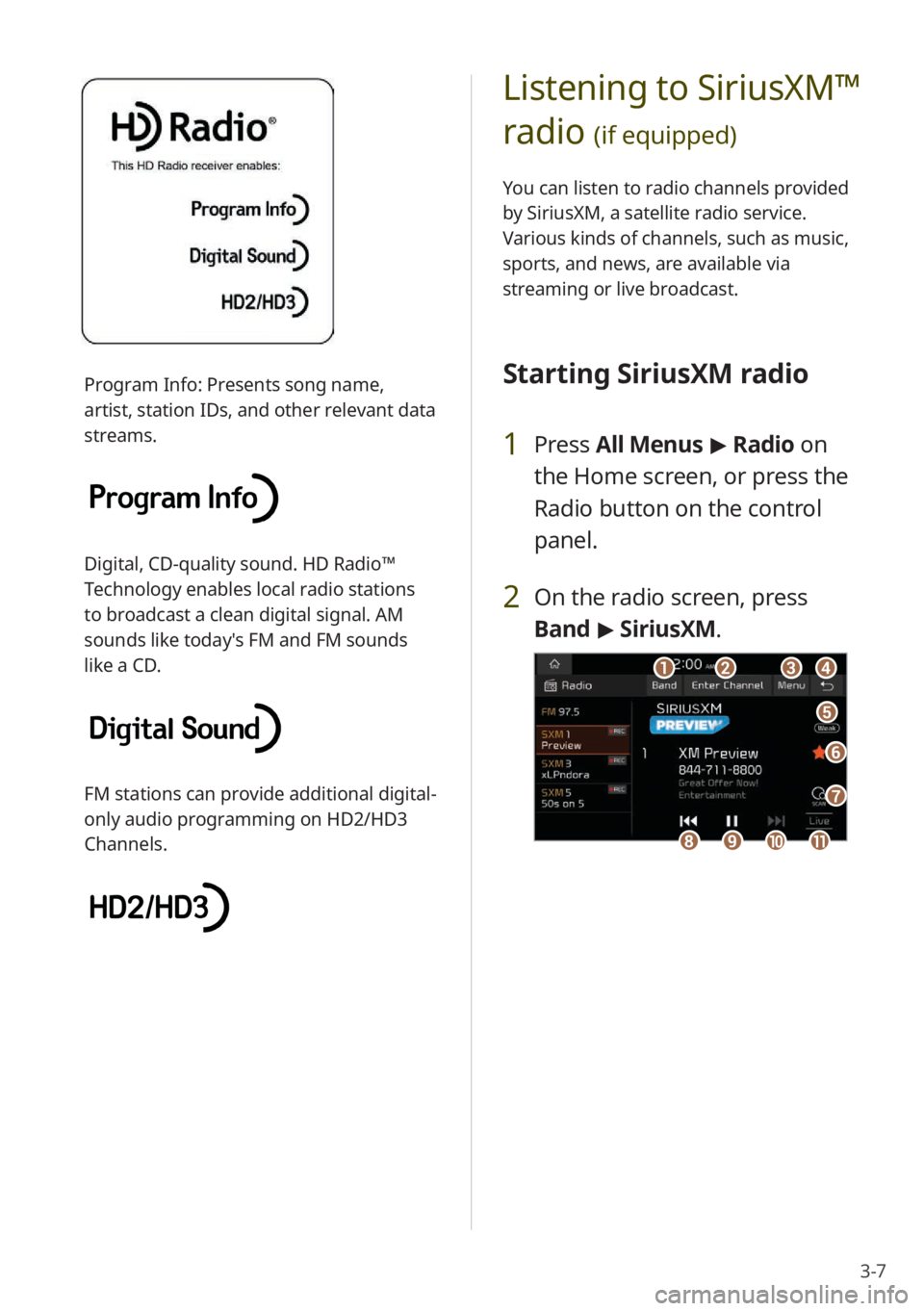
2 On the radio screen, press
Band > SiriusXM.
dd
ff
ee
gg
aabbcc
iijjkkhh
Program Info: Presents song name,
artist, station IDs, and other relevant data
streams.
Digital, CD-quality sound. HD Radio™
Technology enables local radio stations
to broadcast a clean digital signal. AM
sounds like today′s FM and FM sounds
like a CD.
FM stations can provide additional digital-
only audio programming on HD2/HD3
Channels.
Page 66 of 156

3-8
d d Return to the previous level.
e e Weak reception indicator
f f Save the current radio channel to
the preset list, or delete it from the
list.
g g Scan through all available SiriusXM
radio channels.
h h Move to the previous segment.
Press and hold to rewind.
i i Pause or resume the broadcast.
j j Move to the next segment. Press
and hold to fast forward.
k k Switch to the live broadcast mode.
This button is activated only when
a live broadcast is available on the
selected channel.
\333Note
The icon will be shown next to the
first 10 SiriusXM channels saved. Once
preset channels are saved, broadcasts
from these channels will be buffered
automatically for your convenience each
time you start your vehicle.
a a Select a radio mode.
b b Change the radio channel by
entering a channel number
manually.
c c Display the options list.
\225Display Off (if equipped): Turn
off the screen. Press the screen
to turn it back on.
\225Channel List : Access the list
of available SiriusXM radio
channels.
\225 What is on My Presets?: View
broadcast schedule of the
radio channels on your preset
list.
> See ″Viewing the program
schedule.″
\225 Featured Favorites: Listen to
groups of channels provided
by SiriusXM.
> See ″Listening to
Featured Favorites channels.″
\225 Reorder Presets (if equipped):
Rearrange saved radio stations
on the preset list.
> See
″ Rearranging the preset list (if
equipped) .″
\225Delete Presets: Delete saved
radio stations from the preset
list.
> See ″Deleting saved radio
stations.″
\225 Set Number of Presets (if
equipped): Set the number of
radio stations to display on the
preset list.
> See ″Changing the
number of radio stations on the
preset list (if equipped).″
\225 Sound Settings: Customize the
system sound settings.
> See
″ Configuring the sound settings.″
\225 User′s Manual on Web (QR
Code): Access the web manual
via the QR code. For safety
reasons, you can access the QR
code only when your vehicle is
stationary.
Page 67 of 156

3-9
Selecting radio channels
by using channel numbers
If you know the exact channel number,
you can enter it to select the radio channel
directly.
1 On the radio screen, press
Band > SiriusXM.
2 On the SiriusXM radio screen,
press Enter Channel .
3 Enter a channel number and
press OK.
Searching for SiriusXM
radio channels
You can select a radio channel from the
available SiriusXM channels list.
1 On the radio screen, press
Band > SiriusXM.
2 On the SiriusXM radio screen,
press Menu > Channel List .
3 Select a category and a radio
channel.
\225To add a radio channel to the preset
list, press the star icon next to the
channel (if equipped).
\225To skip a radio channel when
scanning, press Skip next to the
channel. To cancel your skip settings
for all channels, press Unskip All.
Page 68 of 156

3-10
Listening to Featured
Favorites channels
You can listen to Featured Favorites
channels on SiriusXM radio. Multiple sets
of channels can be broadcast and can be
changed by SiriusXM.
1 On the radio screen, press
Band > SiriusXM.
2 On the SiriusXM radio screen,
press Menu > Featured
Favorites.
3 Select a radio channel.
Viewing the program
schedule
You can view the program schedule and
information for the radio channels on
your preset list.
1 On the radio screen, press
Band > SiriusXM.
2 On the SiriusXM radio screen,
press Menu > What is on My
Presets?.
3 Set a date and time on the top
line of the screen.
\225 To select a date, press the date
display field above the preset list and
select a date and time zone.
\225To select a time, press the left or
right arrow.
4 Select a radio channel and a
program to view its detailed
information.
\333 Note
If there are multiple programs in one time
slot, arrows will appear in the time slot
next to the first program. Press the arrows
to view information about the previous or
next program.
Page 90 of 156
5-14
Using functions during a
call
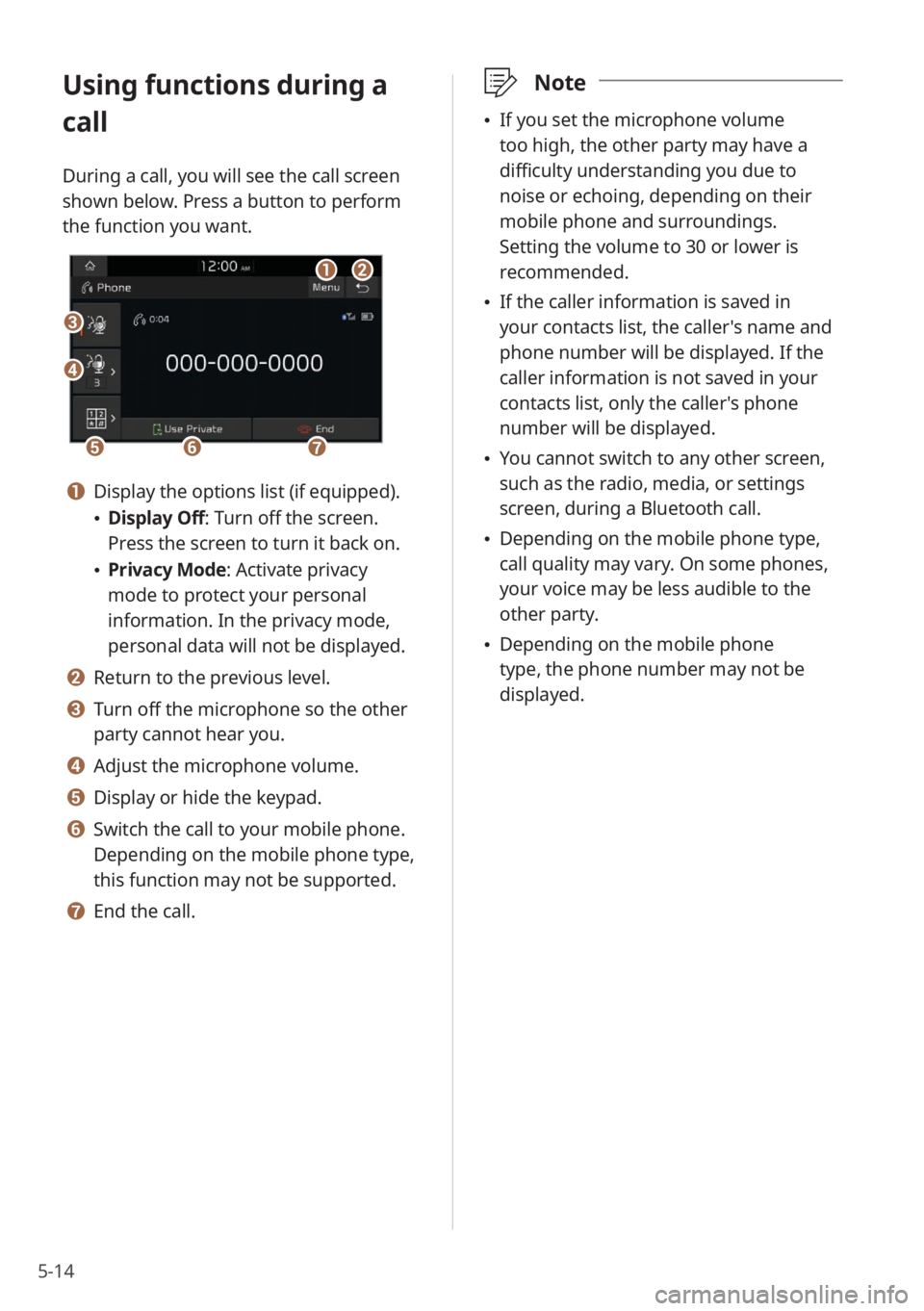
During a call, you will see the call screen
shown below. Press a button to perform
the function you want.
cc
bbaa
eeffgg
dd
a a Display the options list (if equipped).
\225Display Off: Turn off the screen.
Press the screen to turn it back on.
\225Privacy Mode : Activate privacy
mode to protect your personal
information. In the privacy mode,
personal data will not be displayed.
b b Return to the previous level.
c c Turn off the microphone so the other
party cannot hear you.
d d Adjust the microphone volume.
e e Display or hide the keypad.
f f Switch the call to your mobile phone.
Depending on the mobile phone type,
this function may not be supported.
g g End the call.
\333 Note
\225If you set the microphone volume
too high, the other party may have a
difficulty understanding you due to
noise or echoing, depending on their
mobile phone and surroundings.
Setting the volume to 30 or lower is
recommended.
\225If the caller information is saved in
your contacts list, the caller's name and
phone number will be displayed. If the
caller information is not saved in your
contacts list, only the caller's phone
number will be displayed.
\225You cannot switch to any other screen,
such as the radio, media, or settings
screen, during a Bluetooth call.
\225Depending on the mobile phone type,
call quality may vary. On some phones,
your voice may be less audible to the
other party.
\225Depending on the mobile phone
type, the phone number may not be
displayed.
Page 112 of 156

8-8
Steering Wheel MODE
Button
You can switch between different radio/
media functions when pressing the Mode
button on your steering wheel.
Home Screen
You can change the widgets and
menus displayed on the Home screen.
Personalize the Home screen by adding
your favorite menus.
> See ″Changing the
Home screen widgets″ or
″ Changing the Home
screen menu icons.″
Media Change
Notifications
You can set to briefly display media
information at the top of the screen
when not on the main media screen. If
you change the media item by using any
controls on the control panel or steering
wheel, media information will appear
regardless of this setting.
Extend Rear Camera Use (if
equipped)
You can set the rear view screen to remain
active even if you shift to any position
other than ″R″ (Reverse) after backing up.
When you shift to ″P″ (Park) or drive at a
predetermined speed or faster, the rear
view screen will be deactivated and the
system will display the previous screen
automatically.
Page 113 of 156

8-9
Configuring the
button settings
(if
equipped)
You can customize the button functions.
Depending on the vehicle model or
specifications, displayed screens and
available options may vary.
On the Home screen, press All
Menus > Setup > Button and
select an option to change.
Custom Button ☆
You can assign a function to the Custom
button on your control panel.
Custom Button ★ (Steering
Wheel)
(if equipped)
You can assign a function to the Custom
button on your steering wheel.
MODE Button (Steering
Wheel)
You can switch between different radio/
media functions when pressing the Mode
button on your steering wheel.
Page 116 of 156

8-12
Language
You can change the system language.
\333Note
\225It may take a while for the system to
apply the selected language. When the
change is completed, a pop-up window
will appear telling you the system
language has changed. Press outside
the pop-up window area on the screen
to close the window, or wait for a few
seconds.
\225This setting will not affect user data,
such as MP3 file names.
Keyboard
You can customize your keyboard
settings.
\333 Note
Your keyboard settings will be applied
throughout the system when inputting
text.
[English-Latin Keyboard Type
You can select an English keyboard.
[Default Keyboard
You can select a default keyboard.
Media Options (if equipped)
You can change the settings for the radio
or media player.
[Radio/Media Off at Vehicle
Startup
You can set the system to turn off the
radio or media player when the engine is
turned off.
Page 119 of 156

8-15
[Phone Projection
You can adjust the volume levels for
phone projection features individually.
\333 Note
To restore the default volume settings for
phone projection, press Reset.
Tone (if equipped)
You can adjust the tone and output level
of each sound.
\333Note
To restore the default settings for all
sound modes, press Center.
Priority (if equipped)
You can set specific sounds to take priority
over other sounds when they play at the
same time.
[Centerpoint® Surround
Technology
(if equipped)
You can enjoy rich surround sound via the
stereo sound source, such as digital audio
files or satellite radio.
[ Dynamic Speed
Compensation
(if equipped)
You can enjoy a stable listening
environment by automatically calibrating
the sound according to your driving
speed.
Volume (if equipped)
You can adjust the volume levels for
various system features, including phone
projection.
[System Sound
You can adjust the volume levels for
individual system features.
\333 Note
To restore the default volume settings for
system features, press Reset.
Page 121 of 156

8-17
System Volumes (if equipped)
You can adjust the volume for various
sounds and change the volume-related
settings.
[System Sound /Subsystem
Volumes
You can adjust the volume levels for
individual system features.
\333 Note
To restore the default volume settings for
system features, press Reset.
[Phone Projection /Connected
Devices
You can adjust the volume levels for
phone projection features individually.
\333 Note
To restore the default volume settings for
phone projection, press Reset.
[Speed Dependent Volume
Control
You can set the volume to be adjusted
automatically according to your driving
speed.
[Start-up Volume Limit
You can set to automatically lower the
system volume upon vehicle start-up, if
the volume has been previously set to a
high level.
Radio Noise (if equipped)
You can select the FM radio noise
reduction option for the sound quality of
the incoming signal.
\225 Original Sound : The original sound will
be maintained. Radio noise may be loud.
\225 Minimum Noise Reduction : The
original sound will be maintained
and noise reduction will be adjusted
automatically.
\225 Max. Noise Reduction : Radio noise is
minimized. The volume may be reduced.