lock KIA RIO HATCHBACK 2007 Service Manual
[x] Cancel search | Manufacturer: KIA, Model Year: 2007, Model line: RIO HATCHBACK, Model: KIA RIO HATCHBACK 2007Pages: 221, PDF Size: 2.65 MB
Page 107 of 221
Knowing your vehicle98
36. BOOKMARK (MARK) ButtonWhen the CD player unit is operating, the
desired track on the disc can be book-
marked by using the MARK button.(MP3
CD only)
Press the MARK button for more than
0.8 second to bookmark the desired
track.
“M” will be displayed on the LCD and
“MEMORY No. ”will display for approxi-
mately five seconds.
To play a bookmarked track, press the
MARK button within 0.8 second and
select the bookmarked track to play.
To erase a bookmarked track, press
the MARK button for more than 0.8
second. The unit will beep once when
the bookmark is erased.7. SCROLL ButtonWhen the CD is playing, you can scroll
through long file names by pressing the
DOLBY button for approximately one
second. The file name will appear on the
LCD for about three seconds.
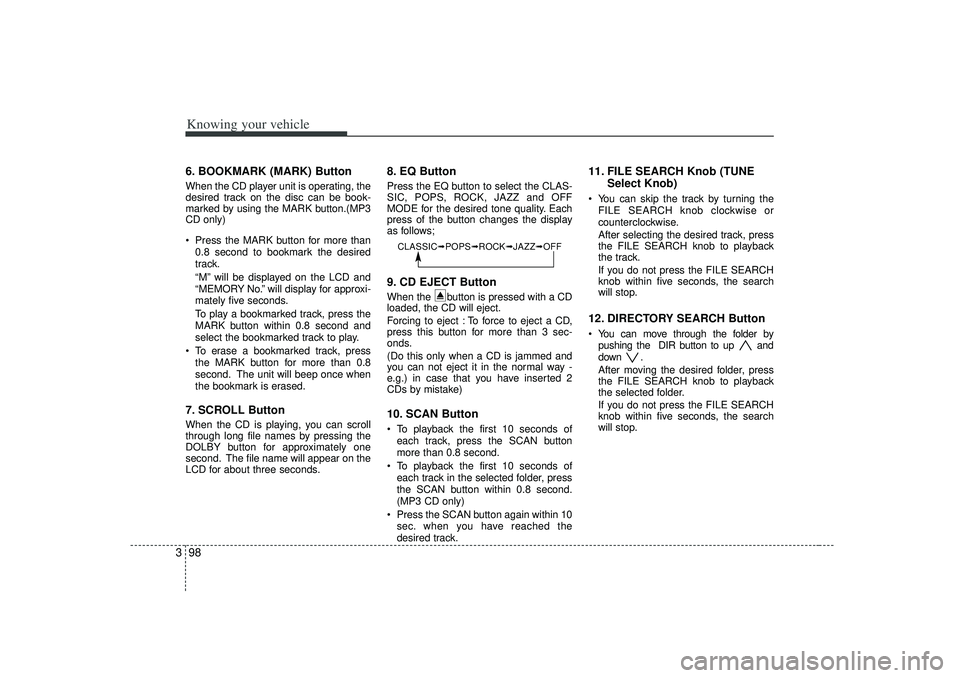
8. EQ ButtonPress the EQ button to select the CLAS-
SIC, POPS, ROCK, JAZZ and OFF
MODE for the desired tone quality. Each
press of the button changes the display
as follows;9. CD EJECT ButtonWhen the button is pressed with a CD
loaded, the CD will eject.
Forcing to eject : To force to eject a CD,
press this button for more than 3 sec-
onds.
(Do this only when a CD is jammed and
you can not eject it in the normal way -
e.g.) in case that you have inserted 2
CDs by mistake)10. SCAN ButtonTo playback the first 10 seconds of
each track, press the SCAN button
more than 0.8 second.
To playback the first 10 seconds of
each track in the selected folder, press
the SCAN button within 0.8 second.
(MP3 CD only)
Press the SCAN button again within 10
sec. when you have reached the
desired track.
11. FILE SEARCH Knob (TUNE
Select Knob)You can skip the track by turning the
FILE SEARCH knob clockwise or
counterclockwise.
After selecting the desired track, press
the FILE SEARCH knob to playback
the track.
If you do not press the FILE SEARCH
knob within five seconds, the search
will stop.12. DIRECTORY SEARCH ButtonYou can move through the folder by
pushing the DIR button to up and
down .
After moving the desired folder, press
the FILE SEARCH knob to playback
the selected folder.
If you do not press the FILE SEARCH
knob within five seconds, the search
will stop.
CLASSIC➟ POPS➟ROCK➟ JAZZ➟OFF
Page 110 of 221
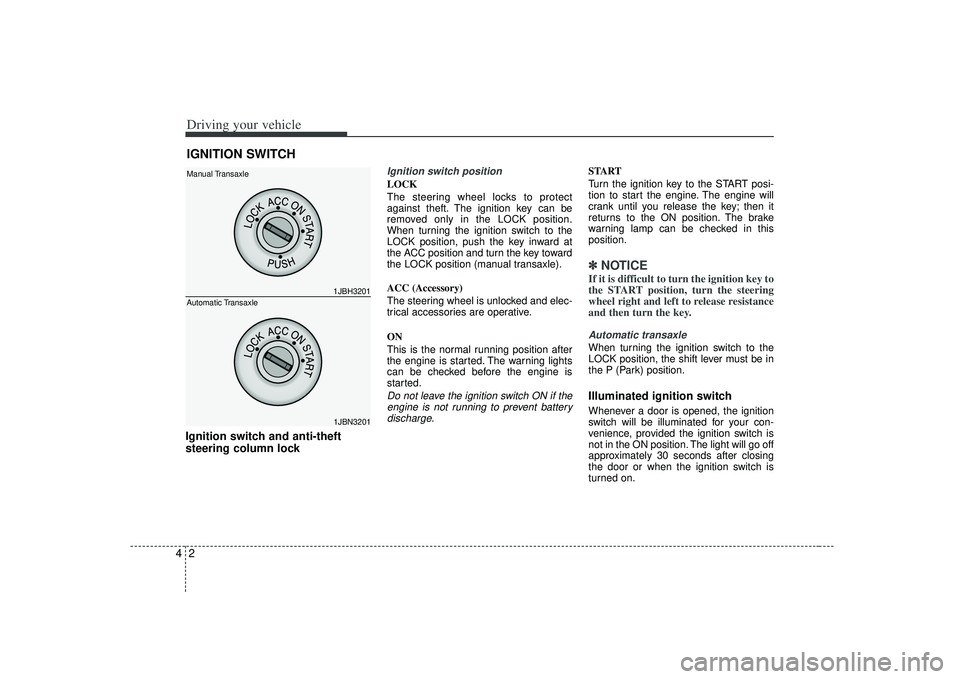
Driving your vehicle24Ignition switch and anti-theft
steering column lock
Ignition switch positionLOCK
The steering wheel locks to protect
against theft. The ignition key can be
removed only in the LOCK position.
When turning the ignition switch to the
LOCK position, push the key inward at
the ACC position and turn the key toward
the LOCK position (manual transaxle).
ACC (Accessory)
The steering wheel is unlocked and elec-
trical accessories are operative.
ON
This is the normal running position after
the engine is started. The warning lights
can be checked before the engine is
started.Do not leave the ignition switch ON if theengine is not running to prevent batterydischarge.
START
Turn the ignition key to the START posi-
tion to start the engine. The engine will
crank until you release the key; then it
returns to the ON position. The brake
warning lamp can be checked in this
position.✽ ✽ NOTICEIf it is difficult to turn the ignition key to
the START position, turn the steering
wheel right and left to release resistance
and then turn the key.Automatic transaxleWhen turning the ignition switch to the
LOCK position, the shift lever must be in
the P (Park) position.Illuminated ignition switchWhenever a door is opened, the ignition
switch will be illuminated for your con-
venience, provided the ignition switch is
not in the ON position. The light will go off
approximately 30 seconds after closing
the door or when the ignition switch is
turned on.
IGNITION SWITCH
1JBH32011JBN3201
Manual Transaxle
Automatic Transaxle
Page 111 of 221

43
Driving your vehicle
1. Make sure the parking brake isapplied.
2. Manual Transaxle - Depress the
clutch pedal fully and shift the
transaxle into Neutral. Keep the clutch
pedal depressed while turning the
ignition switch to the start position.
The starter will not operate if the
clutch pedal is not fully depressed.
Automatic Transaxle - Place the
transaxle shift lever in P (Park).
Depress the brake pedal fully.
You can also start the engine when the shift lever is in the N (Neutral)position.
3. Turn the ignition switch to START and hold it there until the engine starts (a
maximum of 10 seconds), then
release the key.
4. In extremely cold weather (below -18°C / 0°F) or after the vehicle has
not been operated for several days, let
the engine warm up without depress-
ing the accelerator.
Whether the engine is cold or warm, it
should be started without depressing the accelerator.✽ ✽ NOTICEDo not engage the starter for more than
10 seconds. If the engine stalls or fails to
start, wait 5 to 10 seconds before re-
engaging the starter. Excessive or
improper use of the starter may damage
it. The starter will not operate if:
Manual Transaxle - the clutch pedal is
not fully depressed.
Automatic Transaxle - the shift lever
is NOT in the P (Park) or N (Neutral)
position.
WARNING
- Ignition key
• Never turn the ignition switch to LOCK or ACC while the vehicle is
moving. This would result in loss
of directional control and braking
function, which could cause an
accident or collision.
Before leaving the driver’s seat, always make sure the shift lever
is engaged in 1
stgear for manual
transaxle or P (Park) for automat-
ic transaxle. Then, set the parking
brake fully and shut the engine
off. Unexpected and sudden vehi-
cle movement may occur if these
precautions are not taken.
Never reach for the ignition switch, or any other controls
through the steering wheel while
the vehicle is in motion. The pres-
ence of your hand or arm in this
area could cause a loss of vehicle
control, an accident and serious
bodily injury or death.
Do not place any movable objects around the driver’s seat as they
may move while driving, interfere
with the driver and lead to an
accident.
CAUTION -
Stall
If the engine stalls while you are inmotion, do not attempt to move theshift lever to the P (Park) position. If traffic and road conditions permit,you may put the shift lever in the N (Neutral) position while the vehicleis still moving and turn the ignitionswitch to the START position in an attempt to restart the engine.
STARTING THE ENGINE
CAUTION
Always wear appropriate shoes whenoperating your vehicle. Unsuitableshoes (high heels, ski boots,etc.) may interfere with your ability to use thebrake and accelerator pedal, and theclutch (if equipped).
Page 114 of 221
Driving your vehicle64
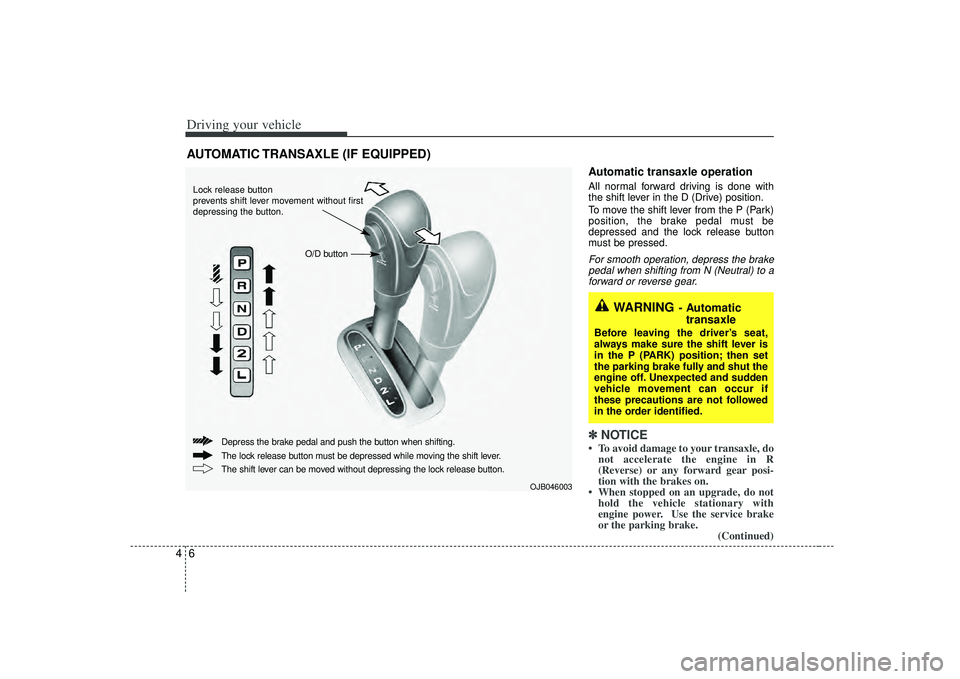
Automatic transaxle operationAll normal forward driving is done with
the shift lever in the D (Drive) position.
To move the shift lever from the P (Park)
position, the brake pedal must be
depressed and the lock release button
must be pressed.For smooth operation, depress the brakepedal when shifting from N (Neutral) to aforward or reverse gear.✽ ✽ NOTICE• To avoid damage to your transaxle, do
not accelerate the engine in R
(Reverse) or any forward gear posi-
tion with the brakes on.
• When stopped on an upgrade, do not hold the vehicle stationary with
engine power. Use the service brake
or the parking brake.
(Continued)
AUTOMATIC TRANSAXLE (IF EQUIPPED)
WARNING
- Automatic
transaxle
Before leaving the driver’s seat,
always make sure the shift lever is
in the P (PARK) position; then set
the parking brake fully and shut the
engine off. Unexpected and sudden
vehicle movement can occur if
these precautions are not followed
in the order identified.
OJB046003
Lock release button
prevents shift lever movement without first
depressing the button.
O/D button
The lock release button must be depressed while moving the shift lever. Depress the brake pedal and push the button when shifting.
The shift lever can be moved without depressing the lock release button.
Page 115 of 221
47
Driving your vehicle
(Continued)
• Do not shift from N (Neutral) or P(Park) into D (Drive), or R (Reverse)
when the engine is above idle speed.Transaxle rangesP (Park)This position locks the transaxle and pre-
vents the front wheels from rotating.
Always come to a complete stop before
shifting into this position.
✽ ✽ NOTICEThe transaxle may be damaged if you
shift into P (Park) while the vehicle is in
motion.
R (Reverse)Use this position to drive the vehicle
backward.✽ ✽NOTICEAlways come to a complete stop before
shifting into or out of R (Reverse); you
may damage the transaxle if you shift
into R while the vehicle is in motion.N (Neutral)With the gearshift in the N position, the
wheels and transaxle are not locked. The
vehicle will roll freely even on the slight-
est incline unless the parking brake or
service brakes are applied.D (Drive)This is the normal forward driving posi-
tion. The transaxle will automatically shift
through a 4-gear sequence, providing the
best fuel economy and power.
For extra power when passing another
vehicle or climbing grades, depress the
accelerator fully, at which time the
transaxle will automatically downshift to
the next lower gear.
(Continued)
Before leaving the driver’s seat,
always make sure the shift lever
is in the P (Park) position. Set the
parking brake fully, shut the
engine off and take the key with
you. Unexpected and sudden
vehicle movement can occur if
you do not follow these precau-
tions in the order specified.
Never leave a child unattended in a vehicle.
WARNING
Shifting into P (Park) while thevehicle is in motion will cause the
drive wheels to lock which will
cause you to lose control of the
vehicle.
Do not use the P (Park) position in place of the parking brake.
Always make sure the shift lever
is latched in the P (Park) position
so that it cannot be moved unless
the lock release button is pushed
in, AND set the parking brake fully.
(Continued)
Page 117 of 221

49
Driving your vehicle
Shift lock systemFor your safety, the Automatic Transaxle
has a shift lock system which prevents
shifting the transaxle out of P (Park)
unless the brake pedal is depressed.
To shift the transaxle out of P (Park):
1. Depress and hold the brake pedal.
2. Start the engine or turn the ignition tothe ON position.
3. Depress the lock release button and move the shift lever.
If the brake pedal is repeatedly
depressed and released with the shift
lever in the P (Park) position, a chattering
sound near the shift lever may be heard.
This is a normal condition.Ignition key interlock systemThe ignition key cannot be removed
unless the shift lever is in the P (Park)
position. If the ignition switch is in any
other position, the key cannot be
removed.
BRAKE SYSTEM Power brakes Your vehicle has power-assisted brakes
that adjust automatically through normal
usage.
In the event that the power-assisted
brakes lose power because of a stalled
engine or some other reason, you can
still stop your vehicle by applying greater
force to the brake pedal than you nor-
mally would. The stopping distance, how-
ever, will be longer.
When the engine is not running, the
reserve brake power is partially depleted
each time the brake pedal is applied. Do
not pump the brake pedal when the
power assist has been interrupted.
Pump the brake pedal only when neces-
sary to maintain steering control on slip-
pery surfaces.In the event of brake failure If service brakes fail to operate while the
vehicle is in motion, you can make an
emergency stop with the parking brake.
The stopping distance, however, will be
much greater than normal.
WARNING
- Parking brake
Pulling the parking brake while the
vehicle is moving at normal speeds
can cause a sudden loss of control
of the vehicle. If you must use the
parking brake to stop the vehicle,
use great caution in applying the
brake.
WARNING -
Brakes
Do not drive with your foot rest- ing on the brake pedal. This will
create abnormal high brake tem-
peratures, excessive brake lining
and pad wear, and increased
stopping distances.
When descending a long or steep hill, shift to a lower gear and
avoid continuous application of
the brakes. Continuous brake
application will cause the brakes
to overheat and could result in a
temporary loss of braking per-
formance.
(Continued)
Page 120 of 221
Driving your vehicle12
4Parking on curbed streets When parking your vehicle on an uphill
grade, park as close to the curb as
possible and turn the front wheels
away from the curb so that the front
wheels will contact the curb if the vehi-
cle moves backward.
When parking your vehicle on a down- hill grade, park as close to the curb as
possible and turn the front wheels
toward the curb so that the front
wheels will contact the curb if the vehi-
cle moves forward.
Anti-lock brake system (ABS)
(if equipped)
The ABS continuously senses the speed
of the wheels. If the wheels are going to
lock, the ABS repeatedly modulates the
hydraulic brake pressure to the wheels.
When you apply your brakes under con-
ditions which may lock the wheels, you
may hear a “tik-tik’’ sound from the
brakes, or feel a corresponding sensation
in the brake pedal. This is normal and it
means your ABS is active.
In order to obtain the maximum benefit
from your ABS in an emergency situation,
do not attempt to modulate your brake
pressure and do not try to pump your
brakes. Press your brake pedal as hard
as possible or as hard as the situation
warrants and allow the ABS to control the
force being delivered to the brakes.
Even with the anti-lock brake system,your vehicle still requires sufficient
stopping distance. Always maintain a
safe distance from the vehicle in front
of you.
Always slow down when cornering. The anti-lock brake system cannot pre-
vent accidents resulting from exces-
sive speeds.
On loose or uneven road surfaces, operation of the anti-lock brake system
may result in a longer stopping dis-
tance than for vehicles equipped with a
conventional brake system.
WARNING
- ABS Brakes
Your ABS is not a substitute for
good driving judgement. You can
still have an accident. In fact, your
ABS will probably not be able to
prevent an accident in the following
driving conditions:
Dangerous driving, such asneglecting safety precautions,
speeding, or driving too close to
the vehicle in front of you.
Driving at high speed in situa- tions providing considerably less
traction, such as wet conditions
where hydroplaning could occur.
Driving too fast on poor road sur- faces. The ABS is designed to
improve maximum braking effec-
tiveness on typical highways and
roads in good condition. On poor
road surfaces, the ABS may actu-
ally reduce braking effectiveness.
Page 122 of 221
Driving your vehicle14
4Power steering (if equipped)Power steering uses energy from the
engine to assist you in steering the vehi-
cle. If the engine is off or if the power
steering system becomes inoperative,
the vehicle may still be steered, but it will
require increased steering effort.
Should you notice any change in the
effort required to steer during normal
vehicle operation, have the power steer-
ing checked by an authorized Kia dealer.✽ ✽
NOTICE• Never hold the steering wheel against
a stop (extreme right or left turn) for
more than 5 seconds with the engine
running. Holding the steering wheel
for more than 5 seconds in either posi-
tion may cause damage to the power
steering pump.
• If the power steering drive belt breaks or if the power steering pump mal-
functions, the steering effort will
greatly increase.
✽ ✽ NOTICEIf the vehicle is parked for extended
periods outside in cold weather (below -
10 °C /14 °F), the power steering may
require increased effort when the engine
is first started. This is caused by
increased fluid viscosity due to the cold
weather and does not indicate a mal-
function.
When this happens, increase the engine
RPM by depressing the accelerator until
the RPM reaches 1,500 rpm then release
or let the engine idle for two or three
minutes to warm up the fluid.
Tilt steering (if equipped)A tilt steering wheel allows you to adjust
the steering wheel before you drive. You
can also raise it to the highest level to
give your legs more room when you exit
and enter the vehicle.
The steering wheel should be positioned
so that it is comfortable for you to drive,
while permitting you to see the instru-
ment panel warning lights and gauges.
STEERING WHEEL
WARNING -
Steering wheel
Never adjust the angle of steering
wheel while driving. You may lose
your steering control and cause
severe personal injury or acci-
dents.
After adjusting, push the steering wheel both up and down to be
certain it is locked in position.
Page 123 of 221
415
Driving your vehicle
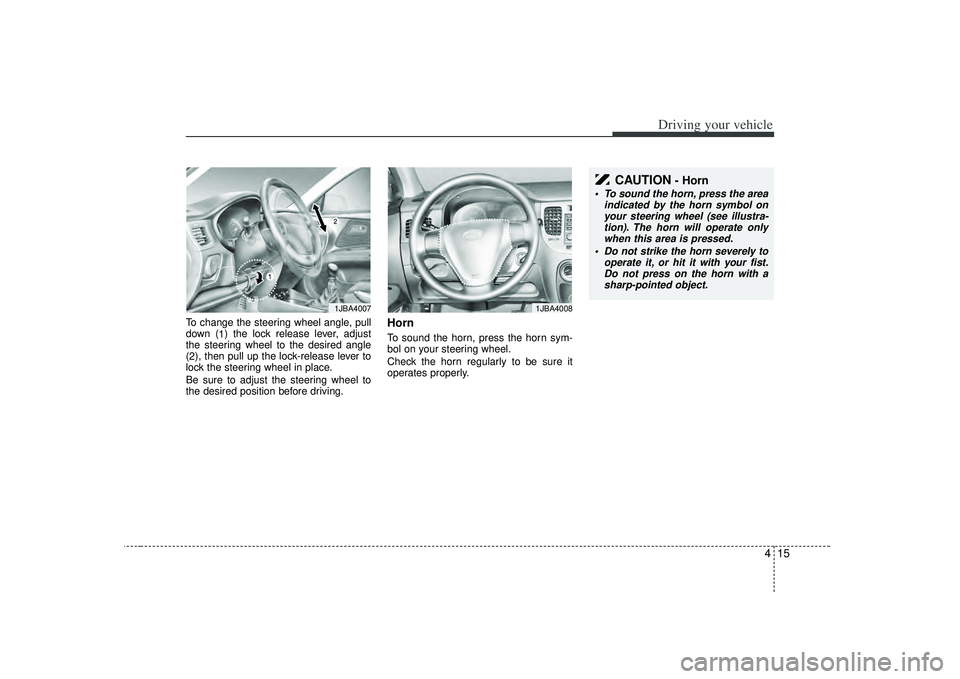
To change the steering wheel angle, pull
down (1) the lock release lever, adjust
the steering wheel to the desired angle
( 2 ), then pull up the lock-release lever to
lock the steering wheel in place.
Be sure to adjust the steering wheel to
the desired position before driving.
HornTo sound the horn, press the horn sym-
bol on your steering wheel.
Check the horn regularly to be sure it
operates properly.
1JBA4007
CAUTION
- Horn
To sound the horn, press the area indicated by the horn symbol onyour steering wheel (see illustra-tion). The horn will operate only when this area is pressed.
Do not strike the horn severely to operate it, or hit it with your fist.Do not press on the horn with asharp-pointed object.
1JBA4008
Page 127 of 221
419
Driving your vehicle
Warning lights / audible indicators Checking operation All warning lights are checked by turning
the ignition switch ON (do not start the
engine). Any light that does not illuminate
should be checked by an authorized Kia
dealer.
After starting the engine, check to make
sure that all warning lights are off. If any
are still on, this indicates a situation that
needs attention. When releasing the
parking brake, the brake system warning
light should go off. The fuel warning light
will stay on if the fuel level is low.Anti-lock brake system
(ABS) warning light (if
equipped) This light illuminates if the key is turned
to ON and goes off in approximately 3
seconds if the system is operating nor-
mally.
If the light stays on, you may have a
problem with your ABS. Contact an
authorized Kia dealer as soon as possi-
ble.
Electronic brake force
distribution (EBD) sys-
tem warning
(if equipped)If ABS and BRAKE warning lights illumi-
nate at the same time while driving, your
vehicle has a problem with ABS and EBD
system.
In this case, your ABS and regular brake
system may not work normally. Have the
vehicle checked by an authorized Kia
dealer as soon as possible.
Engine oil pressure
warning This warning light indicates the engine oil
pressure is low.
If the warning light illuminates while driv-
ing:
1. Drive safely to the side of the road andstop.
2. With the engine off, check the engine oil level. If the level is low, add oil as
required.
If the warning light remains on after
adding oil or if oil is not available, call an
authorized Kia dealer.✽ ✽ NOTICEIf the engine is not stopped immediately,
severe damage could result.
WARNINGS AND INDICATORS
ABS
ABS
WARNING
- Brake indica-
tors
If the both ABS and Brake warning
lights are ON and stay ON, your
vehicle’s brake system will not work
normally. You may experience an
unexpected and dangerous situa-
tion during sudden braking. In this
case, avoid high speed driving and
abrupt braking. Have your vehicle
checked by authorized Kia dealer
as soon as possible.