Jack KIA RIO HATCHBACK 2012 Owners Manual
[x] Cancel search | Manufacturer: KIA, Model Year: 2012, Model line: RIO HATCHBACK, Model: KIA RIO HATCHBACK 2012Pages: 385, PDF Size: 9.68 MB
Page 7 of 385

Index
4I
Economical operation ··················\
··················\
················5-42
Electric power steering ··················\
··················\
··············4-35
Electronic stability program (ESC) ··················\
·············5-25
Emergency starting ··················\
··················\
··················\
····6-4Jump starting ··················\
··················\
··················\
···········6-4
Push starting ··················\
··················\
··················\
············6-6
Emergency while driving ··················\
··················\
·············6-2
Emission control system ··················\
··················\
············7-66 Crankcase emission control system··················\
···········7-66
Evaporative emission control System ··················\
·······7-66
Exhaust emission control system ··················\
··············7-66
Engine ··················\
··················\
··················\
··················\
······8-2
Engine compartment ··················\
··················\
··················\
··2-4
Engine compartment panel fuse ··················\
··················\
7-58
Engine coolant ··················\
··················\
··················\
·········7-26
Engine coolcant temperature gauge··················\
·············4-43
Engine number ··················\
··················\
··················\
···········8-8
Engine oil ··················\
··················\
··················\
·················7-25\
Engine overheats ··················\
··················\
··················\
········6-7
Engine start/stop button ··················\
··················\
···············5-6
Engine will not start··················\
··················\
··················\
···6-3
Evaporative emission control System ··················\
··········7-66
Exhaust emission control system··················\
·················7-66\
Explanation of scheduled maintenance items ···············7-22
Exterior care··················\
··················\
··················\
·············7-60 Flat tire (with spare tire) ··················\
··················\
············6-13
Jack and tools ··················\
··················\
··················\
········6-13
Changing tires··················\
··················\
··················\
········6-14
Compact spare tire ··················\
··················\
··················\
·6-19
Removing and storing the spare tire···········\
·················6-14\
Flat tire (with tire mobility kit) ··················\
··················\
·6-21
Floor mat anchor(s) ··················\
··················\
·················4-10\
1
Fluid Automatic transaxle fluid ··················\
··················\
········7-30
Brakes/clutch fluid··················\
··················\
··················\
·7-29
Washer fluid··················\
··················\
··················\
···········7-30
Folding the outside rearviwe mirror ··················\
············4-40
Folding the rear seat ··················\
··················\
··················\
3-10
Front passenger and rear seat belt ··················\
···············3-16
Front seat adjustment ··················\
··················\
··················\
·3-4
Fuel filler lid ··················\
··················\
··················\
············4-28
Fuel gauge··················\
··················\
··················\
················4-43
Fuel requirements ··················\
··················\
··················\
······1-3
Fuses ··················\
··················\
··················\
··················\
······7-50 Engine compartment panel fuse ··················\
················7-52
Fuse/relay panel description ··················\
··················\
····7-54
Instrument panel fuse ··················\
··················\
··············7-51
Memory fuse··················\
··················\
··················\
··········7-51
Multi fuse ··················\
··················\
··················\
··············7-53
FE
Page 9 of 385

Index
6I
Clothes hanger ··················\
··················\
··················\
·····4-100
Cup holder ··················\
··················\
··················\
·············4-97
Digital clock and calendar ··················\
··················\
·······4-99
Floor mat anchor(s) ··················\
··················\
···············4-101
Power outlet ··················\
··················\
··················\
···········4-98
Shopping bag holder··················\
··················\
················4-99
Sliding armrest ··················\
··················\
··················\
······4-97
Sunvisor ··················\
··················\
··················\
·················4-98\
Interior light ··················\
··················\
··················\
·············4-78
Interior overview··················\
··················\
··················\
········2-2
ISG system ··················\
··················\
··················\
···············5-37
Jack and tools··················\
··················\
··················\
···········6-13
Jump starting··················\
··················\
··················\
··············6-4
Key positions ··················\
··················\
··················\
·············5-4
Keys ··················\
··················\
··················\
··················\
·········4-2 Immobilizer key··················\
··················\
··················\
·····4-10
Remote(or Smart) key battery replacement ················4-97 Label
Air bag warning label ··················\
··················\
··············3-53
Refrigerant label ··················\
··················\
··················\
······8-8
Tire sidewall labeling ··················\
··················\
··············7-42
Tire specification and pressure label ··················\
···········8-8
Vehicle certification label ··················\
··················\
··········8-7
LCD display warning··················\
··················\
·················4-63\
Lighting··················\
··················\
··················\
··················\
··4-70 Battery saver function··················\
··················\
··············4-70
Lower anchor ··················\
··················\
··················\
···········3-27
Lubricants and capacities··················\
··················\
·············8-5
Luggage net ··················\
··················\
··················\
·············4-93
Luggage tray ··················\
··················\
··················\
············4-94
Maintenance ··················\
··················\
··················\
·············4-51 Explanation of scheduled maintenance items ·············7-22
Maintenance services·············\
··················\
··················\
····7-3
Maintenance under severe usage conditions ···············7-20
Normal maintenance schedule··················\
··················\
···7-8
Owner maintenance ··················\
··················\
··················\
·7-5
Scheduled maintenance service ··················\
··················\
·7-7
Tire maintenance ··················\
··················\
··················\
···7-42
J
L
MK
Page 201 of 385
Features of your vehicle
126
4
(Continued)
If the USB device is divided by logical drives, only the music fileson the highest-priority drive arerecognized by car audio.
Devices such as MP3 Player/ Cellular phone/Digital camera canbe unrecognizable by standardUSB I/F can be unrecognizable.
Charging through the USB may not be supported in some mobiledevices.
USB HDD or USB types liable to connection failures due to vehiclevibrations are not supported.(i-stick type)
Some non-standard USB devices (METAL COVER TYPE USB) canbe unrecognizable.
Some USB flash memory readers (such as CF, SD, micro SD, etc.) orexternal-HDD type devices can beunrecognizable.
Music files protected by DRM (DIGITAL RIGHTS MANAGEMENT)are not recognizable.
(Continued)(Continued) The data in the USB memory may be lost while using this audio.Always back up important data on a personal storage device.
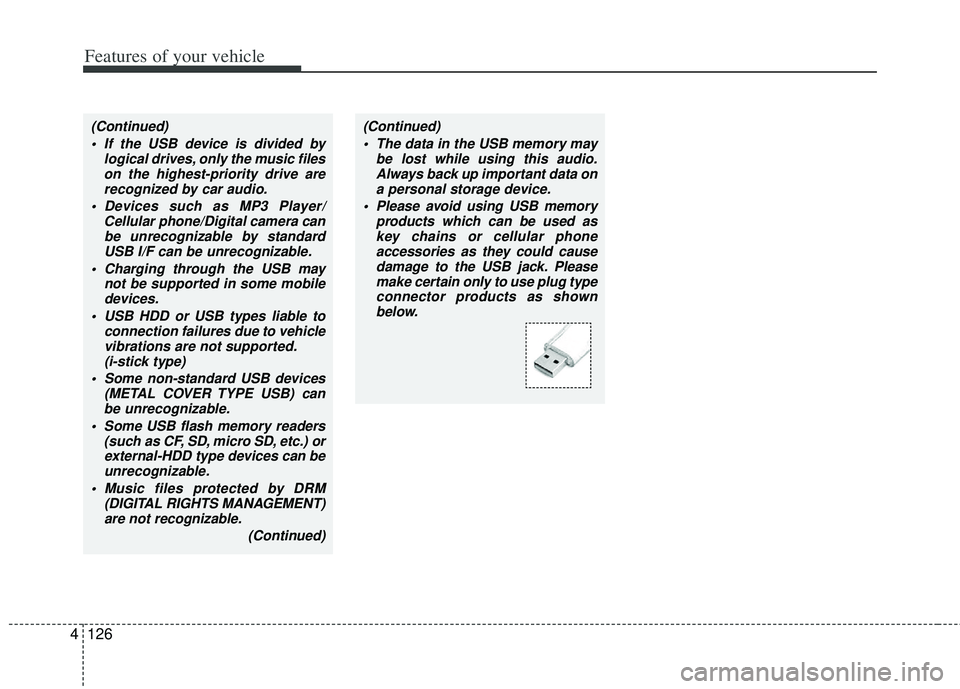
Please avoid using USB memory products which can be used askey chains or cellular phoneaccessories as they could cause damage to the USB jack. Pleasemake certain only to use plug typeconnector products as shownbelow.
Page 265 of 385
Driving your vehicle
42
5
Your vehicle's fuel economy depends
mainly on your style of driving, where you
drive and when you drive.
Each of these factors affects how many
miles (kilometers) you can get from a gal-
lon (liter) of fuel. To operate your vehicle
as economically as possible, use the fol-
lowing driving suggestions to help save
money in both fuel and repairs:
Drive smoothly. Accelerate at a moder-
ate rate. Don't make "jack-rabbit" starts
or full-throttle shifts and maintain a
steady cruising speed. Don't race
between stoplights. Try to adjust your
speed to the traffic so you don't have to
change speeds unnecessarily. Avoid
heavy traffic whenever possible.
Always maintain a safe distance from
other vehicles so you can avoid unnec-
essary braking. This also reduces
brake wear.
Drive at a moderate speed. The faster you drive, the more fuel your vehicle
uses. Driving at a moderate speed,
especially on the highway, is one of the
most effective ways to reduce fuel con-
sumption. Don't "ride" the brake pedal. This can
increase fuel consumption and also
increase wear on these components.
In addition, driving with your foot rest-
ing on the brake pedal may cause the
brakes to overheat, which reduces
their effectiveness and may lead to
more serious consequences.
Take care of your tires. Keep them inflated to the recommended pressure.
Incorrect inflation, either too much or
too little, results in unnecessary tire
wear. Check the tire pressures at least
once a month.
Be sure that the wheels are aligned correctly. Improper alignment can
result from hitting curbs or driving too
fast over irregular surfaces. Poor align-
ment causes faster tire wear and may
also result in other problems as well as
greater fuel consumption. Keep your vehicle in good condition.
For better fuel economy and reduced
maintenance costs, maintain your vehi-
cle in accordance with the mainte-
nance schedule in section 7. If you
drive your vehicle in severe conditions,
more frequent maintenance is required
(see section 7 for details).
Keep your vehicle clean. For maximum service, your vehicle should be kept
clean and free of corrosive materials. It
is especially important that mud, dirt,
ice, etc. not be allowed to accumulate
on the underside of the vehicle. This
extra weight can result in increased
fuel consumption and also contribute
to corrosion.
Travel lightly. Don't carry unnecessary weight in your vehicle. Weight reduces
fuel economy.
Don't let the engine idle longer than necessary. If you are waiting (and not
in traffic), turn off your engine and
restart only when you're ready to go.
ECONOMICAL OPERATION
Page 292 of 385
613
What to do in an emergency
IF YOU HAVE A FLAT TIRE
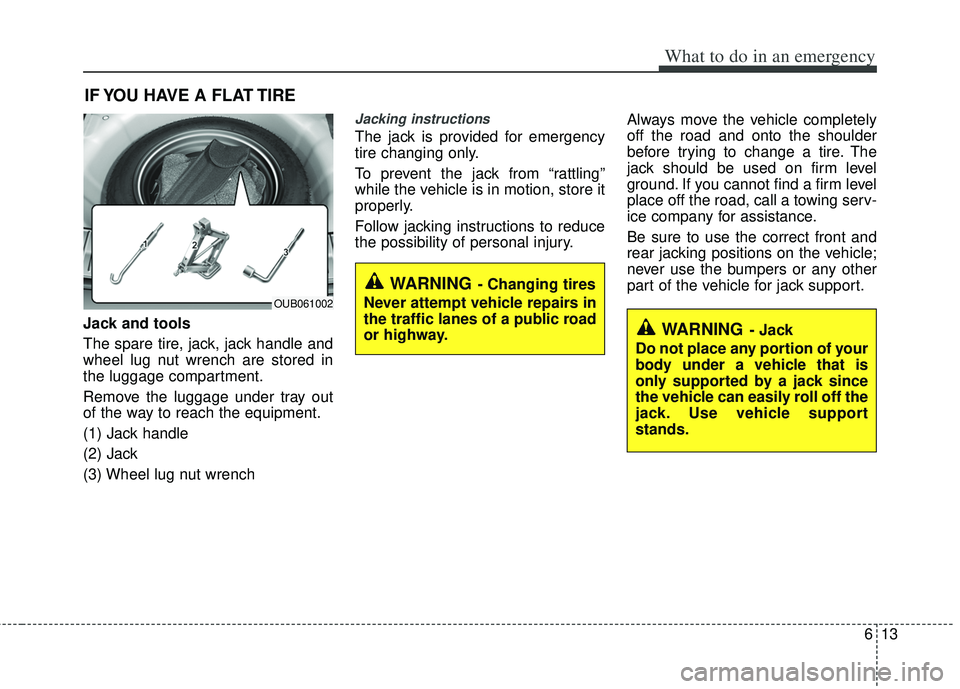
Jack and tools
The spare tire, jack, jack handle and
wheel lug nut wrench are stored in
the luggage compartment.
Remove the luggage under tray out
of the way to reach the equipment.
(1) Jack handle
(2) Jack
(3) Wheel lug nut wrench
Jacking instructions
The jack is provided for emergency
tire changing only.
To prevent the jack from “rattling”
while the vehicle is in motion, store it
properly.
Follow jacking instructions to reduce
the possibility of personal injury.Always move the vehicle completely
off the road and onto the shoulder
before trying to change a tire. The
jack should be used on firm level
ground. If you cannot find a firm level
place off the road, call a towing serv-
ice company for assistance.
Be sure to use the correct front and
rear jacking positions on the vehicle;
never use the bumpers or any other
part of the vehicle for jack support.
WARNING- Jack
Do not place any portion of your
body under a vehicle that is
only supported by a jack since
the vehicle can easily roll off the
jack. Use vehicle support
stands.
WARNING- Changing tires
Never attempt vehicle repairs in
the traffic lanes of a public road
or highway.
OUB061002
Page 293 of 385

What to do in an emergency
14
6
Do not allow anyone to remain in the
vehicle while it is on the jack.
Make sure any children present are
in a secure place away from the road
and from the vehicle to be raised with
the jack.
Removing and storing the spare
tire
Turn the tire hold-down wing bolt
counterclockwise.
Store the tire in the reverse order of
removal.
To prevent the spare tire and tools
from “rattling” while the vehicle is in
motion, store them properly.Changing tires
1. Park on a level surface and apply
the parking brake firmly.
2. Shift the shift lever into R (Reverse) for manual transaxle or
P (Park) for automatic transaxle.
3. Activate the hazard warning flash- er.
OED066033
WARNING- Running vehi-
cle on jack
Do not start or run the engine of
the vehicle while the vehicle is
on the jack as this may cause
the vehicle to fall off the jack.
OUB061003
Page 294 of 385
615
What to do in an emergency
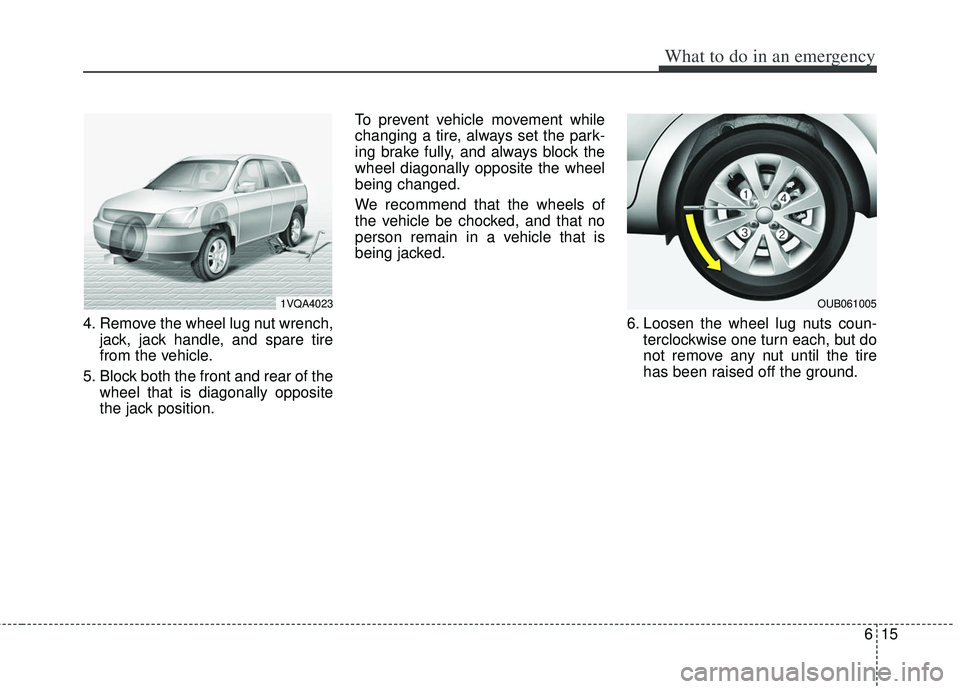
4. Remove the wheel lug nut wrench,jack, jack handle, and spare tire
from the vehicle.
5. Block both the front and rear of the wheel that is diagonally opposite
the jack position. To prevent vehicle movement while
changing a tire, always set the park-
ing brake fully, and always block the
wheel diagonally opposite the wheel
being changed.
We recommend that the wheels of
the vehicle be chocked, and that no
person remain in a vehicle that is
being jacked.
6. Loosen the wheel lug nuts coun-terclockwise one turn each, but do
not remove any nut until the tire
has been raised off the ground.
1VQA4023OUB061005
Page 295 of 385
What to do in an emergency
16
6
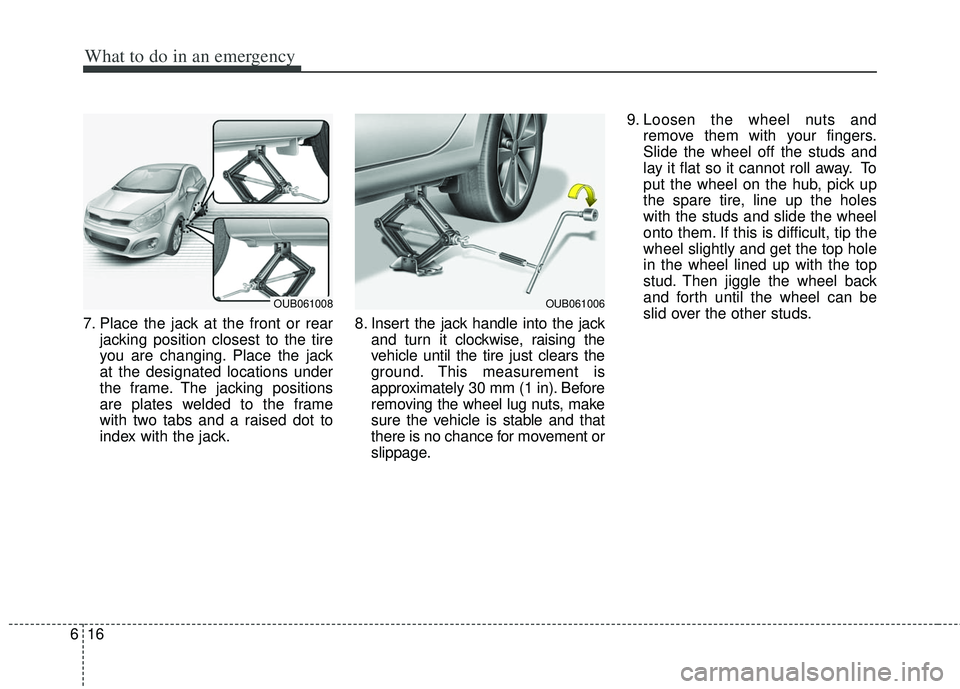
7. Place the jack at the front or rear
jacking position closest to the tire
you are changing. Place the jack
at the designated locations under
the frame. The jacking positions
are plates welded to the frame
with two tabs and a raised dot to
index with the jack. 8. Insert the jack handle into the jack
and turn it clockwise, raising the
vehicle until the tire just clears the
ground. This measurement is
approximately 30 mm (1 in). Before
removing the wheel lug nuts, make
sure the vehicle is stable and that
there is no chance for movement or
slippage. 9. Loosen the wheel nuts and
remove them with your fingers.
Slide the wheel off the studs and
lay it flat so it cannot roll away. To
put the wheel on the hub, pick up
the spare tire, line up the holes
with the studs and slide the wheel
onto them. If this is difficult, tip the
wheel slightly and get the top hole
in the wheel lined up with the top
stud. Then jiggle the wheel back
and forth until the wheel can be
slid over the other studs.
OUB061008OUB061006
Page 297 of 385
What to do in an emergency
18
6
If you have a tire gauge, remove the
valve cap and check the air pressure.
If the pressure is lower than recom-
mended, drive slowly to the nearest
service station and inflate to the cor-
rect pressure. If it is too high, adjust
it until it is correct. Always reinstall
the valve cap after checking or
adjusting the tire pressure. If the cap
is not replaced, air may leak from the
tire. If you lose a valve cap, buy
another and install it as soon as pos-
sible.
After you have changed wheels,
always secure the flat tire in its place
and return the jack and tools to their
proper storage locations.
Note that most lug nuts do not have
metric threads. Be sure to use
extreme care in checking for thread
style before installing aftermarket lug
nuts or wheels. If in doubt, consult an
authorized Kia dealer.To prevent the jack, jack handle,
wheel lug nut wrench and spare tire
from rattling while the vehicle is in
motion, store them properly.
Check the inflation pressures as
soon as possible after installing the
spare tire. Adjust it to the specified
pressure, if necessary. Refer to
“Tires and wheels” in section 8.CAUTION - Reducing lug
nuts
Make certain during wheelremoval that the same nuts thatwere removed are reinstalled -or, if replaced, that nuts withmetric threads and the samechamfer configuration are used.Your vehicle has metric threadson the wheel studs and nuts.Installation of a non-metricthread nut on a metric stud willnot secure the wheel to the hubproperly and will damage thestud so that it must be replaced.
WARNING- Wheel studs
Do not drive your vehicle with
damaged wheel studs. If the
studs are damaged, they may
lose their ability to retain the
wheel. This could lead to the
loss of the wheel and a colli-
sion.