position light KIA RIO HATCHBACK 2014 User Guide
[x] Cancel search | Manufacturer: KIA, Model Year: 2014, Model line: RIO HATCHBACK, Model: KIA RIO HATCHBACK 2014Pages: 446, PDF Size: 12.98 MB
Page 59 of 446
Safety features of your vehicle
42
3
Any child age 12 and under should
ride in the rear seat. Children too
large for child restraints should use
the available lap/shoulder belts. No
matter what type of crash, children of
all ages are safer when restrained in
the rear seat.
✽ ✽
NOTICE
Do not modify or replace the front
passenger seat. Don't place anything
on or attach anything such as a blan-
ket, front seat covers or after market
seat heater to the front passenger
seat. This can adversely affect the
occupant detection system.
If the occupant detection system is
not working properly, the SRS air
bag warning light on the instru-
ment panel will illuminate because
the passenger's front air bag is con-
nected with the occupant detection
system. If there is a malfunction of
the occupant detection system, the
PASSENGER AIR BAG “OFF” indi-
cator will not illuminate and the pas-
senger's front air bag will inflate in
frontal impact crashes even if there is
no occupant in the front passenger's
seat.
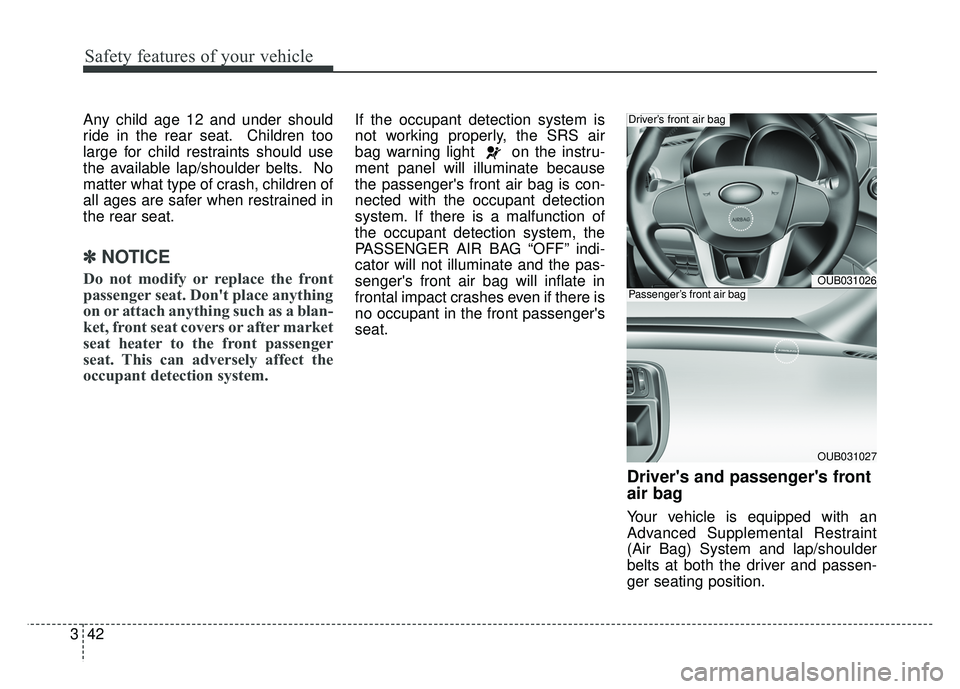
Driver's and passenger's front
air bag
Your vehicle is equipped with an
Advanced Supplemental Restraint
(Air Bag) System and lap/shoulder
belts at both the driver and passen-
ger seating position.
OUB031026
OUB031027
Driver’s front air bag
Passenger’s front air bag
Page 77 of 446
Features of your vehicle
64
Even though you press the button,
the doors will not lock and the chime
will sound for 3 seconds if any of the
following occurs:
The smart key is in the vehicle.
The ignition switch is in the ACC orON position.
Any door except the trunk (or tail- gate) is opened.
Unlocking
Pressing the button of the driver's
outside door handle with all doors
closed and locked, unlocks the dri-
ver's door. The hazard warning lights
will blink and the chime will sound
twice to indicate that the driver's door
is unlocked. All doors are unlocked if
the button is pressed once more
within 4 seconds. The hazard warn-
ing lights will blink and the chime will
sound twice to indicate that all the
doors are unlocked. Pressing the button in the front pas-
senger's outside door handle with all
doors closed and locked, unlocks all
the doors. The hazard warning lights
will blink and the chime will sound
twice to indicate that all doors are
unlocked. The button will only oper-
ate when the smart key is within
28~40 in. (0.7~1 m) from the outside
door handle.
Trunk unlocking (4 door)
The trunk will open when the trunk
unlock button is pressed.
The trunk will automatically lock after
it has been opened.
If the trunk is closed with the smart
key in the trunk, the warning chime
will sound for about 5 seconds and
the trunk will not lock.
Tailgate unlocking (5 door)
(if equipped)
If you are within 0.7 m (28 in.) from
the outside tailgate handle, with your
smart key in possession, the tailgate
will unlock and open when you press
the tailgate handle switch.
The hazard warning lights will blink
twice to indicate that the tailgate is
unlocked.
Also, once the tailgate is opened and
then closed, the tailgate will lock
automatically.
Start-up
You can start the engine without
inserting the key. For detailed infor-
mation refer to “Starting the engine
with a smart key” in section 5.
Page 85 of 446
Features of your vehicle
14
4
Do not arm the system until all
passengers have left the vehicle. If
the system is armed while a pas-
senger(s) remains in the vehicle,
the alarm may be activated when
the remaining passenger(s)
leaves the vehicle. If any door (or
tailgate) or engine hood is opened
within 30 seconds after the sys-
tem enters the armed stage, the
system will be disarmed to pre-
vent unnecessary alarm.Theft-alarm stage
The alarm will be activated if any of
the following occurs while the system
is armed.
A front or rear door is opened with-
out using the transmitter (or smart
key).
The tailgate is opened without using the transmitter (or smart
key).
The engine hood is opened.
The horn will sound and the hazard
warning lights will blink continuously
for approximately 27 seconds. To
turn off the system, unlock the doors
with the transmitter (or smart key).
Disarmed stage
The system will be disarmed when:
Transmitter
- The door unlock button is pressed.
- The engine is started. (within 3 seconds)
- The ignition switch is in the “ON” position for 30 seconds or more.
Smart key
- The door unlock button is pressed.
- The button of the front outside dooris pressed while carrying the smart
key.
- The engine is started. (within 3 seconds)
After the doors are unlocked, the
hazard warning lights will blink twice
to indicate that the system is dis-
armed.
After pressing the unlock button, if
any door (or tailgate) is not opened
within 30 seconds, the system will be
rearmed.
Page 97 of 446
Features of your vehicle
26
4
In cold and wet climates, power win-
dows may not work properly due to
freezing conditions.
Power windows
The ignition switch must be in the ON
position for power windows to oper-
ate. Each door has a power window
switch that controls the door’s win-
dow. The driver has a power window
lock switch which can block the oper-
ation of passenger windows.
The power windows can be operated
for approximately 30 seconds after
the ignition key is removed or turned
to the ACC or LOCK position.
However, if the front doors are
opened, the power windows cannot
be operated even within the 30 sec-
ond period.
✽ ✽
NOTICE
While driving with the rear windows
down or with the sunroof (if
equipped) in an open (or partially
open) position, your vehicle may
demonstrate a wind buffeting or
pulsation noise. This noise is a nor-
mal occurrence and can be reduced
or eliminated by taking the follow-
ing actions. If the noise occurs with
one or both of the rear windows
down, partially lower both front
windows approximately one inch. If
you experience the noise with the
sunroof open, slightly reduce the
size of the sunroof opening.
Window opening and closing
(if equipped)
The driver’s door has a master power
window switch that controls all the
windows in the vehicle.
To open or close a window, press
down or pull up the front portion of
the corresponding switch to the first
detent position (5).
Auto down window (if equipped) (Driver’s window)
Pressing the power window switch
momentarily to the second detent
position (6) completely lowers the
driver’s window even when the
switch is released. To stop the win-
dow at the desired position while the
window is in operation, momentarily
pull up the switch to the opposite
direction of the window movement.
Page 101 of 446
Features of your vehicle
30
4
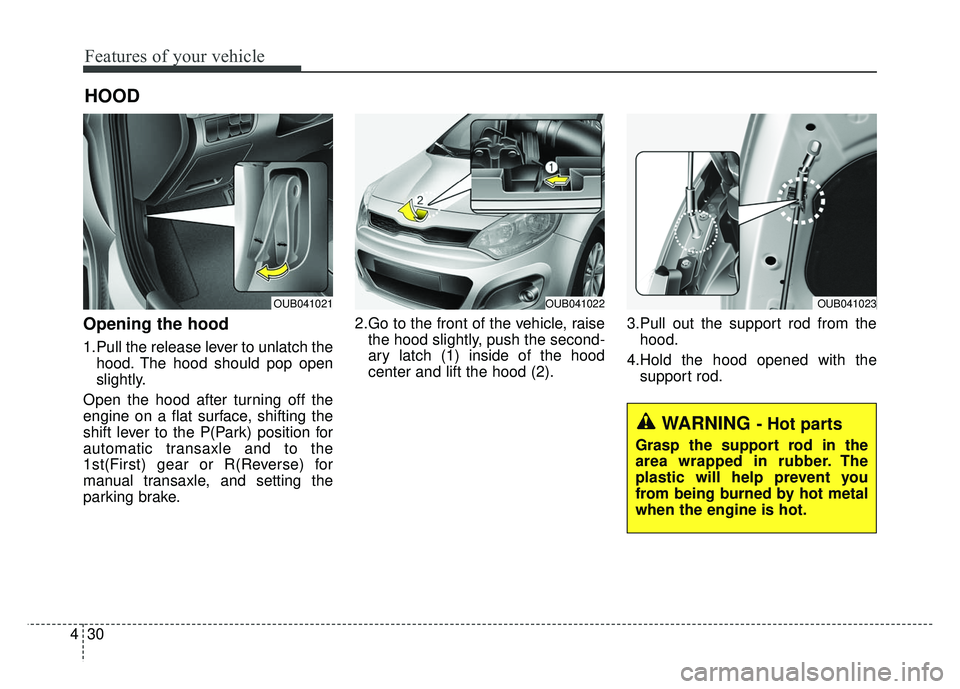
Opening the hood
1.Pull the release lever to unlatch the
hood. The hood should pop open
slightly.
Open the hood after turning off the
engine on a flat surface, shifting the
shift lever to the P(Park) position for
automatic transaxle and to the
1st(First) gear or R(Reverse) for
manual transaxle, and setting the
parking brake. 2.Go to the front of the vehicle, raise
the hood slightly, push the second-
ary latch (1) inside of the hood
center and lift the hood (2). 3.Pull out the support rod from the
hood.
4.Hold the hood opened with the support rod.
HOOD
WARNING - Hot parts
Grasp the support rod in the
area wrapped in rubber. The
plastic will help prevent you
from being burned by hot metal
when the engine is hot.
OUB041021OUB041022OUB041023
Page 107 of 446
Features of your vehicle
36
4
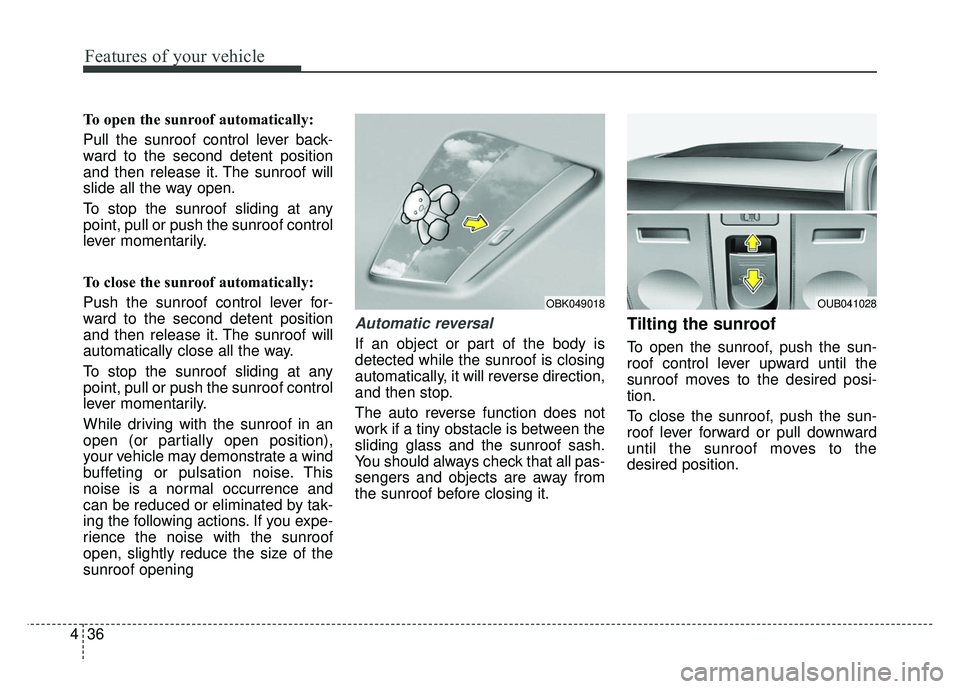
To open the sunroof automatically:
Pull the sunroof control lever back-
ward to the second detent position
and then release it. The sunroof will
slide all the way open.
To stop the sunroof sliding at any
point, pull or push the sunroof control
lever momentarily.
To close the sunroof automatically:
Push the sunroof control lever for-
ward to the second detent position
and then release it. The sunroof will
automatically close all the way.
To stop the sunroof sliding at any
point, pull or push the sunroof control
lever momentarily.
While driving with the sunroof in an
open (or partially open position),
your vehicle may demonstrate a wind
buffeting or pulsation noise. This
noise is a normal occurrence and
can be reduced or eliminated by tak-
ing the following actions. If you expe-
rience the noise with the sunroof
open, slightly reduce the size of the
sunroof opening
Automatic reversal
If an object or part of the body is
detected while the sunroof is closing
automatically, it will reverse direction,
and then stop.
The auto reverse function does not
work if a tiny obstacle is between the
sliding glass and the sunroof sash.
You should always check that all pas-
sengers and objects are away from
the sunroof before closing it.
Tilting the sunroof
To open the sunroof, push the sun-
roof control lever upward until the
sunroof moves to the desired posi-
tion.
To close the sunroof, push the sun-
roof lever forward or pull downward
until the sunroof moves to the
desired position.
OBK049018OUB041028
Page 109 of 446
Features of your vehicle
38
4
Resetting the sunroof
Whenever the vehicle battery is dis-
connected or discharged, or related
fuse is blown, you must reset your
sunroof system as follows:
1.Turn the ignition switch to the ON
position and close the sunroof
completely.
2.Release the control lever.
3.Push and hold the control lever for- ward (for more than 10 seconds)
until the sunroof tilts and slightly
moves. Then, release the lever.
4.Within 3 seconds, push and hold the control lever forward (for more
than 5 seconds) until the sunroof is
operated as follows;
TILT DOWN → SLIDE OPEN →
SLIDE CLOSE
Then, release the control lever.
When this is complete, the sunroof
system is reset. ❈
For more detailed information,
contact an authorized Kia dealer.
✽ ✽
NOTICE
If the sunroof is not reset when the
vehicle battery is disconnected, dis-
charged, or related fuse is blown, the
sunroof may not operate properly.
Page 110 of 446
439
Features of your vehicle
Electric power steering
Power steering uses a motor to
assist you in steering the vehicle. If
the engine is off or if the power steer-
ing system becomes inoperative, the
vehicle may still be steered, but it will
require increased steering effort.
The motor driven power steering is
controlled by the power steering con-
trol unit which senses the steering
wheel torque and vehicle speed to
command the motor.
The steering wheel becomes heavier
as the vehicle’s speed increases and
becomes lighter as the vehicle’s
speed decreases for better control of
the steering wheel.
Should you notice any change in the
effort required to steer during normal
vehicle operation, have the power
steering checked by an authorized
Kia dealer.
✽ ✽
NOTICE
The following symptoms may occur
during normal vehicle operation:
• The steering effort is high immedi-
ately after turning the ignition
switch on. This happens as the sys-
tem performs the EPS system
diagnostics. When the diagnostics
is completed, the steering wheel
will return to its normal condition.
• A click noise may be heard from the EPS relay after the ignition
switch is turned to the ON or
LOCK position.
• Motor noise may be heard when the vehicle is at a stop or at a low
driving speed.
• The steering effort increases if the steering wheel is rotated continu-
ously when the vehicle is not in
motion. However, after a few min-
utes, it will return to its normal
conditions.
• When you operate the steering wheel in low temperature, abnor-
mal noise could occur. If tempera-
ture rises, the noise will disappear.
This is a normal condition.
If the Electric Power Steering System
does not operate normally, the warn-
ing light will illuminate on the instru-
ment cluster. The steering wheel may
become difficult to control or operate
abnormally. Take your vehicle to an
authorized Kia dealer and have the
vehicle checked as soon as possible.
STEERING WHEEL
Page 111 of 446
Features of your vehicle
40
4
Tilt and telescoping
(if equipped) steering
Tilt steering allows you to adjust the
steering wheel before you drive. You
can also raise it to give your legs
more room when you exit and enter
the vehicle.
The steering wheel should be posi-
tioned so that it is comfortable for
you to drive, while permitting you to
see the instrument panel warning
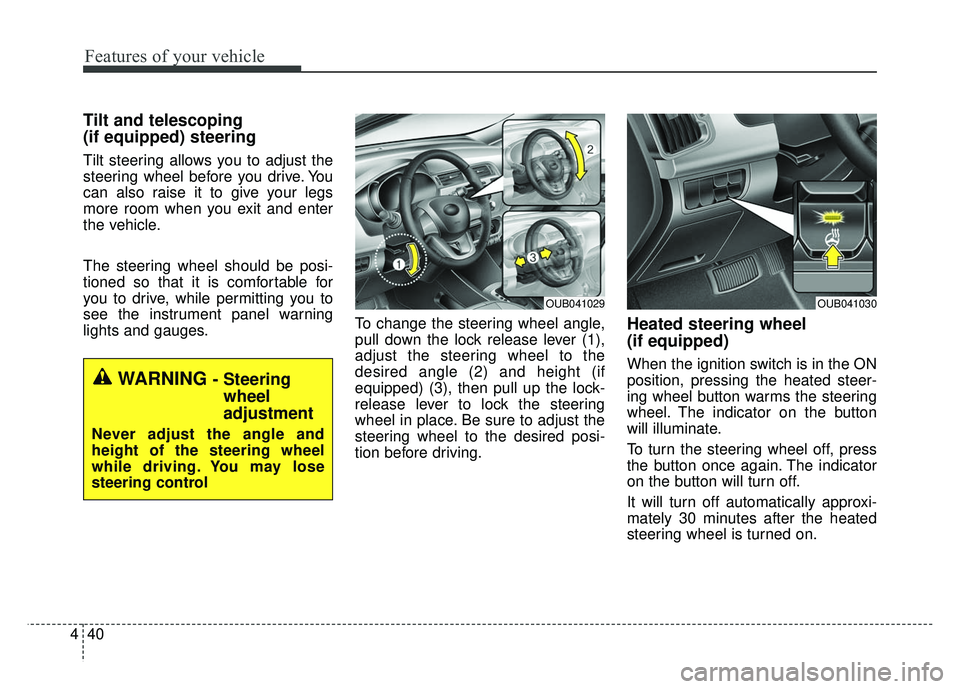
lights and gauges. To change the steering wheel angle,
pull down the lock release lever (1),
adjust the steering wheel to the
desired angle (2) and height (if
equipped) (3), then pull up the lock-
release lever to lock the steering
wheel in place. Be sure to adjust the
steering wheel to the desired posi-
tion before driving.
Heated steering wheel
(if equipped)
When the ignition switch is in the ON
position, pressing the heated steer-
ing wheel button warms the steering
wheel. The indicator on the button
will illuminate.
To turn the steering wheel off, press
the button once again. The indicator
on the button will turn off.
It will turn off automatically approxi-
mately 30 minutes after the heated
steering wheel is turned on.
WARNING - Steering
wheel
adjustment
Never adjust the angle and
height of the steering wheel
while driving. You may lose
steering control
OUB041029OUB041030
Page 113 of 446
Features of your vehicle
42
4
Inside rearview mirror
Adjust the rearview mirror so that the
center view through the rear window
is seen. Make this adjustment before
you start driving.
Do not place objects in the rear seat
which would interfere with your vision
through the rear window.
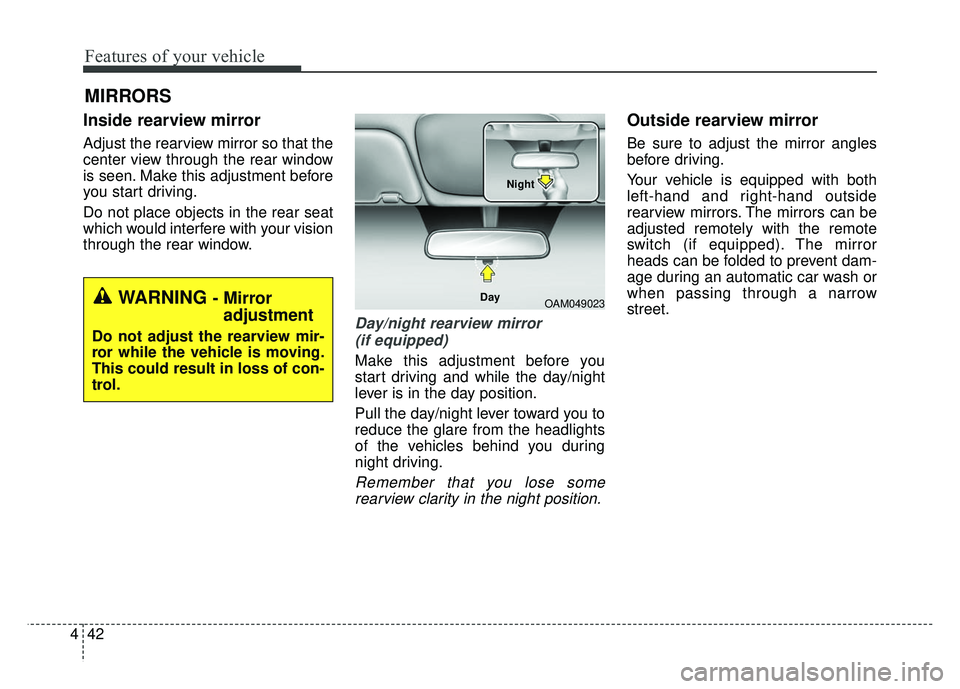
Day/night rearview mirror
(if equipped)
Make this adjustment before you
start driving and while the day/night
lever is in the day position.
Pull the day/night lever toward you to
reduce the glare from the headlights
of the vehicles behind you during
night driving.
Remember that you lose somerearview clarity in the night position.
Outside rearview mirror
Be sure to adjust the mirror angles
before driving.
Your vehicle is equipped with both
left-hand and right-hand outside
rearview mirrors. The mirrors can be
adjusted remotely with the remote
switch (if equipped). The mirror
heads can be folded to prevent dam-
age during an automatic car wash or
when passing through a narrow
street.
MIRRORS
WARNING - Mirror adjustment
Do not adjust the rearview mir-
ror while the vehicle is moving.
This could result in loss of con-
trol.
OAM049023
Day Night