phone KIA RIO HATCHBACK 2017 User Guide
[x] Cancel search | Manufacturer: KIA, Model Year: 2017, Model line: RIO HATCHBACK, Model: KIA RIO HATCHBACK 2017Pages: 532, PDF Size: 12.04 MB
Page 208 of 532
Features of your vehicle
138
4 (Continued)
- When driving on rugged anduneven roads
- During severe rain (heavy rains, windstorms)
Phone related voice commands can be used only when a
Bluetooth®
Wireless Technology device is con-
nected.
When making calls by stating a name, the corresponding contact
must be downloaded and stored
within the audio system.
After downloading the
Bluetooth®
Wireless Technology phone book,
it takes some times to convert the
phone book data into voice infor-
mation. During this time, voice
recognition may not properly oper-
ate.
Pronounce the voice commands naturally and clearly as if in a nor-
mal conversation.
Page 210 of 532
Features of your vehicle
140
4
SYSTEM CONTROLLERS
AND FUNCTIONS
❈ Display and settings may differ
depending on the selected audio.
Audio Head Unit
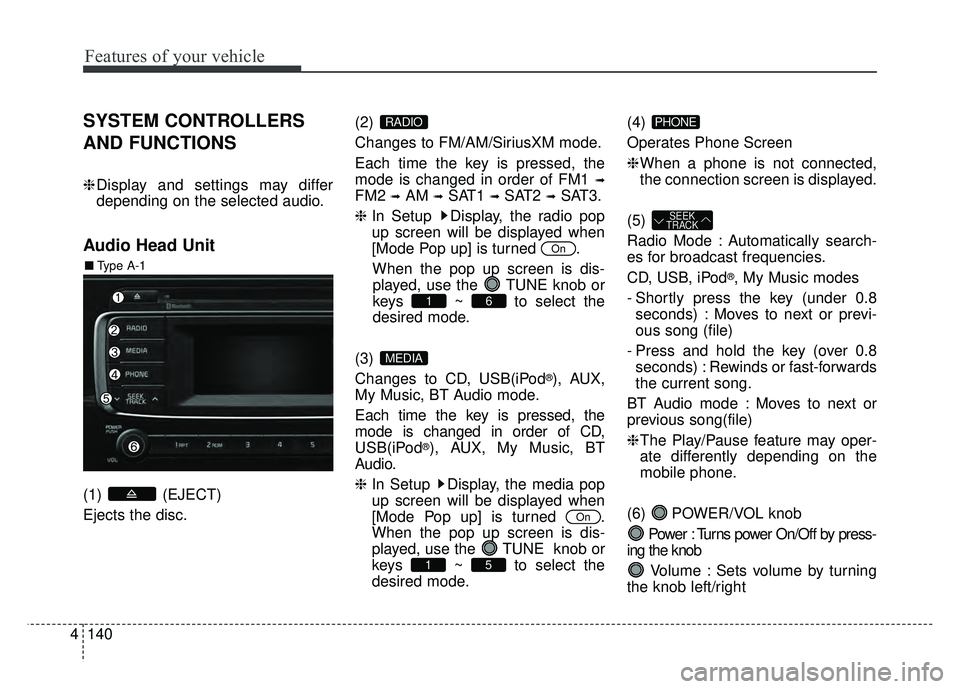
(1) (EJECT)
Ejects the disc. (2)
Changes to FM/AM/SiriusXM mode.
Each time the key is pressed, the
mode is changed in order of FM1
➟
FM2 ➟AM ➟SAT1 ➟SAT2 ➟SAT3.
❈ In Setup Display, the radio pop
up screen will be displayed when
[Mode Pop up] is turned .
When the pop up screen is dis-played, use the TUNE knob or
keys ~ to select the
desired mode.
(3)
Changes to CD, USB(iPod
®), AUX,
My Music, BT Audio mode.
Each time the key is pressed, the
mode is changed in order of CD,
USB(iPod
®), AUX, My Music, BT
Audio.
❈ In Setup Display, the media pop
up screen will be displayed when
[Mode Pop up] is turned .
When the pop up screen is dis-
played, use the TUNE knob or
keys ~ to select the
desired mode. (4)
Operates Phone Screen
❈
When a phone is not connected,
the connection screen is displayed.
(5)
Radio Mode : Automatically search-
es for broadcast frequencies.
CD, USB, iPod
®, My Music modes
- Shortly press the key (under 0.8 seconds) : Moves to next or previ-
ous song (file)
- Press and hold the key (over 0.8 seconds) : Rewinds or fast-forwards
the current song.
BT Audio mode : Moves to next or
previous song(file)
❈ The Play/Pause feature may oper-
ate differently depending on the
mobile phone.
(6) POWER/VOL knob Power : Turns power On/Off by press-
ing the knob
Volume : Sets volume by turning
the knob left/right
SEEK
TRACK
PHONE
51
On
MEDIA
61
On
RADIO
■ Type A-1
Page 211 of 532
Features of your vehicle
4141
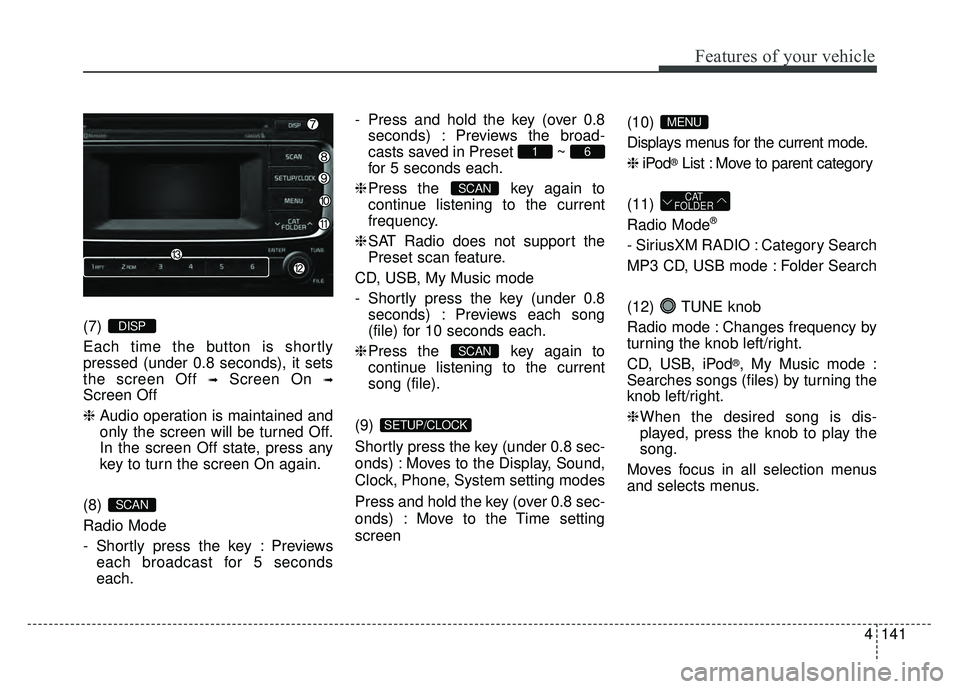
(7)
Each time the button is shortly
pressed (under 0.8 seconds), it sets
the screen Off
➟Screen On ➟
Screen Off
❈Audio operation is maintained and
only the screen will be turned Off.
In the screen Off state, press any
key to turn the screen On again.
(8)
Radio Mode
- Shortly press the key : Previews each broadcast for 5 seconds
each. - Press and hold the key (over 0.8
seconds) : Previews the broad-
casts saved in Preset ~
for 5 seconds each.
❈ Press the key again to
continue listening to the current
frequency.
❈ SAT Radio does not support the
Preset scan feature.
CD, USB, My Music mode
- Shortly press the key (under 0.8 seconds) : Previews each song
(file) for 10 seconds each.
❈ Press the key again to
continue listening to the current
song (file).
(9)
Shortly press the key (under 0.8 sec-
onds) : Moves to the Display, Sound,
Clock, Phone, System setting modes
Press and hold the key (over 0.8 sec-
onds) : Move to the Time setting
screen (10)
Displays menus for the current mode.
❈
iPod
®List : Move to parent category
(11)
Radio Mode
®
- SiriusXM RADIO : Category Search
MP3 CD, USB mode : Folder Search
(12) TUNE knob
Radio mode : Changes frequency by
turning the knob left/right.
CD, USB, iPod
®, My Music mode :
Searches songs (files) by turning the
knob left/right.
❈ When the desired song is dis-
played, press the knob to play the
song.
Moves focus in all selection menus
and selects menus.
CAT
FOLDER
MENU
SETUP/CLOCK
SCAN
SCAN
61
SCAN
DISP
Page 212 of 532
Features of your vehicle
142
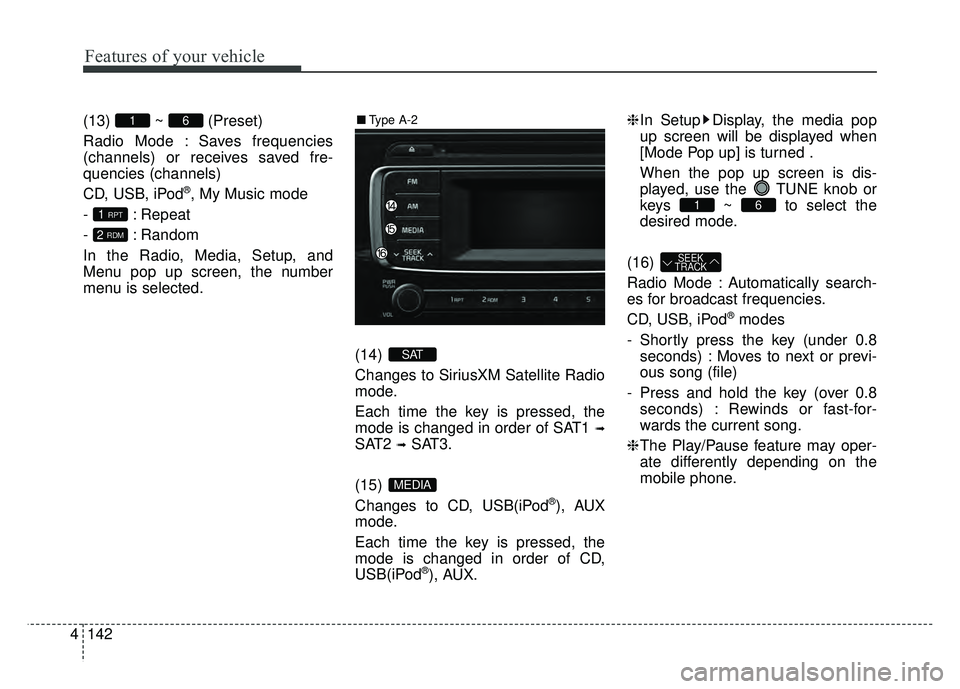
4 (13) ~ (Preset)
Radio Mode : Saves frequencies
(channels) or receives saved fre-
quencies (channels)
CD, USB, iPod
®, My Music mode
- : Repeat
- : Random
In the Radio, Media, Setup, and
Menu pop up screen, the number
menu is selected.
(14)
Changes to SiriusXM Satellite Radio
mode.
Each time the key is pressed, the
mode is changed in order of SAT1
➟
SAT2 ➟SAT3.
(15)
Changes to CD, USB(iPod
®), AUX
mode.
Each time the key is pressed, the
mode is changed in order of CD,
USB(iPod
®), AUX. ❈
In Setup Display, the media pop
up screen will be displayed when
[Mode Pop up] is turned .
When the pop up screen is dis-
played, use the TUNE knob or
keys ~ to select the
desired mode.
(16)
Radio Mode : Automatically search-
es for broadcast frequencies.
CD, USB, iPod
®modes
- Shortly press the key (under 0.8 seconds) : Moves to next or previ-
ous song (file)
- Press and hold the key (over 0.8 seconds) : Rewinds or fast-for-
wards the current song.
❈ The Play/Pause feature may oper-
ate differently depending on the
mobile phone.
SEEK
TRACK
61
MEDIA
SAT
2 RDM
1 RPT
61■ Type A-2
Page 227 of 532
Features of your vehicle
4157
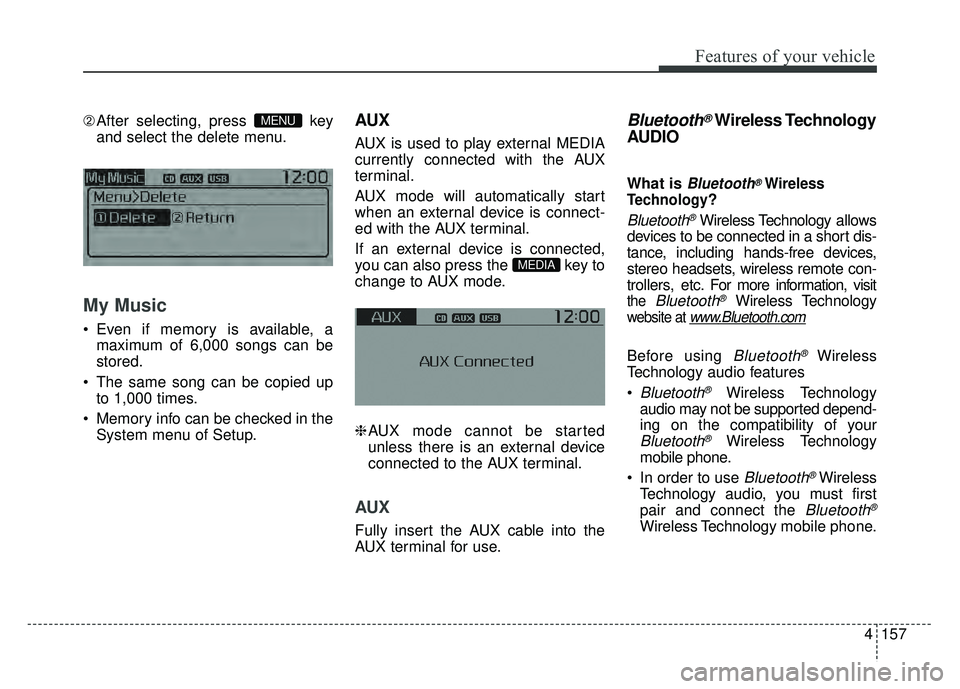
➁After selecting, press key
and select the delete menu.
My Music
Even if memory is available, a
maximum of 6,000 songs can be
stored.
The same song can be copied up to 1,000 times.
Memory info can be checked in the System menu of Setup.
AUX
AUX is used to play external MEDIA
currently connected with the AUX
terminal.
AUX mode will automatically start
when an external device is connect-
ed with the AUX terminal.
If an external device is connected,
you can also press the key to
change to AUX mode.
❈AUX mode cannot be started
unless there is an external device
connected to the AUX terminal.
AUX
Fully insert the AUX cable into the
AUX terminal for use.
Bluetooth®Wireless Technology
AUDIO
What is Bluetooth®Wireless
Technology
?
Bluetooth®Wireless Technology allows
devices to be connected in a short dis-
tance, including hands-free devices,
stereo headsets, wireless remote con-
trollers, etc. For more information, visit
the Bluetooth®Wireless Technology
website at www.Bluetooth.com
Before using Bluetooth®Wireless
Technology audio features
Bluetooth®Wireless Technology
audio may not be supported depend-
ing on the compatibility of your
Bluetooth®Wireless Technology
mobile phone.
In order to use
Bluetooth®Wireless
Technology audio, you must first
pair and connect the
Bluetooth®
Wireless Technology mobile phone.
MEDIA
MENU
Page 228 of 532
Features of your vehicle
158
4 The Bluetooth
®word mark and
logos are registered trademarks
owned by Bluetooth SIG, Inc. and
any use of such marks by Kia is
under license. Other trademarks
and trade names are those of their
respective owners. A Bluetooth
®
enabled cell phone is required to use
Bluetooth®Wireless Technology.
Bluetooth®Wireless Technology
audio can be used only when the
[Audio Streaming] of Phone is
turned .
Starting Bluetooth®Wireless
Technology Audio
key to change the
mode in order of CD ➟ USB ➟ AUX
➟ My Music ➟ BT Audio.
Bluetooth®
Wireless Technology audio will start
playing.
❈ Audio may not automatically start
playing in some mobile phones.
Using the Bluetooth®Wireless
Technology audio features
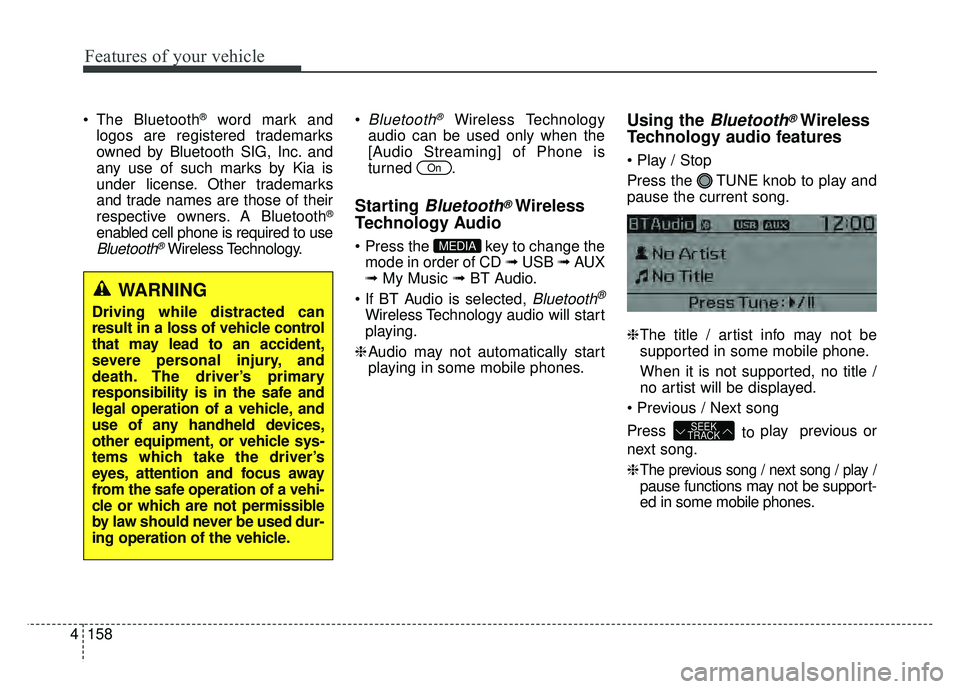
Press the TUNE knob to play and
pause the current song.
❈
The title / artist info may not be
supported in some mobile phone.
When it is not supported, no title /
no artist will be displayed.
Press to play previous or
next song.
❈
The previous song / next song / play /
pause functions may not be support-
ed in some mobile phones.
SEEK
TRACK
MEDIA
On
WARNING
Driving while distracted can
result in a loss of vehicle control
that may lead to an accident,
severe personal injury, and
death. The driver’s primary
responsibility is in the safe and
legal operation of a vehicle, and
use of any handheld devices,
other equipment, or vehicle sys-
tems which take the driver’s
eyes, attention and focus away
from the safe operation of a vehi-
cle or which are not permissible
by law should never be used dur-
ing operation of the vehicle.
Page 229 of 532
Features of your vehicle
4159
PHONE
Before using the Bluetooth®Wireless
Technology phone features
In order to use
Bluetooth®Wireless
Technology phone, you must first
pair and connect the
Bluetooth®
Wireless Technology mobile phone.
If the mobile phone is not paired or connected, it is not possible to
enter Phone mode. Once a phone
is paired or connected, the guid-
ance screen will be displayed.
If Priority is set upon vehicle igni- tion (IGN/ACC ON), the
Bluetooth®
Wireless Technology phone will be
automatically connected. Even if
you are outside, the
Bluetooth®
Wireless Technology phone will be
automatically connected once you
are in the vicinity of the vehicle. If
you do not want automatic
Bluetooth®Wireless Technology
phone connection, set the
Bluetooth®Wireless Technology
power to OFF.
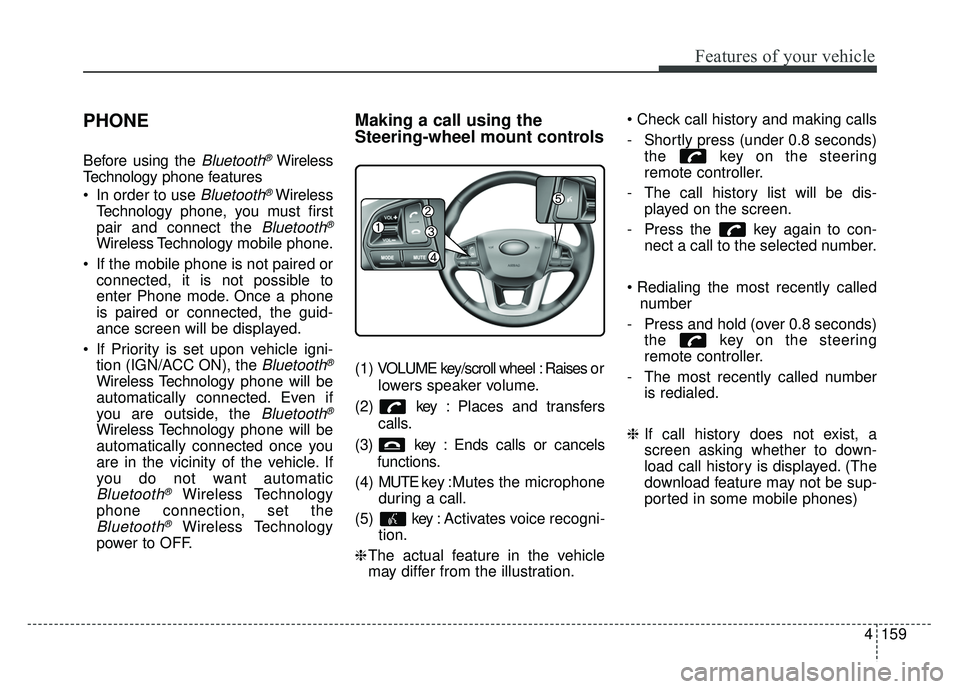
Making a call using the
Steering-wheel mount controls
( 1 ) VOLUME key/scroll wheel : Raises o r
lowers speaker volume.
(2) key : Places and transfers calls.
(3) key : Ends calls or cancels functions.
(4) MUTE key : Mutes the microphone
during a call.
(5) key : Activates voice recogni- tion.
❈ The actual feature in the vehicle
may differ from the illustration.
- Shortly press (under 0.8 seconds)
the key on the steering
remote controller.
- The call history list will be dis- played on the screen.
- Press the key again to con- nect a call to the selected number.
number
- Press and hold (over 0.8 seconds) the key on the steering
remote controller.
- The most recently called number is redialed.
❈ If call history does not exist, a
screen asking whether to down-
load call history is displayed. (The
download feature may not be sup-
ported in some mobile phones)
Page 230 of 532
Features of your vehicle
160
4
Bluetooth®Wireless Technology
Pairing a
Bluetooth®Wireless
Technology Device
What is Bluetooth®Wireless
Technology Pairing?
Pairing refers to the process of syn-
chronizing your
Bluetooth®Wireless
Technology phone or device with the
car audio system for connection.
Pairing is necessary to connect and
use the
Bluetooth®Wireless Technology
feature.
The Bluetooth
®word mark and logos
are registered trademarks owned by
Bluetooth SIG, Inc. and any use of
such marks by Kia is under license.
Other trademarks and trade names
are those of their respective owners.
A Bluetooth
®enabled cell phone is
required to use
Bluetooth®Wireless
Technology
Pairing key / key
on the Steering Remote
Controller
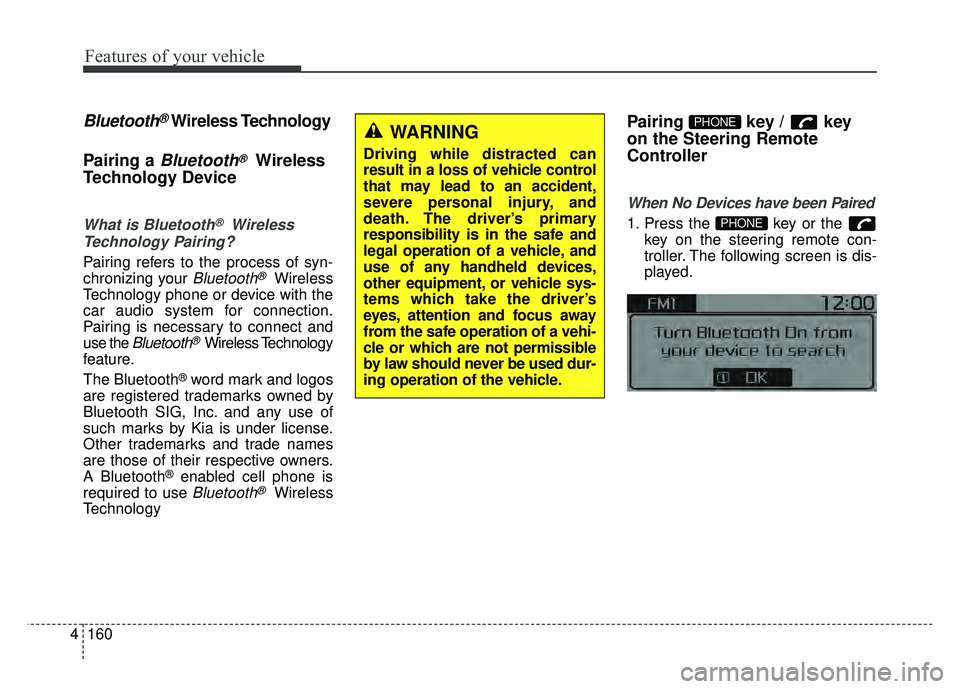
When No Devices have been Paired
1. Press the key or the key on the steering remote con-
troller. The following screen is dis-
played.PHONE
PHONEWARNING
Driving while distracted can
result in a loss of vehicle control
that may lead to an accident,
severe personal injury, and
death. The driver’s primary
responsibility is in the safe and
legal operation of a vehicle, and
use of any handheld devices,
other equipment, or vehicle sys-
tems which take the driver’s
eyes, attention and focus away
from the safe operation of a vehi-
cle or which are not permissible
by law should never be used dur-
ing operation of the vehicle.
Page 231 of 532
![KIA RIO HATCHBACK 2017 User Guide Features of your vehicle
4161
2. Select [OK] button to enter thePair Phone screen.
1) Vehicle Name : Name of device as shown when searching from your
Bluetooth®Wireless Technology
device
2) Passkey :](/img/2/57977/w960_57977-230.png "KIA RIO HATCHBACK 2017 User Guide Features of your vehicle
4161
2. Select [OK] button to enter thePair Phone screen.
1) Vehicle Name : Name of device as shown when searching from your
Bluetooth®Wireless Technology
device
2) Passkey :")
Features of your vehicle
4161
2. Select [OK] button to enter thePair Phone screen.
1) Vehicle Name : Name of device as shown when searching from your
Bluetooth®Wireless Technology
device
2) Passkey : Passkey used to pair the device
3. From your
Bluetooth®Wireless
Technology device (i.e. Mobile
Phone), search and select your
car audio system.
[Non SSP supported device]
(SSP: Secure Simple Pairing)
4. After a few moments, a screen is displayed where the passkey is
entered. Hear, enter the passkey
"0000" to pair your
Bluetooth®
Wireless Technology device with
the car audio system. [SSP supported device]
4. After a few moments, a screen is
displayed 6 digits passkey. Hear,
check the passkey on your
Bluetooth®Wireless Technology
device and confirm.
5. Once pairing is complete, the fol- lowing screen is displayed.
Some phones (i.e., iPhone
®, Android TM
and Blackberry®phones) may offer
an option to allow acceptance of all
future Bluetooth connection requests
by default." and "Visit http://www.kia.
com/us/en/content/owners/bluetooth
for additional information on pairing
your Bluetooth-enabled mobile
phone, and to view a phone compat-
ibility list. If
Bluetooth®Wireless Technology
devices are paired but none are
currently connected, pressing the key or the key on the
steering wheel displays the follow-
ing screen. Select [Pair] button to
pair a new device or select [Connect]
to connect a previously paired
device.
PHONE
Page 232 of 532
![KIA RIO HATCHBACK 2017 User Guide Features of your vehicle
162
4
Pairing through [PHONE]
Setup
Press the key Select
[Phone] Select [Pair Phone]
Select TUNE knob
1. The following steps are the same as those described in the section](/img/2/57977/w960_57977-231.png "KIA RIO HATCHBACK 2017 User Guide Features of your vehicle
162
4
Pairing through [PHONE]
Setup
Press the key Select
[Phone] Select [Pair Phone]
Select TUNE knob
1. The following steps are the same as those described in the section")
Features of your vehicle
162
4
Pairing through [PHONE]
Setup
Press the key Select
[Phone] Select [Pair Phone]
Select TUNE knob
1. The following steps are the same as those described in the section
"When No Devices have been
Paired" on the previous page.
Bluetooth®Wireless Technology
features supported within the vehi-
cle are as follows. Some features
may not be supported depending
on your
Bluetooth®Wireless Technology
device.
- Outgoing/Incoming Handsfree calls
- Operations during a call (Switch to Private, Switch to call waiting,
MIC on/off)
- Downloading Call History
- Downloading Mobile Contacts
-
Bluetooth®Wireless Technology
device auto connection
- Bluetooth Audio Streaming
Up to five Bluetooth®Wireless Technology
devices can be paired to the Car
Handsfree system.
Only one Bluetooth
®device can be
connected at a time.
Only one Bluetooth®Wireless Technology
device can be connected at a time.
Other devices cannot be paired
while a Bluetooth®Wireless Technology
device is connected. Only
Bluetooth®Wireless Technology
Handsfree and Bluetooth audio relat-
ed features are supported.
Bluetooth related operations are pos- sible only within devices that support
Handsfree or audio features, such as
a
Bluetooth®Wireless Technology
mobile phone or a Bluetooth audio
device.
If a connected
Bluetooth®Wireless
Technology device becomes discon-
nected due to being out of communi-
cation range, turning the device OFF,
or a
Bluetooth®Wireless Technology
communication error, corresponding
Bluetooth®Wireless Technology
devices are automatically searched
and reconnected.
If the system becomes unstable due to communication errors between the
car Handsfree and the
Bluetooth®
Wireless Technology device, reset
the device by turning off and back on
again. Upon resetting
Bluetooth®
Wireless Technology device, the sys-
tem will be restored.
SETUP/CLOCK