reset KIA RIO HATCHBACK 2017 Owner's Manual
[x] Cancel search | Manufacturer: KIA, Model Year: 2017, Model line: RIO HATCHBACK, Model: KIA RIO HATCHBACK 2017Pages: 532, PDF Size: 12.04 MB
Page 213 of 532
Features of your vehicle
4143
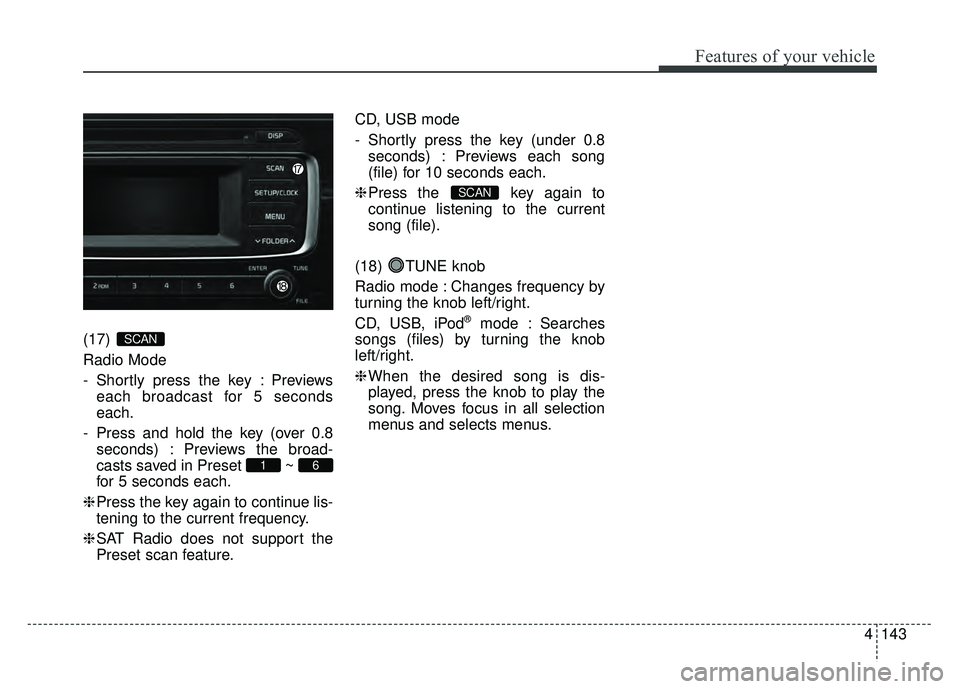
(17)
Radio Mode
- Shortly press the key : Previews
each broadcast for 5 seconds
each.
- Press and hold the key (over 0.8 seconds) : Previews the broad-
casts saved in Preset ~
for 5 seconds each.
❈ Press the key again to continue lis-
tening to the current frequency.
❈ SAT Radio does not support the
Preset scan feature. CD, USB mode
- Shortly press the key (under 0.8
seconds) : Previews each song
(file) for 10 seconds each.
❈ Press the key again to
continue listening to the current
song (file).
(18) TUNE knob
Radio mode : Changes frequency by
turning the knob left/right.
CD, USB, iPod
®mode : Searches
songs (files) by turning the knob
left/right.
❈ When the desired song is dis-
played, press the knob to play the
song. Moves focus in all selection
menus and selects menus.
SCAN
61
SCAN
Page 218 of 532
Features of your vehicle
148
4
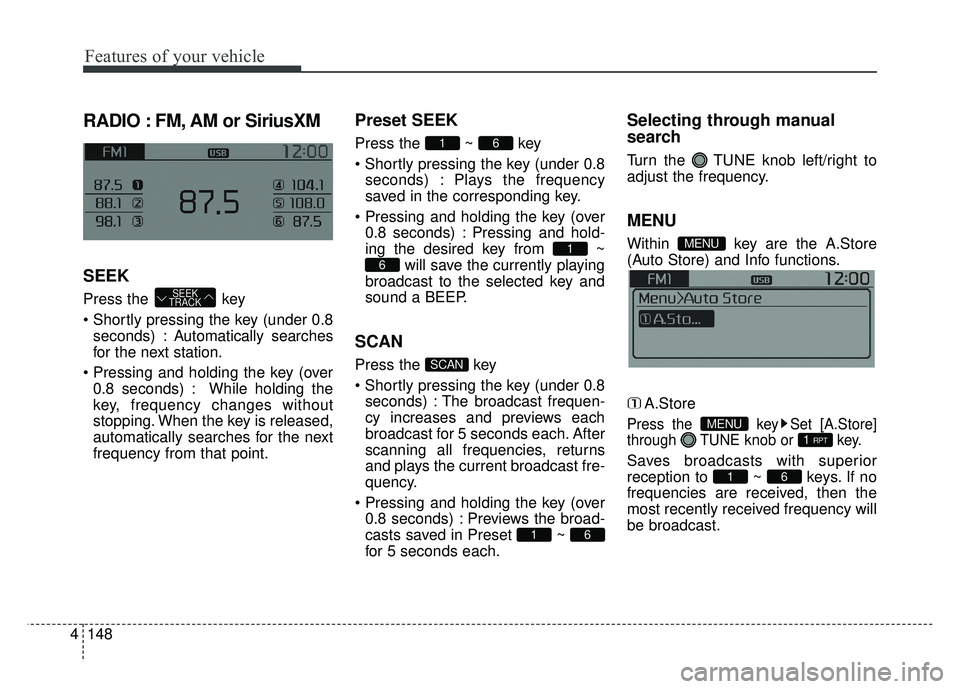
RADIO : FM, AM or SiriusXM
SEEK
Press the key
seconds) : Autom atically searches
for the next station.
0.8 seconds) : While holding the
key, frequency changes without
stopping. When the key is released,
automatically searches for the next
frequency from that point.
Preset SEEK
Press the ~ key
seconds) : Plays the frequency
saved in the corresponding key.
0.8 seconds) : Pressing and hold-
ing the desired key from ~ will save the currently playing
broadcast to the selected key and
sound a BEEP.
SCAN
Press the key
seconds) : The broadcast frequen-
cy increases and previews each
broadcast for 5 seconds each. After
scanning all frequencies, returns
and plays the current broadcast fre-
quency.
0.8 seconds) : Previews the broad-
casts saved in Preset ~
for 5 seconds each.
Selecting through manual
search
Turn the TUNE knob left/right to
adjust the frequency.
MENU
Within key are the A.Store
(Auto Store) and Info functions.
A.Store
Press the key Set [A.Store]
through TUNE knob or key.
Saves broadcasts with superior
reception to ~ keys. If no
frequencies are received, then the
most recently received frequency will
be broadcast.61
1 RPTMENU
MENU
61
SCAN
6
1
61
SEEK
TRACK
Page 221 of 532
Features of your vehicle
4151
Preset
Press the key ~
Shortly pressing the key (under 0.8seconds) : Plays the frequency
saved in the corresponding key.
Pressing and holding the key (over 0.8 seconds) : Pressing and hold-
ing the desired key from ~ will save the current broad-
cast to the selected key and sound
a BEEP.
✽ ✽ Troubleshooting
1. Antenna Error
If this message is displayed, the anten-
na or antenna cable is broken or
unplugged. Please consult with your
Kia dealership.
2. No Signal If this message is displayed, it means
that the antenna is covered and that
the SiriusXM Satellite Radio signal is
not available. Ensure the antenna is
uncovered and has a clear view of the
sky.
Tune
Rotate TUNE knob : Changes
the channel number or scrolls cat-
egory list.
Press TUNE knob : Selects the menu.
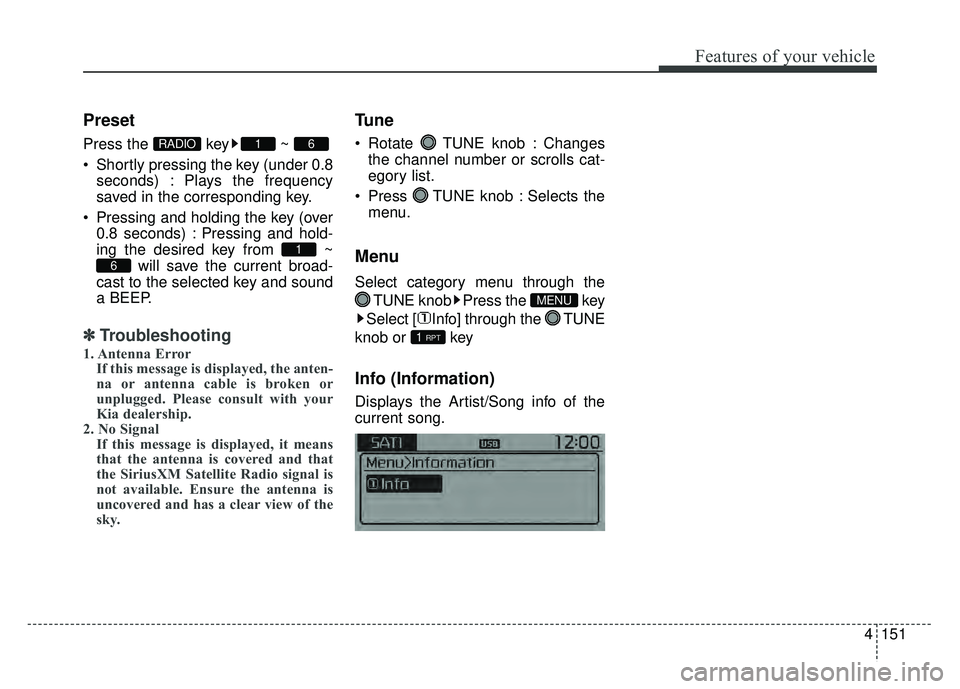
Menu
Select category menu through the
TUNE knob Press the key
Select [ Info] through the TUNE
knob or key
Info (Information)
Displays the Artist/Song info of the
current song.
1 RPT
MENU
6
1
61RADIO
Page 232 of 532
![KIA RIO HATCHBACK 2017 Owners Manual Features of your vehicle
162
4
Pairing through [PHONE]
Setup
Press the key Select
[Phone] Select [Pair Phone]
Select TUNE knob
1. The following steps are the same as those described in the section](/img/2/57977/w960_57977-231.png "KIA RIO HATCHBACK 2017 Owners Manual Features of your vehicle
162
4
Pairing through [PHONE]
Setup
Press the key Select
[Phone] Select [Pair Phone]
Select TUNE knob
1. The following steps are the same as those described in the section")
Features of your vehicle
162
4
Pairing through [PHONE]
Setup
Press the key Select
[Phone] Select [Pair Phone]
Select TUNE knob
1. The following steps are the same as those described in the section
"When No Devices have been
Paired" on the previous page.
Bluetooth®Wireless Technology
features supported within the vehi-
cle are as follows. Some features
may not be supported depending
on your
Bluetooth®Wireless Technology
device.
- Outgoing/Incoming Handsfree calls
- Operations during a call (Switch to Private, Switch to call waiting,
MIC on/off)
- Downloading Call History
- Downloading Mobile Contacts
-
Bluetooth®Wireless Technology
device auto connection
- Bluetooth Audio Streaming
Up to five Bluetooth®Wireless Technology
devices can be paired to the Car
Handsfree system.
Only one Bluetooth
®device can be
connected at a time.
Only one Bluetooth®Wireless Technology
device can be connected at a time.
Other devices cannot be paired
while a Bluetooth®Wireless Technology
device is connected. Only
Bluetooth®Wireless Technology
Handsfree and Bluetooth audio relat-
ed features are supported.
Bluetooth related operations are pos- sible only within devices that support
Handsfree or audio features, such as
a
Bluetooth®Wireless Technology
mobile phone or a Bluetooth audio
device.
If a connected
Bluetooth®Wireless
Technology device becomes discon-
nected due to being out of communi-
cation range, turning the device OFF,
or a
Bluetooth®Wireless Technology
communication error, corresponding
Bluetooth®Wireless Technology
devices are automatically searched
and reconnected.
If the system becomes unstable due to communication errors between the
car Handsfree and the
Bluetooth®
Wireless Technology device, reset
the device by turning off and back on
again. Upon resetting
Bluetooth®
Wireless Technology device, the sys-
tem will be restored.
SETUP/CLOCK
Page 246 of 532
Features of your vehicle
176
4
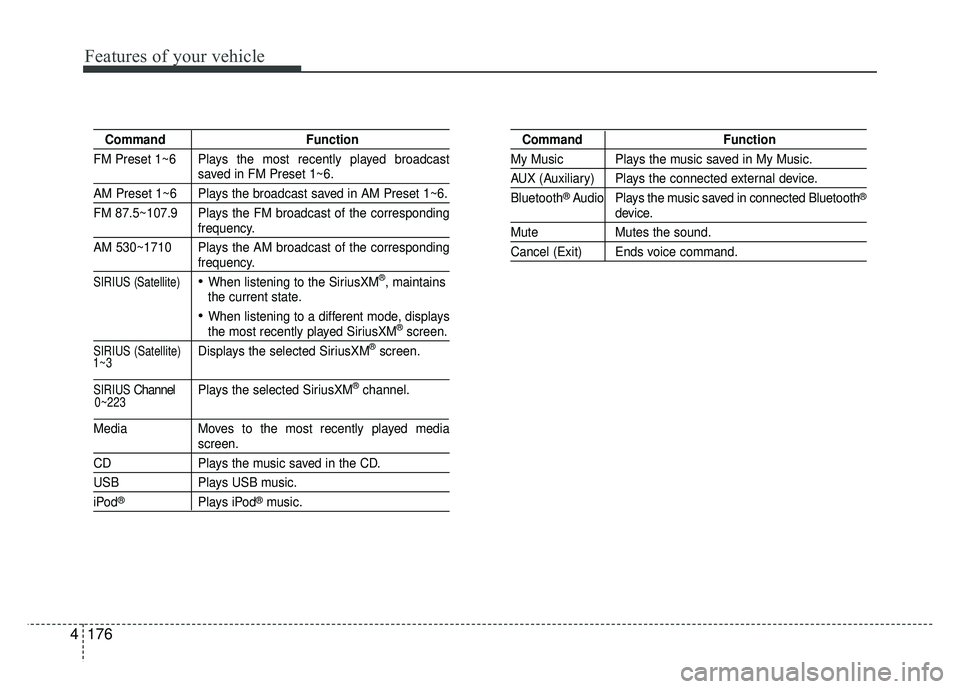
Command Function
FM Preset 1~6 Plays the most recently played broadcast
saved in FM Preset 1~6.
AM Preset 1~6 Plays the broadcast saved in AM Preset 1~6.
FM 87.5~107.9 Plays the FM broadcast of the corresponding
frequency.
AM 530~1710 Plays the AM broadcast of the corresponding
frequency.
SIRIUS (Satellite)When listening to the SiriusXM®, maintains
the current state.
When listening to a different mode, displaysthe most recently played SiriusXM®screen.
SIRIUS (Satellite)Displays the selected SiriusXM®screen.
SIRIUSChannel P l ay s the selected SiriusXM®channel.
Media Moves to the most recently played media
screen.
CD Plays the music saved in the CD.
USBPlays USB music.
iPod®Plays iPod®music.
Command Function
My Music Plays the music saved in My Music.
AUX (Auxiliary) Plays the connected external device.
Bluetooth
®Audio Plays the music saved in connected Bluetooth®
device.
Mute Mutes the sound.
Cancel (Exit) Ends voice command.
0~223
1~3
Page 247 of 532
Features of your vehicle
4177
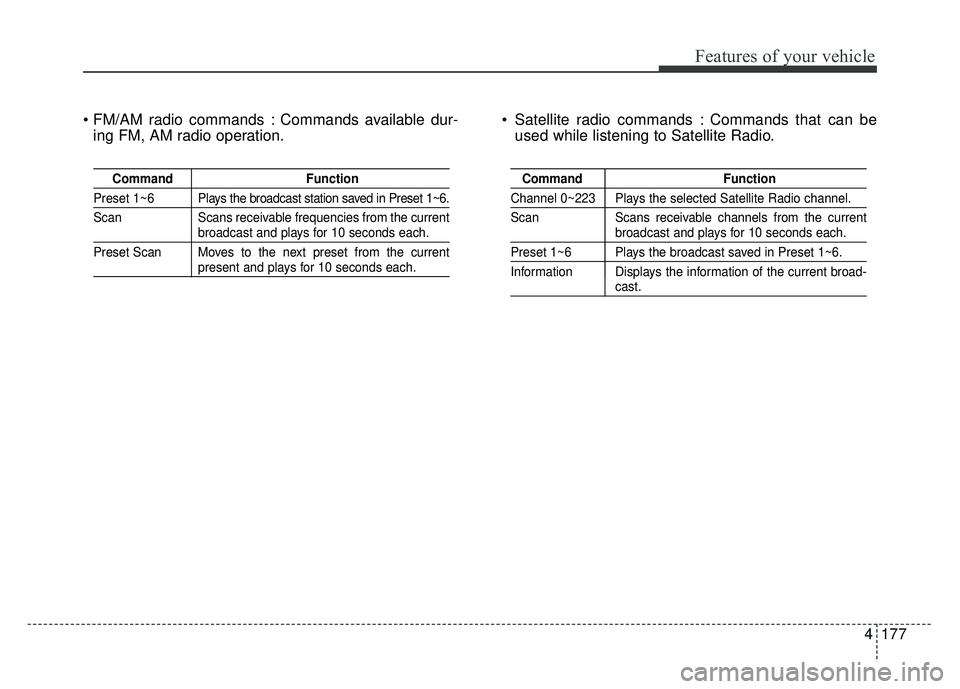
Commands available dur-ing FM, AM radio operation. Satellite radio commands : Commands that can be
used while listening to Satellite Radio.
Command Function
Preset 1~6 Plays the broadcast station saved in Preset 1~6.
Scan Scans receivable frequencies from the current
broadcast and plays for 10 seconds each.
Preset Scan Moves to the next preset from the current
present and plays for 10 seconds each.
Command Function
Channel 0~223 Plays the selected Satellite Radio channel.
Scan Scans receivable channels from the current
broadcast and plays for 10 seconds each.
Preset 1~6 Plays the broadcast saved in Preset 1~6.
Information Displays the information of the current broad-
cast.
Page 253 of 532
4183
Features of your vehicle
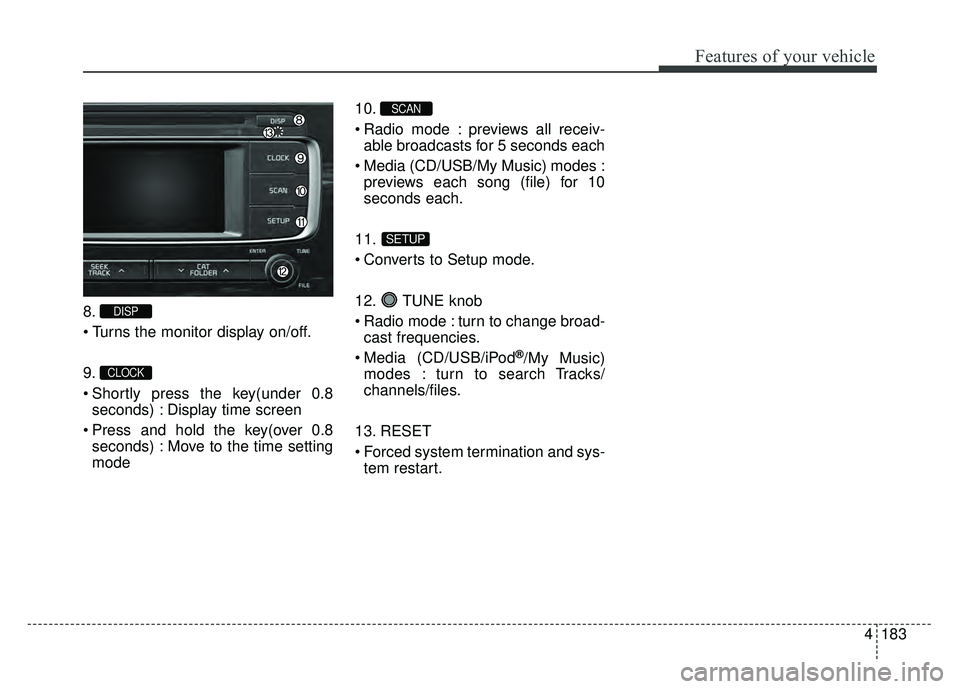
8.
9.
Shortly press the key(under 0.8seconds) : Display time screen
Press and hold the key(over 0.8 seconds) : Move to the time setting
mode 10.
Radio mode : previews all receiv-
able broadcasts for 5 seconds each
Media (CD/USB/My Music) modes : previews each song (file) for 10
seconds each.
11.
Converts to Setup mode.
12. TUNE knob
Radio mode : turn to change broad- cast frequencies.
Media (CD/USB/iPod
®/My Music)
modes : turn to search Tracks/
channels/files.
13. RESET
Forced system termination and sys- tem restart.
SETUP
SCAN
CLOCK
DISP
Page 255 of 532
4185
Features of your vehicle
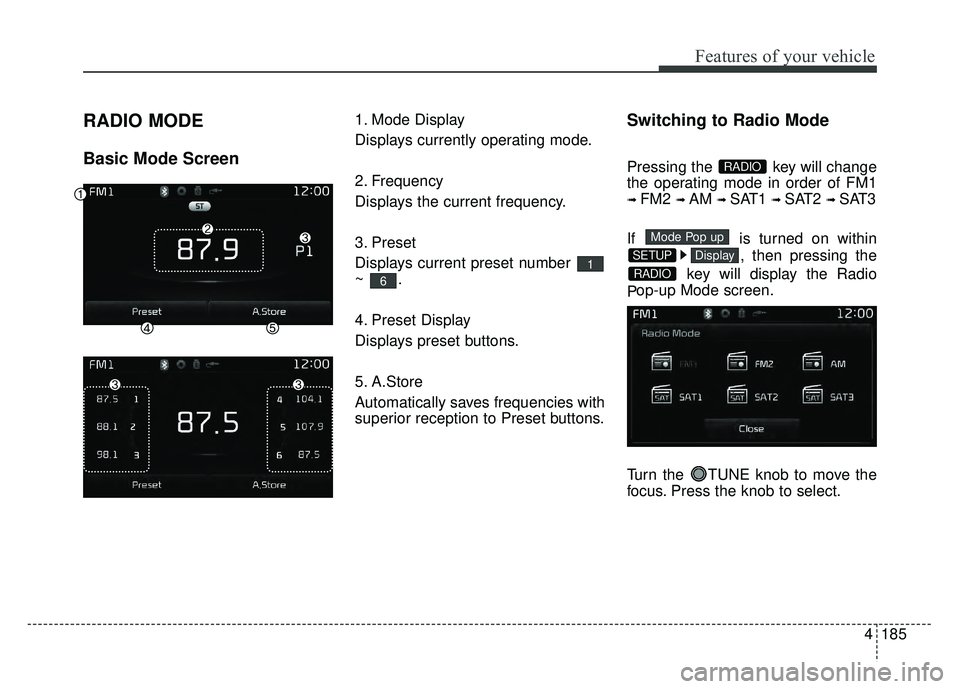
RADIO MODE
Basic Mode Screen
1. Mode Display
Displays currently operating mode.
2. Frequency
Displays the current frequency.
3. Preset
Displays current preset number
~.
4. Preset Display
Displays preset buttons.
5. A.Store
Automatically saves frequencies with
superior reception to Preset buttons.Switching to Radio Mode
Pressing the key will change
the operating mode in order of FM1
➟ FM2 ➟ AM ➟ SAT1 ➟ SAT2 ➟ SAT3
If is turned on within , then pressing the
key will display the Radio
P op-up Mode screen.
Turn the TUNE knob to move the
focus. Press the knob to select.
RADIO
DisplaySETUP
Mode Pop up
RADIO
6
1
Page 256 of 532
Features of your vehicle
186
4
Searching Radio Frequencies
Using Seek
Press the key to play the
previous/next frequency.
Using TUNE
Turn the TUNE knob to select the
desired frequency.
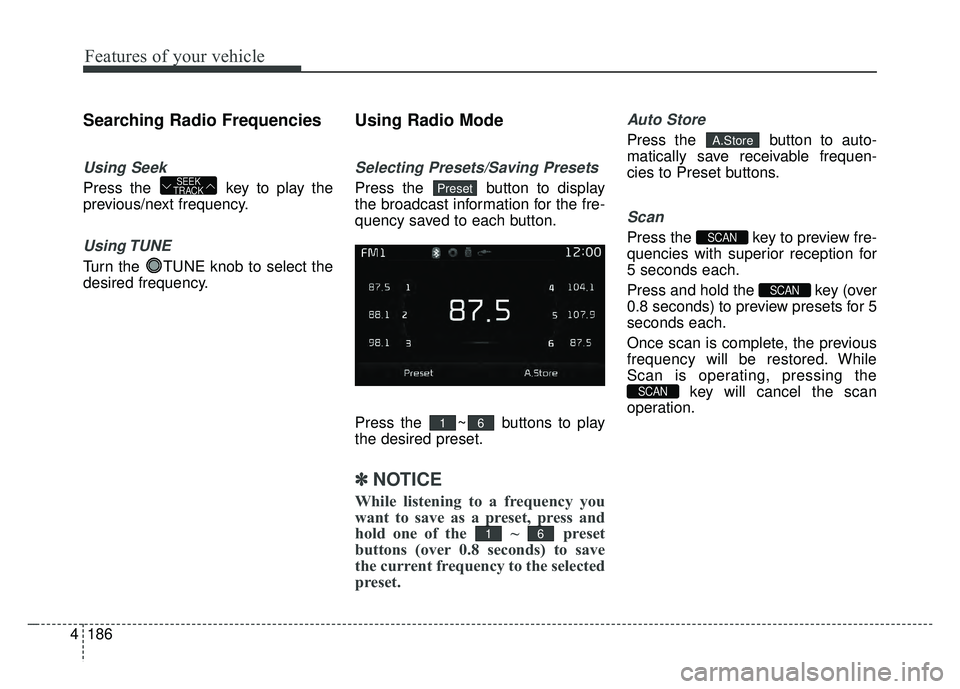
Using Radio Mode
Selecting Presets/Saving Presets
Press the button to display
the broadcast information for the fre-
quency saved to each button.
Press the ~ buttons to play
the desired preset.
✽ ✽
NOTICE
While listening to a frequency you
want to save as a preset, press and
hold one of the ~ preset
buttons (over 0.8 seconds) to save
the current frequency to the selected
preset.
Auto Store
Press the button to auto-
matically save receivable frequen-
cies to Preset buttons.
Scan
Press the key to preview fre-
quencies with superior reception for
5 seconds each.
Press and hold the key (over
0.8 seconds) to preview presets for 5
seconds each.
Once scan is complete, the previous
frequency will be restored. While
Scan is operating, pressing the
key will cancel the scan
operation.
SCAN
SCAN
SCAN
A.Store
61
61
PresetSEEK
TRACK
Page 258 of 532
Features of your vehicle
188
4
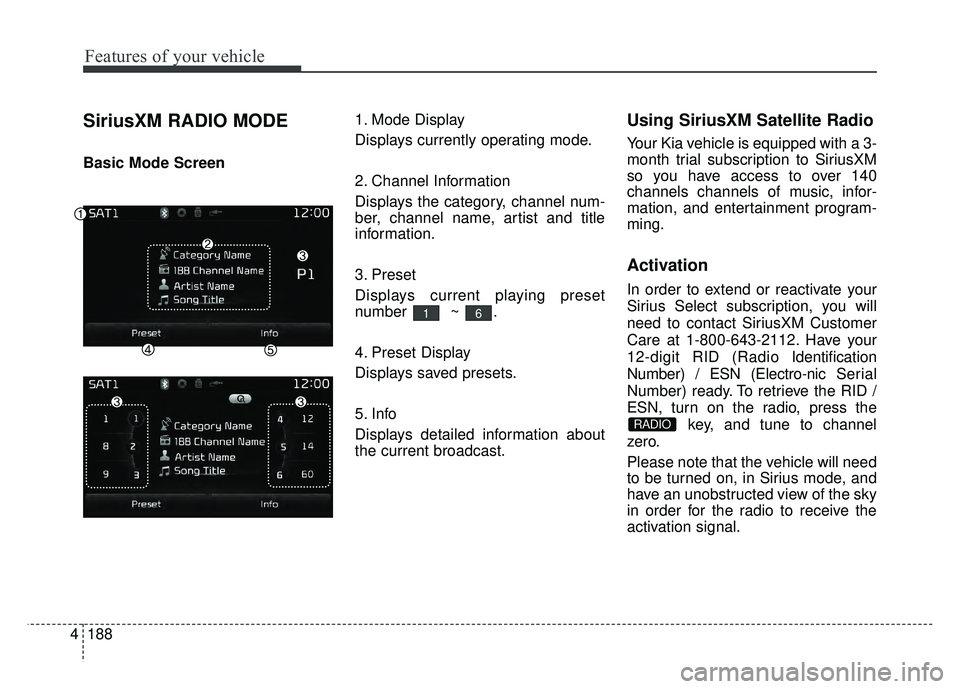
SiriusXM RADIO MODE
Basic Mode Screen 1. Mode Display
Displays currently operating mode.
2. Channel Information
Displays the category, channel num-
ber, channel name, artist and title
information.
3. Preset
Displays current playing preset
number ~ .
4. Preset Display
Displays saved presets.
5. Info
Displays detailed information about
the current broadcast.
Using SiriusXM Satellite Radio
Your Kia vehicle is equipped with a 3-
month trial subscription to SiriusXM
so you have access to over 140
channels channels of music, infor-
mation, and entertainment program-
ming.
Activation
In order to extend or reactivate your
Sirius Select subscription, you will
need to contact SiriusXM Customer
Care at 1-800-643-2112. Have your
12-digit RID (Radio Identification
Number) / ESN (Electro-nic Serial
Number) ready. To retrieve the RID /
ESN, turn on the radio, press the
key, and tune to channel
zero.
Please note that the vehicle will need
to be turned on, in Sirius mode, and
have an unobstructed view of the sky
in order for the radio to receive the
activation signal.
RADIO
61