reset KIA RIO HATCHBACK 2017 Owner's Guide
[x] Cancel search | Manufacturer: KIA, Model Year: 2017, Model line: RIO HATCHBACK, Model: KIA RIO HATCHBACK 2017Pages: 532, PDF Size: 12.04 MB
Page 260 of 532
Features of your vehicle
190
4
Selecting Presets/Saving
Presets
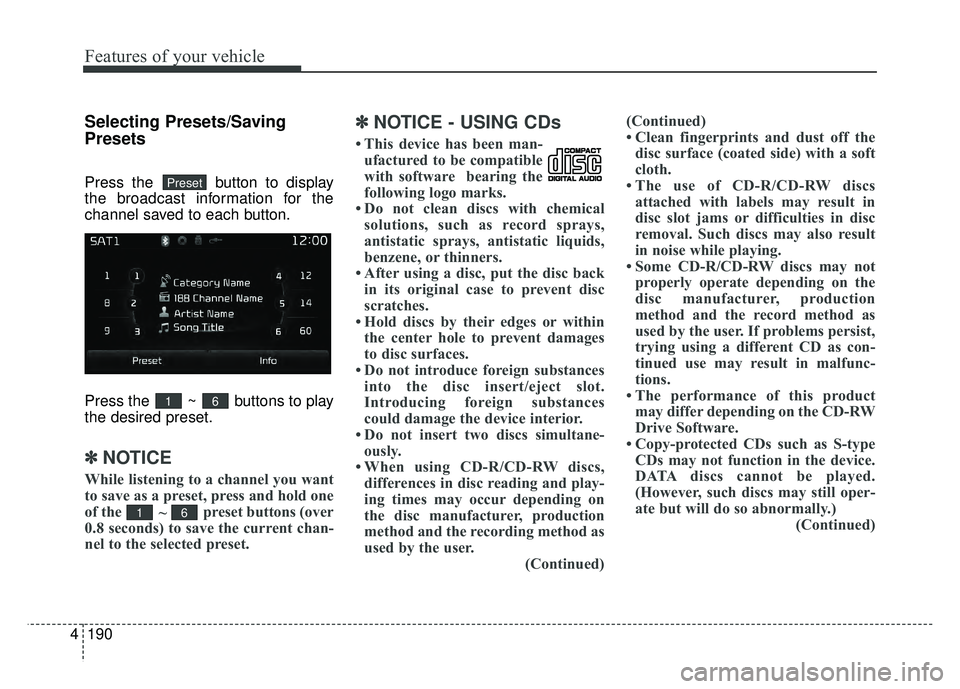
Press the button to display
the broadcast information for the
channel saved to each button.
Press the ~ buttons to play
the desired preset.
✽ ✽
NOTICE
While listening to a channel you want
to save as a preset, press and hold one
of the
~ preset buttons (over
0.8 seconds) to save the current chan-
nel to the selected preset.
✽ ✽ NOTICE - USING CDs
• This device has been man-
ufactured to be compatible
with software bearing the
following logo marks.
• Do not clean discs with chemical solutions, such as record sprays,
antistatic sprays, antistatic liquids,
benzene, or thinners.
• After using a disc, put the disc back in its original case to prevent disc
scratches.
• Hold discs by their edges or within the center hole to prevent damages
to disc surfaces.
• Do not introduce foreign substances into the disc insert/eject slot.
Introducing foreign substances
could damage the device interior.
• Do not insert two discs simultane- ously.
• When using CD-R/CD-RW discs, differences in disc reading and play-
ing times may occur depending on
the disc manufacturer, production
method and the recording method as
used by the user. (Continued)(Continued)
• Clean fingerprints and dust off the
disc surface (coated side) with a soft
cloth.
• The use of CD-R/CD-RW discs attached with labels may result in
disc slot jams or difficulties in disc
removal. Such discs may also result
in noise while playing.
• Some CD-R/CD-RW discs may not properly operate depending on the
disc manufacturer, production
method and the record method as
used by the user. If problems persist,
trying using a different CD as con-
tinued use may result in malfunc-
tions.
• The performance of this product may differ depending on the CD-RW
Drive Software.
• Copy-protected CDs such as S-type CDs may not function in the device.
DATA discs cannot be played.
(However, such discs may still oper-
ate but will do so abnormally.) (Continued)
61
61
Preset
Page 274 of 532
Features of your vehicle
204
4
✽
✽
NOTICE - USING THE
iPod®DEVICE
• iPod®is a registered trademark of
Apple Inc.
• In order to use the iPod
®while
operating the keys, you must use a
dedicated iPod
®cable. (the cable
that is supplied when purchasing
iPod
®/iPhone®products)
• If the iPod®is connected to the
vehicle while it is playing, a high
pitch sound could occur for
approximately 1-2 seconds imme-
diately after connecting. If possi-
ble, connect the iPod
®to the vehi-
cle with the iPod®stopped/paused.
• During ACC ON state, connecting the iPod
®through the iPod®cable
will charge the iPod®through the
car audio system.
• When connecting with the iPod
®
cable, make sure to fully insert the
jack to prevent communication
interference. (Continued)(Continued)
• When the EQ features of an exter-
nal device, such as the iPod
®, and
the audio system are both active,
EQ effects could overlap and
cause sound deterioration and dis-
tortion. Whenever possible, turn
off the EQ feature within the
external device upon use by con-
necting with the audio system.
• Noise may occur when an iPod
®or
AUX device is connected. When
such devices are not being used,
disconnect the device for storage.
• When the iPod
®or AUX device
power is connected to the power
jack, playing the external device
may result in noise. In such cases,
disconnect the power connection
before use.
• Skipping or improper operation may occur depending on the char-
acteristics of your iPod
® /iPhone®
device. (Continued)(Continued)
• If your iPhone
®is connected to
both the Bluetooth®Wireless
Technology and USB, the sound
may not be properly played. In
your iPhone
®, select the Dock con-
nector or Bluetooth®Wireless
Technology to change the sound
output (source).
• iPod
®mode cannot be operated
when the iPod®cannot be recog-
nized due to versions that do not
support communication protocols.
• For fifth generation iPod
®Nano
devices, the iPod®may not be rec-
ognized when the battery level is
low. Please charge the iPod
®for
use.
• Search/play orders shown within the iPod
®device may differ with
the orders shown within the audio
system.
• If the iPod
®malfunctions due to an
iPod®device defect, reset the iPod®
and try again. (To learn more, refer
to your iPod®manual) (Continued)
Page 287 of 532
4217
Features of your vehicle
✽
✽NOTICE
•Bluetooth®Wireless Technology fea-
tures supported within the vehicle
are as follows. Some features may
not be supported depending on your
Bluetooth®Wireless Technology device.
- Outgoing/Incoming Handsfree calls
- Operations during a call (Switch to Private, Switch to call waiting, MIC
on/off)
- Downloading Call History
- Downloading Mobile Contacts
- Bluetooth
®Wireless Technology
device auto connection
- Bluetooth Audio Streaming
• Up to five Bluetooth
®Wireless
Technology devices can be paired to
the Car Handsfree system.
• Only one Bluetooth
®Wireless
Technology device can be connected
at a time.
• Other devices cannot be paired while a Bluetooth
®Wireless Technology device is
connected.
• Only Bluetooth
®Wireless Technology
Handsfree and Bluetooth audio related
features are supported. (Continued)(Continued)
• Bluetooth related operations are pos-
sible only with devices that support
Handsfree or audio features, such as
a Bluetooth
®Wireless Technology
mobile phone or a Bluetooth audio
device.
• If a connected Bluetooth
®Wireless
Technology device becomes discon-
nected due to being out of communica-
tion range, turning the device OFF, or
a Bluetooth
®Wireless Technology com-
munication error, corresponding
Bluetooth
®Wireless Technology devices
are automatically searched and recon-
nected.
• If the system becomes unstable due to communication errors between the
car Handsfree and the Bluetooth
®
Wireless Technology device, reset the
device by turning off and back on
again. Upon resetting Bluetooth
®
Wireless Technology device, the sys-
tem will be restored.
(Continued)(Continued)
• After pairing is complete, a contacts
download request is sent once to the
mobile phone. Some mobile phones
may require confirmation upon
receiving a download request, ensure
your mobile phone accepts the con-
nection. Refer to your phones user’s
manual for additional information
regarding phone pairing and connec-
tions.
Page 300 of 532
Features of your vehicle
230
4
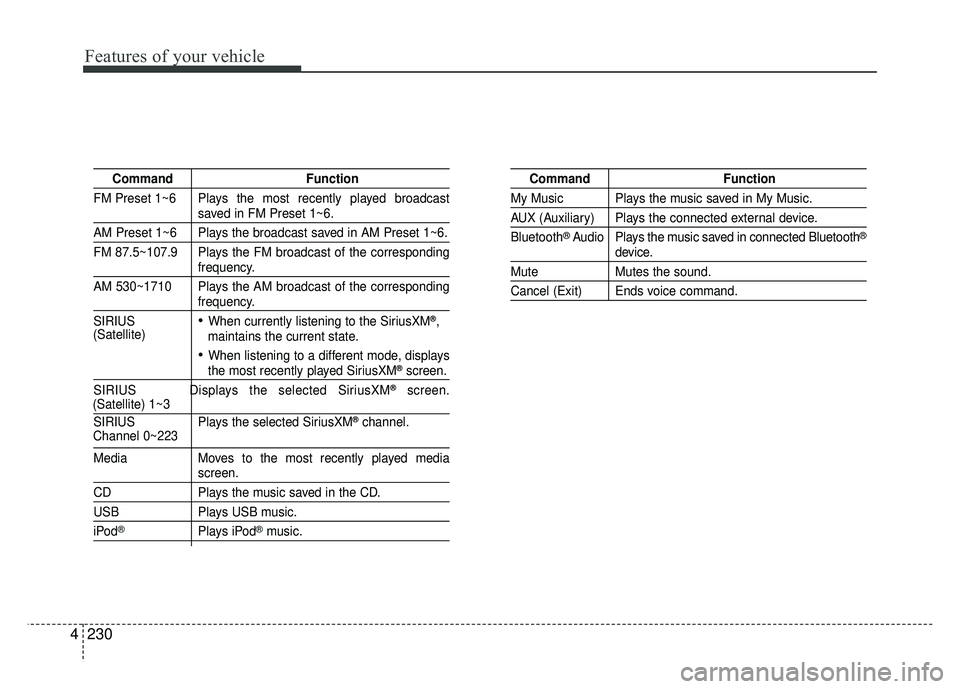
Command Function
FM Preset 1~6 Plays the most recently played broadcast
saved in FM Preset 1~6.
AM Preset 1~6 Plays the broadcast saved in AM Preset 1~6.
FM 87.5~107.9 Plays the FM broadcast of the corresponding
frequency.
AM 530~1710 Plays the AM broadcast of the corresponding
frequency.
SIRIUS
When currently listening to the SiriusXM®,
maintains the current state.
When listening to a different mode, displaysthe most recently played SiriusXM®screen.
SIRIUS Displays the selected SiriusXM®screen.
SIRIUS Plays the selected SiriusXM®channel.
Media Moves to the most recently played mediascreen.
CD Plays the music saved in the CD.
USBPlays USB music.
iPod®Plays iPod®music.
Command Function
My Music Plays the music saved in My Music.
AUX (Auxiliary) Plays the connected external device.
Bluetooth
® Audio Plays the music saved in connected Bluetooth®
device.
Mute Mutes the sound.
Cancel (Exit) Ends voice command.
Channel 0~223
(Satellite)
(Satellite) 1~3
Page 301 of 532
4231
Features of your vehicle
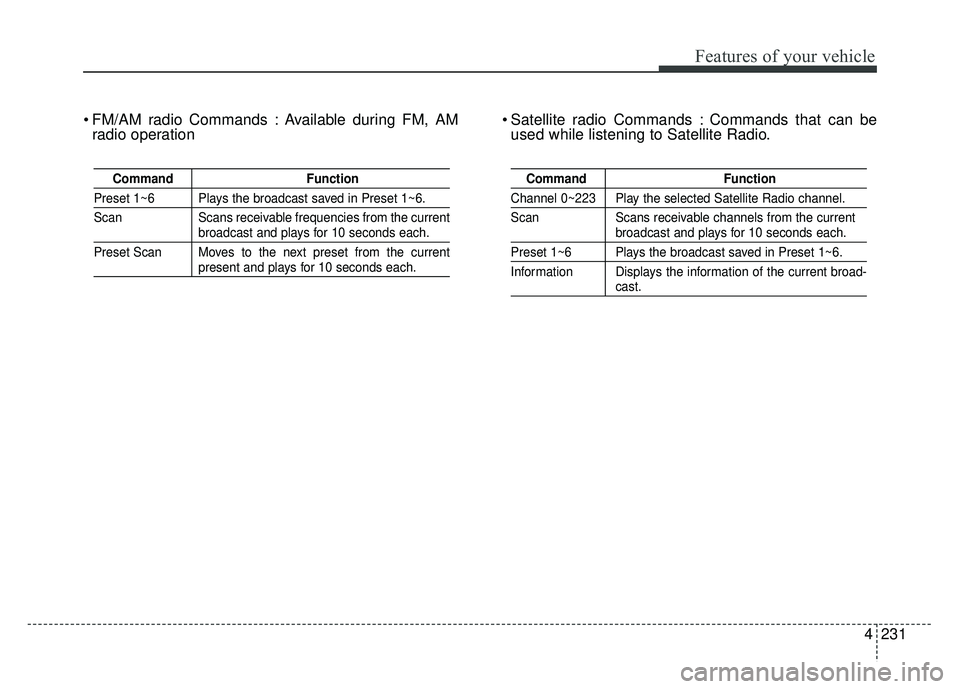
FM/AM radio Commands : Available during FM, AMradio operation Satellite radio Commands : Commands that can be
used while listening to Satellite Radio.
Command Function
Preset 1~6 Plays the broadcast saved in Preset 1~6.
Scan Scans receivable frequencies from the current
broadcast and plays for 10 seconds each.
Preset Scan Moves to the next preset from the current
present and plays for 10 seconds each.
Command Function
Channel 0~223 Play the selected Satellite Radio channel.
Scan Scans receivable channels from the current
broadcast and plays for 10 seconds each.
Preset 1~6 Plays the broadcast saved in Preset 1~6.
Information Displays the information of the current broad-
cast.
Page 304 of 532
Features of your vehicle
234
4
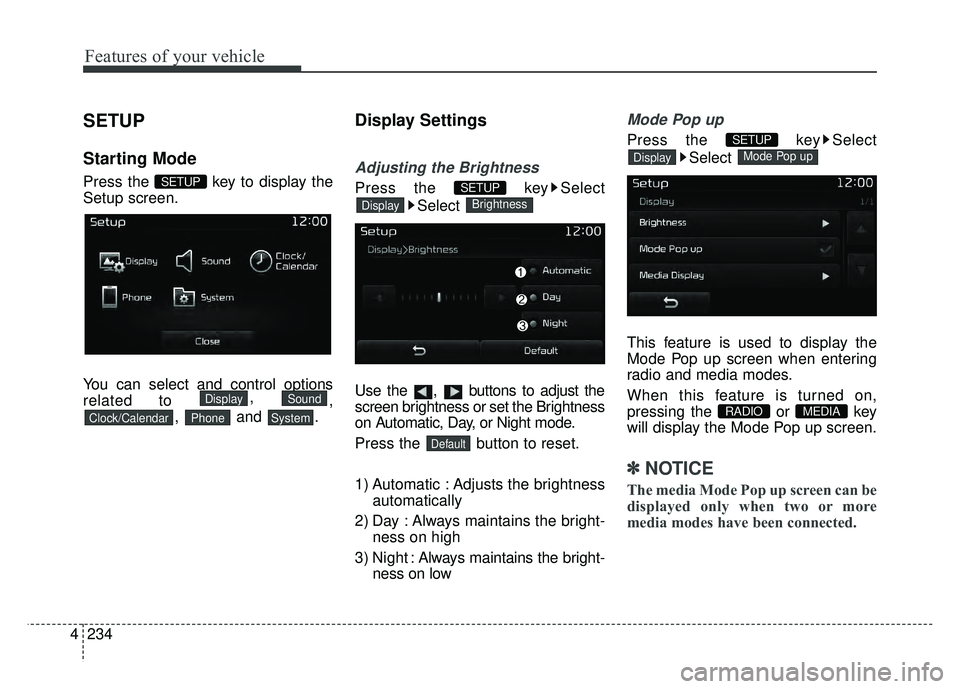
SETUP
Starting Mode
Press the key to display the
Setup screen.
You can select and control options
related to ,
,
, and .
Display Settings
Adjusting the Brightness
Press the key Select
Select
Use the , buttons to adjust the
screen brightness or set the Brightness
on Automatic, Day, or Night mode.
Press the button to reset.
1) Automatic : Adjusts the brightness automatically
2) Day : Always maintains the bright- ness on high
3) Night : Always maintains the bright-
ness on low
Mode Pop up
Press the key Select
Select
This feature is used to display the
Mode Pop up screen when entering
radio and media modes.
When this feature is turned on,
pressing the or key
will display the Mode Pop up screen.
✽ ✽ NOTICE
The media Mode Pop up screen can be
displayed only when two or more
media modes have been connected.
MEDIA RADIO
Mode Pop upDisplay
SETUP
Default
BrightnessDisplay
SETUP
SystemPhoneClock/Calendar
SoundDisplay
SETUP
Page 305 of 532
4235
Features of your vehicle
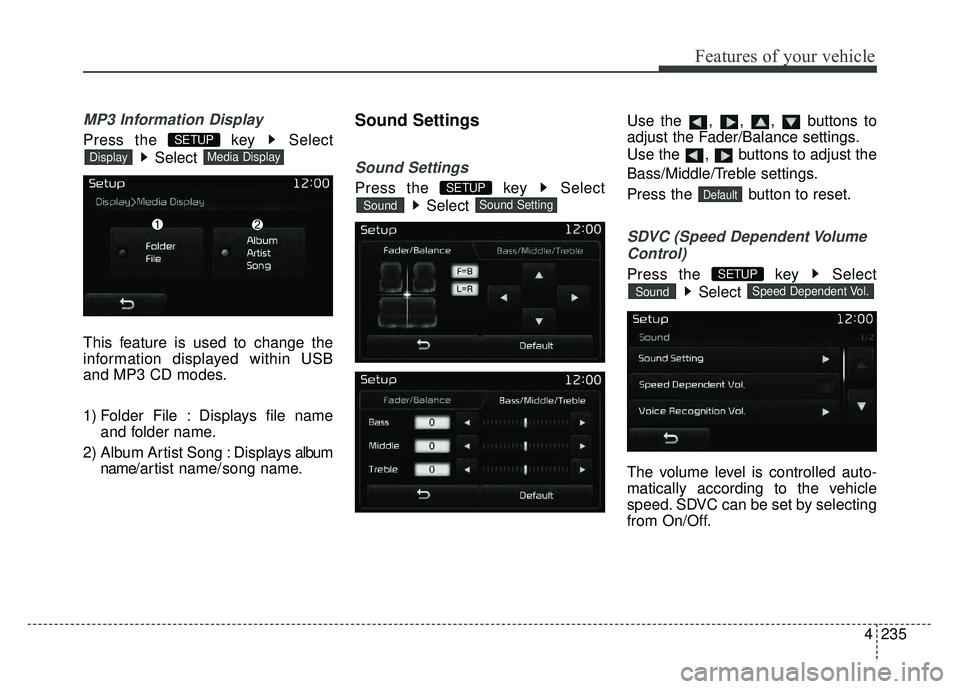
MP3 Information Display
Press the key SelectSelect
This feature is used to change the
information displayed within USB
and MP3 CD modes.
1) Folder File : Displays file name and folder name.
2) Album Artist Song : Displays album name/ a r tist name/ song name.
Sound Settings
Sound Settings
Press the key Select
Select Use the , , , buttons to
adjust the Fader/Balance settings.
Use the , buttons to adjust the
Bass/Middle/Treble settings.
Press the button to reset.
SDVC (Speed Dependent Volume
Control)
Press the key Select
Select
The volume level is controlled auto-
matically according to the vehicle
speed. SDVC can be set by selecting
from On/Off.
Speed Dependent Vol.Sound
SETUP
DefaultSound SettingSound
SETUP
Media DisplayDisplay
SETUP
Page 350 of 532
Driving your vehicle
38
5
Move the lever (1) down (to SET-)
and release it immediately. The
cruising speed will decrease by 1.0
mph (1.6 km/h) each time the lever
is operated in this manner.
To temporarily accelerate with
the cruise control on:
If you want to speed up temporarily
when the cruise control is on,
depress the accelerator pedal.
Increased speed will not interfere
with the cruise control operation or
change the set speed.
To return to the set speed, take your
foot off the accelerator.
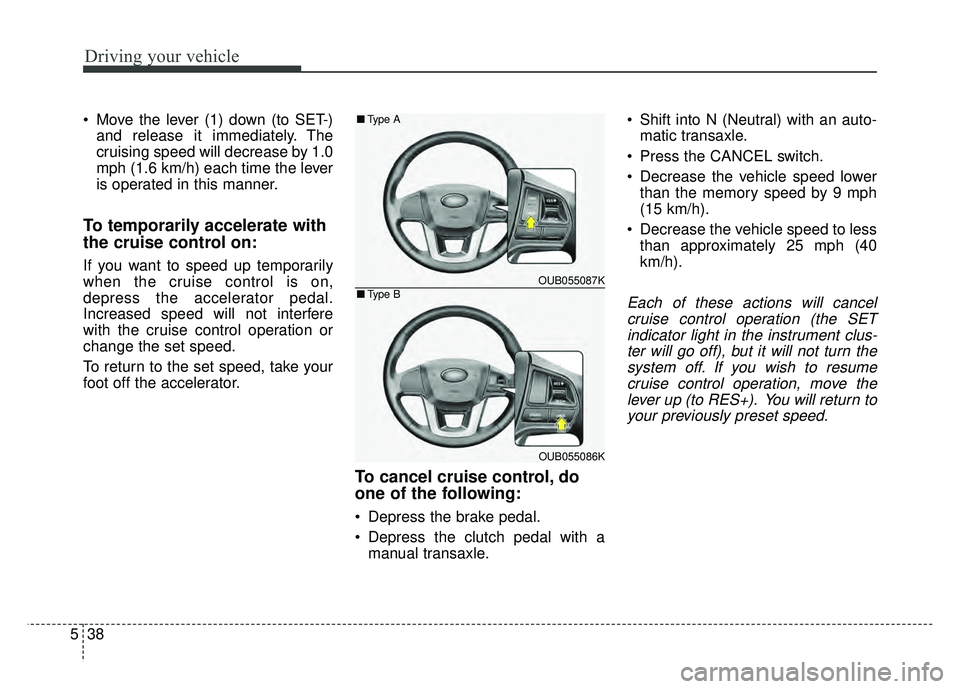
To cancel cruise control, do
one of the following:
Depress the brake pedal.
Depress the clutch pedal with amanual transaxle. Shift into N (Neutral) with an auto-
matic transaxle.
Press the CANCEL switch.
Decrease the vehicle speed lower than the memory speed by 9 mph
(15 km/h).
Decrease the vehicle speed to less than approximately 25 mph (40
km/h).
Each of these actions will cancelcruise control operation (the SETindicator light in the instrument clus-ter will go off), but it will not turn thesystem off. If you wish to resumecruise control operation, move thelever up (to RES+). You will return toyour previously preset speed.
OUB055087K
OUB055086K
■ Type A
■Type B
Page 455 of 532
Maintenance
50
7
Battery recharging
Your vehicle has a maintenance-free,
calcium-based battery.
If the battery becomes discharged
in a short time (because, for exam-
ple, the headlights or interior lights
were left on while the vehicle was
not in use), recharge it by slow
charging (trickle) for 10 hours.
If the battery gradually discharges because of high electric load while
the vehicle is being used, recharge
it at no more than 20-30A for two
hours. When recharging the battery,
observe the following precautions:
The battery must be removed from
the vehicle and placed in an area
with good ventilation.
Watch the battery during charging, and stop or reduce the charging
rate if the battery cells begin
gassing (boiling) violently or if the
temperature of the electrolyte of
any cell exceeds 120°F (49°C).
Wear eye protection when check- ing the battery during charging.
Disconnect the battery charger in the following order.
1. Turn off the battery charger main switch.
2. Unhook the negative clamp from the negative battery terminal.
3. Unhook the positive clamp from the positive battery terminal.
Before performing maintenance or recharging the battery, turn off all
accessories and stop the engine.
The negative battery cable must be removed first and installed last
when the battery is disconnected.
Reset items
Items should be reset after the bat-
tery has been discharged or the bat-
tery has been disconnected.
Auto down window (See section 4)
Sunroof (See section 4)
Trip computer (See section 4)
Climate control system (See section 4)
Clock (See section 4)
Audio (See section 4)
Page 459 of 532
Maintenance
54
7
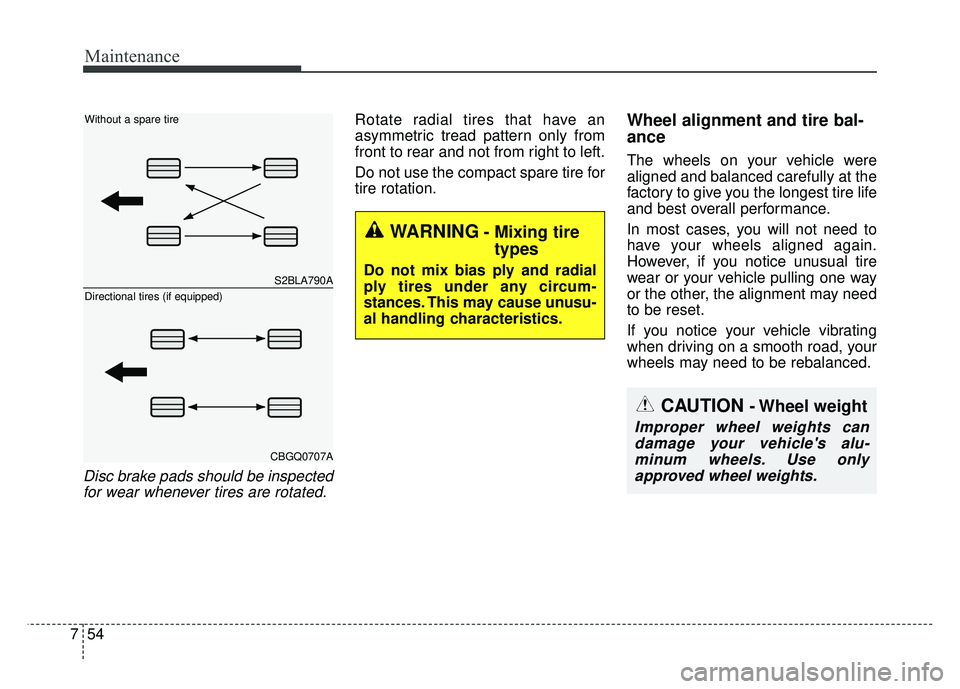
Disc brake pads should be inspected
for wear whenever tires are rotated.
Rotate radial tires that have an
asymmetric tread pattern only from
front to rear and not from right to left.
Do not use the compact spare tire for
tire rotation.Wheel alignment and tire bal-
ance
The wheels on your vehicle were
aligned and balanced carefully at the
factory to give you the longest tire life
and best overall performance.
In most cases, you will not need to
have your wheels aligned again.
However, if you notice unusual tire
wear or your vehicle pulling one way
or the other, the alignment may need
to be reset.
If you notice your vehicle vibrating
when driving on a smooth road, your
wheels may need to be rebalanced.
WARNING- Mixing tire types
Do not mix bias ply and radial
ply tires under any circum-
stances. This may cause unusu-
al handling characteristics.S2BLA790A
CBGQ0707A
Without a spare tire
Directional tires (if equipped)
CAUTION - Wheel weight
Improper wheel weights can
damage your vehicle's alu-minum wheels. Use onlyapproved wheel weights.