lock KIA RIO HATCHBACK 2017 Workshop Manual
[x] Cancel search | Manufacturer: KIA, Model Year: 2017, Model line: RIO HATCHBACK, Model: KIA RIO HATCHBACK 2017Pages: 532, PDF Size: 12.04 MB
Page 164 of 532
Features of your vehicle
94
4
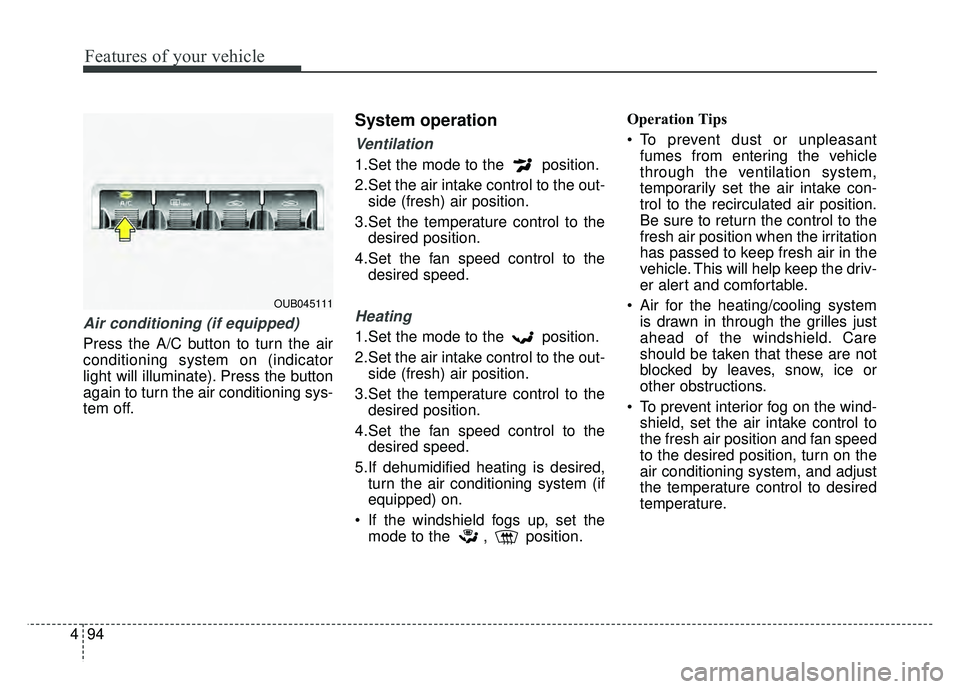
Air conditioning (if equipped)
Press the A/C button to turn the air
conditioning system on (indicator
light will illuminate). Press the button
again to turn the air conditioning sys-
tem off.
System operation
Ventilation
1.Set the mode to the position.
2.Set the air intake control to the out-
side (fresh) air position.
3.Set the temperature control to the desired position.
4.Set the fan speed control to the desired speed.
Heating
1.Set the mode to the position.
2.Set the air intake control to the out-side (fresh) air position.
3.Set the temperature control to the desired position.
4.Set the fan speed control to the desired speed.
5.If dehumidified heating is desired, turn the air conditioning system (if
equipped) on.
If the windshield fogs up, set the mode to the , position. Operation Tips
To prevent dust or unpleasant
fumes from entering the vehicle
through the ventilation system,
temporarily set the air intake con-
trol to the recirculated air position.
Be sure to return the control to the
fresh air position when the irritation
has passed to keep fresh air in the
vehicle. This will help keep the driv-
er alert and comfortable.
Air for the heating/cooling system is drawn in through the grilles just
ahead of the windshield. Care
should be taken that these are not
blocked by leaves, snow, ice or
other obstructions.
To prevent interior fog on the wind- shield, set the air intake control to
the fresh air position and fan speed
to the desired position, turn on the
air conditioning system, and adjust
the temperature control to desired
temperature.
OUB045111
Page 176 of 532
Features of your vehicle
106
4
Operation Tips
To keep dust or unpleasant fumes
from entering the vehicle through
the ventilation system, temporarily
set the air intake control to the
recirculated air position. Be sure to
return the control to the fresh air
position when the irritation has
passed to keep fresh air in the
vehicle. This will help keep the driv-
er alert and comfortable.
Air for the heating/cooling system is drawn in through the grilles just
ahead of the windshield. Care
should be taken that these are not
blocked by leaves, snow, ice or
other obstructions.
To prevent interior fog on the wind- shield, set the air intake control to
the fresh air position and fan speed
to the desired position, turn on the
air conditioning system, and adjust
the temperature control to desired
temperature.Air conditioning
Kia Air Conditioning Systems are
filled with environmentally friendly R-
134a refrigerant.
1. Start the engine. Press the air con- ditioning button.
2. Set the mode to the position.
3. Set the air intake control to the outside air or recirculated air posi-
tion.
4. Adjust the fan speed control and temperature control to maintain
maximum comfort.
When maximum cooling is desired, set the temperature control to the
extreme left position, then set the
fan speed control to the highest
speed.CAUTION
When using the air condition- ing system, monitor the tem-perature gauge closely whiledriving up hills or in heavytraffic when outside tempera-tures are high. Air condition-ing system operation maycause engine overheating.Continue to use the blower fanbut turn the air conditioningsystem off if the temperaturegauge indicates engine over-heating.
When opening the windows in humid weather air condition-ing may create water dropletsinside the vehicle. Sinceexcessive water droplets maycause damage to electricalequipment, air conditioningshould only be used with thewindows closed.
Page 185 of 532
4115
Features of your vehicle
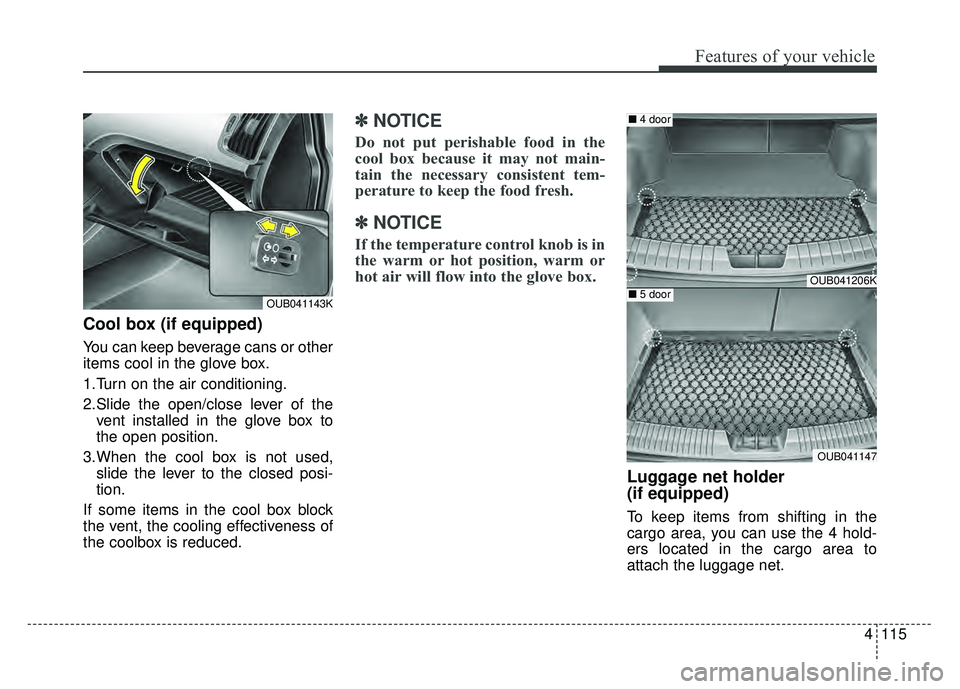
Cool box (if equipped)
You can keep beverage cans or other
items cool in the glove box.
1.Turn on the air conditioning.
2.Slide the open/close lever of thevent installed in the glove box to
the open position.
3.When the cool box is not used, slide the lever to the closed posi-
tion.
If some items in the cool box block
the vent, the cooling effectiveness of
the coolbox is reduced.
✽ ✽
NOTICE
Do not put perishable food in the
cool box because it may not main-
tain the necessary consistent tem-
perature to keep the food fresh.
✽ ✽
NOTICE
If the temperature control knob is in
the warm or hot position, warm or
hot air will flow into the glove box.
Luggage net holder
(if equipped)
To keep items from shifting in the
cargo area, you can use the 4 hold-
ers located in the cargo area to
attach the luggage net.
OUB041143K
OUB041206K
OUB041147
■ 4 door
■5 door
Page 192 of 532
Features of your vehicle
122
4
Digital clock and calendar
(if equipped)
Whenever the battery terminals or
related fuses are disconnected, you
must reset the clock and the calen-
dar.
When the ignition switch is in the
ACC or ON position, the clock but-
tons operate as follows:
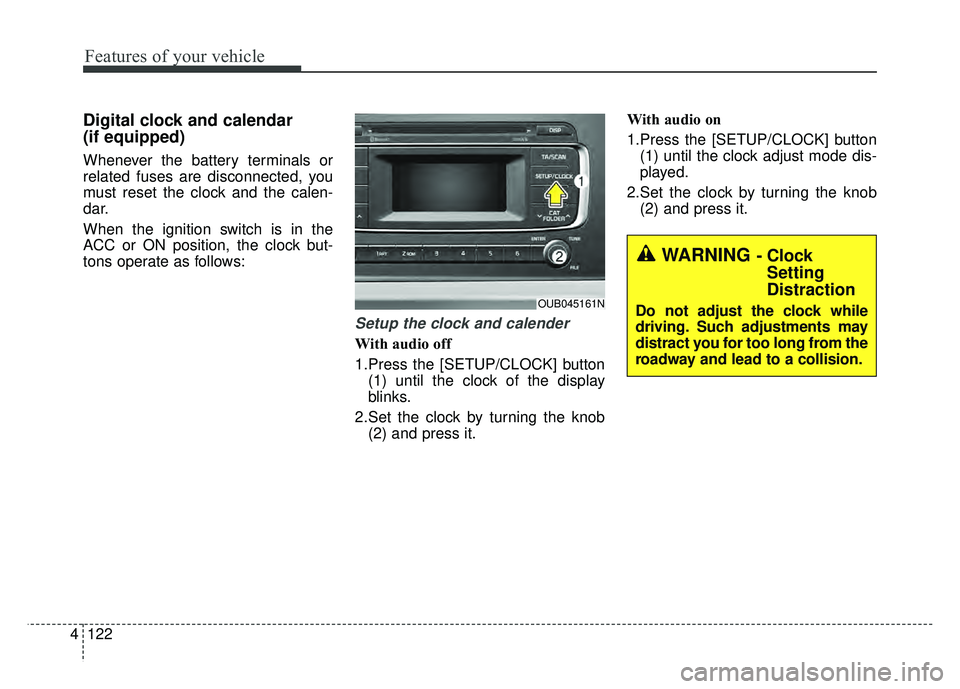
Setup the clock and calender
With audio off
1.Press the [SETUP/CLOCK] button
(1) until the clock of the display
blinks.
2.Set the clock by turning the knob (2) and press it. With audio on
1.Press the [SETUP/CLOCK] button
(1) until the clock adjust mode dis-
played.
2.Set the clock by turning the knob (2) and press it.
OUB045161N
WARNING - ClockSetting
Distraction
Do not adjust the clock while
driving. Such adjustments may
distract you for too long from the
roadway and lead to a collision.
Page 195 of 532
Features of your vehicle
4125
AUDIO SYSTEM
If you install an aftermarket HID
head lamp, your vehicle’s audio and
electronic device may malfunction.
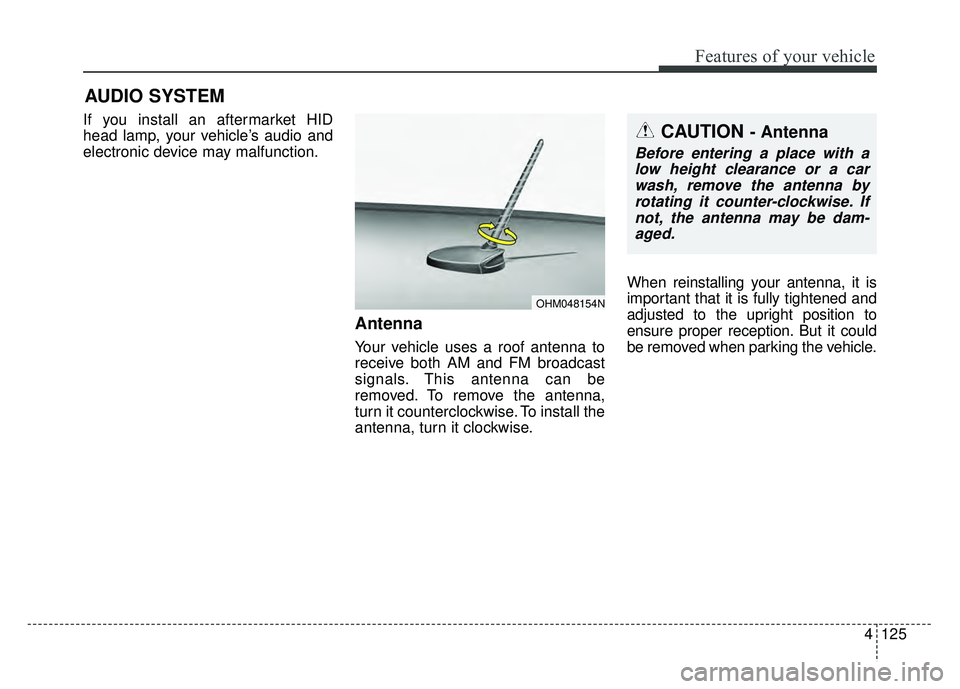
Antenna
Your vehicle uses a roof antenna to
receive both AM and FM broadcast
signals. This antenna can be
removed. To remove the antenna,
turn it counterclockwise. To install the
antenna, turn it clockwise.When reinstalling your antenna, it is
important that it is fully tightened and
adjusted to the upright position to
ensure proper reception. But it could
be removed when parking the vehicle.
CAUTION - Antenna
Before entering a place with a
low height clearance or a carwash, remove the antenna byrotating it counter-clockwise. Ifnot, the antenna may be dam-aged.
OHM048154N
Page 199 of 532
Features of your vehicle
4129
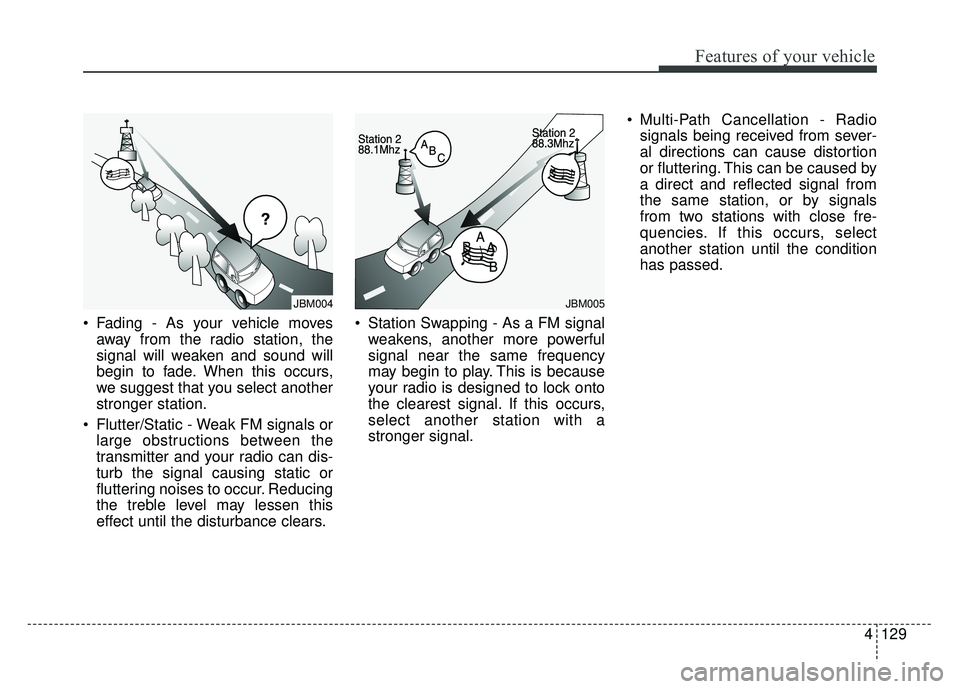
Fading - As your vehicle moves
away from the radio station, the
signal will weaken and sound will
begin to fade. When this occurs,
we suggest that you select another
stronger station.
Flutter/Static - Weak FM signals or large obstructions between the
transmitter and your radio can dis-
turb the signal causing static or
fluttering noises to occur. Reducing
the treble level may lessen this
effect until the disturbance clears. Station Swapping - As a FM signal
weakens, another more powerful
signal near the same frequency
may begin to play. This is because
your radio is designed to lock onto
the clearest signal. If this occurs,
select another station with a
stronger signal. Multi-Path Cancellation - Radio
signals being received from sever-
al directions can cause distortion
or fluttering. This can be caused by
a direct and reflected signal from
the same station, or by signals
from two stations with close fre-
quencies. If this occurs, select
another station until the condition
has passed.
JBM005JBM004
Page 200 of 532
Features of your vehicle
130
4
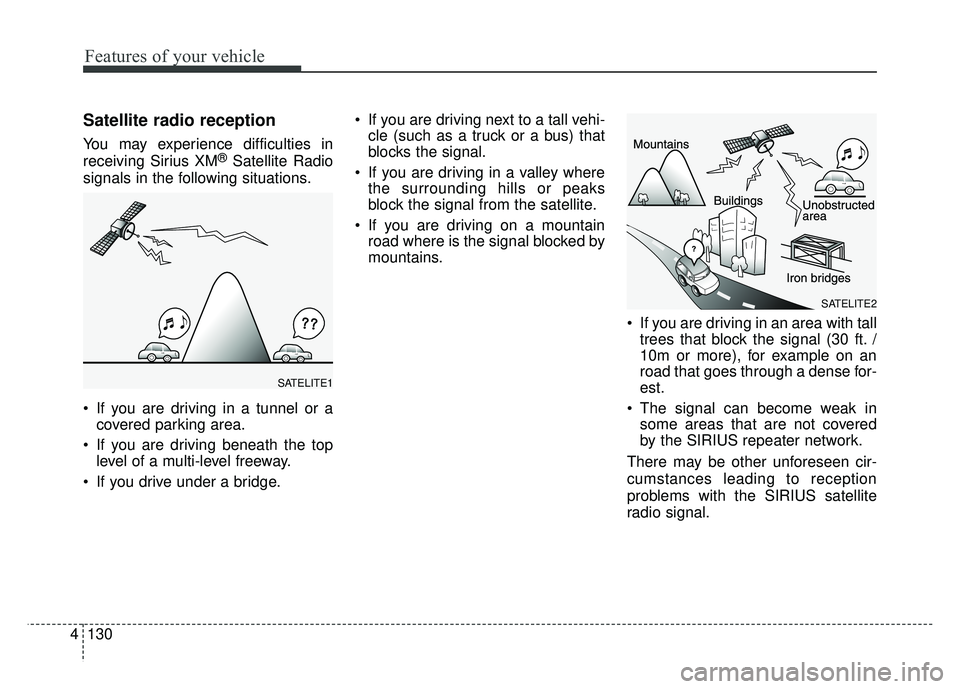
Satellite radio reception
You may experience difficulties in
receiving Sirius XM®Satellite Radio
signals in the following situations.
If you are driving in a tunnel or a covered parking area.
If you are driving beneath the top level of a multi-level freeway.
If you drive under a bridge. If you are driving next to a tall vehi-
cle (such as a truck or a bus) that
blocks the signal.
If you are driving in a valley where the surrounding hills or peaks
block the signal from the satellite.
If you are driving on a mountain road where is the signal blocked by
mountains.
If you are driving in an area with talltrees that block the signal (30 ft. /
10m or more), for example on an
road that goes through a dense for-
est.
The signal can become weak in some areas that are not covered
by the SIRIUS repeater network.
There may be other unforeseen cir-
cumstances leading to reception
problems with the SIRIUS satellite
radio signal.
SATELITE1
SATELITE2
Page 211 of 532
Features of your vehicle
4141
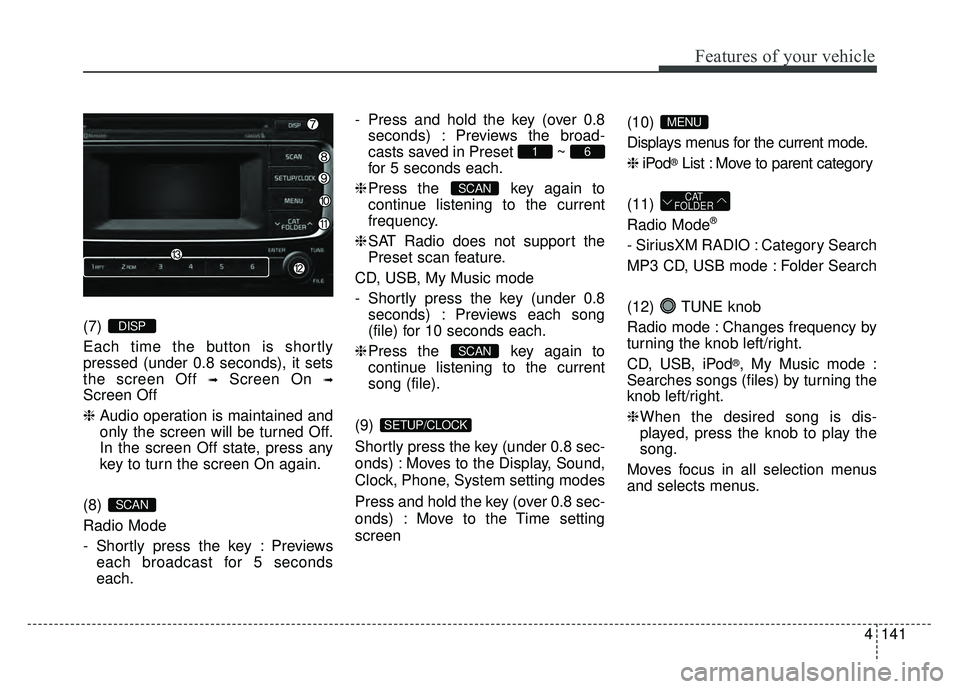
(7)
Each time the button is shortly
pressed (under 0.8 seconds), it sets
the screen Off
➟Screen On ➟
Screen Off
❈Audio operation is maintained and
only the screen will be turned Off.
In the screen Off state, press any
key to turn the screen On again.
(8)
Radio Mode
- Shortly press the key : Previews each broadcast for 5 seconds
each. - Press and hold the key (over 0.8
seconds) : Previews the broad-
casts saved in Preset ~
for 5 seconds each.
❈ Press the key again to
continue listening to the current
frequency.
❈ SAT Radio does not support the
Preset scan feature.
CD, USB, My Music mode
- Shortly press the key (under 0.8 seconds) : Previews each song
(file) for 10 seconds each.
❈ Press the key again to
continue listening to the current
song (file).
(9)
Shortly press the key (under 0.8 sec-
onds) : Moves to the Display, Sound,
Clock, Phone, System setting modes
Press and hold the key (over 0.8 sec-
onds) : Move to the Time setting
screen (10)
Displays menus for the current mode.
❈
iPod
®List : Move to parent category
(11)
Radio Mode
®
- SiriusXM RADIO : Category Search
MP3 CD, USB mode : Folder Search
(12) TUNE knob
Radio mode : Changes frequency by
turning the knob left/right.
CD, USB, iPod
®, My Music mode :
Searches songs (files) by turning the
knob left/right.
❈ When the desired song is dis-
played, press the knob to play the
song.
Moves focus in all selection menus
and selects menus.
CAT
FOLDER
MENU
SETUP/CLOCK
SCAN
SCAN
61
SCAN
DISP
Page 214 of 532
![KIA RIO HATCHBACK 2017 Workshop Manual Features of your vehicle
144
4
SETUP
Display Settings
Press the key Select
[Display] through TUNE knob or key Select menu through
TUNE knob
Mode Pop up
[Mode Pop up] Changes /
selection mode
or](/img/2/57977/w960_57977-213.png "KIA RIO HATCHBACK 2017 Workshop Manual Features of your vehicle
144
4
SETUP
Display Settings
Press the key Select
[Display] through TUNE knob or key Select menu through
TUNE knob
Mode Pop up
[Mode Pop up] Changes /
selection mode
or")
Features of your vehicle
144
4
SETUP
Display Settings
Press the key Select
[Display] through TUNE knob or key Select menu through
TUNE knob
Mode Pop up
[Mode Pop up] Changes /
selection mode
or key to display the mode
change pop up screen.
Media Display
When playing an MP3 file, select the
desired display info from ‘Folder/File’
or ‘Album/Artist/Song’.
MEDIA
RADIO
OffOn
1 RPT
SETUP/CLOCK
Page 215 of 532
![KIA RIO HATCHBACK 2017 Workshop Manual Features of your vehicle
4145
SOUND SETTINGS
Press the key Select
[Sound] through TUNE knob or key Select menu through
TUNE knob
Tone
This menu allows you to set the
Bass, Middle, Treble.
Select [To](/img/2/57977/w960_57977-214.png "KIA RIO HATCHBACK 2017 Workshop Manual Features of your vehicle
4145
SOUND SETTINGS
Press the key Select
[Sound] through TUNE knob or key Select menu through
TUNE knob
Tone
This menu allows you to set the
Bass, Middle, Treble.
Select [To")
Features of your vehicle
4145
SOUND SETTINGS
Press the key Select
[Sound] through TUNE knob or key Select menu through
TUNE knob
Tone
This menu allows you to set the
Bass, Middle, Treble.
Select [Tone] Select menu through
TUNE knobTu r n TUNE knob
left/right to set
Bass, Middle, Treble : Selects the sound tone.
Default : Restores default settings.
❈ Return : While adjusting values,
pressing the TUNE knob will
restore the parent menu.
Position
This menu allows you to set the
Fader, Balance.
Select [Position] Select menu through
TUNE knob Turn TUNE knob
left/right to set
Fader, Balance : Selects the sound
fader and balance.
Default : Restores default settings.
❈ Return : While adjusting values,
pressing the TUNE knob will
restore the parent menu.
Speed Dependent Volume
Control
This feature is used to automatically
control the volume level according to
the speed of the vehicle.
Select [Speed Dependent Vol.] Set
[Off/On] of
TUNEknob
Voice Recognition Volume
(if equipped)
Adjusts voice recognition volume.
Select [Voice Recognition Vol.] Set
volume of
TUNEknob
2 RDM
SETUP/CLOCK