USB KIA RIO HATCHBACK 2018 User Guide
[x] Cancel search | Manufacturer: KIA, Model Year: 2018, Model line: RIO HATCHBACK, Model: KIA RIO HATCHBACK 2018Pages: 492, PDF Size: 10.36 MB
Page 231 of 492
![KIA RIO HATCHBACK 2018 User Guide Audio system
522
✽
✽NOTICE
The repeat folder function is avail-
able only when songs are playing
from the [File] category under
[List].
Shuffle play
Select [Shuffle] to enable/disable
‘Shuffleâ€](/img/2/57983/w960_57983-230.png "KIA RIO HATCHBACK 2018 User Guide Audio system
522
✽
✽NOTICE
The repeat folder function is avail-
able only when songs are playing
from the [File] category under
[List].
Shuffle play
Select [Shuffle] to enable/disable
‘Shuffleâ€")
Audio system
522
✽
✽NOTICE
The repeat folder function is avail-
able only when songs are playing
from the [File] category under
[List].
Shuffle play
Select [Shuffle] to enable/disable
‘Shuffle’, ‘Shuffle folder’ or ‘Shuffle
category’ play.
Shuffle: Songs are played in
random order.
Shuffle folder: Songs within the current folder are played in ran-
dom order.
Shuffle category: Songs within the current category are played in
random order.
Menu
Select [Menu], and select the desired
function.
Information: Detailed information on the currently playing song is dis-
played.
Sound Settings: Audio sound set- tings can be changed.
✽ ✽ NOTICE - Using the iPod®
Devices
• To use the audio system’s iPod®
control function, use the dedicated
cable provided with your iPod®.
• Connecting the iPod®to the vehi-
cle during play may result in a
loud noise that lasts about one to
two seconds. Connect the iPod
®to
the vehicle after stopping or paus-
ing play.
• Connect the iPod
®with the vehicle
in the ACC ON state to begin
charging.
• When connecting the iPod
®cable,
be sure to fully push the cable into
the port.
• When EQ effects are enabled simultaneously on external
devices, such as iPod
®s and the
audio system, the EQ effects may
overlap, causing sound quality
deterioration or distortion.
Deactivate the EQ function for all
external devices, if possible.
• Noise may occur when your iPod
®
or the AUX port is connected.
Disconnect and store separately
when not in use. (Continued)(Continued)
• There may be noise if the audio
system is used with an iPod
®or
AUX external device connected to
the power jack. In these cases, dis-
connect the iPod
®or external
device from the power jack.
• Play may be interrupted, or device malfunctions may occur depend-
ing on the characteristics of your
iPod
®/iPhone®.
• Play may fail if your iPhone®is
connected through both Bluetooth®
Wireless Technology and USB. In
this case, select Dock connector or
Bluetooth
®Wireless Technology
on your iPhone®to change the
sound output settings.
• If your software version does not support the communication proto-
col or your iPod
®is not recognized
due to device failure, anomalies or
defects, iPod
®mode cannot be
used.
• iPod
®nano (5th generation)
devices may not be recognized if
the battery is low. Charge suffi-
ciently before use. (Continued)
Page 232 of 492
Audio system
23
5
(Continued)
• The search and song play order in
the iPod
®device may be different
from the search order in the audio
system.
• If the iPod
®has failed due to an
internal defect, please reset the
iPod
®(consult your iPod®manual).
• Depending on the software ver- sion, the iPod
®may fail to sync
with the system. If the media is
removed or disconnected before
recognition, the previous mode
may not be restored (iPad
®cannot
be charged).
• Cables other than the 1-meter cable provided with iPod
®/iPhone®
products may not be recognized.
• When other music apps are used on your iPod
®, the system sync
function may fail due to malfunc-
tion of the iPod
®application.
iPod®
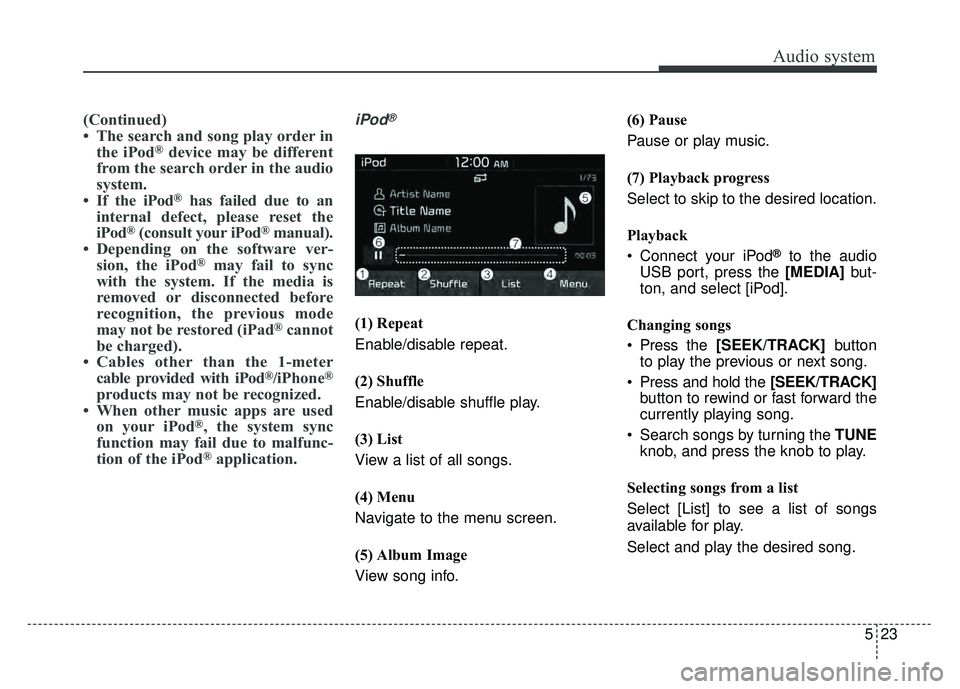
(1) Repeat
Enable/disable repeat.
(2) Shuffle
Enable/disable shuffle play.
(3) List
View a list of all songs.
(4) Menu
Navigate to the menu screen.
(5) Album Image
View song info. (6) Pause
Pause or play music.
(7) Playback progress
Select to skip to the desired location.
Playback
Connect your iPod
®to the audio
USB port, press the [MEDIA] but-
ton, and select [iPod].
Changing songs
Press the [SEEK/TRACK] button
to play the previous or next song.
Press and hold the [SEEK/TRACK] button to rewind or fast forward the
currently playing song.
Search songs by turning the TUNE knob, and press the knob to play.
Selecting songs from a list
Select [List] to see a list of songs
available for play.
Select and play the desired song.
Page 246 of 492
Audio system
37
5
✽
✽
NOTICE
• When paired devices are deleted,
the call history and contacts of the
device saved to the audio system
are deleted.
• For Bluetooth
®Wireless Technology
connections with low connection pri-
ority, some time may be required for
the connection to be established.
• Contacts can be downloaded only from the currently connected
Bluetooth
®Wireless Technology
device.
If no Bluetooth
®Wireless Technology
device is connected, the download
contacts button is disabled.
• If the language setting is Korean, Bluetooth
®Wireless Technology
voice prompts are not supported.
System
Press the [SETUP] button on the
audio system ➟ Select [System].
Language: Change the user lan- guage.
Default: Reset the audio system.
System Information: At the System Information screen, Software version
information, updates are available.
- System Update: At the SystemInformation screen, insert the
USB memory with the latest file
downloaded, and then select the
[Update] to begin updating. The
system with then reboot auto-
matically.
✽ ✽ NOTICE
• The system resets to the default
values, and all saved data and set-
tings are lost.
• This product needs supplemented software updates and additional
functions, which collectively may
take some time to complete,
depending on the amount of data.
• If the Power is disconnected or the USB is removed during an update,
the data might be damaged. Please
wait until the update is complete
while engine is on.
Page 419 of 492
869
Maintenance
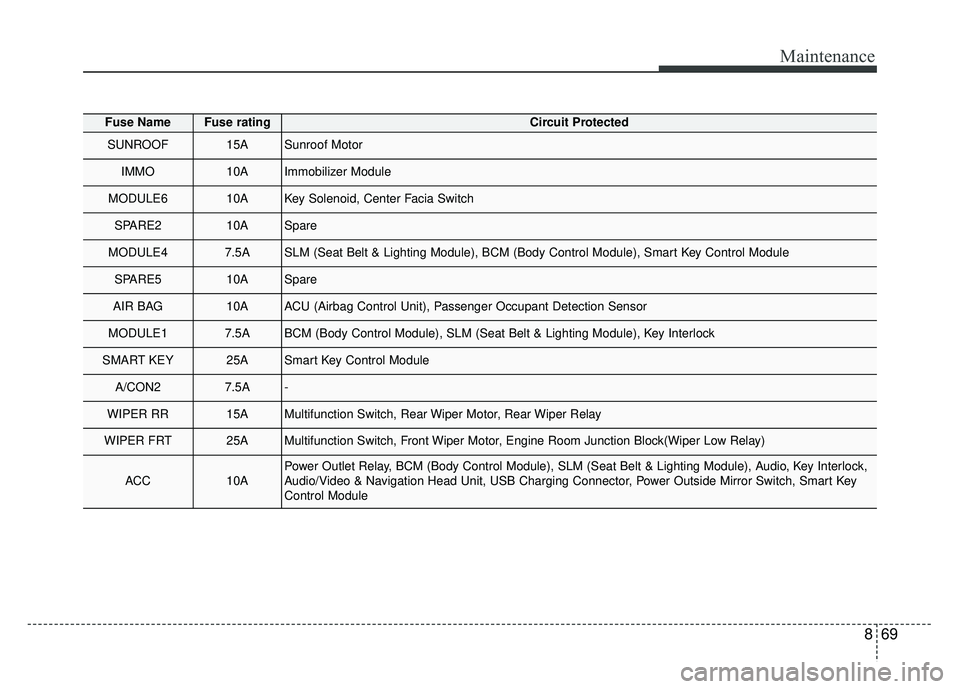
Fuse NameFuse ratingCircuit Protected
SUNROOF15ASunroof Motor
IMMO10AImmobilizer Module
MODULE610AKey Solenoid, Center Facia Switch
SPARE210ASpare
MODULE47.5ASLM (Seat Belt & Lighting Module), BCM (Body Control Module), Smart Key Control Module
SPARE510ASpare
AIR BAG10AACU (Airbag Control Unit), Passenger Occupant Detection Sensor
MODULE17.5ABCM (Body Control Module), SLM (Seat Belt & Lighting Module), Key Interlock
SMART KEY25ASmart Key Control Module
A/CON27.5A-
WIPER RR15AMultifunction Switch, Rear Wiper Motor, Rear Wiper Relay
WIPER FRT25AMultifunction Switch, Front Wiper Motor, Engine Room Junction Block(Wiper Low Relay)
ACC10APower Outlet Relay, BCM (Body Control Module), SLM (Seat Belt & Lighting Module), Audio, Key Interlock,
Audio/Video & Navigation Head Unit, USB Charging Connector, Power Outside Mirror Switch, Smart Key
Control Module
Page 480 of 492
Index
2I
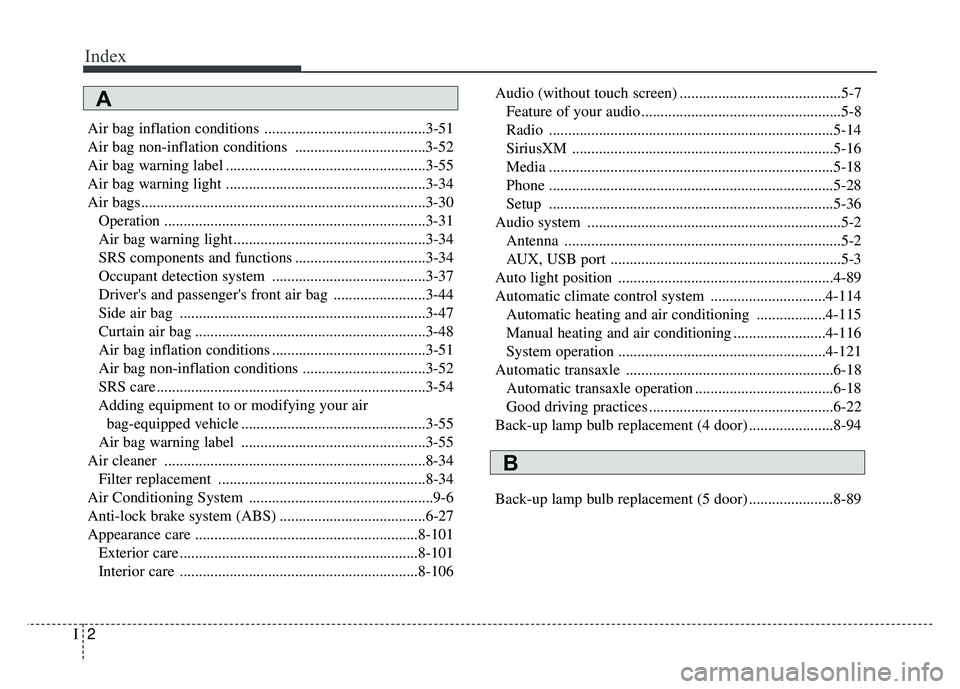
Air bag inflation conditions ..........................................3-51
Air bag non-inflation conditions ..................................3-52
Air bag warning label ....................................................3-55
Air bag warning light ....................................................3-34
Air bags........................................................................\
..3-30Operation ....................................................................3-31\
Air bag warning light ..................................................3-34
SRS components and functions ..................................3-34
Occupant detection system ........................................3-37
Driver's and passenger's front air bag ........................3-44
Side air bag ................................................................3-47
Curtain air bag ............................................................3-48
Air bag inflation conditions ........................................3-51
Air bag non-inflation conditions ................................3-52
SRS care ......................................................................3-\
54
Adding equipment to or modifying your air bag-equipped vehicle ................................................3-55
Air bag warning label ................................................3-55
Air cleaner ....................................................................8-34\
Filter replacement ......................................................8-34
Air Conditioning System ................................................9-6
Anti-lock brake system (ABS) ......................................6-27
Appearance care ..........................................................8-101 Exterior care ..............................................................8-101
Interior care ..............................................................8-106 Audio (without touch screen) ..........................................5-7
Feature of your audio ....................................................5-8
Radio ........................................................................\
..5-14
SiriusXM ....................................................................5-16\
Media ........................................................................\
..5-18
Phone ........................................................................\
..5-28
Setup ........................................................................\
..5-36
Audio system ..................................................................5-2 Antenna ........................................................................\
5-2
AUX, USB port ............................................................5-3
Auto light position ........................................................4-89
Automatic climate control system ..............................4-114 Automatic heating and air conditioning ..................4-115
Manual heating and air conditioning ........................4-116
System operation ......................................................4-121
Automatic transaxle ......................................................6-18 Automatic transaxle operation ....................................6-18
Good driving practices ................................................6-22
Back-up lamp bulb replacement (4 door) ......................8-94
Back-up lamp bulb replacement (5 door) ......................8-89
A
B
Page 485 of 492
I7
Index
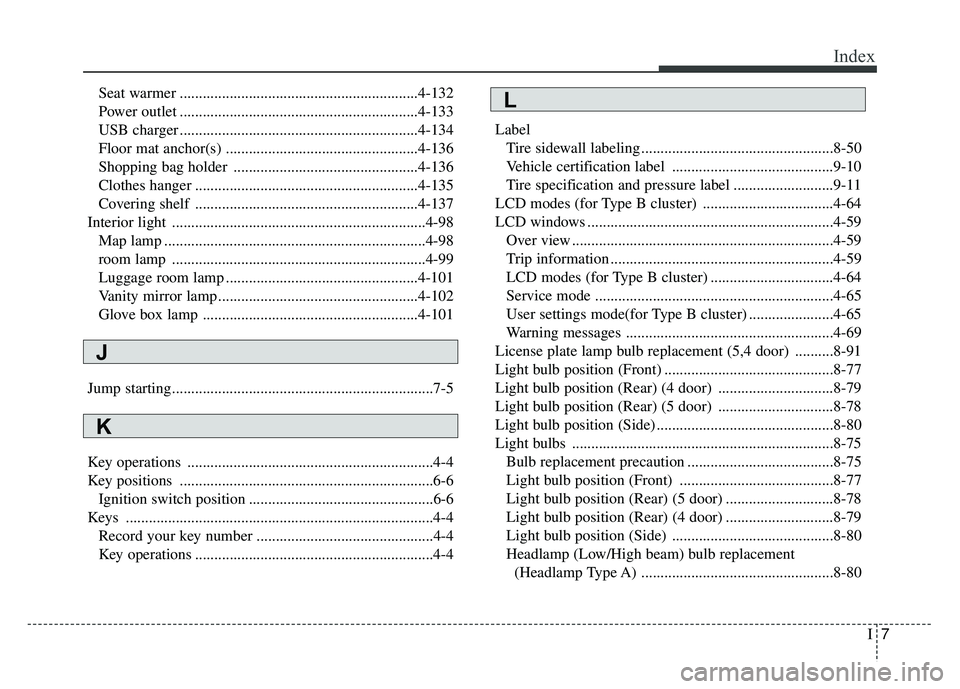
Seat warmer ..............................................................4-132
Power outlet ..............................................................4-133
USB charger ..............................................................4-134
Floor mat anchor(s) ..................................................4-136
Shopping bag holder ................................................4-136
Clothes hanger ..........................................................4-135
Covering shelf ..........................................................4-137
Interior light ..................................................................4-98 Map lamp ....................................................................4-98\
room lamp ..................................................................4-99
Luggage room lamp ..................................................4-101
Vanity mirror lamp ....................................................4-102
Glove box lamp ........................................................4-101
Jump starting....................................................................7-5
Key operations ................................................................4-4
Key positions ..................................................................6-6 Ignition switch position ................................................6-6
Keys ........................................................................\
........4-4 Record your key number ..............................................4-4
Key operations ..............................................................4-4 Label
Tire sidewall labeling ..................................................8-50
Vehicle certification label ..........................................9-10
Tire specification and pressure label ..........................9-11
LCD modes (for Type B cluster) ..................................4-64
LCD windows ................................................................4-59 Over view ....................................................................4-59\
Trip information ..........................................................4-59
LCD modes (for Type B cluster) ................................4-64
Service mode ..............................................................4-65
User settings mode(for Type B cluster) ......................4-65
Warning messages ......................................................4-69
License plate lamp bulb replacement (5,4 door) ..........8-91
Light bulb position (Front) ............................................8-77
Light bulb position (Rear) (4 door) ..............................8-79
Light bulb position (Rear) (5 door) ..............................8-78
Light bulb position (Side) ..............................................8-80
Light bulbs ....................................................................8-75\
Bulb replacement precaution ......................................8-75
Light bulb position (Front) ........................................8-77
Light bulb position (Rear) (5 door) ............................8-78
Light bulb position (Rear) (4 door) ............................8-79
Light bulb position (Side) ..........................................8-80
Headlamp (Low/High beam) bulb replacement (Headlamp Type A) ..................................................8-80
J
K
L
Page 491 of 492
I13
Index
Trunk lamp bulb replacement (4 door) ..........................8-97
Trunk (4 door)................................................................4-21Opening the trunk ......................................................4-21
Closing the trunk ........................................................4-21
Emergency trunk safety release ..................................4-22
Turn signals....................................................................4-91\
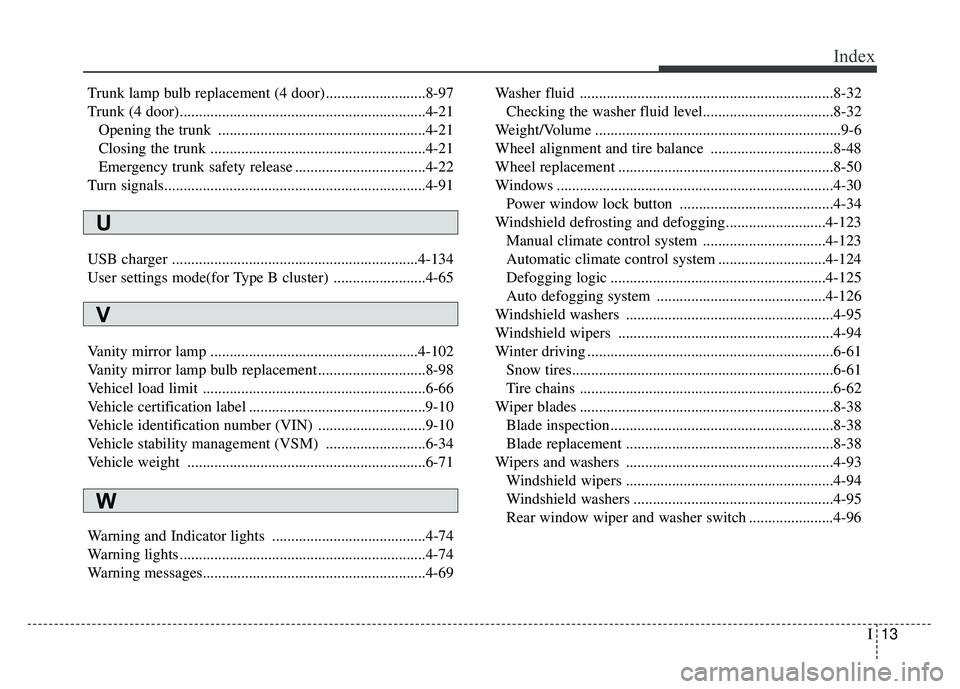
USB charger ................................................................4-134
User settings mode(for Type B cluster) ........................4-65
Vanity mirror lamp ......................................................4-102
Vanity mirror lamp bulb replacement ............................8-98
Vehicel load limit ..........................................................6-66
Vehicle certification label ..............................................9-10
Vehicle identification number (VIN) ............................9-10
Vehicle stability management (VSM) ..........................6-34
Vehicle weight ..............................................................6-71
Warning and Indicator lights ........................................4-74
Warning lights ................................................................4-74
Warning messages..........................................................4-69 Washer fluid ..................................................................8-32
Checking the washer fluid level..................................8-32
Weight/Volume ................................................................9-6
Wheel alignment and tire balance ................................8-48
Wheel replacement ........................................................8-50
Windows ........................................................................\
4-30 Power window lock button ........................................4-34
Windshield defrosting and defogging..........................4-123 Manual climate control system ................................4-123
Automatic climate control system ............................4-124
Defogging logic ........................................................4-125
Auto defogging system ............................................4-126
Windshield washers ......................................................4-95
Windshield wipers ........................................................4-94
Winter driving ................................................................6-61 Snow tires....................................................................6-61\
Tire chains ..................................................................6-62
Wiper blades ..................................................................8-38 Blade inspection ..........................................................8-38
Blade replacement ......................................................8-38
Wipers and washers ......................................................4-93 Windshield wipers ......................................................4-94
Windshield washers ....................................................4-95
Rear window wiper and washer switch ......................4-96
U
V
W